


 Free 3D
 3D Print Models
 3D Scans
 Animation & MoCap
 Textures
 Materials
 Skin Reference
 2D Game Assets
 Sound Effects
 Brushes & Tools
 Reference Photos
 Stock Images
 HDR Images
 3ds Max
 Maya
Maya Blender
 Unreal Engine
 Unity
Unity ZBrush
 Cinema 4D
 LightWave
 Marmoset
 SketchUp
 FBX
FBX DAE
DAE DXF
DXF GLB
GLBApplyimg poses alters character shape/face.
 189
189Thread Activity
ExcessiveTue, Jan 13
yorkee2020Tue, Jan 13
ExcessiveTue, Jan 13
yorkee2020Tue, Jan 13
ExcessiveTue, Jan 13
yorkee2020Tue, Jan 13

How infuriating it is to spend hours over a hot laptop perfecting your character to look like an acquaintance, just to have the face turn into human shrek look alike after appyling a body pose!! Or is it just me? Applying a body pose to my G9 character changed the shape of the face (not the
expression) completely, how/why does this happen and how can it be prevented?
expression) completely, how/why does this happen and how can it be prevented?
! REPORT

Let me ask again: you created a character (dials, sculpting) and when you load a pose, the character changes?
This could possibly be because no rigging to shape took place after loading the character morphs, or because the morphs were not ultimately ERC frozen. I can't think of any other explanation.
This could possibly be because no rigging to shape took place after loading the character morphs, or because the morphs were not ultimately ERC frozen. I can't think of any other explanation.
REPLY
! REPORT
yorkee2020
Karma: 1,256
Mon, Jan 12Thank you for your prompt reply. I have used said character for a few eeeks now with no problems, I cannot for the life of me remember which/whos pose
i applied. I am not aware of ERC freezing, but I will google it, once again thank you. Please see the image below, left is my character and right is the 'other' creation!!
i applied. I am not aware of ERC freezing, but I will google it, once again thank you. Please see the image below, left is my character and right is the 'other' creation!!
Pushee-Ri
Karma: 52,920
Mon, Jan 12If you didn't create the character yourself, forget about the ERC Freeze. Luxe (below) has another tip.


Luxe Muse
Karma: 9,337
Mon, Jan 12Some poses (expressions) come with custom morphs that are automatically applied, though they do not always benefit your model/shape.
Pushee-Ri
Karma: 52,920
Mon, Jan 12@Luxe: That reminds me a little of our discussion a few days ago about Julio ... and the other Julio 
@Yorkee:
What happens when you reset the pose? Does the face remain... uhhmm, so .... ehmmm different... or does it go back to normal?
I'm about to call it a day, but I'll check back in on the thread tomorrow. Good luck
@Yorkee:
What happens when you reset the pose? Does the face remain... uhhmm, so .... ehmmm different... or does it go back to normal?
I'm about to call it a day, but I'll check back in on the thread tomorrow. Good luck
yorkee2020
Thanks for the help guys. I have had the problem where, when applying poses the character disappears into space, pressing CTRL when applying the pose locks the figures present position, I' wondering if there is a similar work around to exclude/lock morphs or expressions when posing?. Pushee, I will check on your query about returning to normal and get back to you, that is a good point.
Karma: 1,256
Mon, Jan 12Thanks for the help guys. I have had the problem where, when applying poses the character disappears into space, pressing CTRL when applying the pose locks the figures present position, I' wondering if there is a similar work around to exclude/lock morphs or expressions when posing?. Pushee, I will check on your query about returning to normal and get back to you, that is a good point.
Luxe Muse
Karma: 9,337
Mon, Jan 12It seems to be a different issue, Yorkee. Some pose creators design their poses for a specific environment. For example, a pose might be made for the third floor of a mansion, and when it is applied, your character's world position updates to that spot. You can avoid this by doing exactly what you did: holding CTRL and choosing not to apply the position with the pose.
Luxe Muse
Karma: 9,337
Mon, Jan 12But the morph issue is different. What I mentioned could be one possibility, but there might be other things going on in your environment as well. For example, another issue that sometimes happens is that vendors create corrective morphs without applying the proper restrictions, so when your character is smiling, those morphs can activate.
yorkee2020
Karma: 1,256
Mon, Jan 12Excellent thank you, I cant find any solution through google for this particulat problem, the is a clever (Daz) guy on you tube puts out some good solutions and ticks, the 3D Guru or similar name, I may try dropping him a line. Again, many thanks.

any time I save poses I have to take the extra steps to uncheck all of the head values, because by default all the eye and face part bones are saved - I don't want these values even at zero. it would be nice if there was a way to streamline this or even make it the default behavior, but alas
REPLY
! REPORT

IB2024Tue, Jan 13
Account Closed
Íl have you turned on hidden morphs and checked what's currently applying to the figure? Is there anything what shouldn't be?
It's possible that something is triggering a badly created corrective or some other morph.
If you can't see anything that stands out, start zeroing out dials one by one and see if anything is having an unexpected effect.
It's possible that something is triggering a badly created corrective or some other morph.
If you can't see anything that stands out, start zeroing out dials one by one and see if anything is having an unexpected effect.
REPLY
! REPORT
yorkee2020
Karma: 1,256
Tue, Jan 13Thank you, I will give it a go. It's really frustrating, I would have thought there would be some kind of 'jiggery' you could apply to select & lock shapes in one click.
Excessive
Karma: 7,854
Tue, Jan 13If you want to fix poses that do this imo you should probably just re-save them yourself, while it's technically an option that you can uncompress them and edit the text of the file it doesn't really save you any time and is massively error prone. What I do, and what I would do if I had the problem you're having:
- load a blank character (this really should not matter, because we're going to exclude all the bad stuff anyway, but it's a safe practice)
- load your problematic pose
- hit the + button in the content library, or File -> Save As -> Pose Preset if you want to put the result in a different folder
- right click in the Pose Preset Save Options window
- select Check Only -> Check All Rotations Only
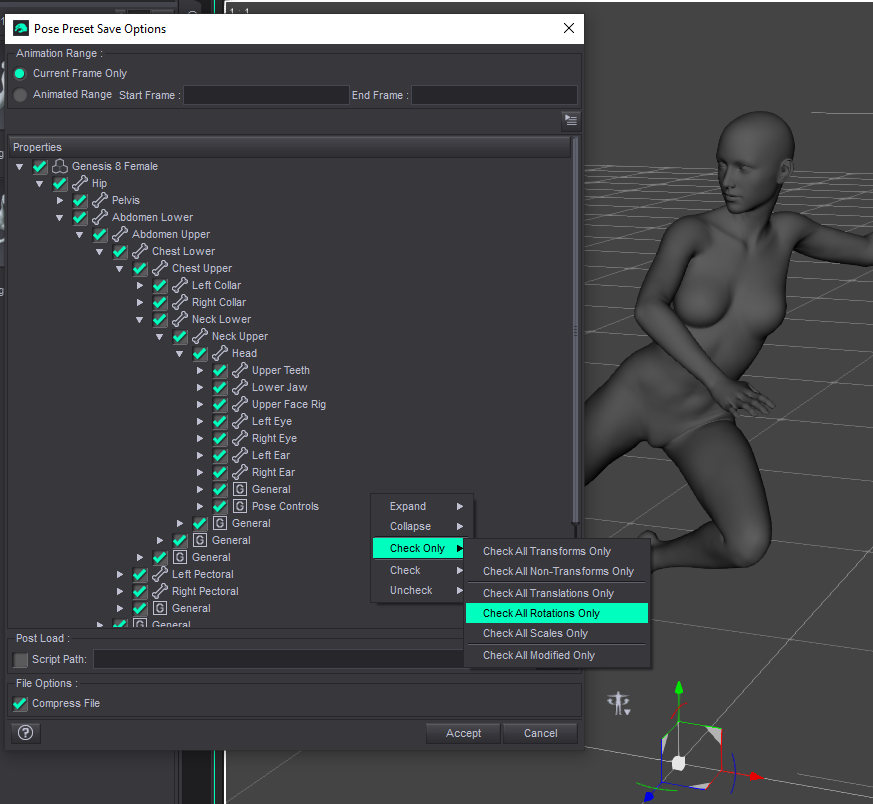
- then uncheck all the child bone values below the Head; you do still want the head rotation itself checked though
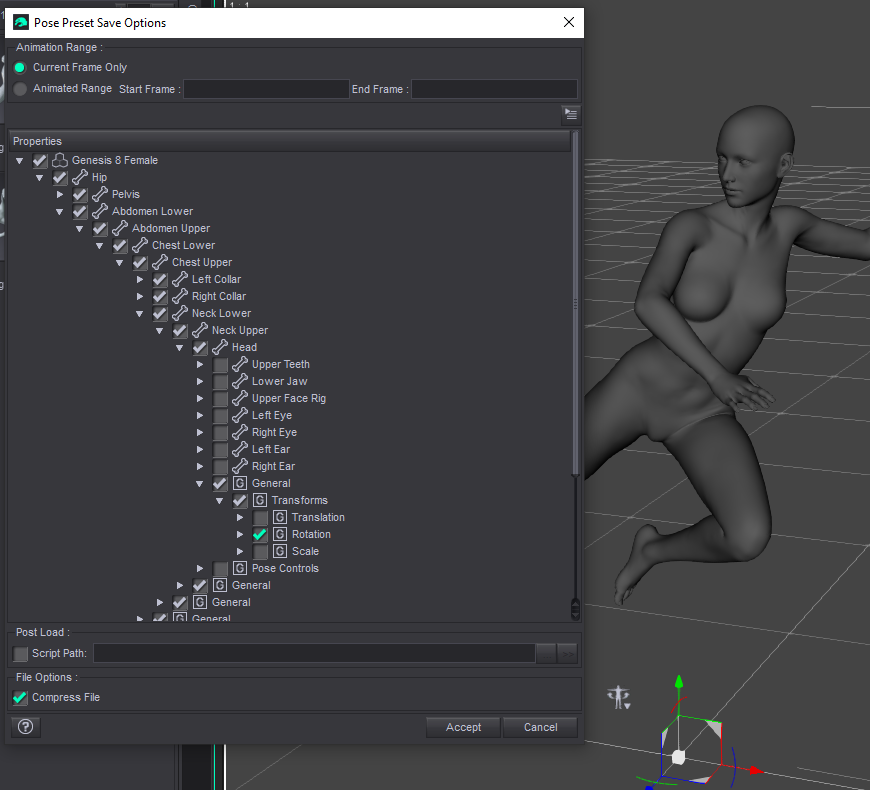
you technically should also uncheck values from the root bone.
- load a blank character (this really should not matter, because we're going to exclude all the bad stuff anyway, but it's a safe practice)
- load your problematic pose
- hit the + button in the content library, or File -> Save As -> Pose Preset if you want to put the result in a different folder
- right click in the Pose Preset Save Options window
- select Check Only -> Check All Rotations Only
- then uncheck all the child bone values below the Head; you do still want the head rotation itself checked though
you technically should also uncheck values from the root bone.
yorkee2020
Karma: 1,256
Tue, Jan 13Thanks once again Ex!....My original problem was not that poses were being changed without specific input, but that shapes, in particular face shapes were being altered when applying a pose. It is the shaping that concerns me, would your solution above lock body/face morph/shaping. I have had instances in the past where applied body morphs have been discarded/altered, ie, legs longer, breasts smaller when applying a pose.
Excessive
Karma: 7,854
Tue, Jan 13yeah that's what I'm telling you how to fix, if you load the pose that is altering face shapes and re-save it like shown it will filter all of that stuff out.
yorkee2020
Karma: 1,256
Tue, Jan 13Thanks again, scuse' me, I'm a bit slow, it's an age thing ya know!!
Excessive
Karma: 7,854
Tue, Jan 13just note, you probably should not overwrite the original, give it a new file name