


 Free 3D
 3D Print Models
 3D Scans
 Animation & MoCap
 Textures
 Materials
 Skin Reference
 2D Game Assets
 Sound Effects
 Brushes & Tools
 Reference Photos
 Stock Images
 HDR Images
 3ds Max
 Maya
 Blender
 Unreal Engine
 Unity
 ZBrush
 Cinema 4D
 LightWave
 Marmoset
 SketchUp
 FBX
 DAE
 DXF
 GLB

Library Organizer for DAZ Studio

Not Rated Yet


This Item Was Made Using
! REPORT
NOTE: DIGITAL DOWNLOAD, NOT A PHYSICAL ITEM

Add to Collection

4 Likes
Share This Daz Content


Top Rated Vendor


Creators of unique and high-quality 3d (Daz Studio) content since 2001
Vendor's Pages


License
Personal Use Only License
This item comes with our Personal Use Only Licensing. This means you may not share this model or use it for any commercial purposes or in any way that involves an exchange of money, promotes a business entity, or otherwise results directly or indirectly in financial gain.
For full license terms, see our 3D Content Licensing Agreement
Item Details
| Vendor: | Aeon Soul |
| Published: | Nov 03, 2026 |
| Download Size: | 853.5 KB |
| Software: | Daz Studio |
| dForce: | – |
Included Formats

Statistics
| Favorites: | 1 |
| Likes: | 4 |
| Views: | 107 |
Item Ratings
Not Rated Yet
Library Organizer for DAZ Studio
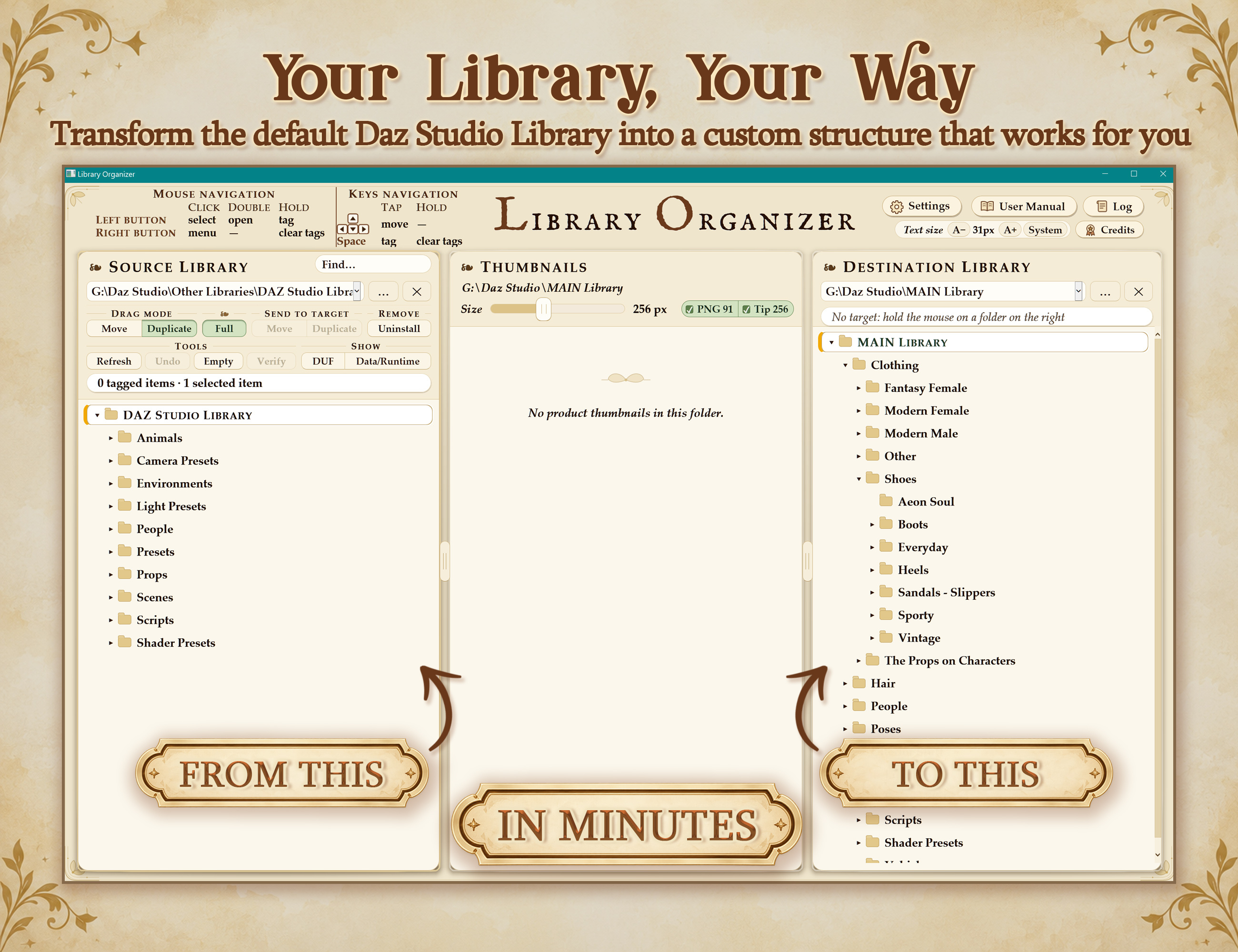
After years of struggling to tame an unruly DAZ Studio library that kept growing out of proportion and never felt quite as organized as we wanted, we created Library Organizer.
An intuitive and efficient tool designed to help you reorganize your content in minutes.
Library Organizer is made for artists who see their content library as a creative toolkit, something that should adapt to the way they think, create, and work, rather than the other way around.
Library Organizer works directly with your installed content, without relying on DAZ Studio's database or product metadata. This includes manually installed and third-party products.
Just unzip and start using it!
LIBRARY ORGANIZER TUTORIALS: Please, check our official YouTube channel for more tutorials and walk-throughs.
FEATURES:
ORGANIZE AND TRANSFER
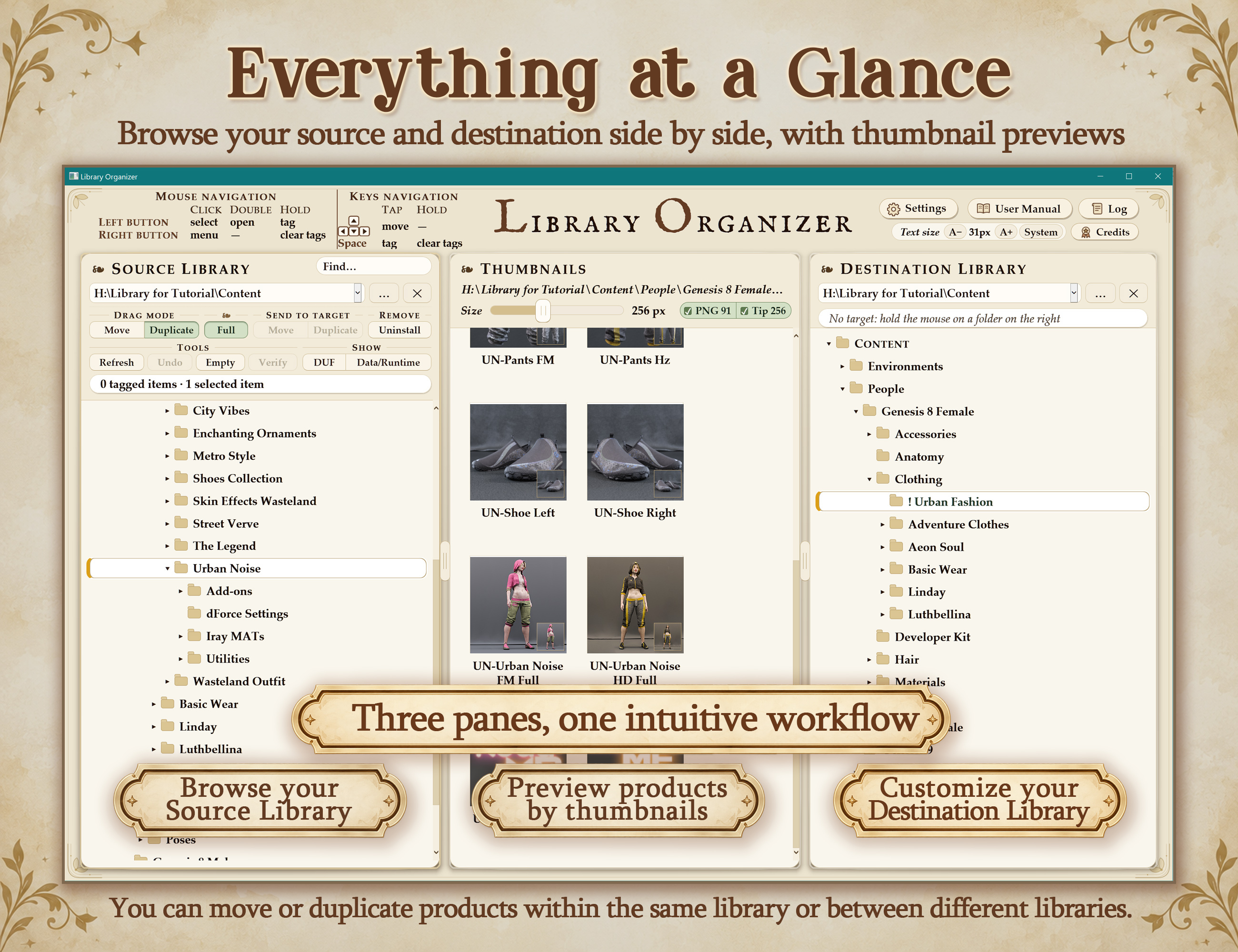
- Browse and organize visually: identify content through adjustable thumbnails alongside source and destination folder trees.
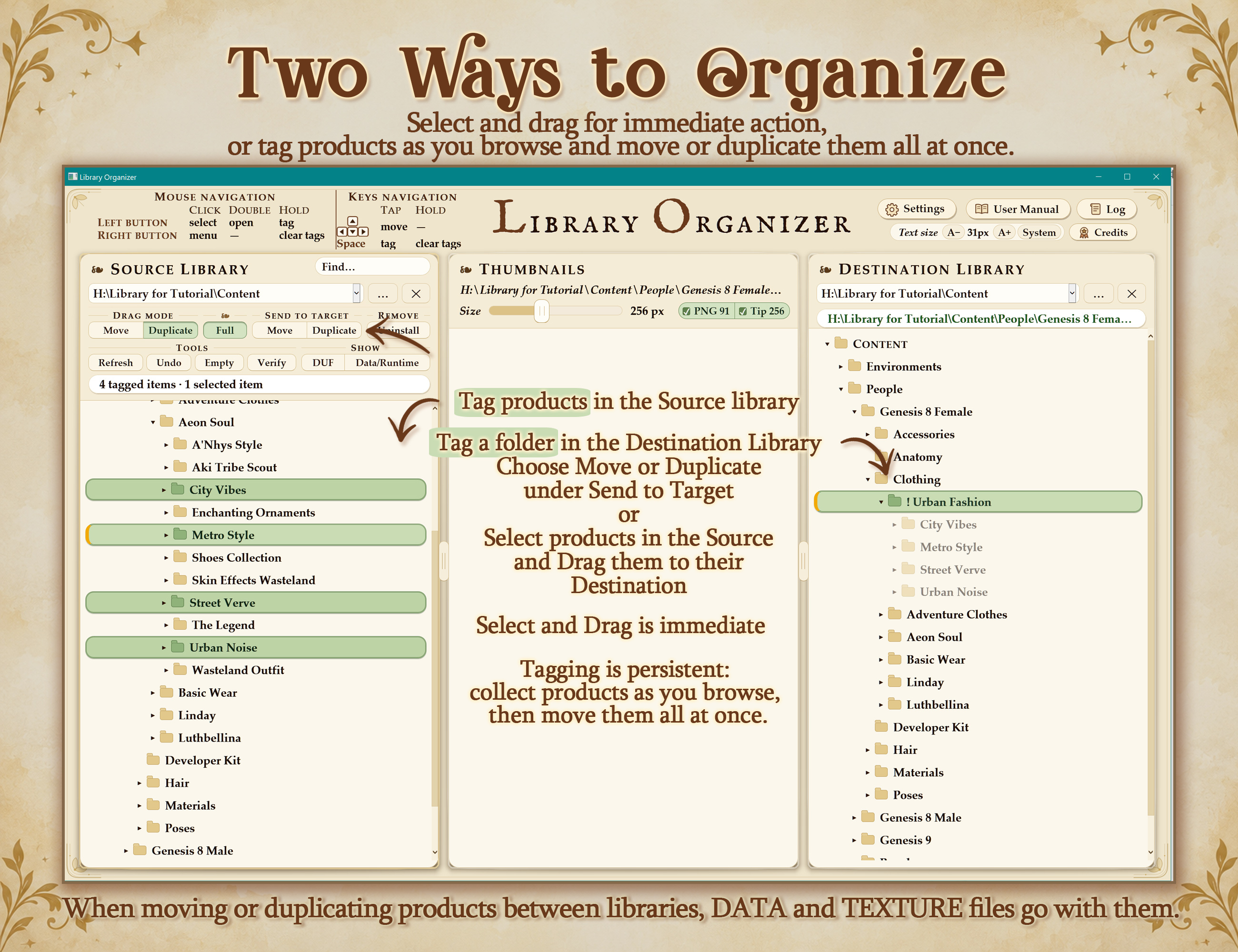
- Move or duplicate in batches: work with whole folders or individual product files using drag and drop or tagging and Send to Target.
- Transfer complete products between libraries: include associated Data, Textures and installation records, preserving shared dependencies in the original library. Supports different drives and network shares.
- Create and rename folders and products: build your preferred structure, keeping associated thumbnails attached when files are moved, copied, renamed or deleted.
DAZ SMART CONTENT SUPPORT
- Optional product-record updates: update recorded paths after moves and renames, then re-import metadata in DAZ Studio to refresh Smart Content.
- Automatic backups and restoration: back up product records before changing them, with options to restore individual changes or all originals.
COMPATIBILITY AND SETUP
- Manually installed and third-party content: core operations read product files directly without requiring DAZ’s database.
- Portable Windows application: unzip and launch without installation, with settings stored alongside the application. Supports 64-bit Windows 10 and 11.
UNINSTALL AND CLEAN UP
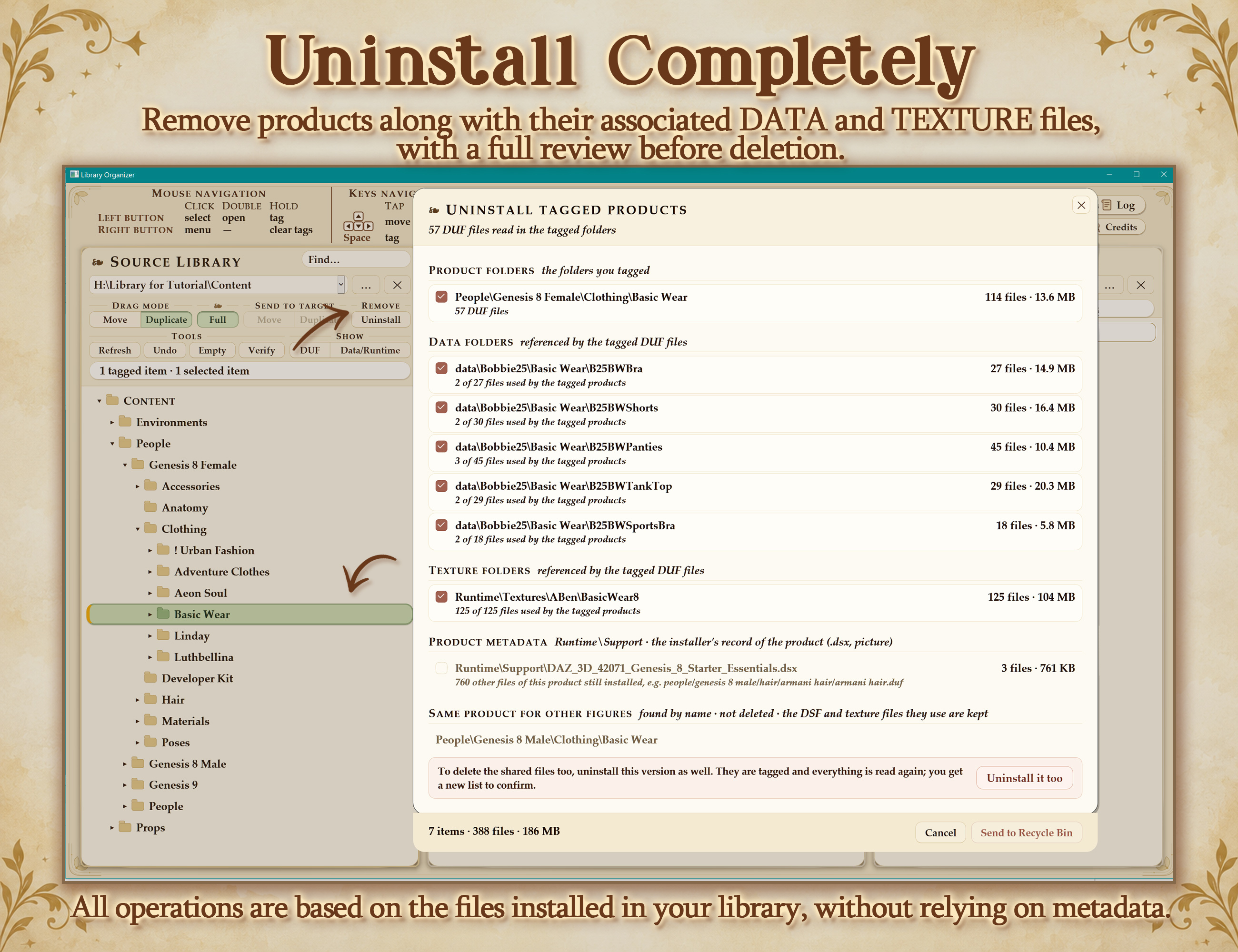
- Smart uninstall: identify associated product files, Data, Textures and metadata for removal.
- Detailed removal review: inspect file counts and sizes, and choose what to remove or keep.
- Shared-file protection: check dependencies used by other figure versions, with an optional whole-library scan for dependencies used by other products.
- Remove related figure versions together: include other detected versions directly from the uninstall review.
- Empty-folder cleanup: find and remove empty branches, including parent folders left empty after uninstalling.
- Standard deletion: remove selected folders or product files while leaving associated Data and Textures untouched.
FIND AND VERIFY
- Search your library: locate folders and product files by name and jump directly to them.
- Verify product files: identify missing dependencies and files located in another library.
- Identify Figure: inspect which figure selected content was made for, with supporting evidence and a web-search fallback.
- Find Online: look up product listings using product and creator information, with your choice of search engine.
RECOVERY AND CONTROL
- Undo: reverse the last move or duplication, including after reopening the tool, and undo tagging actions step by step. Merged folders cannot be undone automatically.
- Recovery and activity history: send deleted and uninstalled content to the Recycle Bin, subject to Windows’ limits, and review operations in the activity log.
- Customizable controls: configure keyboard shortcuts and mouse behaviour.
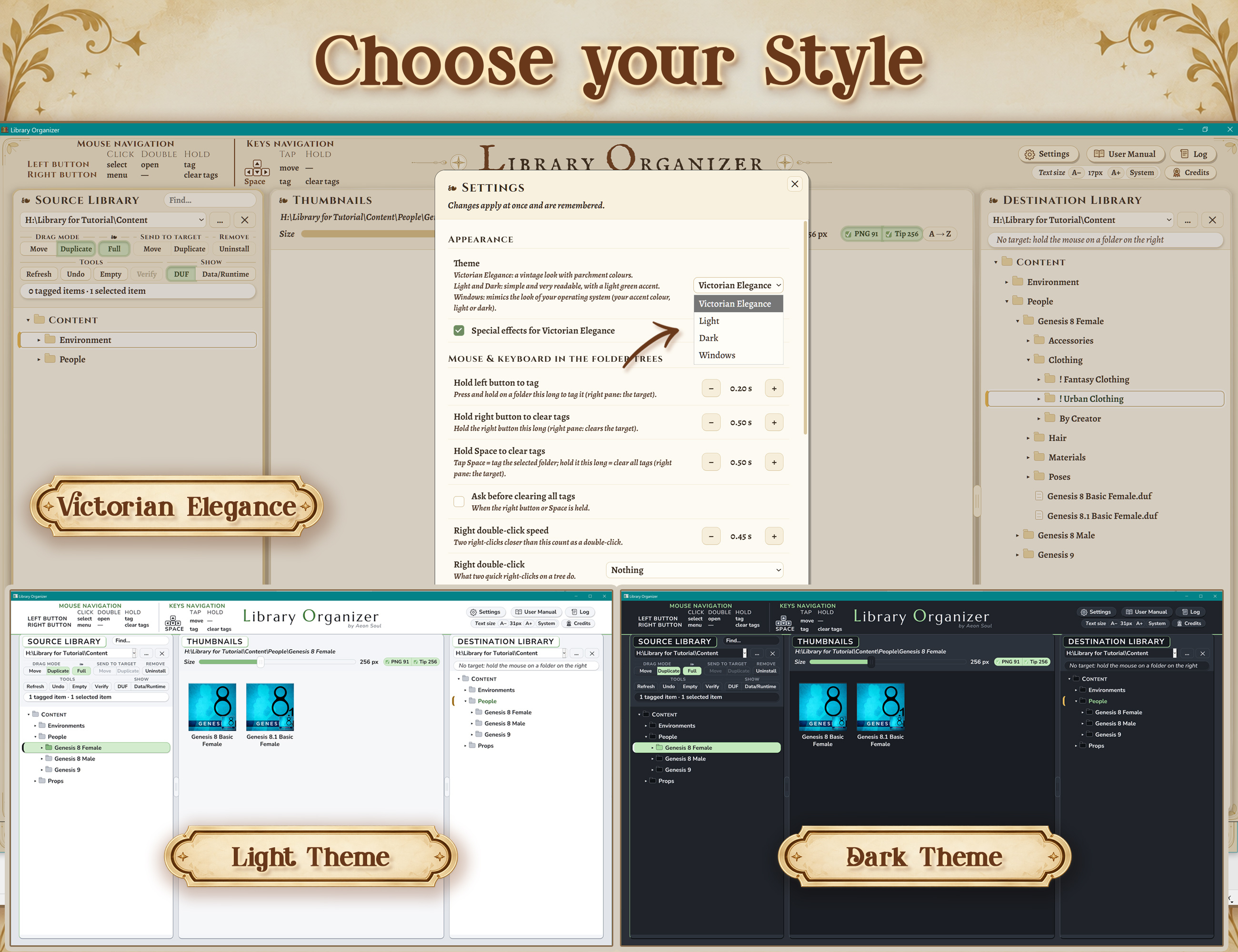
- Adjustable interface: resize thumbnails, text and panes, with four themes and Windows accessibility support.
HELP AND DOCUMENTATION
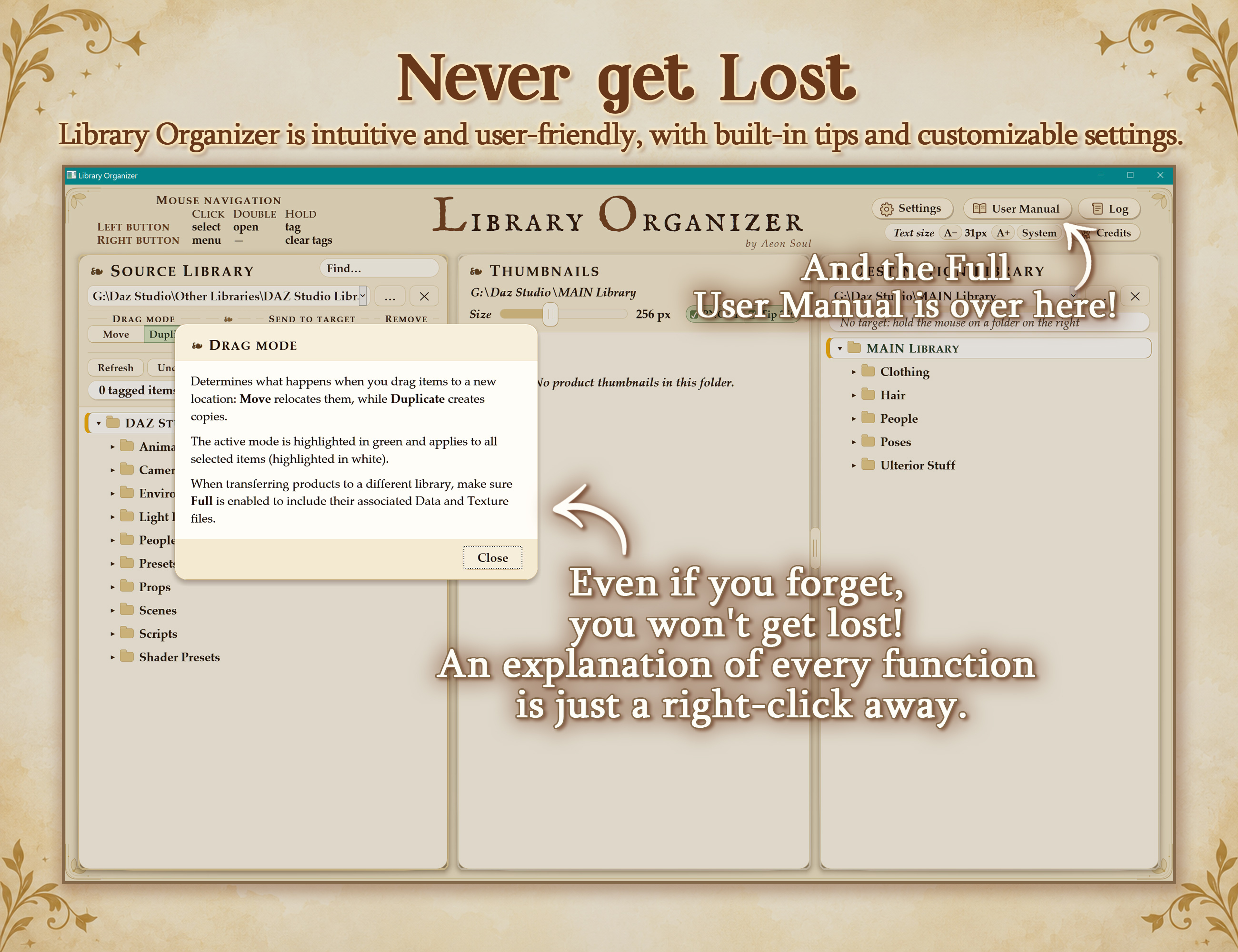
- Contextual help: right-click interface controls for explanations.
- Extensive user manual: quick-start tutorial, detailed feature reference, Smart Content guidance and troubleshooting.
An intuitive and efficient tool designed to help you reorganize your content in minutes.
Library Organizer is made for artists who see their content library as a creative toolkit, something that should adapt to the way they think, create, and work, rather than the other way around.
Library Organizer works directly with your installed content, without relying on DAZ Studio's database or product metadata. This includes manually installed and third-party products.
Just unzip and start using it!
LIBRARY ORGANIZER TUTORIALS: Please, check our official YouTube channel for more tutorials and walk-throughs.
FEATURES:
ORGANIZE AND TRANSFER
- Browse and organize visually: identify content through adjustable thumbnails alongside source and destination folder trees.
- Move or duplicate in batches: work with whole folders or individual product files using drag and drop or tagging and Send to Target.
- Transfer complete products between libraries: include associated Data, Textures and installation records, preserving shared dependencies in the original library. Supports different drives and network shares.
- Create and rename folders and products: build your preferred structure, keeping associated thumbnails attached when files are moved, copied, renamed or deleted.
DAZ SMART CONTENT SUPPORT
- Optional product-record updates: update recorded paths after moves and renames, then re-import metadata in DAZ Studio to refresh Smart Content.
- Automatic backups and restoration: back up product records before changing them, with options to restore individual changes or all originals.
COMPATIBILITY AND SETUP
- Manually installed and third-party content: core operations read product files directly without requiring DAZ’s database.
- Portable Windows application: unzip and launch without installation, with settings stored alongside the application. Supports 64-bit Windows 10 and 11.
UNINSTALL AND CLEAN UP
- Smart uninstall: identify associated product files, Data, Textures and metadata for removal.
- Detailed removal review: inspect file counts and sizes, and choose what to remove or keep.
- Shared-file protection: check dependencies used by other figure versions, with an optional whole-library scan for dependencies used by other products.
- Remove related figure versions together: include other detected versions directly from the uninstall review.
- Empty-folder cleanup: find and remove empty branches, including parent folders left empty after uninstalling.
- Standard deletion: remove selected folders or product files while leaving associated Data and Textures untouched.
FIND AND VERIFY
- Search your library: locate folders and product files by name and jump directly to them.
- Verify product files: identify missing dependencies and files located in another library.
- Identify Figure: inspect which figure selected content was made for, with supporting evidence and a web-search fallback.
- Find Online: look up product listings using product and creator information, with your choice of search engine.
RECOVERY AND CONTROL
- Undo: reverse the last move or duplication, including after reopening the tool, and undo tagging actions step by step. Merged folders cannot be undone automatically.
- Recovery and activity history: send deleted and uninstalled content to the Recycle Bin, subject to Windows’ limits, and review operations in the activity log.
- Customizable controls: configure keyboard shortcuts and mouse behaviour.
- Adjustable interface: resize thumbnails, text and panes, with four themes and Windows accessibility support.
HELP AND DOCUMENTATION
- Contextual help: right-click interface controls for explanations.
- Extensive user manual: quick-start tutorial, detailed feature reference, Smart Content guidance and troubleshooting.
Categories
