


 Free 3D
 3D Print Models
 3D Scans
 Animation & MoCap
 Textures
 Materials
 Skin Reference
 2D Game Assets
 Sound Effects
 Brushes & Tools
 Reference Photos
 Stock Images
 HDR Images
 3ds Max
 Maya
 Blender
 Unreal Engine
 Unity
 ZBrush
 Cinema 4D
 LightWave
 Marmoset
 SketchUp
 FBX
 DAE
 DXF
 GLB
Smooth System for DAZ Studio

Not Rated Yet


! REPORT
NOTE: DIGITAL DOWNLOAD, NOT A PHYSICAL ITEM

Add to Collection

4 Likes
Share This Daz Content


Offered By
Someone who likes to create things.

License
Extended Use License
This item comes with our Extended Use Licensing. This means that you may use the model for both non-commercial and commercial purposes, in a variety of mediums and applications.
For full license terms, see our 3D Content Licensing Agreement
Item Details
| Vendor: | akimsa1 |
| Published: | Nov 04, 2026 |
| Download Size: | 647 KB |
| Software: | Daz Studio |
| dForce: | – |
Included Formats

Statistics
| Favorites: | 2 |
| Likes: | 4 |
| Views: | 219 |
Item Ratings
Not Rated Yet
Smooth System for DAZ Studio
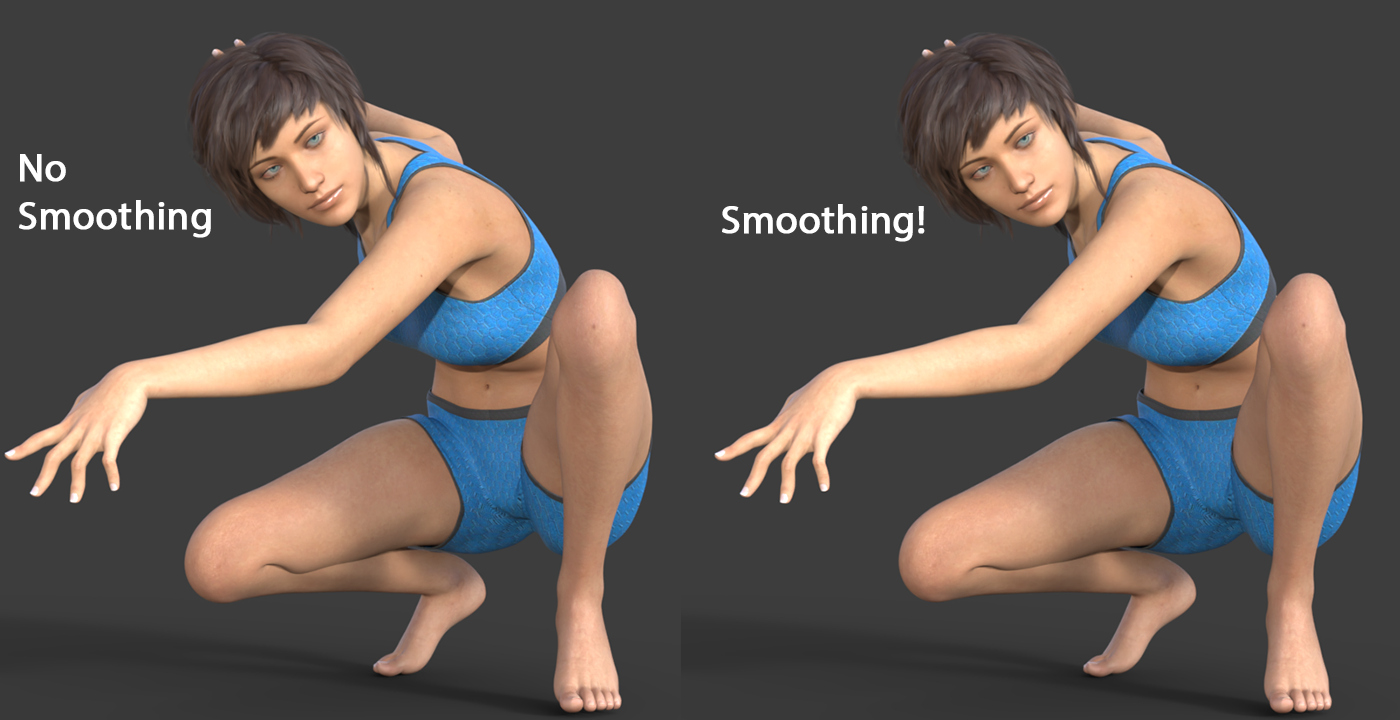
Take control of your character’s deformations.
Tired of ugly bends, collapsing elbows, pinched armpits and distorted knees? Buying JCMs, installing extra products, spending hours fixing your characters for extreme poses? And your unique characters, with their custom proportions?
Smooth System is a DAZ Studio plugin (not a morph) that smooths your figure’s mesh after the pose is applied. It’s added to the figure as a modifier and recalculates whenever you change the pose or move the timeline. It doesn’t change the figure’s base geometry and doesn’t create morphs.
It keeps your figure’s base shape, with your morphs applied, as its reference, so custom characters and unusual proportions are welcome. It can help reduce the number of JCMs you need.
What you get
Six smoothing methods: Simple, Keep Detail, Preserve Volume, Preserve Edges, Even Surface and Mix. Test which one suits each case.
Mix, made for elbows, armpits and knees: it keeps detail where skin stretches and flattens where it squashes (Stretch Amount and Flatten Amount sliders).
Enable by Section: switch the effect on or off per surface and per bone. Fix an elbow without touching the rest of your character.
Advanced Zones: build custom areas from surfaces, regions, face groups and bones.
Bake and Freeze for animation.
Different from the built-in Smoothing modifier: it combines several smoothing methods commonly used in 3D, and it lets you choose exactly where it works.
Requirements
Windows 64-bit
DAZ Studio 4.24 (64-bit)
Figures with a skeleton and skin binding (for example, Genesis figures)
Good to know
Results depend on the figure, pose, method and settings.
Manual installation: copy one file (smoothsystem.dll) into your DAZ Studio plugins folder. Step-by-step instructions are in the guide.
No Mac version. Tested on DAZ Studio 4.24 only.
Smooth System applies its own smoothing calculations to the figure. However, DAZ Studio's native Smoothing Modifier does not recognize or account for these additional changes when processing clothing. Since the native system is internal and cannot be directly modified or extended by my plugin, integrating both systems was not possible.
To overcome this limitation, I've developed an independent Collision System designed specifically to improve clothing interaction with figures. It will include additional methods such as Pressure and Wrap, Hug, Lift, Snap, along with section-based controls, just like Smooth System. Testing is nearly complete, and the Collision System will be released soon.
Included: plugin, illustrated PDF guide, README and license.
DAZ and DAZ Studio are trademarks of DAZ 3D, Inc. Smooth System is an independent product and is not affiliated with, sponsored by, or endorsed by DAZ 3D, Inc.
Tired of ugly bends, collapsing elbows, pinched armpits and distorted knees? Buying JCMs, installing extra products, spending hours fixing your characters for extreme poses? And your unique characters, with their custom proportions?
Smooth System is a DAZ Studio plugin (not a morph) that smooths your figure’s mesh after the pose is applied. It’s added to the figure as a modifier and recalculates whenever you change the pose or move the timeline. It doesn’t change the figure’s base geometry and doesn’t create morphs.
It keeps your figure’s base shape, with your morphs applied, as its reference, so custom characters and unusual proportions are welcome. It can help reduce the number of JCMs you need.
What you get
Six smoothing methods: Simple, Keep Detail, Preserve Volume, Preserve Edges, Even Surface and Mix. Test which one suits each case.
Mix, made for elbows, armpits and knees: it keeps detail where skin stretches and flattens where it squashes (Stretch Amount and Flatten Amount sliders).
Enable by Section: switch the effect on or off per surface and per bone. Fix an elbow without touching the rest of your character.
Advanced Zones: build custom areas from surfaces, regions, face groups and bones.
Bake and Freeze for animation.
Different from the built-in Smoothing modifier: it combines several smoothing methods commonly used in 3D, and it lets you choose exactly where it works.
Requirements
Windows 64-bit
DAZ Studio 4.24 (64-bit)
Figures with a skeleton and skin binding (for example, Genesis figures)
Good to know
Results depend on the figure, pose, method and settings.
Manual installation: copy one file (smoothsystem.dll) into your DAZ Studio plugins folder. Step-by-step instructions are in the guide.
No Mac version. Tested on DAZ Studio 4.24 only.
Smooth System applies its own smoothing calculations to the figure. However, DAZ Studio's native Smoothing Modifier does not recognize or account for these additional changes when processing clothing. Since the native system is internal and cannot be directly modified or extended by my plugin, integrating both systems was not possible.
To overcome this limitation, I've developed an independent Collision System designed specifically to improve clothing interaction with figures. It will include additional methods such as Pressure and Wrap, Hug, Lift, Snap, along with section-based controls, just like Smooth System. Testing is nearly complete, and the Collision System will be released soon.
Included: plugin, illustrated PDF guide, README and license.
DAZ and DAZ Studio are trademarks of DAZ 3D, Inc. Smooth System is an independent product and is not affiliated with, sponsored by, or endorsed by DAZ 3D, Inc.
Categories
