


 Free 3D
 3D Print Models
 3D Scans
 Animation & MoCap
 Textures
 Materials
 Skin Reference
 2D Game Assets
 Sound Effects
 Brushes & Tools
 Reference Photos
 Stock Images
 HDR Images
 3ds Max
 Maya
Maya Blender
 Unreal Engine
 Unity
Unity ZBrush
 Cinema 4D
 LightWave
 Marmoset
 SketchUp
 FBX
FBX DAE
DAE DXF
DXF GLB
GLB
Fluent for DAZ Studio

5.0 Stars |38 Ratings


User Artwork (1)

This Item Was Made Using
! REPORT
FREE
NOTE: DIGITAL DOWNLOAD, NOT A PHYSICAL ITEM

Add to Collection

68 Likes
Share This Daz Content


Offered By


I'm a hobbist who like to create 3D renders.
I am a developer (its my daily job). I use IA as a tool to develop plugins, but my 2 decades of experience as a developer/technical project manager is driving the process ;)
I am a developer (its my daily job). I use IA as a tool to develop plugins, but my 2 decades of experience as a developer/technical project manager is driving the process ;)

License
Extended Use License
This item comes with our Extended Use Licensing. This means that you may use the model for both non-commercial and commercial purposes, in a variety of mediums and applications.
For full license terms, see our 3D Content Licensing Agreement
Item Details
| Vendor: | Ap3nciler |
| Published: | Aug 28, 2026 |
| Download Size: | 589 KB |
| Software: | Daz Studio |
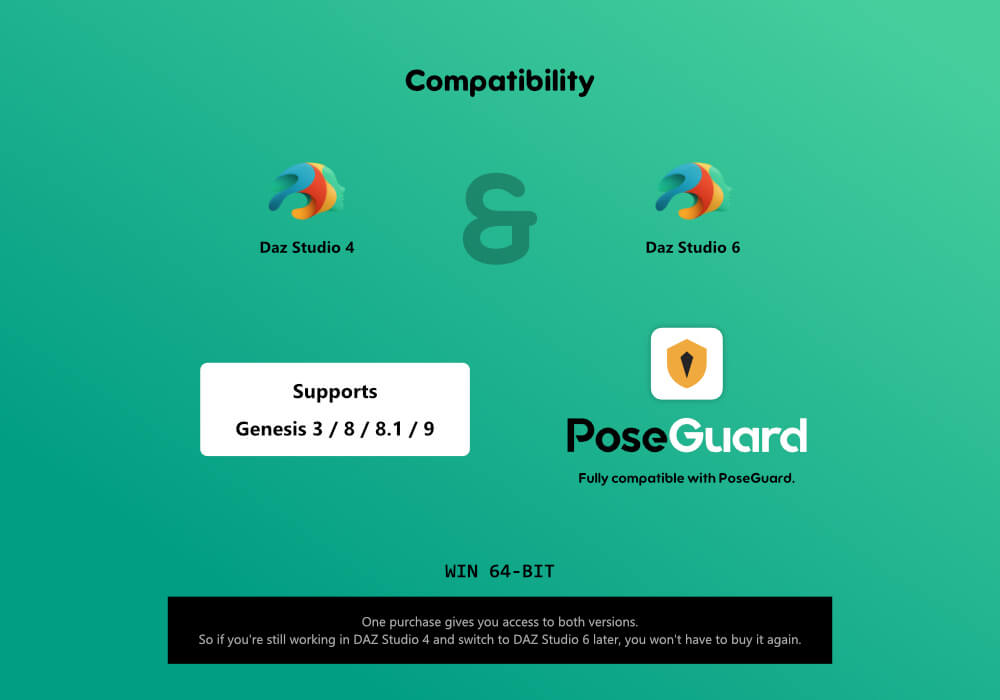
| Compatible Figures: | Genesis 3 Female Genesis 8 Female Genesis 8.1 Female Genesis 9 |
| dForce: | – |
Included Formats

Statistics
| Favorites: | 15 |
| Likes: | 68 |
| Views: | 3,656 |
Item Ratings
38 Ratings5 Stars|Oct 18, 2026
It is extremely practical.
5 Stars|Oct 13, 2026
Great tool ! Very, very useful, thank you very much !
5 Stars|Oct 06, 2026
Incredible work. Does exactly what is on the tin, quickly and without fuss.
5 Stars|Oct 05, 2026
Another tool I wish I had years ago. Great Work!
5 Stars|Oct 04, 2026
GREAT! product!
5 Stars|Sep 30, 2026
5 stars good work
Page 1 of 7
Fluent for DAZ Studio
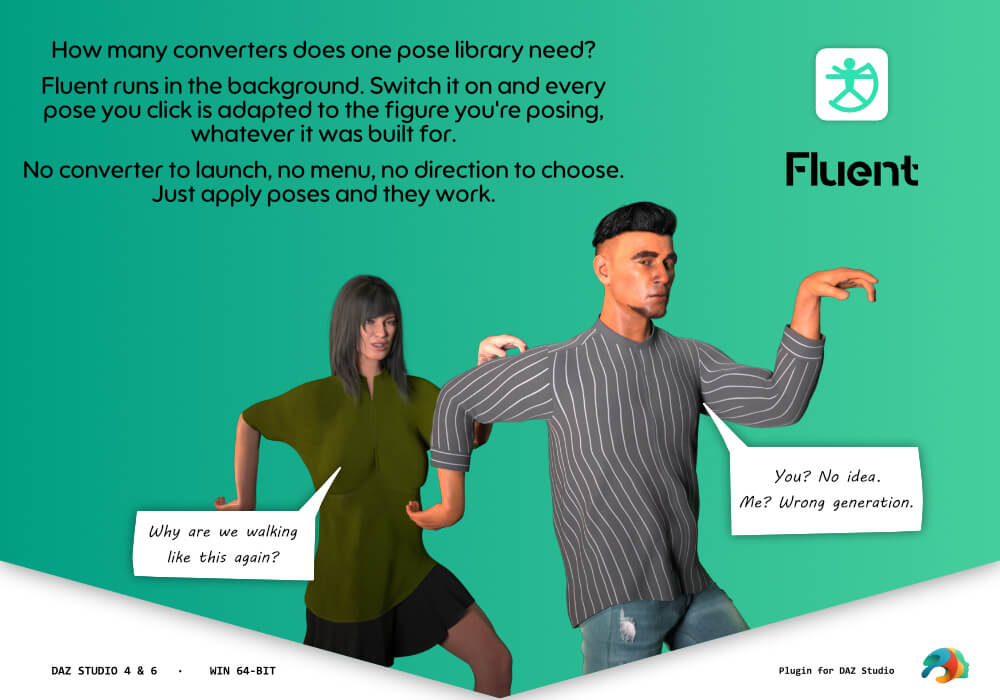
Fluent makes every pose you own work on every Genesis figure you own.
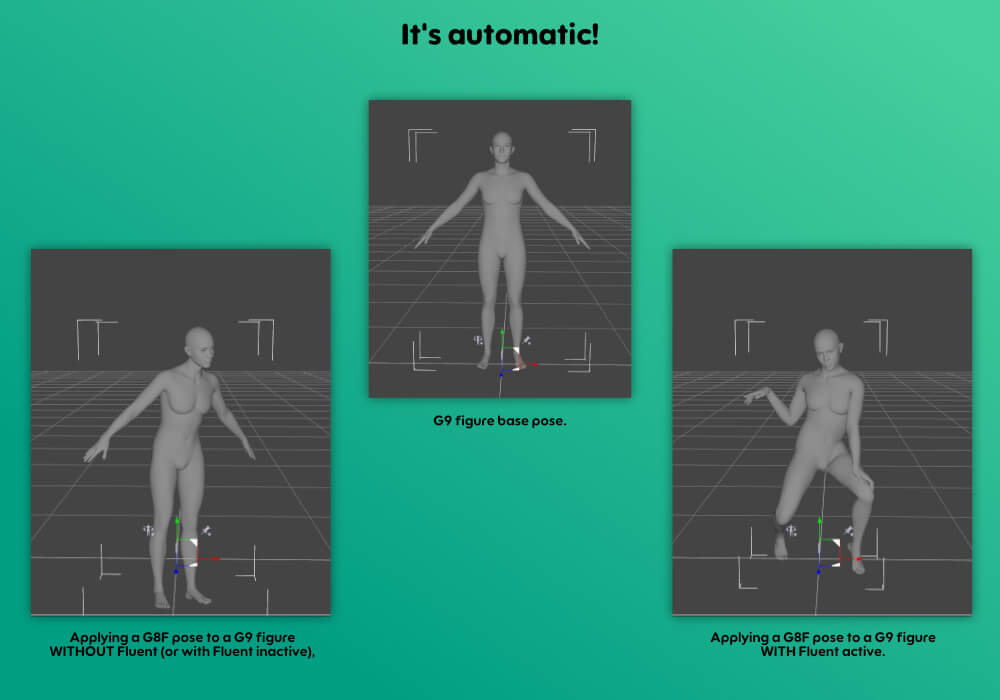
Turn it on once and forget it. Apply a Genesis 9 pose to a Genesis 8 figure, a
Genesis 3 pose to a Genesis 9 figure, or anything in between — the pose lands
correctly, on the figure you applied it to. No menu, no picking the file
twice, and no question unless the pose leaves no other choice. You keep working
exactly the way you already do.
KEY FEATURES ------------------
- One Toggle, Then Nothing
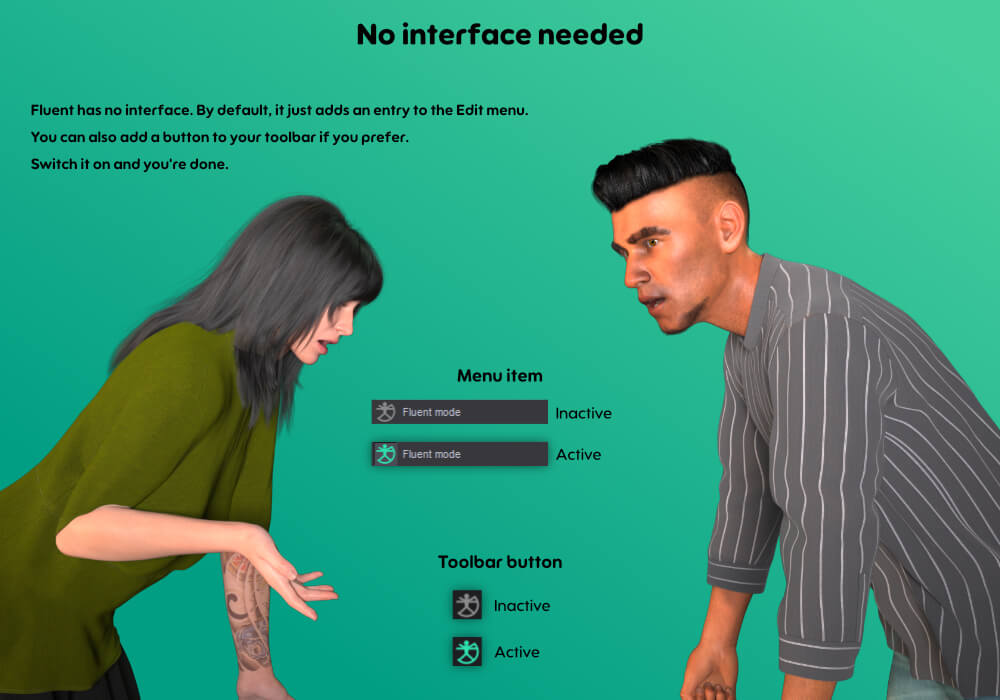
Fluent adds a single checkable entry, Edit > Fluent mode, doubled by a
two-state button in the Standard toolbar and by its own "Fluent" toolbar,
one right-click away from the toolbar area. Switch it on and it stays on
between sessions. There is no pane and nothing to configure — when it
is working, you do not notice it at all. The one time Fluent speaks up is
described under "Asks Only When It Must".
- Every Direction, One Product
Genesis 3, Genesis 8, Genesis 8.1 and Genesis 9, in both directions, all ten
combinations. Not one product per direction.
- Applies to the Figure You Selected
You browse your library and double-click a pose exactly as you always have.
Fluent recognises which generation the pose was made for, compares it with
the figure receiving it, and corrects the pose in place. If they already
match, it does strictly nothing.
- Real Rig Conversion, Not a Copy
Genesis 3 and Genesis 8 share all 170 bone names but sit 45 degrees apart
along the whole arm chain (T-pose against A-pose), so copying values gives a
broken figure. Genesis 8 and Genesis 9 share only 3 names. Fluent converts
through the rest orientation of each bone, read from the figure itself, so
the result is right for your character and its morphs — not just for the
base figure.
- Bend and Twist Handled Together
Genesis 8 carries a limb's twist on a dedicated bone and forbids it on the
bending bone; Genesis 9 splits it differently again. Converting channel by
channel loses that rotation silently. Fluent recomposes each limb as a whole,
so the twist survives the trip.
- Pose Controllers Included
The pCTRL and body_ctrl sliders that shape hands, arms and torso are
translated between the two naming schemes, not dropped. A pose that closes a
hand still closes it after conversion.
- Partial Poses Stay Partial
Nearly half of the poses in a typical library touch 30 bones or fewer — a
hand pose, an expression, a single arm. Fluent only writes the channels the
file actually contains, so applying a leg pose never wipes the hand pose you
already had.
- Every Pose Format Your Library Uses
Ordinary pose presets, hierarchical poses (H.Pose), and poses shipped inside
wearable or property presets — a measurable slice of any real library, and
formats that would otherwise do nothing at all on another generation.
- Props Stay in the Hand
A cigarette between the fingers, a phone at the ear, a tankard in the fist:
when a pose places a prop on the figure, Fluent puts it back in the
equivalent hand of the converted figure, the right way round, instead of
leaving it floating where the original figure's hand used to be.
- Feet on the Ground
A crouching, kneeling or floor-sitting pose lowers the hips by a set
distance, and that distance does not suit a figure of another size: a
Genesis 9 given a Genesis 8 crouch used to sink up to 10 cm into the floor.
Fluent keeps the ground contact of the original pose instead.
- One Undo
A converted pose is one entry in the undo stack, not two. Ctrl+Z once and
you are back where you were. A pose you identified through the panel takes
two: the load, then the conversion.
- Works Alongside PoseGuard
If you also use PoseGuard, its protection applies to a converted pose exactly
as it does to a native one. See the dedicated section below.
- It Says What It Did
Hover the toolbar button and the tooltip tells you what happened to the last
pose. Everything else — every bone converted, every channel a figure refused
— goes to the Daz Studio log, so a support question can be answered from the
log alone.
- Asks Only When It Must
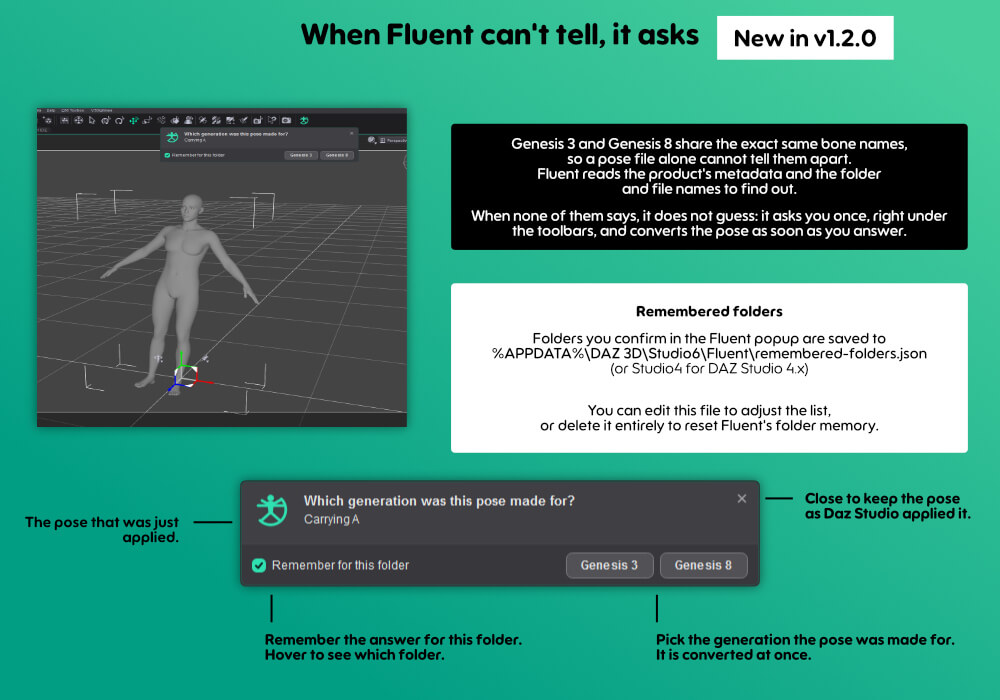
Genesis 3 and Genesis 8 poses look identical from the inside. When neither
the product's metadata nor the folder and file names tell them apart,
Fluent does not guess: it asks, in a small panel under the toolbars, which
generation the pose was made for. One click converts it, and "Remember for
this folder" spares you the question for the rest of that folder. In any
other case it cannot settle, it lets Daz Studio apply the pose unchanged
and says so. A wrong conversion is worse than none.
WHO IT IS FOR ------------------
Anyone with a pose library spanning more than one Genesis generation. If you
have ever bought the same pose set twice, or left a Genesis 3 pack unused since
moving to Genesis 9, this is what Fluent is for.
USING FLUENT WITH POSEGUARD ------------------
If you own PoseGuard, the two plugins are designed to work together, and there
is nothing to set up. Install both, arm PoseGuard as you normally would, and
apply your poses as usual.
What that means in practice:
- Everything PoseGuard protects on a native pose, it protects on a converted
one. The conversion happens before PoseGuard has its say, so the guard always
has the last word — in Light mode as in Full mode.
- Fluent never forces a value past a lock. A property locked in Daz Studio,
whether you locked it by hand or PoseGuard locked it for you, is left exactly
as it is, and Fluent reports it in the log rather than pretending otherwise.
- A converted pose is a single undo entry, named after the pose file, so
PoseGuard recognises it as the pose load it is.
The order is simply the one you would want: Daz Studio applies the pose, Fluent
converts it for the figure receiving it, then PoseGuard restores what you asked
it to keep.
Neither plugin requires the other. Fluent works on its own, and so does
PoseGuard.
REQUIREMENTS ------------------
- Daz Studio 6 (Qt6-based release), or Daz Studio 4.20 or later.
- Windows 64-bit.
- Both plugin files are included in this package; install the one matching
your Daz Studio version, or both if you use both.
SCOPE AND LIMITATIONS ------------------
Stated plainly, because knowing what a tool does not do is part of trusting
what it does.
- Body rotations, and the pose controllers that drive them. Facial expression
rigs are left untouched: the expression naming schemes of Genesis 8 and
Genesis 9 have nothing in common, and a mechanical translation would produce
a distorted face rather than the intended one.
- Hip height is converted so that the figure keeps the ground contact of the
original pose. Horizontal hip placement and the figure's own position in the
scene are left exactly as Daz Studio applies them. On a pose seated on a
raised support with the feet off the ground, it is the lowest point of the
body that is matched, not the seat.
- Some channels cannot receive a converted value because the target rig locks
them — toe joints, for instance, differ between generations. Fluent reports
each one in the log rather than pretending the pose transferred whole.
- A prop is placed on the equivalent bone of the converted figure, within a
centimetre or two of where the original pose holds it. Daz Studio only applies
a hierarchical pose to a prop that is attached to the figure: load the prop
with the figure selected, exactly as you would for the original figure. A prop
held with both hands follows one hand.
- Genesis 1 and Genesis 2 are outside the supported range.
FAQ ------------------
Q: Do I have to do anything when applying a pose?
A: No. Browse and double-click as usual. Fluent works on the pose Daz Studio
has just applied, on the figure you had selected.
Q: What happens if the pose already matches the figure's generation?
A: Nothing at all. Fluent stays out of the way, and Genesis 8 and Genesis 8.1
count as the same generation — their rigs are identical.
Q: Will it slow Daz Studio down?
A: A conversion is measured in milliseconds on Daz Studio 6, and under a
second in the heaviest case on Daz Studio 4. Loading the pose itself takes
longer than converting it.
Q: Can I turn it off for one pose?
A: Yes — the toggle is a standard Daz Studio action, so you can also assign it
a keyboard shortcut from the Customize dialog and flip it as you work.
Q: I gave the wrong answer for a folder. How do I take it back?
A: Answers are kept in a small text file, remembered-folders.json, in
AppData\Roaming\DAZ 3D\Studio6\Fluent (Studio4 for Daz Studio 4). Delete
the line for that folder, or the whole file, with Daz Studio closed.
Q: The pose landed but one detail did not transfer. Why?
A: Open the Daz Studio log (Help > Troubleshooting > View Log File) and look
for the lines starting with "Fluent:". Every bone, controller and channel
that did not make the trip is listed there, with the value it wanted and
the value it got.
CHANGELOG --------------------
1.2.2 - 2026-10-02
- Fixed: a pose already made for the selected figure is now always applied
as-is. When nothing told whether a Genesis 8 pose was made for the female
or the male figure (a folder named only "Genesis 8", or a "Genesis 8"
answer in the question panel), Fluent assumed female and converted a male
pose applied to a male figure, slightly changing the hip height, feet and
hands. Such a pose now takes the figure's own gender and passes through.
- Fixed: remembered "Genesis 8" answers are no longer saved as female.
Answers saved by 1.2.1 are read back correctly, nothing to delete.
1.2.1 - 2026-10-01
- Changed: "Remember for this folder" is now unticked by default, and keeps
the state of your last answer the next time Fluent asks.
- Improved: remembered answers are now tied to their content library: two
libraries holding the same sub-folder no longer share an answer. Answers
saved with 1.2.0 keep working.
1.2.0 - 2026-09-30
- New: when nothing can tell whether a pose was made for Genesis 3 or
Genesis 8 (no product metadata, and folder and file names that say nothing),
Fluent now asks. A small panel appears under the toolbars with two buttons,
Genesis 3 and Genesis 8, and the pose is converted as soon as you answer.
"Remember for this folder" (ticked by default) converts the other poses of
that folder without asking again. Close the panel to keep the pose as Daz
Studio applied it.
- Improved: Fluent recognises far more folder and file names: abbreviations
such as G3F, G8M, G8.1 or G9, and joined forms such as Genesis8Female. When a
pose's file name and its folder disagree, the file name wins, so a Genesis 9
pose filed under a Genesis 8 folder is no longer converted as a Genesis 8 one.
- Fixed (Daz Studio 4): the toolbar button's tooltip showed a stray character
instead of a dash.
1.1.0 - 2026-09-24
- New: props held in a pose are placed in the equivalent hand of the converted
figure, correctly oriented, instead of floating where the original figure's
hand was. This covers hierarchical poses and wearable presets, in every
direction, including Genesis 3. A prop held at the mouth now follows the head.
- New: hip height is converted. A crouching, kneeling or floor-sitting pose no
longer sinks the figure into the ground (up to 10 cm between Genesis 8 and
Genesis 9): Fluent keeps the ground contact of the original pose, to within
about a centimetre.
- Improved: Fluent also recognises the generation a pose was made for from the
product's installation files, so poses stored in folders that do not name
their generation are converted even when Daz Studio's content database is
unavailable.
- Fixed: a prop loaded without selecting the figure is no longer moved by
Fluent. Daz Studio does not pose it in that case either, and moving it anyway
sent it further off each time the pose was applied.
1.0.4 - 2026-09-11
- Fixed: loading a layout preset while Daz Studio was running could still take the
Fluent toolbar away until the next restart. As soon as the preset did not include it,
the toolbar was gone from the toolbar right-click menu and from Window > Workspace >
Toolbars. Fluent now puts its toolbar back right after the preset is loaded, without
restarting. A toolbar you uncheck still stays unchecked.
- License: clarified that Fluent may be used in any project, personal or commercial,
including comics and graphic novels, still renders, animation, video games and client
work. No royalties, no attribution required, and everything you create is yours. The
plugin itself is unchanged.
1.0.3 - 2026-09-04
- Fixed: the Fluent toolbar could disappear for good. Once you switched workspace
layout, or restored or overwrote a layout preset, the toolbar was gone from both the
toolbar right-click menu and Window > Workspace > Toolbars, with no way to bring it
back. Fluent now restores its toolbar whenever it finds it missing, or present but not
anchored anywhere. Hiding it still behaves as before: a toolbar you uncheck stays
unchecked, Fluent does not reopen it.
1.0.2 - 2026-09-01
- Fixed: fingers could splay outwards when a Genesis 9 pose was applied to a Genesis 8
figure, most visibly on hands with joint limits turned off. Genesis 9 and Genesis 8
shape the palm differently, and correcting for that difference asked the metacarpal
joints for three times their range. Fluent now tells a difference in SHAPE from a
difference in rest pose, and keeps those bones within the range their rig allows. The
45-degree shoulder difference between Genesis 3 and Genesis 8, which is a rest pose
difference, is still corrected in full.
1.0.1 - 2026-08-31
- Fixed: applying a Genesis 9 pose to a Genesis 8 or Genesis 3 figure could twist the
whole hand and fingers out of shape. Genesis 9 carries limb twist on leaf bones that
only deform the mesh, while Genesis 8 carries it on a chain bone that turns everything
below it. The twist is now taken back off the child bone, so the forearm twists and the
hand stays put.
1.0.0 - 2026-08-26
- Initial release.
Turn it on once and forget it. Apply a Genesis 9 pose to a Genesis 8 figure, a
Genesis 3 pose to a Genesis 9 figure, or anything in between — the pose lands
correctly, on the figure you applied it to. No menu, no picking the file
twice, and no question unless the pose leaves no other choice. You keep working
exactly the way you already do.
KEY FEATURES ------------------
- One Toggle, Then Nothing
Fluent adds a single checkable entry, Edit > Fluent mode, doubled by a
two-state button in the Standard toolbar and by its own "Fluent" toolbar,
one right-click away from the toolbar area. Switch it on and it stays on
between sessions. There is no pane and nothing to configure — when it
is working, you do not notice it at all. The one time Fluent speaks up is
described under "Asks Only When It Must".
- Every Direction, One Product
Genesis 3, Genesis 8, Genesis 8.1 and Genesis 9, in both directions, all ten
combinations. Not one product per direction.
- Applies to the Figure You Selected
You browse your library and double-click a pose exactly as you always have.
Fluent recognises which generation the pose was made for, compares it with
the figure receiving it, and corrects the pose in place. If they already
match, it does strictly nothing.
- Real Rig Conversion, Not a Copy
Genesis 3 and Genesis 8 share all 170 bone names but sit 45 degrees apart
along the whole arm chain (T-pose against A-pose), so copying values gives a
broken figure. Genesis 8 and Genesis 9 share only 3 names. Fluent converts
through the rest orientation of each bone, read from the figure itself, so
the result is right for your character and its morphs — not just for the
base figure.
- Bend and Twist Handled Together
Genesis 8 carries a limb's twist on a dedicated bone and forbids it on the
bending bone; Genesis 9 splits it differently again. Converting channel by
channel loses that rotation silently. Fluent recomposes each limb as a whole,
so the twist survives the trip.
- Pose Controllers Included
The pCTRL and body_ctrl sliders that shape hands, arms and torso are
translated between the two naming schemes, not dropped. A pose that closes a
hand still closes it after conversion.
- Partial Poses Stay Partial
Nearly half of the poses in a typical library touch 30 bones or fewer — a
hand pose, an expression, a single arm. Fluent only writes the channels the
file actually contains, so applying a leg pose never wipes the hand pose you
already had.
- Every Pose Format Your Library Uses
Ordinary pose presets, hierarchical poses (H.Pose), and poses shipped inside
wearable or property presets — a measurable slice of any real library, and
formats that would otherwise do nothing at all on another generation.
- Props Stay in the Hand
A cigarette between the fingers, a phone at the ear, a tankard in the fist:
when a pose places a prop on the figure, Fluent puts it back in the
equivalent hand of the converted figure, the right way round, instead of
leaving it floating where the original figure's hand used to be.
- Feet on the Ground
A crouching, kneeling or floor-sitting pose lowers the hips by a set
distance, and that distance does not suit a figure of another size: a
Genesis 9 given a Genesis 8 crouch used to sink up to 10 cm into the floor.
Fluent keeps the ground contact of the original pose instead.
- One Undo
A converted pose is one entry in the undo stack, not two. Ctrl+Z once and
you are back where you were. A pose you identified through the panel takes
two: the load, then the conversion.
- Works Alongside PoseGuard
If you also use PoseGuard, its protection applies to a converted pose exactly
as it does to a native one. See the dedicated section below.
- It Says What It Did
Hover the toolbar button and the tooltip tells you what happened to the last
pose. Everything else — every bone converted, every channel a figure refused
— goes to the Daz Studio log, so a support question can be answered from the
log alone.
- Asks Only When It Must
Genesis 3 and Genesis 8 poses look identical from the inside. When neither
the product's metadata nor the folder and file names tell them apart,
Fluent does not guess: it asks, in a small panel under the toolbars, which
generation the pose was made for. One click converts it, and "Remember for
this folder" spares you the question for the rest of that folder. In any
other case it cannot settle, it lets Daz Studio apply the pose unchanged
and says so. A wrong conversion is worse than none.
WHO IT IS FOR ------------------
Anyone with a pose library spanning more than one Genesis generation. If you
have ever bought the same pose set twice, or left a Genesis 3 pack unused since
moving to Genesis 9, this is what Fluent is for.
USING FLUENT WITH POSEGUARD ------------------
If you own PoseGuard, the two plugins are designed to work together, and there
is nothing to set up. Install both, arm PoseGuard as you normally would, and
apply your poses as usual.
What that means in practice:
- Everything PoseGuard protects on a native pose, it protects on a converted
one. The conversion happens before PoseGuard has its say, so the guard always
has the last word — in Light mode as in Full mode.
- Fluent never forces a value past a lock. A property locked in Daz Studio,
whether you locked it by hand or PoseGuard locked it for you, is left exactly
as it is, and Fluent reports it in the log rather than pretending otherwise.
- A converted pose is a single undo entry, named after the pose file, so
PoseGuard recognises it as the pose load it is.
The order is simply the one you would want: Daz Studio applies the pose, Fluent
converts it for the figure receiving it, then PoseGuard restores what you asked
it to keep.
Neither plugin requires the other. Fluent works on its own, and so does
PoseGuard.
REQUIREMENTS ------------------
- Daz Studio 6 (Qt6-based release), or Daz Studio 4.20 or later.
- Windows 64-bit.
- Both plugin files are included in this package; install the one matching
your Daz Studio version, or both if you use both.
SCOPE AND LIMITATIONS ------------------
Stated plainly, because knowing what a tool does not do is part of trusting
what it does.
- Body rotations, and the pose controllers that drive them. Facial expression
rigs are left untouched: the expression naming schemes of Genesis 8 and
Genesis 9 have nothing in common, and a mechanical translation would produce
a distorted face rather than the intended one.
- Hip height is converted so that the figure keeps the ground contact of the
original pose. Horizontal hip placement and the figure's own position in the
scene are left exactly as Daz Studio applies them. On a pose seated on a
raised support with the feet off the ground, it is the lowest point of the
body that is matched, not the seat.
- Some channels cannot receive a converted value because the target rig locks
them — toe joints, for instance, differ between generations. Fluent reports
each one in the log rather than pretending the pose transferred whole.
- A prop is placed on the equivalent bone of the converted figure, within a
centimetre or two of where the original pose holds it. Daz Studio only applies
a hierarchical pose to a prop that is attached to the figure: load the prop
with the figure selected, exactly as you would for the original figure. A prop
held with both hands follows one hand.
- Genesis 1 and Genesis 2 are outside the supported range.
FAQ ------------------
Q: Do I have to do anything when applying a pose?
A: No. Browse and double-click as usual. Fluent works on the pose Daz Studio
has just applied, on the figure you had selected.
Q: What happens if the pose already matches the figure's generation?
A: Nothing at all. Fluent stays out of the way, and Genesis 8 and Genesis 8.1
count as the same generation — their rigs are identical.
Q: Will it slow Daz Studio down?
A: A conversion is measured in milliseconds on Daz Studio 6, and under a
second in the heaviest case on Daz Studio 4. Loading the pose itself takes
longer than converting it.
Q: Can I turn it off for one pose?
A: Yes — the toggle is a standard Daz Studio action, so you can also assign it
a keyboard shortcut from the Customize dialog and flip it as you work.
Q: I gave the wrong answer for a folder. How do I take it back?
A: Answers are kept in a small text file, remembered-folders.json, in
AppData\Roaming\DAZ 3D\Studio6\Fluent (Studio4 for Daz Studio 4). Delete
the line for that folder, or the whole file, with Daz Studio closed.
Q: The pose landed but one detail did not transfer. Why?
A: Open the Daz Studio log (Help > Troubleshooting > View Log File) and look
for the lines starting with "Fluent:". Every bone, controller and channel
that did not make the trip is listed there, with the value it wanted and
the value it got.
CHANGELOG --------------------
1.2.2 - 2026-10-02
- Fixed: a pose already made for the selected figure is now always applied
as-is. When nothing told whether a Genesis 8 pose was made for the female
or the male figure (a folder named only "Genesis 8", or a "Genesis 8"
answer in the question panel), Fluent assumed female and converted a male
pose applied to a male figure, slightly changing the hip height, feet and
hands. Such a pose now takes the figure's own gender and passes through.
- Fixed: remembered "Genesis 8" answers are no longer saved as female.
Answers saved by 1.2.1 are read back correctly, nothing to delete.
1.2.1 - 2026-10-01
- Changed: "Remember for this folder" is now unticked by default, and keeps
the state of your last answer the next time Fluent asks.
- Improved: remembered answers are now tied to their content library: two
libraries holding the same sub-folder no longer share an answer. Answers
saved with 1.2.0 keep working.
1.2.0 - 2026-09-30
- New: when nothing can tell whether a pose was made for Genesis 3 or
Genesis 8 (no product metadata, and folder and file names that say nothing),
Fluent now asks. A small panel appears under the toolbars with two buttons,
Genesis 3 and Genesis 8, and the pose is converted as soon as you answer.
"Remember for this folder" (ticked by default) converts the other poses of
that folder without asking again. Close the panel to keep the pose as Daz
Studio applied it.
- Improved: Fluent recognises far more folder and file names: abbreviations
such as G3F, G8M, G8.1 or G9, and joined forms such as Genesis8Female. When a
pose's file name and its folder disagree, the file name wins, so a Genesis 9
pose filed under a Genesis 8 folder is no longer converted as a Genesis 8 one.
- Fixed (Daz Studio 4): the toolbar button's tooltip showed a stray character
instead of a dash.
1.1.0 - 2026-09-24
- New: props held in a pose are placed in the equivalent hand of the converted
figure, correctly oriented, instead of floating where the original figure's
hand was. This covers hierarchical poses and wearable presets, in every
direction, including Genesis 3. A prop held at the mouth now follows the head.
- New: hip height is converted. A crouching, kneeling or floor-sitting pose no
longer sinks the figure into the ground (up to 10 cm between Genesis 8 and
Genesis 9): Fluent keeps the ground contact of the original pose, to within
about a centimetre.
- Improved: Fluent also recognises the generation a pose was made for from the
product's installation files, so poses stored in folders that do not name
their generation are converted even when Daz Studio's content database is
unavailable.
- Fixed: a prop loaded without selecting the figure is no longer moved by
Fluent. Daz Studio does not pose it in that case either, and moving it anyway
sent it further off each time the pose was applied.
1.0.4 - 2026-09-11
- Fixed: loading a layout preset while Daz Studio was running could still take the
Fluent toolbar away until the next restart. As soon as the preset did not include it,
the toolbar was gone from the toolbar right-click menu and from Window > Workspace >
Toolbars. Fluent now puts its toolbar back right after the preset is loaded, without
restarting. A toolbar you uncheck still stays unchecked.
- License: clarified that Fluent may be used in any project, personal or commercial,
including comics and graphic novels, still renders, animation, video games and client
work. No royalties, no attribution required, and everything you create is yours. The
plugin itself is unchanged.
1.0.3 - 2026-09-04
- Fixed: the Fluent toolbar could disappear for good. Once you switched workspace
layout, or restored or overwrote a layout preset, the toolbar was gone from both the
toolbar right-click menu and Window > Workspace > Toolbars, with no way to bring it
back. Fluent now restores its toolbar whenever it finds it missing, or present but not
anchored anywhere. Hiding it still behaves as before: a toolbar you uncheck stays
unchecked, Fluent does not reopen it.
1.0.2 - 2026-09-01
- Fixed: fingers could splay outwards when a Genesis 9 pose was applied to a Genesis 8
figure, most visibly on hands with joint limits turned off. Genesis 9 and Genesis 8
shape the palm differently, and correcting for that difference asked the metacarpal
joints for three times their range. Fluent now tells a difference in SHAPE from a
difference in rest pose, and keeps those bones within the range their rig allows. The
45-degree shoulder difference between Genesis 3 and Genesis 8, which is a rest pose
difference, is still corrected in full.
1.0.1 - 2026-08-31
- Fixed: applying a Genesis 9 pose to a Genesis 8 or Genesis 3 figure could twist the
whole hand and fingers out of shape. Genesis 9 carries limb twist on leaf bones that
only deform the mesh, while Genesis 8 carries it on a chain bone that turns everything
below it. The twist is now taken back off the child bone, so the forearm twists and the
hand stays put.
1.0.0 - 2026-08-26
- Initial release.
