


 Free 3D
 3D Print Models
 3D Scans
 Animation & MoCap
 Textures
 Materials
 Skin Reference
 2D Game Assets
 Sound Effects
 Brushes & Tools
 Reference Photos
 Stock Images
 HDR Images
 3ds Max
 Maya
Maya Blender
 Unreal Engine
 Unity
Unity ZBrush
 Cinema 4D
 LightWave
 Marmoset
 SketchUp
 FBX
FBX DAE
DAE DXF
DXF GLB
GLB
ShotList for DAZ Studio

5.0 Stars |1 Rating


This Item Was Made Using
! REPORT
NOTE: DIGITAL DOWNLOAD, NOT A PHYSICAL ITEM

Add to Collection

10 Likes
Share This Daz Content


Offered By


I'm a hobbist who like to create 3D renders.
I am a developer (its my daily job). I use IA as a tool to develop plugins, but my 2 decades of experience as a developer/technical project manager is driving the process ;)
I am a developer (its my daily job). I use IA as a tool to develop plugins, but my 2 decades of experience as a developer/technical project manager is driving the process ;)

License
Extended Use License (IP Restricted)
This item comes with our Extended Use Licensing. This means that you may use the model in a variety of mediums and applications. But, because certain intellectual property depicted in this model may not be affiliated with or endorsed by the original rights holder, this model is subject to an Editorial Use Only Restriction which limits the ways in which you may use this model.
For full license terms, see our 3D Content Licensing Agreement
Item Details
| Vendor: | Ap3nciler |
| Published: | Jul 03, 2026 |
| Download Size: | 358.7 KB |
| Software: | Daz Studio |
| dForce: | – |
Included Formats

Statistics
| Favorites: | 1 |
| Likes: | 10 |
| Views: | 642 |
Item Ratings
1 Rating5 Stars|Jul 26, 2026
Such awesome plug-in. Giant Turn On/Off IRAY Preview button is worth the price of admission alone. Finally no need to snipe that tiny drop down menu in the Viewport on 4,5,6K screens. Trust me, you'll never again use DAZ without SL if you try that IRAY button once. 
ShotList for DAZ Studio
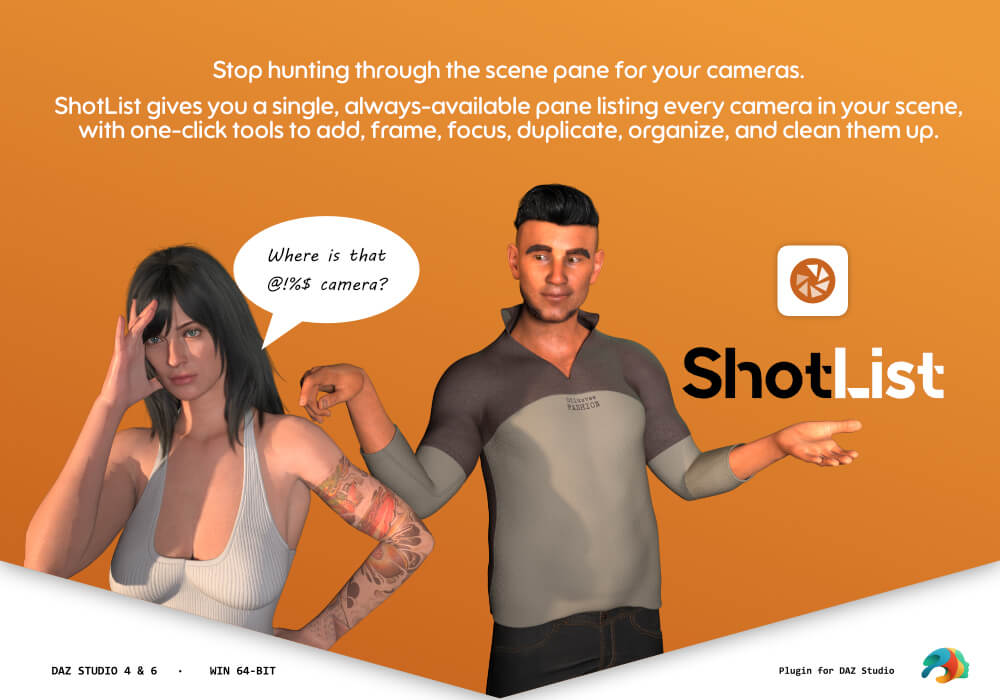
ShotList is a native, dockable camera management pane for Daz Studio.
Stop hunting through the Scene tab for your cameras. ShotList gives you a
single, always-available panel listing every camera in your scene, with
one-click tools to add, frame, focus, duplicate, organize, and clean them up.
KEY FEATURES ------------------
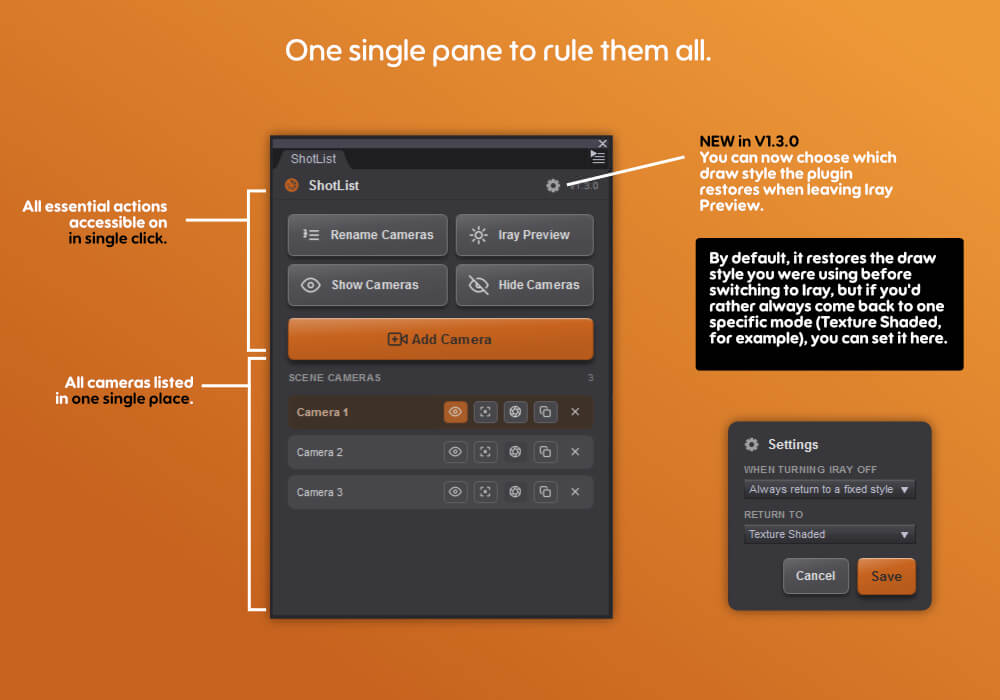
- Live Camera List
Every camera in your scene, listed in one scrollable panel that updates
automatically as cameras are added or removed — no manual refresh needed.
The active camera is highlighted, and the list stays in sync even when you
switch views from the viewport's own dropdown.
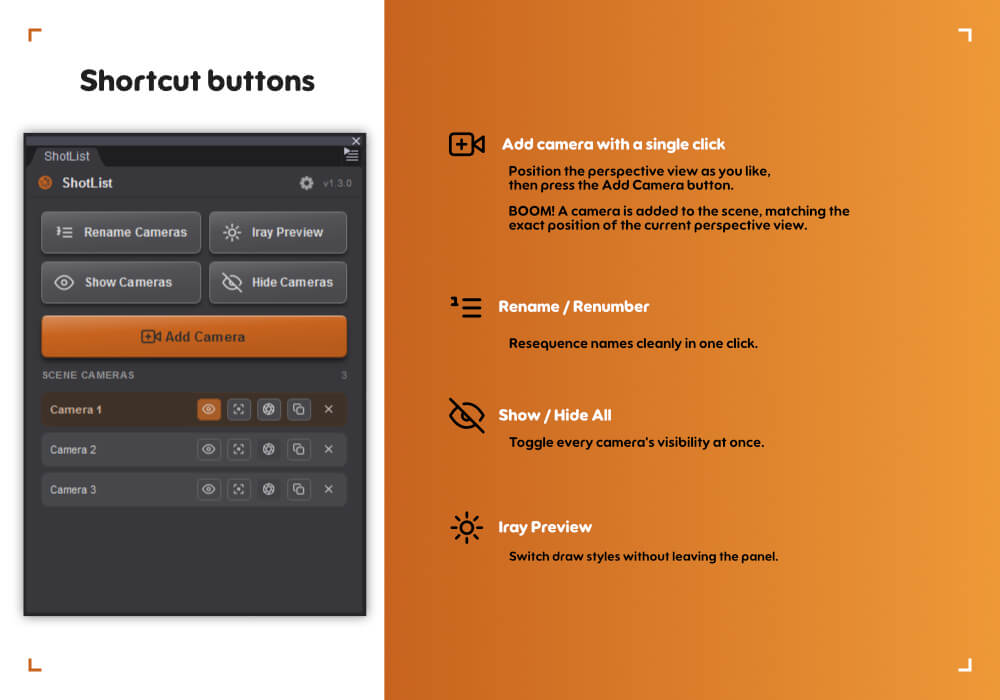
- One-Click Add Camera
Instantly creates a new camera positioned and oriented exactly like your
current viewport view, so you capture the shot you're already framing.
Cameras are automatically named and numbered without conflicts, and each new
camera starts with its headlamp turned off — no more accidental flat lighting.
Cameras are placed on a group named "Cameras", in case you want to manipulate
them through the outline.
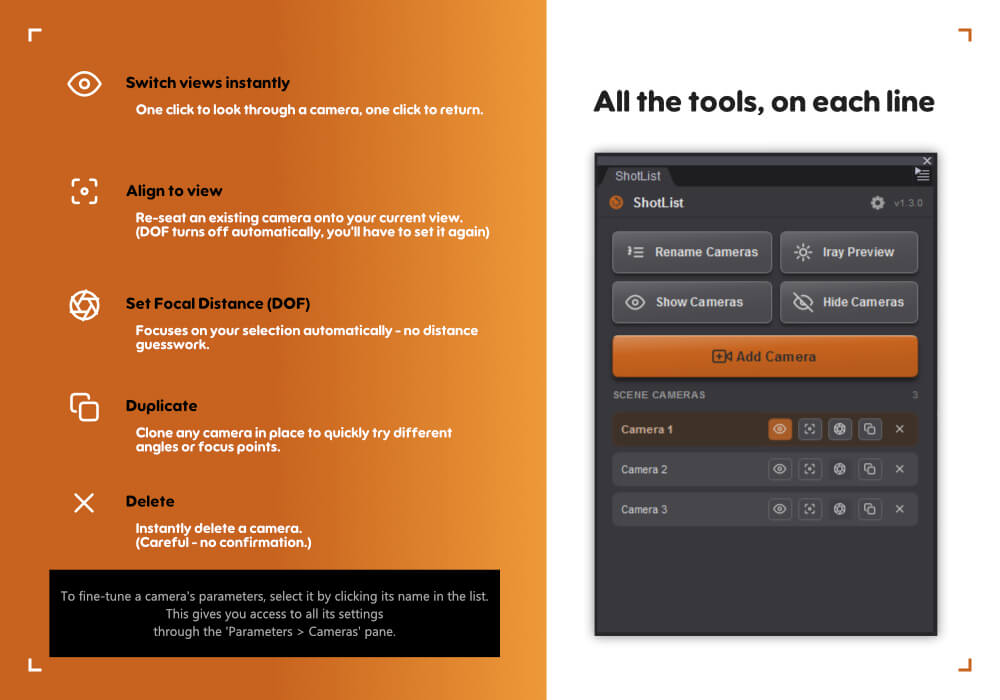
- Switch Views Instantly
Click a camera's View button to look through it immediately. Click again to
return cleanly — no more fiddling with the viewport's camera dropdown.
- Align to View
Re-seat an existing camera onto your current Perspective view in one click —
reframe a shot without creating a new camera. Depth of Field is switched off
for safety so you can re-focus cleanly afterwards.
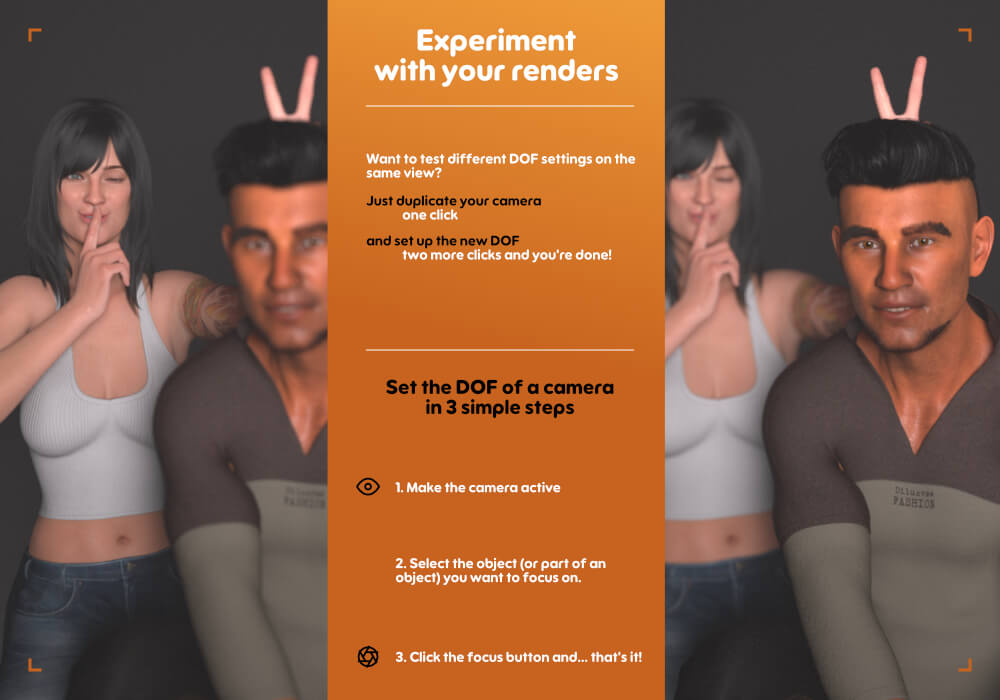
- Set Focal (Depth of Field)
Focus the active camera on whatever you have selected in the viewport — a
whole object, or a single body part. ShotList turns Depth of Field on and
computes the focal distance automatically, then flips to a one-click
"Disable Focal" toggle. No more guessing focal-distance numbers by hand.
- Duplicate Camera
Clone any camera in place, keeping its exact position and framing — perfect
for creating slight angle variations of a shot. The copy starts with Depth
of Field off.
- Select & Edit Parameters
Click a camera's name to select it in the scene, just like clicking it in
the Scene tab — its parameters appear instantly, ready to fine-tune.
- Group Cameras
Automatically add new cameras into a single "Cameras" group
node, keeping your scene hierarchy tidy.
- Rename / Renumber Cameras
Resequences all cameras to clean, consistent names ("Camera 1", "Camera 2"…)
with one click — perfect after deleting or reordering shots.
- Show / Hide All Cameras
Toggle the visibility of every camera in the scene at once, synced with the
Scene tab's own visibility icons.
- Iray Viewport Preview Toggle
Switch the active viewport between Texture Shaded and NVIDIA Iray draw
styles directly from the panel — quickly preview lighting and materials
without leaving your camera workflow.
- Delete Cameras
Remove any camera straight from its row, with automatic fallback to the
Perspective view if you delete the camera you're currently looking through.
- Native Look & Feel
A clean, icon-driven interface styled to match Daz Studio's own look — fully
dockable, floatable, and resizable like any built-in pane.
WHO IT'S FOR ------------------
Any Daz Studio artist working with multiple camera angles per scene —
storyboarding, comic/sequential art, turntables, or multi-shot renders —
who wants a faster, list-driven way to manage cameras than the default
Scene tab provides.
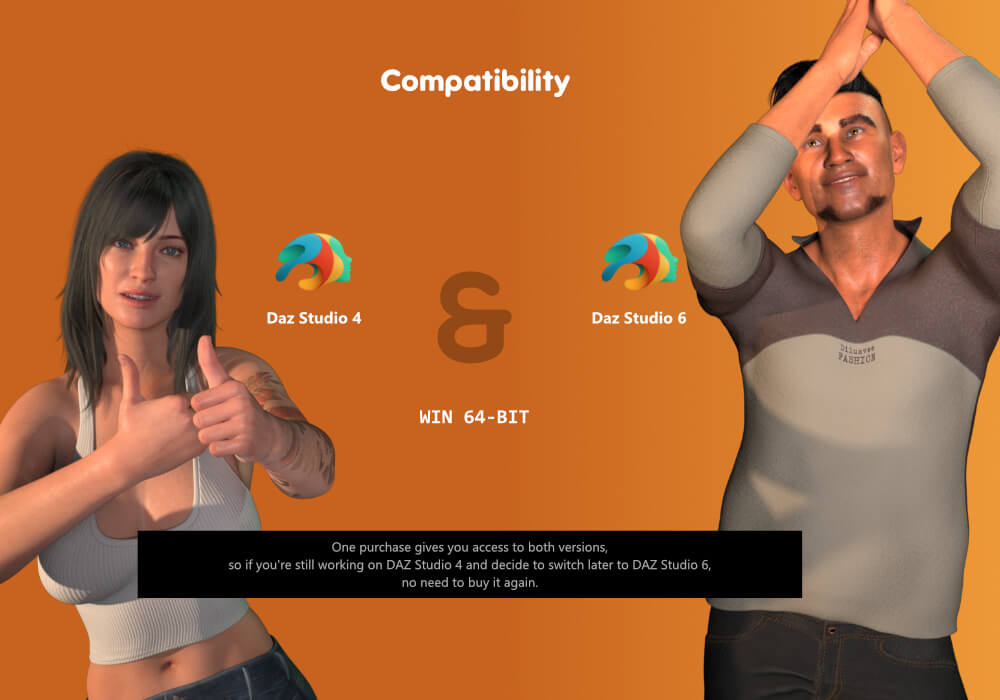
REQUIREMENTS ------------------
- Daz Studio 4 or Daz Studio 6
- Windows 64-bit
FAQ ---------------------------
Q: The Iray viewport preview toggle doesn't work in Daz Studio 4 with my
RTX 50-series (or newer) card — why?
A: This is a limitation of Daz Studio 4 itself, not of ShotList. Daz Studio 4
ships with an older build of NVIDIA Iray that predates support for the
RTX 50-series (Blackwell) and newer GPU architectures. Because that Iray
version cannot initialize those GPUs, the Iray draw style falls back to the
CPU or simply fails to render — no matter which plugin or method is used to
switch to it.
ShotList's Iray toggle just flips Daz Studio's own viewport draw style, so it
inherits the exact same limitation. If you need GPU-accelerated Iray preview
with an RTX 50-series or newer card, use Daz Studio 6, which ships with a
current Iray build that supports these GPUs. Every other ShotList feature
works normally in Daz Studio 4.
CHANGELOG --------------------
1.3.1 - 2026-10-19
- Compatibility: the Daz Studio 6 plugin is now built for Daz Studio 6.26 and
later, which no longer loads plugins built for earlier releases. A separate
build for Daz Studio 6.25 is included in the package (same file name, in
its own folder).
There is no functional change. The Daz Studio 4 plugin only receives the new
version number.
1.3.0 - 2026-08-07
- New: a Settings gear in the panel's title bar lets you control how the Iray
Preview toggle behaves when you switch Iray off — either return to the draw
style that was active before (default), or always return to a fixed draw
style you choose from a list.
- Fixed: turning Iray Preview off could leave the viewport in a textured
wireframe mode instead of plain Texture Shaded, when Iray had been enabled
from the viewport's own draw-style menu rather than from ShotList. The
viewport now returns to the correct shaded style. Applies to both Daz
Studio 4 and Daz Studio 6.
- Packaging fix: the plugin files are now named with the "dsp_" prefix
(dsp_shotlist_ds6.dll / dsp_shotlist_ds4.dll) that Daz Studio requires in
order to detect and load a plugin. Some earlier packages used a name without
that prefix, which certain Daz Studio installs skipped at startup.
1.2.3 - 2026-07-24
- Fixed the Iray Preview toggle in Daz Studio 4: on some systems, clicking the
button again to leave Iray preview did nothing and the viewport stayed stuck
in Iray mode. The plugin now restores the exact draw style that was active
before Iray was enabled, so the toggle reliably switches back.
- Removed the panel's fixed minimum width, so a floating ShotList pane can now
be resized narrower than before.
1.2.2 - 2026-07-19
- Aligned the panel background with Daz Studio's own panel color so the
plugin no longer stands out against the host interface. Card, row and
border tones were re-derived to keep the same visual hierarchy.
1.2.1 - 2026-07-08
- Fixed a bug where a newly added camera (Add Camera) could fail to match
the current viewport's position/orientation in Daz Studio 6.
- Fixed the Iray Preview toggle in Daz Studio 4: it could fail to switch, or
fail to switch back once turned on.
- Refreshed the look of the panel's main action buttons (raised, beveled
style) and removed a stray focus outline that could appear on click.
1.2.0 - 2026-07-07
- Fixed a bug related to the Iray preview switch in DAZ Studio 4
(an overly strict check was causing false positives on GPU identification;
this check was unnecessary and has been removed)
- New interface design (consistent with future plugins)
- Improved package structure
1.1.0 - 2026-07-03
- New "Align to View" button — reframe an existing camera onto the current
Perspective view.
- New "Set Focal / Disable Focal" — automatic Depth of Field focusing on the
selected object or body part.
- New "Duplicate" button — clone a camera in place.
- New cameras now start with their headlamp turned off.
- Refreshed, icon-driven interface.
- The active-camera highlight now stays in sync with the viewport's own view
dropdown.
1.0.0 - 2026-06-30
- Initial version of the plugin
Stop hunting through the Scene tab for your cameras. ShotList gives you a
single, always-available panel listing every camera in your scene, with
one-click tools to add, frame, focus, duplicate, organize, and clean them up.
KEY FEATURES ------------------
- Live Camera List
Every camera in your scene, listed in one scrollable panel that updates
automatically as cameras are added or removed — no manual refresh needed.
The active camera is highlighted, and the list stays in sync even when you
switch views from the viewport's own dropdown.
- One-Click Add Camera
Instantly creates a new camera positioned and oriented exactly like your
current viewport view, so you capture the shot you're already framing.
Cameras are automatically named and numbered without conflicts, and each new
camera starts with its headlamp turned off — no more accidental flat lighting.
Cameras are placed on a group named "Cameras", in case you want to manipulate
them through the outline.
- Switch Views Instantly
Click a camera's View button to look through it immediately. Click again to
return cleanly — no more fiddling with the viewport's camera dropdown.
- Align to View
Re-seat an existing camera onto your current Perspective view in one click —
reframe a shot without creating a new camera. Depth of Field is switched off
for safety so you can re-focus cleanly afterwards.
- Set Focal (Depth of Field)
Focus the active camera on whatever you have selected in the viewport — a
whole object, or a single body part. ShotList turns Depth of Field on and
computes the focal distance automatically, then flips to a one-click
"Disable Focal" toggle. No more guessing focal-distance numbers by hand.
- Duplicate Camera
Clone any camera in place, keeping its exact position and framing — perfect
for creating slight angle variations of a shot. The copy starts with Depth
of Field off.
- Select & Edit Parameters
Click a camera's name to select it in the scene, just like clicking it in
the Scene tab — its parameters appear instantly, ready to fine-tune.
- Group Cameras
Automatically add new cameras into a single "Cameras" group
node, keeping your scene hierarchy tidy.
- Rename / Renumber Cameras
Resequences all cameras to clean, consistent names ("Camera 1", "Camera 2"…)
with one click — perfect after deleting or reordering shots.
- Show / Hide All Cameras
Toggle the visibility of every camera in the scene at once, synced with the
Scene tab's own visibility icons.
- Iray Viewport Preview Toggle
Switch the active viewport between Texture Shaded and NVIDIA Iray draw
styles directly from the panel — quickly preview lighting and materials
without leaving your camera workflow.
- Delete Cameras
Remove any camera straight from its row, with automatic fallback to the
Perspective view if you delete the camera you're currently looking through.
- Native Look & Feel
A clean, icon-driven interface styled to match Daz Studio's own look — fully
dockable, floatable, and resizable like any built-in pane.
WHO IT'S FOR ------------------
Any Daz Studio artist working with multiple camera angles per scene —
storyboarding, comic/sequential art, turntables, or multi-shot renders —
who wants a faster, list-driven way to manage cameras than the default
Scene tab provides.
REQUIREMENTS ------------------
- Daz Studio 4 or Daz Studio 6
- Windows 64-bit
FAQ ---------------------------
Q: The Iray viewport preview toggle doesn't work in Daz Studio 4 with my
RTX 50-series (or newer) card — why?
A: This is a limitation of Daz Studio 4 itself, not of ShotList. Daz Studio 4
ships with an older build of NVIDIA Iray that predates support for the
RTX 50-series (Blackwell) and newer GPU architectures. Because that Iray
version cannot initialize those GPUs, the Iray draw style falls back to the
CPU or simply fails to render — no matter which plugin or method is used to
switch to it.
ShotList's Iray toggle just flips Daz Studio's own viewport draw style, so it
inherits the exact same limitation. If you need GPU-accelerated Iray preview
with an RTX 50-series or newer card, use Daz Studio 6, which ships with a
current Iray build that supports these GPUs. Every other ShotList feature
works normally in Daz Studio 4.
CHANGELOG --------------------
1.3.1 - 2026-10-19
- Compatibility: the Daz Studio 6 plugin is now built for Daz Studio 6.26 and
later, which no longer loads plugins built for earlier releases. A separate
build for Daz Studio 6.25 is included in the package (same file name, in
its own folder).
There is no functional change. The Daz Studio 4 plugin only receives the new
version number.
1.3.0 - 2026-08-07
- New: a Settings gear in the panel's title bar lets you control how the Iray
Preview toggle behaves when you switch Iray off — either return to the draw
style that was active before (default), or always return to a fixed draw
style you choose from a list.
- Fixed: turning Iray Preview off could leave the viewport in a textured
wireframe mode instead of plain Texture Shaded, when Iray had been enabled
from the viewport's own draw-style menu rather than from ShotList. The
viewport now returns to the correct shaded style. Applies to both Daz
Studio 4 and Daz Studio 6.
- Packaging fix: the plugin files are now named with the "dsp_" prefix
(dsp_shotlist_ds6.dll / dsp_shotlist_ds4.dll) that Daz Studio requires in
order to detect and load a plugin. Some earlier packages used a name without
that prefix, which certain Daz Studio installs skipped at startup.
1.2.3 - 2026-07-24
- Fixed the Iray Preview toggle in Daz Studio 4: on some systems, clicking the
button again to leave Iray preview did nothing and the viewport stayed stuck
in Iray mode. The plugin now restores the exact draw style that was active
before Iray was enabled, so the toggle reliably switches back.
- Removed the panel's fixed minimum width, so a floating ShotList pane can now
be resized narrower than before.
1.2.2 - 2026-07-19
- Aligned the panel background with Daz Studio's own panel color so the
plugin no longer stands out against the host interface. Card, row and
border tones were re-derived to keep the same visual hierarchy.
1.2.1 - 2026-07-08
- Fixed a bug where a newly added camera (Add Camera) could fail to match
the current viewport's position/orientation in Daz Studio 6.
- Fixed the Iray Preview toggle in Daz Studio 4: it could fail to switch, or
fail to switch back once turned on.
- Refreshed the look of the panel's main action buttons (raised, beveled
style) and removed a stray focus outline that could appear on click.
1.2.0 - 2026-07-07
- Fixed a bug related to the Iray preview switch in DAZ Studio 4
(an overly strict check was causing false positives on GPU identification;
this check was unnecessary and has been removed)
- New interface design (consistent with future plugins)
- Improved package structure
1.1.0 - 2026-07-03
- New "Align to View" button — reframe an existing camera onto the current
Perspective view.
- New "Set Focal / Disable Focal" — automatic Depth of Field focusing on the
selected object or body part.
- New "Duplicate" button — clone a camera in place.
- New cameras now start with their headlamp turned off.
- Refreshed, icon-driven interface.
- The active-camera highlight now stays in sync with the viewport's own view
dropdown.
1.0.0 - 2026-06-30
- Initial version of the plugin
Categories
