


 Free 3D
 3D Print Models
 3D Scans
 Animation & MoCap
 Textures
 Materials
 Skin Reference
 2D Game Assets
 Sound Effects
 Brushes & Tools
 Reference Photos
 Stock Images
 HDR Images
 3ds Max
 Maya
 Blender
 Unreal Engine
 Unity
 ZBrush
 Cinema 4D
 LightWave
 Marmoset
 SketchUp
 FBX
 DAE
 DXF
 GLB

Bruises and Beatdown FX for Genesis 9 and Genesis 8 Female

Not Rated Yet


This Item Was Made Using
! REPORT
NOTE: DIGITAL DOWNLOAD, NOT A PHYSICAL ITEM

Add to Collection

0 Likes
Share This Daz Content


Offered By


License
Extended Use License
This item comes with our Extended Use Licensing. This means that you may use the model for both non-commercial and commercial purposes, in a variety of mediums and applications.
For full license terms, see our 3D Content Licensing Agreement
Item Details
| Vendor: | audrey12 |
| Published: | Nov 14, 2026 |
| Download Size: | 39.7 MB |
| Software: | Daz Studio |
| Compatible Figures: | Genesis 9 Genesis 8 Female Genesis 8.1 Female |
| dForce: | – |
Included Formats

Statistics
| Favorites: | 0 |
| Likes: | 0 |
| Views: | 30 |
Item Ratings
Not Rated Yet
Bruises and Beatdown FX for Genesis 9 and Genesis 8 Female
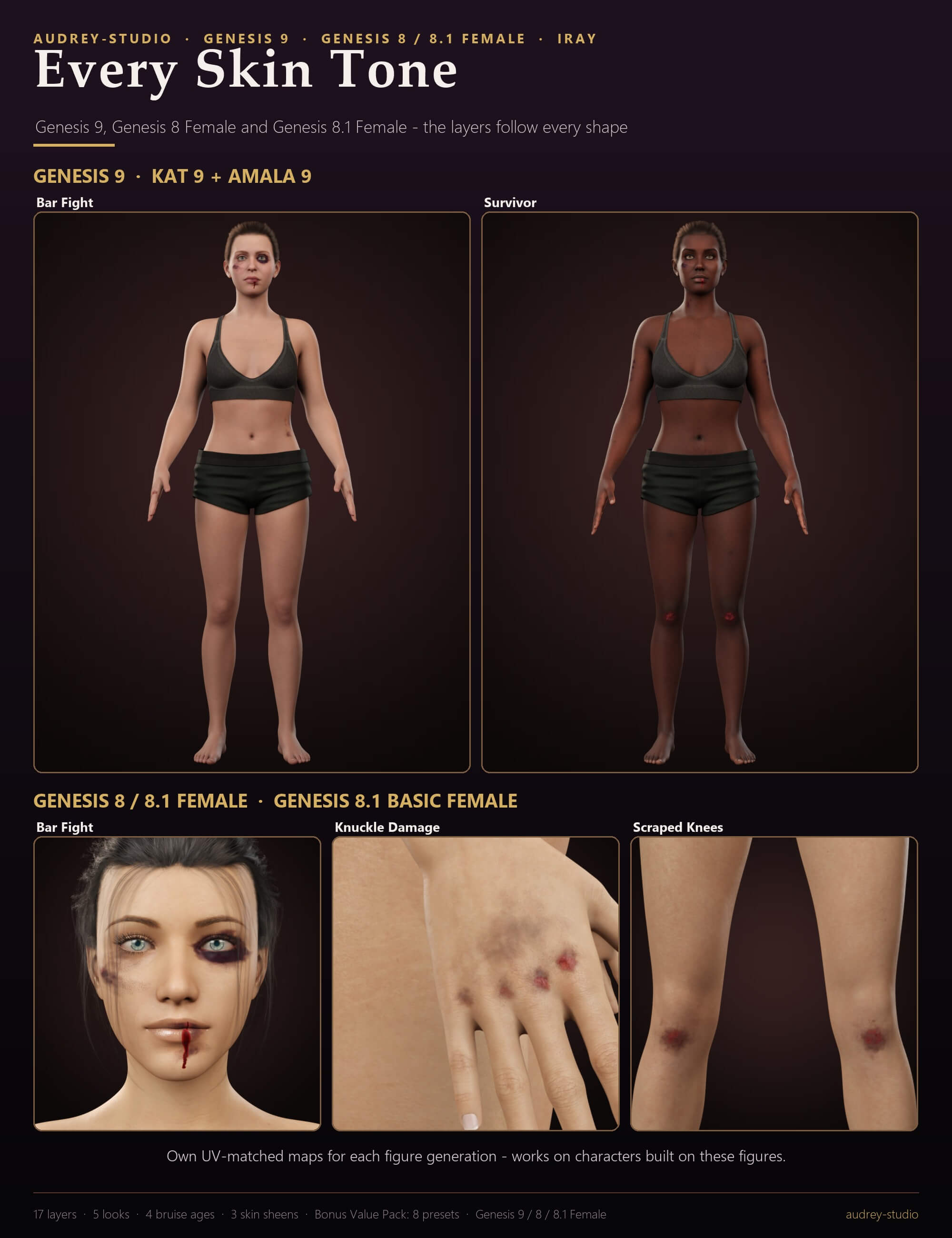
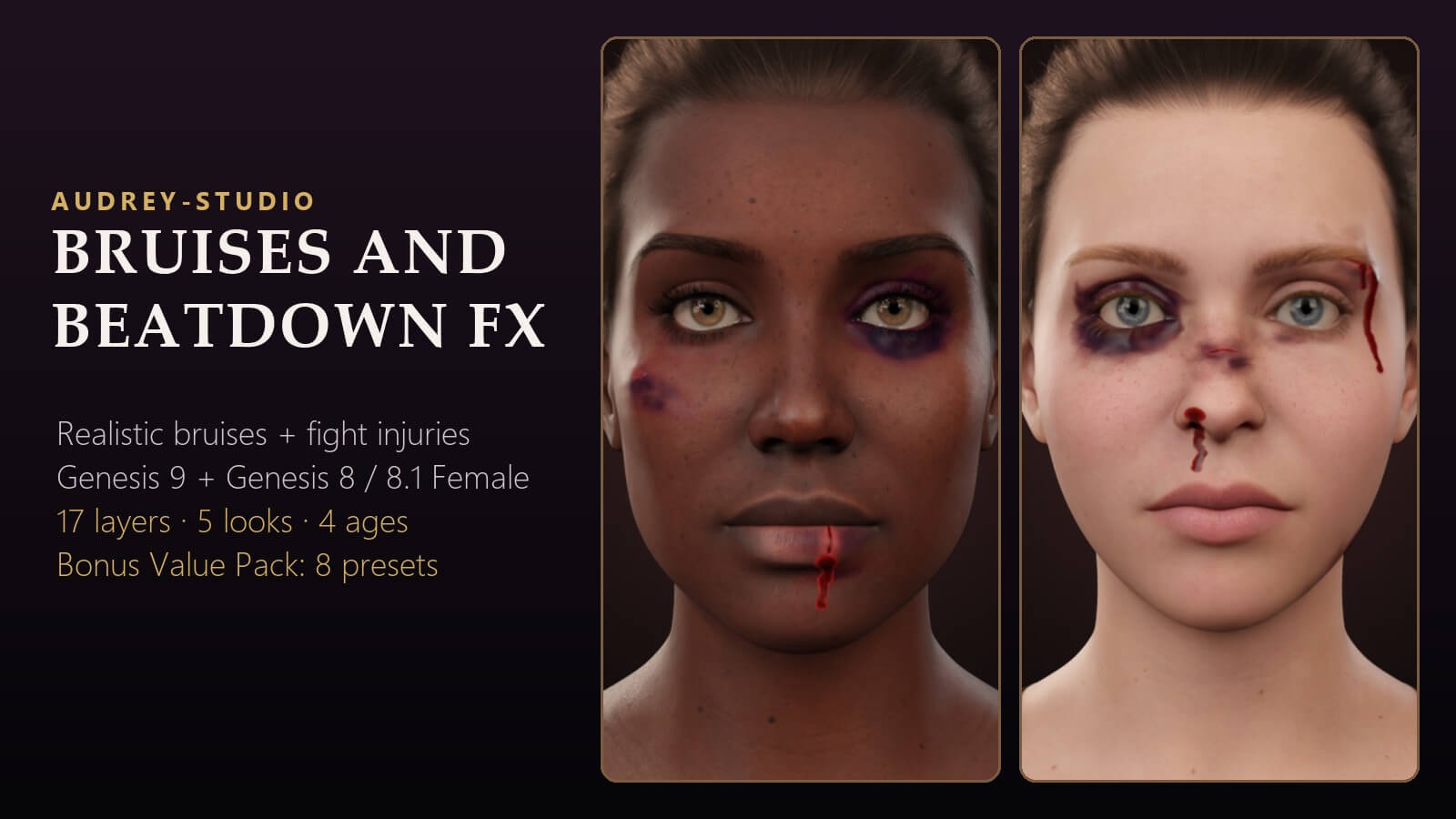
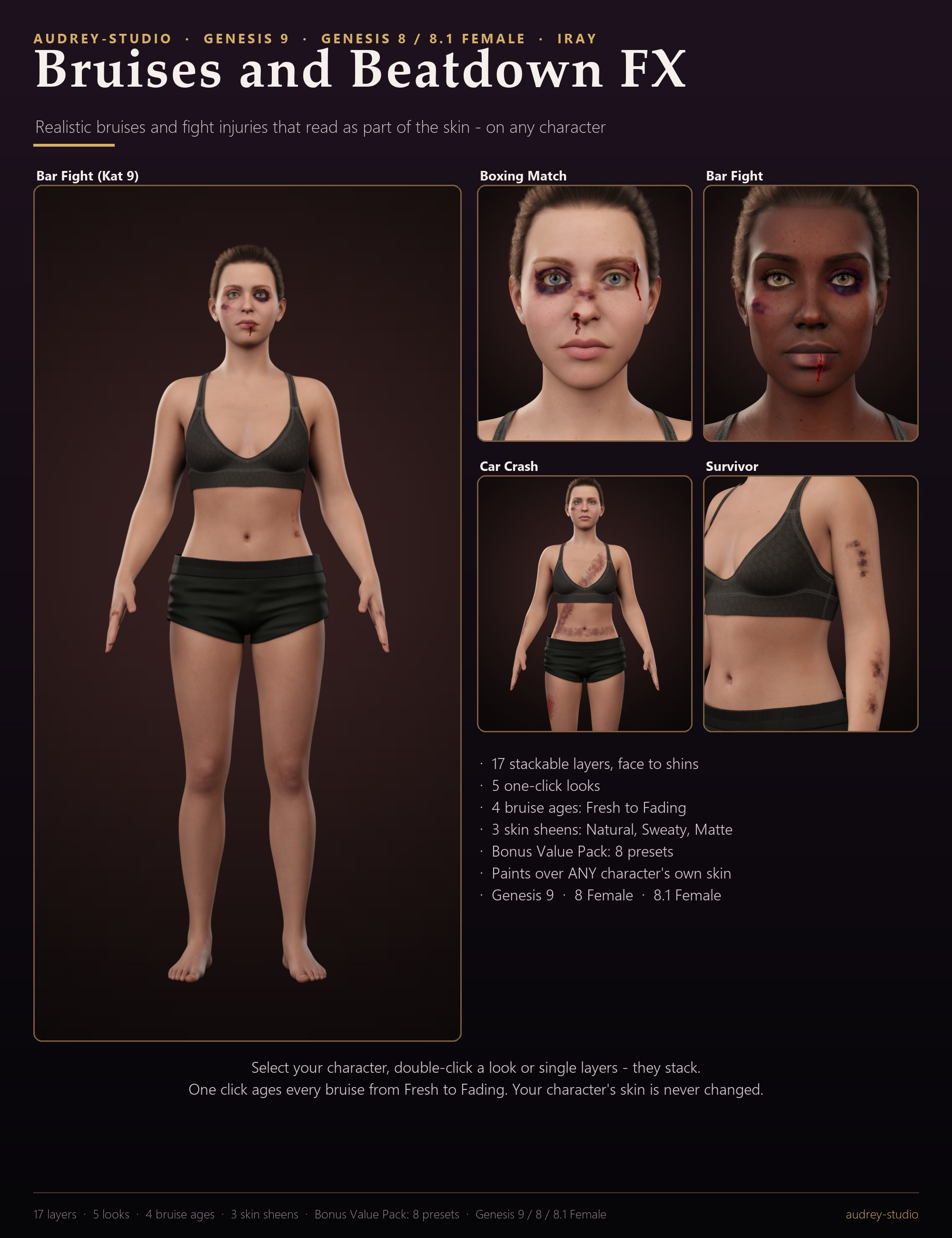
Bruises that read as bruising under the skin, not as makeup or stickers. Fresh bruises are red-purple and swollen, with a darker blotchy core, a soft irregular edge and tiny broken vessels at the rim; black eyes darken the lids and drain onto the cheek; cuts gape a little with a swollen margin and a thin run of blood; scrapes and road rash are raw, grazed skin.
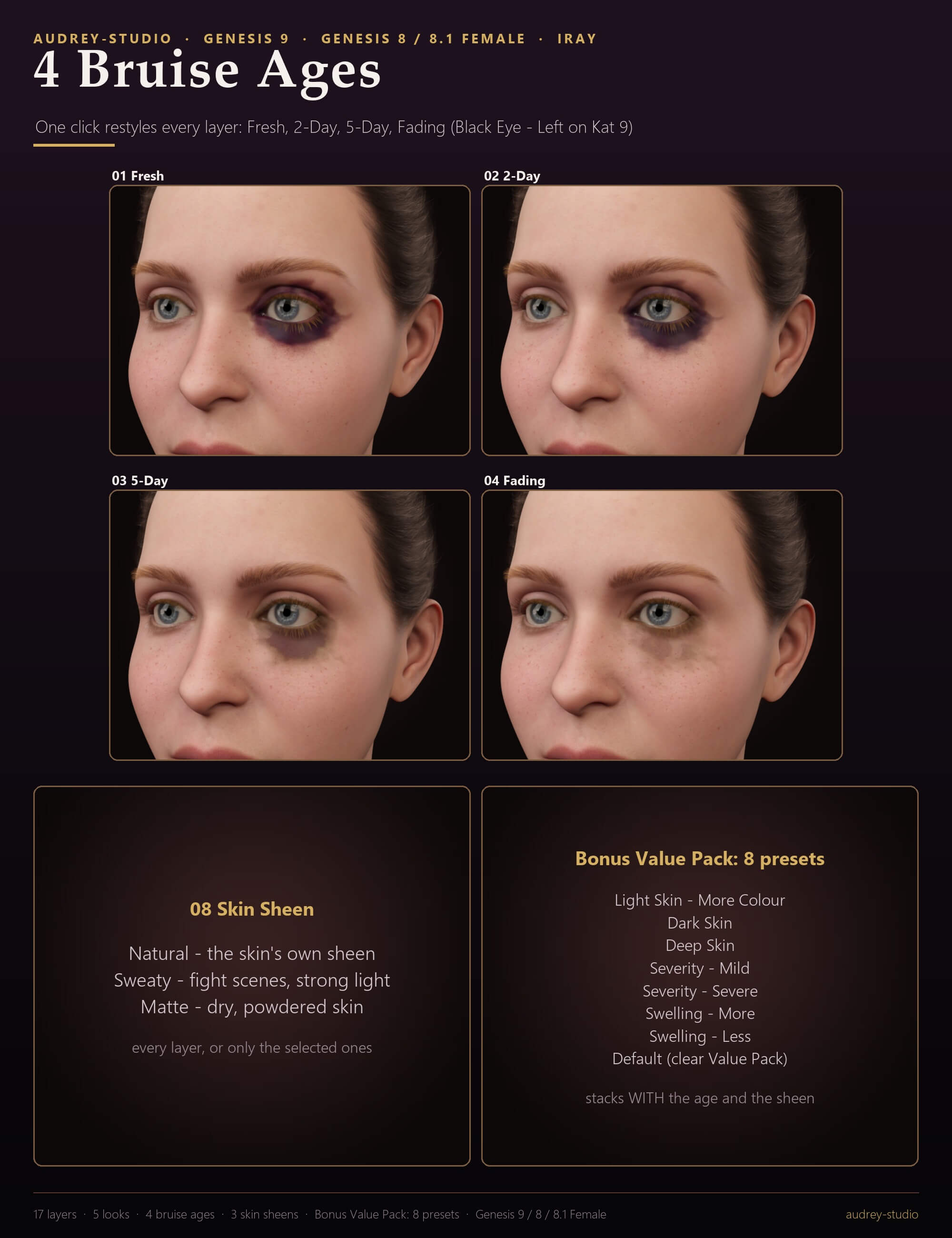
BRUISE AGE - every layer has four baked age stages: Fresh (red-purple, swollen), 2-Day (deep blue-purple), 5-Day (a plum core with a green-brown rim) and Fading (patchy yellow-brown). One click ages the whole character or only the layers you selected in the Scene pane, so a fresh black eye can sit next to week-old grip marks.
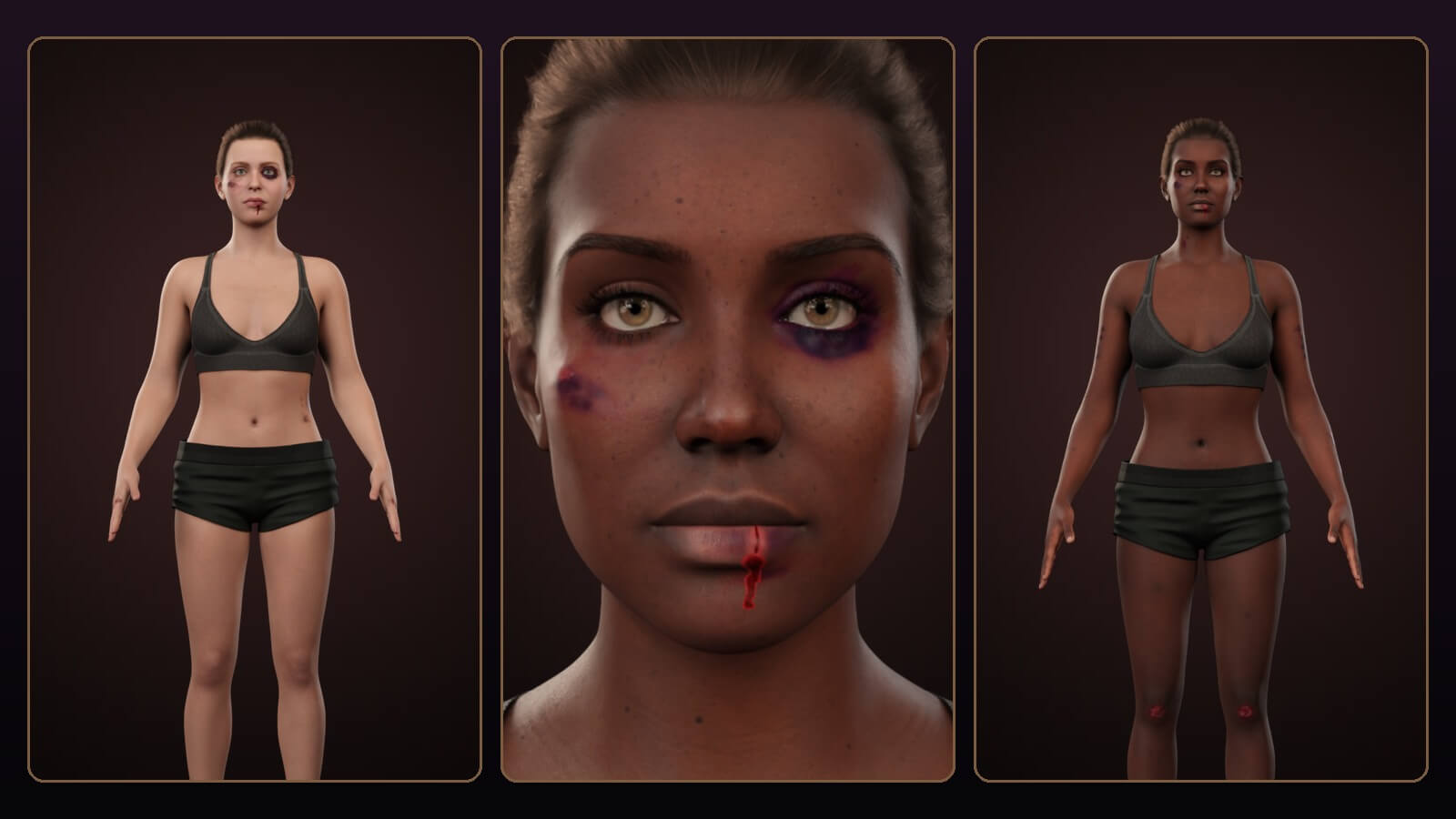
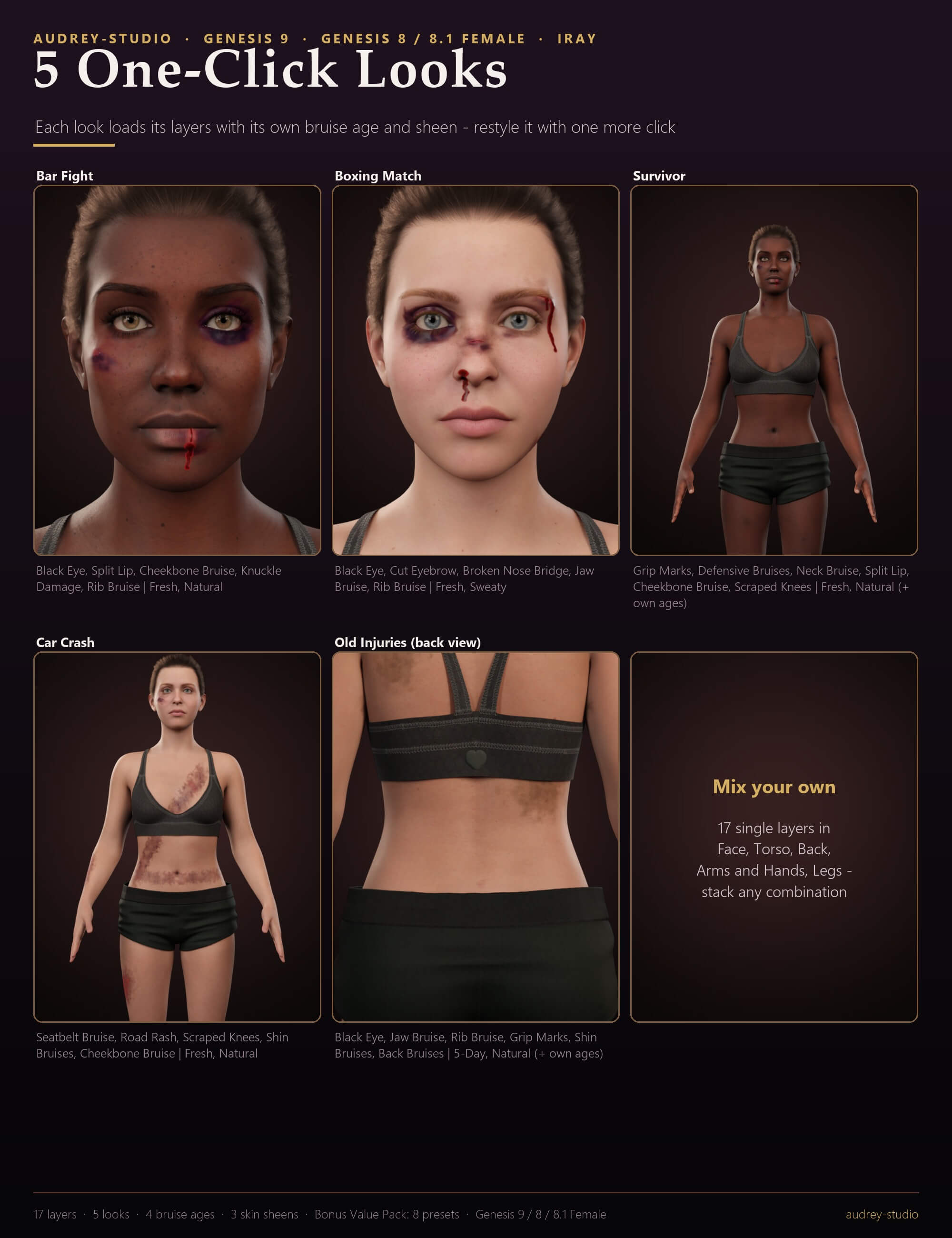
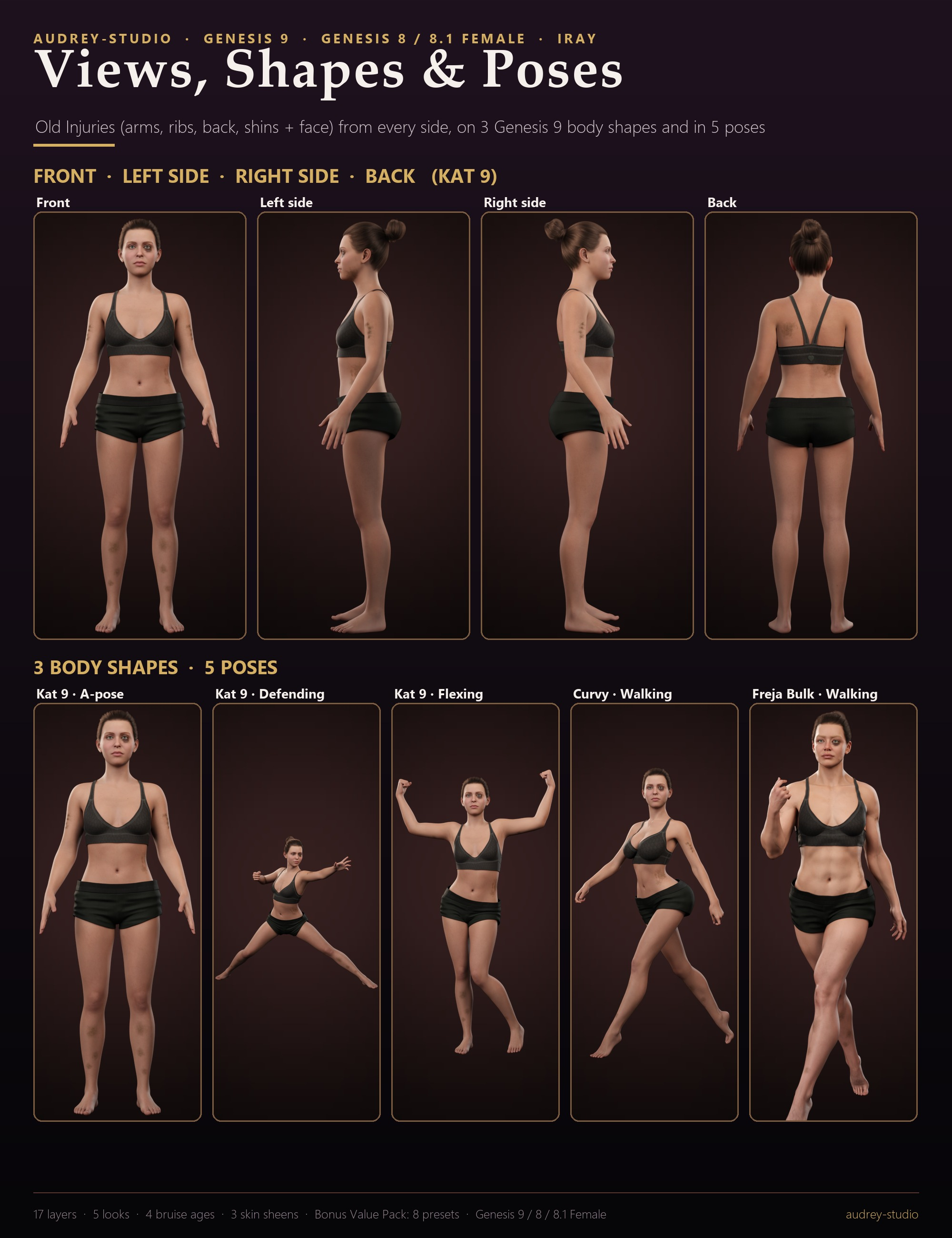
Every layer is a separate paint layer ON TOP of your character's skin: semi-transparent colour with soft, irregular edges, a relief map for the swelling and the cuts, and a sheen that matches skin. Her skin maps and shader are never changed. Stack as many layers as you like, remove them one by one, or start from one of 5 one-click looks (Bar Fight, Boxing Match, Survivor, Car Crash, Old Injuries).
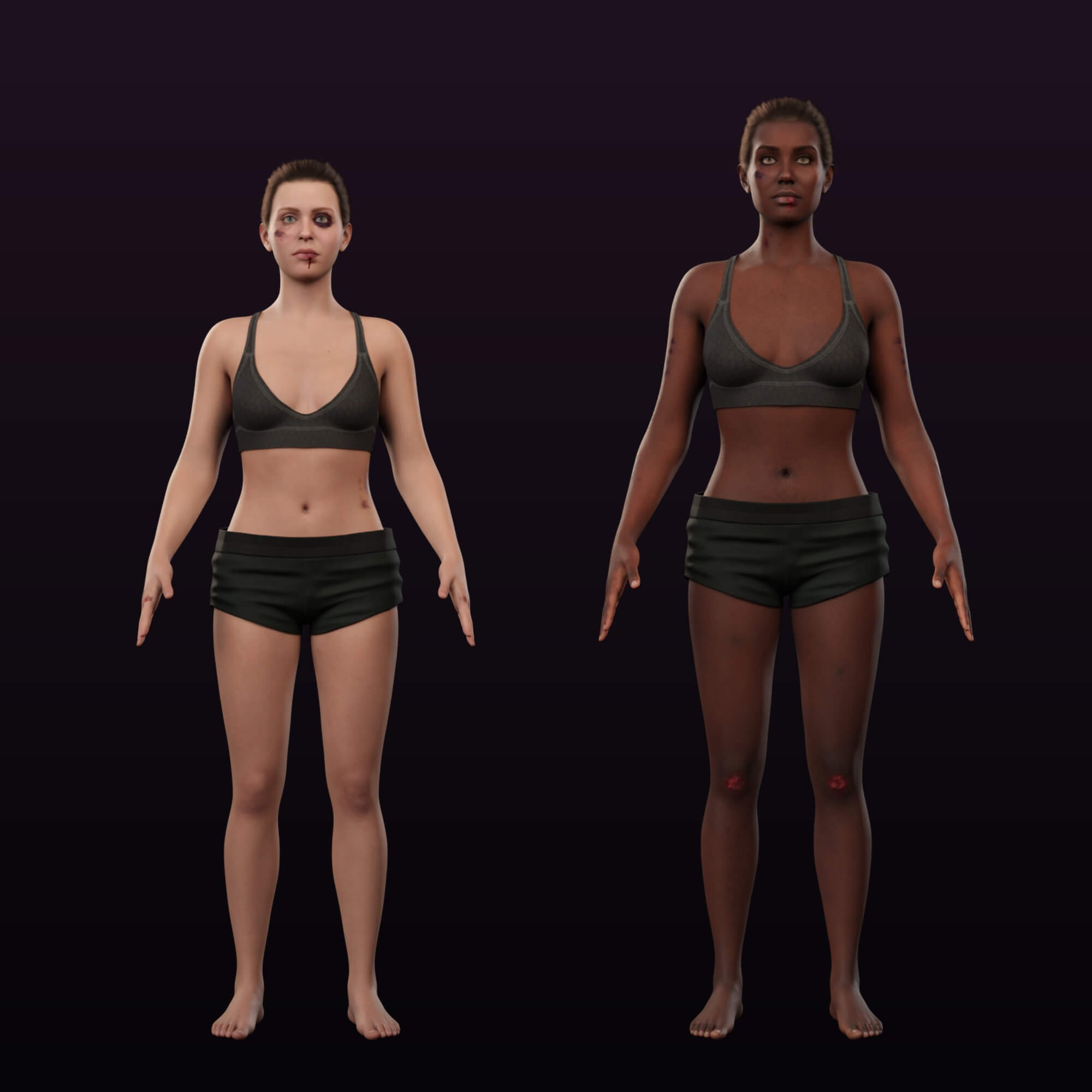
Designed on the body in 3D and baked into each figure's own UV layout - Genesis 9, Genesis 8 Female and Genesis 8.1 Female - so each bruise lands on the same spot of every character of those figures. Tuned to read on light and dark skin; the Value Pack adds more colour for very pale skin and deeper tones for dark skin.
WHAT'S INCLUDED
- 5 one-click looks: Bar Fight, Boxing Match, Survivor, Car Crash, Old Injuries
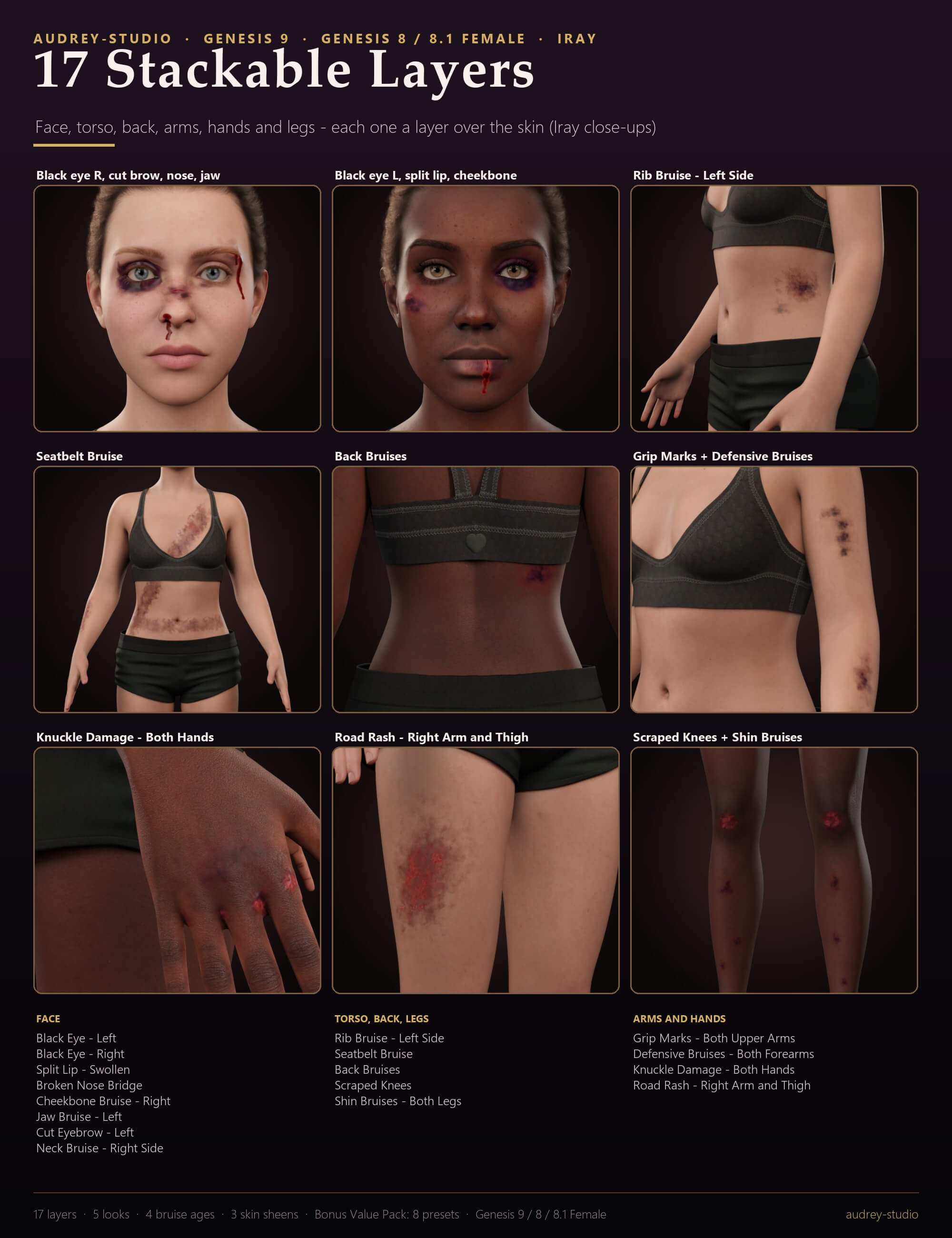
- 8 face and neck layers: Black Eye - Left, Black Eye - Right, Split Lip - Swollen, Broken Nose Bridge, Cheekbone Bruise - Right, Jaw Bruise - Left, Cut Eyebrow - Left, Neck Bruise - Right Side
- 2 torso layers: Rib Bruise - Left Side, Seatbelt Bruise
- 1 back layer: Back Bruises
- 4 arm and hand layers: Grip Marks - Both Upper Arms, Defensive Bruises - Both Forearms, Knuckle Damage - Both Hands, Road Rash - Right Arm and Thigh
- 2 leg layers: Scraped Knees, Shin Bruises - Both Legs
- 4 bruise ages: Fresh, 2-Day, 5-Day, Fading (all layers or the selected ones; each age has its own baked maps)
- 3 skin sheens: Natural, Sweaty, Matte (all layers or the selected ones)
- Bonus Shader Value Pack: 8 presets: Light Skin - More Colour, Dark Skin, Deep Skin, Severity - Mild, Severity - Severe, Swelling - More, Swelling - Less, Default (clear Value Pack)
- Remove presets: everything, the selected layers, and one per layer
- Genesis 9, Genesis 8 Female and Genesis 8.1 Female (each UV layout baked separately; any character skin of those figures)
- Not included: the characters, hair, lights, poses and clothing shown in the promo images
MATERIALS / SHADING
- One Iray Uber paint layer per injury: colour, cutout, relief normal and sheen maps
- Bruise ages: 4 baked map sets per layer (colour, cutout, relief, sheen) - the bruise changes colour, spreads and the swelling goes down
- Skin sheens: how much the bruised skin shines, from matte to sweaty
SHAPING / FIT
- Nothing to fit: the layers follow every body morph and pose of the character
- A geograft added later is hidden in the layers by the next preset click
TECHNICAL
- No extra mesh to load: each layer is a render-time shell of the figure; delete the layers you do not use
- Your character's skin, maps, shader and UV set are never changed
- Stacks with our other skin-layer packs: every pack paints on its own layer distance, so the packs stack without flicker
- Maps: 2K colour, cutout and normal maps per layer and age, sheen masks at 1K (half that on the small Genesis 8.1 head / neck tiles)
- Presets load-tested in DAZ Studio 4.24 and DAZ Studio 6 (Genesis 9 itself needs 4.20+); Iray renders checked in DAZ Studio 6
- Download: audrey-studio_Bruises_and_Beatdown_FX_G9_G8.zip (41.6 MB, 1245 files)
HOW TO USE
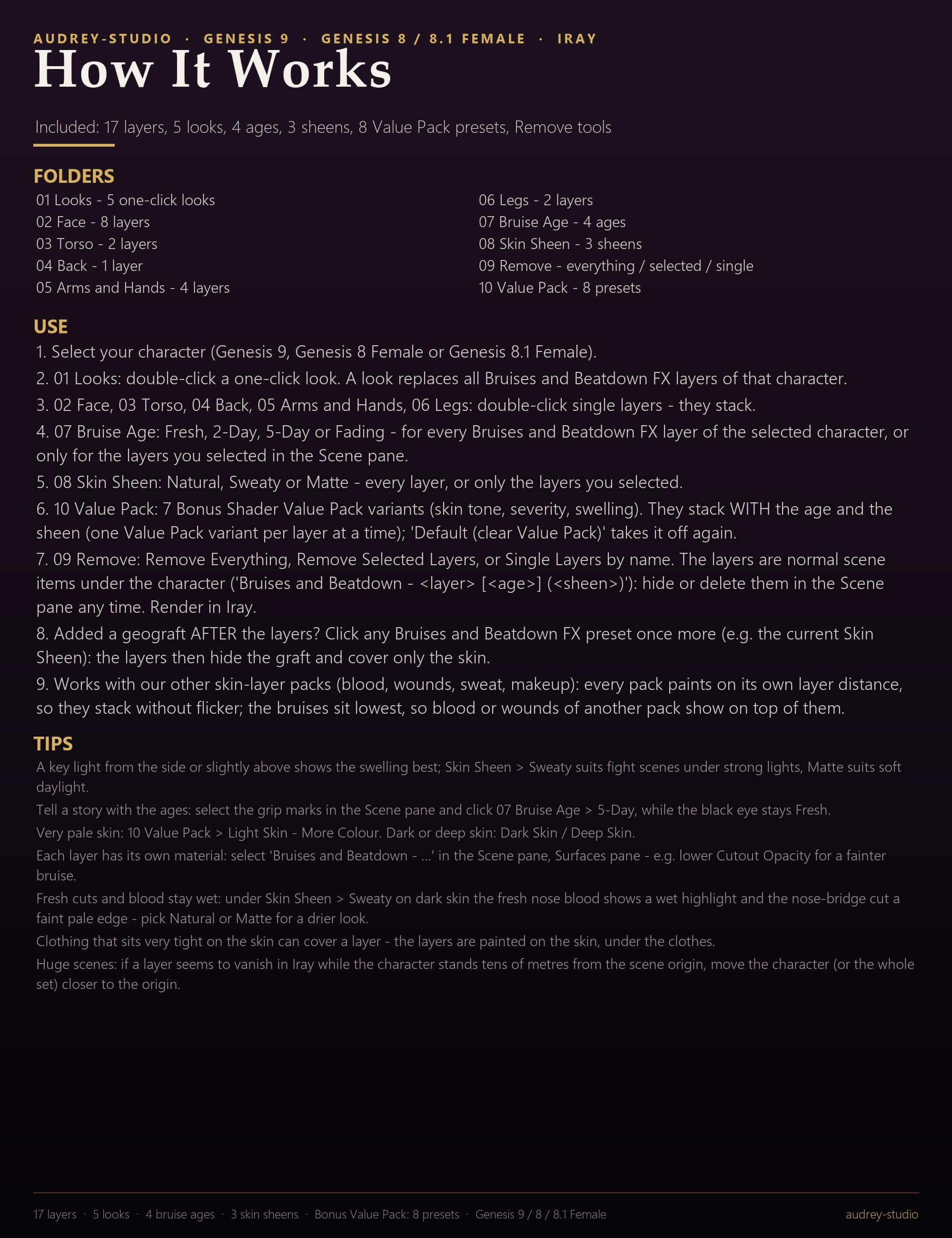
1. Select your character (Genesis 9, Genesis 8 Female or Genesis 8.1 Female).
2. 01 Looks: double-click a one-click look. A look replaces all Bruises and Beatdown FX layers of that character.
3. 02 Face, 03 Torso, 04 Back, 05 Arms and Hands, 06 Legs: double-click single layers - they stack.
4. 07 Bruise Age: Fresh, 2-Day, 5-Day or Fading - for every Bruises and Beatdown FX layer of the selected character, or only for the layers you selected in the Scene pane. A second age clicked right after the first waits a few seconds (longer on heavy looks) while DAZ Studio finishes loading the maps - one click is enough.
5. 08 Skin Sheen: Natural, Sweaty or Matte - every layer, or only the layers you selected.
6. 10 Value Pack: 7 Bonus Shader Value Pack variants (skin tone, severity, swelling). They stack WITH the age and the sheen (one Value Pack variant per layer at a time); 'Default (clear Value Pack)' takes it off again.
7. 09 Remove: Remove Everything, Remove Selected Layers, or Single Layers by name. The layers are normal scene items under the character ('Bruises and Beatdown - (layer) [(age)] ((sheen))'): hide or delete them in the Scene pane any time. Render in Iray.
8. Added a geograft AFTER the layers? Click any Bruises and Beatdown FX preset once more (e.g. the current Skin Sheen): the layers then hide the graft and cover only the skin.
9. Works with our other skin-layer packs (blood, wounds, sweat, makeup): every pack paints on its own layer distance, so the packs stack without flicker.
TIPS
- A key light from the side or slightly above shows the swelling best; Skin Sheen > Sweaty suits fight scenes under strong lights, Matte suits soft daylight.
- Tell a story with the ages: select the grip marks in the Scene pane and click 07 Bruise Age > 5-Day, while the black eye stays Fresh.
- Very pale skin: 10 Value Pack > Light Skin - More Colour. Dark or deep skin: Dark Skin / Deep Skin.
- Each layer has its own material: select 'Bruises and Beatdown - …' in the Scene pane, Surfaces pane - e.g. lower Cutout Opacity for a fainter bruise.
- Fresh cuts and blood stay wet: under Skin Sheen > Sweaty on dark skin the fresh nose blood shows a wet highlight and the nose-bridge cut a faint pale edge - pick Natural or Matte for a drier look.
- Clothing that sits very tight on the skin can cover a layer - the layers are painted on the skin, under the clothes.
- Huge scenes: if a layer seems to vanish in Iray while the character stands tens of metres from the scene origin, move the character (or the whole set) closer to the origin.
Rendered in DAZ Studio with Iray; character, hair, poses, clothing and lights not included.
BRUISE AGE - every layer has four baked age stages: Fresh (red-purple, swollen), 2-Day (deep blue-purple), 5-Day (a plum core with a green-brown rim) and Fading (patchy yellow-brown). One click ages the whole character or only the layers you selected in the Scene pane, so a fresh black eye can sit next to week-old grip marks.
Every layer is a separate paint layer ON TOP of your character's skin: semi-transparent colour with soft, irregular edges, a relief map for the swelling and the cuts, and a sheen that matches skin. Her skin maps and shader are never changed. Stack as many layers as you like, remove them one by one, or start from one of 5 one-click looks (Bar Fight, Boxing Match, Survivor, Car Crash, Old Injuries).
Designed on the body in 3D and baked into each figure's own UV layout - Genesis 9, Genesis 8 Female and Genesis 8.1 Female - so each bruise lands on the same spot of every character of those figures. Tuned to read on light and dark skin; the Value Pack adds more colour for very pale skin and deeper tones for dark skin.
WHAT'S INCLUDED
- 5 one-click looks: Bar Fight, Boxing Match, Survivor, Car Crash, Old Injuries
- 8 face and neck layers: Black Eye - Left, Black Eye - Right, Split Lip - Swollen, Broken Nose Bridge, Cheekbone Bruise - Right, Jaw Bruise - Left, Cut Eyebrow - Left, Neck Bruise - Right Side
- 2 torso layers: Rib Bruise - Left Side, Seatbelt Bruise
- 1 back layer: Back Bruises
- 4 arm and hand layers: Grip Marks - Both Upper Arms, Defensive Bruises - Both Forearms, Knuckle Damage - Both Hands, Road Rash - Right Arm and Thigh
- 2 leg layers: Scraped Knees, Shin Bruises - Both Legs
- 4 bruise ages: Fresh, 2-Day, 5-Day, Fading (all layers or the selected ones; each age has its own baked maps)
- 3 skin sheens: Natural, Sweaty, Matte (all layers or the selected ones)
- Bonus Shader Value Pack: 8 presets: Light Skin - More Colour, Dark Skin, Deep Skin, Severity - Mild, Severity - Severe, Swelling - More, Swelling - Less, Default (clear Value Pack)
- Remove presets: everything, the selected layers, and one per layer
- Genesis 9, Genesis 8 Female and Genesis 8.1 Female (each UV layout baked separately; any character skin of those figures)
- Not included: the characters, hair, lights, poses and clothing shown in the promo images
MATERIALS / SHADING
- One Iray Uber paint layer per injury: colour, cutout, relief normal and sheen maps
- Bruise ages: 4 baked map sets per layer (colour, cutout, relief, sheen) - the bruise changes colour, spreads and the swelling goes down
- Skin sheens: how much the bruised skin shines, from matte to sweaty
SHAPING / FIT
- Nothing to fit: the layers follow every body morph and pose of the character
- A geograft added later is hidden in the layers by the next preset click
TECHNICAL
- No extra mesh to load: each layer is a render-time shell of the figure; delete the layers you do not use
- Your character's skin, maps, shader and UV set are never changed
- Stacks with our other skin-layer packs: every pack paints on its own layer distance, so the packs stack without flicker
- Maps: 2K colour, cutout and normal maps per layer and age, sheen masks at 1K (half that on the small Genesis 8.1 head / neck tiles)
- Presets load-tested in DAZ Studio 4.24 and DAZ Studio 6 (Genesis 9 itself needs 4.20+); Iray renders checked in DAZ Studio 6
- Download: audrey-studio_Bruises_and_Beatdown_FX_G9_G8.zip (41.6 MB, 1245 files)
HOW TO USE
1. Select your character (Genesis 9, Genesis 8 Female or Genesis 8.1 Female).
2. 01 Looks: double-click a one-click look. A look replaces all Bruises and Beatdown FX layers of that character.
3. 02 Face, 03 Torso, 04 Back, 05 Arms and Hands, 06 Legs: double-click single layers - they stack.
4. 07 Bruise Age: Fresh, 2-Day, 5-Day or Fading - for every Bruises and Beatdown FX layer of the selected character, or only for the layers you selected in the Scene pane. A second age clicked right after the first waits a few seconds (longer on heavy looks) while DAZ Studio finishes loading the maps - one click is enough.
5. 08 Skin Sheen: Natural, Sweaty or Matte - every layer, or only the layers you selected.
6. 10 Value Pack: 7 Bonus Shader Value Pack variants (skin tone, severity, swelling). They stack WITH the age and the sheen (one Value Pack variant per layer at a time); 'Default (clear Value Pack)' takes it off again.
7. 09 Remove: Remove Everything, Remove Selected Layers, or Single Layers by name. The layers are normal scene items under the character ('Bruises and Beatdown - (layer) [(age)] ((sheen))'): hide or delete them in the Scene pane any time. Render in Iray.
8. Added a geograft AFTER the layers? Click any Bruises and Beatdown FX preset once more (e.g. the current Skin Sheen): the layers then hide the graft and cover only the skin.
9. Works with our other skin-layer packs (blood, wounds, sweat, makeup): every pack paints on its own layer distance, so the packs stack without flicker.
TIPS
- A key light from the side or slightly above shows the swelling best; Skin Sheen > Sweaty suits fight scenes under strong lights, Matte suits soft daylight.
- Tell a story with the ages: select the grip marks in the Scene pane and click 07 Bruise Age > 5-Day, while the black eye stays Fresh.
- Very pale skin: 10 Value Pack > Light Skin - More Colour. Dark or deep skin: Dark Skin / Deep Skin.
- Each layer has its own material: select 'Bruises and Beatdown - …' in the Scene pane, Surfaces pane - e.g. lower Cutout Opacity for a fainter bruise.
- Fresh cuts and blood stay wet: under Skin Sheen > Sweaty on dark skin the fresh nose blood shows a wet highlight and the nose-bridge cut a faint pale edge - pick Natural or Matte for a drier look.
- Clothing that sits very tight on the skin can cover a layer - the layers are painted on the skin, under the clothes.
- Huge scenes: if a layer seems to vanish in Iray while the character stands tens of metres from the scene origin, move the character (or the whole set) closer to the origin.
Rendered in DAZ Studio with Iray; character, hair, poses, clothing and lights not included.
