


 Free 3D
 3D Print Models
 3D Scans
 Animation & MoCap
 Textures
 Materials
 Skin Reference
 2D Game Assets
 Sound Effects
 Brushes & Tools
 Reference Photos
 Stock Images
 HDR Images
 3ds Max
 Maya
 Blender
 Unreal Engine
 Unity
 ZBrush
 Cinema 4D
 LightWave
 Marmoset
 SketchUp
 FBX
 DAE
 DXF
 GLB

Bullet and Stab Wounds FX for Genesis 9 and Genesis 8 Female

Not Rated Yet


This Item Was Made Using
! REPORT
NOTE: DIGITAL DOWNLOAD, NOT A PHYSICAL ITEM

Add to Collection

0 Likes
Share This Daz Content


Offered By


License
Extended Use License
This item comes with our Extended Use Licensing. This means that you may use the model for both non-commercial and commercial purposes, in a variety of mediums and applications.
For full license terms, see our 3D Content Licensing Agreement
Item Details
| Vendor: | audrey12 |
| Published: | Nov 14, 2026 |
| Download Size: | 31.4 MB |
| Software: | Daz Studio |
| Compatible Figures: | Genesis 9 Genesis 8 Female Genesis 8.1 Female |
| dForce: | – |
Included Formats

Statistics
| Favorites: | 0 |
| Likes: | 0 |
| Views: | 42 |
Item Ratings
Not Rated Yet
Bullet and Stab Wounds FX for Genesis 9 and Genesis 8 Female
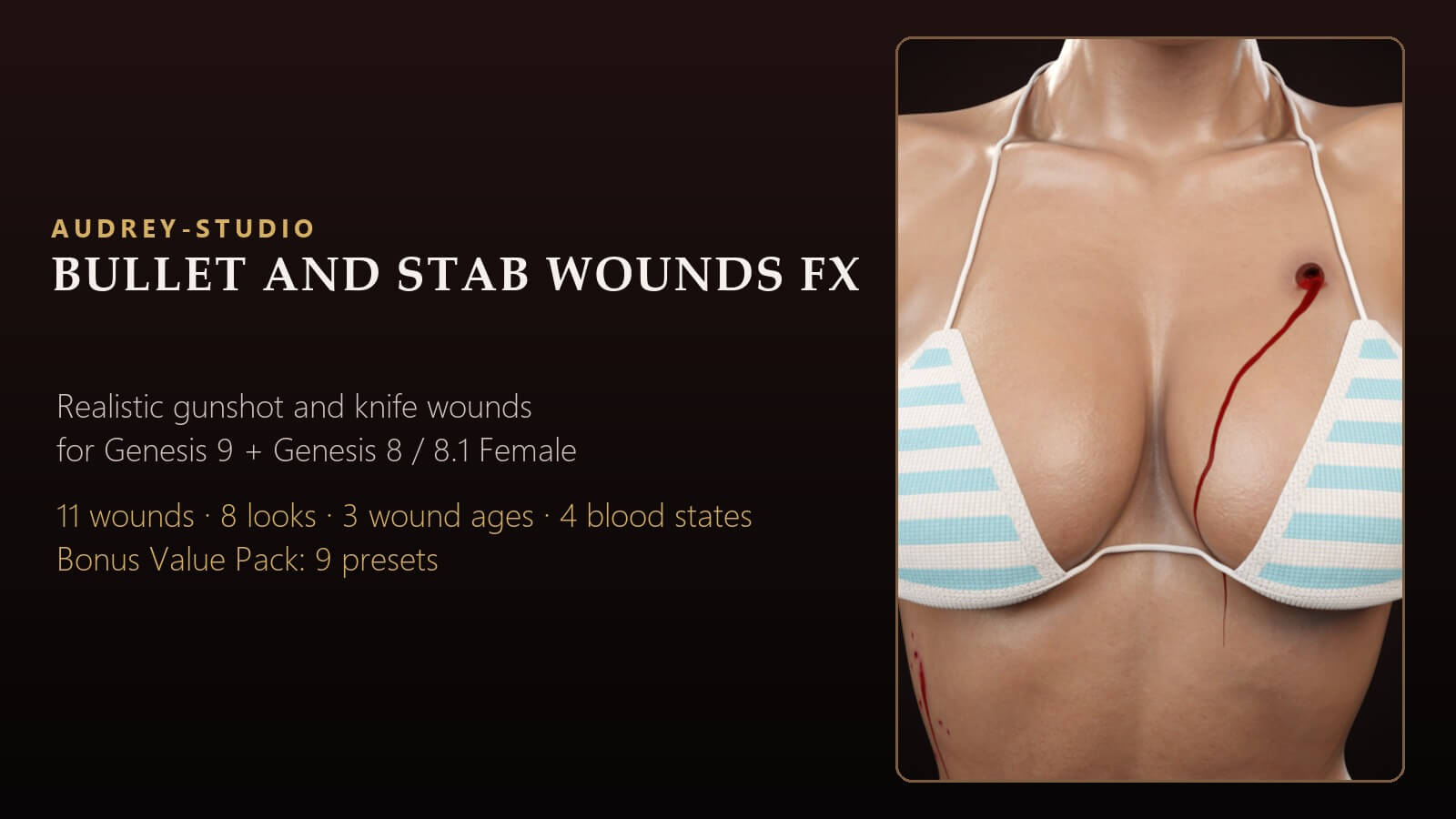
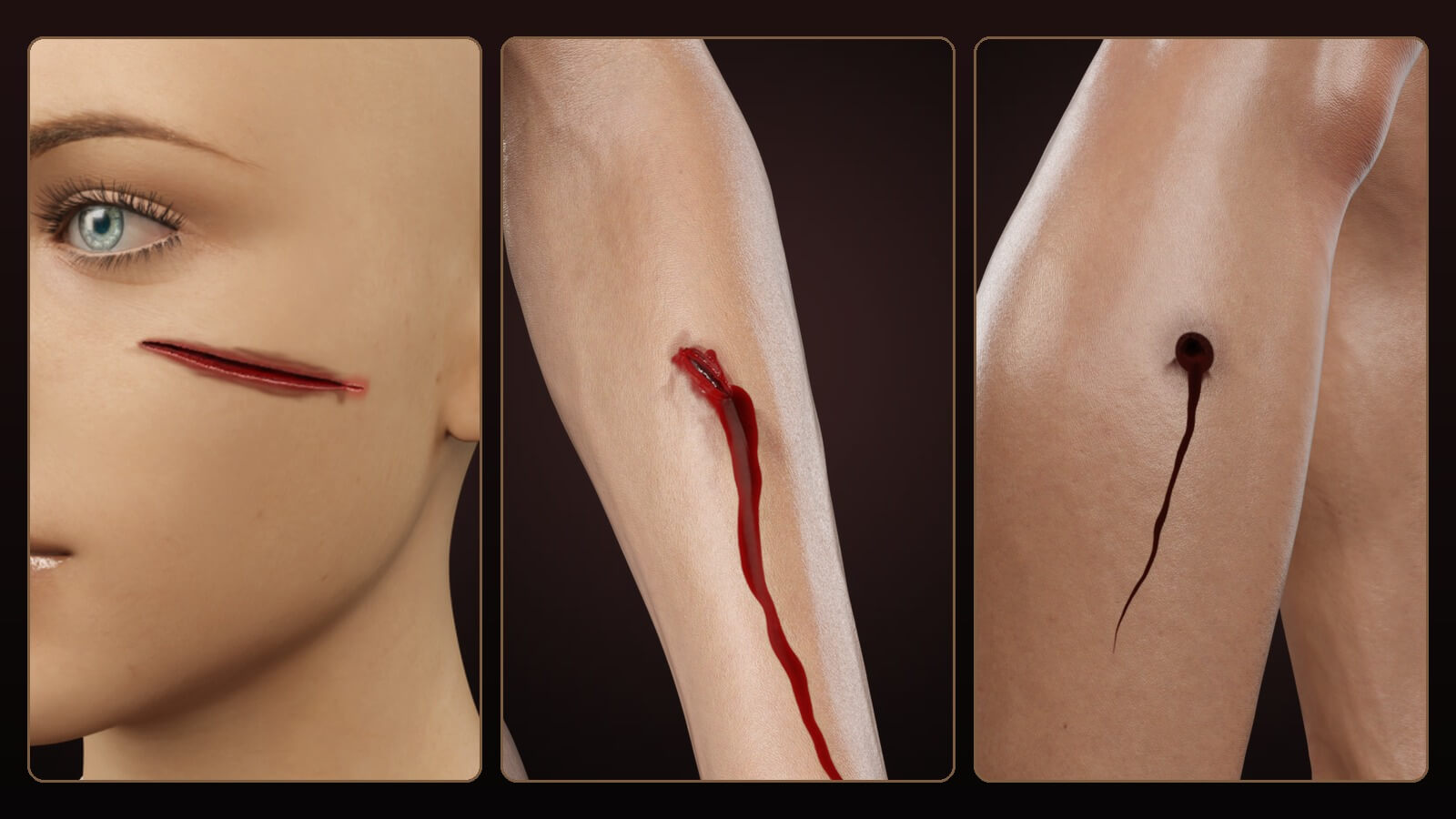
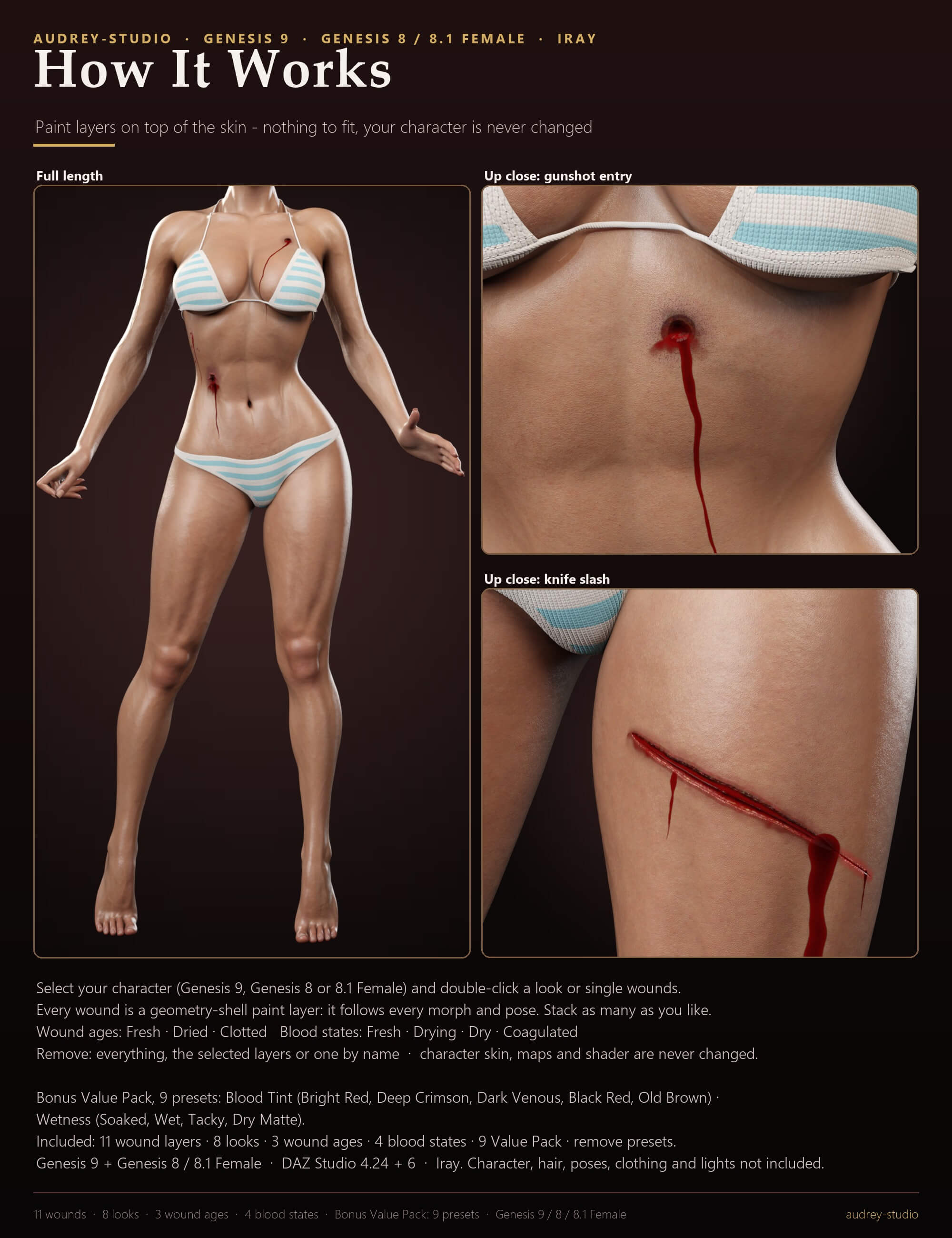
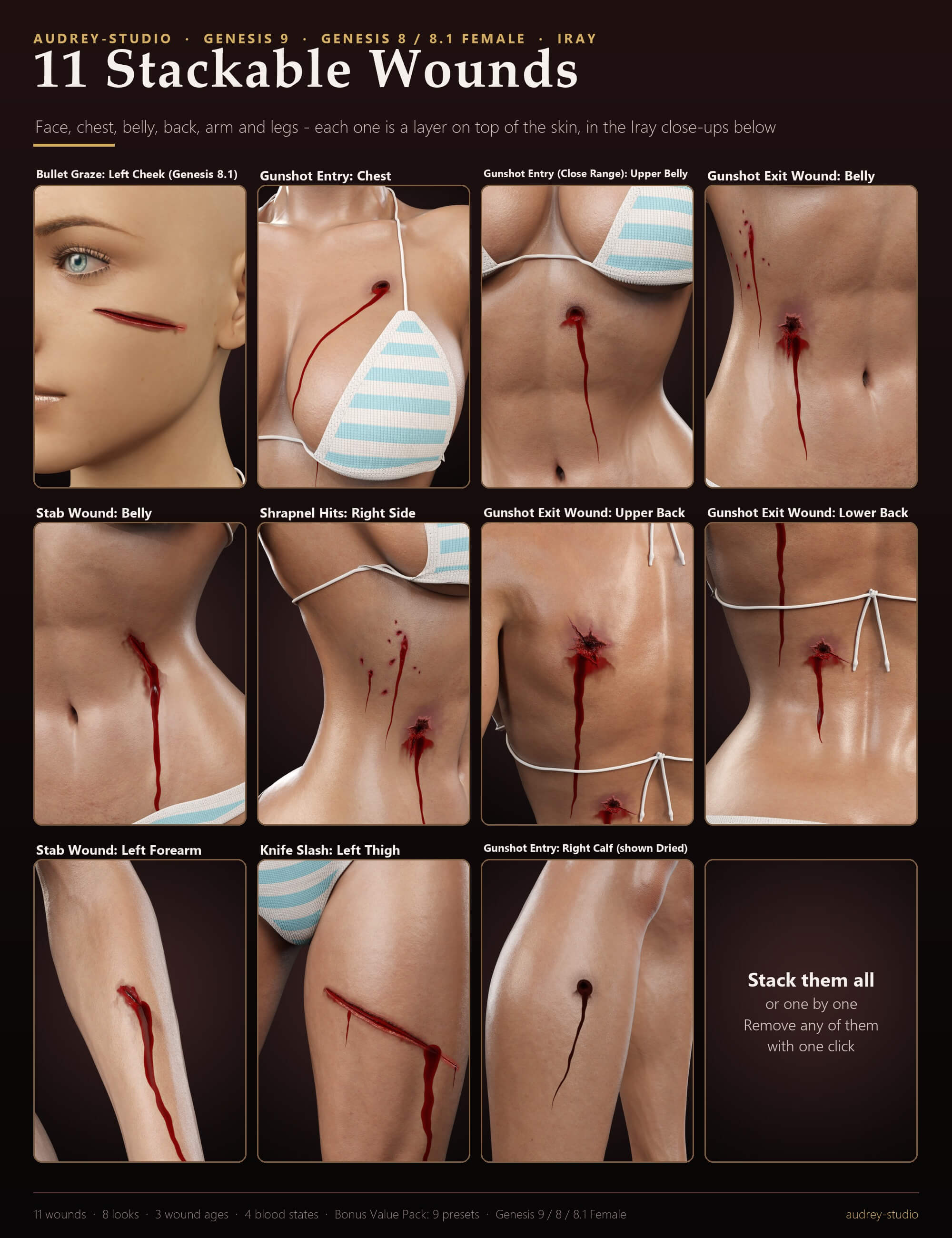
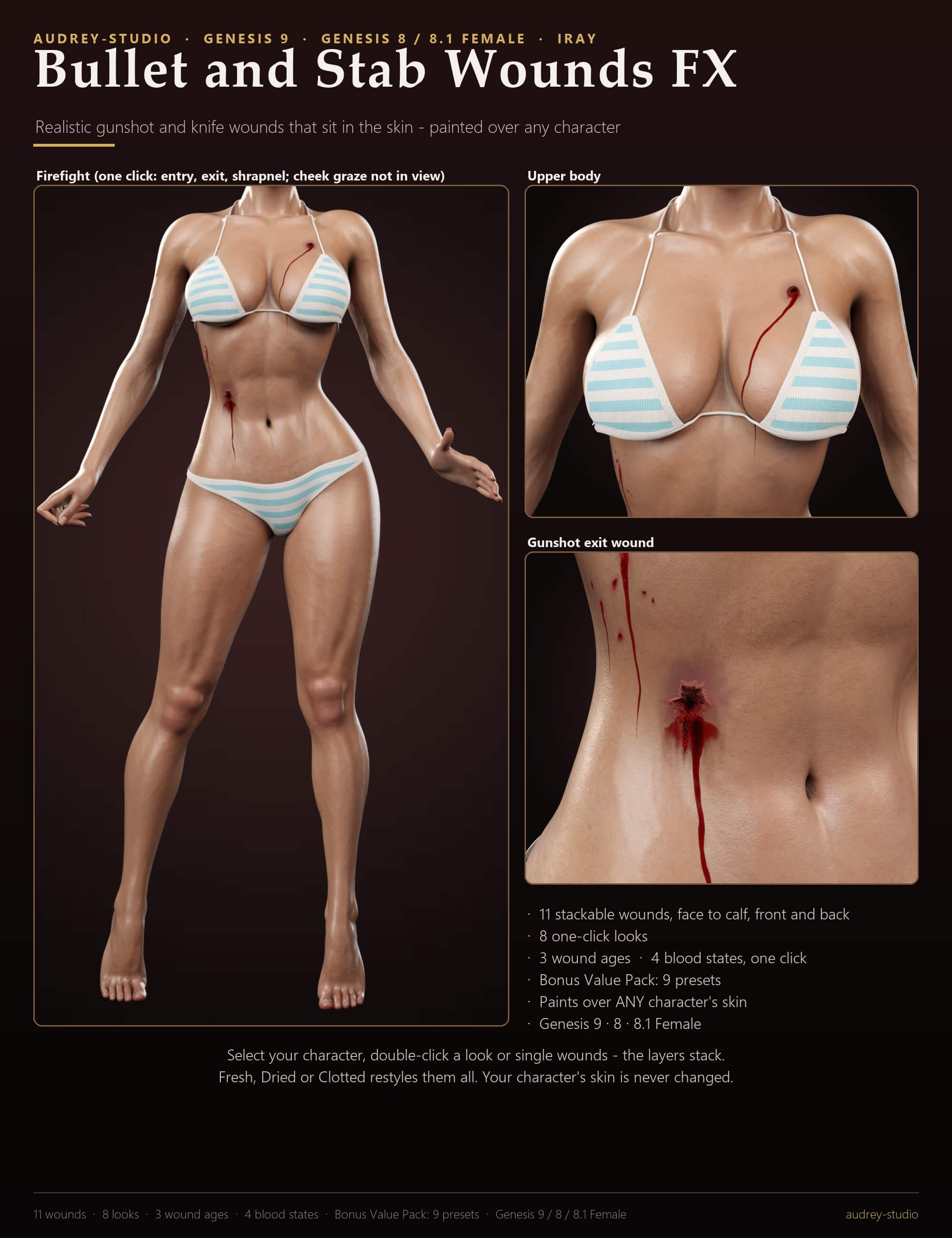
Gunshot and knife wounds that sit in the skin instead of on it. A bullet entry is a small dark hole with a bruised margin; an exit wound is torn open from the inside; a stab wound is a narrow gaping slit; shrapnel leaves a scatter of small cuts; a knife slash opens across the thigh and a bullet graze furrows the cheek. The blood runs follow the body.
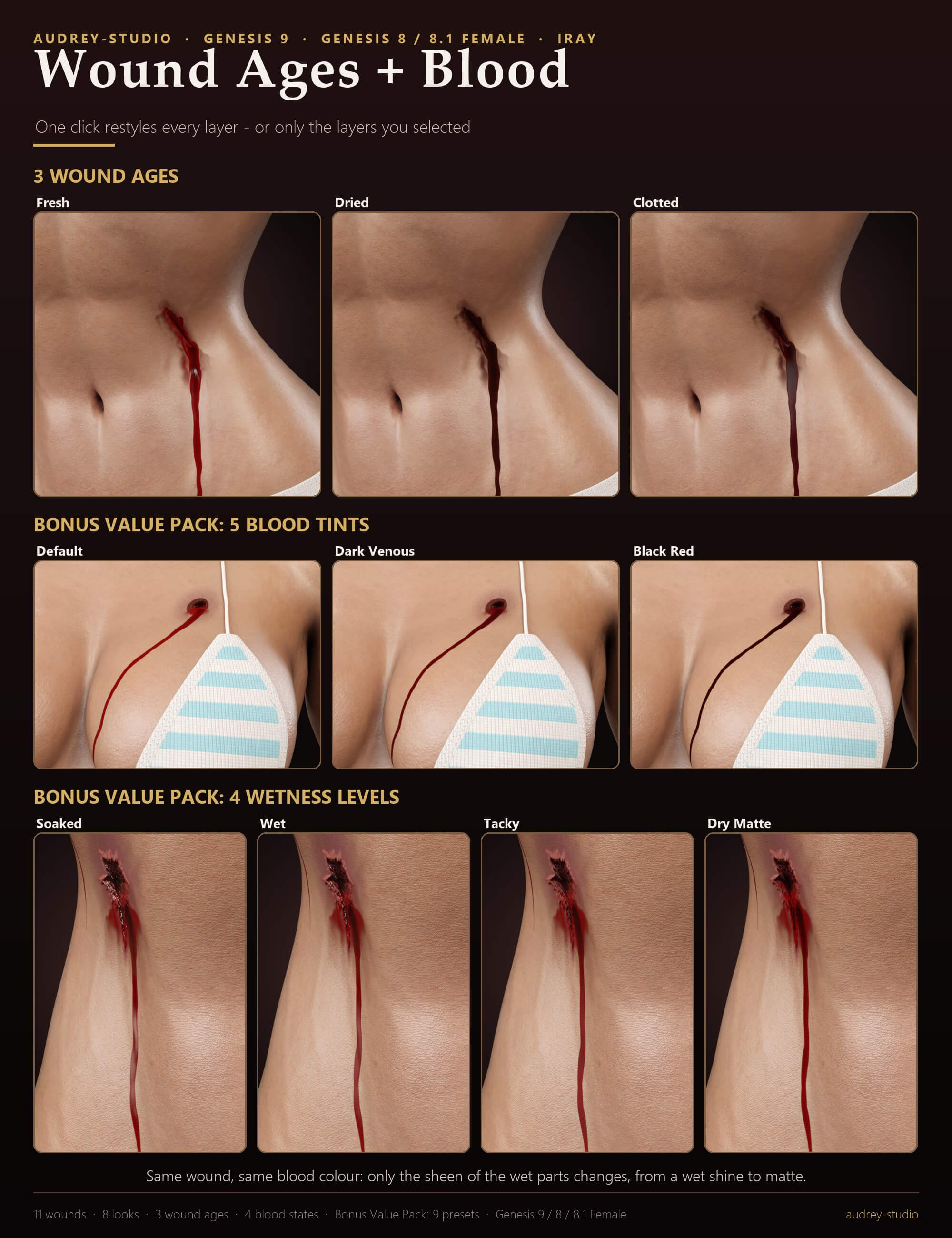
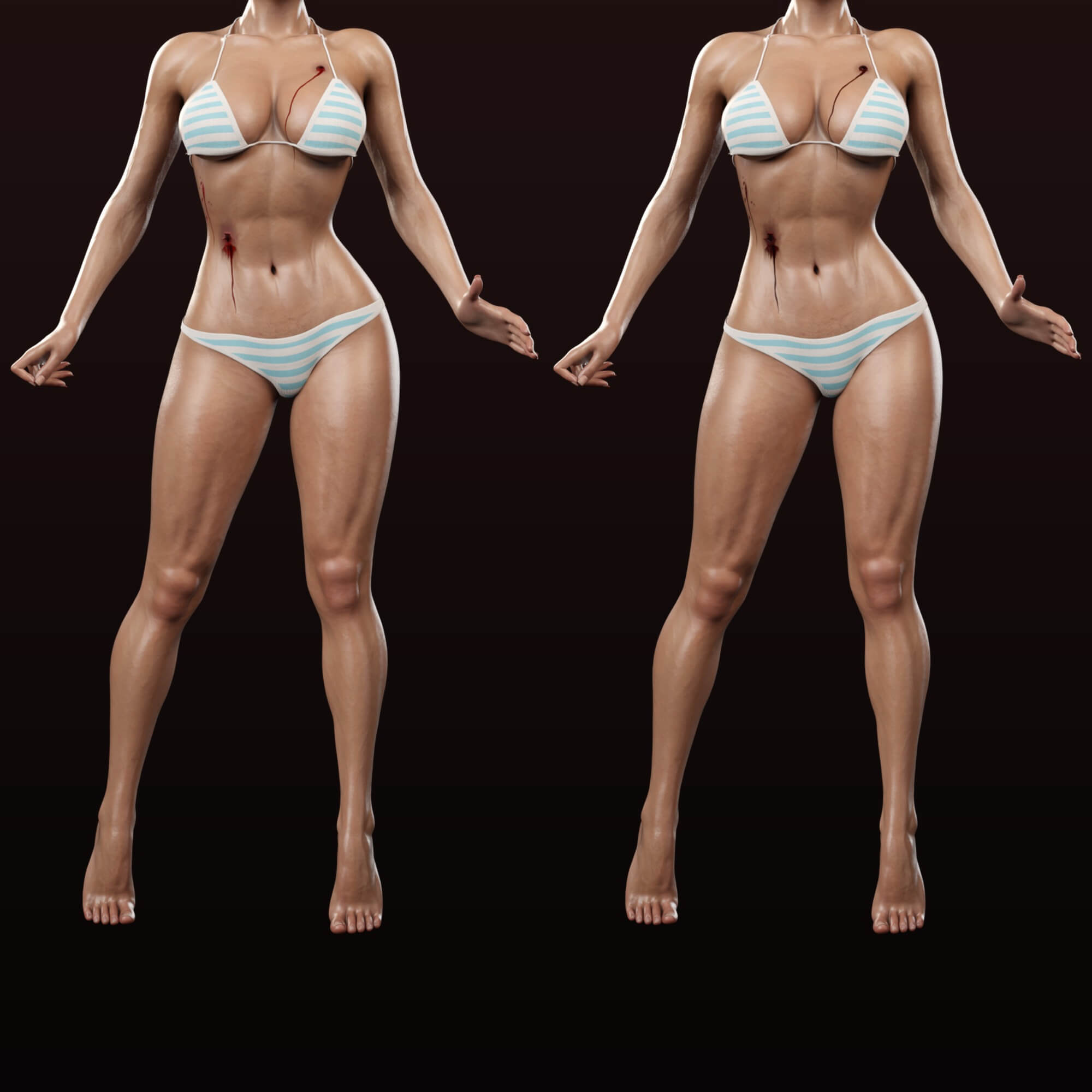
WOUND AGES - one click takes every layer from Fresh through Dried to Clotted, the whole character or only the layers you selected in the Scene pane. Blood states (Fresh, Drying, Dry, Coagulated), 5 blood tints (Bright Red, Deep Crimson, Dark Venous, Black Red, Old Brown) and 4 wetness levels (Soaked, Wet, Tacky, Dry Matte) then fine-tune the blood.
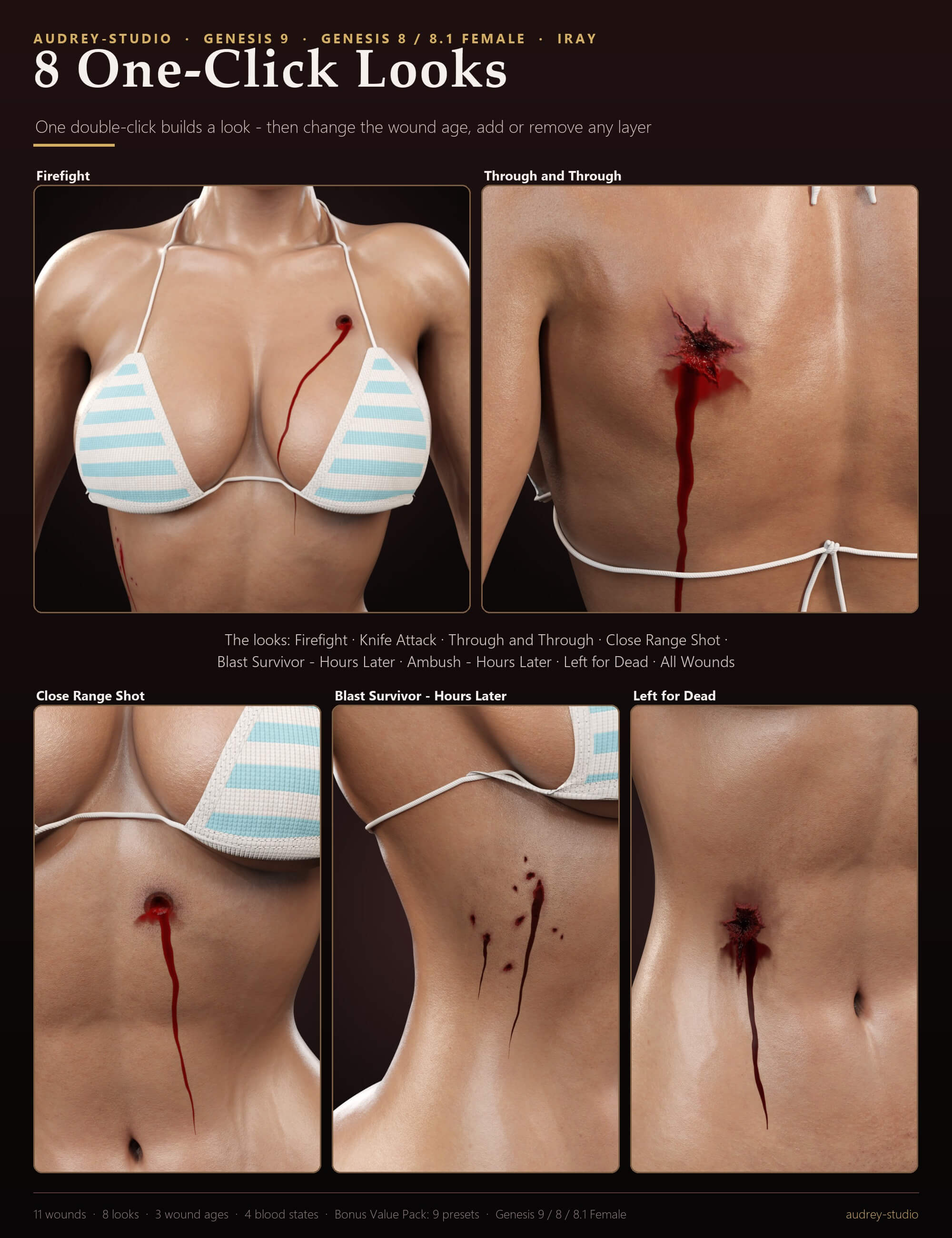
Every layer is a separate paint layer ON TOP of your character's skin: semi-transparent colour with soft, irregular edges, a relief map for the wound depth and torn edges, and gloss only on the wet blood. Her skin maps and shader are never changed. Stack as many as you like, remove them one by one, or start from one of 8 one-click looks (Firefight, Knife Attack, Through and Through, Close Range Shot, Blast Survivor - Hours Later, Ambush - Hours Later, Left for Dead, All Wounds).
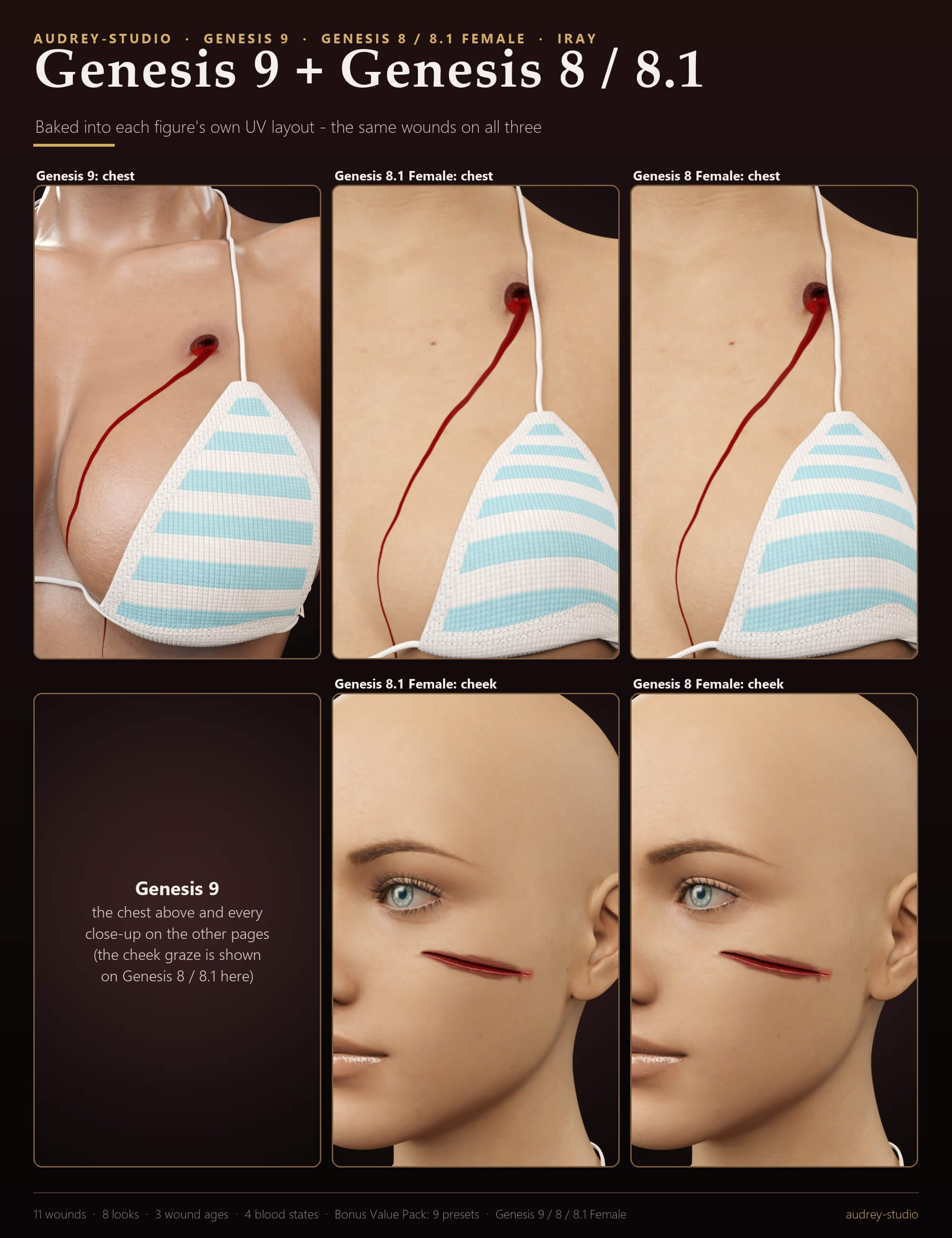
Designed on the body in 3D and baked into each figure's own UV layout - Genesis 9, Genesis 8 Female and Genesis 8.1 Female - so each wound lands on the same spot of every figure.
WHAT'S INCLUDED
- 8 one-click looks: Firefight, Knife Attack, Through and Through, Close Range Shot, Blast Survivor - Hours Later, Ambush - Hours Later, Left for Dead, All Wounds
- 1 face layer: Bullet Graze - Left Cheek
- 5 torso layers: Gunshot Entry - Chest, Gunshot Entry (Close Range) - Upper Belly, Gunshot Exit Wound - Belly, Stab Wound - Belly, Shrapnel Hits - Right Side
- 2 back layers: Gunshot Exit Wound - Upper Back, Gunshot Exit Wound - Lower Back
- 1 arm layer: Stab Wound - Left Forearm
- 2 leg layers: Knife Slash - Left Thigh, Gunshot Entry - Right Calf
- 3 wound ages: Fresh, Dried, Clotted (all layers or the selected ones)
- 4 blood states: Fresh, Drying, Dry, Coagulated (all layers or the selected ones)
- Bonus Value Pack: 5 blood tints (Bright Red, Deep Crimson, Dark Venous, Black Red, Old Brown) + 4 wetness levels (Soaked, Wet, Tacky, Dry Matte)
- Remove presets: everything, the selected layers, and one per layer
- Genesis 9, Genesis 8 Female and Genesis 8.1 Female (each UV layout baked separately; any character skin of those figures)
- Not included: the characters, hair, poses, clothing and lights shown in the promo images
MATERIALS / SHADING
- One Iray Uber paint layer per wound: colour, cutout, relief normal and wet-gloss maps
- Wound ages: tint, wetness and relief of every layer; blood states and tints: the blood; wetness: how much the wounds glisten
SHAPING / FIT
- Nothing to fit: the layers follow every body morph and pose of the character
- A geograft added later is hidden in the layers by the next preset click
TECHNICAL
- The layers are DAZ geometry shells (no extra mesh, no polygons added)
- Your character's skin, maps, shader and UV set are never changed
- Maps: 4K colour, cutout and normal maps; wet masks at half size
- Tested in DAZ Studio 4.24 and DAZ Studio 6 (Genesis 9 itself needs 4.20+), Iray
- Download: audrey-studio_Bullet_and_Stab_Wounds_FX_G9_G8.zip (32.9 MB, 518 files)
HOW TO USE
1. Select your character (Genesis 9, Genesis 8 Female or Genesis 8.1 Female).
2. 01 Looks: double-click a one-click look. A look replaces all Bullet and Stab Wounds FX layers of that character.
3. 02 Face, 03 Torso, 04 Back, 05 Arms and Hands, 06 Legs: double-click single wounds - they stack.
4. 07 Wound Age: Fresh, Dried or Clotted - for every Bullet and Stab Wounds FX layer of the selected character, or only for the layers you selected in the Scene pane.
5. 08 Blood State: Fresh, Drying, Dry or Coagulated - restyles only the blood and the wet parts.
6. 09 Blood Tint (Bright Red, Deep Crimson, Dark Venous, Black Red, Old Brown) and 10 Wetness (Soaked, Wet, Tacky, Dry Matte): every layer, or only the layers you selected. They keep the current Wound Age.
7. 11 Remove: Remove Everything, Remove Selected Layers, or single layers by name. The layers are normal scene items under the character ('Bullet Stab - (layer) [(age)] ((blood state))'): hide or delete them in the Scene pane any time. Render in Iray.
8. Added a geograft AFTER the layers? Click any Bullet and Stab Wounds FX preset once more (e.g. the current Wetness): the layers then hide the graft and cover only the skin.
TIPS
- A key light from the side or slightly above shows the relief of the wound edges best; a light near the camera makes fresh blood glisten.
- Mix the ages: select one layer in the Scene pane, then 07 Wound Age > Dried, and the other layers stay Fresh.
- Each layer has its own material: select 'Bullet Stab - …' in the Scene pane, Surfaces pane - e.g. lower Cutout Opacity for a fainter wound.
- Clothing that sits very tight on the skin can cover a layer - the layers are painted on the skin, under the clothes.
- Huge scenes: if a layer seems to vanish in Iray while the character stands tens of metres from the scene origin, move the character (or the whole set) closer to the origin.
Rendered in DAZ Studio with Iray; character, hair, poses, clothing and lights not included.
WOUND AGES - one click takes every layer from Fresh through Dried to Clotted, the whole character or only the layers you selected in the Scene pane. Blood states (Fresh, Drying, Dry, Coagulated), 5 blood tints (Bright Red, Deep Crimson, Dark Venous, Black Red, Old Brown) and 4 wetness levels (Soaked, Wet, Tacky, Dry Matte) then fine-tune the blood.
Every layer is a separate paint layer ON TOP of your character's skin: semi-transparent colour with soft, irregular edges, a relief map for the wound depth and torn edges, and gloss only on the wet blood. Her skin maps and shader are never changed. Stack as many as you like, remove them one by one, or start from one of 8 one-click looks (Firefight, Knife Attack, Through and Through, Close Range Shot, Blast Survivor - Hours Later, Ambush - Hours Later, Left for Dead, All Wounds).
Designed on the body in 3D and baked into each figure's own UV layout - Genesis 9, Genesis 8 Female and Genesis 8.1 Female - so each wound lands on the same spot of every figure.
WHAT'S INCLUDED
- 8 one-click looks: Firefight, Knife Attack, Through and Through, Close Range Shot, Blast Survivor - Hours Later, Ambush - Hours Later, Left for Dead, All Wounds
- 1 face layer: Bullet Graze - Left Cheek
- 5 torso layers: Gunshot Entry - Chest, Gunshot Entry (Close Range) - Upper Belly, Gunshot Exit Wound - Belly, Stab Wound - Belly, Shrapnel Hits - Right Side
- 2 back layers: Gunshot Exit Wound - Upper Back, Gunshot Exit Wound - Lower Back
- 1 arm layer: Stab Wound - Left Forearm
- 2 leg layers: Knife Slash - Left Thigh, Gunshot Entry - Right Calf
- 3 wound ages: Fresh, Dried, Clotted (all layers or the selected ones)
- 4 blood states: Fresh, Drying, Dry, Coagulated (all layers or the selected ones)
- Bonus Value Pack: 5 blood tints (Bright Red, Deep Crimson, Dark Venous, Black Red, Old Brown) + 4 wetness levels (Soaked, Wet, Tacky, Dry Matte)
- Remove presets: everything, the selected layers, and one per layer
- Genesis 9, Genesis 8 Female and Genesis 8.1 Female (each UV layout baked separately; any character skin of those figures)
- Not included: the characters, hair, poses, clothing and lights shown in the promo images
MATERIALS / SHADING
- One Iray Uber paint layer per wound: colour, cutout, relief normal and wet-gloss maps
- Wound ages: tint, wetness and relief of every layer; blood states and tints: the blood; wetness: how much the wounds glisten
SHAPING / FIT
- Nothing to fit: the layers follow every body morph and pose of the character
- A geograft added later is hidden in the layers by the next preset click
TECHNICAL
- The layers are DAZ geometry shells (no extra mesh, no polygons added)
- Your character's skin, maps, shader and UV set are never changed
- Maps: 4K colour, cutout and normal maps; wet masks at half size
- Tested in DAZ Studio 4.24 and DAZ Studio 6 (Genesis 9 itself needs 4.20+), Iray
- Download: audrey-studio_Bullet_and_Stab_Wounds_FX_G9_G8.zip (32.9 MB, 518 files)
HOW TO USE
1. Select your character (Genesis 9, Genesis 8 Female or Genesis 8.1 Female).
2. 01 Looks: double-click a one-click look. A look replaces all Bullet and Stab Wounds FX layers of that character.
3. 02 Face, 03 Torso, 04 Back, 05 Arms and Hands, 06 Legs: double-click single wounds - they stack.
4. 07 Wound Age: Fresh, Dried or Clotted - for every Bullet and Stab Wounds FX layer of the selected character, or only for the layers you selected in the Scene pane.
5. 08 Blood State: Fresh, Drying, Dry or Coagulated - restyles only the blood and the wet parts.
6. 09 Blood Tint (Bright Red, Deep Crimson, Dark Venous, Black Red, Old Brown) and 10 Wetness (Soaked, Wet, Tacky, Dry Matte): every layer, or only the layers you selected. They keep the current Wound Age.
7. 11 Remove: Remove Everything, Remove Selected Layers, or single layers by name. The layers are normal scene items under the character ('Bullet Stab - (layer) [(age)] ((blood state))'): hide or delete them in the Scene pane any time. Render in Iray.
8. Added a geograft AFTER the layers? Click any Bullet and Stab Wounds FX preset once more (e.g. the current Wetness): the layers then hide the graft and cover only the skin.
TIPS
- A key light from the side or slightly above shows the relief of the wound edges best; a light near the camera makes fresh blood glisten.
- Mix the ages: select one layer in the Scene pane, then 07 Wound Age > Dried, and the other layers stay Fresh.
- Each layer has its own material: select 'Bullet Stab - …' in the Scene pane, Surfaces pane - e.g. lower Cutout Opacity for a fainter wound.
- Clothing that sits very tight on the skin can cover a layer - the layers are painted on the skin, under the clothes.
- Huge scenes: if a layer seems to vanish in Iray while the character stands tens of metres from the scene origin, move the character (or the whole set) closer to the origin.
Rendered in DAZ Studio with Iray; character, hair, poses, clothing and lights not included.
