


 Free 3D
 3D Print Models
 3D Scans
 Animation & MoCap
 Textures
 Materials
 Skin Reference
 2D Game Assets
 Sound Effects
 Brushes & Tools
 Reference Photos
 Stock Images
 HDR Images
 3ds Max
 Maya
Maya Blender
 Unreal Engine
 Unity
Unity ZBrush
 Cinema 4D
 LightWave
 Marmoset
 SketchUp
 FBX
FBX DAE
DAE DXF
DXF GLB
GLB
Wet Skin Studio for Genesis 9, 8, and 8.1

Not Rated Yet


This Item Was Made Using
! REPORT
NOTE: DIGITAL DOWNLOAD, NOT A PHYSICAL ITEM

Add to Collection

4 Likes
Share This Daz Content


Offered By


License
Extended Use License
This item comes with our Extended Use Licensing. This means that you may use the model for both non-commercial and commercial purposes, in a variety of mediums and applications.
For full license terms, see our 3D Content Licensing Agreement
Item Details
| Vendor: | audrey12 |
| Published: | Oct 17, 2026 |
| Download Size: | 91.3 MB |
| Software: | Daz Studio |
| Compatible Figures: | Genesis 9 Genesis 8 Female Genesis 8 Male Genesis 8.1 Female |
| dForce: | – |
Included Formats

Statistics
| Favorites: | 0 |
| Likes: | 4 |
| Views: | 210 |
Item Ratings
Not Rated Yet
Wet Skin Studio for Genesis 9, 8, and 8.1
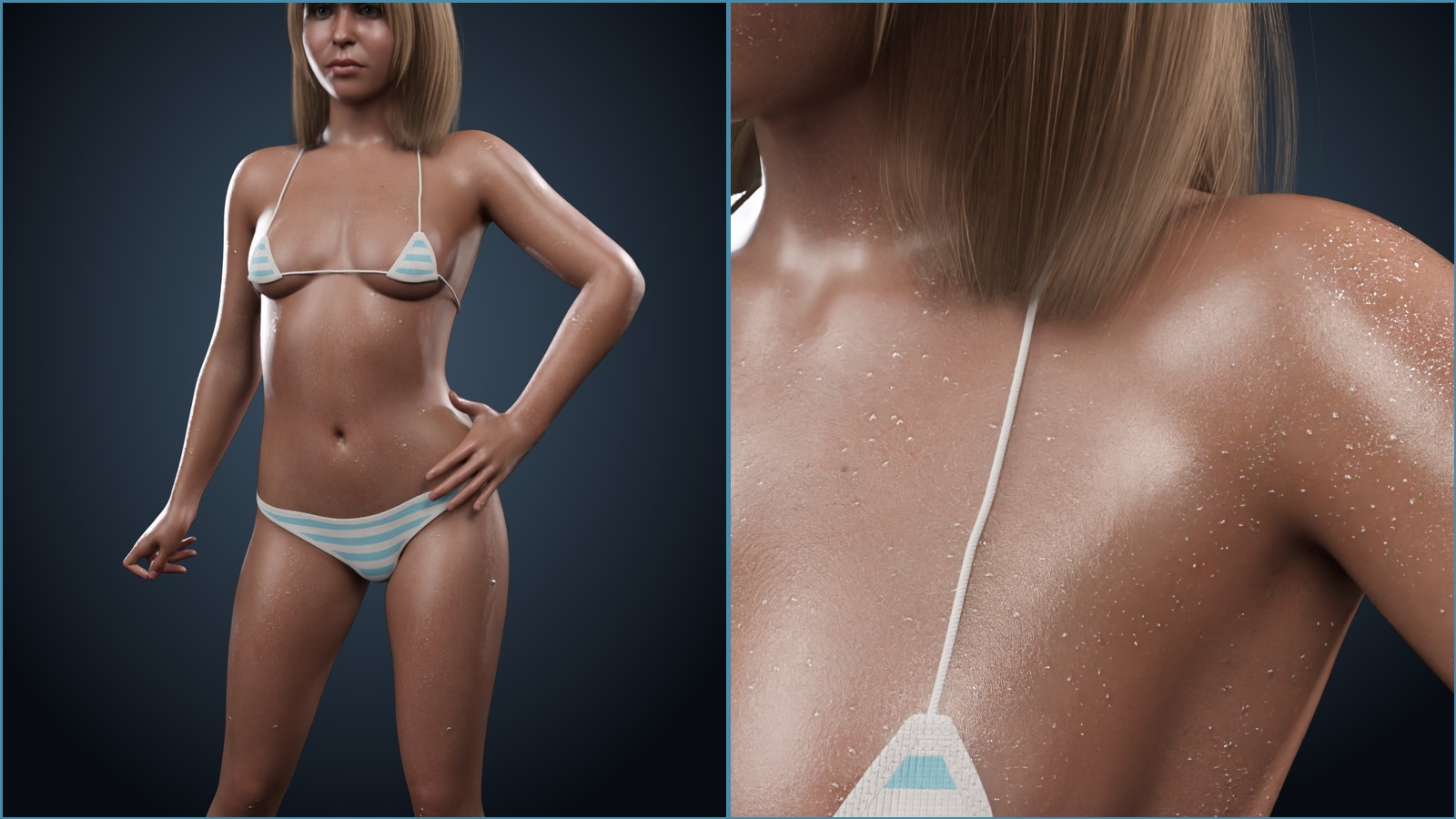
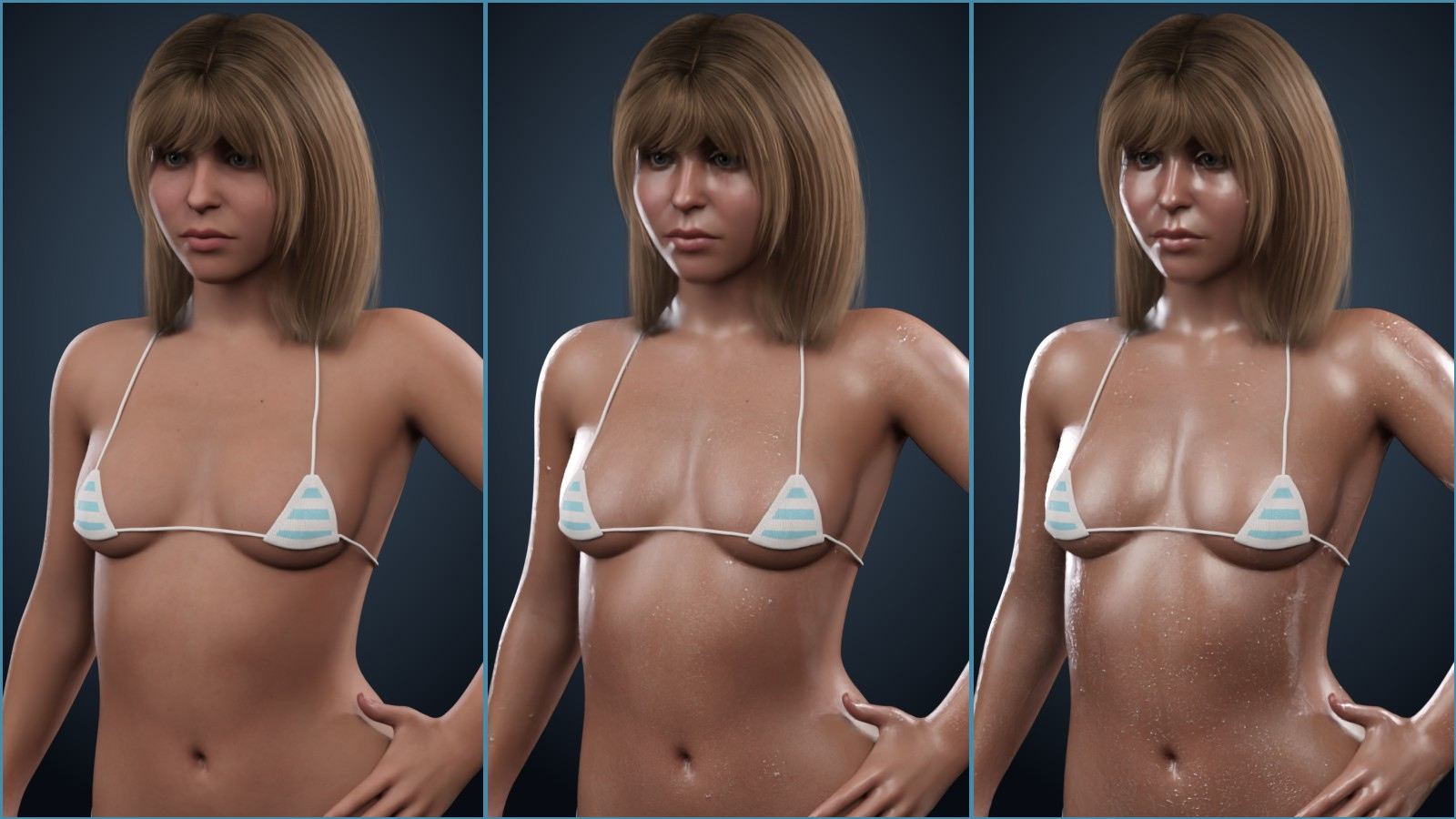
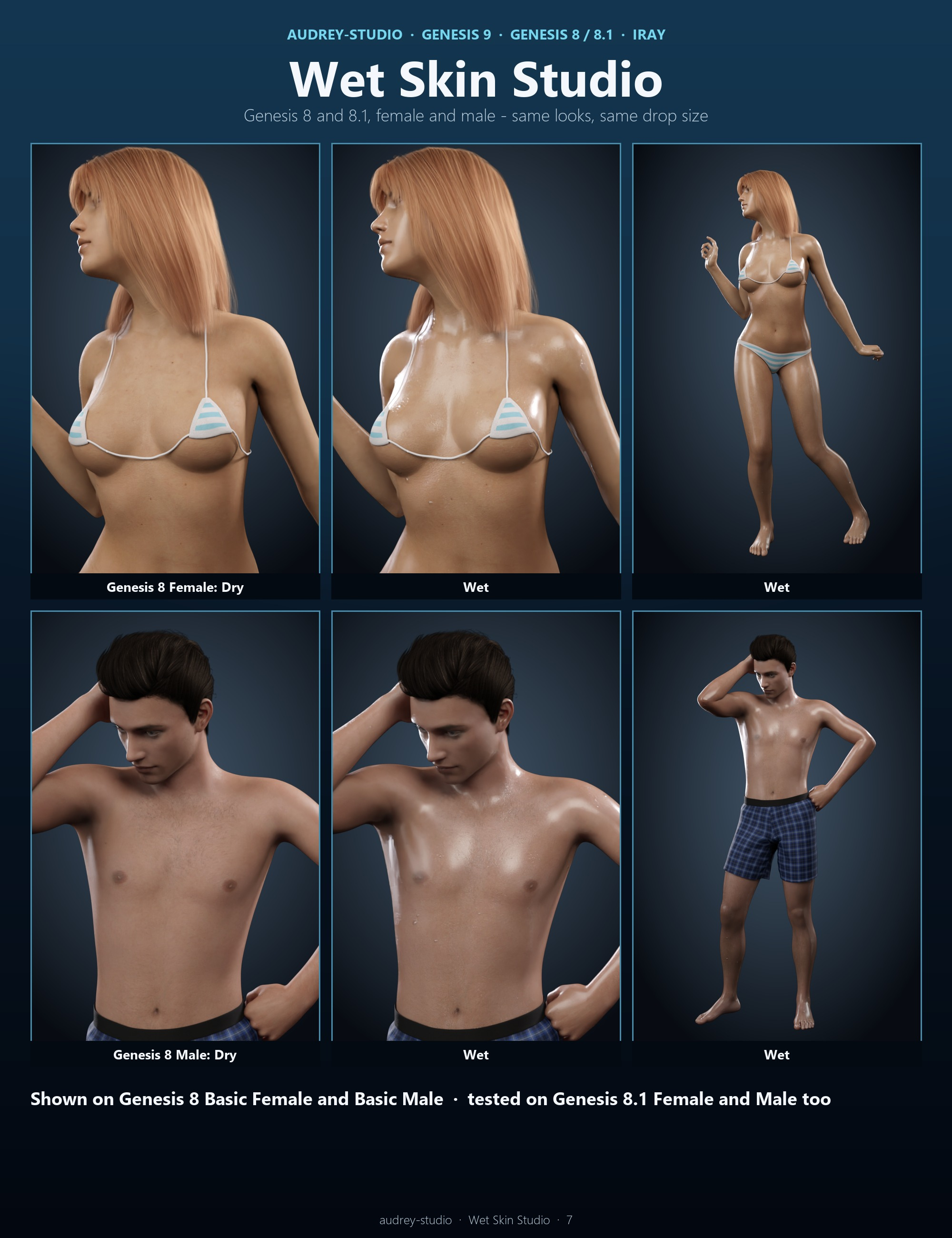
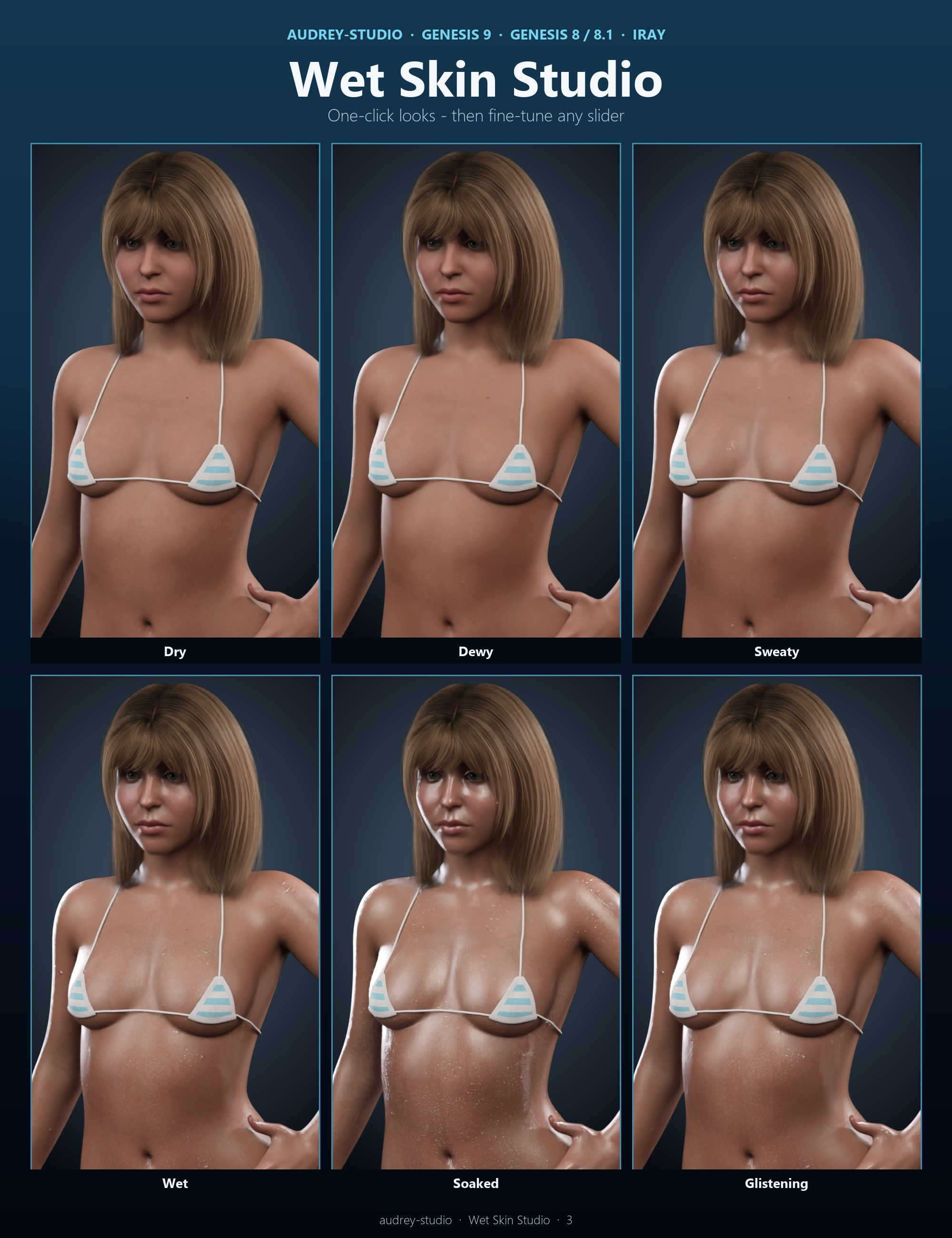
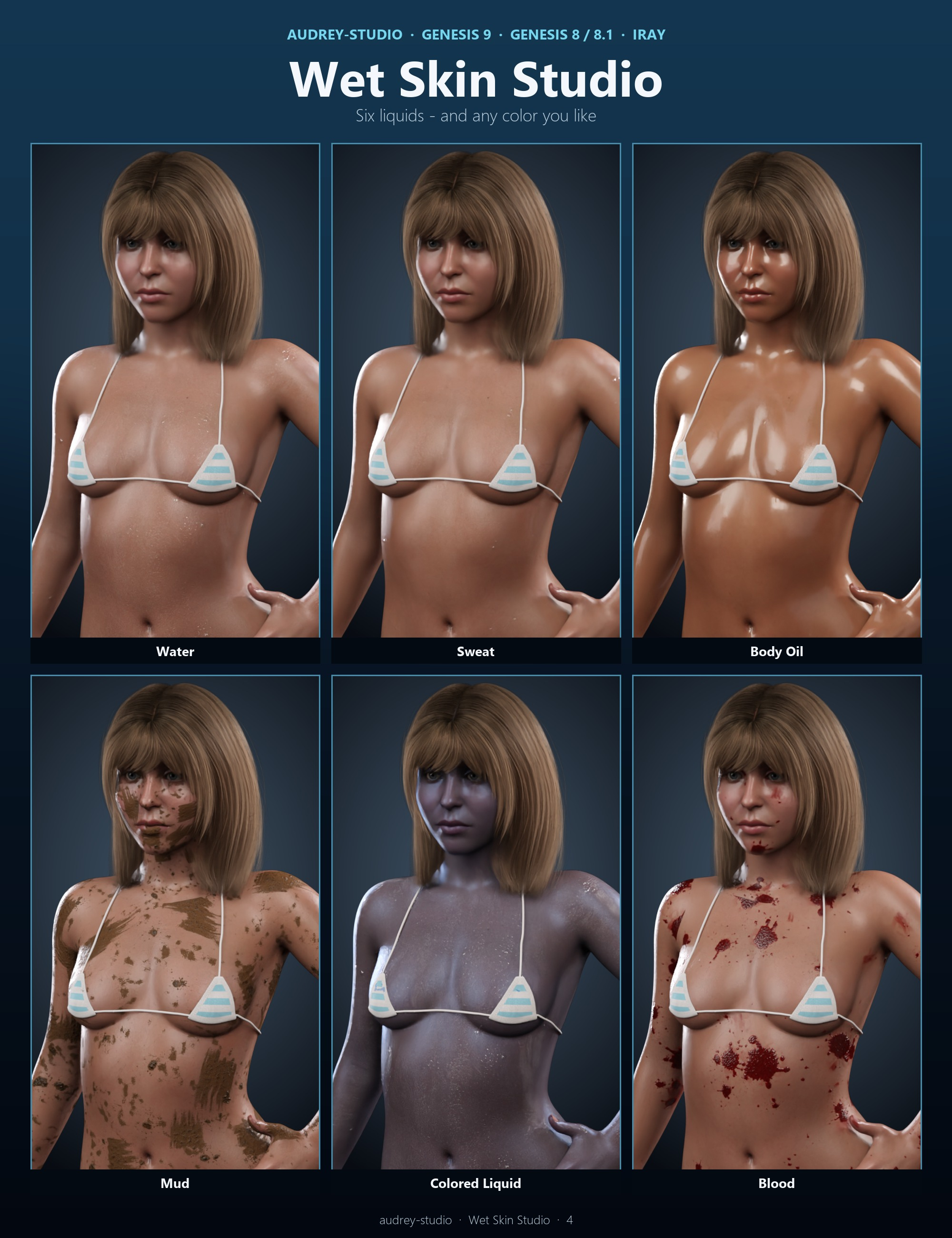
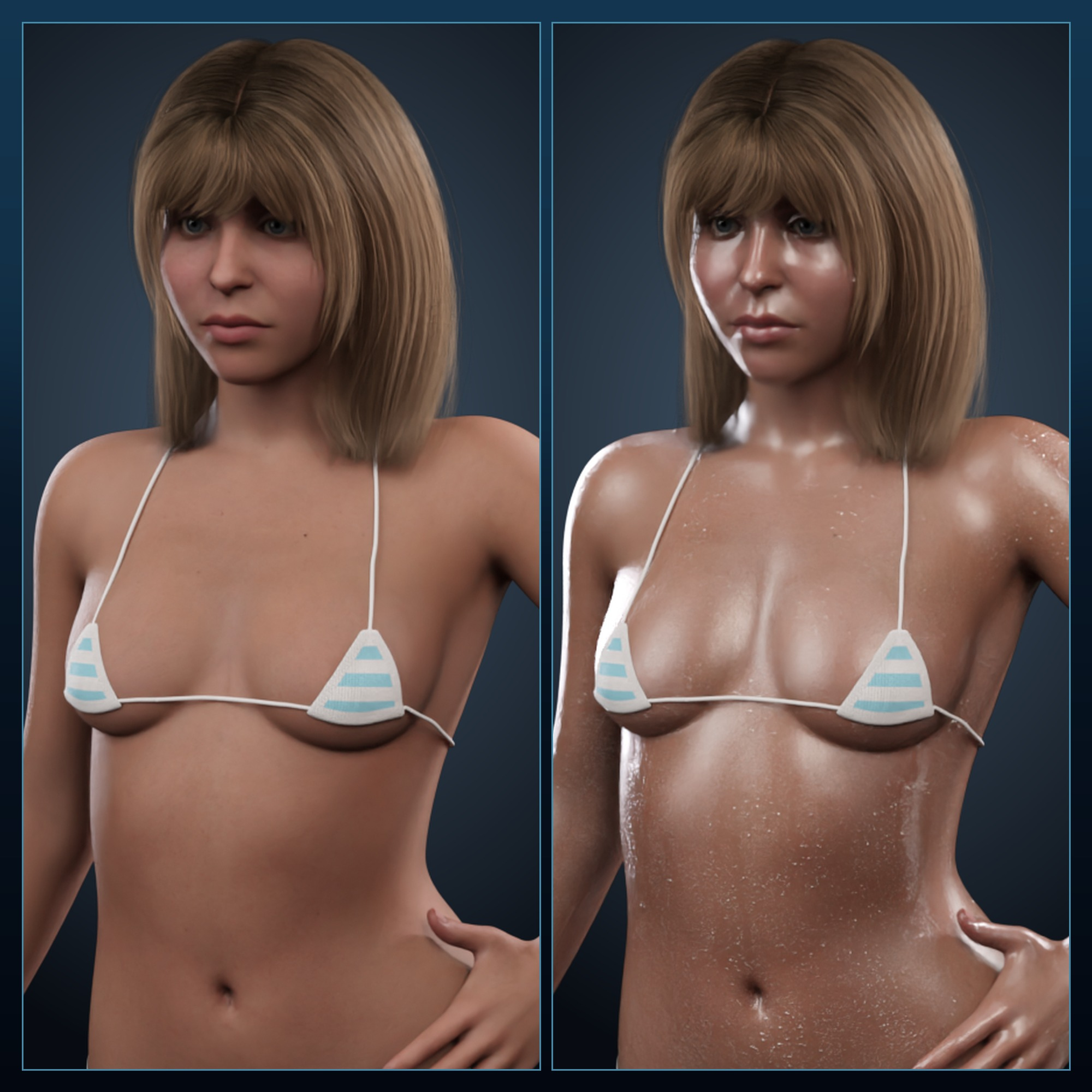
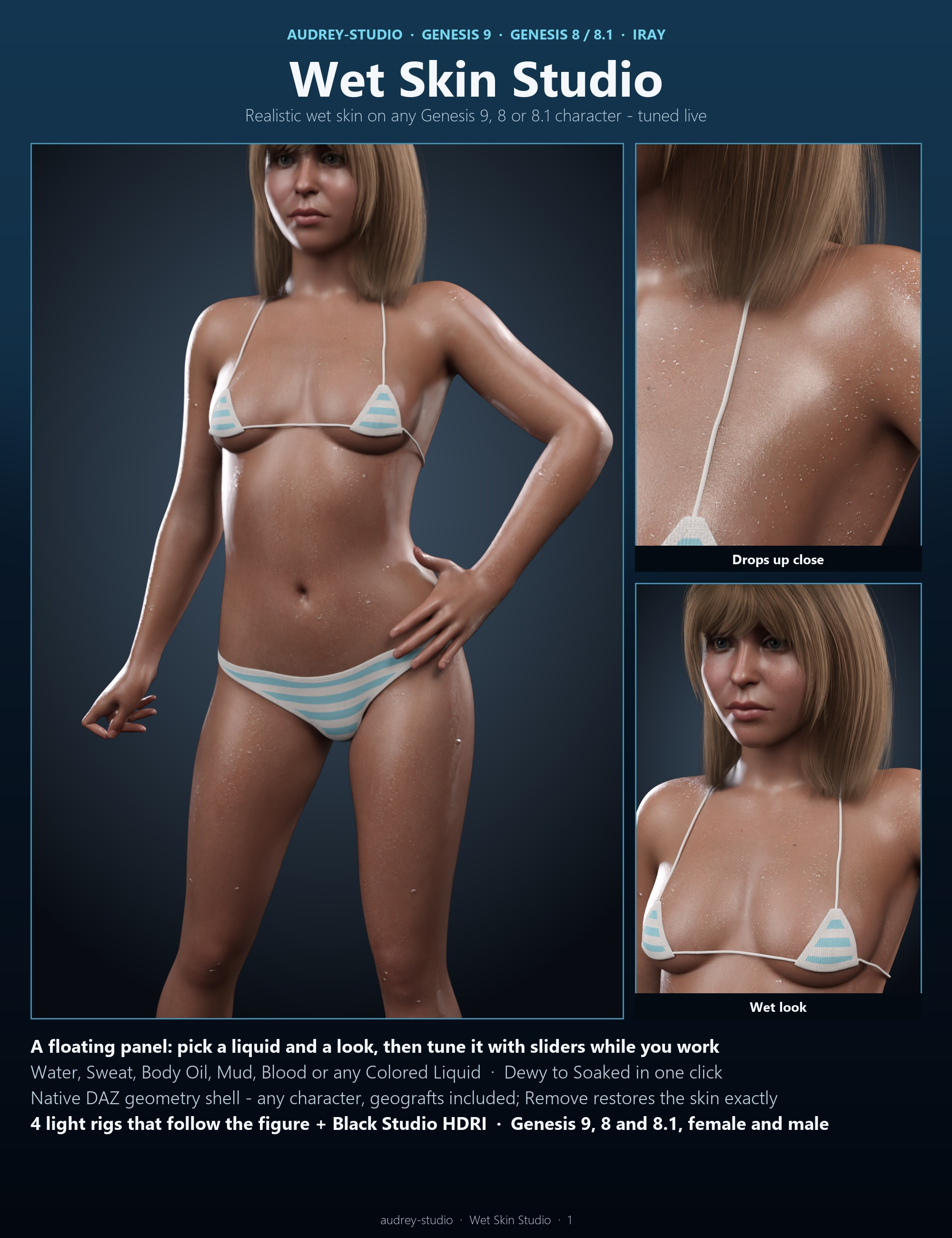
Realistic wet skin for any Genesis 9, Genesis 8 or Genesis 8.1 character, female or male - set in one click and tuned live. Wet Skin Studio adds a floating panel to DAZ Studio that stays open while you pose, orbit and render: pick a liquid (Water, Sweat, Body Oil, Mud, Blood or any Colored Liquid), pick a look (Dewy, Sweaty, Wet, Soaked, Glistening) and fine-tune it with sliders that explain themselves.
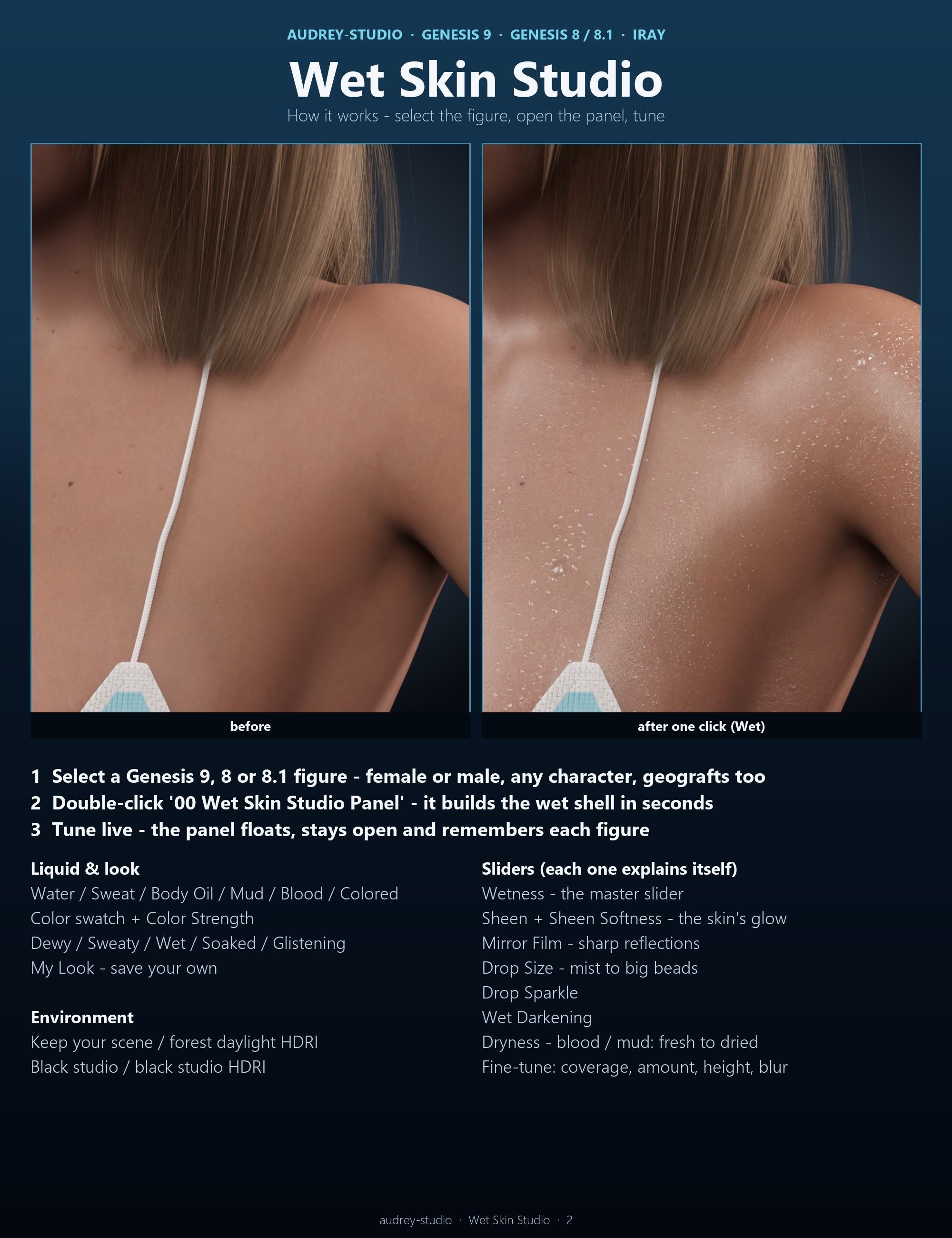
How it works: the panel builds a native DAZ geometry shell on the selected character - parented and fitted, nothing else to buy or load - with a thin mirror-smooth water film over all the skin and seamless 4K droplet maps (no stretched streaks on shoulders or collarbones), and adds a soft sheen to the skin itself. Geografts get the same wet shell; eyes, mouth and nails stay dry. Remove takes it all off again and restores the original skin values exactly.
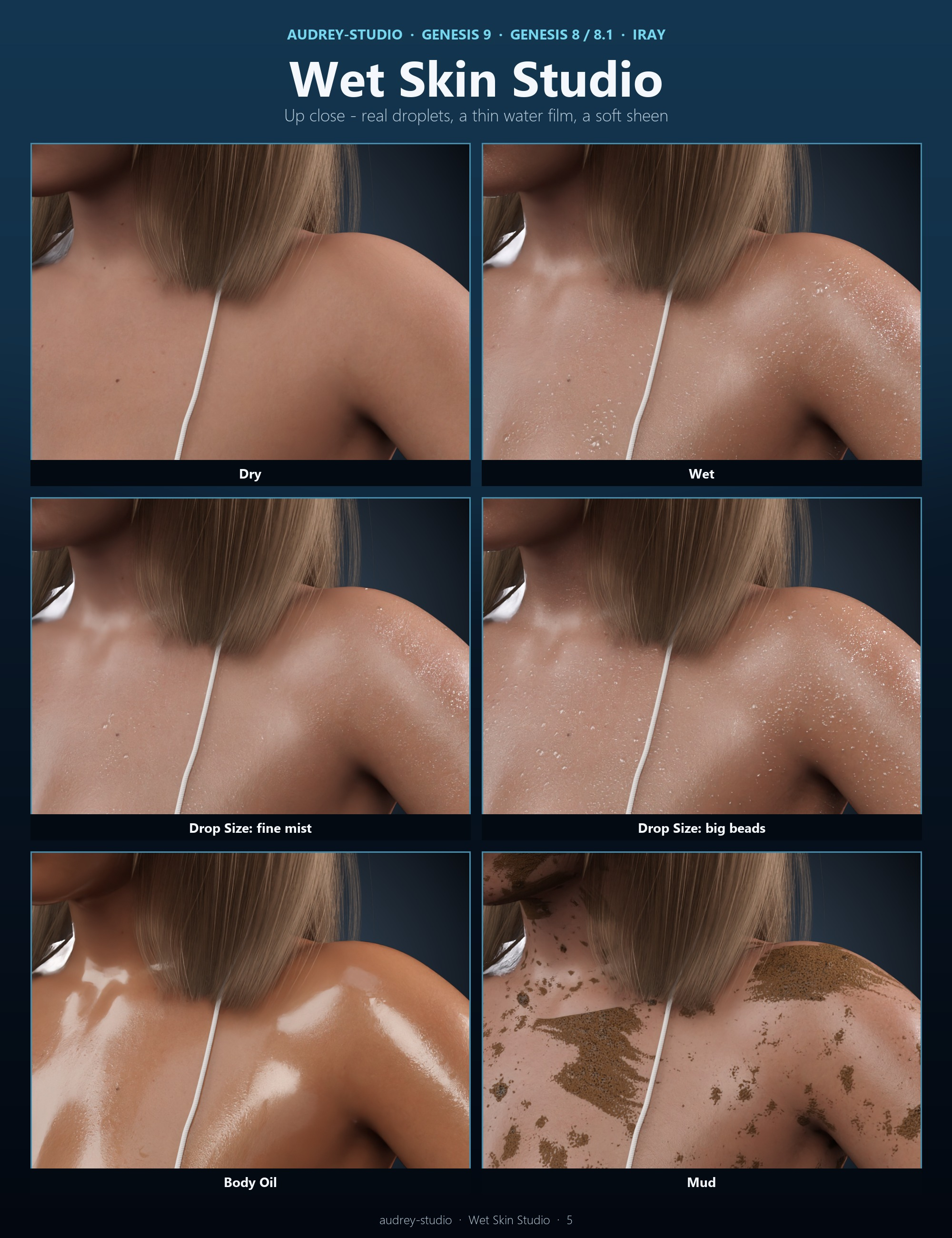
Sliders: Wetness (the master), Sheen and Sheen Softness (the skin's own glow), Mirror Film (sharp reflections), Drop Size (fine mist to big beads), Drop Sparkle, Wet Darkening, Dryness (blood and mud: fresh and glossy to dried and matte), a color picker with Color Strength, plus fine-tune sliders. Save your own look as My Look. The panel remembers the values you left on each figure.
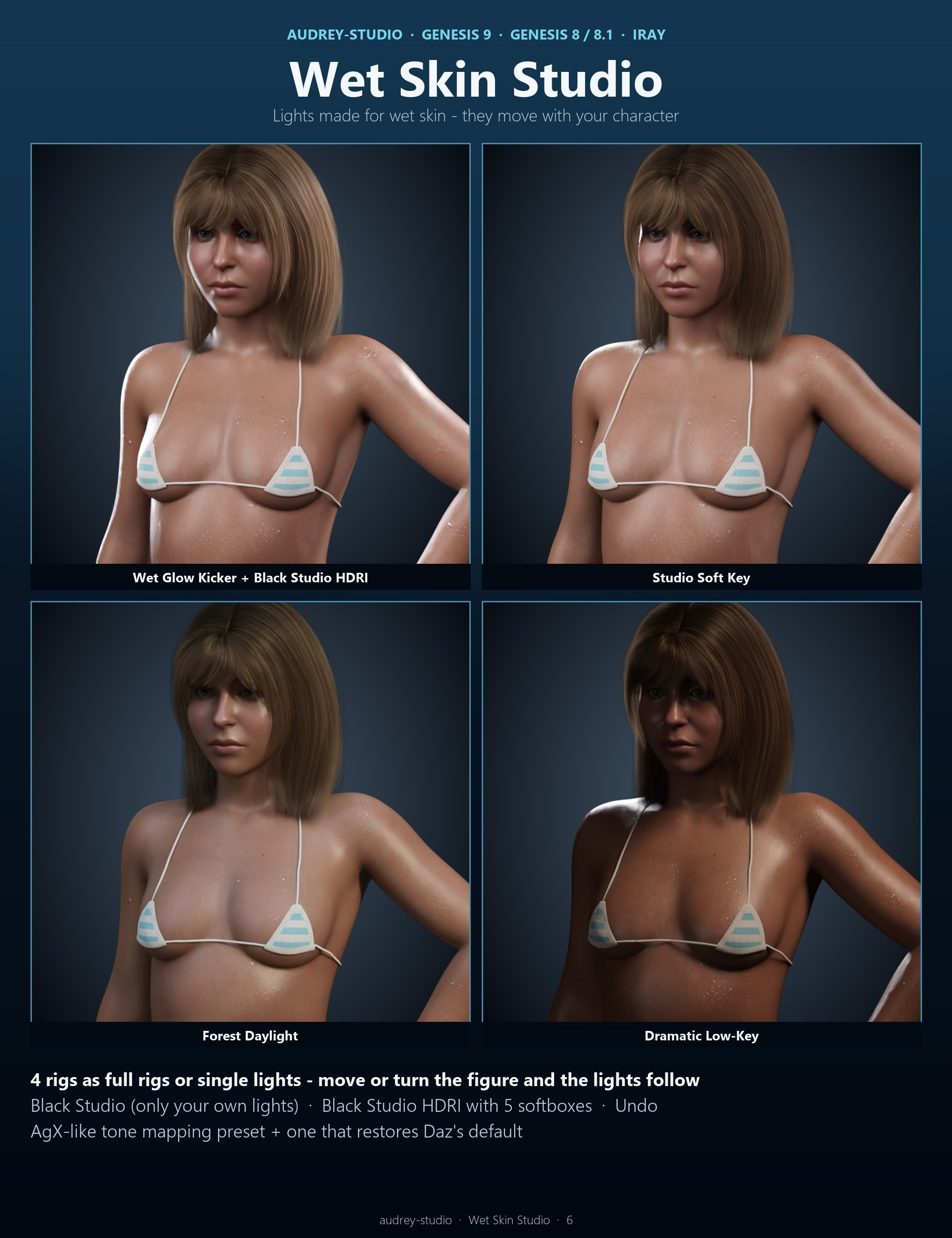
Lights made for wet skin (water shows through highlights): four light rigs that FOLLOW the character - move or turn the figure and the lights move with it - Studio Soft Key, Wet Glow Kicker (glints in every drop), Dramatic Low-Key and Forest Daylight, as full rigs or single lights; a one-click Black Studio (only your own lights), a Black Studio HDRI with five softboxes for the skin to reflect, an AgX-like tone mapping preset and a one-click way back to Daz's default.
WHAT'S INCLUDED
- The Wet Skin Studio panel (script) + Remove Wet Skin + an optional menu / toolbar button
- 6 liquids: Water, Sweat, Body Oil, Mud, Blood, Colored Liquid (any color)
- 5 one-click looks + My Look; 8 main sliders + 5 fine-tune sliders; 4 environment options
- Seamless 4K maps: droplets (normal + coverage), blood and mud (coverage, normal, gloss, thickness shade)
- Lights: 4 follow-character rigs (20 presets: full rigs + single lights + remove), Black Studio, Black Studio HDRI, Undo,
2 tone-mapping presets, the same rigs as plain light presets at the scene origin
- 2 HDRIs: the black studio softbox HDRI (ours) and a CC0 forest daylight HDRI (Poly Haven)
- for Genesis 9, Genesis 8 and Genesis 8.1 - female and male, any character
NOTES
- Iray only (the wet shell and the sheen are Iray materials); the Iray viewport shows the effect too.
- Water shows in highlights and reflections: use a light with a rim or kicker (the included rigs) or the Black Studio
HDRI; a very bright, flat HDRI makes the water film look milky.
- Only one panel can be open at a time; close it before running other scripts and before quitting DAZ Studio.
- Wet Darkening deepens the skin tone (it can read as a tan) - the looks keep it at 0.
- Blood and mud are surface layers: no dried-blood cracks; a fresh glossy pool can show a white highlight when it
faces the key light directly (raise Dryness a little).
- Other wet shells on the figure (from other products) are switched off, not deleted.
How it works: the panel builds a native DAZ geometry shell on the selected character - parented and fitted, nothing else to buy or load - with a thin mirror-smooth water film over all the skin and seamless 4K droplet maps (no stretched streaks on shoulders or collarbones), and adds a soft sheen to the skin itself. Geografts get the same wet shell; eyes, mouth and nails stay dry. Remove takes it all off again and restores the original skin values exactly.
Sliders: Wetness (the master), Sheen and Sheen Softness (the skin's own glow), Mirror Film (sharp reflections), Drop Size (fine mist to big beads), Drop Sparkle, Wet Darkening, Dryness (blood and mud: fresh and glossy to dried and matte), a color picker with Color Strength, plus fine-tune sliders. Save your own look as My Look. The panel remembers the values you left on each figure.
Lights made for wet skin (water shows through highlights): four light rigs that FOLLOW the character - move or turn the figure and the lights move with it - Studio Soft Key, Wet Glow Kicker (glints in every drop), Dramatic Low-Key and Forest Daylight, as full rigs or single lights; a one-click Black Studio (only your own lights), a Black Studio HDRI with five softboxes for the skin to reflect, an AgX-like tone mapping preset and a one-click way back to Daz's default.
WHAT'S INCLUDED
- The Wet Skin Studio panel (script) + Remove Wet Skin + an optional menu / toolbar button
- 6 liquids: Water, Sweat, Body Oil, Mud, Blood, Colored Liquid (any color)
- 5 one-click looks + My Look; 8 main sliders + 5 fine-tune sliders; 4 environment options
- Seamless 4K maps: droplets (normal + coverage), blood and mud (coverage, normal, gloss, thickness shade)
- Lights: 4 follow-character rigs (20 presets: full rigs + single lights + remove), Black Studio, Black Studio HDRI, Undo,
2 tone-mapping presets, the same rigs as plain light presets at the scene origin
- 2 HDRIs: the black studio softbox HDRI (ours) and a CC0 forest daylight HDRI (Poly Haven)
- for Genesis 9, Genesis 8 and Genesis 8.1 - female and male, any character
NOTES
- Iray only (the wet shell and the sheen are Iray materials); the Iray viewport shows the effect too.
- Water shows in highlights and reflections: use a light with a rim or kicker (the included rigs) or the Black Studio
HDRI; a very bright, flat HDRI makes the water film look milky.
- Only one panel can be open at a time; close it before running other scripts and before quitting DAZ Studio.
- Wet Darkening deepens the skin tone (it can read as a tan) - the looks keep it at 0.
- Blood and mud are surface layers: no dried-blood cracks; a fresh glossy pool can show a white highlight when it
faces the key light directly (raise Dryness a little).
- Other wet shells on the figure (from other products) are switched off, not deleted.
