


 Free 3D
 3D Print Models
 3D Scans
 Animation & MoCap
 Textures
 Materials
 Skin Reference
 2D Game Assets
 Sound Effects
 Brushes & Tools
 Reference Photos
 Stock Images
 HDR Images
 3ds Max
 Maya
 Blender
 Unreal Engine
 Unity
 ZBrush
 Cinema 4D
 LightWave
 Marmoset
 SketchUp
 FBX
 DAE
 DXF
 GLB

Zombie Rot and Decay FX for G9 G8

Not Rated Yet




This Item Was Made Using
! REPORT
NOTE: DIGITAL DOWNLOAD, NOT A PHYSICAL ITEM

Add to Collection

0 Likes
Share This Daz Content


Offered By


License
Extended Use License
This item comes with our Extended Use Licensing. This means that you may use the model for both non-commercial and commercial purposes, in a variety of mediums and applications.
For full license terms, see our 3D Content Licensing Agreement
Item Details
| Vendor: | audrey12 |
| Published: | Nov 11, 2026 |
| Download Size: | 210.7 MB |
| Software: | Daz Studio |
| Compatible Figures: | Genesis 9 Genesis 8 Female Genesis 8.1 Female Genesis 8 Male |
| dForce: | – |
Included Formats

Statistics
| Favorites: | 1 |
| Likes: | 0 |
| Views: | 110 |
Item Ratings
Not Rated Yet
Zombie Rot and Decay FX for G9 G8
Turn any character into the walking dead with 8 stackable rot layers - grey-green dead skin, necrotic veins, a rotting cheek and jaw, cracked lips, rotting patches, exposed muscle, a bone-deep tear on the shin and creeping mold - with 6 one-click looks, 3 decay stages, 4 blood states and 6 tints, for Genesis 9 and Genesis 8 / 8.1 Female and Male (Iray).
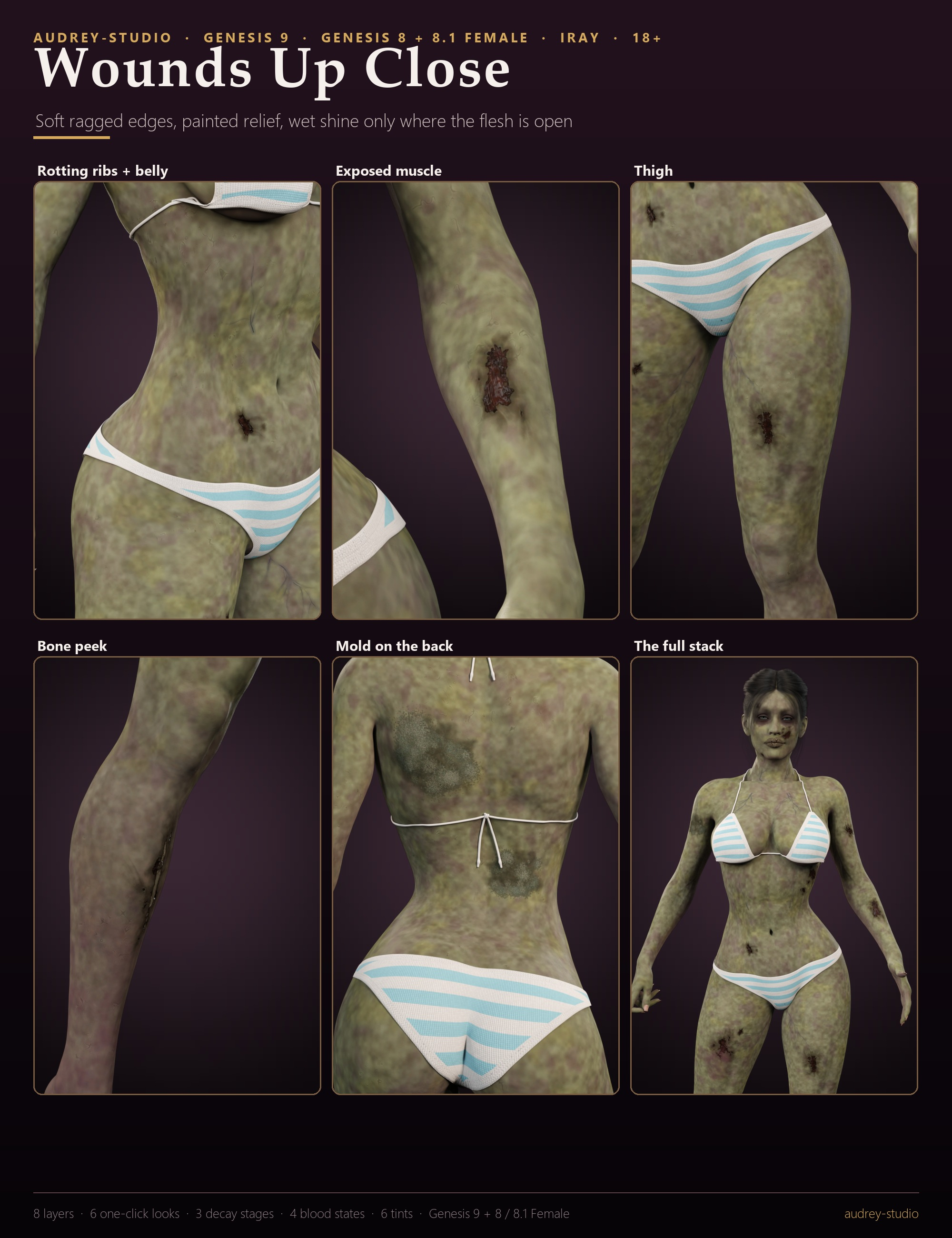
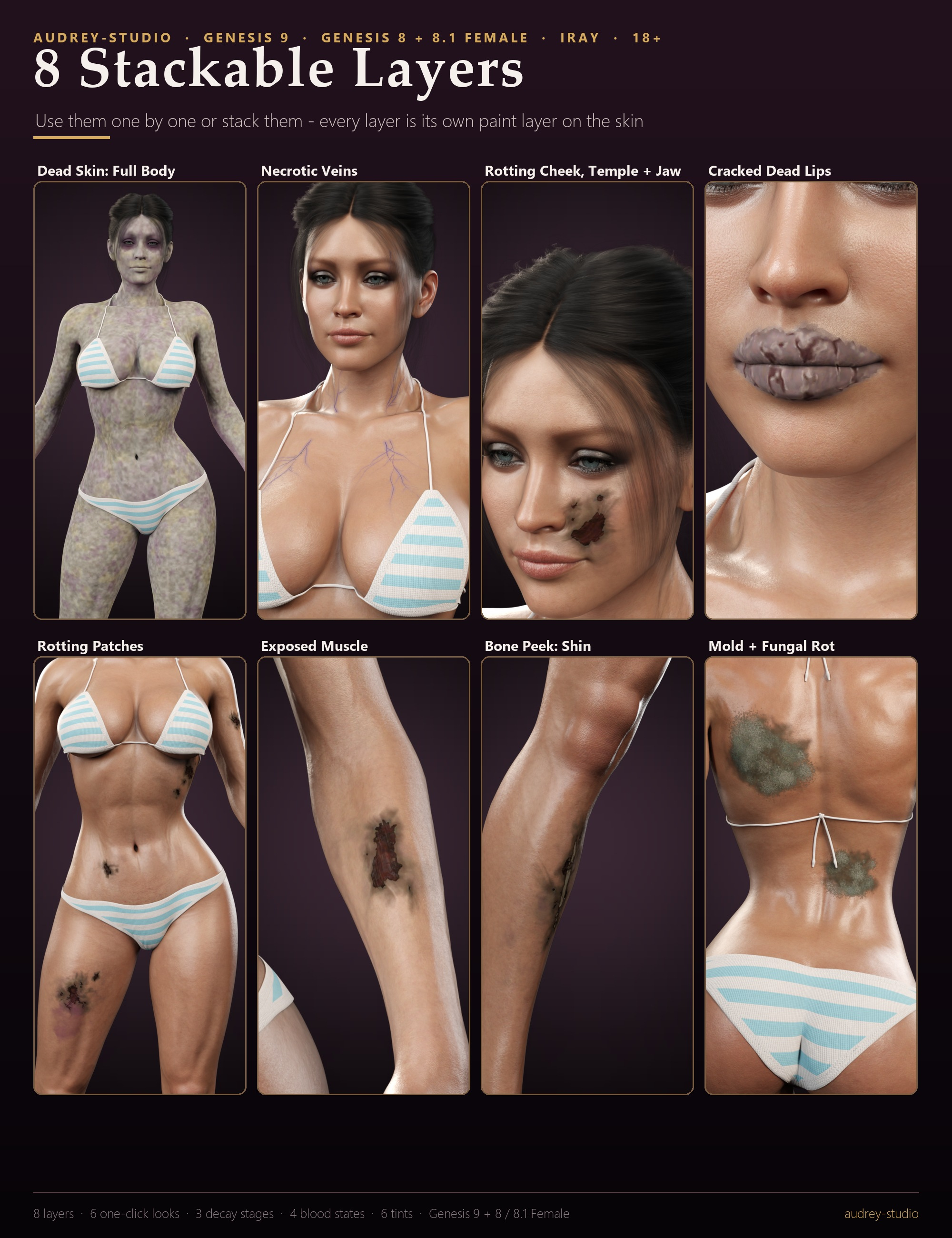
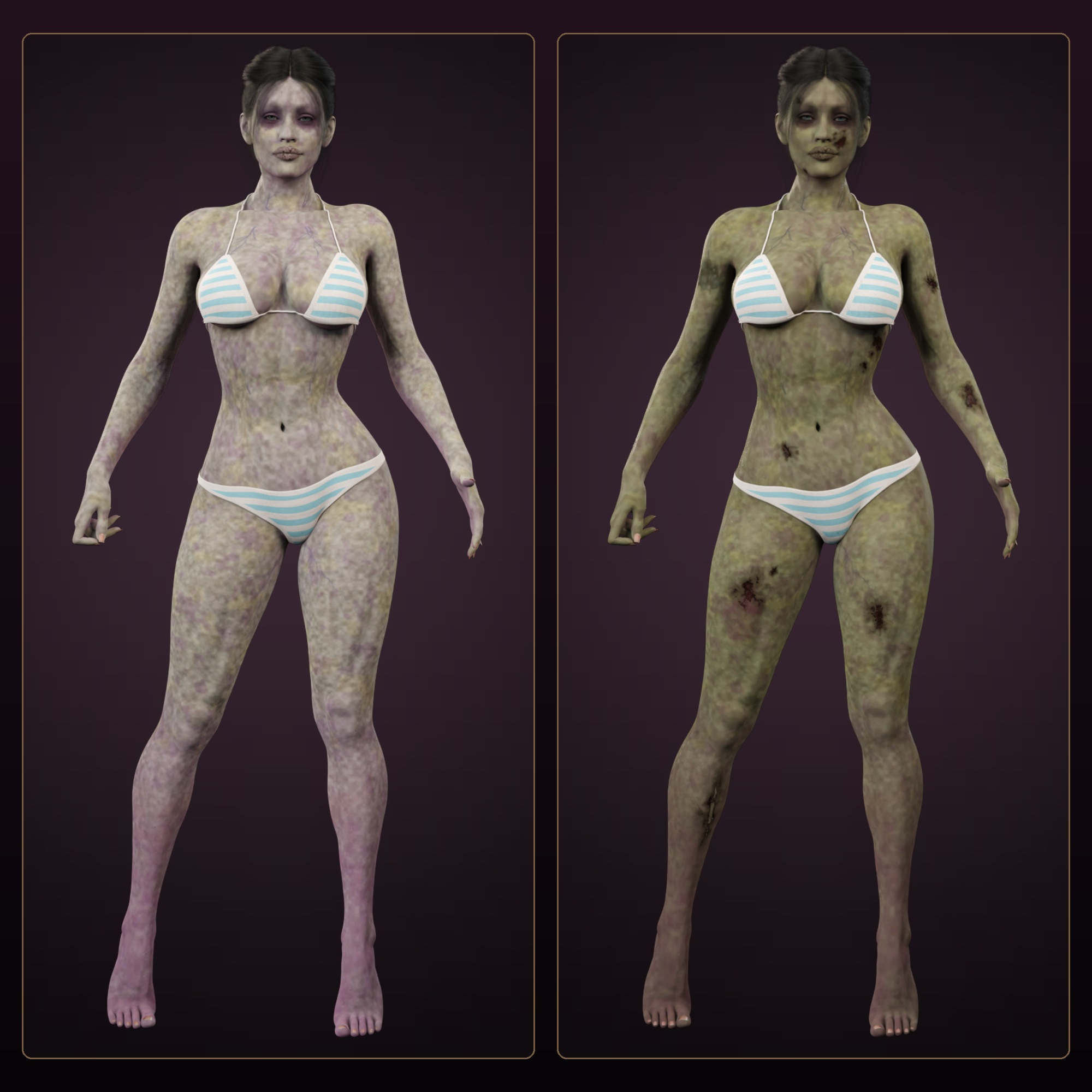
Zombie Rot and Decay FX paints death onto any Genesis 9 or Genesis 8 / 8.1 Female or Male character: a grey-green dead skin tone across the whole body, necrotic veins climbing the neck, chest, face and limbs, a rotting cheek, temple and jaw, cracked dead lips, wet rotting patches on the ribs, belly, thigh and arm, exposed muscle on the left forearm and thigh, a torn right shin with a sliver of bone, and grey-green mold on the back and arm.
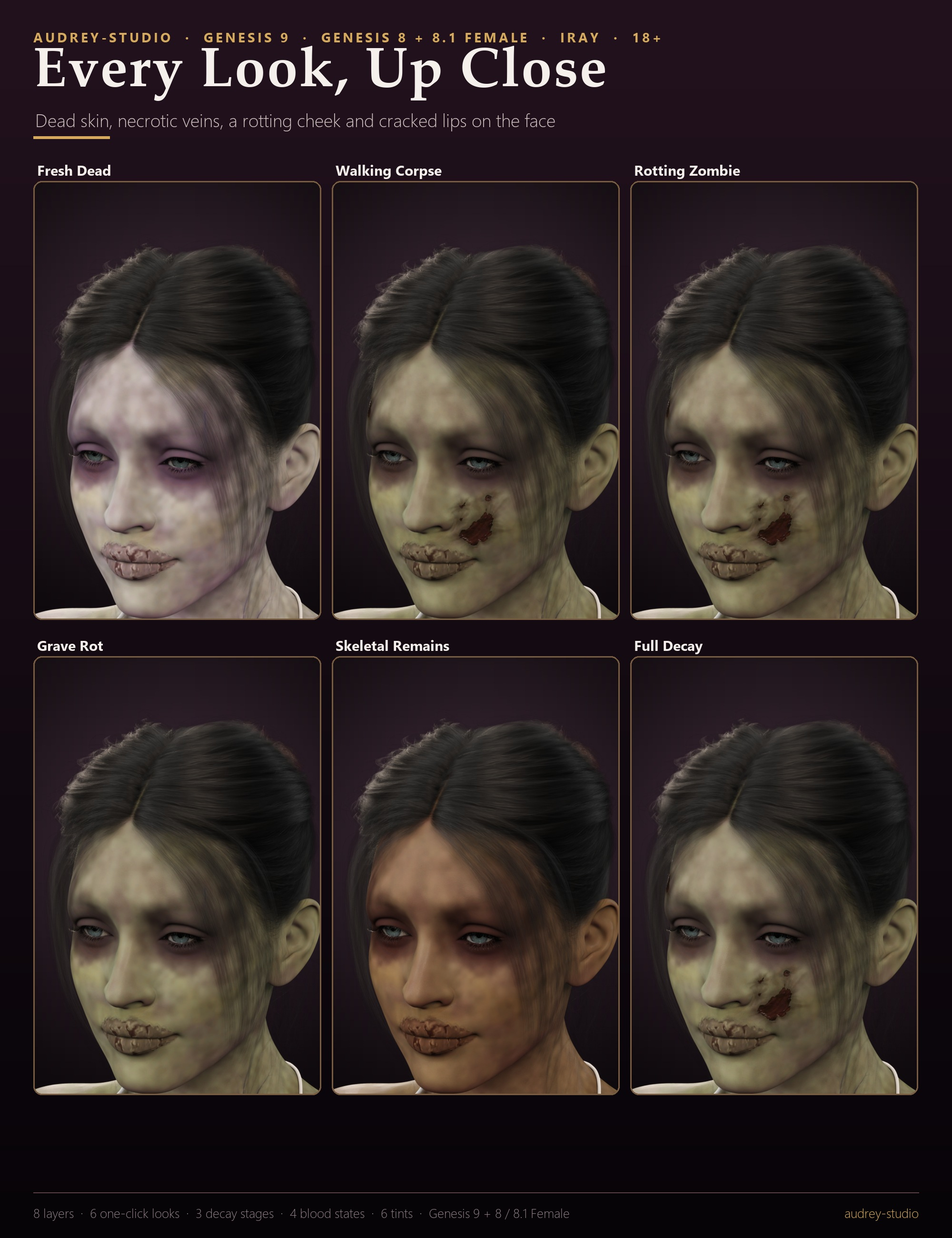
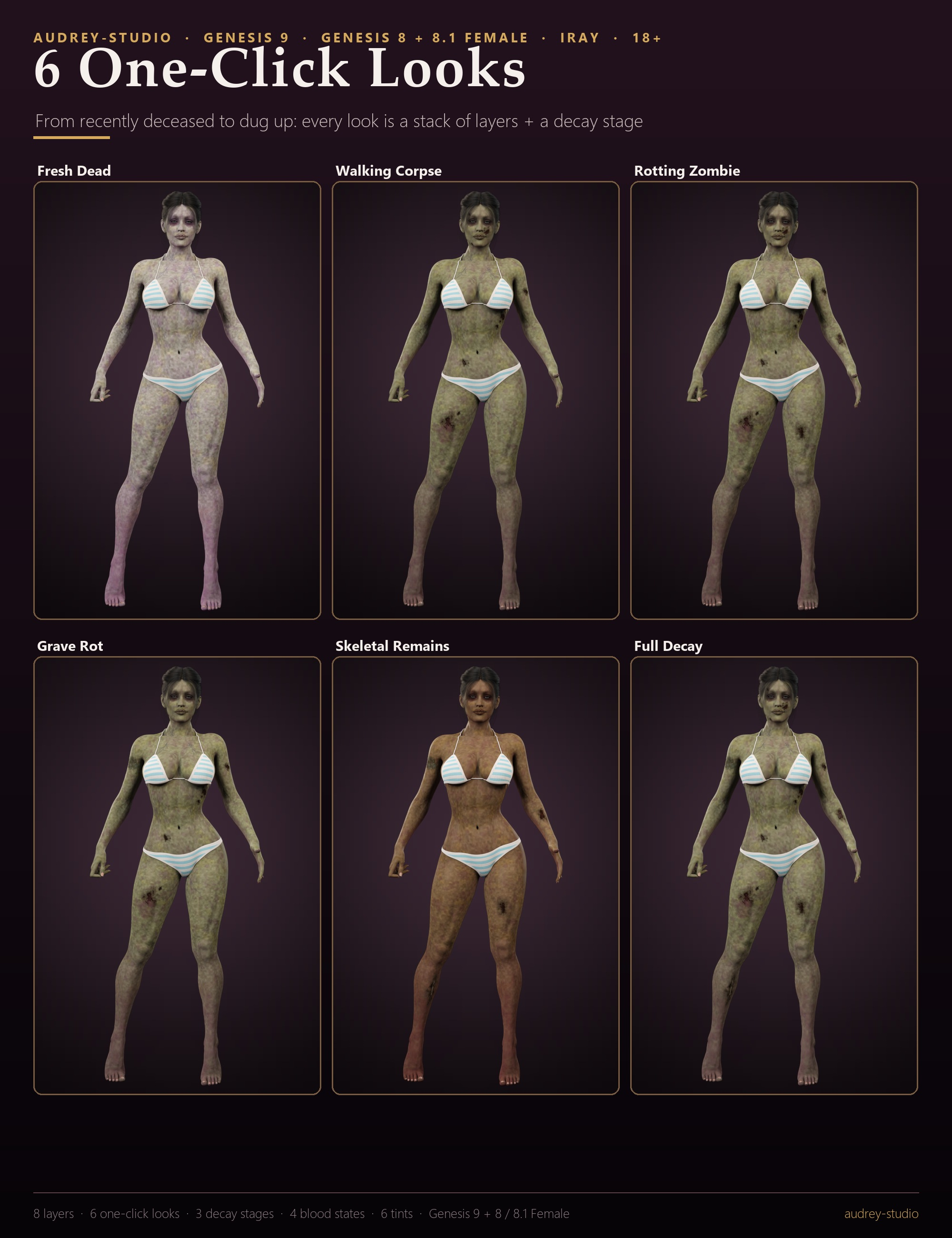
Six one-click looks take a character from recently deceased to dug up: Fresh Dead, Walking Corpse, Rotting Zombie, Grave Rot, Skeletal Remains, Full Decay. Each look is just a stack of the layers - restyle it, add to it, or remove any of them.
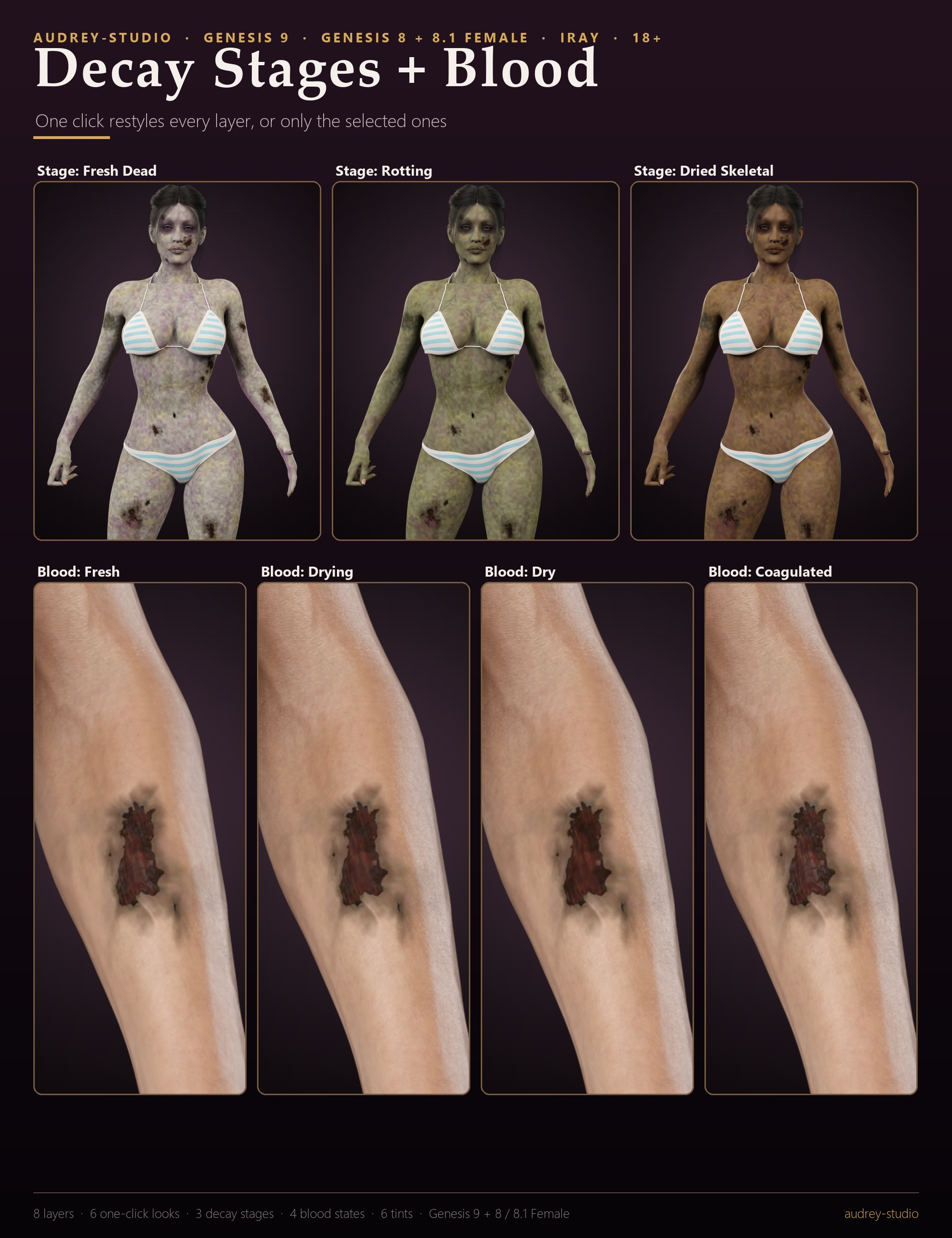
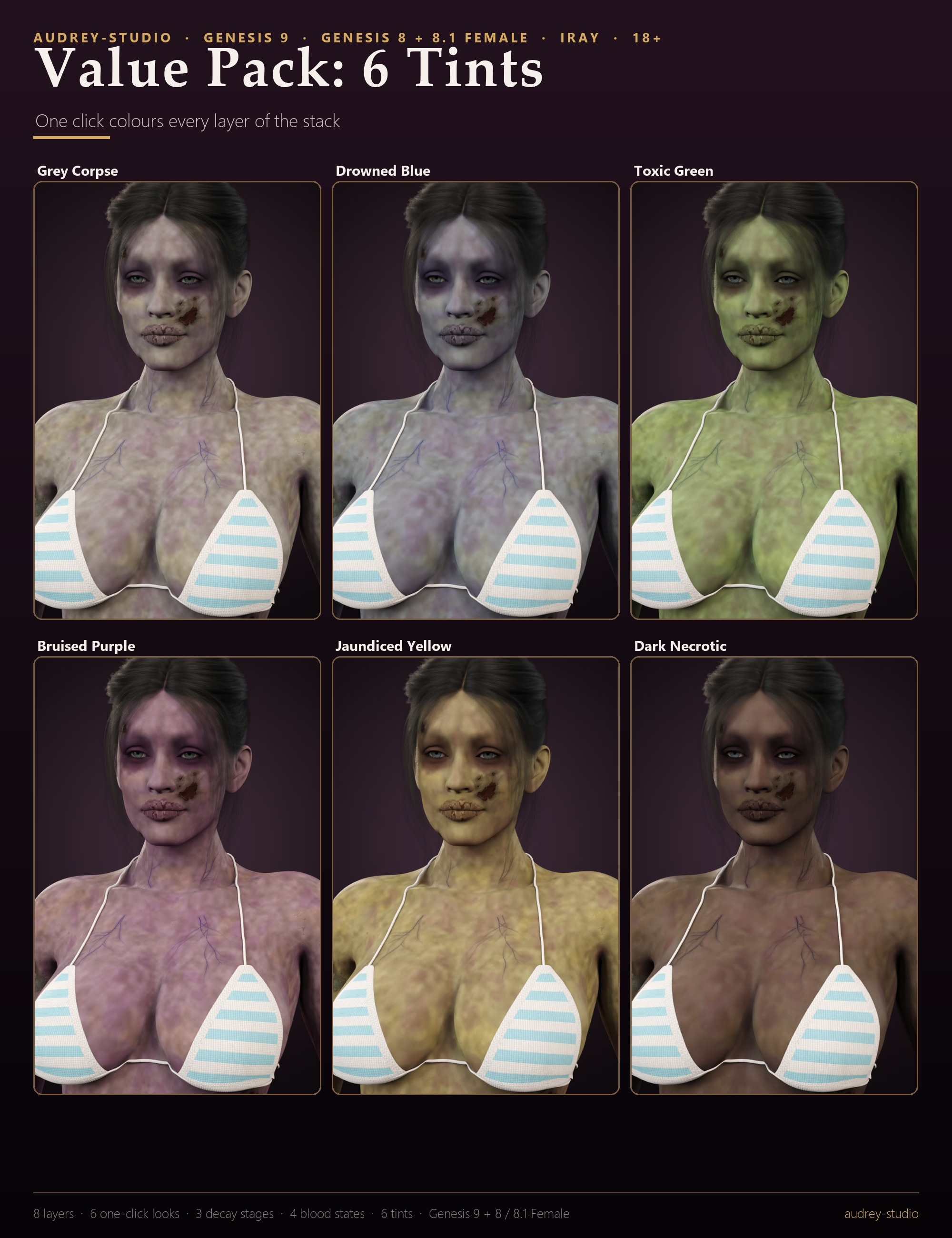
DECAY STAGES restyle the whole stack with one click: Fresh Dead (pale, dry), Rotting (olive, slimy) or Dried Skeletal (brown, leathery, cracked). 4 blood states - Fresh, Drying, Dry and Coagulated - change the wetness, gloss and relief of the layers (the colour stays; the change is subtle and shows most on open, wet flesh), and the Value Pack adds 6 tints: Grey Corpse, Drowned Blue, Toxic Green, Bruised Purple, Jaundiced Yellow, Dark Necrotic.
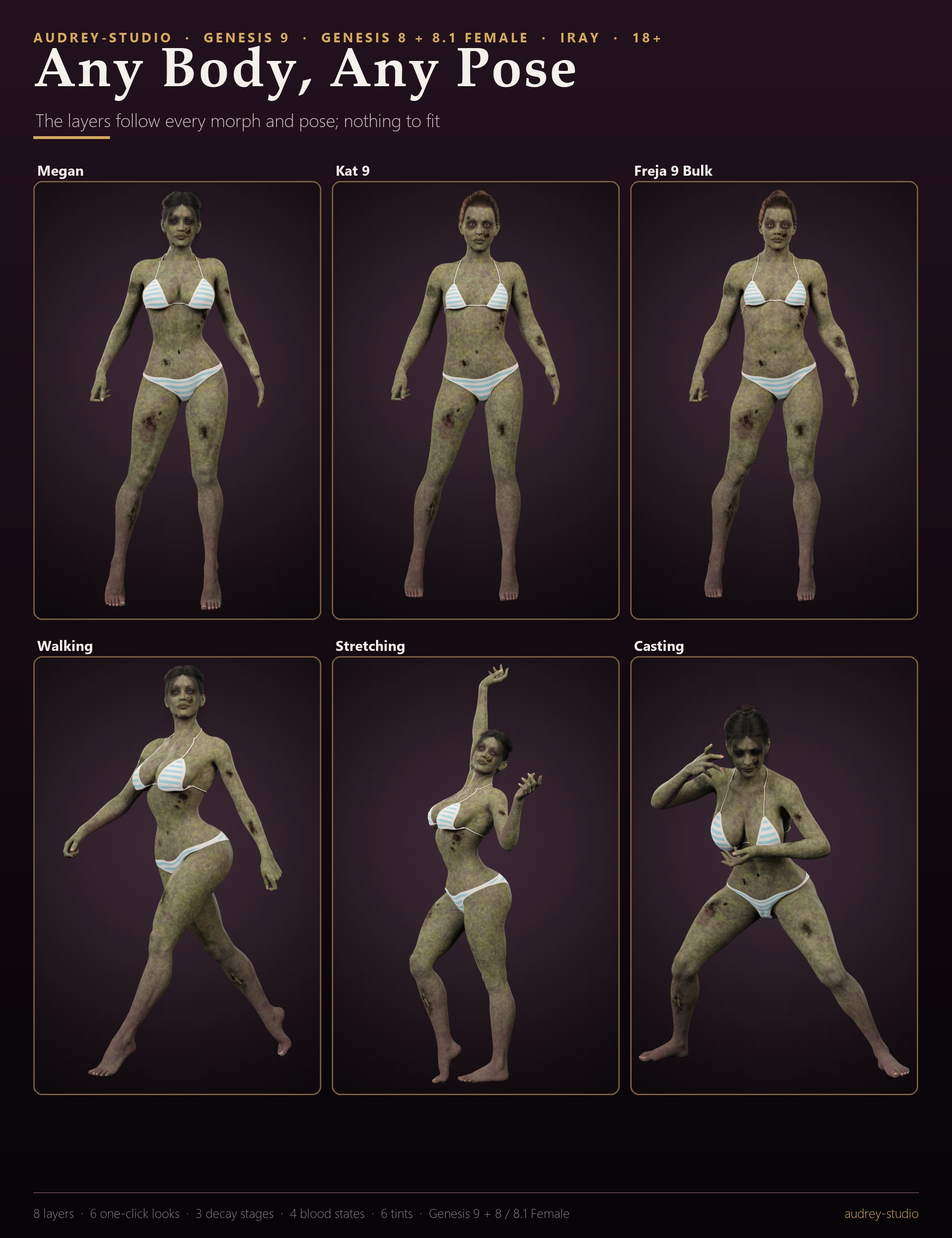
Every layer is its own paint layer ON TOP of your character's skin, with soft ragged edges, painted relief (normal maps) and wet shine only where flesh is open - the skin, maps and shader are never changed, and the wounds blend into the skin they sit on. Designed on the body in 3D and baked into the Genesis 9, Genesis 8 Female, Genesis 8.1 Female, Genesis 8 Male and Genesis 8.1 Male UV layouts, so every wound lands in the same place on each figure. Stacks with the other audrey-studio gore and makeup packs.
WHAT'S INCLUDED
- 6 one-click looks: Fresh Dead, Walking Corpse, Rotting Zombie, Grave Rot, Skeletal Remains, Full Decay
- 8 stackable layers: Dead Skin - Grey-Green Decay (Full Body); Necrotic Veins - Neck, Chest, Face, Limbs; Mold and Fungal Rot - Back and Right Arm; Rotting Patches - Ribs, Belly, Thigh, Arm; Rotting Cheek, Temple and Jaw; Exposed Muscle - Left Forearm and Thigh; Bone Peek - Right Shin; Cracked Dead Lips
- 3 decay stages: Fresh Dead, Rotting, Dried Skeletal (all layers or the selected ones)
- 4 blood states: Fresh, Drying, Dry, Coagulated (all layers or the selected ones)
- Value Pack: 6 tints: Grey Corpse, Drowned Blue, Toxic Green, Bruised Purple, Jaundiced Yellow, Dark Necrotic
- Remove presets: everything, the selected layers, and one per layer
- Genesis 9, Genesis 8 Female, Genesis 8.1 Female, Genesis 8 Male and Genesis 8.1 Male (each UV layout baked separately; any character skin of those figures)
- Not included: the characters, hair, poses, clothing and lights shown in the promo images
- Mature content: graphic gore, for adults (18+) only
MATERIALS / SHADING
- One Iray Uber paint layer per wound: colour, cutout, relief normal and wet-gloss maps
- Decay stages: tint, wetness and relief of every layer; blood states: wetness, gloss and relief (the colour stays, the change is subtle); tints: a colour over the layers
- The full-body dead skin and the veins are translucent: the character's own skin detail shows through
SHAPING / FIT
- Nothing to fit: the layers follow every body morph and pose of the character
- A geograft added later is hidden in the layers by the next preset click
TECHNICAL
- The layers are DAZ geometry shells: no mesh files to install. A shell renders as a copy of the figure, so a full look (up to 8 shells + 4K maps) needs more VRAM than the bare character
- Your character's skin, maps, shader and UV set are never changed
- Maps: 4K colour, cutout and normal maps; wet masks at half size
- Load-tested in DAZ Studio 4.24 and DAZ Studio 6 on every figure (Genesis 9 itself needs 4.20+); Iray renders checked in DAZ Studio 6 on Genesis 9, Genesis 8 / 8.1 Female and Genesis 8 Male
- Download: audrey-studio_Zombie_Rot_and_Decay_FX_G9_G8.zip (221.0 MB, 701 files)
HOW TO USE
1. Select your character (Genesis 9 or Genesis 8 / 8.1 Female or Male).
2. 01 Looks: double-click a one-click look. A look replaces all Zombie Rot and Decay FX layers of that character.
3. 02 Skin and Veins, 03 Face, 04 Rot and Flesh, 05 Bone and Mold: double-click single layers - they stack.
4. 07 Decay Stage: Fresh Dead, Rotting or Dried Skeletal - for every Zombie Rot and Decay FX layer of the selected character,
or only for the layers you selected in the Scene pane.
5. 08 Blood State: Fresh, Drying, Dry or Coagulated - the wetness, gloss and relief of every layer of this pack, or only of
the layers you selected (the colour stays; the change is subtle and shows most on open, wet flesh). New layers take the states of the layers already there.
6. 10 Value Pack - Tints: a colour tint over every layer (replaces the current decay stage).
7. 09 Remove: Remove Everything, Remove Selected Layers, or single layers by name.
The layers are normal scene items under the character ('Zombie Rot - [] ()'): hide or
delete them in the Scene pane any time. Render in Iray.
8. Added a geograft (anatomy, a wound graft, another product's cut) AFTER the layers? Click any Zombie Rot and Decay FX
preset once more (e.g. the current Blood State): the layers then hide the graft and cover only the skin.
TIPS
- A key light from the side or slightly above shows the relief of the wounds and cracked skin best; a light near the camera makes the wet flesh glisten.
- Mix the states: a Dried Skeletal body with one fresh wound = select that layer in the Scene pane, then 07 Decay Stage > Fresh Dead and 08 Blood State > Fresh.
- Each layer has its own material: select 'Zombie Rot - …' in the Scene pane, Surfaces pane - e.g. lower Cutout Opacity for a fainter layer or change Diffuse Color for your own tint.
- The layers are painted on the skin, so tight clothing covers them. Dress the character after applying a look, or leave the wounded areas bare.
- Huge scenes: if a layer seems to vanish in Iray while the character stands tens of metres from the scene origin, move the character (or the whole set) closer to the origin.
- Eyebrow cards and other strand items are separate figures and are not painted: hide them for the look shown in the promo images. Finger and toe nails keep the character's own colour.
Rendered in DAZ Studio with Iray; character, hair, poses, clothing and lights not included.
Zombie Rot and Decay FX paints death onto any Genesis 9 or Genesis 8 / 8.1 Female or Male character: a grey-green dead skin tone across the whole body, necrotic veins climbing the neck, chest, face and limbs, a rotting cheek, temple and jaw, cracked dead lips, wet rotting patches on the ribs, belly, thigh and arm, exposed muscle on the left forearm and thigh, a torn right shin with a sliver of bone, and grey-green mold on the back and arm.
Six one-click looks take a character from recently deceased to dug up: Fresh Dead, Walking Corpse, Rotting Zombie, Grave Rot, Skeletal Remains, Full Decay. Each look is just a stack of the layers - restyle it, add to it, or remove any of them.
DECAY STAGES restyle the whole stack with one click: Fresh Dead (pale, dry), Rotting (olive, slimy) or Dried Skeletal (brown, leathery, cracked). 4 blood states - Fresh, Drying, Dry and Coagulated - change the wetness, gloss and relief of the layers (the colour stays; the change is subtle and shows most on open, wet flesh), and the Value Pack adds 6 tints: Grey Corpse, Drowned Blue, Toxic Green, Bruised Purple, Jaundiced Yellow, Dark Necrotic.
Every layer is its own paint layer ON TOP of your character's skin, with soft ragged edges, painted relief (normal maps) and wet shine only where flesh is open - the skin, maps and shader are never changed, and the wounds blend into the skin they sit on. Designed on the body in 3D and baked into the Genesis 9, Genesis 8 Female, Genesis 8.1 Female, Genesis 8 Male and Genesis 8.1 Male UV layouts, so every wound lands in the same place on each figure. Stacks with the other audrey-studio gore and makeup packs.
WHAT'S INCLUDED
- 6 one-click looks: Fresh Dead, Walking Corpse, Rotting Zombie, Grave Rot, Skeletal Remains, Full Decay
- 8 stackable layers: Dead Skin - Grey-Green Decay (Full Body); Necrotic Veins - Neck, Chest, Face, Limbs; Mold and Fungal Rot - Back and Right Arm; Rotting Patches - Ribs, Belly, Thigh, Arm; Rotting Cheek, Temple and Jaw; Exposed Muscle - Left Forearm and Thigh; Bone Peek - Right Shin; Cracked Dead Lips
- 3 decay stages: Fresh Dead, Rotting, Dried Skeletal (all layers or the selected ones)
- 4 blood states: Fresh, Drying, Dry, Coagulated (all layers or the selected ones)
- Value Pack: 6 tints: Grey Corpse, Drowned Blue, Toxic Green, Bruised Purple, Jaundiced Yellow, Dark Necrotic
- Remove presets: everything, the selected layers, and one per layer
- Genesis 9, Genesis 8 Female, Genesis 8.1 Female, Genesis 8 Male and Genesis 8.1 Male (each UV layout baked separately; any character skin of those figures)
- Not included: the characters, hair, poses, clothing and lights shown in the promo images
- Mature content: graphic gore, for adults (18+) only
MATERIALS / SHADING
- One Iray Uber paint layer per wound: colour, cutout, relief normal and wet-gloss maps
- Decay stages: tint, wetness and relief of every layer; blood states: wetness, gloss and relief (the colour stays, the change is subtle); tints: a colour over the layers
- The full-body dead skin and the veins are translucent: the character's own skin detail shows through
SHAPING / FIT
- Nothing to fit: the layers follow every body morph and pose of the character
- A geograft added later is hidden in the layers by the next preset click
TECHNICAL
- The layers are DAZ geometry shells: no mesh files to install. A shell renders as a copy of the figure, so a full look (up to 8 shells + 4K maps) needs more VRAM than the bare character
- Your character's skin, maps, shader and UV set are never changed
- Maps: 4K colour, cutout and normal maps; wet masks at half size
- Load-tested in DAZ Studio 4.24 and DAZ Studio 6 on every figure (Genesis 9 itself needs 4.20+); Iray renders checked in DAZ Studio 6 on Genesis 9, Genesis 8 / 8.1 Female and Genesis 8 Male
- Download: audrey-studio_Zombie_Rot_and_Decay_FX_G9_G8.zip (221.0 MB, 701 files)
HOW TO USE
1. Select your character (Genesis 9 or Genesis 8 / 8.1 Female or Male).
2. 01 Looks: double-click a one-click look. A look replaces all Zombie Rot and Decay FX layers of that character.
3. 02 Skin and Veins, 03 Face, 04 Rot and Flesh, 05 Bone and Mold: double-click single layers - they stack.
4. 07 Decay Stage: Fresh Dead, Rotting or Dried Skeletal - for every Zombie Rot and Decay FX layer of the selected character,
or only for the layers you selected in the Scene pane.
5. 08 Blood State: Fresh, Drying, Dry or Coagulated - the wetness, gloss and relief of every layer of this pack, or only of
the layers you selected (the colour stays; the change is subtle and shows most on open, wet flesh). New layers take the states of the layers already there.
6. 10 Value Pack - Tints: a colour tint over every layer (replaces the current decay stage).
7. 09 Remove: Remove Everything, Remove Selected Layers, or single layers by name.
The layers are normal scene items under the character ('Zombie Rot - [] ()'): hide or
delete them in the Scene pane any time. Render in Iray.
8. Added a geograft (anatomy, a wound graft, another product's cut) AFTER the layers? Click any Zombie Rot and Decay FX
preset once more (e.g. the current Blood State): the layers then hide the graft and cover only the skin.
TIPS
- A key light from the side or slightly above shows the relief of the wounds and cracked skin best; a light near the camera makes the wet flesh glisten.
- Mix the states: a Dried Skeletal body with one fresh wound = select that layer in the Scene pane, then 07 Decay Stage > Fresh Dead and 08 Blood State > Fresh.
- Each layer has its own material: select 'Zombie Rot - …' in the Scene pane, Surfaces pane - e.g. lower Cutout Opacity for a fainter layer or change Diffuse Color for your own tint.
- The layers are painted on the skin, so tight clothing covers them. Dress the character after applying a look, or leave the wounded areas bare.
- Huge scenes: if a layer seems to vanish in Iray while the character stands tens of metres from the scene origin, move the character (or the whole set) closer to the origin.
- Eyebrow cards and other strand items are separate figures and are not painted: hide them for the look shown in the promo images. Finger and toe nails keep the character's own colour.
Rendered in DAZ Studio with Iray; character, hair, poses, clothing and lights not included.
