


 Free 3D
 3D Print Models
 3D Scans
 Animation & MoCap
 Textures
 Materials
 Skin Reference
 2D Game Assets
 Sound Effects
 Brushes & Tools
 Reference Photos
 Stock Images
 HDR Images
 3ds Max
 Maya
 Blender
 Unreal Engine
 Unity
 ZBrush
 Cinema 4D
 LightWave
 Marmoset
 SketchUp
 FBX
 DAE
 DXF
 GLB
Generation Bridge: A Tool for Daz

4.3 Stars |6 Ratings


! REPORT
FREE
NOTE: DIGITAL DOWNLOAD, NOT A PHYSICAL ITEM

Add to Collection

22 Likes
Share This Daz Content


Offered By


License
Extended Use License
This item comes with our Extended Use Licensing. This means that you may use the model for both non-commercial and commercial purposes, in a variety of mediums and applications.
For full license terms, see our 3D Content Licensing Agreement
Item Details
| Vendor: | BloodyBooger |
| Published: | Sep 29, 2026 |
| Download Size: | 448.6 KB |
| Software: | Daz Studio |
| Compatible Figure: | Genesis 9 |
| dForce: | – |
Included Formats

Statistics
| Favorites: | 12 |
| Likes: | 22 |
| Views: | 1,398 |
Item Ratings
6 Ratings
4 Stars|Oct 27, 2026
Works great!

5 Stars|Oct 15, 2026
Spectaular!!!!!!!!!!!!!!! 
A BILLION THANKS!!!!!!!!!!!!!!!!!!!!!!!
A BILLION THANKS!!!!!!!!!!!!!!!!!!!!!!!
5 Stars|Oct 01, 2026
I love how people want to blame the developer for deception when they clearly did not read the description. I read this shortly after it was posted and the dev clearly stated in the description that it was only for Daz 6 and even stated the reasoning.
My complaint is that the dev forgot about the Beta (I was having issues with 6 at the time, but the Beta ran fine, but the script currently doesn't work on the Beta). I already contacted the dev about it.
As for the script itself, it does what the description states it does. It just runs and converts.
I do have to mention that I think 6 also has a memory leak (Daz crashed after converting for so long).
Thank you dev for being the first to tackle expression converting!
My complaint is that the dev forgot about the Beta (I was having issues with 6 at the time, but the Beta ran fine, but the script currently doesn't work on the Beta). I already contacted the dev about it.
As for the script itself, it does what the description states it does. It just runs and converts.
I do have to mention that I think 6 also has a memory leak (Daz crashed after converting for so long).
Thank you dev for being the first to tackle expression converting!

2 Stars|Sep 30, 2026
Did not specify DAZ 6 only clearly in title or description.
5 Stars|Sep 29, 2026
thank you
5 Stars|Sep 29, 2026
Thank you.
Generation Bridge: A Tool for Daz
Generation Bridge: any pose, expression or animation on any Genesis 3, 8, 8.1 and 9 figure (free script)
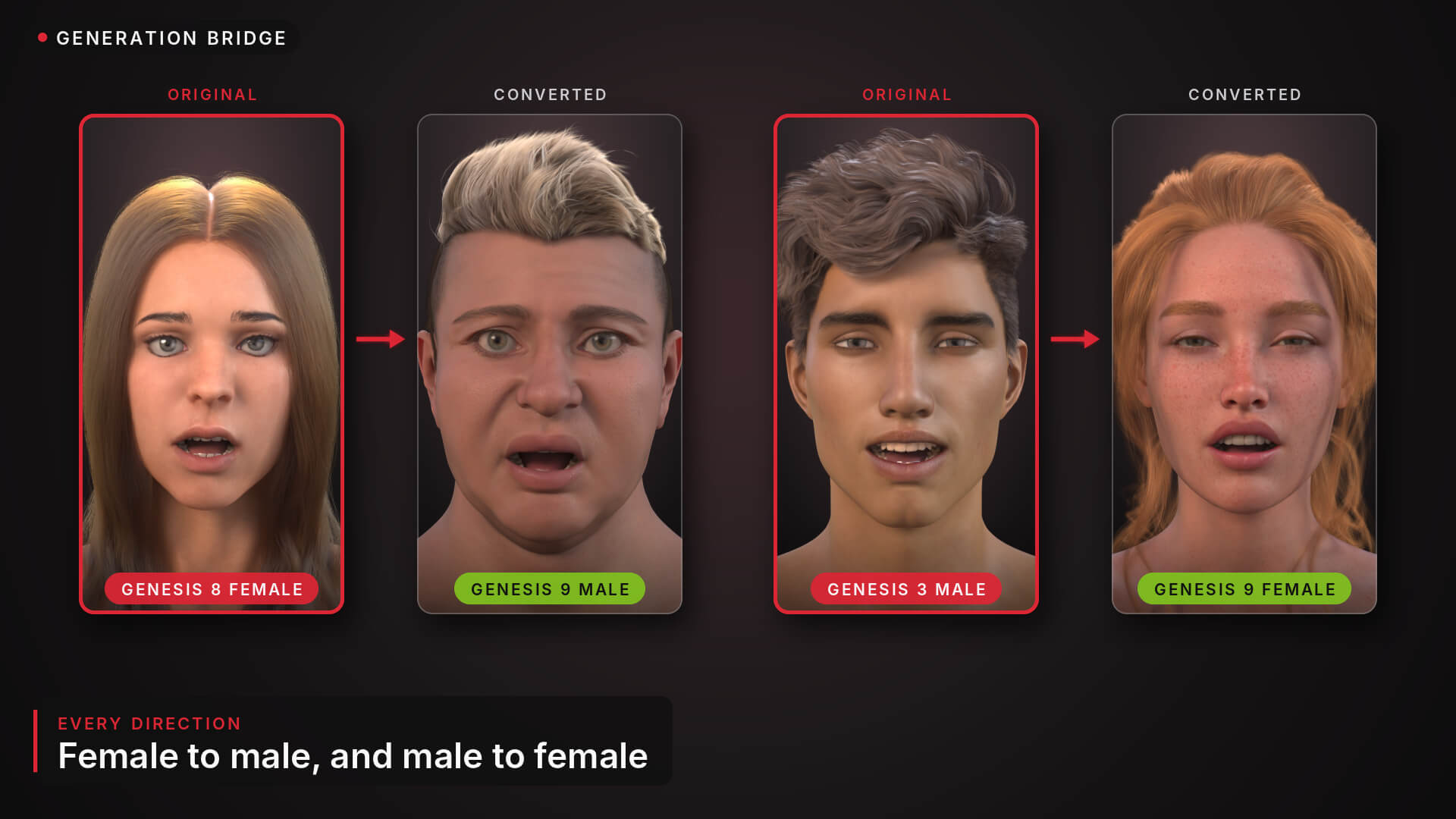
Double-click a pose, an expression or an animation made for another generation and it is rebuilt for your figure on the spot: Genesis 8 poses, expressions and dances on Genesis 9, Genesis 9 animations on Genesis 8, female to male and back. A live strength dial and whole-library conversion included. Free.
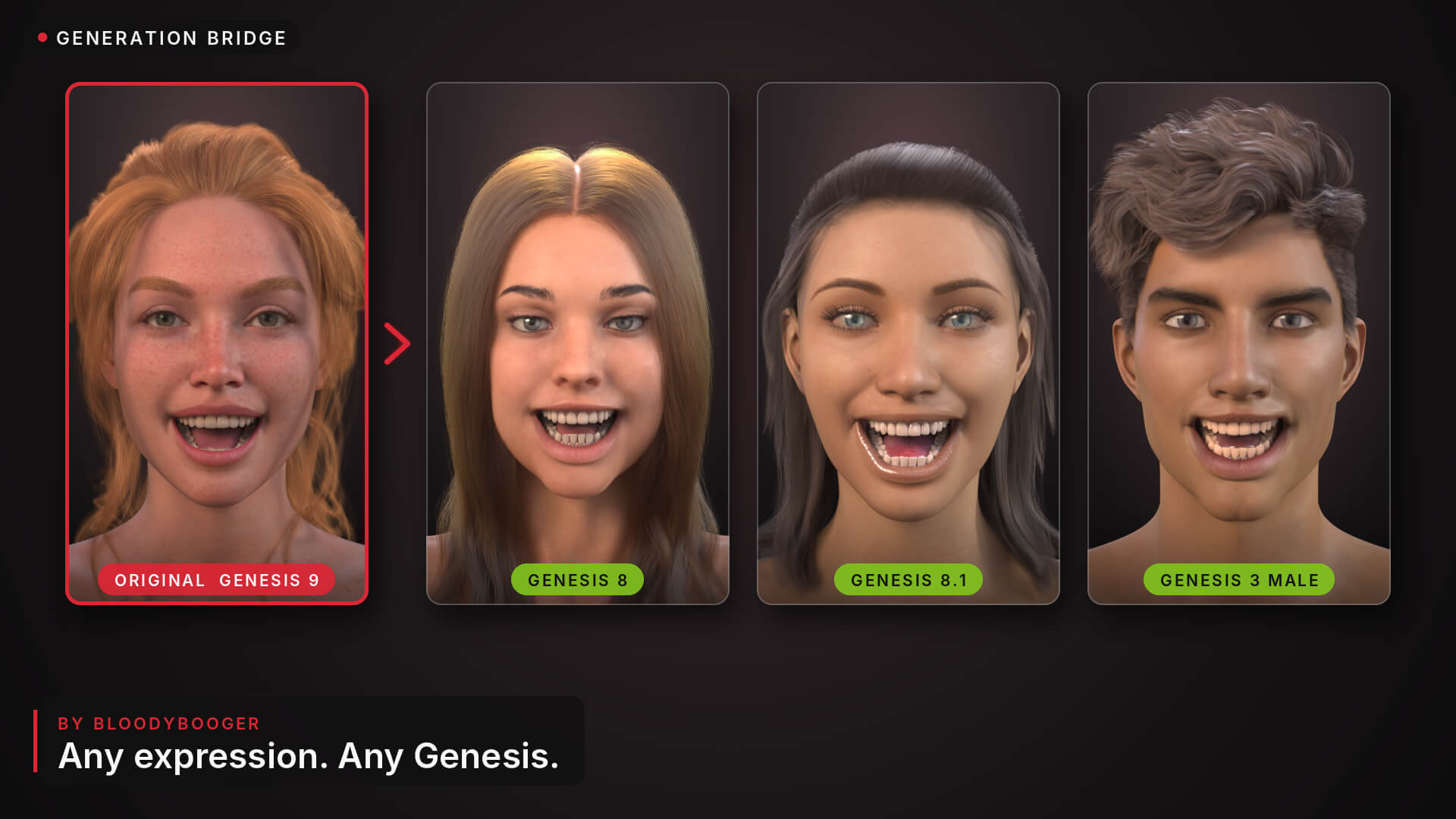
Generation Bridge (formerly Expression Bridge) is a free Daz Script that puts any pose, any facial expression and any animation on any Genesis figure: Genesis 3, 8, 8.1 and 9, female and male, in every direction.
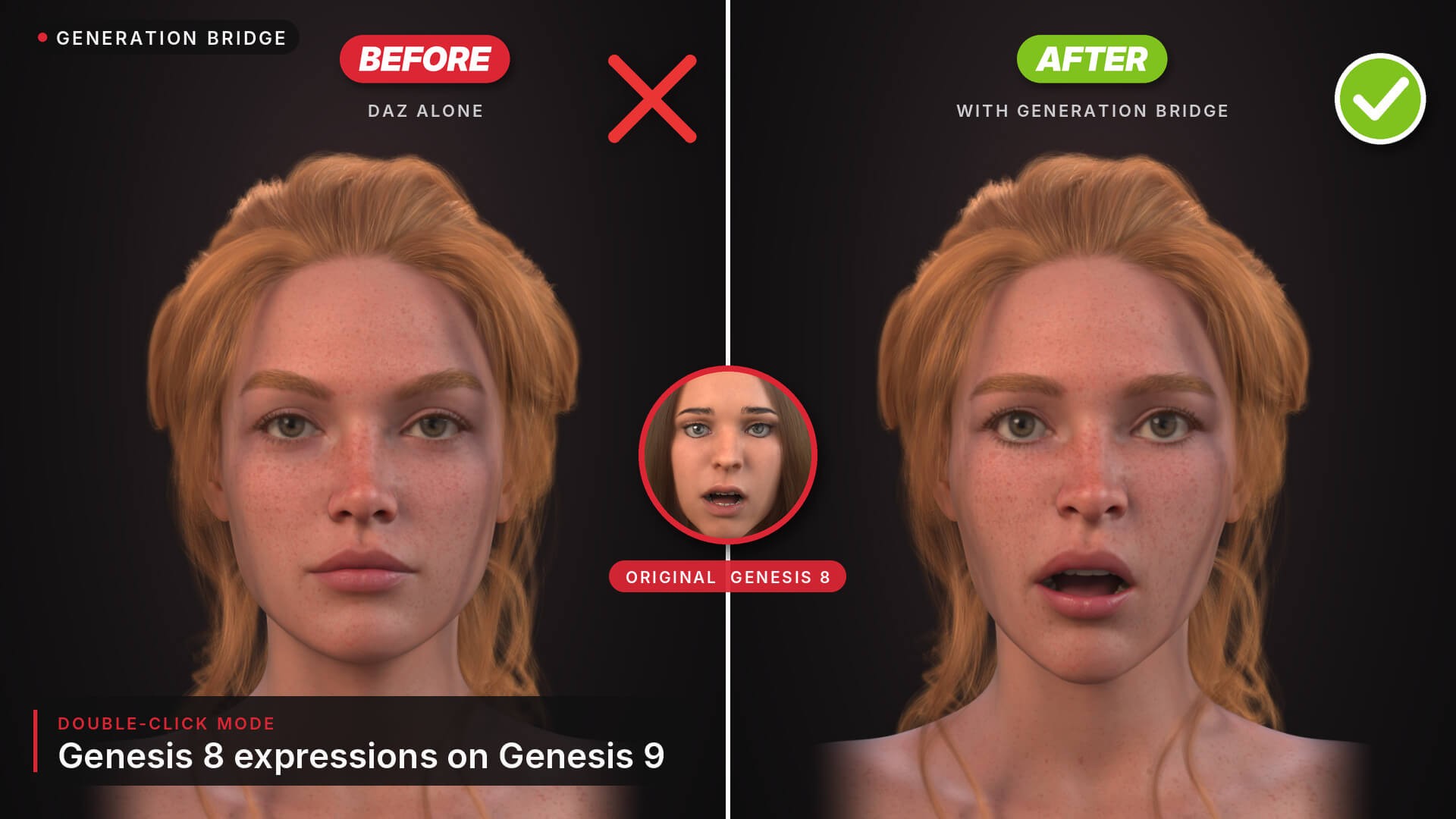
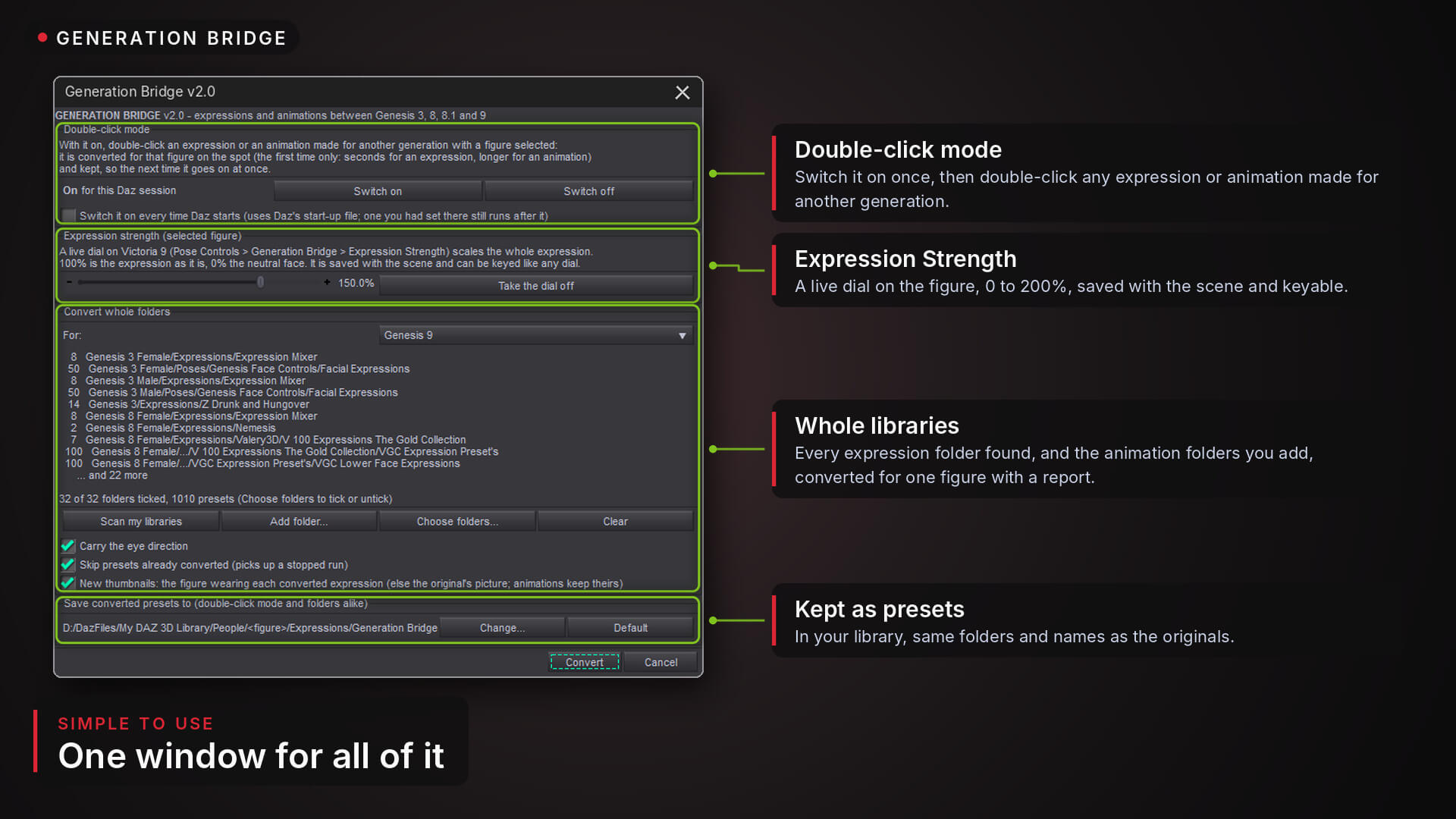
Switch on the double-click mode once. From then on, select a figure and double-click any pose, expression or animation preset as usual. If it was made for another generation, it is rebuilt for your figure on the spot. The first time takes about a second for a pose (the first pose of a session a little longer), a few seconds for an expression and a bit longer for an animation; the result is kept, so the next double-click puts it on at once. Ctrl+Z takes it off.
Poses come across part by part: each body part of your figure points where the original's points (within half a degree on average between Genesis 8 and 9 in the tests), and your figure rests on the floor the way the original does, sitting, kneeling or lying down. Female poses on male figures and male poses on female figures come across the same way. Hand poses and half-body poses set only their own parts, and a pose that carries an expression brings it along, rebuilt like any expression.
It does not just rename dials. It looks at what each expression does to the face and rebuilds that with your figure's own face controls, so expressions made with a vendor's own morphs come across too. The eye openings, the brows, the lip corners and the mouth are matched by meaning, measured on each face. The eye direction, head and neck come along when the original sets them. No extra morphs, no plugin.
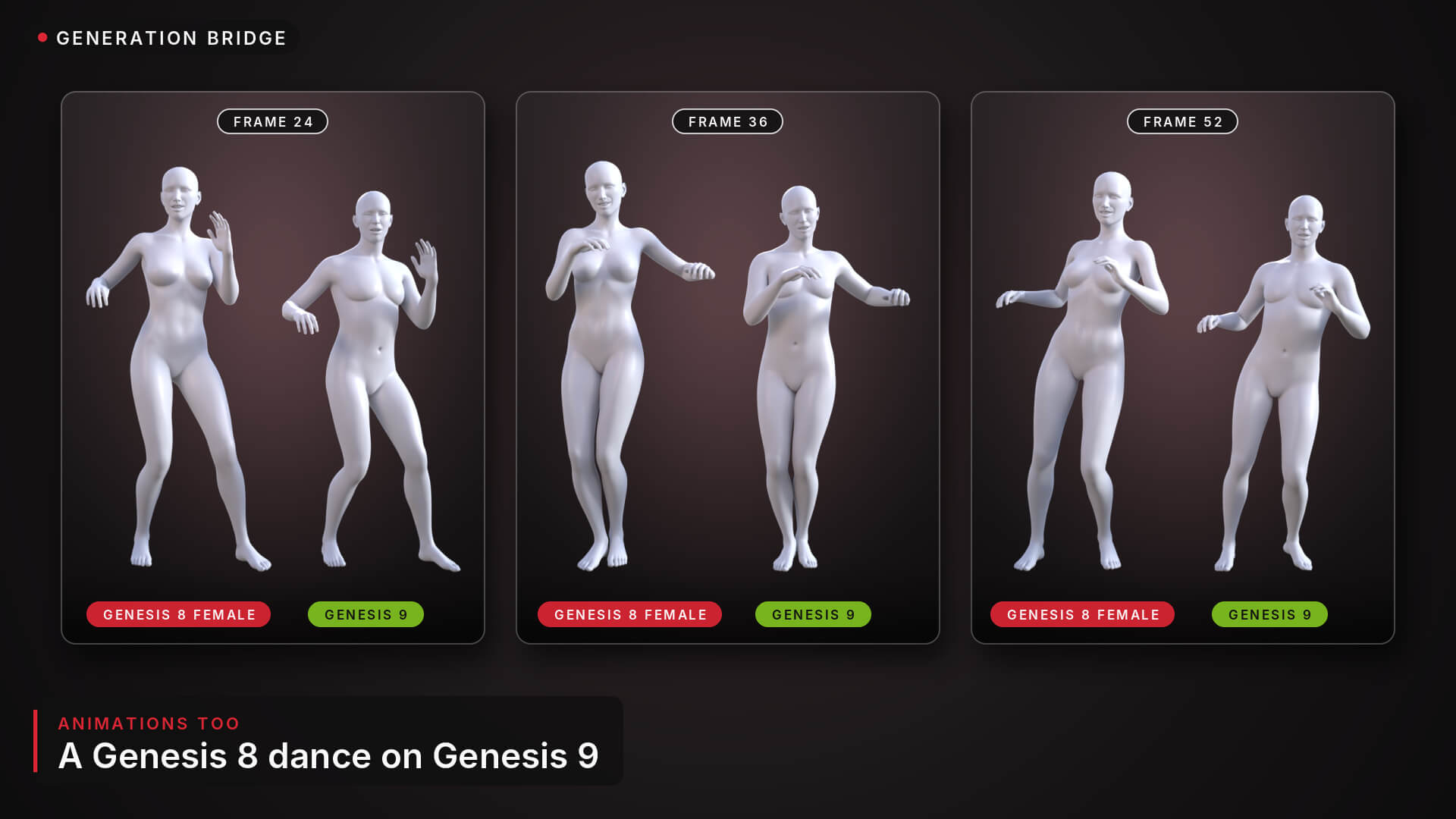
Animations come across whole. Every body part the original moves follows it: each bone of your figure points where the original's points, at every key, and the hip travels like the original's, scaled to your figure's size. The face is rebuilt at each of its keys, like an expression. Parts the original does not move keep your own pose, and the animation lands from the frame you load it at, like Daz's own. Converted to Genesis 9 and back, a Genesis 8 dance puts the hands, feet, hip and head back within 0.01 cm of the original, so basically there is no difference.
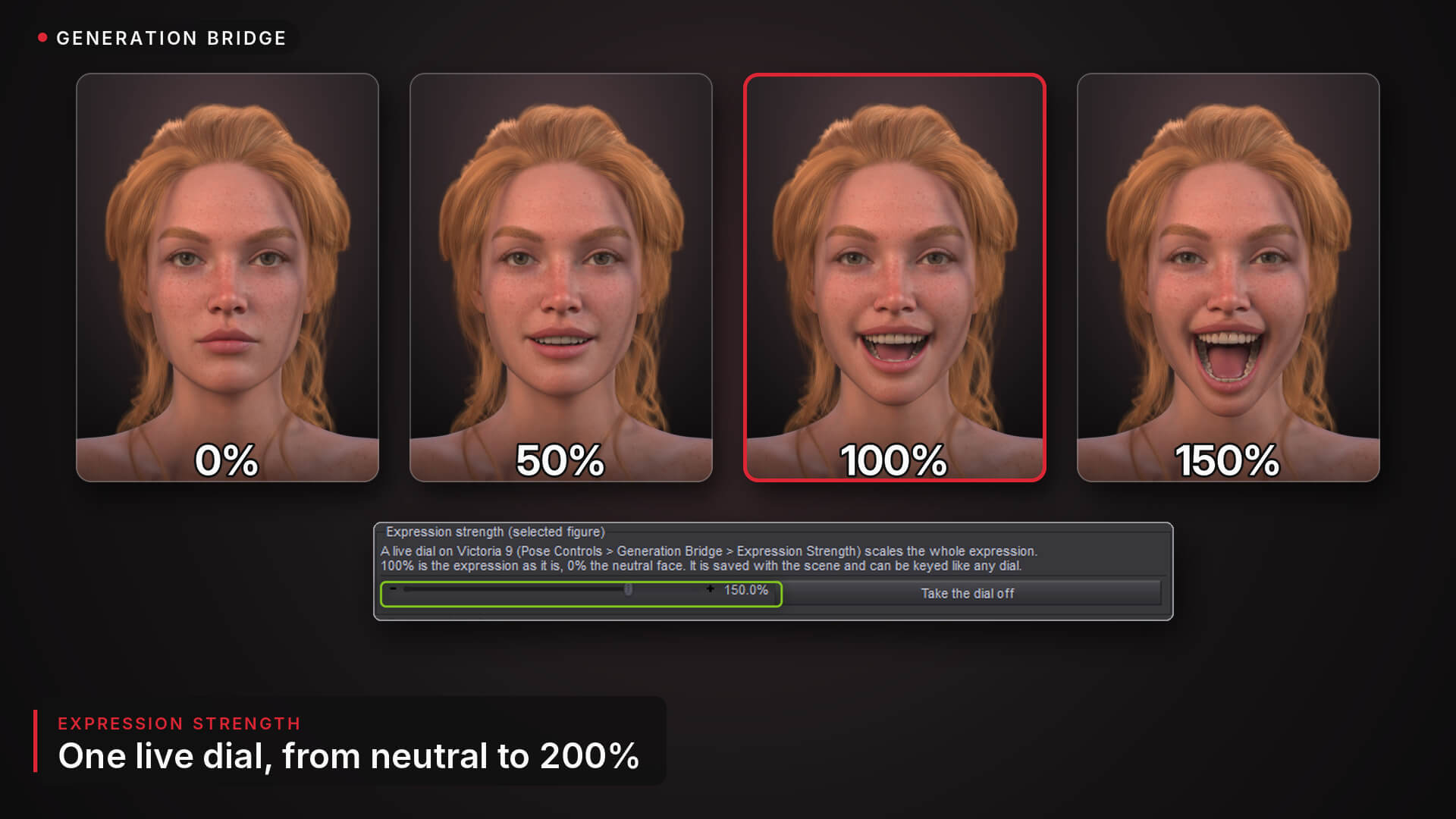
The Expression Strength dial scales the whole expression live, from 0% (neutral) to 200%. It sits on the figure with its other dials, is saved with the scene and can be keyed like any dial, so an expression can grow and fade in an animation.
Have a whole library for another generation? Scan your libraries (or add your animation folders), pick the figure and press Convert: every folder is converted for that figure, in the same folders and with the same names as the originals, with new thumbnails and a report that lists every preset with a quality estimate. Halves stay halves and resets stay resets.
One tool for poses, expressions and animations: no other converter needed.
**New in 2.0 (Expression Bridge becomes Generation Bridge)**
- Every direction between Genesis 3, 8, 8.1 and 9, female and male.
- Poses: body and face, resting on the floor like the original; hand and half-body poses set only their own parts.
- Animations: Animated Pose Presets, body and face, converted on a double-click or a whole folder at once.
- Double-click mode: converts on the spot and keeps the result.
- Expression Strength: a live dial on the figure, 0 to 200%.
- Eyes, head and neck carried; eye openings, brows, lip corners and mouth matched by meaning (the eyes 4 to 5 times closer to the original than 1.1 in the tests).
- Small presets that set only a few dials stack like the originals.
**What you get**
Generation Bridge (the window), Generation Bridge - On and Off (the double-click mode in one click), their icons, and a README that explains every option. Drop the folder into any mapped Scripts folder to have it in your Content Library.
**Compatibility**
Daz Studio 6, the general release (not the public beta, and not 4.24 since on this version it can cause your PC to crash, it still works on 4.24 but I DO NOT RECOMMEND YOU USE IT THERE). Made and tested on Windows.
Genesis 3, Genesis 8, Genesis 8.1 and Genesis 9 figures, female and male, any character. Needs the base figures of the generations involved (they come with Daz).
Not converted: Genesis (1) and Genesis 2 presets, aniBlocks (bake them and save an Animated Pose Preset first), and files that are not pose, expression or animation presets.
**Free tool.** Share it freely. It may not be sold, resold, bundled into a paid product or put behind a paywall. The presets you convert are made from products you own: they are for your own use.
Please leave and review and share your feedback!
Double-click a pose, an expression or an animation made for another generation and it is rebuilt for your figure on the spot: Genesis 8 poses, expressions and dances on Genesis 9, Genesis 9 animations on Genesis 8, female to male and back. A live strength dial and whole-library conversion included. Free.
Generation Bridge (formerly Expression Bridge) is a free Daz Script that puts any pose, any facial expression and any animation on any Genesis figure: Genesis 3, 8, 8.1 and 9, female and male, in every direction.
Switch on the double-click mode once. From then on, select a figure and double-click any pose, expression or animation preset as usual. If it was made for another generation, it is rebuilt for your figure on the spot. The first time takes about a second for a pose (the first pose of a session a little longer), a few seconds for an expression and a bit longer for an animation; the result is kept, so the next double-click puts it on at once. Ctrl+Z takes it off.
Poses come across part by part: each body part of your figure points where the original's points (within half a degree on average between Genesis 8 and 9 in the tests), and your figure rests on the floor the way the original does, sitting, kneeling or lying down. Female poses on male figures and male poses on female figures come across the same way. Hand poses and half-body poses set only their own parts, and a pose that carries an expression brings it along, rebuilt like any expression.
It does not just rename dials. It looks at what each expression does to the face and rebuilds that with your figure's own face controls, so expressions made with a vendor's own morphs come across too. The eye openings, the brows, the lip corners and the mouth are matched by meaning, measured on each face. The eye direction, head and neck come along when the original sets them. No extra morphs, no plugin.
Animations come across whole. Every body part the original moves follows it: each bone of your figure points where the original's points, at every key, and the hip travels like the original's, scaled to your figure's size. The face is rebuilt at each of its keys, like an expression. Parts the original does not move keep your own pose, and the animation lands from the frame you load it at, like Daz's own. Converted to Genesis 9 and back, a Genesis 8 dance puts the hands, feet, hip and head back within 0.01 cm of the original, so basically there is no difference.
The Expression Strength dial scales the whole expression live, from 0% (neutral) to 200%. It sits on the figure with its other dials, is saved with the scene and can be keyed like any dial, so an expression can grow and fade in an animation.
Have a whole library for another generation? Scan your libraries (or add your animation folders), pick the figure and press Convert: every folder is converted for that figure, in the same folders and with the same names as the originals, with new thumbnails and a report that lists every preset with a quality estimate. Halves stay halves and resets stay resets.
One tool for poses, expressions and animations: no other converter needed.
**New in 2.0 (Expression Bridge becomes Generation Bridge)**
- Every direction between Genesis 3, 8, 8.1 and 9, female and male.
- Poses: body and face, resting on the floor like the original; hand and half-body poses set only their own parts.
- Animations: Animated Pose Presets, body and face, converted on a double-click or a whole folder at once.
- Double-click mode: converts on the spot and keeps the result.
- Expression Strength: a live dial on the figure, 0 to 200%.
- Eyes, head and neck carried; eye openings, brows, lip corners and mouth matched by meaning (the eyes 4 to 5 times closer to the original than 1.1 in the tests).
- Small presets that set only a few dials stack like the originals.
**What you get**
Generation Bridge (the window), Generation Bridge - On and Off (the double-click mode in one click), their icons, and a README that explains every option. Drop the folder into any mapped Scripts folder to have it in your Content Library.
**Compatibility**
Daz Studio 6, the general release (not the public beta, and not 4.24 since on this version it can cause your PC to crash, it still works on 4.24 but I DO NOT RECOMMEND YOU USE IT THERE). Made and tested on Windows.
Genesis 3, Genesis 8, Genesis 8.1 and Genesis 9 figures, female and male, any character. Needs the base figures of the generations involved (they come with Daz).
Not converted: Genesis (1) and Genesis 2 presets, aniBlocks (bake them and save an Animated Pose Preset first), and files that are not pose, expression or animation presets.
**Free tool.** Share it freely. It may not be sold, resold, bundled into a paid product or put behind a paywall. The presets you convert are made from products you own: they are for your own use.
Please leave and review and share your feedback!
