


 Free 3D
 3D Print Models
 3D Scans
 Animation & MoCap
 Textures
 Materials
 Skin Reference
 2D Game Assets
 Sound Effects
 Brushes & Tools
 Reference Photos
 Stock Images
 HDR Images
 3ds Max
 Maya
 Blender
 Unreal Engine
 Unity
 ZBrush
 Cinema 4D
 LightWave
 Marmoset
 SketchUp
 FBX
 DAE
 DXF
 GLB
Idle Life 2.0: A Tool for Daz

5.0 Stars |16 Ratings


! REPORT
FREE
NOTE: DIGITAL DOWNLOAD, NOT A PHYSICAL ITEM

Add to Collection

18 Likes
Share This Daz Content


Offered By


License
Extended Use License
This item comes with our Extended Use Licensing. This means that you may use the model for both non-commercial and commercial purposes, in a variety of mediums and applications.
For full license terms, see our 3D Content Licensing Agreement
Item Details
| Vendor: | BloodyBooger |
| Published: | Sep 18, 2026 |
| Download Size: | 2.1 MB |
| Software: | Daz Studio |
| Compatible Figures: | Genesis 8 Female Genesis 9 Genesis 8 Male Genesis 8.1 Female |
| dForce: | – |
Included Formats

Statistics
| Favorites: | 12 |
| Likes: | 18 |
| Views: | 1,568 |
Item Ratings
16 Ratings5 Stars|Oct 29, 2026
Nice Software
5 Stars|Oct 29, 2026
Works great.
5 Stars|Oct 24, 2026
Thank you.
5 Stars|Oct 22, 2026
Love it!
5 Stars|Oct 22, 2026
Cool
5 Stars|Oct 17, 2026
GENUIENLY LIFE CHANGING THANK YOUUUU I was looking for something like this and you just graced us with it…thank you
Page 1 of 3
Idle Life 2.0: A Tool for Daz
Idle Life 2.0: idle animation and handheld camera life for Genesis 8, 8.1 and 9 (free script)
Select a figure, run Idle Life and press play: it becomes someone who breathes, blinks, looks around and shifts their weight, on top of any pose or animation. Select a camera and it gets real handheld motion. Free.
Description
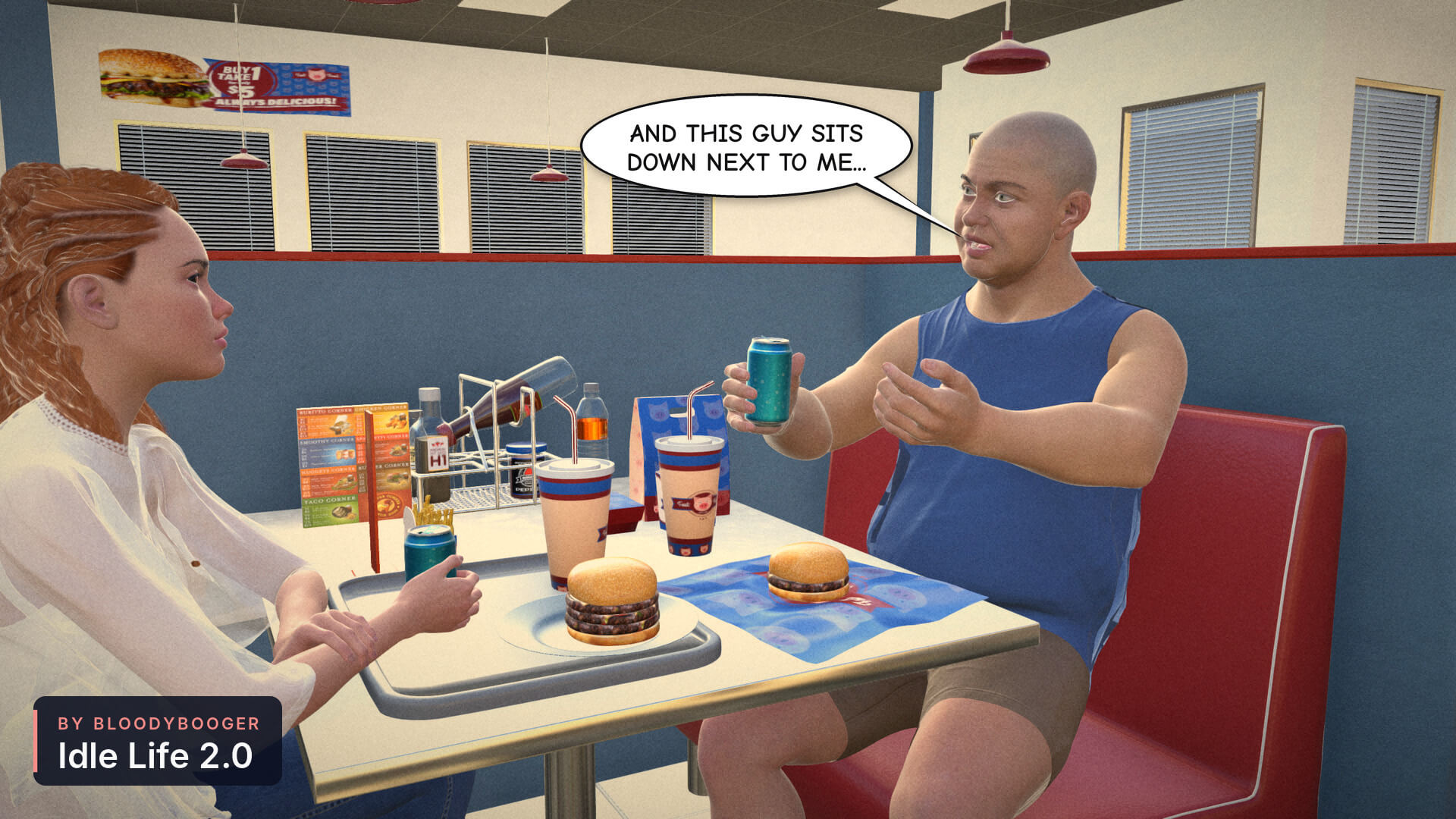
A still figure in a scene looks like a mannequin. The moment it breathes and blinks, it looks like a person. That is what Idle Life does, and it is free.
Idle Life 1.0 did it with a window full of fields and a Generate button, and every change meant generating again. 2.0 is the way I wanted it from the start: select your figure, run Idle Life, press play. That's it.
Breathing, blinks, eye moves, small head and face moves, sway, shoulders, arms, hands and fingers, a knee that bounces when seated and a shift of weight when standing: all of it rides on top of the pose or animation your figure already has. Nothing of yours gets keyed. Change the pose or the animation later and the idle works itself out again on its own. Clear takes it off, and your figure is exactly as it was.
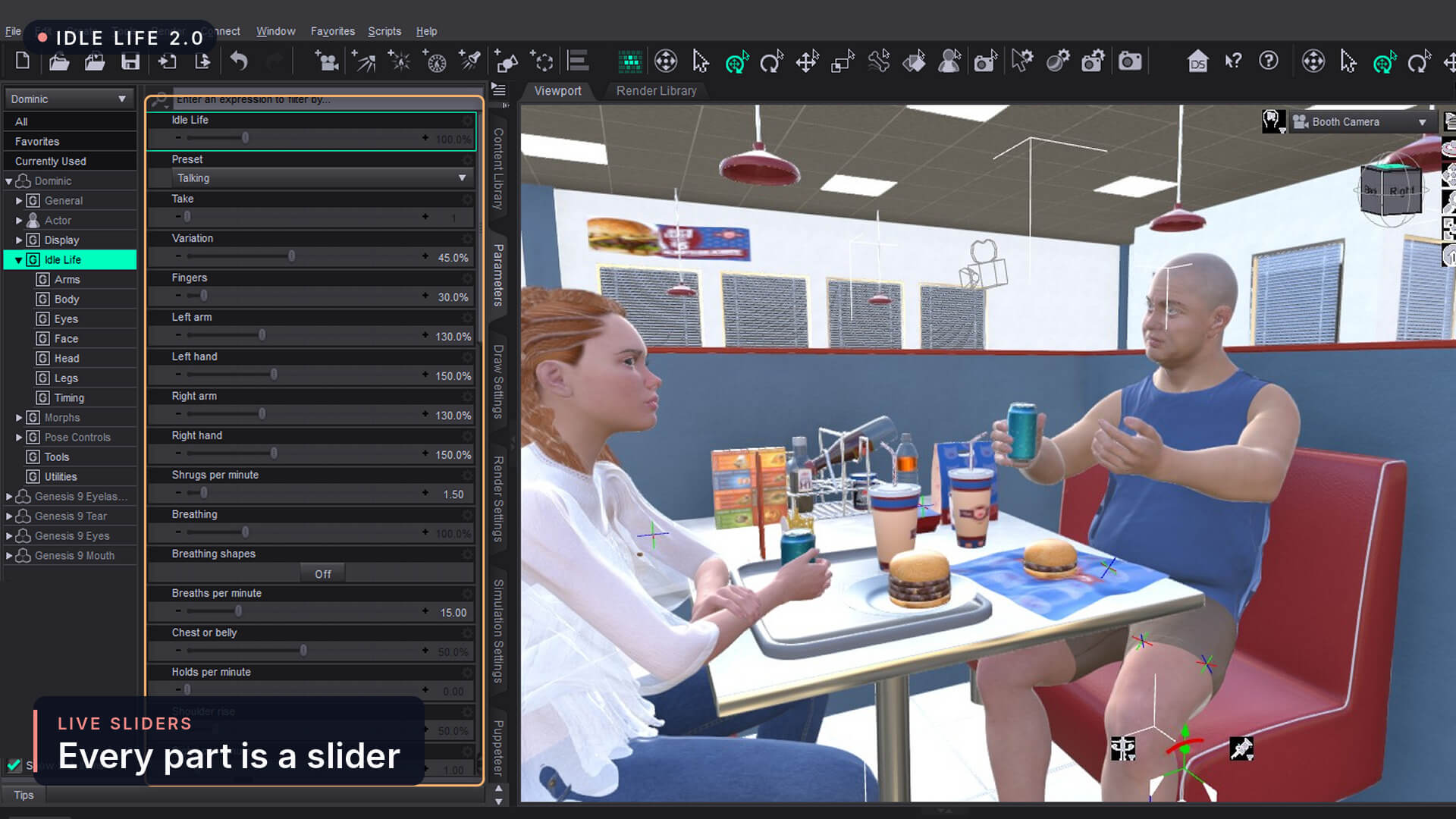
There is no window. Everything is a slider in the Parameters pane, in the Idle Life group, and the sliders change the motion while it plays:
— Idle Life: one slider for all of it, from 0 to 400%.
— Head, Eyes, Face, Body, Arms and Legs: a slider for each part. At 0 that part holds still, for a hand on a cup or a head that has to hold eye contact.
— How often: blinks, eye moves, breaths, sighs, held breaths, nods, shrugs, knee bounces and foot taps, per minute.
— Look left / right and up / down: your figure keeps looking that way, the eyes leading and the head following.
— Talking (new): the mouth moves like your figure is talking, with the head and brows along.
— Mouth breathing (new): the mouth opens with each breath, for someone out of breath.
— Take and Variation: every Take number is its own take of the same settings, so a take you liked is always one number away. Variation decides how far a take strays from the sliders.
—Timing: the loop fills your play range and repeats without a seam, or you set its length yourself.
It understands standing, seated and lying down, and crossed legs, and it keeps the joints away from their limits, so nothing gets stuck.
It comes with ten presets (Relaxed, Subtle, Cinematic, Dialogue, Listening, Focused, Nervous, Winded, Sleeping and the new Talking), in the Preset list on the figure and as files you double-click in the Content Library. Save Preset keeps your own settings as a preset, in both places too.
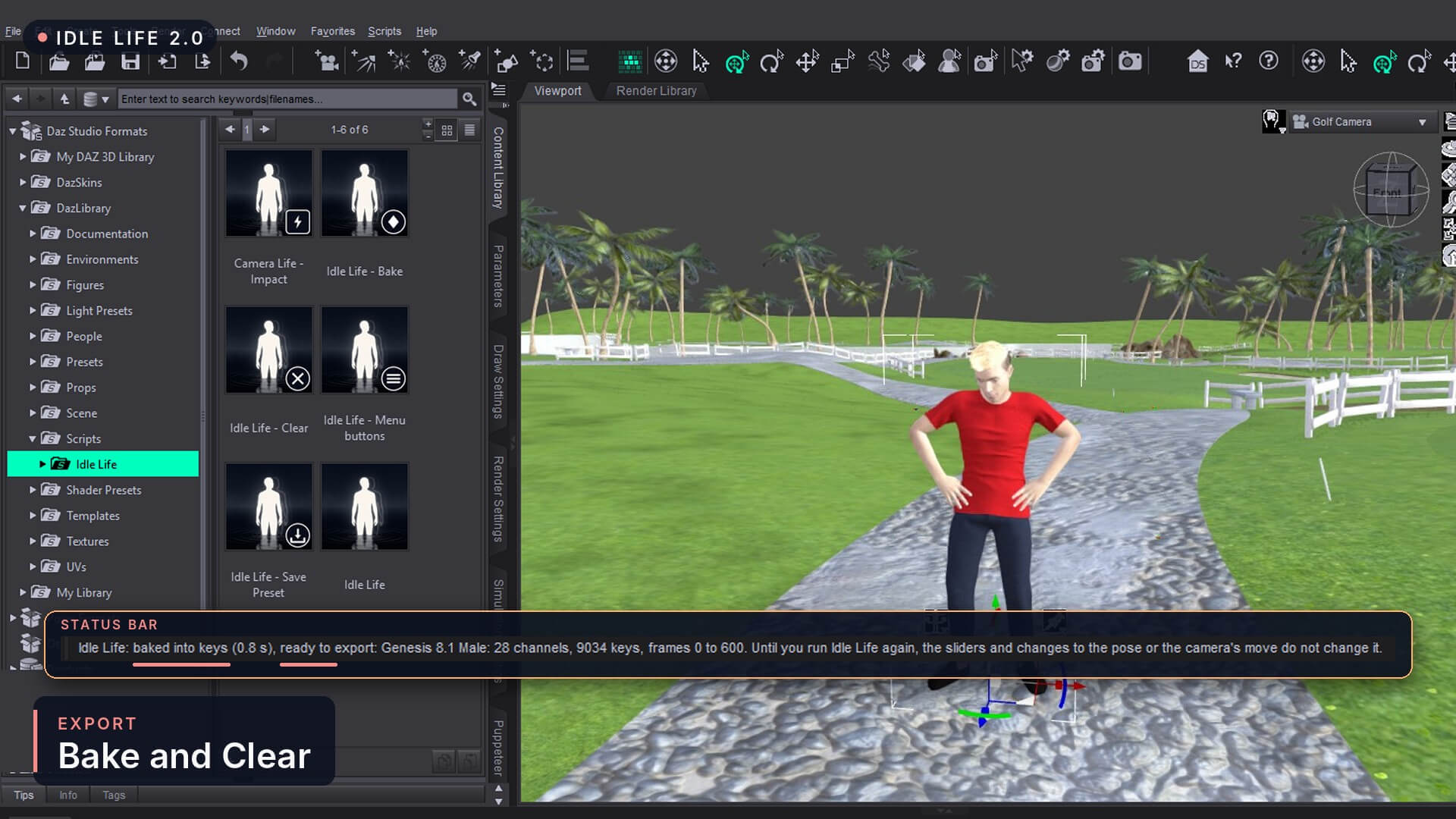
Taking your animation to Blender, Unreal or a game engine? Idle Life - Bake turns the idle into plain keyframes, so it goes along in an FBX export or a pose preset. I checked it in Godot and Blender myself: the bones, the breathing and the face came through exactly as they look in Daz.
***NEW*** Camera Life, breathing and the rest
Camera Life
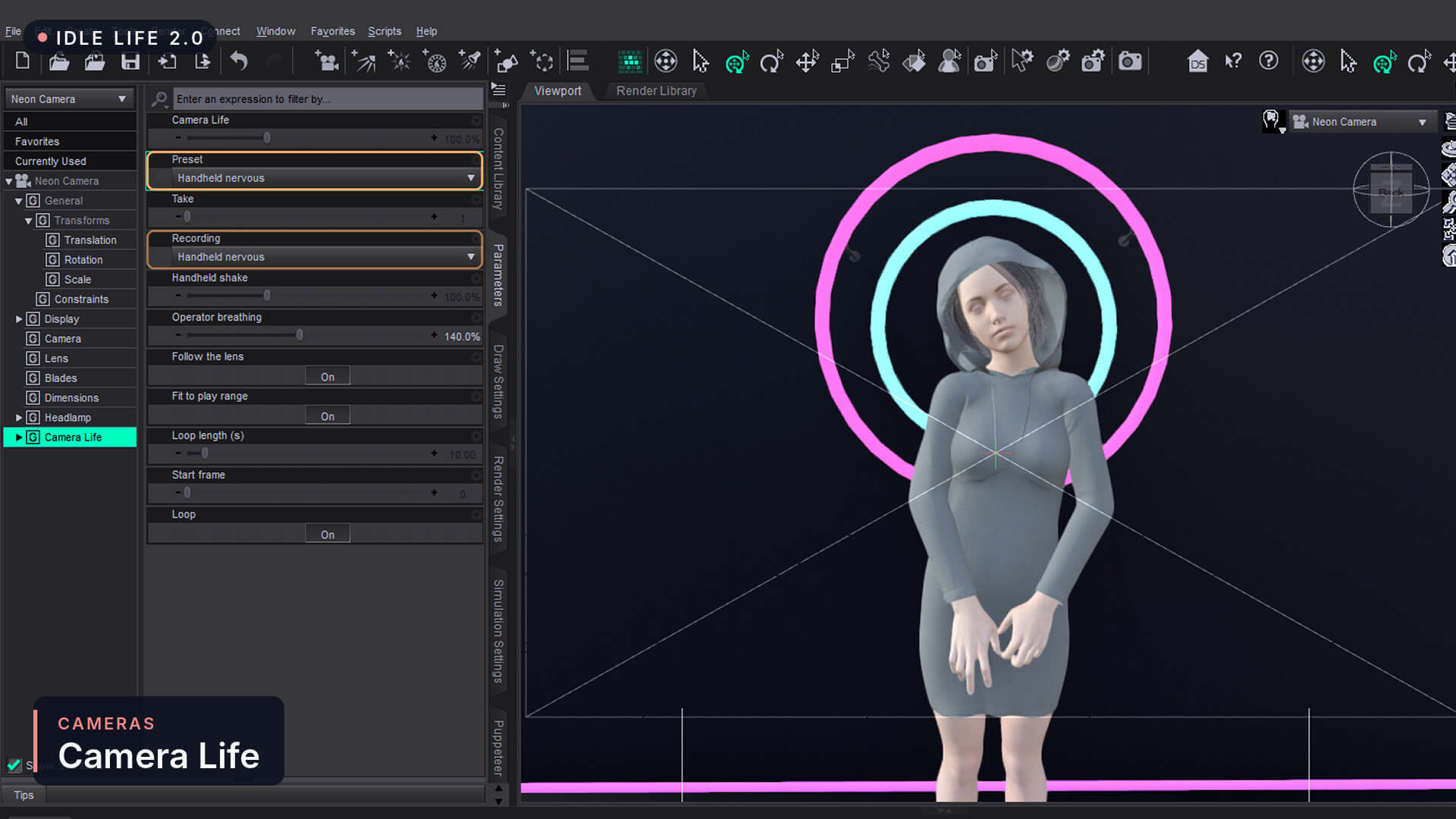
Your camera gets a life too. Select a camera and run Idle Life, and it gets Camera Life: real handheld camera motion, filmed with a real camera and tracked, on top of the camera's own moves. It turns with the camera when it pans or travels, and it follows the lens, so a long lens does not turn a calm shot into an earthquake.
Seven presets: Steady, Handheld calm, Handheld calm 2, Handheld nervous, Walking, Running and Vehicle.
Operator breathing: the slow rise and fall of the person holding the camera.
Camera Life - Impact: a jolt at the frame you pick (a hit, an explosion, a landing), each with its own strength and length. Run it again for another.
Any frame rate, and the same seamless loop over your play range as the figures.
The handheld recordings come from Camera Shakify (CC0), filmed and tracked by Ian Hubert and collected by EatTheFuture.
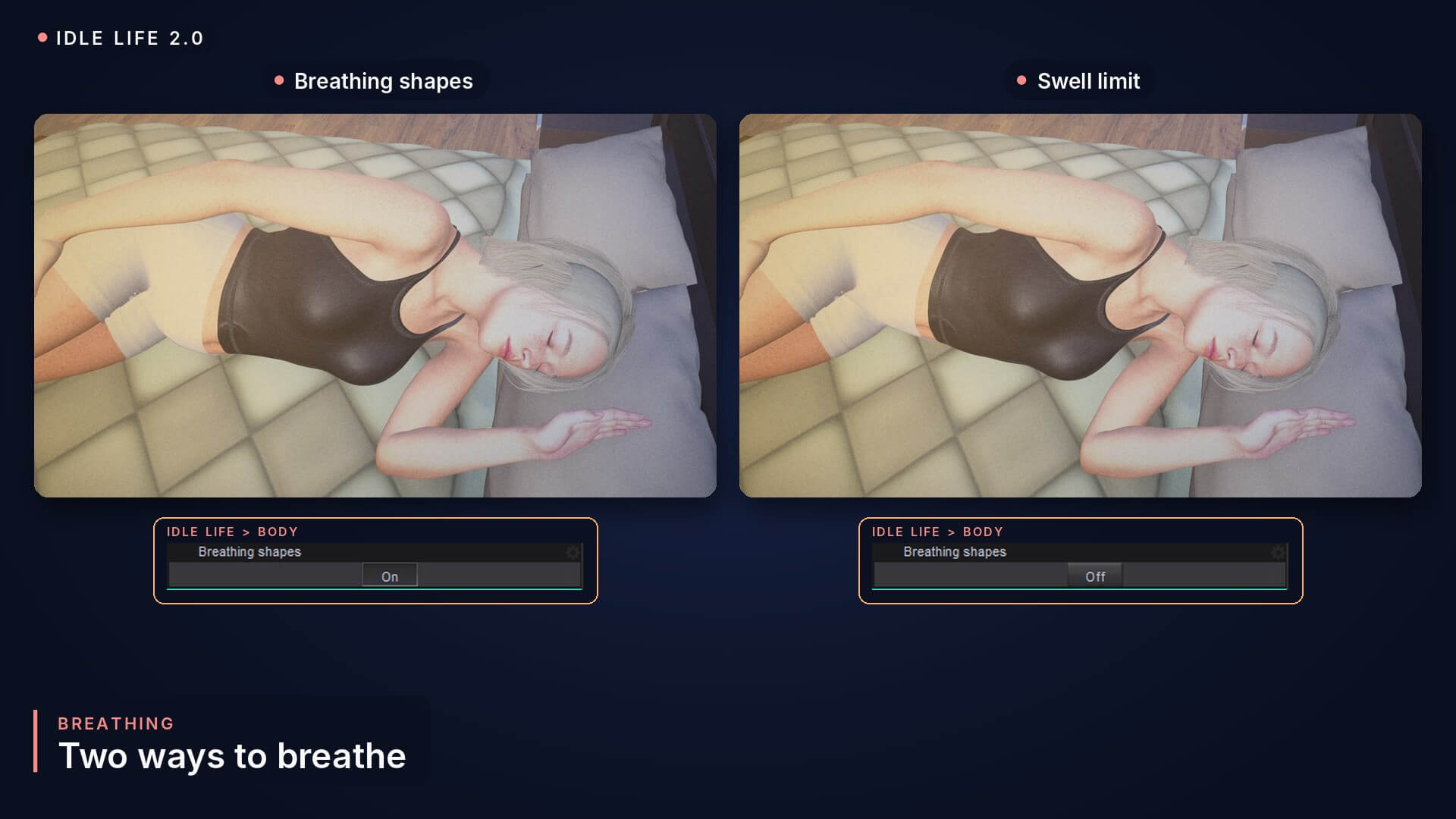
Two ways to breathe
Breathing is where clothes usually give it away, so there are two ways, and one switch to pick between them (Breathing shapes, in the Body group):
Breathing shapes on (the default): the chest and belly swell with shapes made for your figure's body the first time Idle Life runs, and its fitted clothes get matching copies, so they breathe with the body. Lying face down, the back rises instead.
Breathing shapes off: the swell comes from the chest and belly bones, held under a soft limit so the clothes stay outside. The clothes follow the bones, as they always do.
I tested both on tank tops, shirts and sports bras, standing, seated and lying down, at 100% and at 400%. Each one is better at different things, and something that looks off to me may look just right to you, so I don't decide for you. Try both.
Daz Studio 4.24 and Daz Studio 6
It works the same in both. Daz 4.24 is slower: the first run on a figure takes 6 to 7 seconds there (1 to 2 in Daz 6), a preset about a second and a half (about a second), and Bake about 13 seconds (under a second). A camera takes about a second in Daz 4.24 and a fraction of a second in Daz 6.
What you get
Six scripts (Idle Life, Clear, Bake, Save Preset, Menu buttons and Camera Life - Impact), ten figure presets, seven camera presets, the six handheld recordings, and a README that explains every slider. Copy the Idle Life folder into the Scripts folder of any content library and double-click in the Content Library. Menu buttons adds them to Daz's Scripts menu and puts Idle Life and Clear on a toolbar of their own, for buttons or hotkeys.
Have 1.0? Copy 2.0 over it. Your 1.0 presets come across, and Clear takes a 1.0 take off a figure.
Compatibility
Daz Studio 4.24 and Daz Studio 6. Made and tested on Windows.
Genesis 9, Genesis 8.1 and Genesis 8, male and female, and any camera. Works alongside Jiggle Wiggle on the same figure.
*Good to know*
Daz's Undo does not cover what a script links up, so Clear is the way back, and it gives back exactly what was there.
After restarting Daz, the idle plays as saved. Run Idle Life once on your figures and cameras before you change their sliders: it brings back the timing sliders and the updating by itself.
Talking is not lip sync: it does not follow a voice track.
Free tool. Share it freely. It may not be sold, resold, bundled into a paid product or put behind a paywall.
PS. I tested it for days and hours in Daz 6 and Daz 4.24, on Genesis 9, 8.1 and 8, men and women, standing, seated, lying down and over a dance, and on cameras at 24, 30 and 60 fps. If you find any issues or bugs, or have suggestions, please let me know!
If Idle Life helps you, have a look at my other tools too: Jiggle Wiggle for soft body jiggle (it works on the same figure), and the free Load Here, Pose Hold, Expression Bridge and Mixamo Bridge.
PLEASE LEAVE A REVIEW!! THANK YOU SO MUCH, ENJOY!!!
Select a figure, run Idle Life and press play: it becomes someone who breathes, blinks, looks around and shifts their weight, on top of any pose or animation. Select a camera and it gets real handheld motion. Free.
Description
A still figure in a scene looks like a mannequin. The moment it breathes and blinks, it looks like a person. That is what Idle Life does, and it is free.
Idle Life 1.0 did it with a window full of fields and a Generate button, and every change meant generating again. 2.0 is the way I wanted it from the start: select your figure, run Idle Life, press play. That's it.
Breathing, blinks, eye moves, small head and face moves, sway, shoulders, arms, hands and fingers, a knee that bounces when seated and a shift of weight when standing: all of it rides on top of the pose or animation your figure already has. Nothing of yours gets keyed. Change the pose or the animation later and the idle works itself out again on its own. Clear takes it off, and your figure is exactly as it was.
There is no window. Everything is a slider in the Parameters pane, in the Idle Life group, and the sliders change the motion while it plays:
— Idle Life: one slider for all of it, from 0 to 400%.
— Head, Eyes, Face, Body, Arms and Legs: a slider for each part. At 0 that part holds still, for a hand on a cup or a head that has to hold eye contact.
— How often: blinks, eye moves, breaths, sighs, held breaths, nods, shrugs, knee bounces and foot taps, per minute.
— Look left / right and up / down: your figure keeps looking that way, the eyes leading and the head following.
— Talking (new): the mouth moves like your figure is talking, with the head and brows along.
— Mouth breathing (new): the mouth opens with each breath, for someone out of breath.
— Take and Variation: every Take number is its own take of the same settings, so a take you liked is always one number away. Variation decides how far a take strays from the sliders.
—Timing: the loop fills your play range and repeats without a seam, or you set its length yourself.
It understands standing, seated and lying down, and crossed legs, and it keeps the joints away from their limits, so nothing gets stuck.
It comes with ten presets (Relaxed, Subtle, Cinematic, Dialogue, Listening, Focused, Nervous, Winded, Sleeping and the new Talking), in the Preset list on the figure and as files you double-click in the Content Library. Save Preset keeps your own settings as a preset, in both places too.
Taking your animation to Blender, Unreal or a game engine? Idle Life - Bake turns the idle into plain keyframes, so it goes along in an FBX export or a pose preset. I checked it in Godot and Blender myself: the bones, the breathing and the face came through exactly as they look in Daz.
***NEW*** Camera Life, breathing and the rest
Camera Life
Your camera gets a life too. Select a camera and run Idle Life, and it gets Camera Life: real handheld camera motion, filmed with a real camera and tracked, on top of the camera's own moves. It turns with the camera when it pans or travels, and it follows the lens, so a long lens does not turn a calm shot into an earthquake.
Seven presets: Steady, Handheld calm, Handheld calm 2, Handheld nervous, Walking, Running and Vehicle.
Operator breathing: the slow rise and fall of the person holding the camera.
Camera Life - Impact: a jolt at the frame you pick (a hit, an explosion, a landing), each with its own strength and length. Run it again for another.
Any frame rate, and the same seamless loop over your play range as the figures.
The handheld recordings come from Camera Shakify (CC0), filmed and tracked by Ian Hubert and collected by EatTheFuture.
Two ways to breathe
Breathing is where clothes usually give it away, so there are two ways, and one switch to pick between them (Breathing shapes, in the Body group):
Breathing shapes on (the default): the chest and belly swell with shapes made for your figure's body the first time Idle Life runs, and its fitted clothes get matching copies, so they breathe with the body. Lying face down, the back rises instead.
Breathing shapes off: the swell comes from the chest and belly bones, held under a soft limit so the clothes stay outside. The clothes follow the bones, as they always do.
I tested both on tank tops, shirts and sports bras, standing, seated and lying down, at 100% and at 400%. Each one is better at different things, and something that looks off to me may look just right to you, so I don't decide for you. Try both.
Daz Studio 4.24 and Daz Studio 6
It works the same in both. Daz 4.24 is slower: the first run on a figure takes 6 to 7 seconds there (1 to 2 in Daz 6), a preset about a second and a half (about a second), and Bake about 13 seconds (under a second). A camera takes about a second in Daz 4.24 and a fraction of a second in Daz 6.
What you get
Six scripts (Idle Life, Clear, Bake, Save Preset, Menu buttons and Camera Life - Impact), ten figure presets, seven camera presets, the six handheld recordings, and a README that explains every slider. Copy the Idle Life folder into the Scripts folder of any content library and double-click in the Content Library. Menu buttons adds them to Daz's Scripts menu and puts Idle Life and Clear on a toolbar of their own, for buttons or hotkeys.
Have 1.0? Copy 2.0 over it. Your 1.0 presets come across, and Clear takes a 1.0 take off a figure.
Compatibility
Daz Studio 4.24 and Daz Studio 6. Made and tested on Windows.
Genesis 9, Genesis 8.1 and Genesis 8, male and female, and any camera. Works alongside Jiggle Wiggle on the same figure.
*Good to know*
Daz's Undo does not cover what a script links up, so Clear is the way back, and it gives back exactly what was there.
After restarting Daz, the idle plays as saved. Run Idle Life once on your figures and cameras before you change their sliders: it brings back the timing sliders and the updating by itself.
Talking is not lip sync: it does not follow a voice track.
Free tool. Share it freely. It may not be sold, resold, bundled into a paid product or put behind a paywall.
PS. I tested it for days and hours in Daz 6 and Daz 4.24, on Genesis 9, 8.1 and 8, men and women, standing, seated, lying down and over a dance, and on cameras at 24, 30 and 60 fps. If you find any issues or bugs, or have suggestions, please let me know!
If Idle Life helps you, have a look at my other tools too: Jiggle Wiggle for soft body jiggle (it works on the same figure), and the free Load Here, Pose Hold, Expression Bridge and Mixamo Bridge.
PLEASE LEAVE A REVIEW!! THANK YOU SO MUCH, ENJOY!!!
