


 Free 3D
 3D Print Models
 3D Scans
 Animation & MoCap
 Textures
 Materials
 Skin Reference
 2D Game Assets
 Sound Effects
 Brushes & Tools
 Reference Photos
 Stock Images
 HDR Images
 3ds Max
 Maya
Maya Blender
 Unreal Engine
 Unity
Unity ZBrush
 Cinema 4D
 LightWave
 Marmoset
 SketchUp
 FBX
FBX DAE
DAE DXF
DXF GLB
GLBJiggle Wiggle: A Tool for DAZ

Not Rated Yet


! REPORT
NOTE: DIGITAL DOWNLOAD, NOT A PHYSICAL ITEM

Add to Collection

1 Like
Share This Daz Content


Offered By


License
Extended Use License
This item comes with our Extended Use Licensing. This means that you may use the model for both non-commercial and commercial purposes, in a variety of mediums and applications.
For full license terms, see our 3D Content Licensing Agreement
Item Details
| Vendor: | BloodyBooger |
| Published: | Oct 24, 2026 |
| Download Size: | 1.2 MB |
| Software: | Daz Studio |
| Compatible Figures: | Genesis 9 Genesis 8.1 Female Genesis 8 Female |
| dForce: | – |
Included Formats

Statistics
| Favorites: | 1 |
| Likes: | 1 |
| Views: | 256 |
Item Ratings
Not Rated Yet
Jiggle Wiggle: A Tool for DAZ
Jiggle Wiggle: soft body jiggle for Genesis 8, 8.1 and 9 (Daz script)
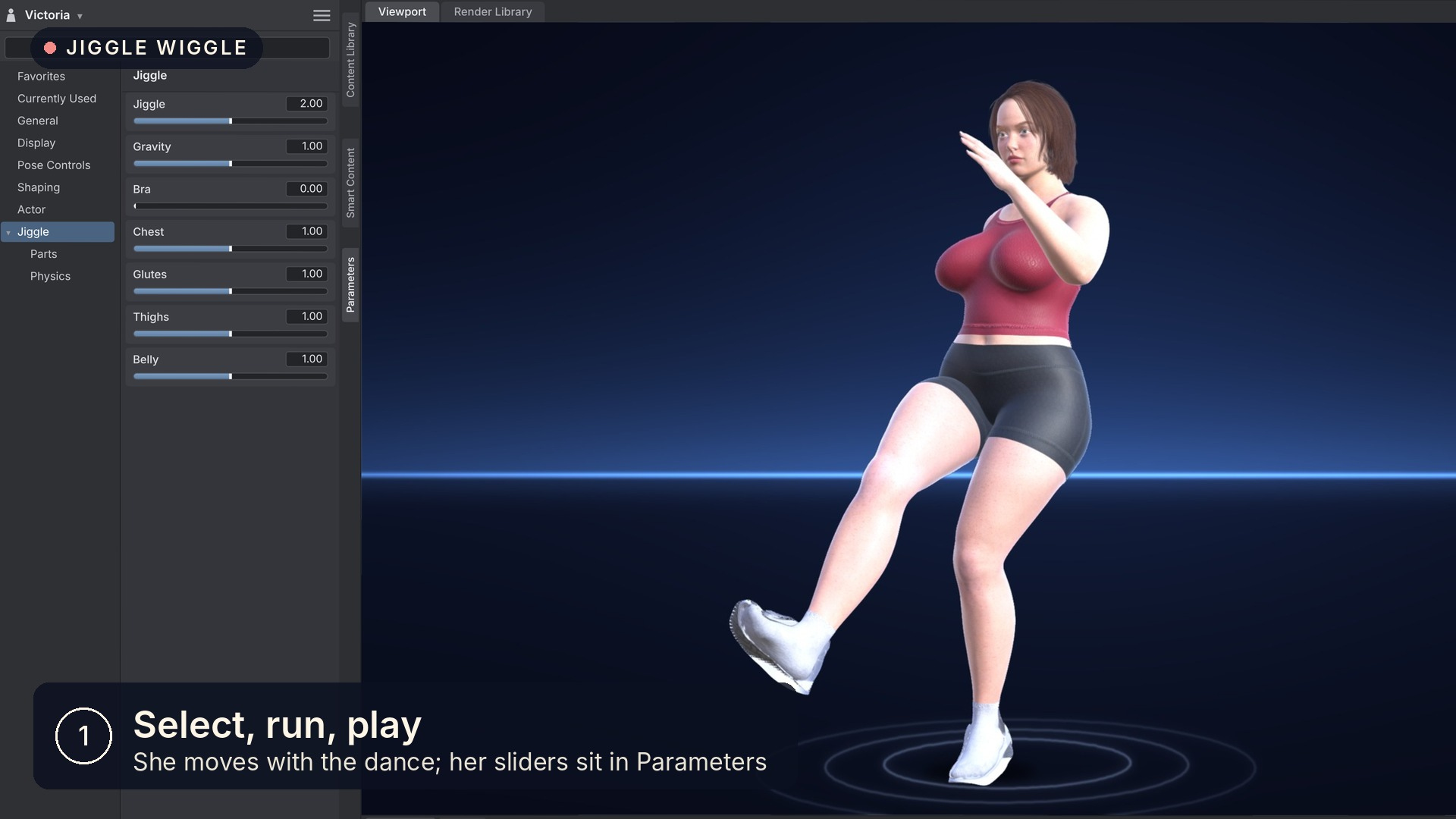
Select an animated figure, run Jiggle and press play: her chest, glutes, thighs and belly bounce and sway with her motion, and her tight clothes move with her.
I hate how many products out there are too expensive, not easy to use, and sometimes just don't work the way I want them to. You pay, you spend an afternoon setting things up, and the result still isn't what you had in mind. I wanted jiggle in my own animations without any of that, so I made Jiggle Wiggle the way I wish those tools worked: select her, run Jiggle, press play. That's it.
Her chest, glutes, thighs and belly bounce and sway with her motion, and her tight clothes (tops, shorts, leggings, bodysuits, bras and more) move with her. There is no window, and no simulation to wait for when you render: the jiggle is part of her animation, so it plays, scrubs and renders like any keyframes would. When you change her animation, the jiggle works itself out again on its own.
Everything is a slider in the Parameters pane, in the Jiggle group:
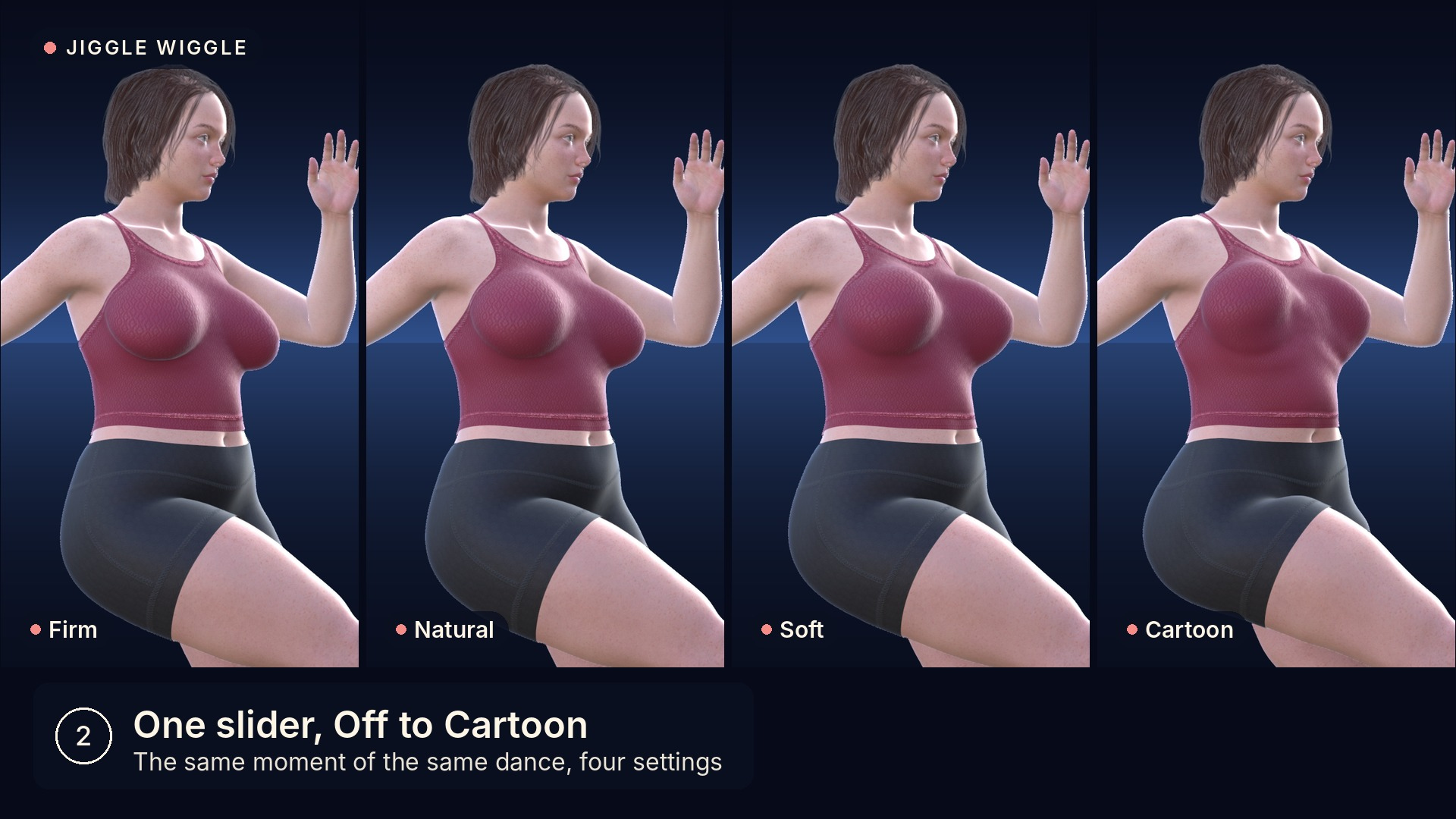
• Jiggle: one slider from Off through Firm, Natural and Soft, all the way to a Cartoon bounce.
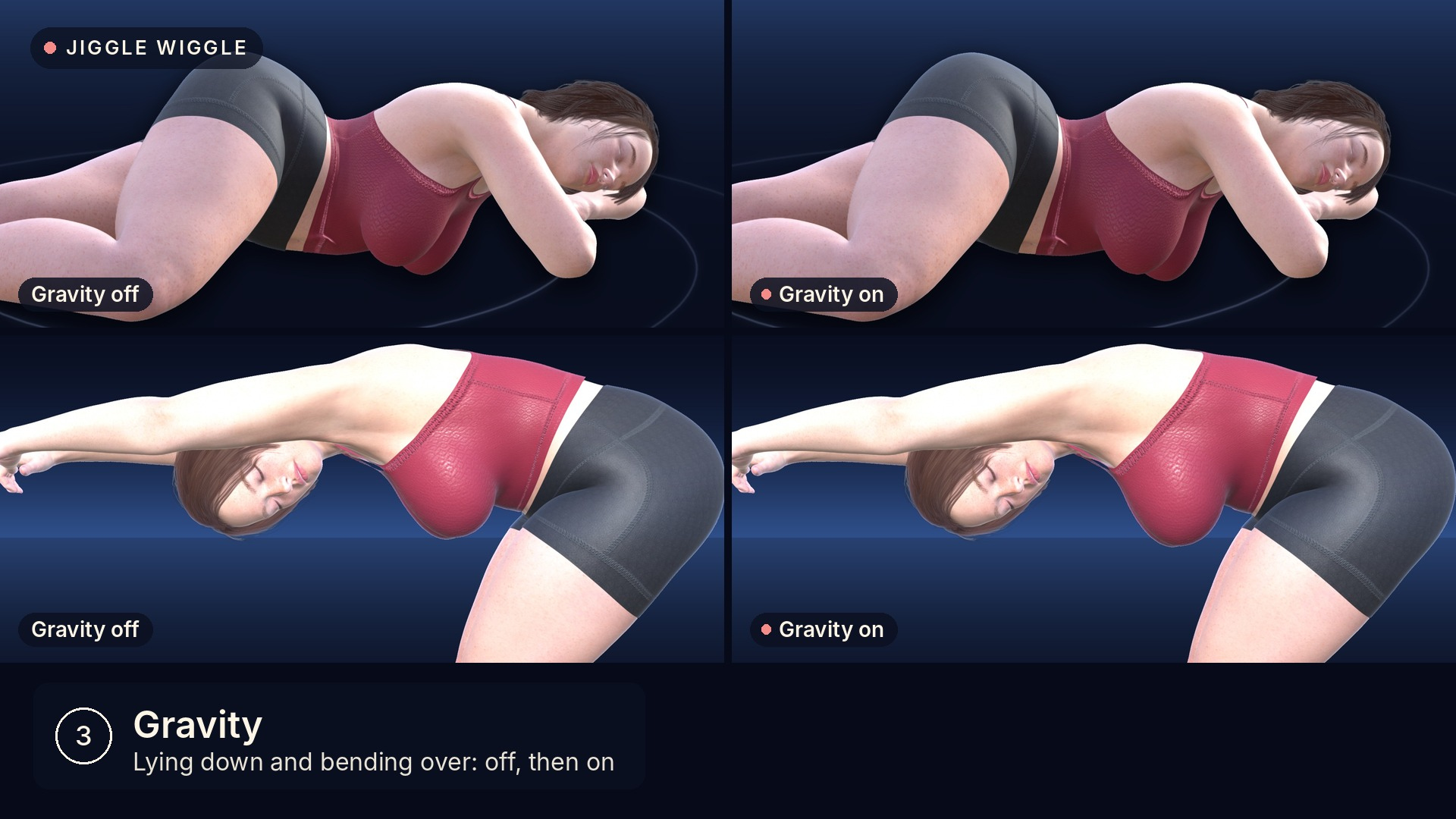
• Gravity: when she lies down, bends over or turns upside down, her chest, belly and glutes settle the way gravity pulls them.
• Bra: a supportive bra. The chest moves less, settles sooner and stays closer to her body.
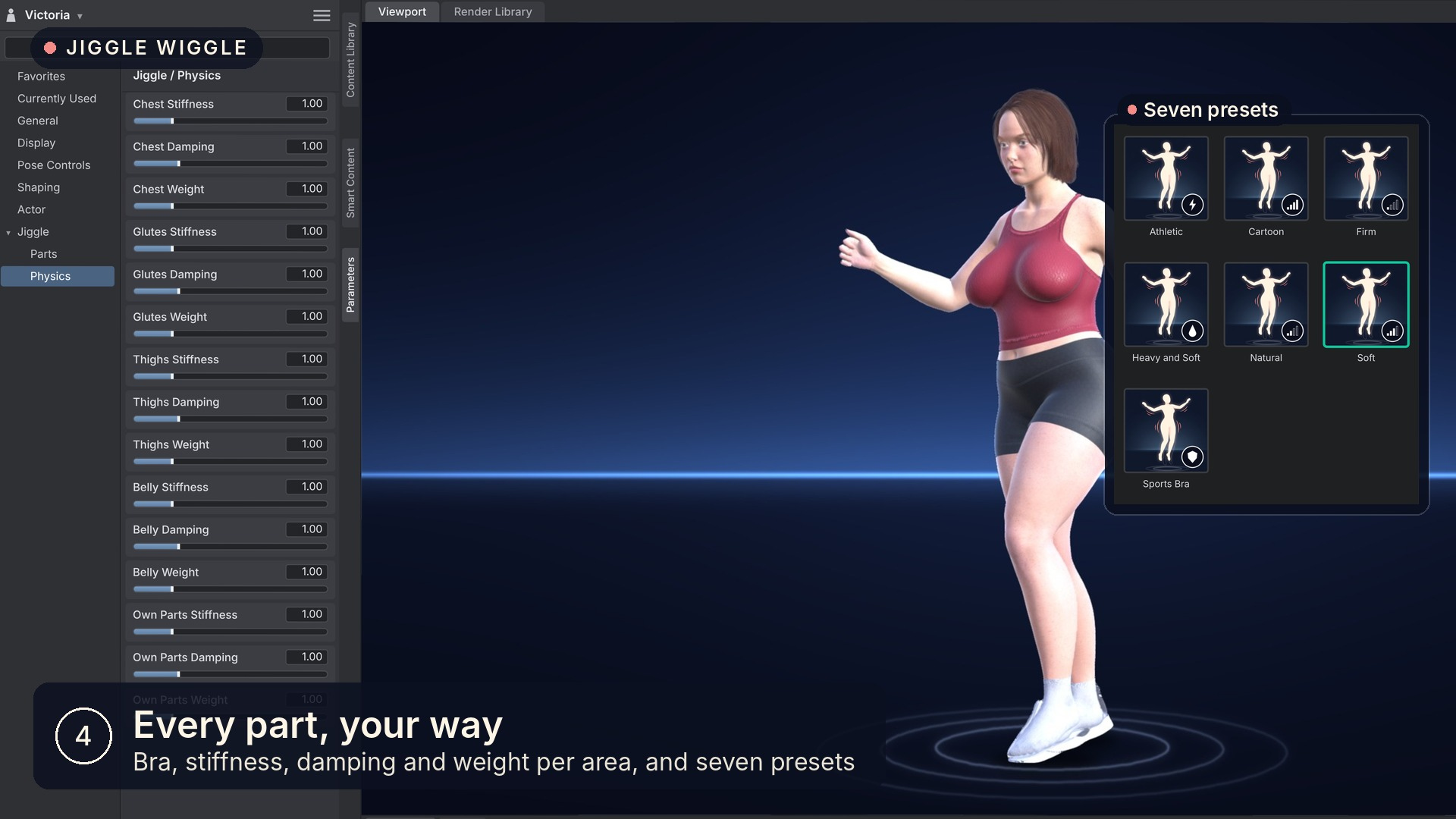
• Physics: Stiffness, Damping and Weight for each area, so the flesh can be tight and quick, or heavy and slow.
• Chest, Glutes, Thighs and Belly, and each part of them (bounce, sway, upper, lower, front, back, inner, outer), from 0 to 200%.
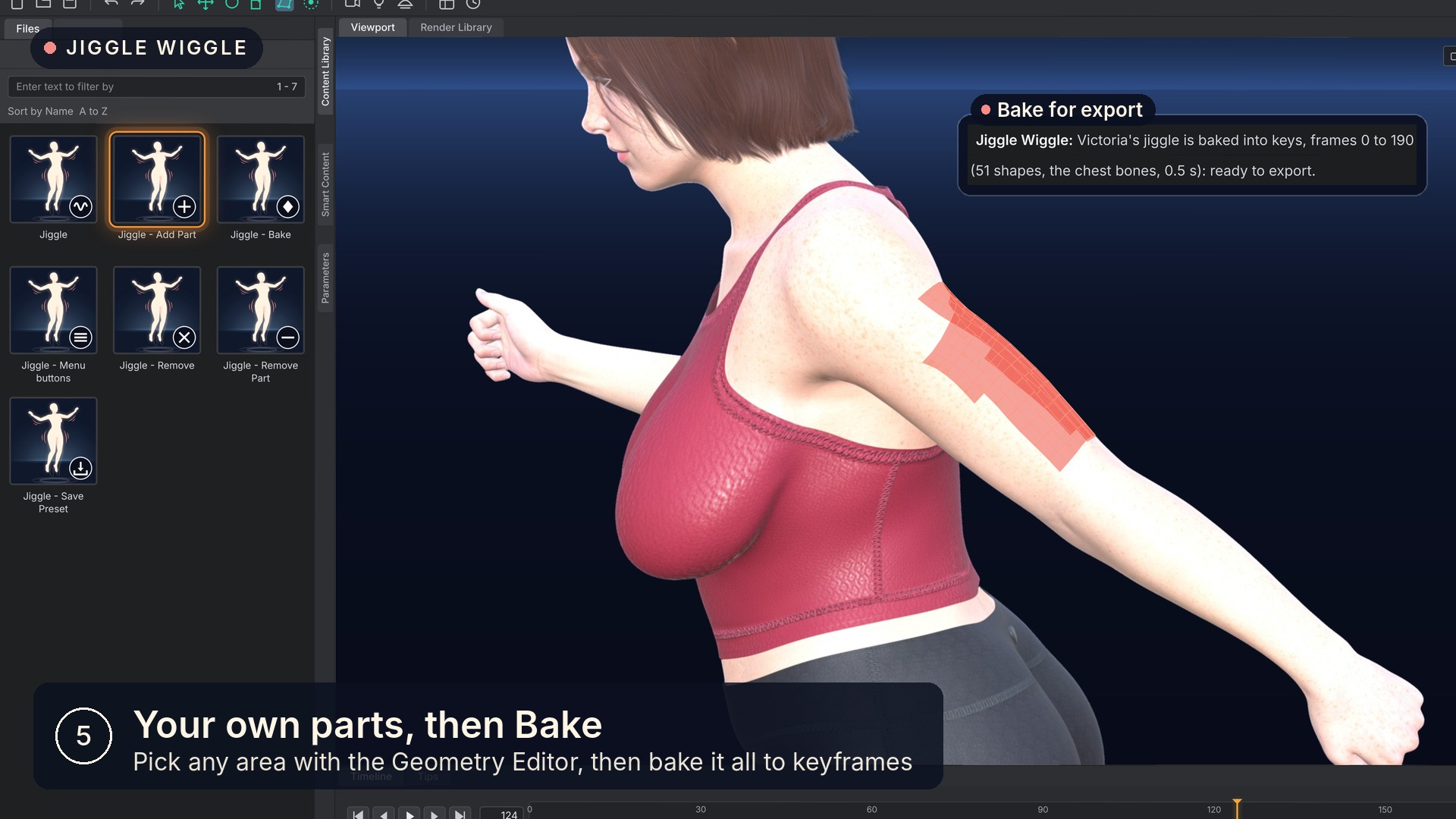
Any other part of her can jiggle too. Pick the polygons with Daz's Geometry Editor (the back of her arms, her calves, wherever you want), run Jiggle - Add Part, and that area gets its own slider.
It comes with seven ready-made presets (Firm, Natural, Soft, Cartoon, Sports Bra, Athletic, and Heavy and Soft), and Save Preset keeps your own settings as a preset you can double-click on any figure.
Taking your animation to Blender, Unreal or a game engine? Jiggle - Bake turns the jiggle into plain keyframes, so it goes along in an FBX export. I checked it in Godot myself, and the shapes came through exactly as they look in Daz. This should work with other engines as well.
Daz Studio 4.24 and Daz Studio 6
It works the same in both, with the same results. Daz 4.24 is slower: each update takes about a second there, and a fraction of a second in Daz 6. In Daz 4.24 it also works with aniMate2 aniblocks.
What you get
Seven scripts (Jiggle, Add Part, Remove Part, Bake, Save Preset, Remove, Menu buttons), seven presets and a README that explains every slider. Copy the Jiggle Wiggle folder into the Scripts folder of any content library and double-click in the Content Library. Menu buttons adds them to Daz's Scripts menu, for toolbar buttons or hotkeys.
Compatibility
Daz Studio 4.24 and Daz Studio 6. Made and tested on Windows.
Genesis 9, Genesis 8.1 and Genesis 8 female figures. Male figures are planned for a later version (currently in development).
It is not a collision simulation: hands, other figures and furniture do not press into her.
Good to know
At the strongest settings, a tight top can show a little skin in some frames of a render, because of the clothing's own smoothing in Daz. The README explains the one-click fix.
PS. I tested it for weeks in my own work inside of Daz 6 and Daz 4.24, on Genesis 9, 8.1 and 8, with dances, aniblocks and figures lying down. If you find any issues or bugs, or have suggestions, please let me know!
Select an animated figure, run Jiggle and press play: her chest, glutes, thighs and belly bounce and sway with her motion, and her tight clothes move with her.
I hate how many products out there are too expensive, not easy to use, and sometimes just don't work the way I want them to. You pay, you spend an afternoon setting things up, and the result still isn't what you had in mind. I wanted jiggle in my own animations without any of that, so I made Jiggle Wiggle the way I wish those tools worked: select her, run Jiggle, press play. That's it.
Her chest, glutes, thighs and belly bounce and sway with her motion, and her tight clothes (tops, shorts, leggings, bodysuits, bras and more) move with her. There is no window, and no simulation to wait for when you render: the jiggle is part of her animation, so it plays, scrubs and renders like any keyframes would. When you change her animation, the jiggle works itself out again on its own.
Everything is a slider in the Parameters pane, in the Jiggle group:
• Jiggle: one slider from Off through Firm, Natural and Soft, all the way to a Cartoon bounce.
• Gravity: when she lies down, bends over or turns upside down, her chest, belly and glutes settle the way gravity pulls them.
• Bra: a supportive bra. The chest moves less, settles sooner and stays closer to her body.
• Physics: Stiffness, Damping and Weight for each area, so the flesh can be tight and quick, or heavy and slow.
• Chest, Glutes, Thighs and Belly, and each part of them (bounce, sway, upper, lower, front, back, inner, outer), from 0 to 200%.
Any other part of her can jiggle too. Pick the polygons with Daz's Geometry Editor (the back of her arms, her calves, wherever you want), run Jiggle - Add Part, and that area gets its own slider.
It comes with seven ready-made presets (Firm, Natural, Soft, Cartoon, Sports Bra, Athletic, and Heavy and Soft), and Save Preset keeps your own settings as a preset you can double-click on any figure.
Taking your animation to Blender, Unreal or a game engine? Jiggle - Bake turns the jiggle into plain keyframes, so it goes along in an FBX export. I checked it in Godot myself, and the shapes came through exactly as they look in Daz. This should work with other engines as well.
Daz Studio 4.24 and Daz Studio 6
It works the same in both, with the same results. Daz 4.24 is slower: each update takes about a second there, and a fraction of a second in Daz 6. In Daz 4.24 it also works with aniMate2 aniblocks.
What you get
Seven scripts (Jiggle, Add Part, Remove Part, Bake, Save Preset, Remove, Menu buttons), seven presets and a README that explains every slider. Copy the Jiggle Wiggle folder into the Scripts folder of any content library and double-click in the Content Library. Menu buttons adds them to Daz's Scripts menu, for toolbar buttons or hotkeys.
Compatibility
Daz Studio 4.24 and Daz Studio 6. Made and tested on Windows.
Genesis 9, Genesis 8.1 and Genesis 8 female figures. Male figures are planned for a later version (currently in development).
It is not a collision simulation: hands, other figures and furniture do not press into her.
Good to know
At the strongest settings, a tight top can show a little skin in some frames of a render, because of the clothing's own smoothing in Daz. The README explains the one-click fix.
PS. I tested it for weeks in my own work inside of Daz 6 and Daz 4.24, on Genesis 9, 8.1 and 8, with dances, aniblocks and figures lying down. If you find any issues or bugs, or have suggestions, please let me know!
