


 Free 3D
 3D Print Models
 3D Scans
 Animation & MoCap
 Textures
 Materials
 Skin Reference
 2D Game Assets
 Sound Effects
 Brushes & Tools
 Reference Photos
 Stock Images
 HDR Images
 3ds Max
 Maya
Maya Blender
 Unreal Engine
 Unity
Unity ZBrush
 Cinema 4D
 LightWave
 Marmoset
 SketchUp
 FBX
FBX DAE
DAE DXF
DXF GLB
GLBPromo images vs. Customer images
 712
712Thread Activity
Luxe MuseSat, Feb 07
MimicMollySat, Feb 07
Pushee-RiFri, Jan 23
Pushee-RiFri, Jan 16
EltucoFri, Jan 16
the joker of spadesFri, Jan 16
EltucoFri, Jan 16
Luxe MuseThu, Jan 08

Sorry, I couldn't think of another title for this thread. Plus, it's early in the morning, my blood sugar is at 69, and I've only had one coffee so far 
What's it all about?
Recently, there have been two posts in quick succession in the gallery (not my pictures) in which customers questioned whether the product they had purchased was identical to the promotional pictures of the product, or whether lighting was a major factor in making a product look good. In both cases, it's about the lighting techniques used for the promos.
Personally, I wouldn't bother making promos with (let's call it diplomatically) sub-optimal lighting... but I do understand that beginners may not yet have internalized all the DAZ secrets of appealing lighting. It was no different for me when I seriously started using DAZ (see below).
My question (to customers but also to producers):
How could the above-mentioned irritations be eliminated (or at least reduced)? What assistance or ideas would you have as customers? I (and probably other producers as well) would be very grateful for your responses.
Here is an example of suboptimal lighting. Believe it or not, this was one of my first projects... and also one of my first promos

What's it all about?
Recently, there have been two posts in quick succession in the gallery (not my pictures) in which customers questioned whether the product they had purchased was identical to the promotional pictures of the product, or whether lighting was a major factor in making a product look good. In both cases, it's about the lighting techniques used for the promos.
Personally, I wouldn't bother making promos with (let's call it diplomatically) sub-optimal lighting... but I do understand that beginners may not yet have internalized all the DAZ secrets of appealing lighting. It was no different for me when I seriously started using DAZ (see below).
My question (to customers but also to producers):
How could the above-mentioned irritations be eliminated (or at least reduced)? What assistance or ideas would you have as customers? I (and probably other producers as well) would be very grateful for your responses.
Here is an example of suboptimal lighting. Believe it or not, this was one of my first projects... and also one of my first promos


! REPORT

Maybe a 'reference' lighting setup could be offered by Renderhub, which at least one image in the promos must use. That way customers could judge how each item in the store looks compared to other items, knowing that they have identical lighting. Not sure how a reference lighting could be duplicated across the various applications that people use to create models, but at least for DAZ it should be possible. Maybe a simple HDRI with even 360 degree lighting??
REPLY
! REPORT


MKDAWUSS
Karma: 83,603
Wed, Jan 07For some products, like environments, that wouldn't exactly work. Works fine for figures, outfits, and select props, though.
I Remember There used to be a Scene file that was used in the past that was based on a three light setup and it was packaged with the item so you could show this is the default item with the default scene lighting. But You can't cure the one button Make art Delusion some people have.
REPLY
! REPORT
Pushee-Ri
Karma: 52,873
Wed, Jan 07You're 100% right about that last sentence. But I'm not talking about art at the touch of a button, I'm talking about giving customers the certainty that they can reproduce promo images in one way or another (I have problems of this kind myself, see below).
If the 'must use' is considered too authoritarian, then alternatively there could be some sort of logo/badge which could be applied to promo images that use the 'reference lighting'. That gives the vendors a choice to include a promo with it, or not.
REPLY
! REPORT
Pushee-Ri
Karma: 52,873
Wed, Jan 07Hey, I already read your first post this morning. A standardized view with the same lighting conditions sounds good at first.
For example, I also have two models that, despite my efforts in terms of lighting, don't match what I saw in the promos. So I can understand frustrated customers.
What puts me off, though, is the MUST. I left Rendo years ago because some blockheads wanted to dictate to me what I had to promote and how I had to do it. Nope thanks guys - tough luck
For example, I also have two models that, despite my efforts in terms of lighting, don't match what I saw in the promos. So I can understand frustrated customers.
What puts me off, though, is the MUST. I left Rendo years ago because some blockheads wanted to dictate to me what I had to promote and how I had to do it. Nope thanks guys - tough luck
The famed "It didn't look like that in the promos!" problem that has hit everyone at least once.
For lighting - which can often make or break an image, BTW - it can certainly help to provide different looks, depending on what the asset is. Environments and scenes it might be a good idea to provide a tip or 2 in the event the area is too bright or dark by default.
As for the products themselves, it's really about showing off what it (or he/she, in the event of people) looks like and what it can do. Some of that can take time, and for producers, there's always the Next Product Up that severely cuts into that time.
There's a risk when it comes to buying something and the idea is to minimize that risk as much as possible.
Good thing products have the user images section which may or may not help sway a potential customer.
For lighting - which can often make or break an image, BTW - it can certainly help to provide different looks, depending on what the asset is. Environments and scenes it might be a good idea to provide a tip or 2 in the event the area is too bright or dark by default.
As for the products themselves, it's really about showing off what it (or he/she, in the event of people) looks like and what it can do. Some of that can take time, and for producers, there's always the Next Product Up that severely cuts into that time.
There's a risk when it comes to buying something and the idea is to minimize that risk as much as possible.
Good thing products have the user images section which may or may not help sway a potential customer.
REPLY
! REPORT
Pushee-Ri
Karma: 52,873
Wed, Jan 07The idea with the user images is great. Then products would (probably) be presented in completely different lighting/rendering situations than in the promos. I really like it and it could even be pushed a little further. I'll summarize the various ideas in a separate post later. This idea will definitely be included 

Rendering the character / clothing in different environments, situations or with different lighting could also work
Shows the different variety products can be in
Shows the different variety products can be in
REPLY
! REPORT
I have fallen foul of the 'great promos, not so great after I purchase'. Examples are :-
Skin with a pronounced color tint. Can look great in a promo with tinted lighting, not so good in other lighting.
Skin with burned in highlights. Can look great if the scene lights match the skin highlights, looks terrible in other lights.
Skin with a face that is drastically tone different to the rest of the body. Can happen with programs like 'Facegen' where the face is from a photo, but the rest of the body is nondescript.
Skin with a pronounced color tint. Can look great in a promo with tinted lighting, not so good in other lighting.
Skin with burned in highlights. Can look great if the scene lights match the skin highlights, looks terrible in other lights.
Skin with a face that is drastically tone different to the rest of the body. Can happen with programs like 'Facegen' where the face is from a photo, but the rest of the body is nondescript.
REPLY
! REPORT
Pushee-Ri
Karma: 52,873
Wed, Jan 07Yes, skins are indeed the main sticking point. Depending on the lighting, one (especially as an inexperienced user) may actually feel like you have a different model in front of you than the one you purchased. I sometimes even have problems with the same model (and the same skin) when it comes to lighting and facial expressions. A facial expression that looks good can quickly turn into something completely different as soon as you start " refining " the lighting.

the joker of spades
Karma: 35,886
Thu, Jan 08In renderings as in reality, light is everything, it's color and life. Unfortunately, when you start, you're in too much of a hurry. Often, you don't study or follow tutorials, and clearly, the renderings don't come to life. I keep reading that promos are misleading. In my opinion, however, many promos show how fantastic that character or model can be if you put in the effort and work correctly. It should be a push to improve, not a penalty for the producer. Unfortunately, people want everything right away... this is the real problem.
Pushee-Ri
Karma: 52,873
Thu, Jan 08@Joker;
You're absolutely right!
It's been a long and sometimes annoying journey for me too (and there's probably still a lot more to learn). Nevertheless, I would be delighted if the irritation and frustration could be reduced somewhat for some users/customers (including those in the " everything has to work immediately " camp).
You're absolutely right!
It's been a long and sometimes annoying journey for me too (and there's probably still a lot more to learn). Nevertheless, I would be delighted if the irritation and frustration could be reduced somewhat for some users/customers (including those in the " everything has to work immediately " camp).

Luxe Muse
Karma: 9,329
Thu, Jan 08This is an area in which I spend most of my time. I hand-draw my skins and generally go through four to six variations (my latest work in progress, Amelia, has gone through ten different skin variations [or I stopped counting, hi, hi, hi]). It is quite difficult to create something that I find good enough, mainly because I'm not the best, not even close.
But yest, of course, lighting and render settings always make a world of difference.
Here is the same skin, different lighting:


But yest, of course, lighting and render settings always make a world of difference.
Here is the same skin, different lighting:
Pushee-Ri
Karma: 52,873
Thu, Jan 08@Luxe
But the two still look like twins. With the perfectly imperfect lighting, you could even turn Julio Iglesias into Quasimodo (well... sort of
Well... I just checked and found the trigger for this thread in the gallery:
https://www.renderhub.com/gallery/83246/doesn-t-look-the-same-as-promo-at-all
Happy guesswork
But the two still look like twins. With the perfectly imperfect lighting, you could even turn Julio Iglesias into Quasimodo (well... sort of
Well... I just checked and found the trigger for this thread in the gallery:
https://www.renderhub.com/gallery/83246/doesn-t-look-the-same-as-promo-at-all
Happy guesswork
Luxe Muse
Karma: 9,329
Thu, Jan 08Impossible https://lh3.googleusercontent.com/g38UPaOBTXZd4kXxBOH2LstRyR4-2to4a8Lxqj_9FHfhGK5SDVaN5Q6Sl56wvZk0tcTnbWsvjz6QZh3L=w1217-h507-p-l90-rj

Maybe he was referring more to the shape and not the skin? Perhaps he hasn't realized that one of DAZ's greatest mysteries is that you might load a character and get 25 other morphs from poorly saved characters or tools dialed in without you realizing it! That's why I keep my base G8-G9 folders only with Luxe morphs in them
Maybe he was referring more to the shape and not the skin? Perhaps he hasn't realized that one of DAZ's greatest mysteries is that you might load a character and get 25 other morphs from poorly saved characters or tools dialed in without you realizing it! That's why I keep my base G8-G9 folders only with Luxe morphs in them

Pushee-Ri
Karma: 52,873
Thu, Jan 08@Luxe:
Here is a better one of Julio ... although the lighting is a little ... hum ... sub-optimal
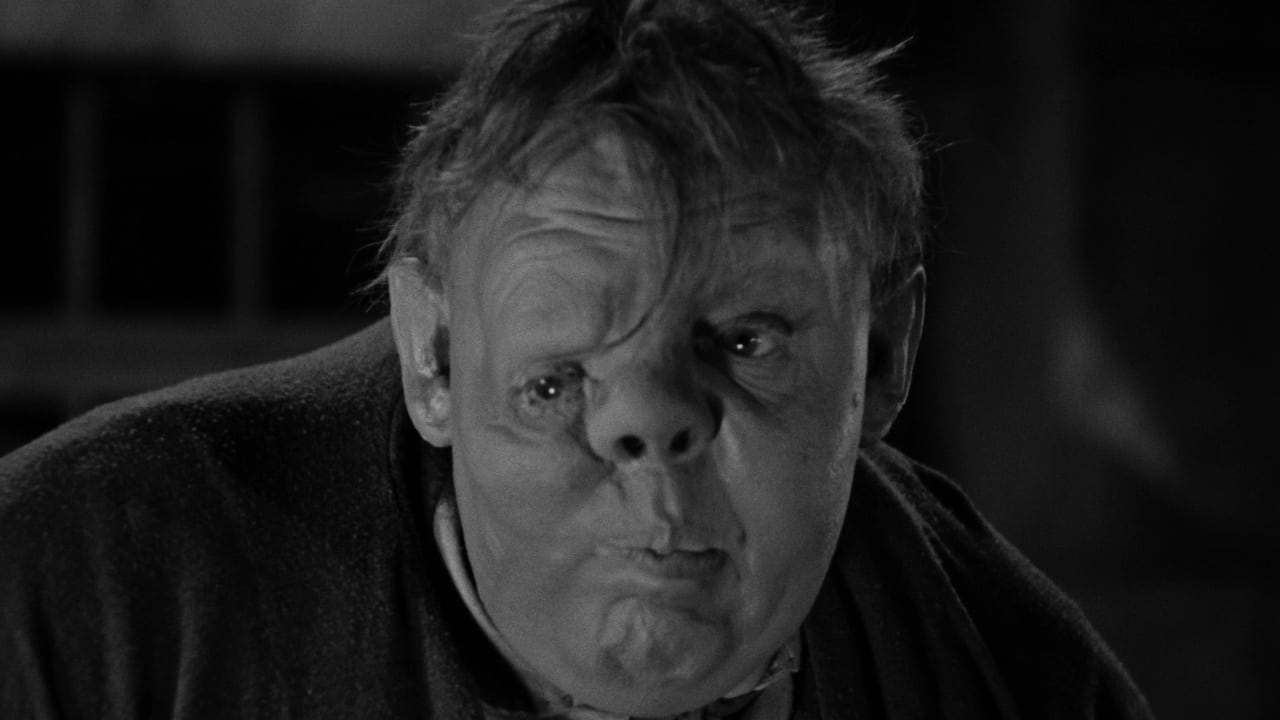
Here is a better one of Julio ... although the lighting is a little ... hum ... sub-optimal

Excessive
Karma: 7,854
Thu, Jan 08genuinely don't know what people expect when they pick the most unflattering lighting possible, it looks like the user rendered with no lights but a single super dim spot directly behind the camera and pointed straight on at her face. I got my camera headlamp in the ballpark of what they rendered but it took work.
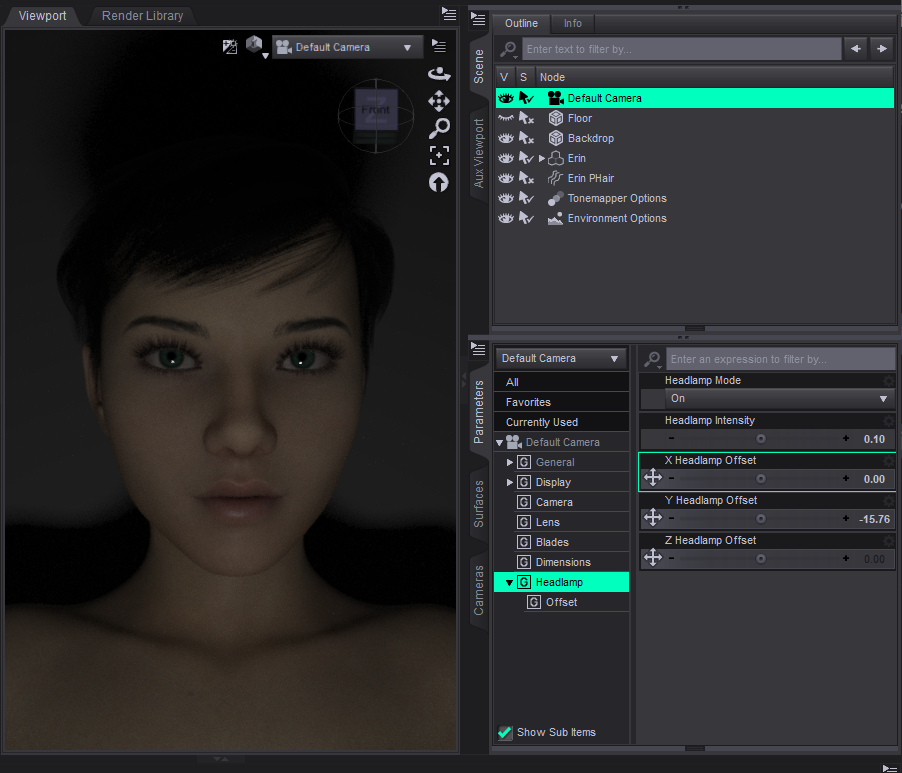
Excessive
Karma: 7,854
Thu, Jan 08obviously not your character, just picked one of mine that was sort of similar for lighting purposes
Luxe Muse
Karma: 9,329
Thu, Jan 08@Exessive Yes, I thought that might be the case, with just the headlamp turned on and somehow the expectation that it would come out identical. However, I believe there is more to it.
Another thought I had involves expressions. Sometimes we use an expression from a package that comes with a morph that has unusual deltas, and the face changes a little.
@Pushee-Ri I think for that picture you used cylindrical distortion in your camera settings.
Another thought I had involves expressions. Sometimes we use an expression from a package that comes with a morph that has unusual deltas, and the face changes a little.
@Pushee-Ri I think for that picture you used cylindrical distortion in your camera settings.
Excessive
Karma: 7,854
Thu, Jan 08.... really wish there was an edit/remove post feature anyway, it seemed like there was no reflection/specular for the eyes in their render despite the light being mostly straight on at the character
Luxe Muse
Karma: 9,329
Thu, Jan 08I see what you mean. The skin is reacting somewhat properly to the light in terms of specularity, but the eyes are just an opaque, flat texture.

Lighting with Daz, especially with the default settings of Dome are poor. Beginners do not dare or do not know how to modify them to improve lighting.
By example, choosing Dome Only already improves the overall lighting a bit, changing the value of Dome Orientation Y is a good way to start understanding how it works.
Back to my tread: Why are the default settings poor? https://www.renderhub.com/forum/14164/why-are-the-default-settings-poor
I do have some ideas but they will not please IT professionals, especially project managers.
*) They are being practical for them, and forget that there are clients who use on a daily basis (from personal experience during my professional career)
*) They move as quickly as possible to be the first on the market, which explains disconnected documentation from the final product, since it is written in parallel with software development by another team.
*) Often they are not users of the products they develop and do not realize the consequences of their choice.
We are lucky that RenderHub has made an opposite choice and are listening to us!
By example, choosing Dome Only already improves the overall lighting a bit, changing the value of Dome Orientation Y is a good way to start understanding how it works.
Back to my tread: Why are the default settings poor? https://www.renderhub.com/forum/14164/why-are-the-default-settings-poor
I do have some ideas but they will not please IT professionals, especially project managers.
*) They are being practical for them, and forget that there are clients who use on a daily basis (from personal experience during my professional career)
*) They move as quickly as possible to be the first on the market, which explains disconnected documentation from the final product, since it is written in parallel with software development by another team.
*) Often they are not users of the products they develop and do not realize the consequences of their choice.
We are lucky that RenderHub has made an opposite choice and are listening to us!
REPLY
! REPORT
Honestly, I think a way to give everyone an idea of what to expect is to put the figure, prop, environment, whatever, in a plain view screen environment and render with no lighting, environment, material changes, etc. For human figures, obviously add clothing of some kind, but just show case what the product looks like "fresh out of the box" without any enhancements. Still do the normal promos/glamour shots to show what it can be but also give what it is. I think what aglassdarkly does with the grey mode images of their characters in a standard plain environment and neutral pose being among their promo images is a prime example of this put into effect.
REPLY
! REPORT
Excessive
Karma: 7,854
Wed, Jan 07yeah imo promo images should mostly stick to "if I gave you a copy of my scene file, you could hit Render and you would get the same output." users aren't buying your postwork technique.
For myself, I give out my render environment and lighting tools, although I don't publish the HDRI lights myself - because I didn't make them, they are already public:
https://www.renderhub.com/intheflesh/itf-studio-hdri-pack-01
the HDRI images that are used in that set are themselves from another public source, I originally got them from the same source and set them up for myself and then realized, oh heck that's what ITF used lol
https://www.renderhub.com/intheflesh/itf-studio-hdri-pack-01
the HDRI images that are used in that set are themselves from another public source, I originally got them from the same source and set them up for myself and then realized, oh heck that's what ITF used lol
REPLY
! REPORT
Luxe Muse
Karma: 9,329
Thu, Jan 08This is a good idea. I will include my environments for the shots too (render settings, and so on).
Excessive
Karma: 7,854
Thu, Jan 08I feel like this is probably the thing that bothered that particular user, yeah

For some time now, I've been using the same lighting for my promotional images: Dome Only and Dome Orientation Y = 45. Sometimes I'll adjust the Film ISO setting (Tonemapper Options) to darken the scene when the highlights are too blown out.
I agree to include Tonemapper Options and Environment Options in my packages.
I agree to include Tonemapper Options and Environment Options in my packages.
REPLY
! REPORT
Pushee-Ri
Karma: 52,873
Thu, Jan 08Yep - I've already added lighting scenes to the package for a few projects. For clothing projects like this one
https://www.renderhub.com/gallery/83460/bat-8-wip
however, it's not just the lighting, but also the pose, the hair, the model's skin, etc. If one of these elements is missing, the lighting scene makes little sense.
I think I'll make a freebie with a few scenes (lighting) soon and then refer to it in projects.
https://www.renderhub.com/gallery/83460/bat-8-wip
however, it's not just the lighting, but also the pose, the hair, the model's skin, etc. If one of these elements is missing, the lighting scene makes little sense.
I think I'll make a freebie with a few scenes (lighting) soon and then refer to it in projects.
DoroThee237
Karma: 19,699
Thu, Jan 08I do think it's a good solution to avoid customer disappointment.
We all know that nothing is perfect, as the fox says in The Little Prince (Antoine de Saint-Exupéry).
But a starter kit of lights for beginners and impatient users is an excellent idea.
We all know that nothing is perfect, as the fox says in The Little Prince (Antoine de Saint-Exupéry).
But a starter kit of lights for beginners and impatient users is an excellent idea.

i think some vendors might be AI enhancing their promos a bit. Dont know for sure but I would not be surprised if it is happening.
REPLY
! REPORT
Tenserknot
Karma: 11,059
Thu, Jan 08but in 3D, a great lighting setup swill turn an average product into an exceptional render. I know this for a fact, cause I do it all the time.
Excessive
Karma: 7,854
Thu, Jan 08yeah it can also take a great product and make it look .... significantly less great
My perspective might be a little different, but the point Pushee is making is quite valid. I've purchased DAZ assets that look far different from the promotional images, particularly with skin tones on Genesis-based characters. My 'problem' when setting up promotional images with my own releases is that the models are deliberately set up so users can tweak the textures to taste and light and depend quite on doing so; images of the base models in simple light would be rather unappealing and unrepresentative of the models' potential. My solution is to show the base model in decent studio light or a sharp HDRI paired with a model using the easiest of adjustments, and other images with enhanced textures in various light settings.
Where I might be guilty of misrepresenting is in using a refined model in the thumbnail or lead image. This is explained in the text, along with what was done to the model in each image. Again, the textures on my models are set up for adjusting in Surfaces.
The key is in the text attached to the product - explaining any enhancements or adjustments in promo images beyond what users will receive when loading the product into a scene. AI enhancements beyond simple clarity tools should always be announced. For characters, simple studio light setups like those offered in the day by Most Digital Creations with each character provide great representative light that should more than suffice for the thumbnail.
As most of the folks in this thread agree - lighting is absolutely key.
Where I might be guilty of misrepresenting is in using a refined model in the thumbnail or lead image. This is explained in the text, along with what was done to the model in each image. Again, the textures on my models are set up for adjusting in Surfaces.
The key is in the text attached to the product - explaining any enhancements or adjustments in promo images beyond what users will receive when loading the product into a scene. AI enhancements beyond simple clarity tools should always be announced. For characters, simple studio light setups like those offered in the day by Most Digital Creations with each character provide great representative light that should more than suffice for the thumbnail.
As most of the folks in this thread agree - lighting is absolutely key.
REPLY
! REPORT
the joker of spades
Karma: 35,886
Fri, Jan 16I can assure you that in no promo is it allowed to change materials or the skin of the characters, nor modify shapes or appearance, at least for the ones I made and those made by xtreame3d..
Eltuco
Karma: 15,484
Fri, Jan 16The images with altered textures were specified in the product description, with the applied textures cited as examples of what users could achieve if they wished to follow that path. I don't believe anyone has been deceived or confused about this to date. If so, that was most certainly not the intention. These products are posted as free for anyone to enjoy and thus present no financial risk to download; perhaps that and the rather limited genre of the weapons have something to do with it.
Initially, my intent was to post the 'altered' images in the 'User Artwork' gallery below the promo images, but it wouldn't allow it. Many of these images show many shape tweaks, texture switches, etc. I've posted a few on some great product pages myself. I tried this again a few moments ago on one of my own and was routed to the gallery submissions page. I didn't pursue it further to see if the image would show up in the 'User Artwork' section on the product page. One way or the other, it will get sorted.
Initially, my intent was to post the 'altered' images in the 'User Artwork' gallery below the promo images, but it wouldn't allow it. Many of these images show many shape tweaks, texture switches, etc. I've posted a few on some great product pages myself. I tried this again a few moments ago on one of my own and was routed to the gallery submissions page. I didn't pursue it further to see if the image would show up in the 'User Artwork' section on the product page. One way or the other, it will get sorted.
Pushee-Ri
Karma: 52,873
Fri, Jan 16@Eltuco:
Hi Eltuco, thank you very much for your contribution
You are absolutely right: especially with models/skin, promoting with sub-optimal (aka standard) lighting would be rather counterproductive... unless you don't want to sell anything Therefore, I think an approach like yours (with lots of additional information) is very good.
Hi Eltuco, thank you very much for your contribution
You are absolutely right: especially with models/skin, promoting with sub-optimal (aka standard) lighting would be rather counterproductive... unless you don't want to sell anything
Therefore, I think an approach like yours (with lots of additional information) is very good.So, dear folks, now I've fallen into the promo trap myself once again. I can see that I have the model I purchased in front of me... but even with the best lighting and various 3D skins, I can't manage to reproduce the character (the soul) seen in the promos.
This is because the model was rendered with a very specific skin (and apparently also created with this skin). You probably know this yourself: a different skin always changes the character (the soul) of a model. And if a model was also created based on a very specific skin, it cannot be used with any other skin.
So I can certainly understand and sympathize with customers' occasional anger when a model doesn't look like they do in the promos - whether it's just because of the lighting or the skin problem I just described.
This is because the model was rendered with a very specific skin (and apparently also created with this skin). You probably know this yourself: a different skin always changes the character (the soul) of a model. And if a model was also created based on a very specific skin, it cannot be used with any other skin.
So I can certainly understand and sympathize with customers' occasional anger when a model doesn't look like they do in the promos - whether it's just because of the lighting or the skin problem I just described.
REPLY
! REPORT

As a customer, the worst promo images tend to be the darker on characters where they're standing. It seems deceptive because it always covers up the reddish legs I see on some models. But I think that's just a general iray problem, and the better but uncommon promos are the characters sitting on the floor. The body is on the same level as the skin tone can be seen more easily. (Your example is what I mean about the lighting. The pose is great.)
Other ones I hate are the overly artistic ones that use very colorful lights. I think these tend to be from a certain promo artist that people hire. DAZ is even hiring them. The light colors "mix" with the outfits they're trying to showcase. Sometimes these pics focus more on the characters (which are customs) than showing off the outfit.
Finally, the weird "vintage" sepia promos. They also tint the assets. RareStone, FeSoul, PAMAWO from the DAZ3D store did this a lot.
The gray lighting setup you use for your outfits is decent. But, you tend to render from the shadowy side. It doesn't bother me much because you do clothes.
Other ones I hate are the overly artistic ones that use very colorful lights. I think these tend to be from a certain promo artist that people hire. DAZ is even hiring them. The light colors "mix" with the outfits they're trying to showcase. Sometimes these pics focus more on the characters (which are customs) than showing off the outfit.
Finally, the weird "vintage" sepia promos. They also tint the assets. RareStone, FeSoul, PAMAWO from the DAZ3D store did this a lot.
The gray lighting setup you use for your outfits is decent. But, you tend to render from the shadowy side. It doesn't bother me much because you do clothes.
REPLY
! REPORT
