


 Free 3D
 3D Print Models
 3D Scans
 Animation & MoCap
 Textures
 Materials
 Skin Reference
 2D Game Assets
 Sound Effects
 Brushes & Tools
 Reference Photos
 Stock Images
 HDR Images
 3ds Max
 Maya
 Blender
 Unreal Engine
 Unity
 ZBrush
 Cinema 4D
 LightWave
 Marmoset
 SketchUp
 FBX
 DAE
 DXF
 GLB
WIP: A Messy Ritual Mask for DAZ
 173

True 3D pros will probably chuckle at my technique. Just think of it as free therapy. A smile a day keeps the doctor away. But since I'm not just describing my technique-I'm also sharing my creative approach-there might be something here for some of you after all.
This product is said to be a ritual mask crafted from metal.
To do this, I first created a face (4 vertices) in Blender, then subdivided it until I had about 1K vertices, and finally used the ShrinkWrap modifier to roughly fit it to the face of the base G9 model. I've gotten into the habit of using ShrinkWrap multiple times. So I apply the modifier, then sculpt in mirror mode, then use ShrinkWrap again, and so on, until the vertices are where I want them.
Once I was done, I deleted the right half of the Verices and used the Mirror Modifier to refine the details (sculpting, edge loops, etc.). After applying the Mirror Modifier, I finished off the first part by applying the Solidify Modifier to give the mask volume and mass. So, nothing new so far.
I'm not a fan of the symmetry that's practically built into the creation of 3D objects. Personally, I find it boring. The same goes for textures, high-gloss finishes, and so on. More on that later.
To break the symmetry, I first shifted just a few axes before adding bumps and dents. I did this using non-mirrored sculpting. Finally, I incorporated the crack in the upper left as part of the mesh. This not only gave it an asymmetrical look, but also allowed me to indulge my love for the irregular and worn-out.
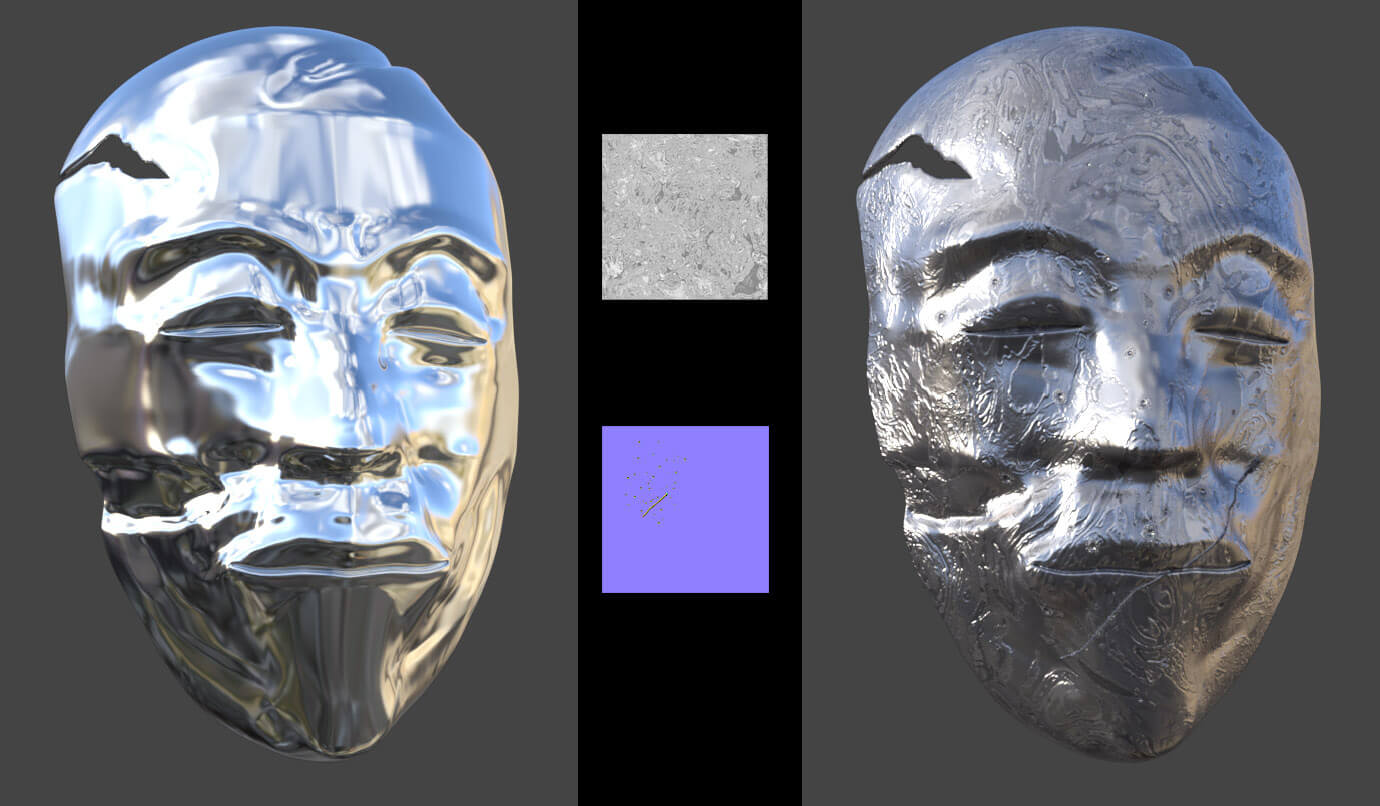
Once the mesh was finished, I moved on to the texture maps. Below on the left, you can see the mask with a simple metal shader. On the right, just a few maps are enough to finally give the 3D model the desired sense of disorder. At the top center is the map I used for the base color and bump, and below that are the normals for the smaller dents and the scratch. By the way, I prefer to use grayscale maps instead of RGB maps because they save a lot of MBs while offering nearly the same quality.
The mask isn't quite finished yet, though, because I still need to add a little more clutter and wear and tear. For example, patina, stains, splatters, etc. Since I don't like to incorporate everything into the maps on a single layer-I prefer to work with separate layers-the next step will be to add one or two GeoShells.
To be continued ...
This product is said to be a ritual mask crafted from metal.
To do this, I first created a face (4 vertices) in Blender, then subdivided it until I had about 1K vertices, and finally used the ShrinkWrap modifier to roughly fit it to the face of the base G9 model. I've gotten into the habit of using ShrinkWrap multiple times. So I apply the modifier, then sculpt in mirror mode, then use ShrinkWrap again, and so on, until the vertices are where I want them.
Once I was done, I deleted the right half of the Verices and used the Mirror Modifier to refine the details (sculpting, edge loops, etc.). After applying the Mirror Modifier, I finished off the first part by applying the Solidify Modifier to give the mask volume and mass. So, nothing new so far.
I'm not a fan of the symmetry that's practically built into the creation of 3D objects. Personally, I find it boring. The same goes for textures, high-gloss finishes, and so on. More on that later.
To break the symmetry, I first shifted just a few axes before adding bumps and dents. I did this using non-mirrored sculpting. Finally, I incorporated the crack in the upper left as part of the mesh. This not only gave it an asymmetrical look, but also allowed me to indulge my love for the irregular and worn-out.
Once the mesh was finished, I moved on to the texture maps. Below on the left, you can see the mask with a simple metal shader. On the right, just a few maps are enough to finally give the 3D model the desired sense of disorder. At the top center is the map I used for the base color and bump, and below that are the normals for the smaller dents and the scratch. By the way, I prefer to use grayscale maps instead of RGB maps because they save a lot of MBs while offering nearly the same quality.
The mask isn't quite finished yet, though, because I still need to add a little more clutter and wear and tear. For example, patina, stains, splatters, etc. Since I don't like to incorporate everything into the maps on a single layer-I prefer to work with separate layers-the next step will be to add one or two GeoShells.
To be continued ...


! REPORT
A bone. A bone - a kingdom for a bone!
DAZ persistently refused to assign a GeoShell to my mask object and then save the whole thing as a wearable (RFN) for G9. So first I had to figure out how to create a bone. It's actually not that hard when it's just a single bone that isn't supposed to have any effect.
I don't want to bore you with the details. This is a work in progress, not a tutorial. If you're still interested, feel free to reach out.
Now that we've dealt with that bone-which was really unnecessary-we can move on to the GeoShells. Things are about to get interesting again. I promise!
To be continued ...
DAZ persistently refused to assign a GeoShell to my mask object and then save the whole thing as a wearable (RFN) for G9. So first I had to figure out how to create a bone. It's actually not that hard when it's just a single bone that isn't supposed to have any effect.
I don't want to bore you with the details. This is a work in progress, not a tutorial. If you're still interested, feel free to reach out.
Now that we've dealt with that bone-which was really unnecessary-we can move on to the GeoShells. Things are about to get interesting again. I promise!
To be continued ...
REPLY
! REPORT