


 Free 3D
 3D Print Models
 3D Scans
 Animation & MoCap
 Textures
 Materials
 Skin Reference
 2D Game Assets
 Sound Effects
 Brushes & Tools
 Reference Photos
 Stock Images
 HDR Images
 3ds Max
 Maya
 Blender
 Unreal Engine
 Unity
 ZBrush
 Cinema 4D
 LightWave
 Marmoset
 SketchUp
 FBX
 DAE
 DXF
 GLB
DAZ: what are your experiences with / thoughts on Decals?
 95

Among the most devilish DAZ inventions are (in addition to ruins.hdr and inflatable breasts) Decals: mulishly things with no script- or other support (i.e., you have to set them up manually), which only work with Iray (and only in Iray Preview Mode), take longer to render, and (even after parenting) don't stay in the same place every time a model is repositioned ...
On the other hand, Decals have two major advantages: they are generation-independent (meaning they work with all versions of Genesis) and they can be projected onto virtually any 3D object - regardless of its UVs. In other words, the same Decal can be used for clothing as well as for models or other objects.
Since I have some ideas for Decal products but am also aware of the challenges involved in working with Decals, I'd like to ask for your opinions first before I get started on the products (and, inevitably, the tutorials). My ideas mainly focus on Decal projection onto poseable models and clothes (i.e., not 'simpler' applications like logos on bottles or other uses like that).
So I'd appreciate it if you could tell me about your experiences with Decals or explain why you do (or don't) use them.
On the other hand, Decals have two major advantages: they are generation-independent (meaning they work with all versions of Genesis) and they can be projected onto virtually any 3D object - regardless of its UVs. In other words, the same Decal can be used for clothing as well as for models or other objects.
Since I have some ideas for Decal products but am also aware of the challenges involved in working with Decals, I'd like to ask for your opinions first before I get started on the products (and, inevitably, the tutorials). My ideas mainly focus on Decal projection onto poseable models and clothes (i.e., not 'simpler' applications like logos on bottles or other uses like that).
So I'd appreciate it if you could tell me about your experiences with Decals or explain why you do (or don't) use them.
! REPORT

I used them for the first time (I'm fairly certain) in these images:
https://www.renderhub.com/gallery/102760/a-gentleman-never-tells
https://www.renderhub.com/gallery/103702/the-newlyweds
They are a little tricky to use. I do have more that I have not used yet. But I do like them.
https://www.renderhub.com/gallery/102760/a-gentleman-never-tells
https://www.renderhub.com/gallery/103702/the-newlyweds
They are a little tricky to use. I do have more that I have not used yet. But I do like them.
REPLY
! REPORT
Camouflage
Karma: 2,352
Thu, Nov 05Thank you very much for your feedback and the examples!
In addition to being a bit fiddly to use (which becomes even more so with seated or reclining models), the material presets can quickly make a product look worse. In one of your examples, you mention blood spatters, for instance. If these spatters are semi-transparent and don't match other skin tones, they usually look really crappy on dark/darker skin. While this is also true for GeoShells and L.I.E., it's even more annoying with Decals, since you have to fiddle around to position them before you even realize the problem.
Personally, I like Decals and the possibilities they offer, too. That said, I don't mind putting in a little extra fiddly work if it results in a good picture. So I'm really happy to hear your positive feedback.
In addition to being a bit fiddly to use (which becomes even more so with seated or reclining models), the material presets can quickly make a product look worse. In one of your examples, you mention blood spatters, for instance. If these spatters are semi-transparent and don't match other skin tones, they usually look really crappy on dark/darker skin. While this is also true for GeoShells and L.I.E., it's even more annoying with Decals, since you have to fiddle around to position them before you even realize the problem.
Personally, I like Decals and the possibilities they offer, too. That said, I don't mind putting in a little extra fiddly work if it results in a good picture. So I'm really happy to hear your positive feedback.
I've been wondering if I would have known a few years ago what this thread is even about. The answer is: No! So here's a brief digression
What exactly are DAZ Studio Decals?
With Decals -or rather, Iray Decal Nodes - you can project graphics and textures, such as logos, onto almost any object without having to change the materials of the projection surface. The only exception is GeoShells. There are many possible uses for Decals, such as
TATTOOS
When it comes to tattoos, all the advantages of Decals really shine. While Shell or LIE tattoos are not only tied to a specific location but are also subject to UV mapping, you can not only position Decals wherever you want but also use the same Decal for all 3D objects in a scene: Genesis 8, Genesis 9, clothes, the dragon from the props, or even just a plane or a sphere.
FOOTPRINTS / PAW PRINTS
A freshly cleaned, boring tile floor only becomes interesting when it has dirty footprints or paw prints on it. With Decals, that's easy to do.
CONTAMINANTS / DUST / DIRT
Imagine a post-apocalyptic scene with characters who've just taken a shower, wearing freshly laundered clothes, sitting in cars that have just come out of the car wash, and buildings that were renovated 10 minutes before rendering. Sounds pretty unrealistic! With Decals, you can add a layer of grime to everything and everyone in your scene: people, clothing, vehicles, buildings, and so on.
And last but not least
GORE
Whether it's blood spatter, wounds, gunshot wounds, or stab wounds - Decals can handle it all. And everything can be freely positioned and applied to any 3D object in your scene.
If you're wondering why there aren't countless decal products out there: they do exist (try searching for DAZ Studio Decals, for example). It's simply the relatively difficult and tricky process of using them that deters many users.
What exactly are DAZ Studio Decals?
With Decals -or rather, Iray Decal Nodes - you can project graphics and textures, such as logos, onto almost any object without having to change the materials of the projection surface. The only exception is GeoShells. There are many possible uses for Decals, such as
TATTOOS
When it comes to tattoos, all the advantages of Decals really shine. While Shell or LIE tattoos are not only tied to a specific location but are also subject to UV mapping, you can not only position Decals wherever you want but also use the same Decal for all 3D objects in a scene: Genesis 8, Genesis 9, clothes, the dragon from the props, or even just a plane or a sphere.
FOOTPRINTS / PAW PRINTS
A freshly cleaned, boring tile floor only becomes interesting when it has dirty footprints or paw prints on it. With Decals, that's easy to do.
CONTAMINANTS / DUST / DIRT
Imagine a post-apocalyptic scene with characters who've just taken a shower, wearing freshly laundered clothes, sitting in cars that have just come out of the car wash, and buildings that were renovated 10 minutes before rendering. Sounds pretty unrealistic! With Decals, you can add a layer of grime to everything and everyone in your scene: people, clothing, vehicles, buildings, and so on.
And last but not least
GORE
Whether it's blood spatter, wounds, gunshot wounds, or stab wounds - Decals can handle it all. And everything can be freely positioned and applied to any 3D object in your scene.
If you're wondering why there aren't countless decal products out there: they do exist (try searching for DAZ Studio Decals, for example). It's simply the relatively difficult and tricky process of using them that deters many users.
REPLY
! REPORT
A really quick example
I used the material presets from my product Black Gold Hands, turned the dust background from the product into a cutout and used in on the Decal. Some fiddly position, scaling and rotating of the Decal later I got this result:
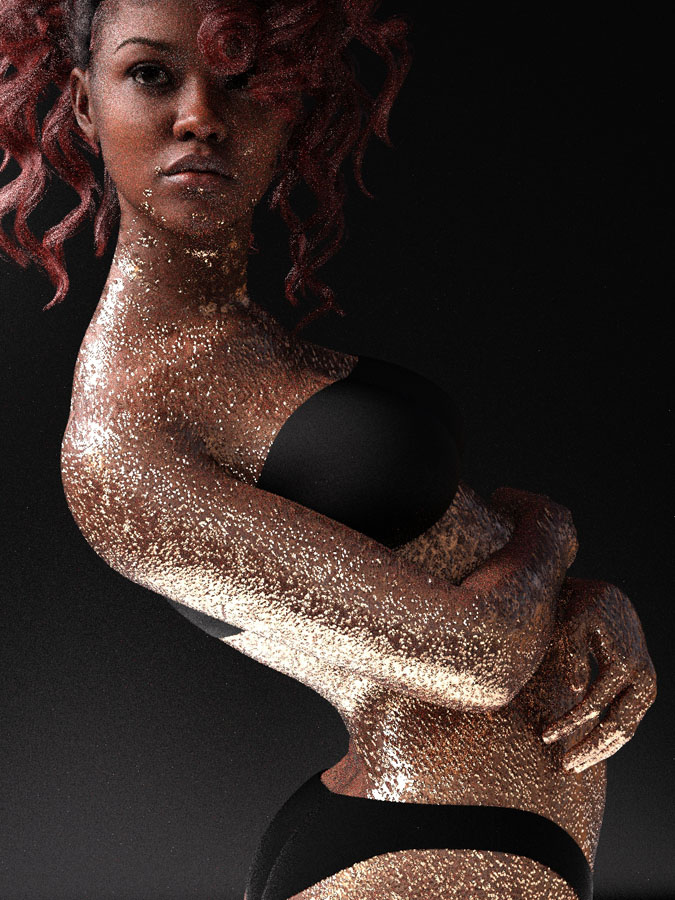
I used the material presets from my product Black Gold Hands, turned the dust background from the product into a cutout and used in on the Decal. Some fiddly position, scaling and rotating of the Decal later I got this result:
REPLY
! REPORT
Camouflage
Karma: 2,352
Fri, Nov 06Original render:
https://www.renderhub.com/gallery/106191/decal-example
https://www.renderhub.com/gallery/106191/decal-example