Free 3D
 3D Print Models
 3D Scans
 Animation & MoCap
 Textures
 Materials
 Skin Reference
 2D Game Assets
 Sound Effects
 Brushes & Tools
 Reference Photos
 Stock Images
 HDR Images
 3ds Max
 Maya
Maya Blender
 Unreal Engine
 Unity
Unity ZBrush
 Cinema 4D
 LightWave
 Marmoset
 SketchUp
 FBX
FBX DAE
DAE DXF
DXF GLB
GLB

! REPORT

Vidya
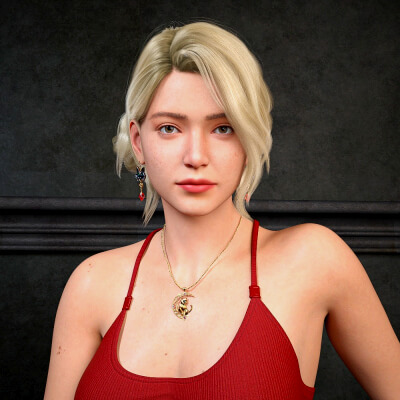
3D Render by Rozsakert67Made in Daz Studio, no post-production.

WOW!!!! I love it! In the picture, every single element - the model, the hairstyle, the jewelry, the makeup, the camera angle, and the facial expression - comes together to form a wonderful, very appealing whole.
Would you like to feature this beautiful image on the product pages as well? I think WinSan3D would appreciate that too. If you're not sure how to do it, I'd be happy to explain
Thank you so much for using and mentioning my projects
Would you like to feature this beautiful image on the product pages as well? I think WinSan3D would appreciate that too. If you're not sure how to do it, I'd be happy to explain
Thank you so much for using and mentioning my projects
REPLY
! REPORT
Rozsakert67
Karma: 16,174
Tue, May 05Thank you very much for your comment. I am very happy to refer to the products I used.
You see, my hidden self has come out now.
There used to be an option to "Upload your art" on the product page. I used to use it sometimes. Lately it doesn't work because for me it says to upload it to my gallery again.
Upload your art - browse - upload - confirm that I made the scene and it was already visible.
It hasn't worked like that for a while.
You see, my hidden self has come out now.
There used to be an option to "Upload your art" on the product page. I used to use it sometimes. Lately it doesn't work because for me it says to upload it to my gallery again.
Upload your art - browse - upload - confirm that I made the scene and it was already visible.
It hasn't worked like that for a while.
Pushee-Ri
Karma: 52,958
Tue, May 05Haha... some improvements to the system often feel better rather than actually being better ...
OK, here's the way to feature an uploaded picture on the product pages:
Open your image in the main gallery or under 'My Gallery'. Below your image, you'll see a small blue 'Edit Item' button. Use it and scroll down to the slots where you entered the product URLs (with the headline 'MARKETPLACE ITEMS USED'). Beside the slots, you'll see checkboxes labeled 'SHOW ON PRODUCT PAGE'Simply check the box(es) and scroll down to - and hit - the 'Save Changes' button. That's it
OK, here's the way to feature an uploaded picture on the product pages:
Open your image in the main gallery or under 'My Gallery'. Below your image, you'll see a small blue 'Edit Item' button. Use it and scroll down to the slots where you entered the product URLs (with the headline 'MARKETPLACE ITEMS USED'). Beside the slots, you'll see checkboxes labeled 'SHOW ON PRODUCT PAGE'Simply check the box(es) and scroll down to - and hit - the 'Save Changes' button. That's it


 Daz Studio
 Nvidia Iray Render