


 Free 3D
 3D Print Models
 3D Scans
 Animation & MoCap
 Textures
 Materials
 Skin Reference
 2D Game Assets
 Sound Effects
 Brushes & Tools
 Reference Photos
 Stock Images
 HDR Images
 3ds Max
 Maya
 Blender
 Unreal Engine
 Unity
 ZBrush
 Cinema 4D
 LightWave
 Marmoset
 SketchUp
 FBX
 DAE
 DXF
 GLB
FaceMocap Studio for Daz

5.0 Stars |1 Rating


! REPORT
NOTE: DIGITAL DOWNLOAD, NOT A PHYSICAL ITEM

Add to Collection

9 Likes
Share This Daz Content


Top Rated Vendor


License
Extended Use License
This item comes with our Extended Use Licensing. This means that you may use the model for both non-commercial and commercial purposes, in a variety of mediums and applications.
For full license terms, see our 3D Content Licensing Agreement
Item Details
| Vendor: | intenzo |
| Published: | Nov 16, 2026 |
| Download Size: | 104.4 MB |
| Software: | Daz Studio |
| Compatible Figures: | Genesis 8 Female Genesis 8.1 Female Genesis 8 Male Genesis 9 |
| dForce: | – |
Included Formats

Statistics
| Favorites: | 3 |
| Likes: | 9 |
| Views: | 371 |
Item Ratings
1 Rating5 Stars|Nov 18, 2026
This is amazing, another tool in my armoury that just makes things so much easier. cannot recommend this enough.
FaceMocap Studio for Daz
FaceMocap Studio — Photo, Video & Live Webcam Facial Mocap Plugin for Daz Studio (G8 / 8.1 / 9)
All-in-one native C++ facial motion capture & photo expression plugin inside Daz Studio (4.20+, 4.6.25 & 4.6.26). Drive Genesis 8, 8.1 & 9 directly from portrait photos, reference videos, or live 720p webcams with 52+ FACS channels, 3D iris gaze, neck/head motion & .DUF Pose Presets.
Bring your characters to life in seconds — directly inside the Daz Studio viewport, with zero external JSON scripts, zero Python installs, and zero cloud uploads.
**FaceMocap Studio** is a high-performance **native C++ dockable pane plugin** (`Window -> Panes (Tabs) -> FaceMocap Studio`) that unifies reference **Photo-to-Expression transfer**, deterministic **Video-to-Timeline facial baking**, and **Real-Time Live Webcam performance capture** for **Genesis 8, Genesis 8.1, and Genesis 9** figures.
Powered by an isolated 64-bit SIMD machine-learning worker process over ultra-low-latency shared memory, FaceMocap Studio streams smooth 30–60 FPS facial animation straight onto your 3D character without stalling the Daz Studio UI or polluting your `Ctrl+Z` Undo stack.
--------------------------------------------------------------------------------
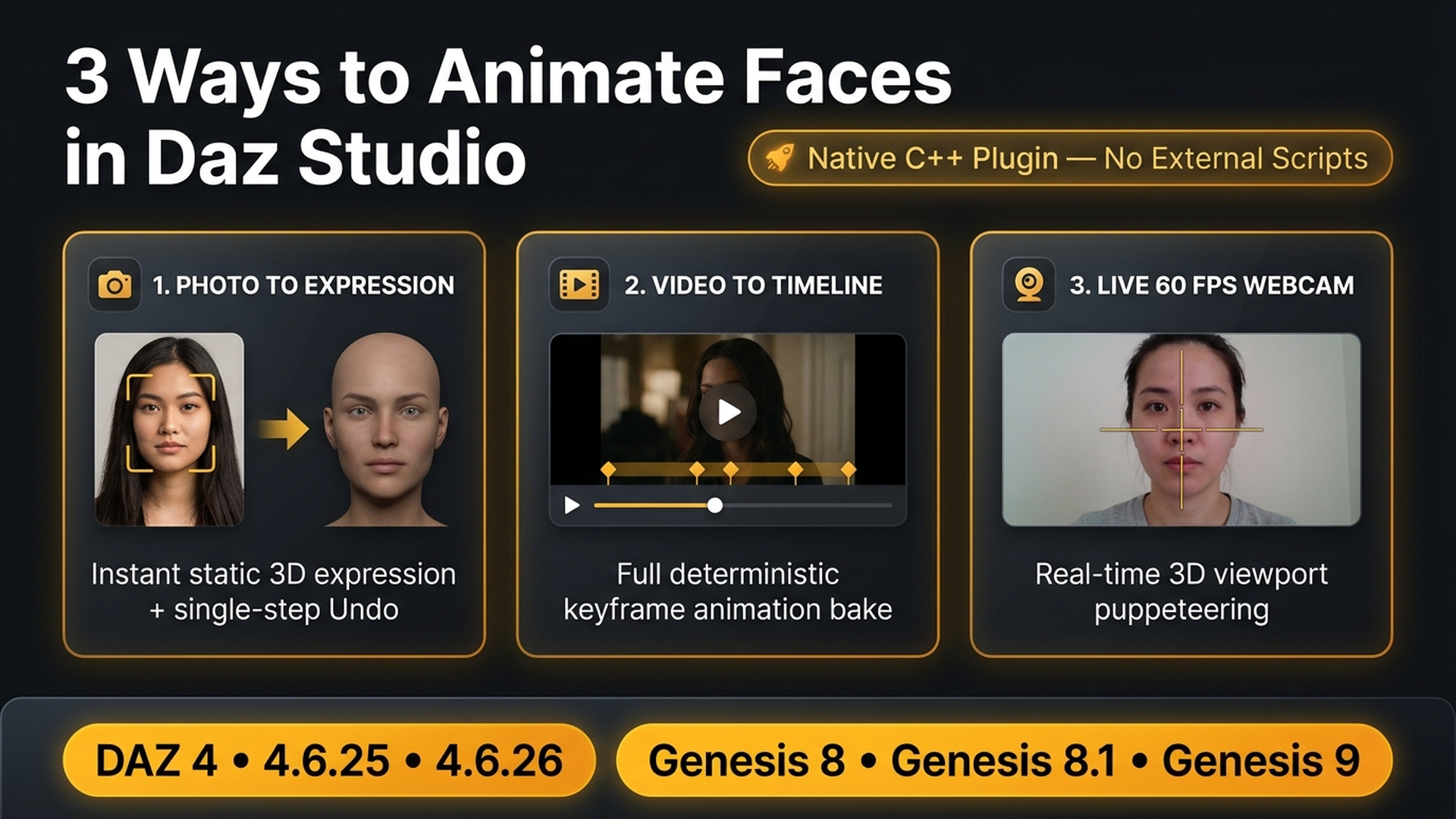
THREE CAPTURE MODES IN ONE NATIVE PANE
--------------------------------------------------------------------------------
1. PHOTO MODE — Instant Portrait Expression Transfer
• Load any portrait photo (PNG, JPG, WEBP, BMP, TIF) or click **Paste Clipboard** directly from your browser or reference board.
• **Multi-Face Selection:** Detects up to 4 faces per photo — simply click any face box in the 2D preview canvas to switch subjects.
• Adjust regional strength sliders in real time while watching your 3D character update live in the viewport, then commit with a single clean `Ctrl+Z` Undo step.
2. VIDEO MODE — Frame-Accurate Reference Video Baking
• Open `.mp4`, `.mov`, `.avi`, `.mkv`, `.wmv`, or `.m4v` performance clips with interactive Play/Pause and timeline scrubbing.
• Pause on any neutral frame to calibrate rest pose, preview live on your character, and click **Bake Video to Timeline** for a deterministic full-video keyframe bake from `00:00`.
3. LIVE WEBCAM MODE — Real-Time 60 FPS Puppeteering & Recording
• Stream 720p HD capture from any USB/integrated webcam or virtual camera (OBS Virtual Camera, iPhone Continuity/Camo, DroidCam).
• **15-Frame Blink-Free Neutral Calibration** zeros out your personal resting face and camera angle in half a second.
• Rehearse live in the 3D viewport with zero Undo-stack bloat, then record directly onto the Daz Studio Timeline.
--------------------------------------------------------------------------------
STUDIO-GRADE ANATOMICAL RIG DRIVING
--------------------------------------------------------------------------------
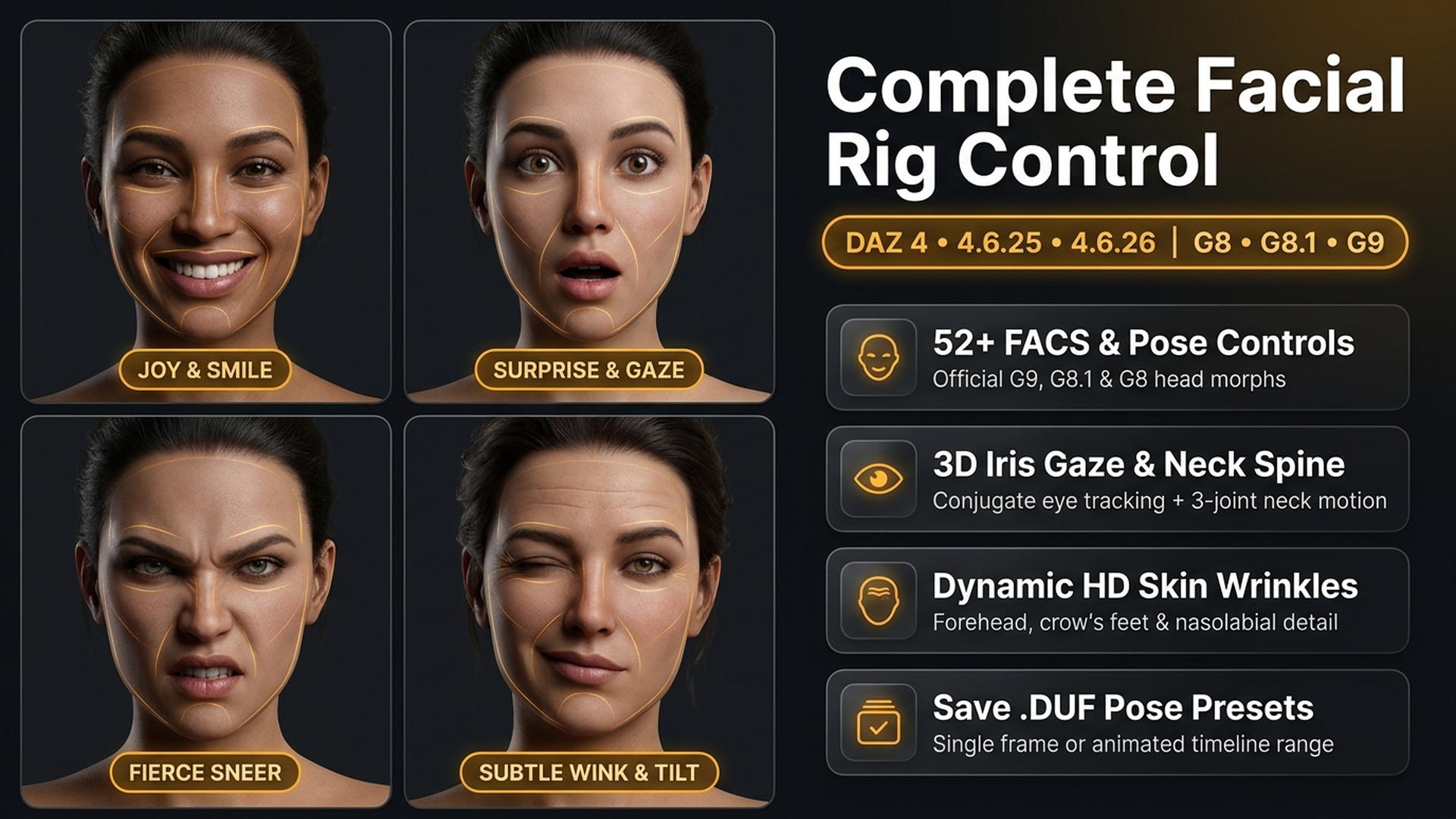
• **52+ ARKit FACS & Official Pose Controls:**
Automatically detects figure generation (even when selecting bones or eyelashes) and binds official controls:
– **Genesis 9:** Built-in `FACS` blendshapes (`facs_bs_*`), anatomical controllers (`facs_ctrl_*`), plus micro-FACS (`BrowSqueeze`, `NasalFlare`, `JawOpenWide`).
– **Genesis 8.1:** Official `FACS` (`facs_jnt_*` / `face_bs_*`) + `Pose Controls > Head`, automatically turning *Eye Look Automatic* off so eyeballs track cleanly.
– **Genesis 8:** Full `Pose Controls > Head` (`eCTRL*`), including signed bipolar jaw, mouth, brow, and eyelid sliders.
• **3D Iris Gaze Fusion & Fast-Attack Eyelid Blinks:**
Combines neural blendshapes with 3D iris-to-canthus geometry (`468` / `473` landmarks) for crisp horizontal & vertical conjugate eye tracking, while asymmetric fast-attack filtering captures rapid 60 ms blinks without lag.
• **Natural 3-Joint Cervical Spine & Head Rotation:**
Distributes Pitch (Bend), Yaw (Twist), and Roll (Side-Side) naturally across `neckLower (20%)`, `neckUpper (25%)`, and `head (55%)` so the neck follows head motion organically instead of twisting on a rigid pivot.
• **Per-Mode Mirror Symmetry:**
Independent **Mirror (Flip Left / Right)** toggles for Photo, Video, and Live Webcam synchronously flip both the 2D wireframe preview and the 3D expression.
• **Dynamic HD Skin Wrinkles (Optional):**
Automatically detects and drives dynamic forehead, glabella, crow's feet, under-eye, nose crease, and nasolabial HD morphs on Genesis 9 if *Aging Face Details HD (AFD)* or *Aging Morphs for Genesis 9 (AM9)* are installed.
• **Native Parameters-Style Zone Sliders & Smart Keyframe Reduction:**
Fine-tune **Master Strength** (`0–200%`), **One-Euro Smoothing**, **Brows**, **Eyes & Blink**, **Cheeks & Nose**, **Mouth & Jaw**, **Head Rotation**, and **Ramer–Douglas–Peucker (RDP) Keyframe Reduction** (reduces Timeline curve density by up to 70% while preserving crisp blink & lip peaks).
• **Native .DUF Pose Preset Saving (Single Frame or Animated Range):**
Click **Save Pose Preset (.duf)…** to open Daz Studio's native Pose Preset Save Options dialog — save a single-frame expression or a multi-frame animated range directly to your Content Library.
--------------------------------------------------------------------------------
COMPATIBILITY & SYSTEM REQUIREMENTS
--------------------------------------------------------------------------------
• **Operating System:** Windows 10 or Windows 11 (64-bit) — 100% offline, no internet connection, no Python, and no GPU drivers required (runs on fast CPU XNNPACK SIMD).
• **Supported Daz Studio Versions (All 3 Native Builds Included):**
– **Daz Studio 4.x** (`4.20` – `4.24+`, 64-bit)
– **Daz Studio 4.6.25** (Daz Studio 2025 / `6.25` 64-bit)
– **Daz Studio 4.6.26** (Daz Studio 2026 / `6.26` 64-bit)
• **Supported Figures:**
– **Genesis 9** (Base / Starter Essentials FACS)
– **Genesis 8.1 Male & Female**
– **Genesis 8 Male & Female** (Head Pose Controls)
– Fully compatible with custom head/body morphs — **transfers expressions & motion only (not a face/identity sculpt transfer)**.
--------------------------------------------------------------------------------
WHAT'S INCLUDED IN THE ZIP PACKAGE
--------------------------------------------------------------------------------
• `Installer/FaceMocapStudio_Setup_1.0.5.exe` — Automated 1-click Windows installer (auto-detects your Daz Studio 4.x, 4.6.25, and 4.6.26 folders)
• `Manual Install/DAZ_Studio_4.20+/` — Native `FaceMocapStudio_ds4.dll` + ML runtime
• `Manual Install/DAZ_Studio_4.6.25/` — Native `dsp_facemocapstudio_625.dll` + ML runtime
• `Manual Install/DAZ_Studio_4.6.26/` — Native `dsp_facemocapstudio_626.dll` + ML runtime
• `Install Readme.txt` — Complete English installation & quick-start guide
All-in-one native C++ facial motion capture & photo expression plugin inside Daz Studio (4.20+, 4.6.25 & 4.6.26). Drive Genesis 8, 8.1 & 9 directly from portrait photos, reference videos, or live 720p webcams with 52+ FACS channels, 3D iris gaze, neck/head motion & .DUF Pose Presets.
Bring your characters to life in seconds — directly inside the Daz Studio viewport, with zero external JSON scripts, zero Python installs, and zero cloud uploads.
**FaceMocap Studio** is a high-performance **native C++ dockable pane plugin** (`Window -> Panes (Tabs) -> FaceMocap Studio`) that unifies reference **Photo-to-Expression transfer**, deterministic **Video-to-Timeline facial baking**, and **Real-Time Live Webcam performance capture** for **Genesis 8, Genesis 8.1, and Genesis 9** figures.
Powered by an isolated 64-bit SIMD machine-learning worker process over ultra-low-latency shared memory, FaceMocap Studio streams smooth 30–60 FPS facial animation straight onto your 3D character without stalling the Daz Studio UI or polluting your `Ctrl+Z` Undo stack.
--------------------------------------------------------------------------------
THREE CAPTURE MODES IN ONE NATIVE PANE
--------------------------------------------------------------------------------
1. PHOTO MODE — Instant Portrait Expression Transfer
• Load any portrait photo (PNG, JPG, WEBP, BMP, TIF) or click **Paste Clipboard** directly from your browser or reference board.
• **Multi-Face Selection:** Detects up to 4 faces per photo — simply click any face box in the 2D preview canvas to switch subjects.
• Adjust regional strength sliders in real time while watching your 3D character update live in the viewport, then commit with a single clean `Ctrl+Z` Undo step.
2. VIDEO MODE — Frame-Accurate Reference Video Baking
• Open `.mp4`, `.mov`, `.avi`, `.mkv`, `.wmv`, or `.m4v` performance clips with interactive Play/Pause and timeline scrubbing.
• Pause on any neutral frame to calibrate rest pose, preview live on your character, and click **Bake Video to Timeline** for a deterministic full-video keyframe bake from `00:00`.
3. LIVE WEBCAM MODE — Real-Time 60 FPS Puppeteering & Recording
• Stream 720p HD capture from any USB/integrated webcam or virtual camera (OBS Virtual Camera, iPhone Continuity/Camo, DroidCam).
• **15-Frame Blink-Free Neutral Calibration** zeros out your personal resting face and camera angle in half a second.
• Rehearse live in the 3D viewport with zero Undo-stack bloat, then record directly onto the Daz Studio Timeline.
--------------------------------------------------------------------------------
STUDIO-GRADE ANATOMICAL RIG DRIVING
--------------------------------------------------------------------------------
• **52+ ARKit FACS & Official Pose Controls:**
Automatically detects figure generation (even when selecting bones or eyelashes) and binds official controls:
– **Genesis 9:** Built-in `FACS` blendshapes (`facs_bs_*`), anatomical controllers (`facs_ctrl_*`), plus micro-FACS (`BrowSqueeze`, `NasalFlare`, `JawOpenWide`).
– **Genesis 8.1:** Official `FACS` (`facs_jnt_*` / `face_bs_*`) + `Pose Controls > Head`, automatically turning *Eye Look Automatic* off so eyeballs track cleanly.
– **Genesis 8:** Full `Pose Controls > Head` (`eCTRL*`), including signed bipolar jaw, mouth, brow, and eyelid sliders.
• **3D Iris Gaze Fusion & Fast-Attack Eyelid Blinks:**
Combines neural blendshapes with 3D iris-to-canthus geometry (`468` / `473` landmarks) for crisp horizontal & vertical conjugate eye tracking, while asymmetric fast-attack filtering captures rapid 60 ms blinks without lag.
• **Natural 3-Joint Cervical Spine & Head Rotation:**
Distributes Pitch (Bend), Yaw (Twist), and Roll (Side-Side) naturally across `neckLower (20%)`, `neckUpper (25%)`, and `head (55%)` so the neck follows head motion organically instead of twisting on a rigid pivot.
• **Per-Mode Mirror Symmetry:**
Independent **Mirror (Flip Left / Right)** toggles for Photo, Video, and Live Webcam synchronously flip both the 2D wireframe preview and the 3D expression.
• **Dynamic HD Skin Wrinkles (Optional):**
Automatically detects and drives dynamic forehead, glabella, crow's feet, under-eye, nose crease, and nasolabial HD morphs on Genesis 9 if *Aging Face Details HD (AFD)* or *Aging Morphs for Genesis 9 (AM9)* are installed.
• **Native Parameters-Style Zone Sliders & Smart Keyframe Reduction:**
Fine-tune **Master Strength** (`0–200%`), **One-Euro Smoothing**, **Brows**, **Eyes & Blink**, **Cheeks & Nose**, **Mouth & Jaw**, **Head Rotation**, and **Ramer–Douglas–Peucker (RDP) Keyframe Reduction** (reduces Timeline curve density by up to 70% while preserving crisp blink & lip peaks).
• **Native .DUF Pose Preset Saving (Single Frame or Animated Range):**
Click **Save Pose Preset (.duf)…** to open Daz Studio's native Pose Preset Save Options dialog — save a single-frame expression or a multi-frame animated range directly to your Content Library.
--------------------------------------------------------------------------------
COMPATIBILITY & SYSTEM REQUIREMENTS
--------------------------------------------------------------------------------
• **Operating System:** Windows 10 or Windows 11 (64-bit) — 100% offline, no internet connection, no Python, and no GPU drivers required (runs on fast CPU XNNPACK SIMD).
• **Supported Daz Studio Versions (All 3 Native Builds Included):**
– **Daz Studio 4.x** (`4.20` – `4.24+`, 64-bit)
– **Daz Studio 4.6.25** (Daz Studio 2025 / `6.25` 64-bit)
– **Daz Studio 4.6.26** (Daz Studio 2026 / `6.26` 64-bit)
• **Supported Figures:**
– **Genesis 9** (Base / Starter Essentials FACS)
– **Genesis 8.1 Male & Female**
– **Genesis 8 Male & Female** (Head Pose Controls)
– Fully compatible with custom head/body morphs — **transfers expressions & motion only (not a face/identity sculpt transfer)**.
--------------------------------------------------------------------------------
WHAT'S INCLUDED IN THE ZIP PACKAGE
--------------------------------------------------------------------------------
• `Installer/FaceMocapStudio_Setup_1.0.5.exe` — Automated 1-click Windows installer (auto-detects your Daz Studio 4.x, 4.6.25, and 4.6.26 folders)
• `Manual Install/DAZ_Studio_4.20+/` — Native `FaceMocapStudio_ds4.dll` + ML runtime
• `Manual Install/DAZ_Studio_4.6.25/` — Native `dsp_facemocapstudio_625.dll` + ML runtime
• `Manual Install/DAZ_Studio_4.6.26/` — Native `dsp_facemocapstudio_626.dll` + ML runtime
• `Install Readme.txt` — Complete English installation & quick-start guide
