


 Free 3D
 3D Print Models
 3D Scans
 Animation & MoCap
 Textures
 Materials
 Skin Reference
 2D Game Assets
 Sound Effects
 Brushes & Tools
 Reference Photos
 Stock Images
 HDR Images
 3ds Max
 Maya
Maya Blender
 Unreal Engine
 Unity
Unity ZBrush
 Cinema 4D
 LightWave
 Marmoset
 SketchUp
 FBX
FBX DAE
DAE DXF
DXF GLB
GLBSkinFX_Studio for DAZ

Not Rated Yet


! REPORT
NOTE: DIGITAL DOWNLOAD, NOT A PHYSICAL ITEM

Add to Collection

5 Likes
Share This Daz Content


Top Rated Vendor


License
Extended Use License (IP Restricted)
This item comes with our Extended Use Licensing. This means that you may use the model in a variety of mediums and applications. But, because certain intellectual property depicted in this model may not be affiliated with or endorsed by the original rights holder, this model is subject to an Editorial Use Only Restriction which limits the ways in which you may use this model.
For full license terms, see our 3D Content Licensing Agreement
Item Details
| Vendor: | intenzo |
| Published: | Oct 24, 2026 |
| Download Size: | 289.3 KB |
| Software: | Daz Studio |
| Compatible Figures: | Genesis 9 Genesis 8 Female Genesis 8 Male Genesis 8.1 Female |
| dForce: | – |
Included Formats

Statistics
| Favorites: | 0 |
| Likes: | 5 |
| Views: | 153 |
Item Ratings
Not Rated Yet
SkinFX_Studio for DAZ
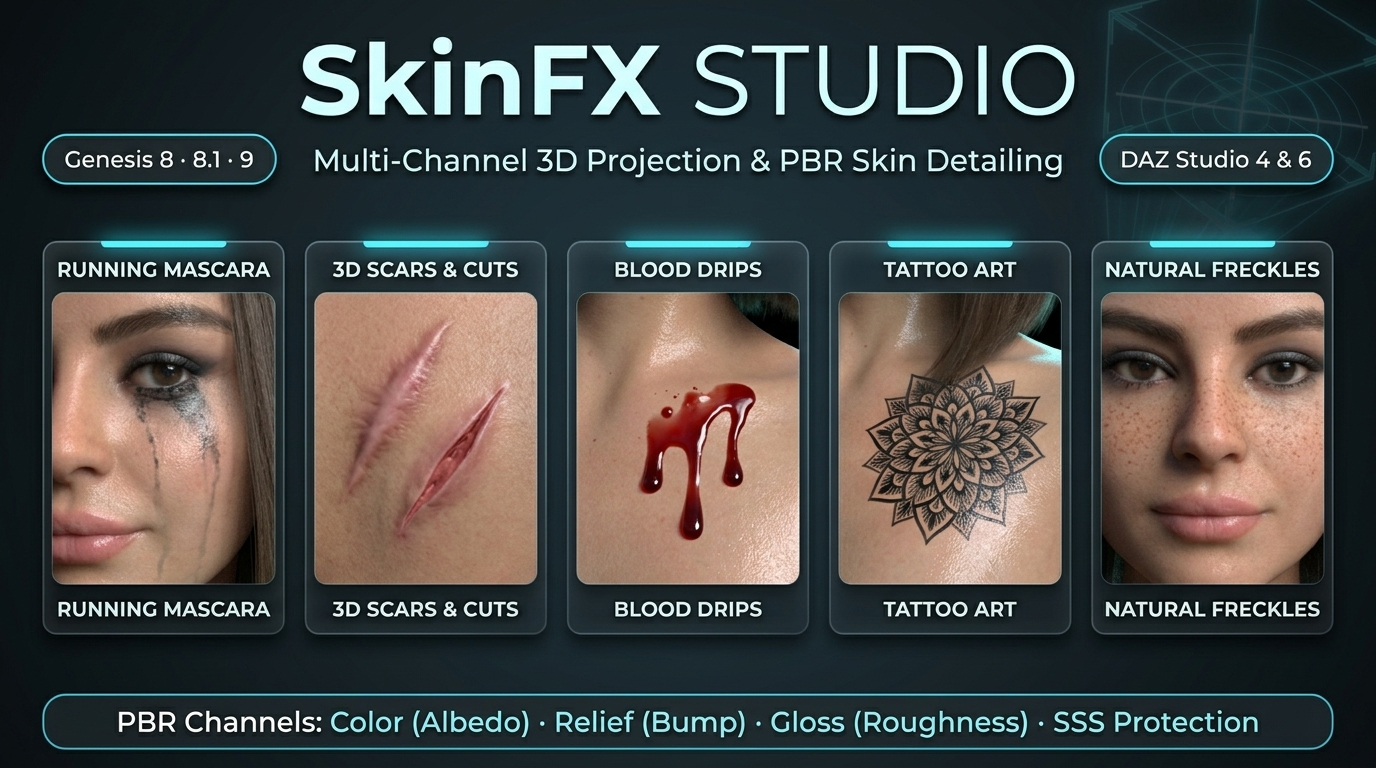
SkinFX Studio for DAZ Studio 4 & 6 (Genesis 8, 8.1, 9) — 3D Decal Projection & Multi-Channel PBR Skin Baking Plugin
Project and bake tattoos, scars, wounds, blood splatters, makeup, tears, and body art directly onto Genesis figures in real time — with zero UV distortion, seamless multi-surface bridging, and full multi-channel PBR support (Color, Bump Relief, and Gloss). Compatible with DAZ Studio 4 & 6.25+
--------------------------------------------------------------------------------
KEY HIGHLIGHTS & FEATURES:
--------------------------------------------------------------------------------
★ DUAL DAZ STUDIO ENGINE SUPPORT (DAZ 4 & DAZ 6)
• Native 64-bit C++ plugin compiled for both DAZ Studio 4.12+ (OpenGL) and DAZ Studio 6.25+ Beta (Qt6 & Filament PBR viewport).
• Full native compatibility with Genesis 8 Female/Male, Genesis 8.1 Female/Male, and Genesis 9 figures.
• Works seamlessly with all Iray PBRSkin, Dual Lobe, and OmniSurface shader architectures.
★ INTERACTIVE 3D VIEWPORT GIZMO & RAYCASTING
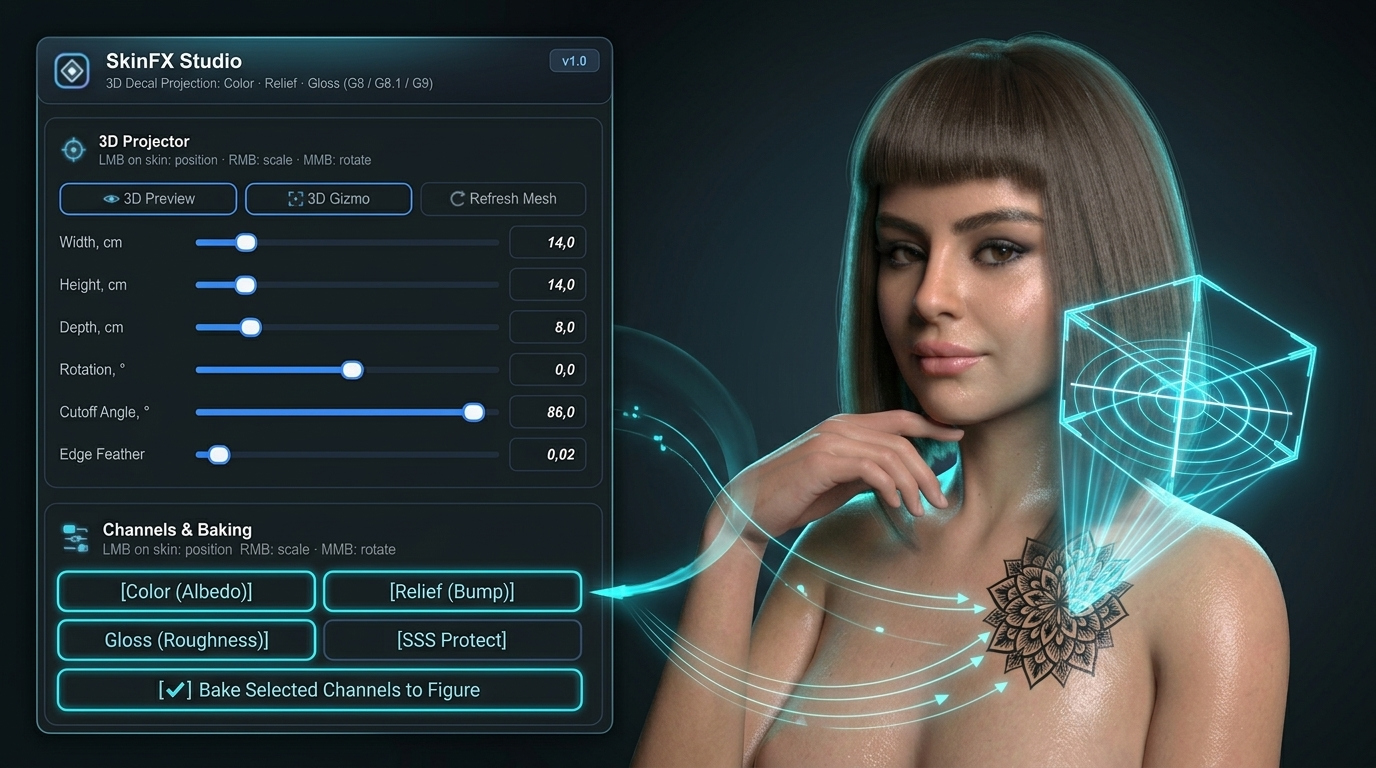
• Click & Drag Anywhere: Decal projector automatically calculates local surface normals and sticks to the body curvature.
• Fast Viewport Shortcuts:
- Left Mouse Button (LMB): Reposition decal on skin.
- Right Mouse Button (RMB): Interactive uniform scaling.
- Shift + RMB: Independent width and height stretching.
- Middle Mouse Button (MMB): Smooth 360-degree rotation.
• Native camera navigation (Alt + LMB / Ctrl + LMB) remains fully functional while editing!
★ MULTI-CHANNEL PBR BAKING ENGINE
• Color (Base Color / Diffuse):
- Advanced Blending Modes:
* Normal (Alpha Blend): Clean edge-blended PNG overlay.
* Overlay: Blends color dynamically into the underlying skin tone, preserving muscle highlights and deep shadows.
* Multiply (Dark Ink): Eliminates white backgrounds automatically — perfect for classic tattoo flash sketches and linework!
• Relief (Bump / Heightmap):
- Add realistic physical embossing (from subtle skin texture to +10.0 / -10.0 raised tissue depth). Perfect for keloid scars, surgical cuts, stitches, burns, and branded skin.
• Gloss (Roughness):
- Isolate wetness or dry finishes strictly to the decal area. Achieve wet dripping blood, tear trails, glossy makeup, or dry leathery scars.
★ SEAMLESS MULTI-SURFACE BRIDGING
• Decals projected across anatomical boundaries (e.g. neck to chest, shoulder across torso and arm, or hip across legs) automatically detect and bake across all affected UV tiles simultaneously with zero visible seams, stretching, or texture misalignment.
★ 1-CLICK WORKFLOW PRESETS
• "Tattoo / Color": Instant 1-click setup for crisp, deep tattoo ink.
• "Scar / Cut": Instant Color + 3D tactile Bump Relief.
• "Relief Only": Bakes pure heightmap displacement without modifying skin color.
• "Gloss Only": Bakes localized roughness/sheen changes without altering diffuse color.
★ NON-DESTRUCTIVE & UNLIMITED STACKING
• 1-Click "Restore Original Skin": Instantly wipe baked decals and revert to your pristine base character textures whenever needed.
• Infinite Decal Stacking: Apply dozens of separate tattoos, wounds, and dirt layers sequentially — lossless 32-bit compositing ensures your base skin never loses resolution or sharpness.
• Zero Scene Clutter: The projector gizmo exists only while you work; no heavy auxiliary geometry is saved into your `.duf` scene files.
★ STUDIO-GRADE PRECISION CONTROLS
• Aspect Ratio Auto-Detect: Keeps your original artwork perfectly proportioned upon import.
• Quality Supersampling (SSAA 1x, 2x, 3x): Multi-sampled anti-aliasing guarantees pin-sharp rasterization and eliminates jagged edges on curved limbs.
• Projection Masking: Choose between Rectangle or Elliptical/Circular projection volumes.
• Cutoff Angle & Edge Feathering: Fine-tune how decals wrap around silhouette edges and blend into natural skin pores.
• Horizontal & Vertical Flipping: Quick one-click mirroring for symmetrical placements.
--------------------------------------------------------------------------------
QUICK 3-STEP WORKFLOW:
--------------------------------------------------------------------------------
1. LOAD FIGURE & ARTWORK
Open DAZ Studio, load your Genesis 8, 8.1, or 9 character, and launch the pane:
Top Menu: Window -> Panes (Tabs) -> SkinFX Studio.
Click "Browse…" and select any decal (PNG, JPG, TGA, TIFF, BMP).
2. POSITION IN 3D VIEWPORT
Click and drag directly on your figure's body in the viewport.
Use RMB to resize, MMB to rotate, and adjust Cutoff / Feathering sliders to taste.
3. SELECT CHANNELS & BAKE
Pick your desired channels (Color, Relief, Gloss) or click a 1-click Preset pill (e.g. "Tattoo / Color" or "Scar").
Click "[✔] Bake Selected Channels to Figure".
Done! Your decal is now part of the figure's PBR skin maps, ready for beautiful rendering in NVIDIA Iray or Filament!
Project and bake tattoos, scars, wounds, blood splatters, makeup, tears, and body art directly onto Genesis figures in real time — with zero UV distortion, seamless multi-surface bridging, and full multi-channel PBR support (Color, Bump Relief, and Gloss). Compatible with DAZ Studio 4 & 6.25+
--------------------------------------------------------------------------------
KEY HIGHLIGHTS & FEATURES:
--------------------------------------------------------------------------------
★ DUAL DAZ STUDIO ENGINE SUPPORT (DAZ 4 & DAZ 6)
• Native 64-bit C++ plugin compiled for both DAZ Studio 4.12+ (OpenGL) and DAZ Studio 6.25+ Beta (Qt6 & Filament PBR viewport).
• Full native compatibility with Genesis 8 Female/Male, Genesis 8.1 Female/Male, and Genesis 9 figures.
• Works seamlessly with all Iray PBRSkin, Dual Lobe, and OmniSurface shader architectures.
★ INTERACTIVE 3D VIEWPORT GIZMO & RAYCASTING
• Click & Drag Anywhere: Decal projector automatically calculates local surface normals and sticks to the body curvature.
• Fast Viewport Shortcuts:
- Left Mouse Button (LMB): Reposition decal on skin.
- Right Mouse Button (RMB): Interactive uniform scaling.
- Shift + RMB: Independent width and height stretching.
- Middle Mouse Button (MMB): Smooth 360-degree rotation.
• Native camera navigation (Alt + LMB / Ctrl + LMB) remains fully functional while editing!
★ MULTI-CHANNEL PBR BAKING ENGINE
• Color (Base Color / Diffuse):
- Advanced Blending Modes:
* Normal (Alpha Blend): Clean edge-blended PNG overlay.
* Overlay: Blends color dynamically into the underlying skin tone, preserving muscle highlights and deep shadows.
* Multiply (Dark Ink): Eliminates white backgrounds automatically — perfect for classic tattoo flash sketches and linework!
• Relief (Bump / Heightmap):
- Add realistic physical embossing (from subtle skin texture to +10.0 / -10.0 raised tissue depth). Perfect for keloid scars, surgical cuts, stitches, burns, and branded skin.
• Gloss (Roughness):
- Isolate wetness or dry finishes strictly to the decal area. Achieve wet dripping blood, tear trails, glossy makeup, or dry leathery scars.
★ SEAMLESS MULTI-SURFACE BRIDGING
• Decals projected across anatomical boundaries (e.g. neck to chest, shoulder across torso and arm, or hip across legs) automatically detect and bake across all affected UV tiles simultaneously with zero visible seams, stretching, or texture misalignment.
★ 1-CLICK WORKFLOW PRESETS
• "Tattoo / Color": Instant 1-click setup for crisp, deep tattoo ink.
• "Scar / Cut": Instant Color + 3D tactile Bump Relief.
• "Relief Only": Bakes pure heightmap displacement without modifying skin color.
• "Gloss Only": Bakes localized roughness/sheen changes without altering diffuse color.
★ NON-DESTRUCTIVE & UNLIMITED STACKING
• 1-Click "Restore Original Skin": Instantly wipe baked decals and revert to your pristine base character textures whenever needed.
• Infinite Decal Stacking: Apply dozens of separate tattoos, wounds, and dirt layers sequentially — lossless 32-bit compositing ensures your base skin never loses resolution or sharpness.
• Zero Scene Clutter: The projector gizmo exists only while you work; no heavy auxiliary geometry is saved into your `.duf` scene files.
★ STUDIO-GRADE PRECISION CONTROLS
• Aspect Ratio Auto-Detect: Keeps your original artwork perfectly proportioned upon import.
• Quality Supersampling (SSAA 1x, 2x, 3x): Multi-sampled anti-aliasing guarantees pin-sharp rasterization and eliminates jagged edges on curved limbs.
• Projection Masking: Choose between Rectangle or Elliptical/Circular projection volumes.
• Cutoff Angle & Edge Feathering: Fine-tune how decals wrap around silhouette edges and blend into natural skin pores.
• Horizontal & Vertical Flipping: Quick one-click mirroring for symmetrical placements.
--------------------------------------------------------------------------------
QUICK 3-STEP WORKFLOW:
--------------------------------------------------------------------------------
1. LOAD FIGURE & ARTWORK
Open DAZ Studio, load your Genesis 8, 8.1, or 9 character, and launch the pane:
Top Menu: Window -> Panes (Tabs) -> SkinFX Studio.
Click "Browse…" and select any decal (PNG, JPG, TGA, TIFF, BMP).
2. POSITION IN 3D VIEWPORT
Click and drag directly on your figure's body in the viewport.
Use RMB to resize, MMB to rotate, and adjust Cutoff / Feathering sliders to taste.
3. SELECT CHANNELS & BAKE
Pick your desired channels (Color, Relief, Gloss) or click a 1-click Preset pill (e.g. "Tattoo / Color" or "Scar").
Click "[✔] Bake Selected Channels to Figure".
Done! Your decal is now part of the figure's PBR skin maps, ready for beautiful rendering in NVIDIA Iray or Filament!
