


 Free 3D
 3D Print Models
 3D Scans
 Animation & MoCap
 Textures
 Materials
 Skin Reference
 2D Game Assets
 Sound Effects
 Brushes & Tools
 Reference Photos
 Stock Images
 HDR Images
 3ds Max
 Maya
Maya Blender
 Unreal Engine
 Unity
Unity ZBrush
 Cinema 4D
 LightWave
 Marmoset
 SketchUp
 FBX
FBX DAE
DAE DXF
DXF GLB
GLBNidaly Daz Camera Deck

Not Rated Yet


! REPORT
NOTE: DIGITAL DOWNLOAD, NOT A PHYSICAL ITEM

Add to Collection

4 Likes
Share This Daz Content


Offered By


I'm a Software engineer with 5+ years of professional experience, and 3D is my hobby. I hit friction points in my own DAZ Studio workflow and build native plugins to fix them, so what I'm submitting is tooling I actually use.

License
Extended Use License
This item comes with our Extended Use Licensing. This means that you may use the model for both non-commercial and commercial purposes, in a variety of mediums and applications.
For full license terms, see our 3D Content Licensing Agreement
Item Details
| Vendor: | Nidaly |
| Published: | Oct 20, 2026 |
| Download Size: | 1.5 MB |
| Software: | Daz Studio |
| dForce: | – |
Included Formats

Statistics
| Favorites: | 3 |
| Likes: | 4 |
| Views: | 150 |
Item Ratings
Not Rated Yet
Nidaly Daz Camera Deck
NIDALY DAZ CAMERA DECK
Every camera. One deck.
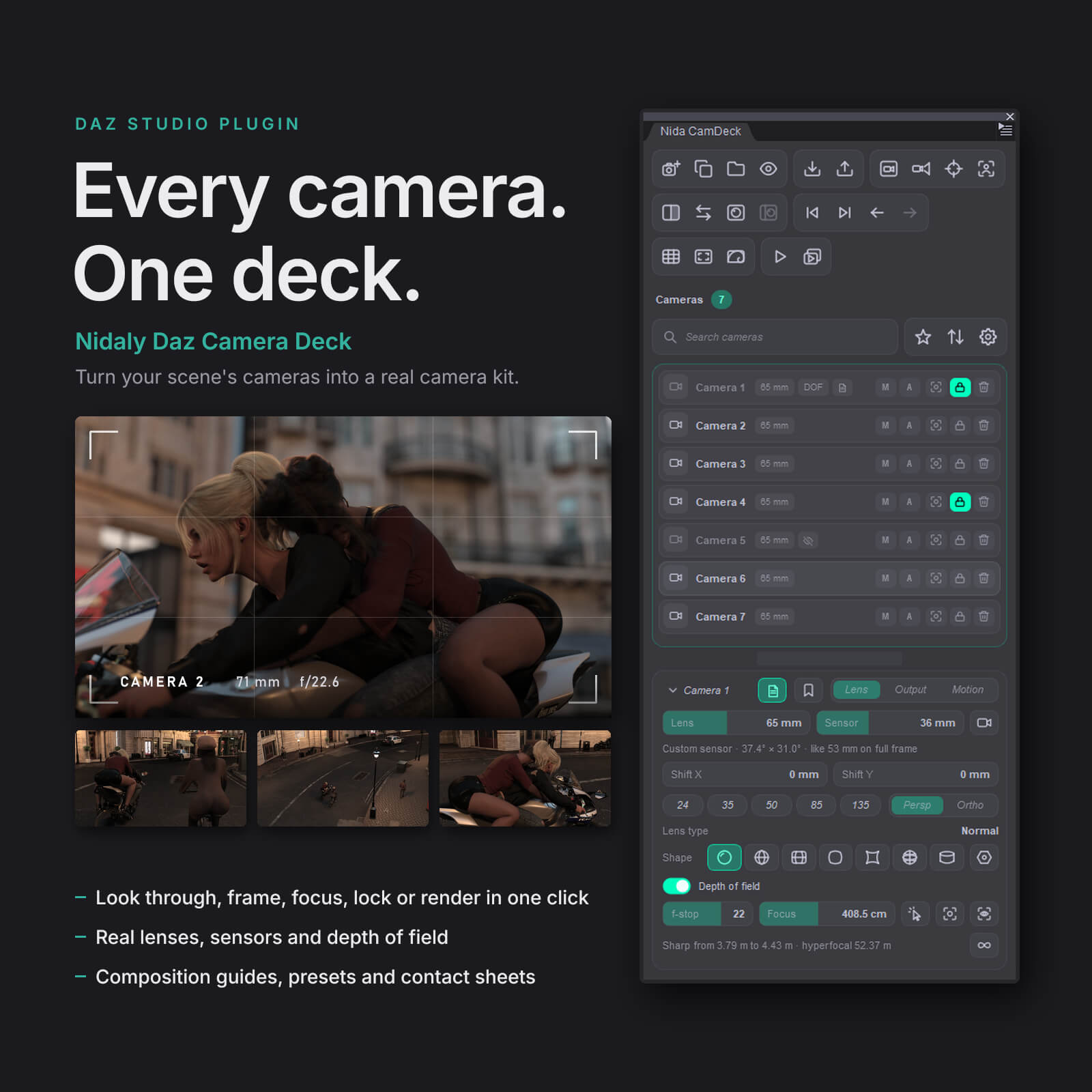
A scene with ten cameras shouldn't mean ten trips through the Scene pane, the Parameters pane and Render Settings. Camera Deck puts every camera of your scene in one pane, Nida CamDeck, and gives each one its own lens, picture size, exposure and notes. Look through, frame, focus, lock or render any of them in one click.
THE CAMERA LIST
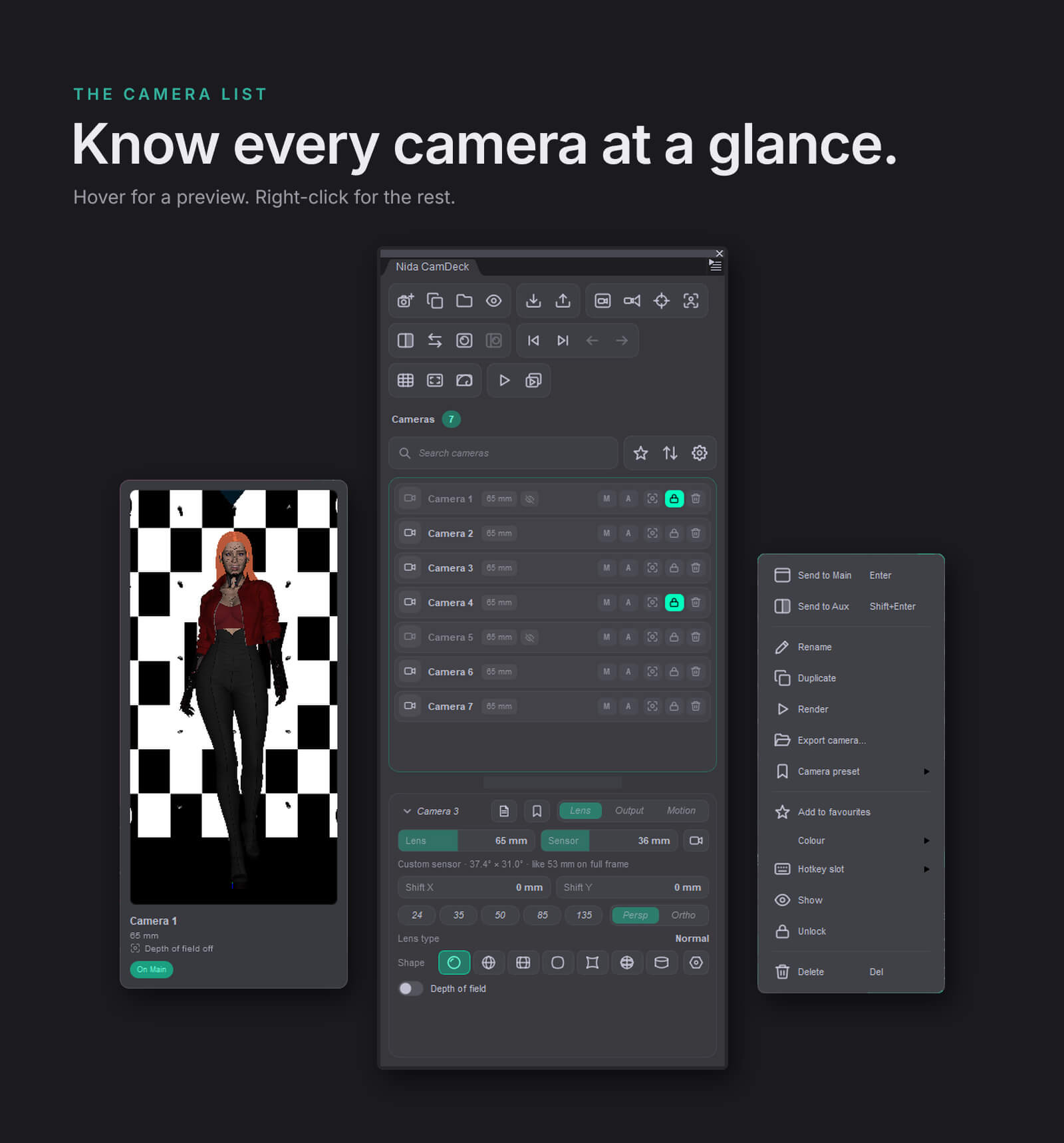
- Every camera as a card: colour tag, name, lens, depth of field, hotkey slot, note, favourite star.
- Hover a card to see what the camera sees, before you switch to it.
- M and A buttons put a camera on the Main or Aux viewport. Double-click does the same.
- Search by name or note, show favourites only, sort by scene order, name, or your own drag-and-drop order.
- Lock a camera so it can't be bumped. Store camera presets that come with every setting locked show as locked, and Unlock frees them.
- Batch rename with patterns: {n}, {n:00}, {name}, {scene}, with a live preview.
- Back and Forward through the cameras you've looked through, like a web browser.
EACH CAMERA, ITS OWN KIT
Lens
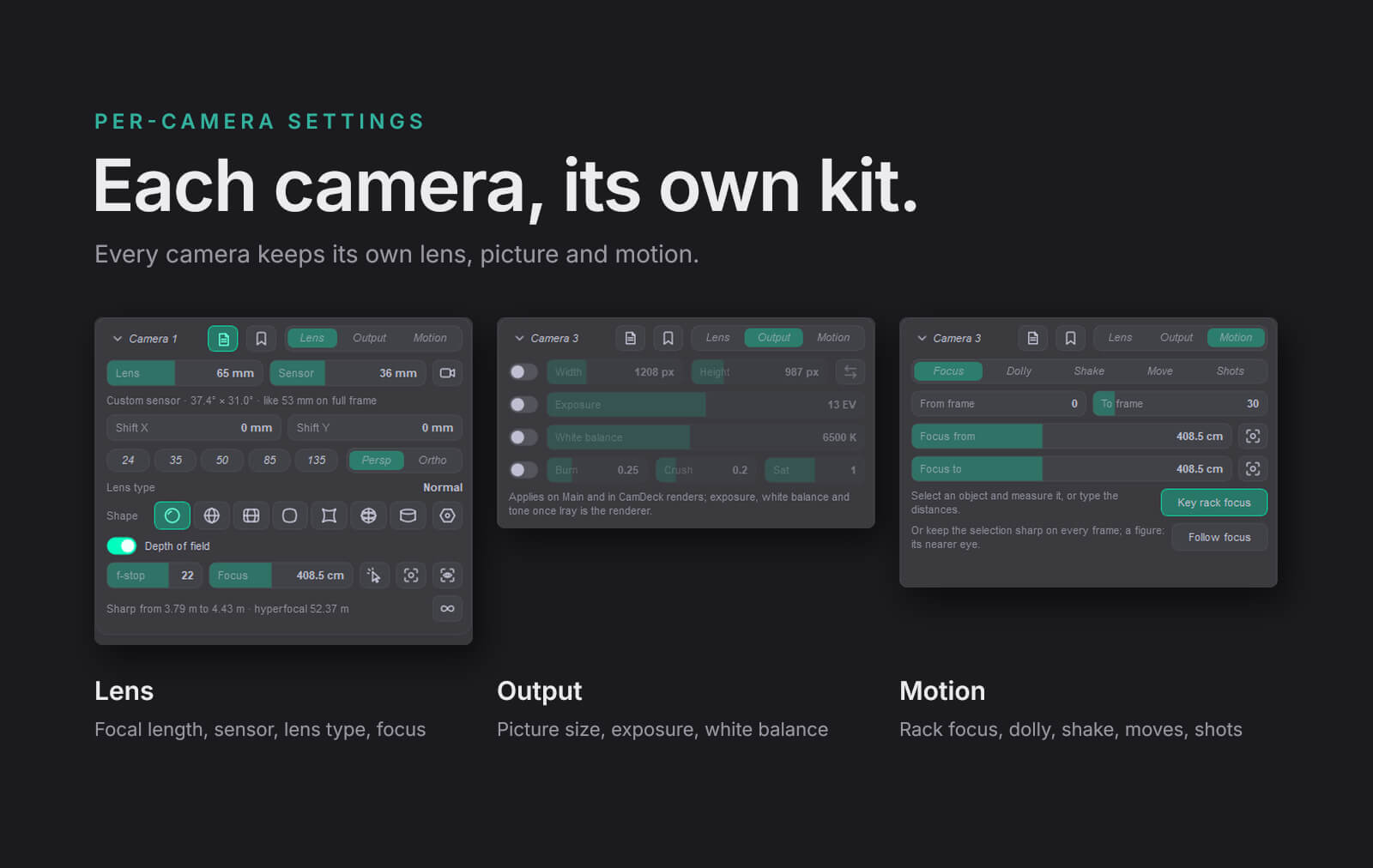
- Focal length with one-click chips: 24, 35, 50, 85, 135 mm.
- Real camera bodies, from IMAX film to phone sensors.
- The angle of view, and the full-frame lens that would frame the same.
- Lens shift for straight verticals, perspective or orthographic.
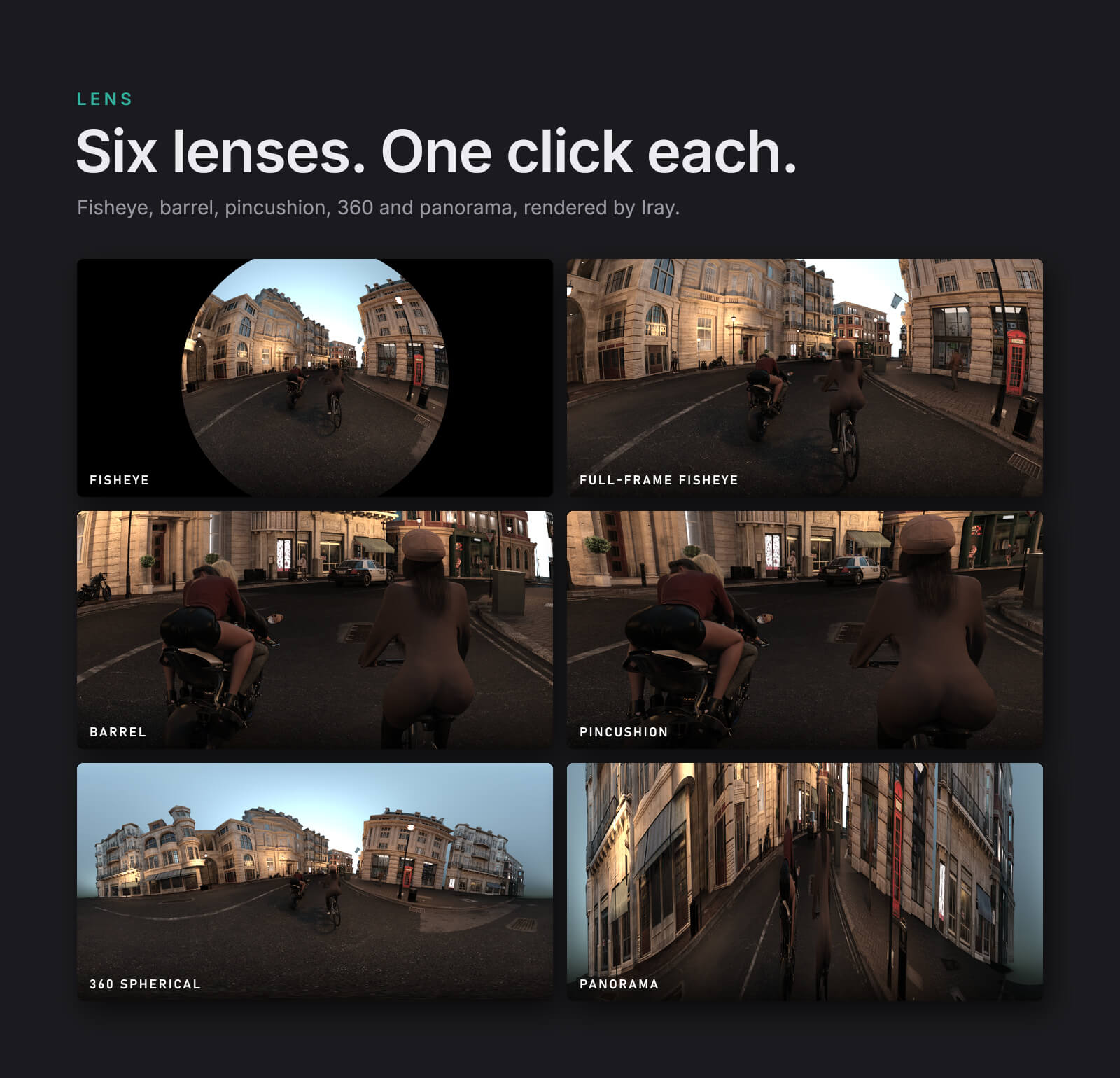
- Lens shapes, rendered by Iray: fisheye, full-frame fisheye, barrel, pincushion, 360 spherical (sets the camera to 2:1), panorama.
- Hexagon bokeh.
Focus
- Pick: click any surface in the viewport and the camera focuses there.
- Focus on the selected object, or on the nearer eye of the selected figure.
- Hyperfocal in one click.
- The sharp range in plain words ("Sharp from 5.24 m to 5.46 m"), worked out from how Iray actually blurs. Iray blurs about ten times more than a real lens at the same F/Stop, so lens calculators and DAZ's own DOF planes promise more sharpness than you get. Camera Deck's numbers match the render.
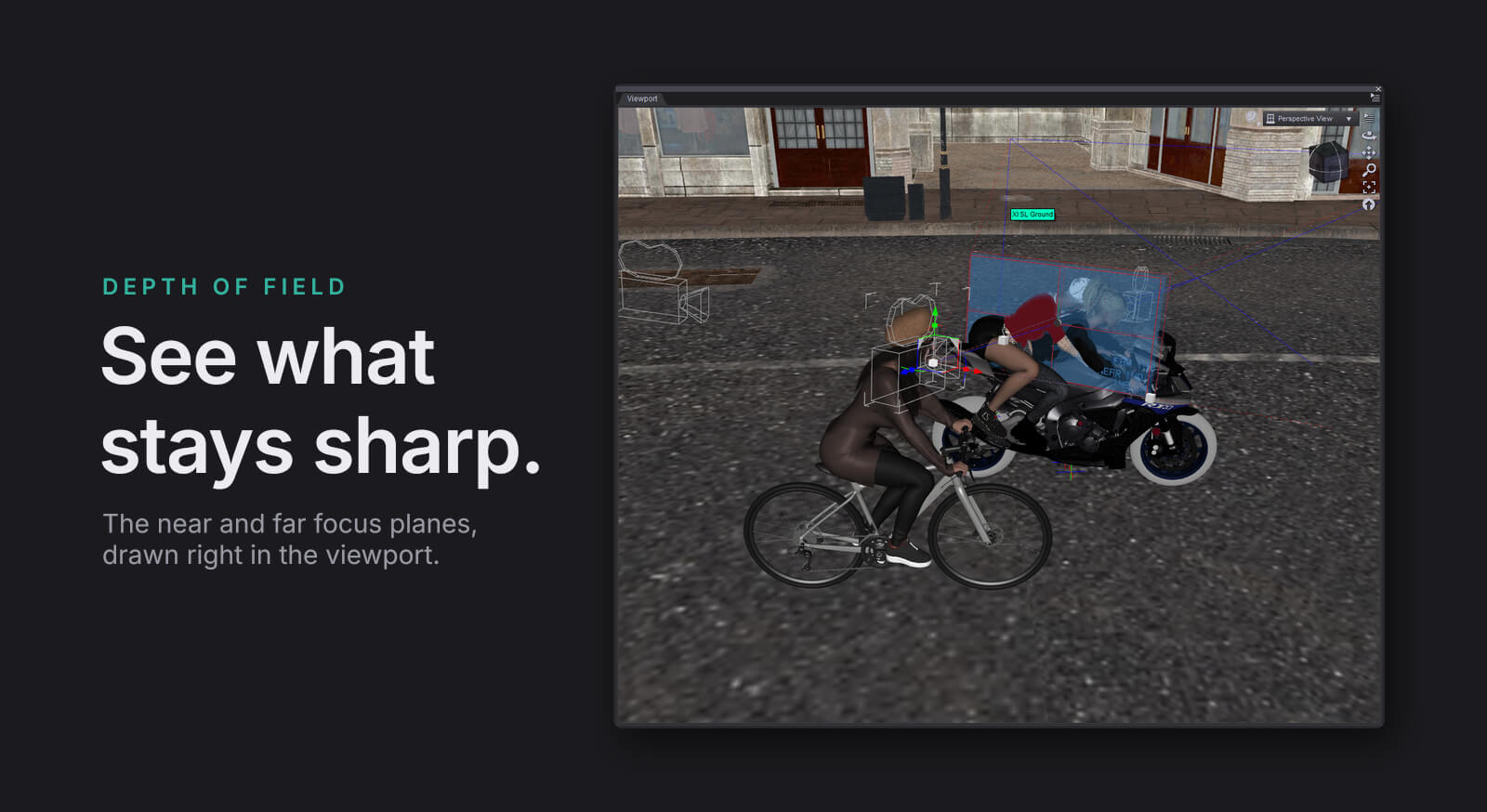
- Depth of field planes in the viewport: near, focus and far, labelled with their distances, following F/Stop and focus as you change them. Never rendered, never saved in the scene.
Output
- Each camera keeps its own render size, exposure, white balance and tone (burn, crush, saturation).
- They apply while the camera is on Main and whenever Camera Deck renders it. Portrait and landscape cameras live side by side in the same scene.
COMPOSITION GUIDES
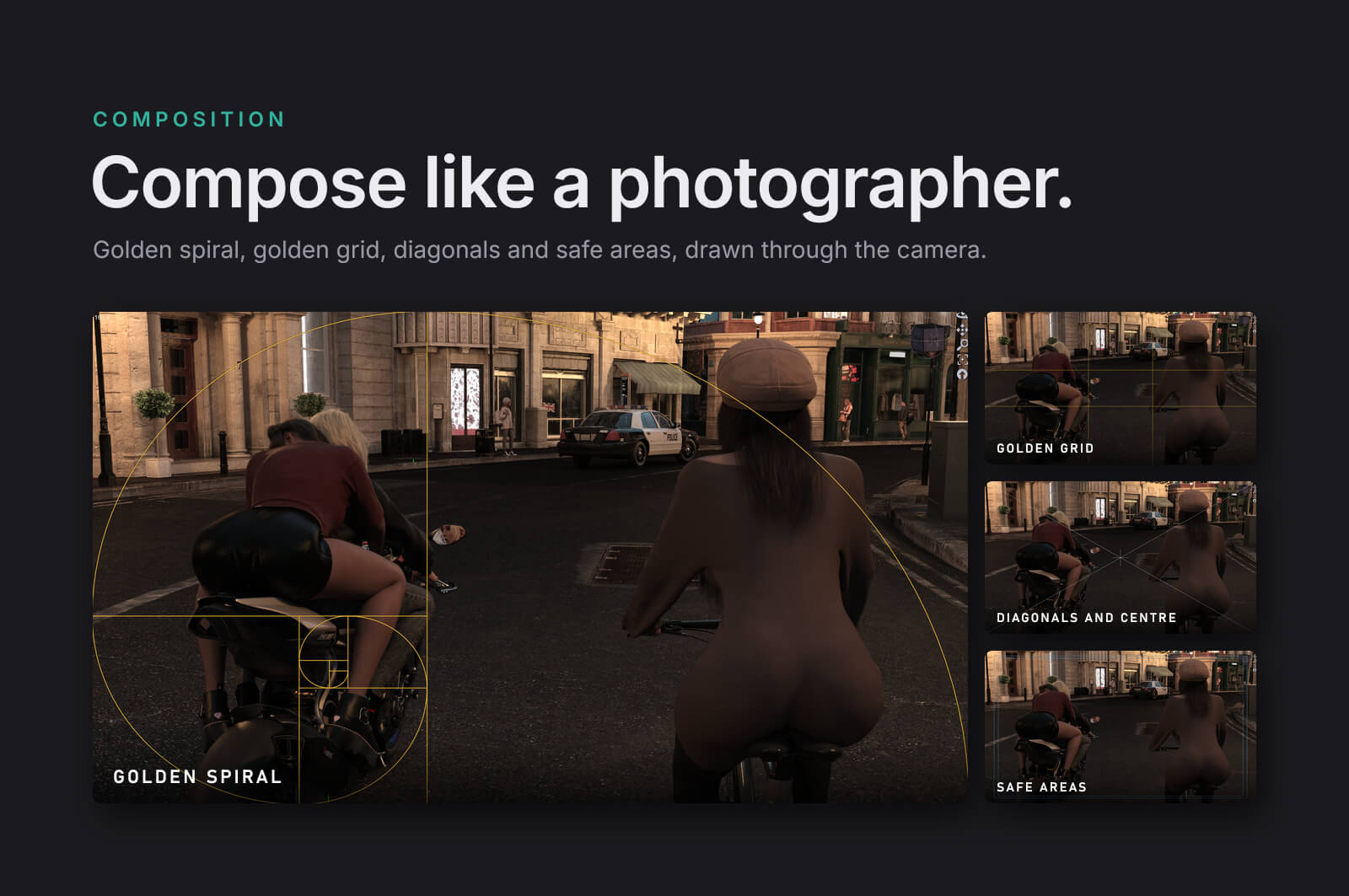
Golden spiral (pick the corner it winds into), golden grid, diagonals and centre, safe areas at 93% and 90%. Drawn over the camera frame on the viewport, Iray preview included, and never in a render. Plus the rule-of-thirds grid and the aspect frame.
MOTION, AS REAL DAZ KEYFRAMES
- Rack focus between two distances or two objects, and follow focus that keeps a moving subject sharp.
- Dolly zoom, the Vertigo effect: the camera moves while the lens zooms, so the subject keeps its size.
- Handheld shake with strength and speed.
- Orbit, push, crane and pan, with ease in and out, aimed at the subject and following it as it moves.
- Shots: line up cameras on the timeline, bake a single "Cut" camera, and render the sequence.
Everything lands as ordinary keyframes you can edit in DAZ's timeline. Each action is one undo step.
RENDERING
- Render the camera on Main, a selection, or every camera in one go. Each one renders with its own size and exposure, named after the scene and the camera, and never overwrites a file.
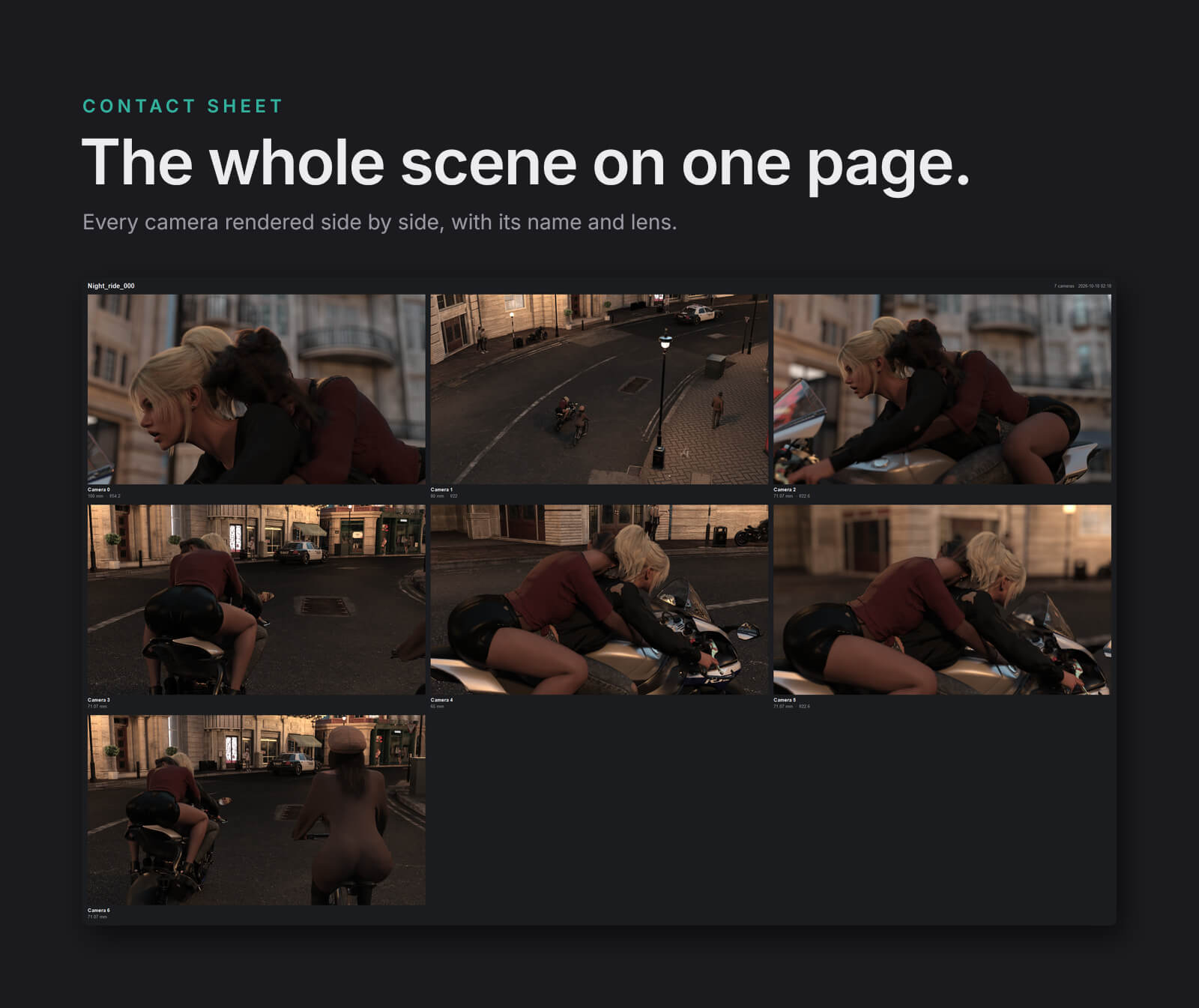
- Contact sheet: every camera rendered small on one labelled page, so you can compare the whole scene at a glance. Choose the tile size and the time per tile.
- Viewports in Iray preview drop to Texture Shaded while a batch runs and come back after, so the preview doesn't eat the graphics memory your renders need.
AND THE REST
- Notes on any camera: what it's for, which shot, what you were trying. Saved with the scene, searchable from the list.
- Camera presets: save a lens, sensor, aperture, lens shape and output settings under a name and apply them to any camera, in any scene.
- Export cameras to a camera set file and import them into another scene. Cameras can be imported straight from any DAZ scene file (.duf).
- Hotkeys for up to 40 cameras, plus Aux viewport, Iray preview and camera history. Fully remappable.
- The commands are also in DAZ's menu bar, under Nidaly > CamDeck.
REQUIREMENTS
- Windows, 64-bit.
- DAZ Studio 4 (tested on 4.24) and/or DAZ Studio 6 (tested on the 6.25 beta). Both plugins are included.
- Lens shapes, exposure, white balance and tone need Iray as the renderer.
WHAT'S IN THE ZIP
- DAZ Studio 4\plugins\nida_camdeck.dll
- DAZ Studio 6\plugins\dsp_nida_camdeck.dll
- Documentation: the full user guide as PDF, TXT and Markdown.
Installation: close DAZ Studio, copy the file for your version into its plugins folder, start DAZ Studio and open Window > Panes (Tabs) > Nida CamDeck. The user guide walks through every button.
Your scenes stay safe: Camera Deck stores its information on the cameras themselves. Open the scene without the plugin and DAZ simply ignores it.
Every camera. One deck.
A scene with ten cameras shouldn't mean ten trips through the Scene pane, the Parameters pane and Render Settings. Camera Deck puts every camera of your scene in one pane, Nida CamDeck, and gives each one its own lens, picture size, exposure and notes. Look through, frame, focus, lock or render any of them in one click.
THE CAMERA LIST
- Every camera as a card: colour tag, name, lens, depth of field, hotkey slot, note, favourite star.
- Hover a card to see what the camera sees, before you switch to it.
- M and A buttons put a camera on the Main or Aux viewport. Double-click does the same.
- Search by name or note, show favourites only, sort by scene order, name, or your own drag-and-drop order.
- Lock a camera so it can't be bumped. Store camera presets that come with every setting locked show as locked, and Unlock frees them.
- Batch rename with patterns: {n}, {n:00}, {name}, {scene}, with a live preview.
- Back and Forward through the cameras you've looked through, like a web browser.
EACH CAMERA, ITS OWN KIT
Lens
- Focal length with one-click chips: 24, 35, 50, 85, 135 mm.
- Real camera bodies, from IMAX film to phone sensors.
- The angle of view, and the full-frame lens that would frame the same.
- Lens shift for straight verticals, perspective or orthographic.
- Lens shapes, rendered by Iray: fisheye, full-frame fisheye, barrel, pincushion, 360 spherical (sets the camera to 2:1), panorama.
- Hexagon bokeh.
Focus
- Pick: click any surface in the viewport and the camera focuses there.
- Focus on the selected object, or on the nearer eye of the selected figure.
- Hyperfocal in one click.
- The sharp range in plain words ("Sharp from 5.24 m to 5.46 m"), worked out from how Iray actually blurs. Iray blurs about ten times more than a real lens at the same F/Stop, so lens calculators and DAZ's own DOF planes promise more sharpness than you get. Camera Deck's numbers match the render.
- Depth of field planes in the viewport: near, focus and far, labelled with their distances, following F/Stop and focus as you change them. Never rendered, never saved in the scene.
Output
- Each camera keeps its own render size, exposure, white balance and tone (burn, crush, saturation).
- They apply while the camera is on Main and whenever Camera Deck renders it. Portrait and landscape cameras live side by side in the same scene.
COMPOSITION GUIDES
Golden spiral (pick the corner it winds into), golden grid, diagonals and centre, safe areas at 93% and 90%. Drawn over the camera frame on the viewport, Iray preview included, and never in a render. Plus the rule-of-thirds grid and the aspect frame.
MOTION, AS REAL DAZ KEYFRAMES
- Rack focus between two distances or two objects, and follow focus that keeps a moving subject sharp.
- Dolly zoom, the Vertigo effect: the camera moves while the lens zooms, so the subject keeps its size.
- Handheld shake with strength and speed.
- Orbit, push, crane and pan, with ease in and out, aimed at the subject and following it as it moves.
- Shots: line up cameras on the timeline, bake a single "Cut" camera, and render the sequence.
Everything lands as ordinary keyframes you can edit in DAZ's timeline. Each action is one undo step.
RENDERING
- Render the camera on Main, a selection, or every camera in one go. Each one renders with its own size and exposure, named after the scene and the camera, and never overwrites a file.
- Contact sheet: every camera rendered small on one labelled page, so you can compare the whole scene at a glance. Choose the tile size and the time per tile.
- Viewports in Iray preview drop to Texture Shaded while a batch runs and come back after, so the preview doesn't eat the graphics memory your renders need.
AND THE REST
- Notes on any camera: what it's for, which shot, what you were trying. Saved with the scene, searchable from the list.
- Camera presets: save a lens, sensor, aperture, lens shape and output settings under a name and apply them to any camera, in any scene.
- Export cameras to a camera set file and import them into another scene. Cameras can be imported straight from any DAZ scene file (.duf).
- Hotkeys for up to 40 cameras, plus Aux viewport, Iray preview and camera history. Fully remappable.
- The commands are also in DAZ's menu bar, under Nidaly > CamDeck.
REQUIREMENTS
- Windows, 64-bit.
- DAZ Studio 4 (tested on 4.24) and/or DAZ Studio 6 (tested on the 6.25 beta). Both plugins are included.
- Lens shapes, exposure, white balance and tone need Iray as the renderer.
WHAT'S IN THE ZIP
- DAZ Studio 4\plugins\nida_camdeck.dll
- DAZ Studio 6\plugins\dsp_nida_camdeck.dll
- Documentation: the full user guide as PDF, TXT and Markdown.
Installation: close DAZ Studio, copy the file for your version into its plugins folder, start DAZ Studio and open Window > Panes (Tabs) > Nida CamDeck. The user guide walks through every button.
Your scenes stay safe: Camera Deck stores its information on the cameras themselves. Open the scene without the plugin and DAZ simply ignores it.
Categories
