


 Free 3D
 3D Print Models
 3D Scans
 Animation & MoCap
 Textures
 Materials
 Skin Reference
 2D Game Assets
 Sound Effects
 Brushes & Tools
 Reference Photos
 Stock Images
 HDR Images
 3ds Max
 Maya
Maya Blender
 Unreal Engine
 Unity
Unity ZBrush
 Cinema 4D
 LightWave
 Marmoset
 SketchUp
 FBX
FBX DAE
DAE DXF
DXF GLB
GLB
True Undock v1.2 - Multi-Monitor & Floating Windows Plugin

Not Rated Yet

This Item Was Made Using
! REPORT
NOTE: DIGITAL DOWNLOAD, NOT A PHYSICAL ITEM

Add to Collection

1 Like
Share This Daz Content


Offered By


Creating high-performance plugins, workflow optimizations, and pipeline tools for Daz Studio professionals.
Vendor's Pages


License
Extended Use License (IP Restricted)
This item comes with our Extended Use Licensing. This means that you may use the model in a variety of mediums and applications. But, because certain intellectual property depicted in this model may not be affiliated with or endorsed by the original rights holder, this model is subject to an Editorial Use Only Restriction which limits the ways in which you may use this model.
For full license terms, see our 3D Content Licensing Agreement
Item Details
| Vendor: | panoptic tools |
| Published: | Oct 22, 2026 |
| Download Size: | 422.7 KB |
| Software: | Daz Studio |
| dForce: | – |
Included Formats

Statistics
| Favorites: | 0 |
| Likes: | 1 |
| Views: | 79 |
Item Ratings
Not Rated Yet
True Undock v1.2 - Multi-Monitor & Floating Windows Plugin
Stop fighting Daz Studio's broken floating panels on dual and multi-monitor setups!
By default, Daz Studio's "Make Pane Undockable" creates sub-windows trapped inside Daz Studio's legacy window manager: they lack Maximize/Minimize buttons, vanish off-screen when mixing 4K and 1080p monitors with different Windows DPI scaling, and cannot detach a single tab without breaking your entire tab group.
TRUE UNDOCK v1.2 fixes all of this at the native C++ level.
==================================================
MAJOR UPDATE v1.2 — WHAT'S NEW & FIXED!
==================================================
(Note: If you have seen or tested the older v1.0 legacy build, v1.2 is a complete architectural overhaul!)
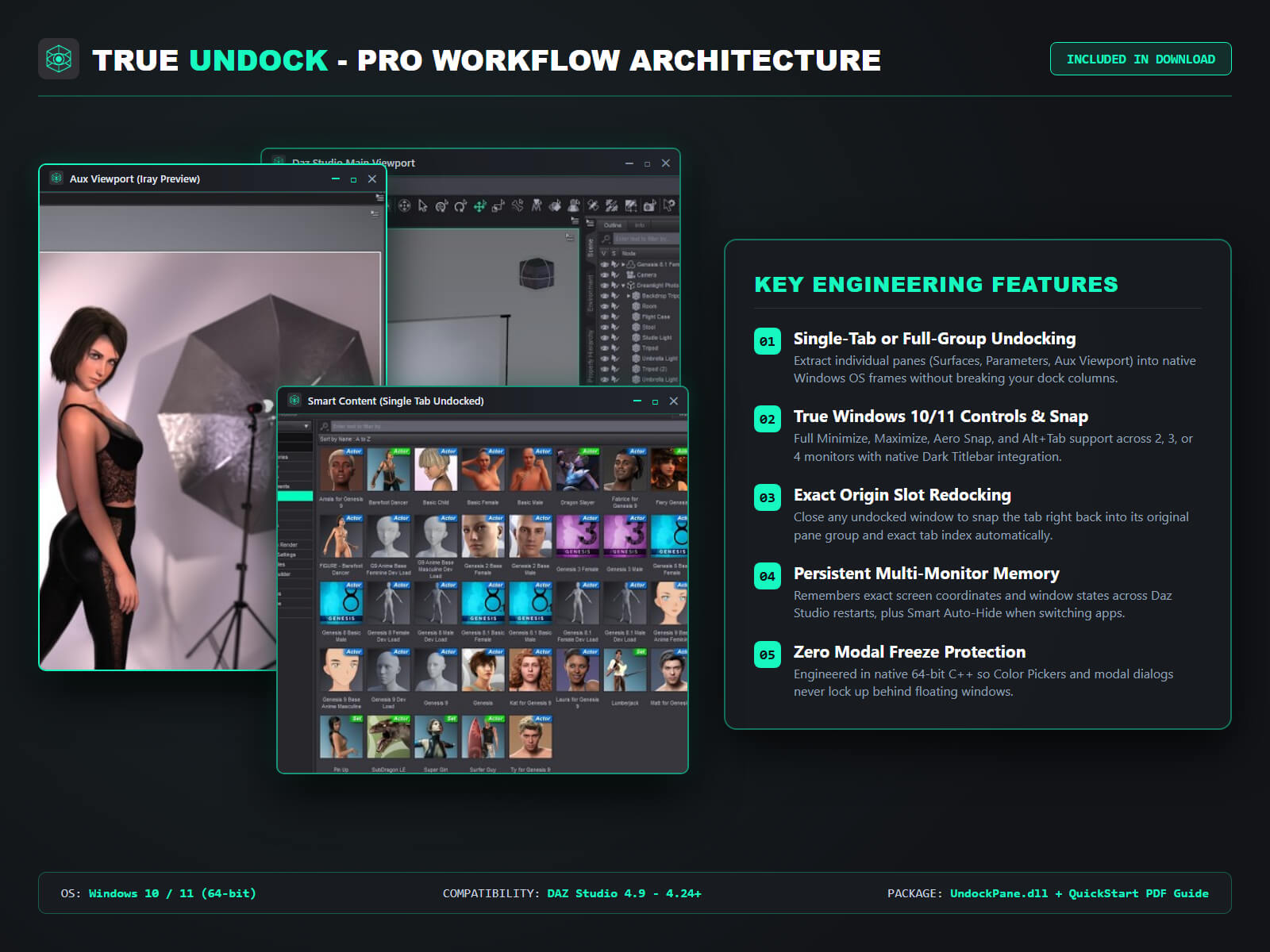
- NEW! Single-Tab Undocking ("True Undock Tab"): Pull out JUST one specific tab (e.g., Surfaces, Parameters, Scene, Timeline) into a standalone OS window without detaching the rest of the group! (v1.0 could only undock entire groups).
- NEW! Exact Re-Dock Memory: Click the [X] button on any floating window and it automatically snaps back into its exact original dock column, width, and tab group!
- NEW! 1-Click Automatic Windows Installer (.exe): No more manual DLL folder hunting. Double-click "Install_TrueUndock.exe" and you are ready in 2 seconds.
- FIXED! Windows 10/11 Native Dark Mode Title Bars (fixes the blinding white title bars from v1.0).
- FIXED! Multi-Monitor Focus & Mixed-DPI Stability: Choose whether floating windows stay visible on your second screen when you Alt+Tab to Photoshop/Blender, and prevent off-screen coordinate glitches on 4K + 1080p setups.
==================================================
KEY FEATURES
==================================================
1. True Independent Windows: Every undocked panel becomes a real Windows window with its own taskbar icon, Alt+Tab entry, Minimize/Maximize buttons, and Windows Snap (Win + Arrows) support.
2. Detach Single Tab or Full Group: Right-click any panel tab header and select "True Undock Tab" or "True Undock Group".
3. Per-Window "Keep on Top" Pinning: Right-click any floating window's tab bar to pin or unpin it above all other windows.
4. Automatic Session Save: Your multi-monitor layout is saved automatically and restored every time you open Daz Studio.
5. Zero Render Overhead: Pure native C++ plugin (compiled against official Daz SDK memory manager). Zero impact on NVIDIA Iray or Filament speed.
==================================================
INSTALLATION (2 EASY OPTIONS INCLUDED)
==================================================
- Option 1 (1-Click Automatic): Run "Install_TrueUndock.exe" included in the ZIP.
- Option 2 (Manual): Copy "UndockPane.dll" into C:\Program Files\DAZ 3D\DAZStudio4\plugins\
(Includes illustrated Dark-Mode PDF User Manual & Quick Install Guide).
==================================================
SYSTEM REQUIREMENTS
==================================================
- Software: Daz Studio 4.9 to 4.24+ (64-bit)
- OS: Windows 10 or Windows 11 (64-bit)
By default, Daz Studio's "Make Pane Undockable" creates sub-windows trapped inside Daz Studio's legacy window manager: they lack Maximize/Minimize buttons, vanish off-screen when mixing 4K and 1080p monitors with different Windows DPI scaling, and cannot detach a single tab without breaking your entire tab group.
TRUE UNDOCK v1.2 fixes all of this at the native C++ level.
==================================================
MAJOR UPDATE v1.2 — WHAT'S NEW & FIXED!
==================================================
(Note: If you have seen or tested the older v1.0 legacy build, v1.2 is a complete architectural overhaul!)
- NEW! Single-Tab Undocking ("True Undock Tab"): Pull out JUST one specific tab (e.g., Surfaces, Parameters, Scene, Timeline) into a standalone OS window without detaching the rest of the group! (v1.0 could only undock entire groups).
- NEW! Exact Re-Dock Memory: Click the [X] button on any floating window and it automatically snaps back into its exact original dock column, width, and tab group!
- NEW! 1-Click Automatic Windows Installer (.exe): No more manual DLL folder hunting. Double-click "Install_TrueUndock.exe" and you are ready in 2 seconds.
- FIXED! Windows 10/11 Native Dark Mode Title Bars (fixes the blinding white title bars from v1.0).
- FIXED! Multi-Monitor Focus & Mixed-DPI Stability: Choose whether floating windows stay visible on your second screen when you Alt+Tab to Photoshop/Blender, and prevent off-screen coordinate glitches on 4K + 1080p setups.
==================================================
KEY FEATURES
==================================================
1. True Independent Windows: Every undocked panel becomes a real Windows window with its own taskbar icon, Alt+Tab entry, Minimize/Maximize buttons, and Windows Snap (Win + Arrows) support.
2. Detach Single Tab or Full Group: Right-click any panel tab header and select "True Undock Tab" or "True Undock Group".
3. Per-Window "Keep on Top" Pinning: Right-click any floating window's tab bar to pin or unpin it above all other windows.
4. Automatic Session Save: Your multi-monitor layout is saved automatically and restored every time you open Daz Studio.
5. Zero Render Overhead: Pure native C++ plugin (compiled against official Daz SDK memory manager). Zero impact on NVIDIA Iray or Filament speed.
==================================================
INSTALLATION (2 EASY OPTIONS INCLUDED)
==================================================
- Option 1 (1-Click Automatic): Run "Install_TrueUndock.exe" included in the ZIP.
- Option 2 (Manual): Copy "UndockPane.dll" into C:\Program Files\DAZ 3D\DAZStudio4\plugins\
(Includes illustrated Dark-Mode PDF User Manual & Quick Install Guide).
==================================================
SYSTEM REQUIREMENTS
==================================================
- Software: Daz Studio 4.9 to 4.24+ (64-bit)
- OS: Windows 10 or Windows 11 (64-bit)
Categories
