


 Free 3D
 3D Print Models
 3D Scans
 Animation & MoCap
 Textures
 Materials
 Skin Reference
 2D Game Assets
 Sound Effects
 Brushes & Tools
 Reference Photos
 Stock Images
 HDR Images
 3ds Max
 Maya
 Blender
 Unreal Engine
 Unity
 ZBrush
 Cinema 4D
 LightWave
 Marmoset
 SketchUp
 FBX
 DAE
 DXF
 GLB
Akari Aizawa for Genesis 8.1 Female + Skin and Lighting Set

Not Rated Yet


User Artwork (3)


! REPORT
NOTE: DIGITAL DOWNLOAD, NOT A PHYSICAL ITEM

Add to Collection

7 Likes
Share This Daz Content


Offered By


I'm a full-time 3D comic artist based in Japan.
DeviantArt: LegalAdultStudio
WHAT I CREATE
Original DAZ Studio characters,
realistic and lightweight Iray skin materials, and practical lighting setups.
All developed for my own commercial 3D projects.
MY PHILOSOPHY
Beautiful details. Simple settings. Efficient workflows.
Great results shouldn't require endless adjustments!
MY PASSION
To me, DAZ Studio is the best 3D software in the world!
I'll never stop exploring its possibilities and pushing its limits!
Created for my own work.
Now available for yours!
DeviantArt: LegalAdultStudio
WHAT I CREATE
Original DAZ Studio characters,
realistic and lightweight Iray skin materials, and practical lighting setups.
All developed for my own commercial 3D projects.
MY PHILOSOPHY
Beautiful details. Simple settings. Efficient workflows.
Great results shouldn't require endless adjustments!
MY PASSION
To me, DAZ Studio is the best 3D software in the world!
I'll never stop exploring its possibilities and pushing its limits!
Created for my own work.
Now available for yours!
Vendor's Pages


License
Extended Use License
This item comes with our Extended Use Licensing. This means that you may use the model for both non-commercial and commercial purposes, in a variety of mediums and applications.
For full license terms, see our 3D Content Licensing Agreement
Item Details
| Vendor: | snakeskinjkt |
| Published: | Nov 09, 2026 |
| Download Size: | 280.4 MB |
| Software: | Daz Studio |
| Compatible Figure: | Genesis 8.1 Female |
| dForce: | – |
Included Formats

Statistics
| Favorites: | 3 |
| Likes: | 7 |
| Views: | 194 |
Item Ratings
Not Rated Yet
Akari Aizawa for Genesis 8.1 Female + Skin and Lighting Set
Akari Aizawa for Genesis 8.1 Female + Skin and Lighting Set
Beautiful Sculpting. Realistic, Lightweight Skin. Simple Lighting.
━━━━━━━━━━━━━━━━━━━━
01 | AKARI AIZAWA — CHARACTER DESIGN
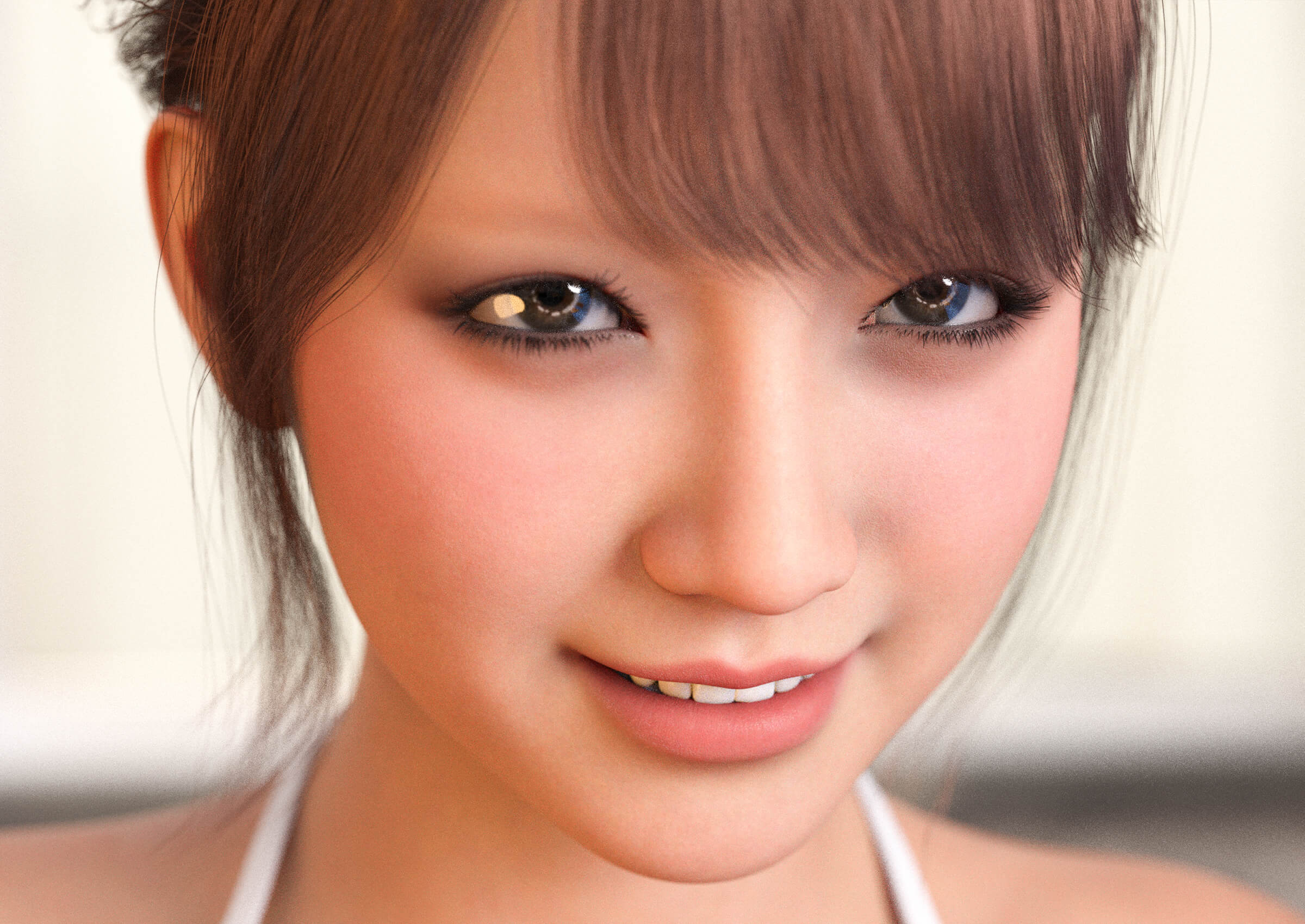
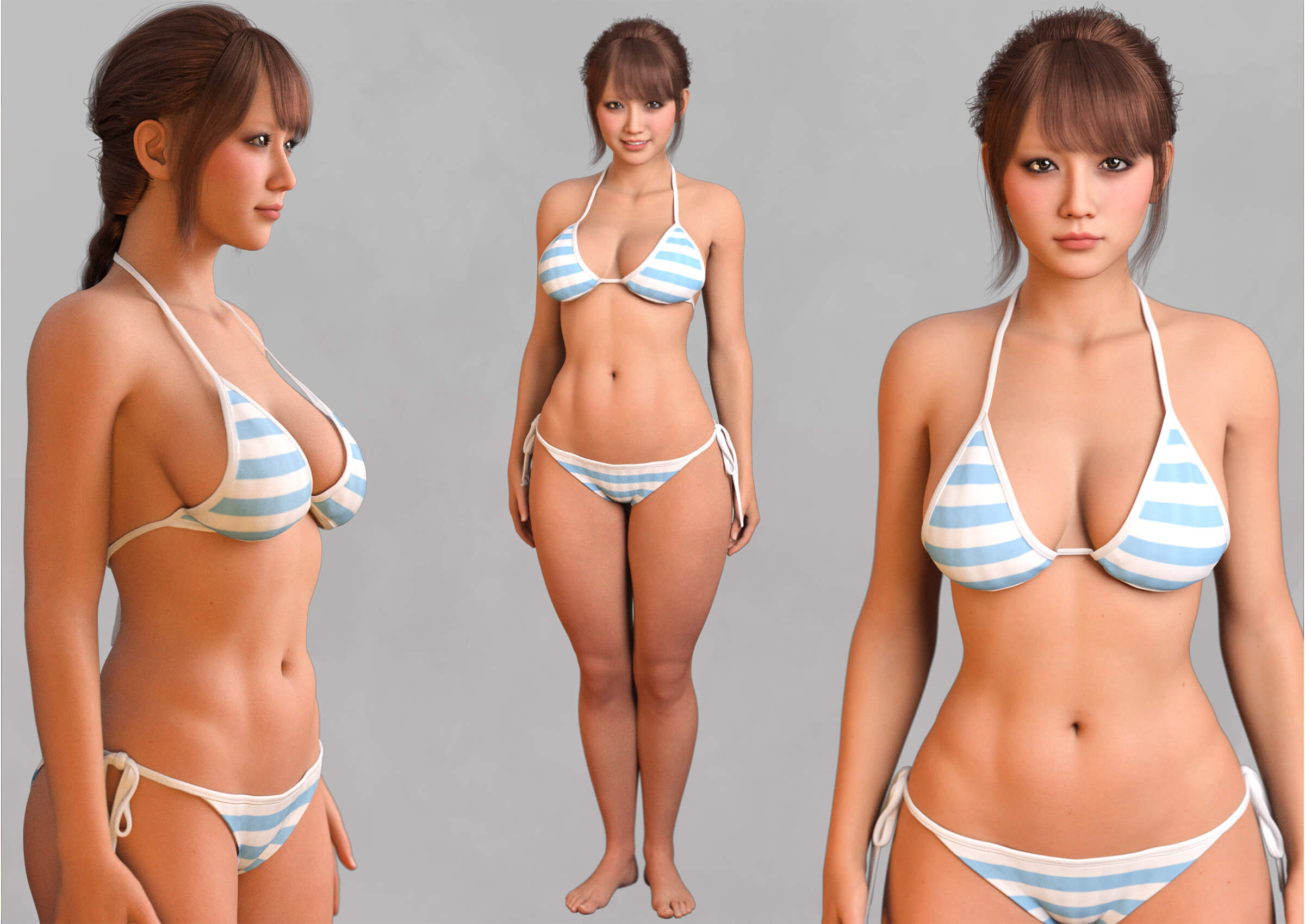
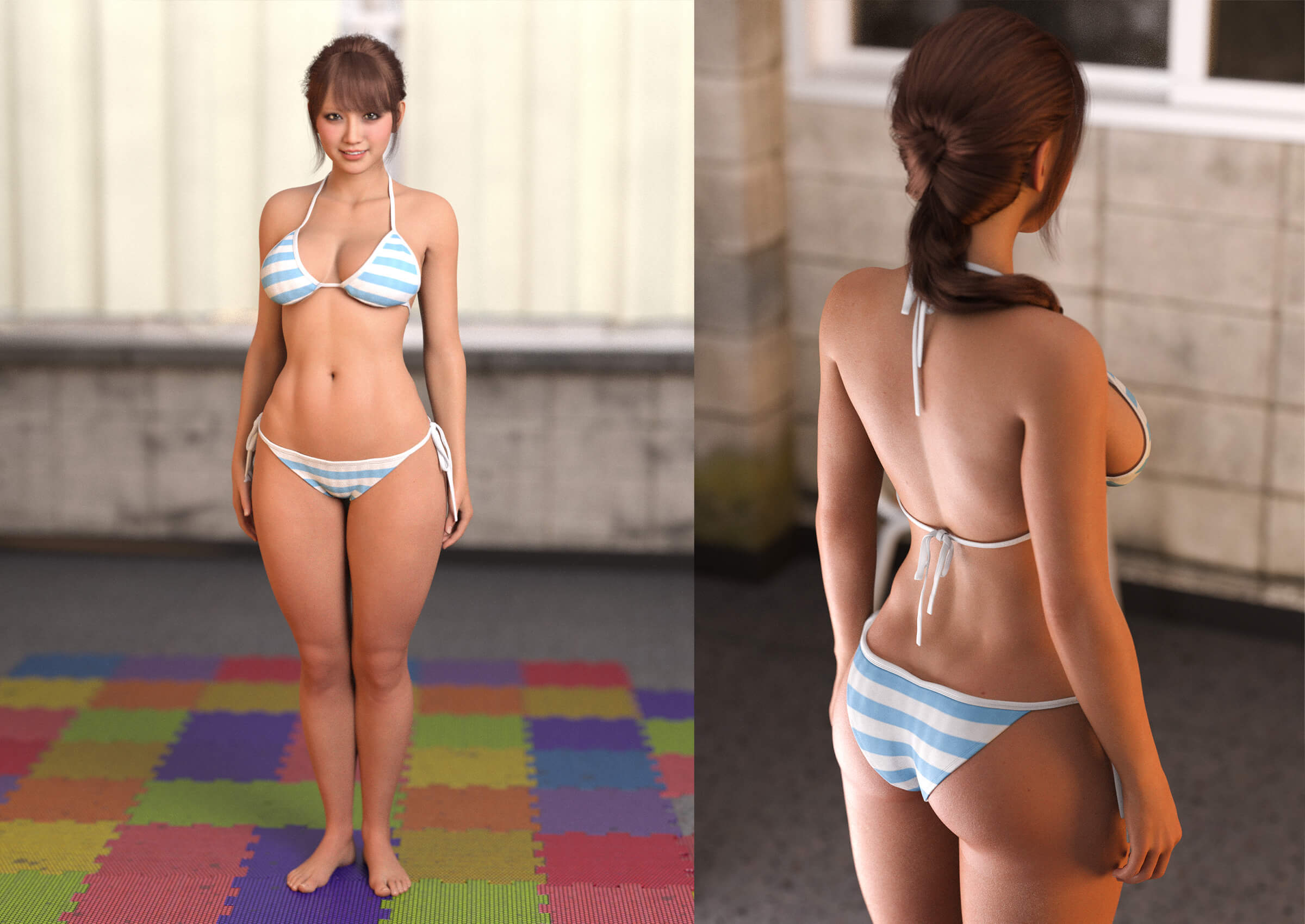
Akari Aizawa is a custom character for Genesis 8.1 Female, originally developed for my own commercial 3D artwork.
This package includes the Akari Aizawa character, optimized Iray skin materials, and my own practical lighting setup.
I focused on creating a beautiful face, natural expressions, and a carefully sculpted body with a realistic sense of softness, weight, and volume.
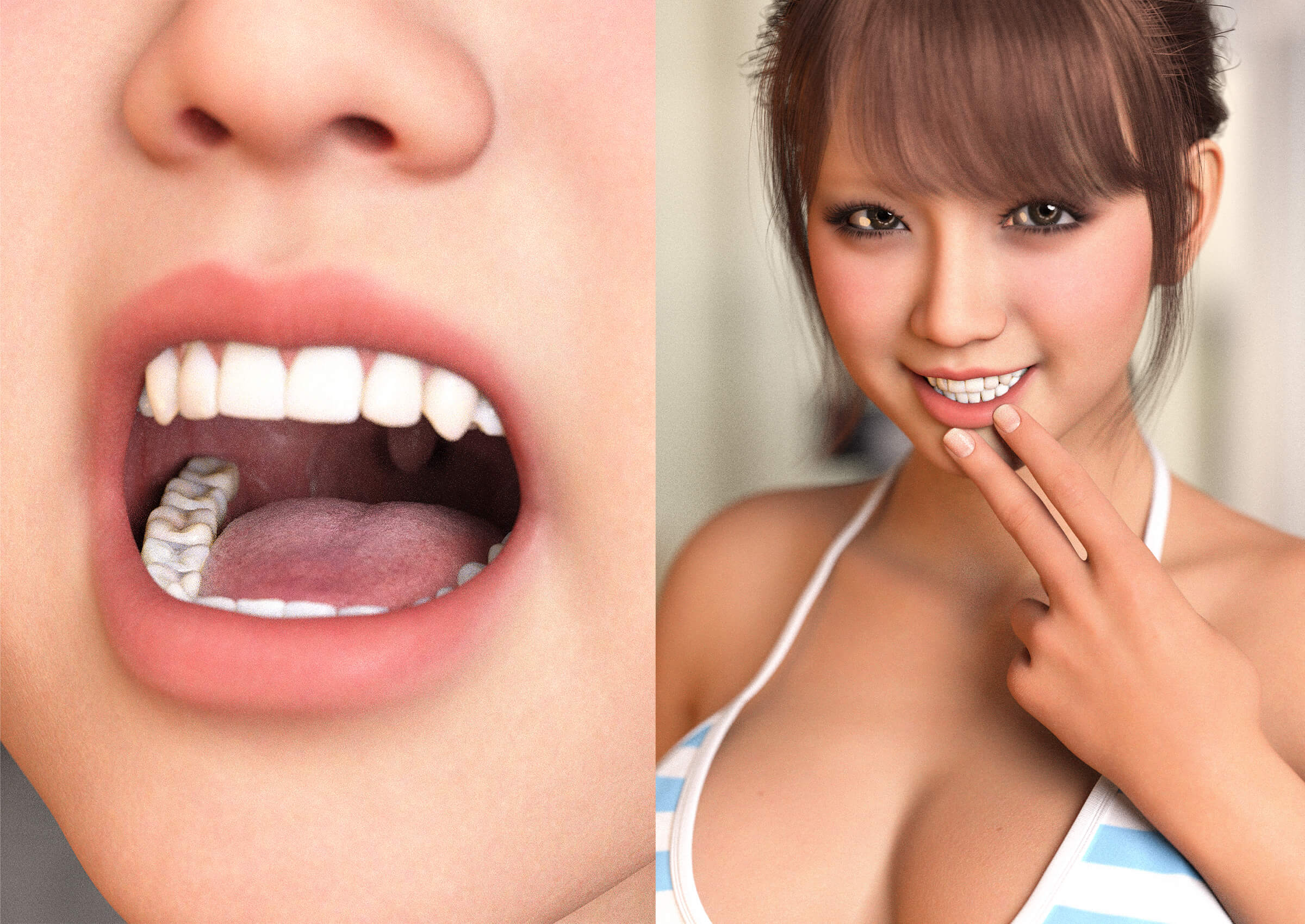
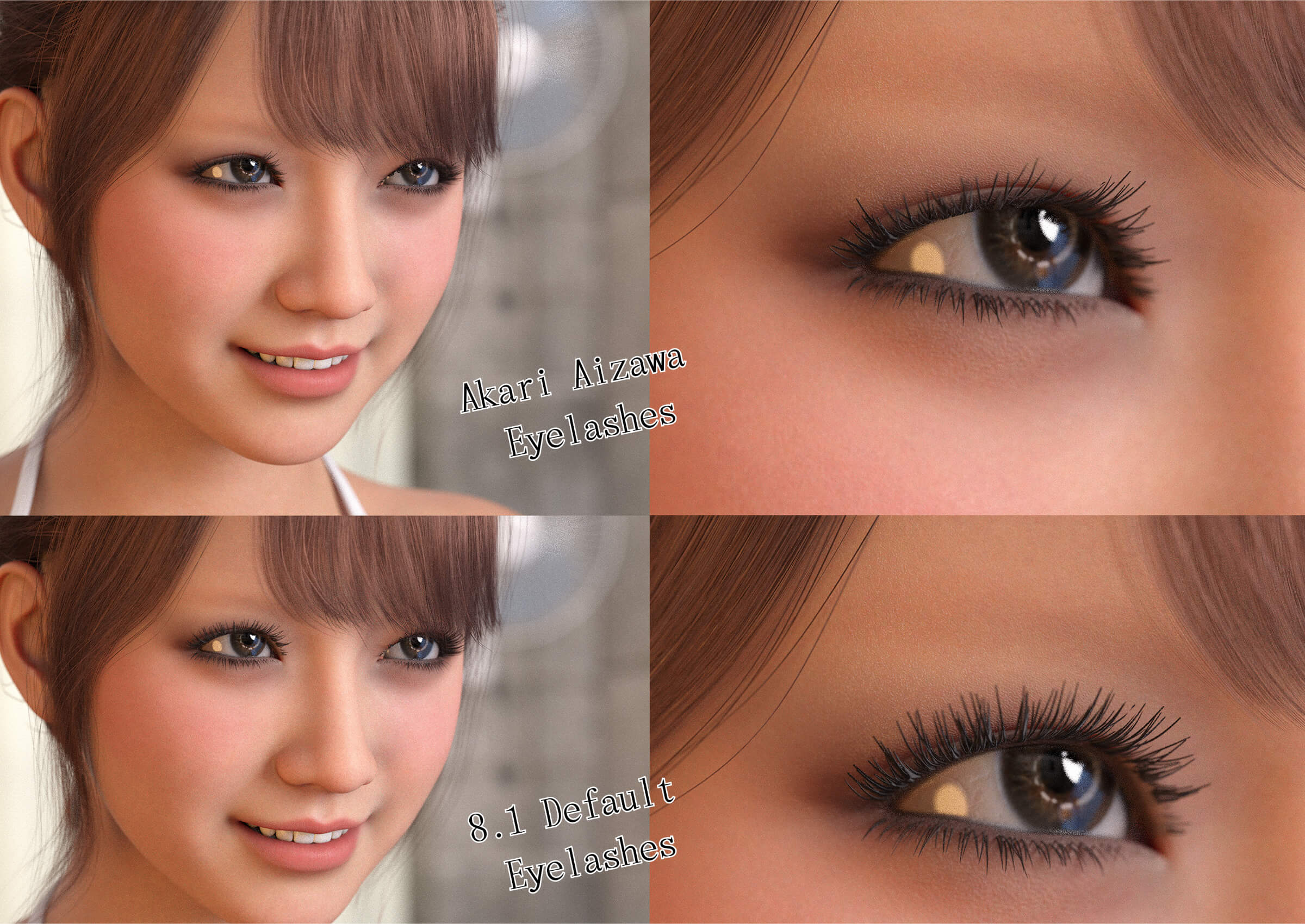
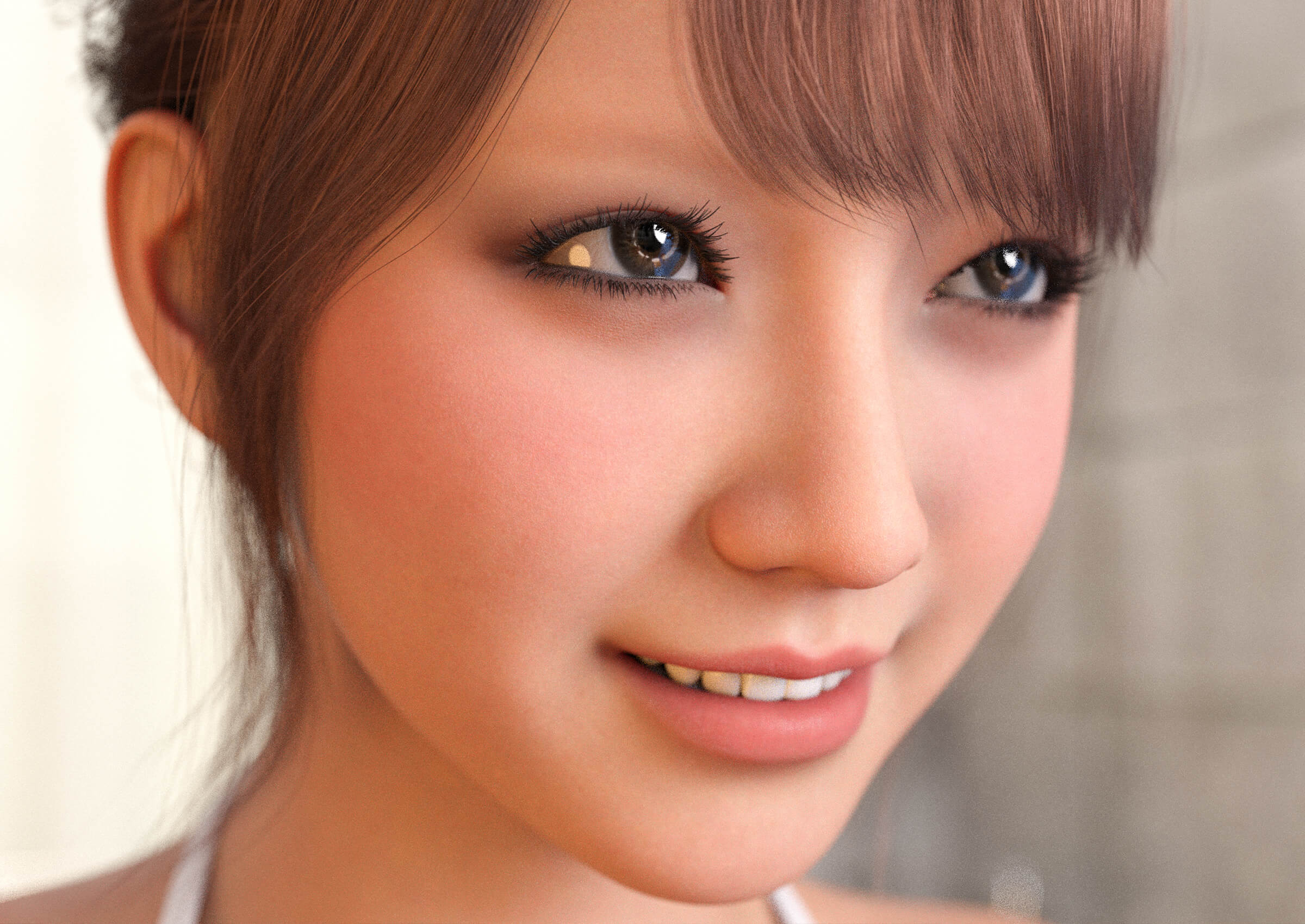
Every detail has been carefully crafted, including the inside of the mouth, teeth, nails, navel, and more. A custom eyelash morph is also included.
Gray-looking nails, bright red tongues, metallic-looking teeth… None of those common problems here!
From full-body renders to extreme close-ups, Akari was designed to deliver production-ready quality for commercial artwork.
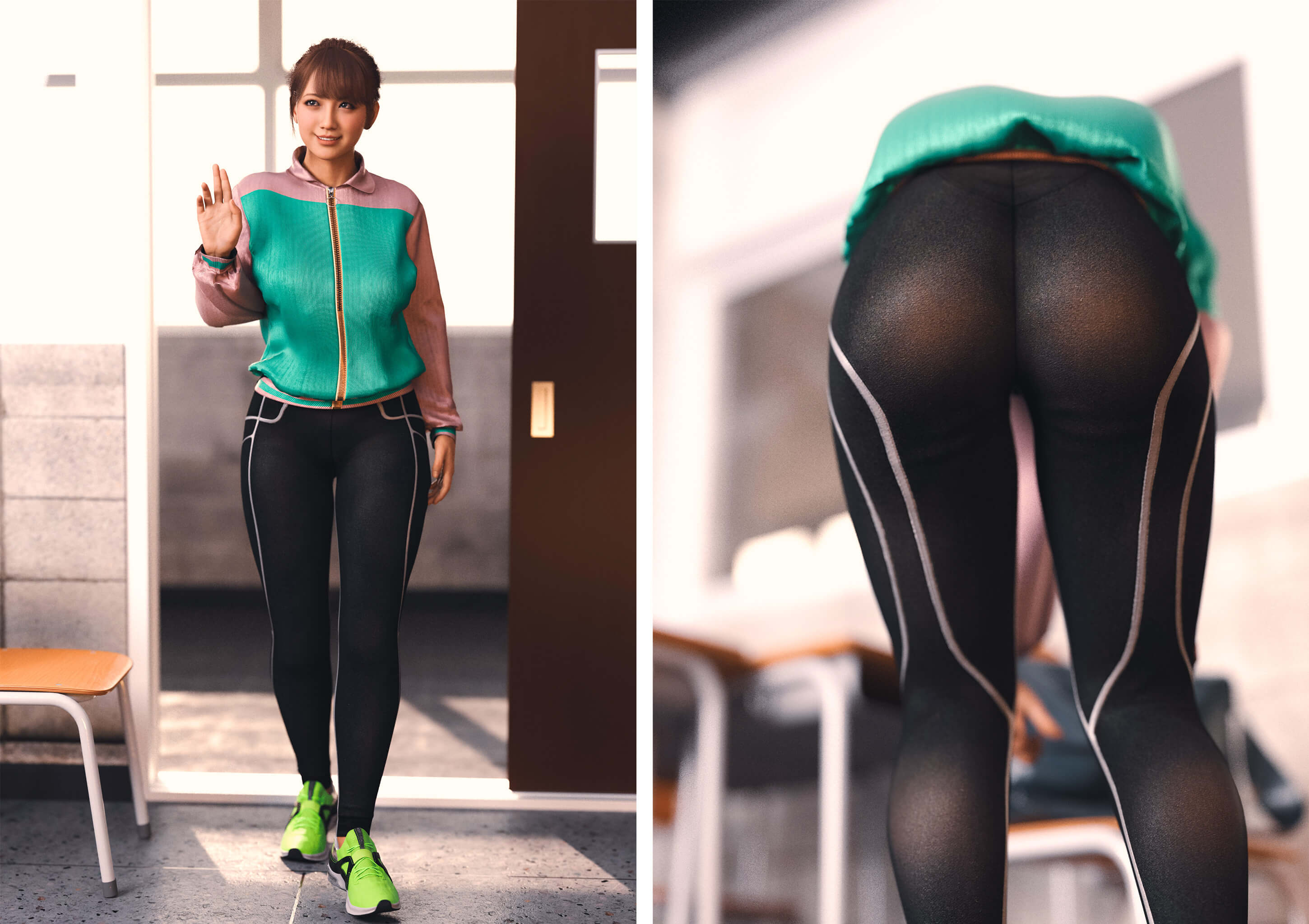
She also works well with a wide variety of clothing, poses, and additional customization using third-party HD morphs.
━━━━━━━━━━━━━━━━━━━━
02 | SIMPLE, LIGHTWEIGHT IRAY SKIN AND LIGHTING
OPTIMIZED IRAY SKIN
DAZ Studio offers an incredible number of skin settings and options. But do we really need all of them?
I decided to simplify things by removing settings and texture maps that contribute very little to the final appearance.
Without compromising pores or fine skin details, I developed a streamlined Iray skin setup that responds naturally to different lighting colors and intensities.
And the entire body uses only approximately 23 texture maps!
Two skin material options are included:
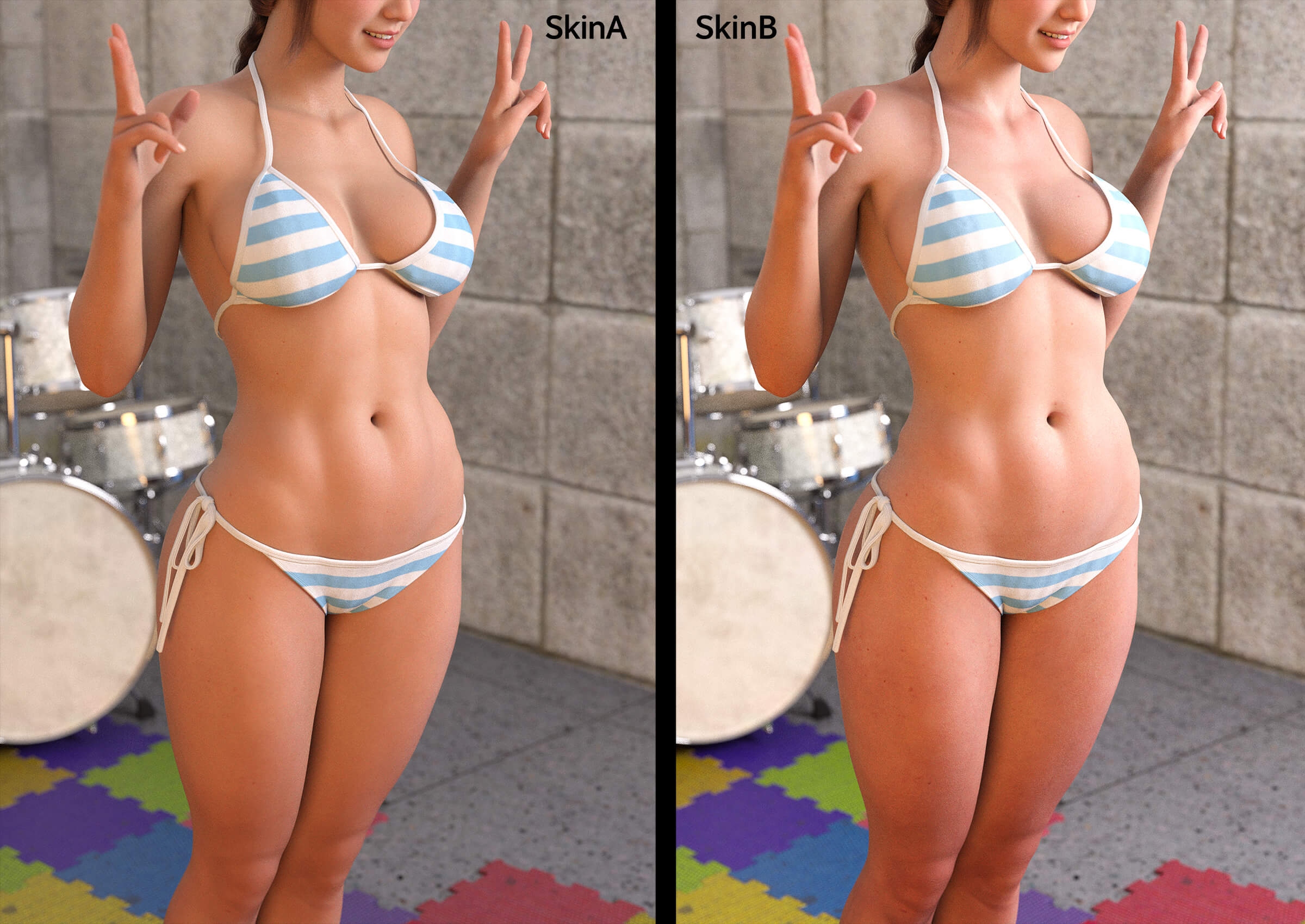
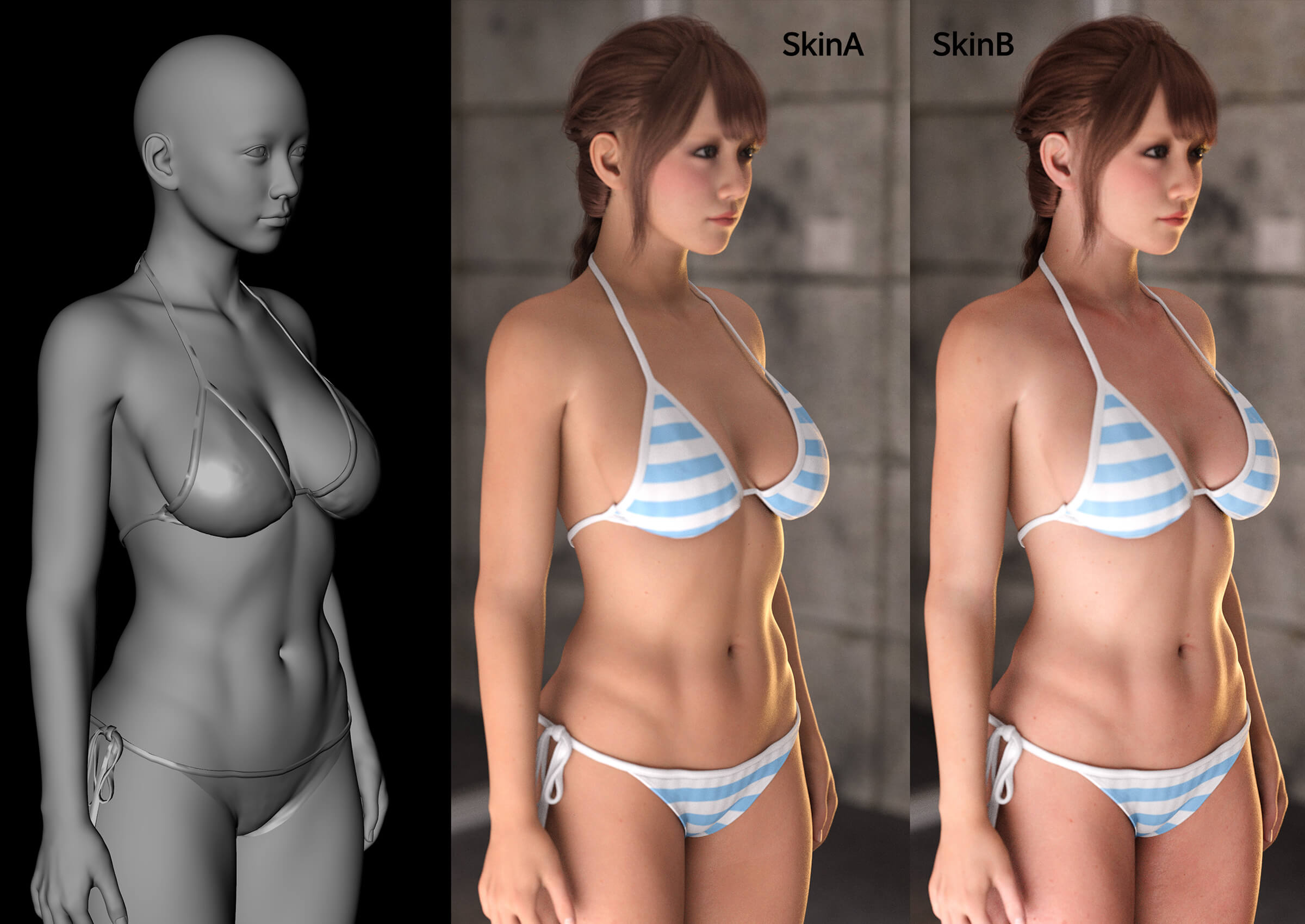
Skin A: Genesis 8 neck UV layout, featuring natural, well-balanced skin tones.
Skin B: Genesis 8.1 neck UV layout, with slightly stronger contrast and enhanced skin detail.
Both use the same underlying Iray surface settings.
INCLUDED 3-LIGHT IRAY LIGHTING SET
Lighting can become incredibly complicated once you start fine-tuning every detail.
But does lighting really need to be that complicated? I believe three lights are enough!
That's why I've included the lighting setup I use regularly in my own commercial artwork.
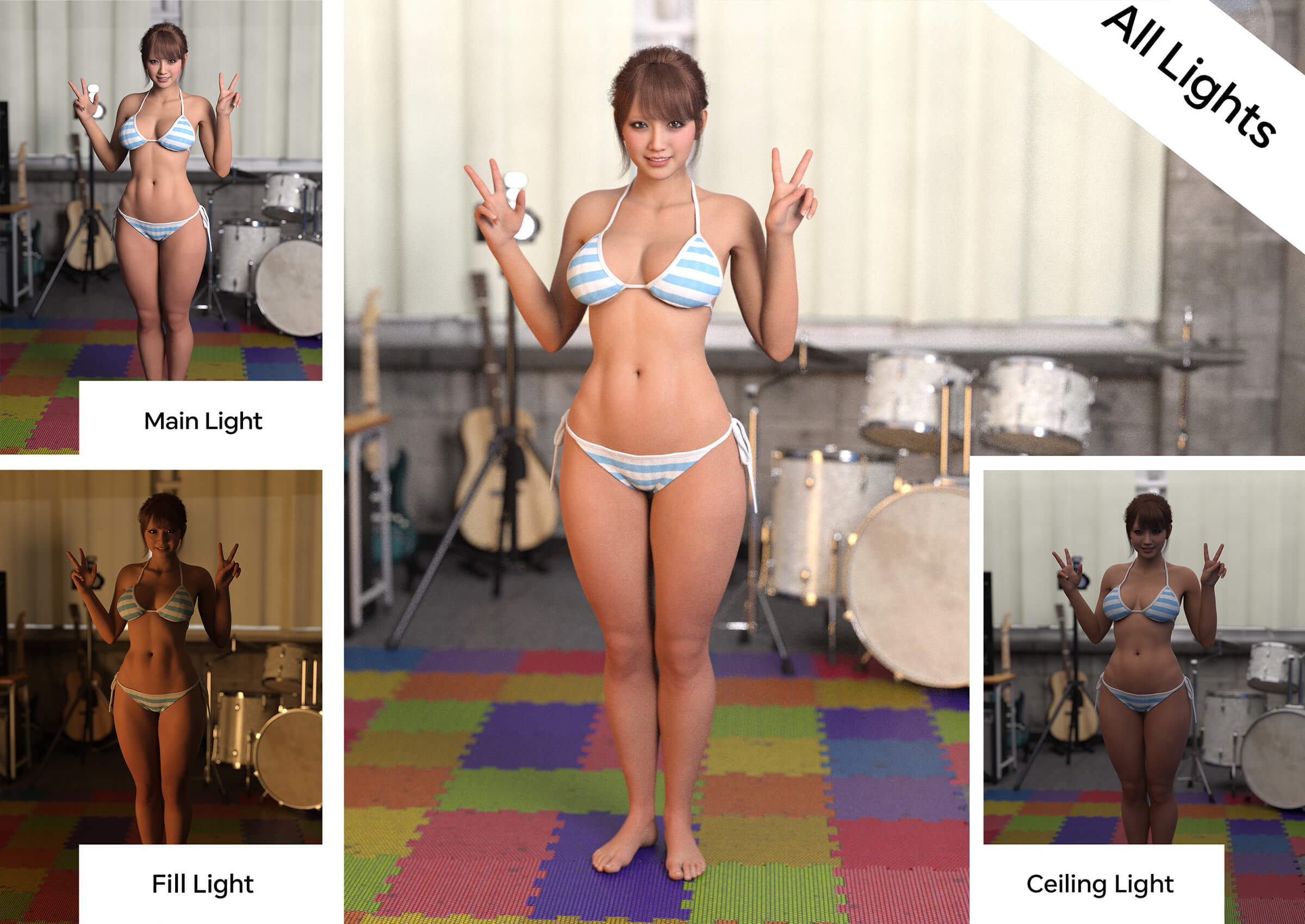
Main Light: The primary light, illuminating the character from the upper right.
Fill Light: A secondary light, softening shadows from the lower left.
Ceiling Dual Area Light: An environmental lighting setup primarily designed to illuminate the entire room.
The Main and Fill lights are parented to the camera, allowing you to adjust their positions intuitively.
For the Ceiling Light, position and scale it slightly larger than the room's ceiling to illuminate the interior evenly.
It consists of two opposing area lights, facing upward and downward.
If you also want to illuminate the ceiling itself, simply make the upward-facing child light visible and adjust its brightness.
Since the Main and Fill lights handle most of the character lighting, the Ceiling Light can generally remain fixed in place.
━━━━━━━━━━━━━━━━━━━━
03 | USE AKARI'S SKIN MATERIALS ON YOUR EXISTING CHARACTERS
Akari's skin materials can also be adapted for your existing Genesis 8 and Genesis 8.1 characters!
The process is simple:
1. Apply Skin A or Skin B according to the character's neck UV layout.
2. Compare the original character's Base Color and SSS texture maps, and choose the one with the most natural-looking skin tones.
3. Assign that same texture to both Base Color and Translucency Color.
For everything other than the skin's Base Color and Translucency Color textures, simply keep Akari's corresponding maps and surface settings!
This allows you to preserve much of the original character's skin tone and identity while taking advantage of Akari's skin appearance and natural response to lighting.
For scenes with multiple characters, this approach can help create a more consistent skin appearance across the cast.
Reusing shared texture maps can also reduce unnecessary texture duplication.
This can help save VRAM, especially in scenes featuring multiple characters. After all, lightweight materials are just as important as beautiful results!
And best of all, in many cases, it can improve the overall appearance of your existing characters!
━━━━━━━━━━━━━━━━━━━━
04 | MY OWN VISION OF "NEW GENESIS"
I didn't simply want to create another beautiful character.
I developed Akari with the ambition of creating my own version of "New Genesis."
Of course, I don't mean a completely new base figure.
My goal was to take advantage of DAZ Studio's excellent character-rendering capabilities while reducing unnecessary complexity, repetitive adjustments, and time-consuming setup.
I wanted to make the entire rendering workflow simpler and more enjoyable.
So, I'd like to make a slightly bold suggestion.
Try removing all the lights from your existing scene and replacing them with Akari's included lighting setup!
Then try applying Akari's skin materials to your other Genesis 8 and Genesis 8.1 characters!
The skin materials and lighting environment I developed for my own commercial artwork are designed to be useful beyond Akari herself.
Less time adjusting settings. More time creating beautiful renders.
That is my vision of "New Genesis."
━━━━━━━━━━━━━━━━━━━━
05 | WHAT'S INCLUDED AND REQUIREMENTS
INCLUDED FILES
- Akari Aizawa Head Morph
- Akari Aizawa Body Morph
- Akari Aizawa Custom Eyelash Morph
- Skin A / Skin B Material Presets
- Iray Materials for Skin, Eyes, Mouth, Teeth, and Nails
- Optimized Texture Maps
- 3-Light Iray Lighting Set
HOW TO USE
Load Genesis 8.1 Female and apply the Head, Body, and Eyelash morphs.
Apply either Skin A or Skin B, then load the included lighting set if desired.
Morphs and materials are provided separately, allowing you to customize the character freely.
REQUIREMENTS AND IMPORTANT NOTES
Required: DAZ Studio and Genesis 8.1 Female. Materials are designed for NVIDIA Iray.
The Head and Body morphs are specifically designed for Genesis 8.1 Female.
The skin materials can also be adapted for Genesis 8 characters when the appropriate UV layout is used.
Hair, clothing, and accessories shown in promotional images are not included.
All promotional images were rendered in DAZ Studio. Some images received only basic brightness and contrast adjustments.
No generative AI, AI image enhancement, face swapping, or beauty/face-filter applications were used in the creation of these images.
**Update – Texture Reference Fix**
Fixed an incorrect texture reference left over during development.
The issue has been corrected in both Skin A and Skin B. No changes have been made to the character's appearance or surface settings.
I apologize for the inconvenience, and thank you for your understanding.
If you've already purchased Akari Aizawa, please download the updated files.
Beautiful Sculpting. Realistic, Lightweight Skin. Simple Lighting.
━━━━━━━━━━━━━━━━━━━━
01 | AKARI AIZAWA — CHARACTER DESIGN
Akari Aizawa is a custom character for Genesis 8.1 Female, originally developed for my own commercial 3D artwork.
This package includes the Akari Aizawa character, optimized Iray skin materials, and my own practical lighting setup.
I focused on creating a beautiful face, natural expressions, and a carefully sculpted body with a realistic sense of softness, weight, and volume.
Every detail has been carefully crafted, including the inside of the mouth, teeth, nails, navel, and more. A custom eyelash morph is also included.
Gray-looking nails, bright red tongues, metallic-looking teeth… None of those common problems here!
From full-body renders to extreme close-ups, Akari was designed to deliver production-ready quality for commercial artwork.
She also works well with a wide variety of clothing, poses, and additional customization using third-party HD morphs.
━━━━━━━━━━━━━━━━━━━━
02 | SIMPLE, LIGHTWEIGHT IRAY SKIN AND LIGHTING
OPTIMIZED IRAY SKIN
DAZ Studio offers an incredible number of skin settings and options. But do we really need all of them?
I decided to simplify things by removing settings and texture maps that contribute very little to the final appearance.
Without compromising pores or fine skin details, I developed a streamlined Iray skin setup that responds naturally to different lighting colors and intensities.
And the entire body uses only approximately 23 texture maps!
Two skin material options are included:
Skin A: Genesis 8 neck UV layout, featuring natural, well-balanced skin tones.
Skin B: Genesis 8.1 neck UV layout, with slightly stronger contrast and enhanced skin detail.
Both use the same underlying Iray surface settings.
INCLUDED 3-LIGHT IRAY LIGHTING SET
Lighting can become incredibly complicated once you start fine-tuning every detail.
But does lighting really need to be that complicated? I believe three lights are enough!
That's why I've included the lighting setup I use regularly in my own commercial artwork.
Main Light: The primary light, illuminating the character from the upper right.
Fill Light: A secondary light, softening shadows from the lower left.
Ceiling Dual Area Light: An environmental lighting setup primarily designed to illuminate the entire room.
The Main and Fill lights are parented to the camera, allowing you to adjust their positions intuitively.
For the Ceiling Light, position and scale it slightly larger than the room's ceiling to illuminate the interior evenly.
It consists of two opposing area lights, facing upward and downward.
If you also want to illuminate the ceiling itself, simply make the upward-facing child light visible and adjust its brightness.
Since the Main and Fill lights handle most of the character lighting, the Ceiling Light can generally remain fixed in place.
━━━━━━━━━━━━━━━━━━━━
03 | USE AKARI'S SKIN MATERIALS ON YOUR EXISTING CHARACTERS
Akari's skin materials can also be adapted for your existing Genesis 8 and Genesis 8.1 characters!
The process is simple:
1. Apply Skin A or Skin B according to the character's neck UV layout.
2. Compare the original character's Base Color and SSS texture maps, and choose the one with the most natural-looking skin tones.
3. Assign that same texture to both Base Color and Translucency Color.
For everything other than the skin's Base Color and Translucency Color textures, simply keep Akari's corresponding maps and surface settings!
This allows you to preserve much of the original character's skin tone and identity while taking advantage of Akari's skin appearance and natural response to lighting.
For scenes with multiple characters, this approach can help create a more consistent skin appearance across the cast.
Reusing shared texture maps can also reduce unnecessary texture duplication.
This can help save VRAM, especially in scenes featuring multiple characters. After all, lightweight materials are just as important as beautiful results!
And best of all, in many cases, it can improve the overall appearance of your existing characters!
━━━━━━━━━━━━━━━━━━━━
04 | MY OWN VISION OF "NEW GENESIS"
I didn't simply want to create another beautiful character.
I developed Akari with the ambition of creating my own version of "New Genesis."
Of course, I don't mean a completely new base figure.
My goal was to take advantage of DAZ Studio's excellent character-rendering capabilities while reducing unnecessary complexity, repetitive adjustments, and time-consuming setup.
I wanted to make the entire rendering workflow simpler and more enjoyable.
So, I'd like to make a slightly bold suggestion.
Try removing all the lights from your existing scene and replacing them with Akari's included lighting setup!
Then try applying Akari's skin materials to your other Genesis 8 and Genesis 8.1 characters!
The skin materials and lighting environment I developed for my own commercial artwork are designed to be useful beyond Akari herself.
Less time adjusting settings. More time creating beautiful renders.
That is my vision of "New Genesis."
━━━━━━━━━━━━━━━━━━━━
05 | WHAT'S INCLUDED AND REQUIREMENTS
INCLUDED FILES
- Akari Aizawa Head Morph
- Akari Aizawa Body Morph
- Akari Aizawa Custom Eyelash Morph
- Skin A / Skin B Material Presets
- Iray Materials for Skin, Eyes, Mouth, Teeth, and Nails
- Optimized Texture Maps
- 3-Light Iray Lighting Set
HOW TO USE
Load Genesis 8.1 Female and apply the Head, Body, and Eyelash morphs.
Apply either Skin A or Skin B, then load the included lighting set if desired.
Morphs and materials are provided separately, allowing you to customize the character freely.
REQUIREMENTS AND IMPORTANT NOTES
Required: DAZ Studio and Genesis 8.1 Female. Materials are designed for NVIDIA Iray.
The Head and Body morphs are specifically designed for Genesis 8.1 Female.
The skin materials can also be adapted for Genesis 8 characters when the appropriate UV layout is used.
Hair, clothing, and accessories shown in promotional images are not included.
All promotional images were rendered in DAZ Studio. Some images received only basic brightness and contrast adjustments.
No generative AI, AI image enhancement, face swapping, or beauty/face-filter applications were used in the creation of these images.
**Update – Texture Reference Fix**
Fixed an incorrect texture reference left over during development.
The issue has been corrected in both Skin A and Skin B. No changes have been made to the character's appearance or surface settings.
I apologize for the inconvenience, and thank you for your understanding.
If you've already purchased Akari Aizawa, please download the updated files.
