


 Free 3D
 3D Print Models
 3D Scans
 Animation & MoCap
 Textures
 Materials
 Skin Reference
 2D Game Assets
 Sound Effects
 Brushes & Tools
 Reference Photos
 Stock Images
 HDR Images
 3ds Max
 Maya
Maya Blender
 Unreal Engine
 Unity
Unity ZBrush
 Cinema 4D
 LightWave
 Marmoset
 SketchUp
 FBX
FBX DAE
DAE DXF
DXF GLB
GLBBetter Timeline for DAZ Studio

Not Rated Yet


! REPORT
NOTE: DIGITAL DOWNLOAD, NOT A PHYSICAL ITEM

Add to Collection

6 Likes
Share This Daz Content


Offered By


License
Extended Use License
This item comes with our Extended Use Licensing. This means that you may use the model for both non-commercial and commercial purposes, in a variety of mediums and applications.
For full license terms, see our 3D Content Licensing Agreement
Item Details
| Vendor: | The3DHouse |
| Published: | Oct 17, 2026 |
| Download Size: | 248.9 KB |
| Software: | Daz Studio |
| Compatible Figures: | Genesis 9 |
| dForce: | – |
Included Formats

Statistics
| Favorites: | 0 |
| Likes: | 6 |
| Views: | 201 |
Item Ratings
Not Rated Yet
Better Timeline for DAZ Studio
Better Timeline is the ultimate replacement for DAZ Studio's default timeline or KeyMate.
It adds tons of quality-of-life features and completely new tools designed to make animation inside DAZ Studio faster, easier, and more intuitive. Better Timeline brings advanced keyframe editing, a fully interactive curve editor, and a wide range of workflow improvements that could save you hundreds of hours.
Whether you're creating simple movements or complex character animations, Better Timeline gives you the tools to work more efficiently, refine your animations with greater precision, and spend less time on repetitive tasks.
If you're serious about animating in DAZ Studio, Better Timeline is the tool you've been looking for.
------------------------------------------------------------------------------------------------------------------
Compatibility:
Better Timeline currently supports DAZ Studio 4 on Windows.
Support for DAZ Studio 6 is already in development and will be provided as a free update to customers who purchase this version.
------------------------------------------------------------------------------------------------------------------
Features:
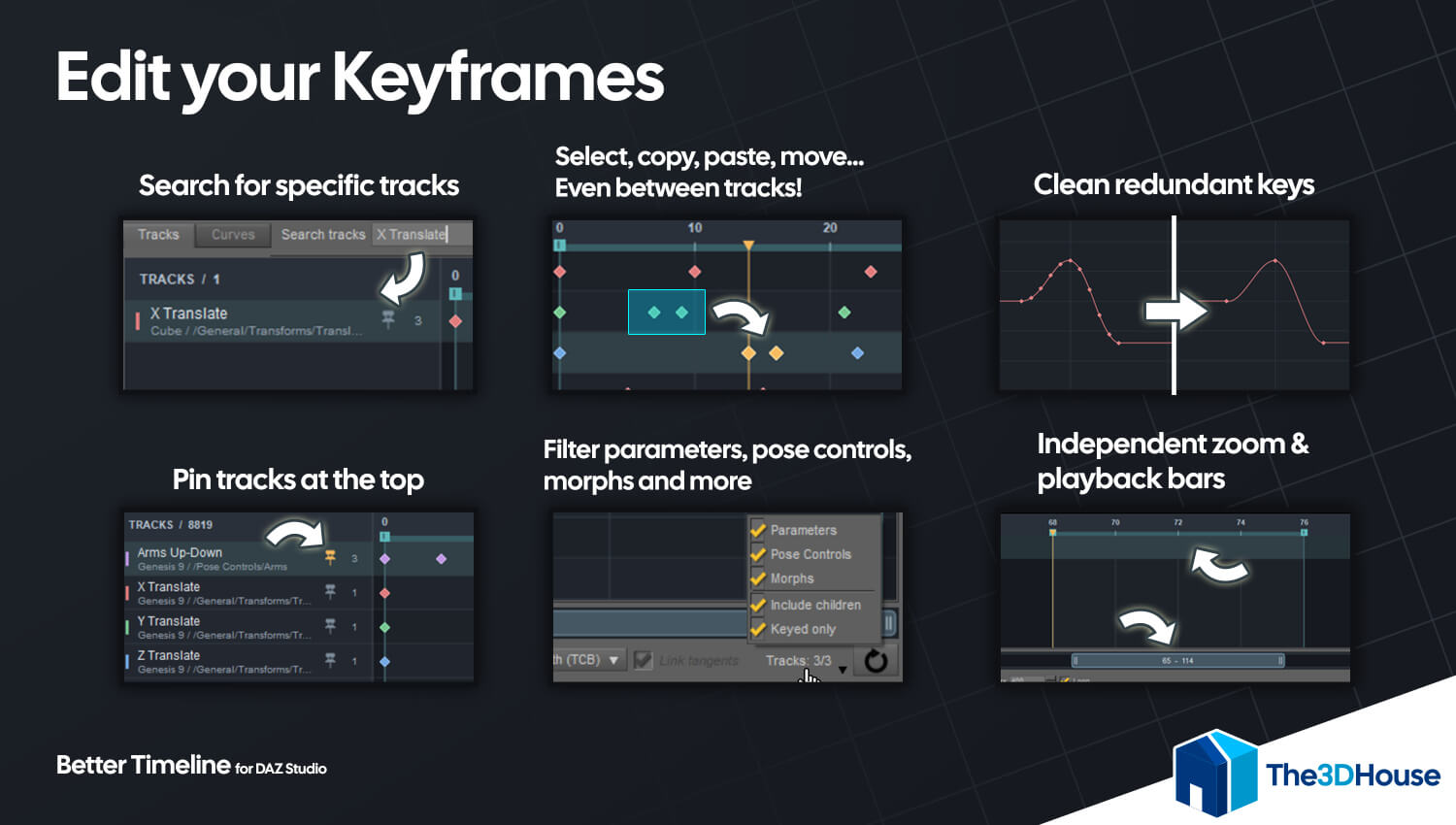
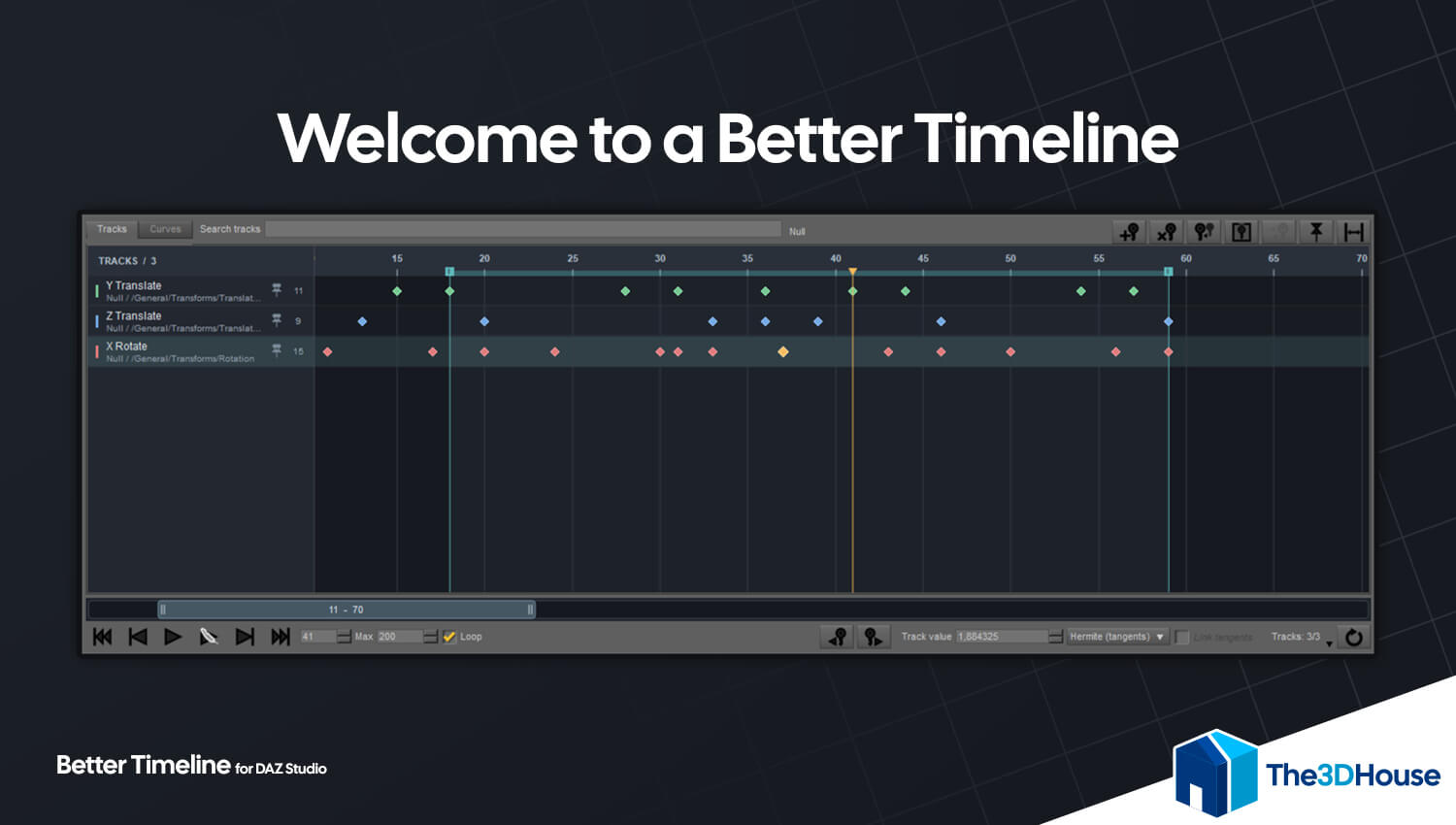
-Tracks and Curves views: Organize your animation in a track layout or refine its motion in a curve editor. Both views share the same timeline range and keyframe selection.
-Flexible keyframe editing: Insert, delete, move, copy, and paste keys. Select individual keys, ranges, or groups across multiple tracks using familiar Ctrl, Shift, and box selection controls.
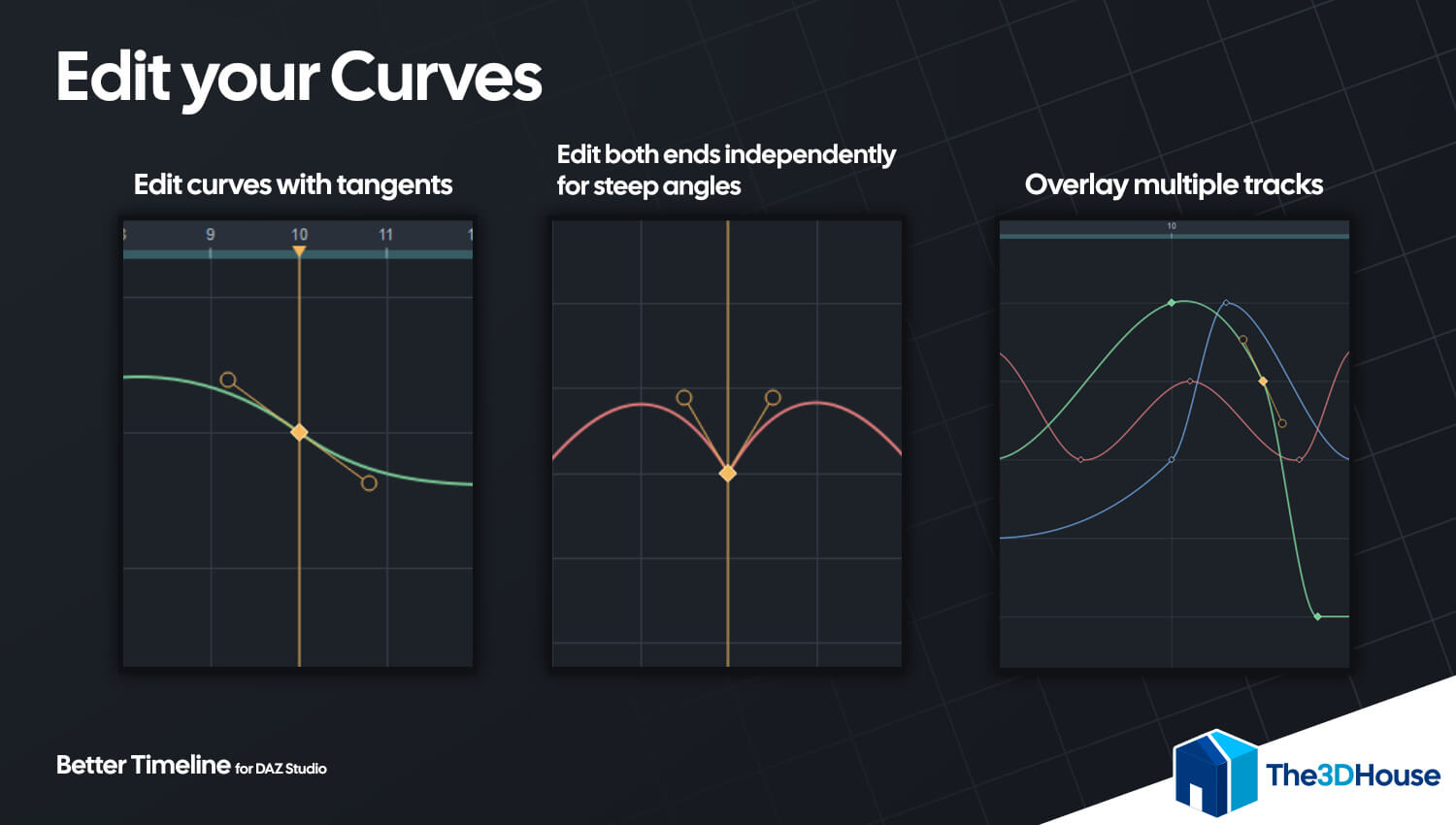
-Editable tangents and interpolation: Shape transitions with linked or independent tangent handles. Apply Linear, Smooth (TCB), or Constant interpolation to selected decimal keys.
-Overlaid curves: Display several curves together to compare their timing and values. Click a keyframe to activate its track and continue editing with the other curves visible.
-Copy between compatible tracks: Transfer keys from one track to another, including their timing and tangent information. Use Paste Inverted to reverse the sign of values and curve slopes.
-Keyframe cleanup: Reduce redundant keys with an adjustable error tolerance while preserving endpoints, changes in direction, and pauses.
-Search, filters, and pinned tracks: Find tracks by node, group, or property. Filter transforms, Pose Controls, and morphs, include child nodes, or keep selected tracks visible while working on another object.
-Playback and range controls: Play, pause, loop, step through frames, and jump between keys. Adjust the scene's playback range using draggable handles directly on the timeline.
-Play Smooth preview mode: Temporarily reduces viewport subdivision and smoothing and hides clothing, hair, and accessories to reduce preview workload. Quality and visibility are restored when playback stops.
-Flexible navigation: Zoom, pan, and fit the view to your selection. A resizable navigation bar keeps Tracks and Curves aligned.
-Native scene editing: Works with DAZ Studio's animation channels, scene saving, and Undo/Redo commands.
-English and Spanish interface: Switch the plugin's language from its panel menu.
------------------------------------------------------------------------------------------------------------------
Changelog:
Version 1.0.0: Initial version
It adds tons of quality-of-life features and completely new tools designed to make animation inside DAZ Studio faster, easier, and more intuitive. Better Timeline brings advanced keyframe editing, a fully interactive curve editor, and a wide range of workflow improvements that could save you hundreds of hours.
Whether you're creating simple movements or complex character animations, Better Timeline gives you the tools to work more efficiently, refine your animations with greater precision, and spend less time on repetitive tasks.
If you're serious about animating in DAZ Studio, Better Timeline is the tool you've been looking for.
------------------------------------------------------------------------------------------------------------------
Compatibility:
Better Timeline currently supports DAZ Studio 4 on Windows.
Support for DAZ Studio 6 is already in development and will be provided as a free update to customers who purchase this version.
------------------------------------------------------------------------------------------------------------------
Features:
-Tracks and Curves views: Organize your animation in a track layout or refine its motion in a curve editor. Both views share the same timeline range and keyframe selection.
-Flexible keyframe editing: Insert, delete, move, copy, and paste keys. Select individual keys, ranges, or groups across multiple tracks using familiar Ctrl, Shift, and box selection controls.
-Editable tangents and interpolation: Shape transitions with linked or independent tangent handles. Apply Linear, Smooth (TCB), or Constant interpolation to selected decimal keys.
-Overlaid curves: Display several curves together to compare their timing and values. Click a keyframe to activate its track and continue editing with the other curves visible.
-Copy between compatible tracks: Transfer keys from one track to another, including their timing and tangent information. Use Paste Inverted to reverse the sign of values and curve slopes.
-Keyframe cleanup: Reduce redundant keys with an adjustable error tolerance while preserving endpoints, changes in direction, and pauses.
-Search, filters, and pinned tracks: Find tracks by node, group, or property. Filter transforms, Pose Controls, and morphs, include child nodes, or keep selected tracks visible while working on another object.
-Playback and range controls: Play, pause, loop, step through frames, and jump between keys. Adjust the scene's playback range using draggable handles directly on the timeline.
-Play Smooth preview mode: Temporarily reduces viewport subdivision and smoothing and hides clothing, hair, and accessories to reduce preview workload. Quality and visibility are restored when playback stops.
-Flexible navigation: Zoom, pan, and fit the view to your selection. A resizable navigation bar keeps Tracks and Curves aligned.
-Native scene editing: Works with DAZ Studio's animation channels, scene saving, and Undo/Redo commands.
-English and Spanish interface: Switch the plugin's language from its panel menu.
------------------------------------------------------------------------------------------------------------------
Changelog:
Version 1.0.0: Initial version
