


 Free 3D
 3D Print Models
 3D Scans
 Animation & MoCap
 Textures
 Materials
 Skin Reference
 2D Game Assets
 Sound Effects
 Brushes & Tools
 Reference Photos
 Stock Images
 HDR Images
 3ds Max
 Maya
Maya Blender
 Unreal Engine
 Unity
Unity ZBrush
 Cinema 4D
 LightWave
 Marmoset
 SketchUp
 FBX
FBX DAE
DAE DXF
DXF GLB
GLB
Face Expression Studio

Not Rated Yet


This Item Was Made Using
! REPORT
NOTE: DIGITAL DOWNLOAD, NOT A PHYSICAL ITEM

Add to Collection

0 Likes
Share This


Offered By


License
Personal Use Only License
This item comes with our Personal Use Only Licensing. This means you may not share this model or use it for any commercial purposes or in any way that involves an exchange of money, promotes a business entity, or otherwise results directly or indirectly in financial gain.
For full license terms, see our 3D Content Licensing Agreement
Item Details
| Offered By: | Ujjwal308 |
| Published: | Oct 27, 2026 |
| Download Size: | 176.3 KB |
| Compatible With: | Daz Studio |
Included Formats

Statistics
| Favorites: | 0 |
| Likes: | 0 |
| Views: | 46 |
Item Ratings
Not Rated Yet
Face Expression Studio
Face Expression Studio
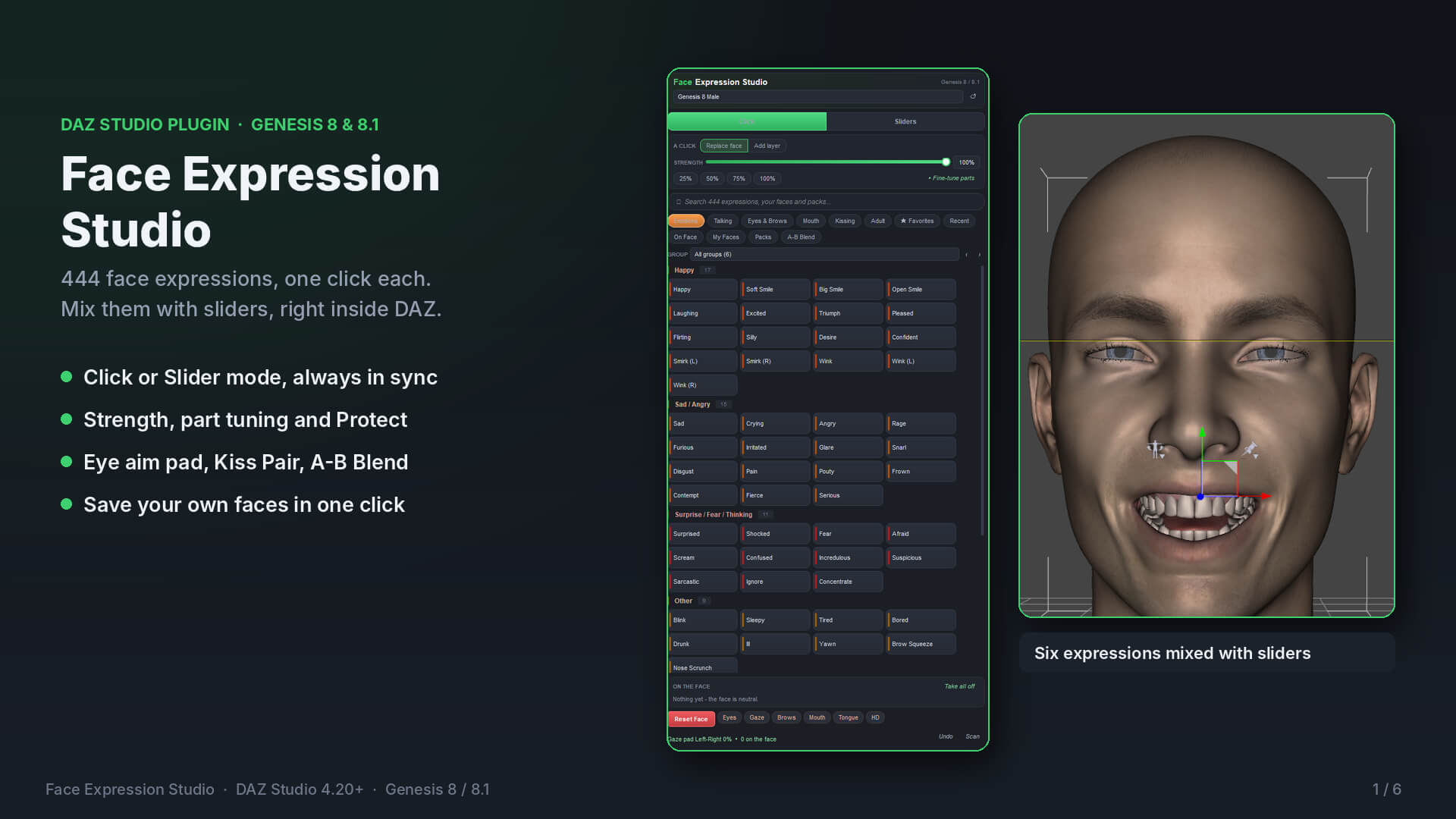
444 face expressions for Genesis 8 and 8.1, right inside DAZ Studio
Finding the right expression usually takes longer than the render itself. You search the library, load a pose, it’s almost right, and you start again. Or you buy another expression pack that still doesn’t have the face you pictured.
Face Expression Studio puts it all in one panel inside DAZ Studio. Click an expression, or mix several with sliders, until the face looks the way you want. Then save it and use it again whenever you need it. It’s your own face library, built by you.
Two ways to work, always in sync
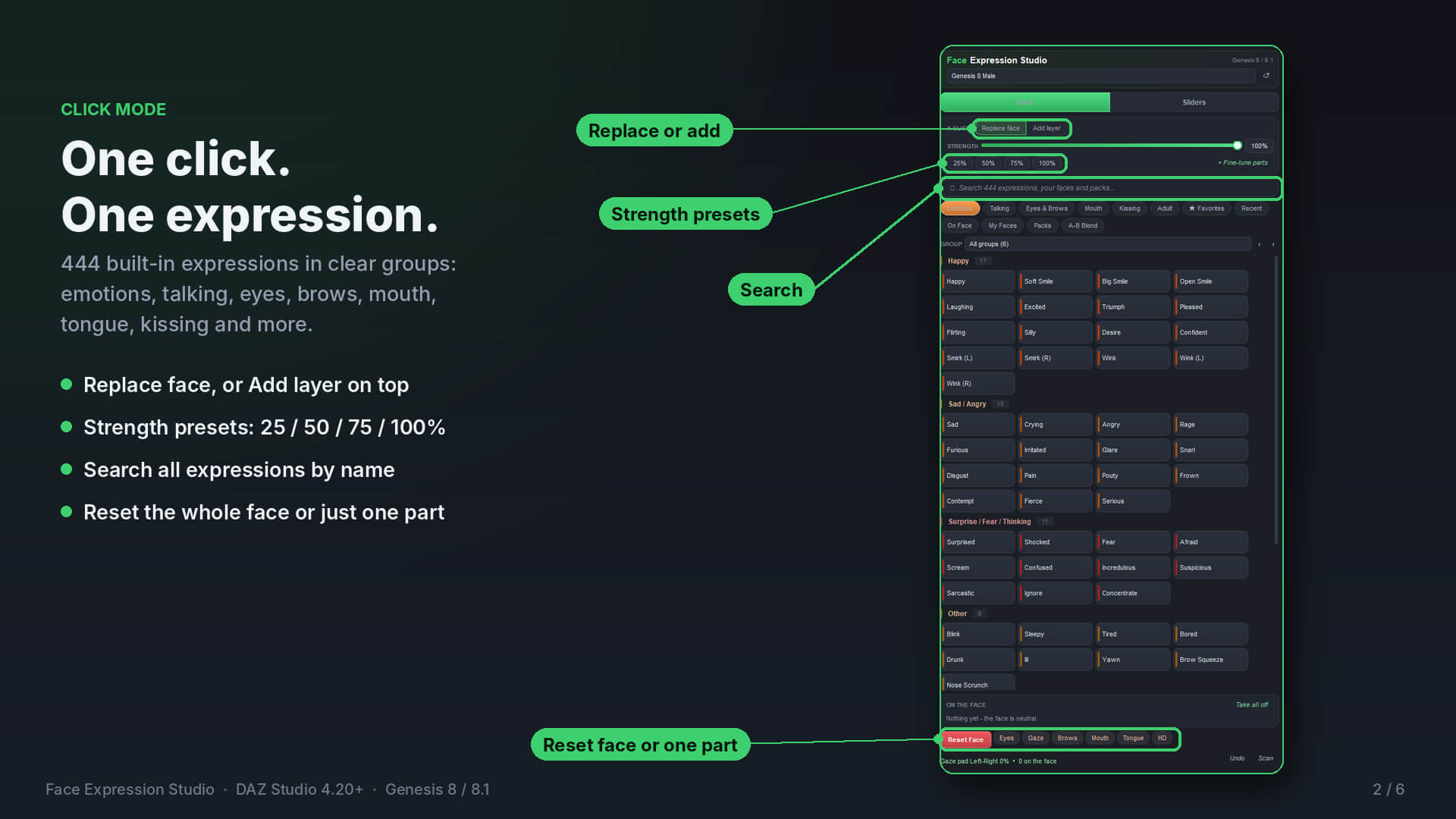
Click mode: one click puts an expression on the face. Choose Replace face or Add layer to stack expressions on top of each other.
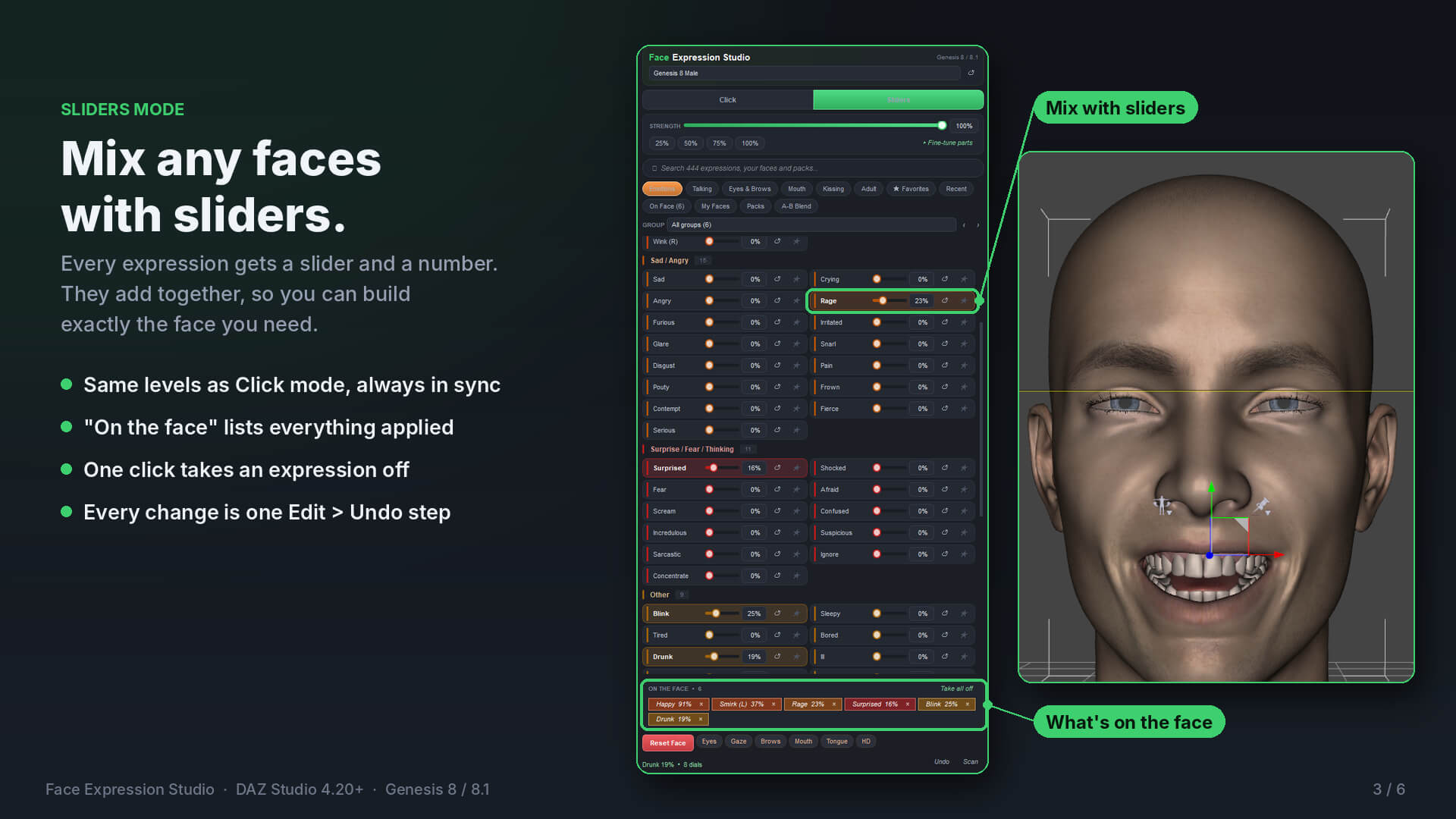
Sliders mode: every expression gets its own slider. They add together, so you can build exactly the face you need, for example a bit of Happy, a bit of Surprised and a little Blink.
Make your own expressions
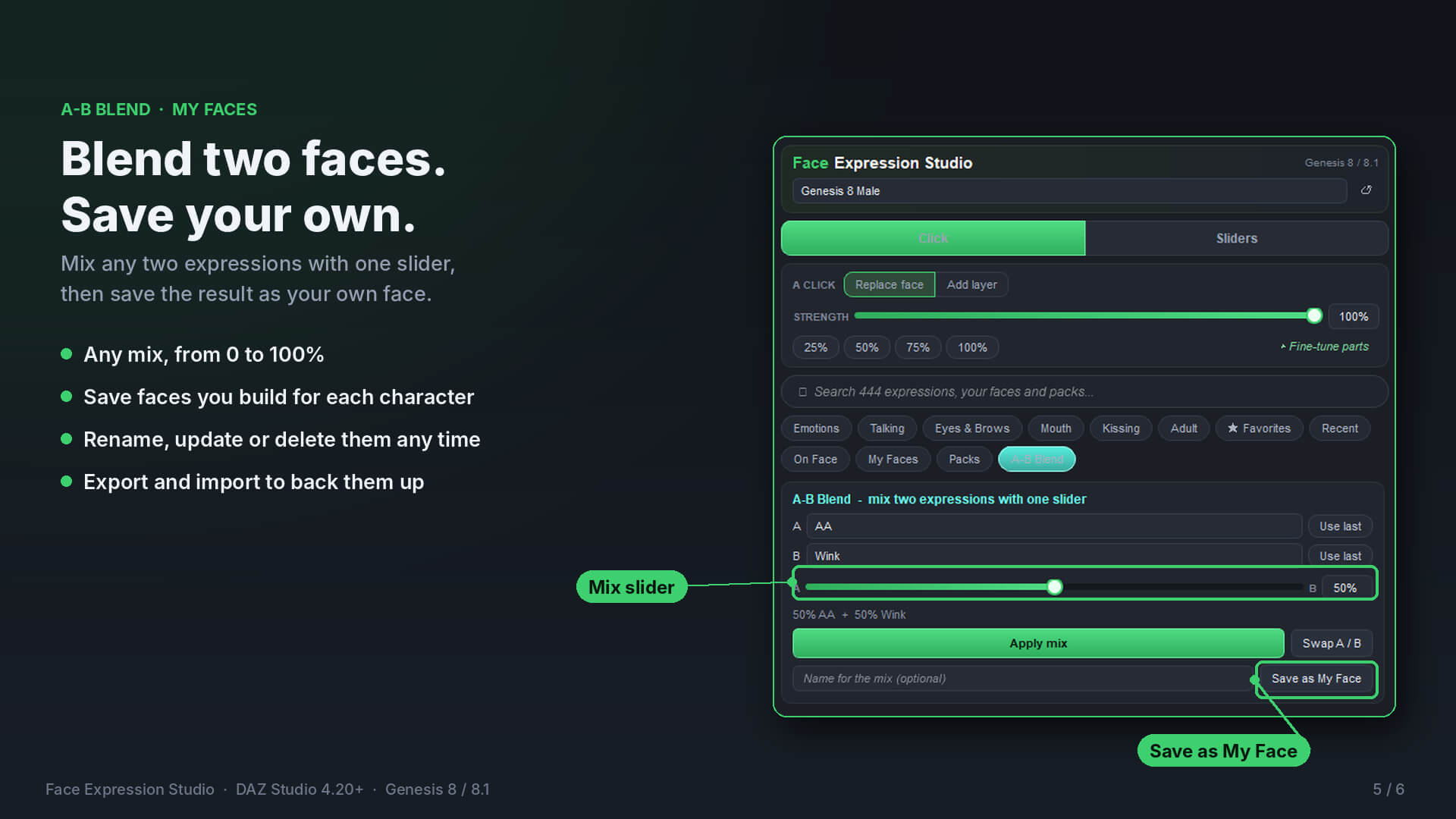
A-B Blend: pick any two expressions and mix them with one slider, from 0 to 100%.
My Faces: save any face you build, rename or update it later, and use it on any figure.
Export and import: back up your faces or move them to another computer.
Strength control: set the overall strength, or fine-tune mouth, eyes, brows and full-face morphs separately.
Protect: lock the eyes, brows or mouth so they stay put while you try other expressions.
What’s included
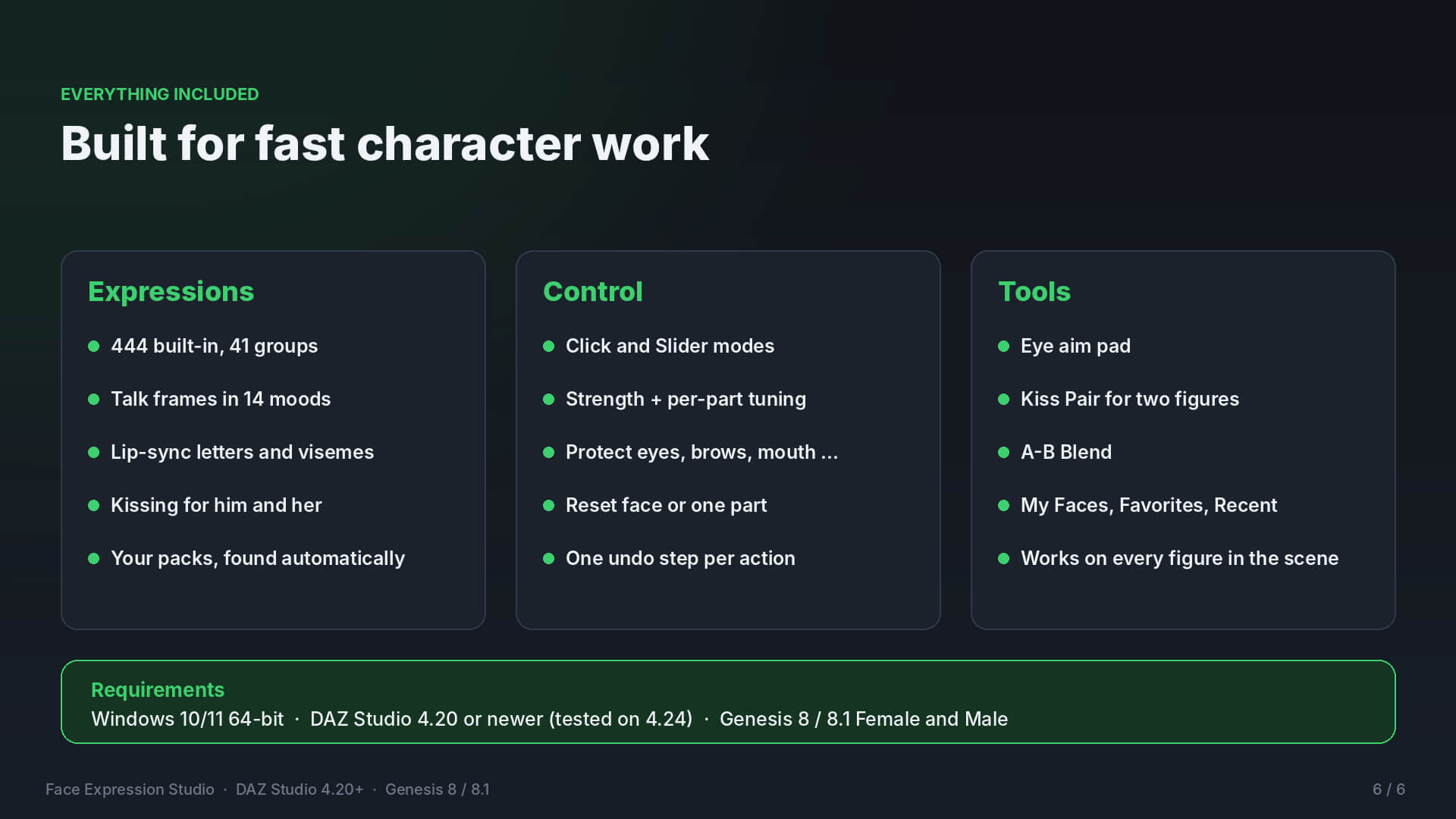
444 built-in expressions in 41 groups: emotions, talking, eyes, brows, mouth, tongue and kissing
Talk frames in 14 moods, plus lip-sync letters and visemes
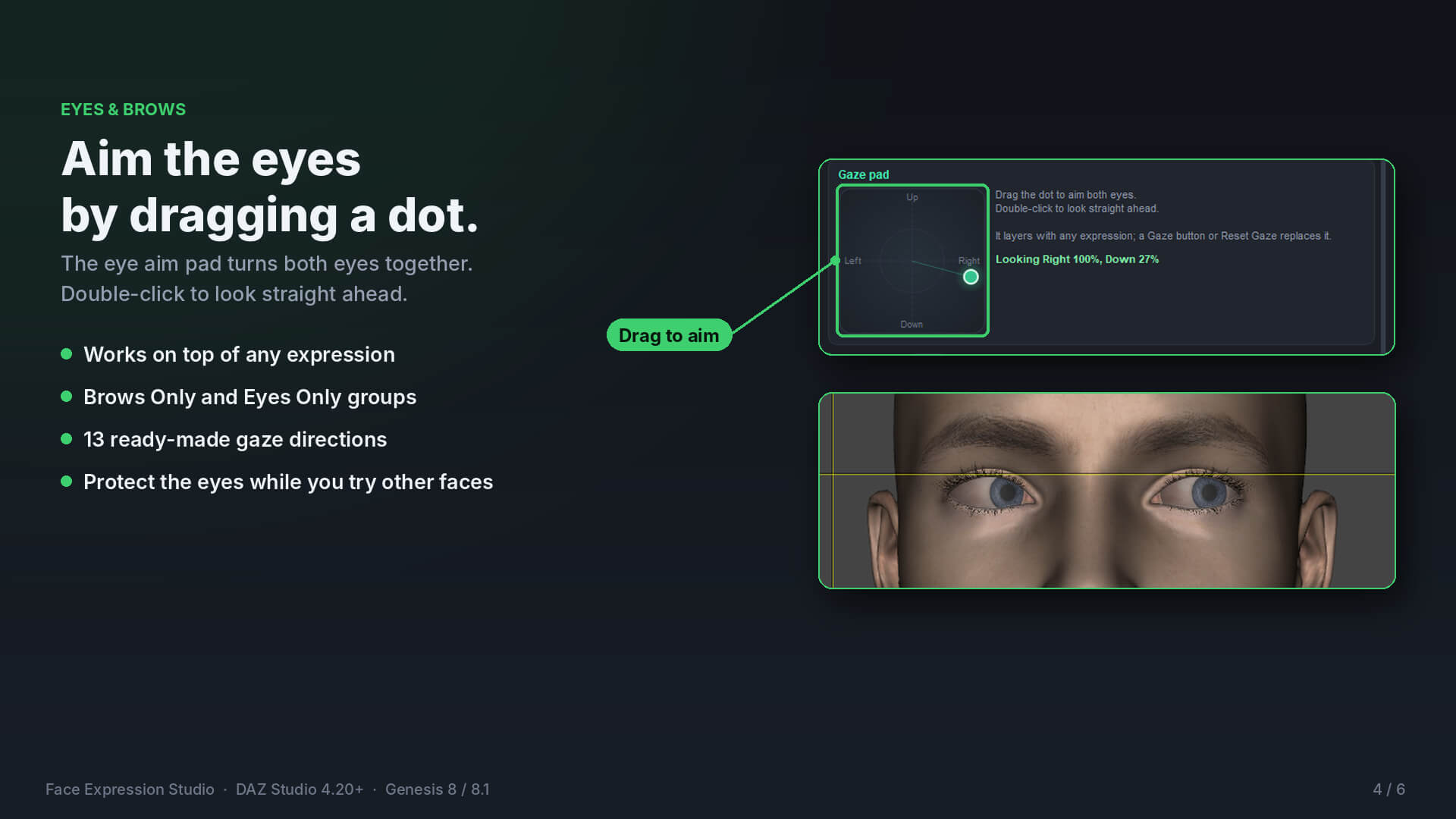
Eye aim pad: drag a dot to aim both eyes, and double-click to look straight ahead
Kiss Pair: matching kisses on two figures with one click
Search, Favorites and Recent
An “On the facelist that shows everything currently applied
Expression packs you already own are found automatically
Built to stay out of your way
Works on every figure in your scene, and each figure keeps its own face
Reset the whole face or just one part (eyes, brows, mouth, tongue)
Every action is one step in Edit > Undo
The panel docks like the Content Library and doesn’t block DAZ Studio
Requirements
Windows 10/11, 64-bit
DAZ Studio 4.20 or newer (tested on 4.24)
Genesis 8 or 8.1, Female or Male
The Genesis 8/8.1 Starter Essentials expression controls
Please note: Mac, 32-bit DAZ Studio, Genesis 3 and Genesis 9 are not supported. A few expressions use extra morphs. If your figure doesn’t have them, those buttons show as dimmed and everything else works normally. This plugin is not made by or affiliated with DAZ 3D.
Copyright (c) 2026 ujjwal308. All rights reserved.
Face Expression Studio (FaceExpressionStudio.dll and all files that come
with it) is the property of ujjwal308. It is licensed to you, not sold.
All rights not clearly given to you here are reserved by ujjwal308.
YOU MAY:
* Install and use the plugin on your own computers for your own work.
* Use images and animations you make with the plugin in personal and
commercial projects.
YOU MAY NOT:
* Modify, edit, change, patch or adapt the plugin in any way.
* Decompile, disassemble or reverse engineer the plugin.
* Resell, sell again, rent, lend or trade the plugin, in whole or in
part, on any website, marketplace or store.
* Share, give away, upload or distribute the plugin file in any way,
including free sharing, file-sharing sites and torrents.
* Include the plugin in another product, bundle or package.
One license is for one person. If other people on your team need the
plugin, each of them needs their own license.
Breaking these terms ends your license. The plugin is provided "as is",
without any warranty. ujjwal308 is not responsible for any loss or damage
that comes from using it.
DAZ Studio and Genesis are trademarks of DAZ 3D. This plugin is not made
by or affiliated with DAZ 3D.
444 face expressions for Genesis 8 and 8.1, right inside DAZ Studio
Finding the right expression usually takes longer than the render itself. You search the library, load a pose, it’s almost right, and you start again. Or you buy another expression pack that still doesn’t have the face you pictured.
Face Expression Studio puts it all in one panel inside DAZ Studio. Click an expression, or mix several with sliders, until the face looks the way you want. Then save it and use it again whenever you need it. It’s your own face library, built by you.
Two ways to work, always in sync
Click mode: one click puts an expression on the face. Choose Replace face or Add layer to stack expressions on top of each other.
Sliders mode: every expression gets its own slider. They add together, so you can build exactly the face you need, for example a bit of Happy, a bit of Surprised and a little Blink.
Make your own expressions
A-B Blend: pick any two expressions and mix them with one slider, from 0 to 100%.
My Faces: save any face you build, rename or update it later, and use it on any figure.
Export and import: back up your faces or move them to another computer.
Strength control: set the overall strength, or fine-tune mouth, eyes, brows and full-face morphs separately.
Protect: lock the eyes, brows or mouth so they stay put while you try other expressions.
What’s included
444 built-in expressions in 41 groups: emotions, talking, eyes, brows, mouth, tongue and kissing
Talk frames in 14 moods, plus lip-sync letters and visemes
Eye aim pad: drag a dot to aim both eyes, and double-click to look straight ahead
Kiss Pair: matching kisses on two figures with one click
Search, Favorites and Recent
An “On the facelist that shows everything currently applied
Expression packs you already own are found automatically
Built to stay out of your way
Works on every figure in your scene, and each figure keeps its own face
Reset the whole face or just one part (eyes, brows, mouth, tongue)
Every action is one step in Edit > Undo
The panel docks like the Content Library and doesn’t block DAZ Studio
Requirements
Windows 10/11, 64-bit
DAZ Studio 4.20 or newer (tested on 4.24)
Genesis 8 or 8.1, Female or Male
The Genesis 8/8.1 Starter Essentials expression controls
Please note: Mac, 32-bit DAZ Studio, Genesis 3 and Genesis 9 are not supported. A few expressions use extra morphs. If your figure doesn’t have them, those buttons show as dimmed and everything else works normally. This plugin is not made by or affiliated with DAZ 3D.
Copyright (c) 2026 ujjwal308. All rights reserved.
Face Expression Studio (FaceExpressionStudio.dll and all files that come
with it) is the property of ujjwal308. It is licensed to you, not sold.
All rights not clearly given to you here are reserved by ujjwal308.
YOU MAY:
* Install and use the plugin on your own computers for your own work.
* Use images and animations you make with the plugin in personal and
commercial projects.
YOU MAY NOT:
* Modify, edit, change, patch or adapt the plugin in any way.
* Decompile, disassemble or reverse engineer the plugin.
* Resell, sell again, rent, lend or trade the plugin, in whole or in
part, on any website, marketplace or store.
* Share, give away, upload or distribute the plugin file in any way,
including free sharing, file-sharing sites and torrents.
* Include the plugin in another product, bundle or package.
One license is for one person. If other people on your team need the
plugin, each of them needs their own license.
Breaking these terms ends your license. The plugin is provided "as is",
without any warranty. ujjwal308 is not responsible for any loss or damage
that comes from using it.
DAZ Studio and Genesis are trademarks of DAZ 3D. This plugin is not made
by or affiliated with DAZ 3D.
