


 Free 3D
 3D Print Models
 3D Scans
 Animation & MoCap
 Textures
 Materials
 Skin Reference
 2D Game Assets
 Sound Effects
 Brushes & Tools
 Reference Photos
 Stock Images
 HDR Images
 3ds Max
 Maya
Maya Blender
 Unreal Engine
 Unity
Unity ZBrush
 Cinema 4D
 LightWave
 Marmoset
 SketchUp
 FBX
FBX DAE
DAE DXF
DXF GLB
GLBThe Algorithm Bar

Not Rated Yet


! REPORT
NOTE: DIGITAL DOWNLOAD, NOT A PHYSICAL ITEM

Add to Collection

3 Likes
Share This Daz Content


Offered By


Website: xanathon.com --- Visit my gallery at: gallery.xanathon.com --- I am also on the Fediverse: social.phantanews.de/@xanathon
Vendor's Pages


License
Extended Use License
This item comes with our Extended Use Licensing. This means that you may use the model for both non-commercial and commercial purposes, in a variety of mediums and applications.
For full license terms, see our 3D Content Licensing Agreement
Item Details
| Vendor: | xanathon |
| Published: | Oct 15, 2026 |
| Download Size: | 57 MB |
| Software: | Daz Studio |
| dForce: | – |
Included Formats

Statistics
| Favorites: | 3 |
| Likes: | 3 |
| Views: | 201 |
Item Ratings
Not Rated Yet
The Algorithm Bar
The Algorithm Bar – Cyberpunk Lounge Bar for Daz Studio
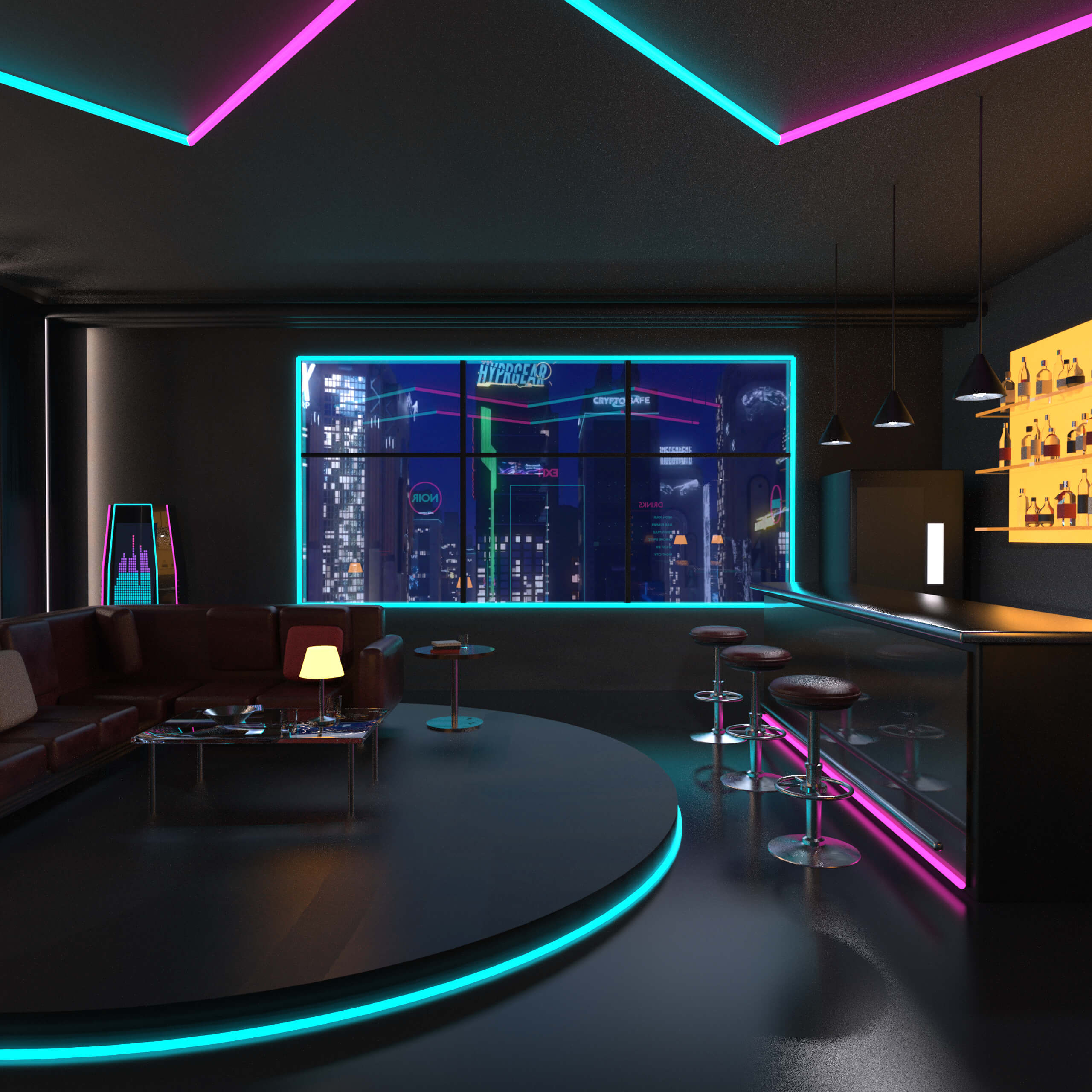
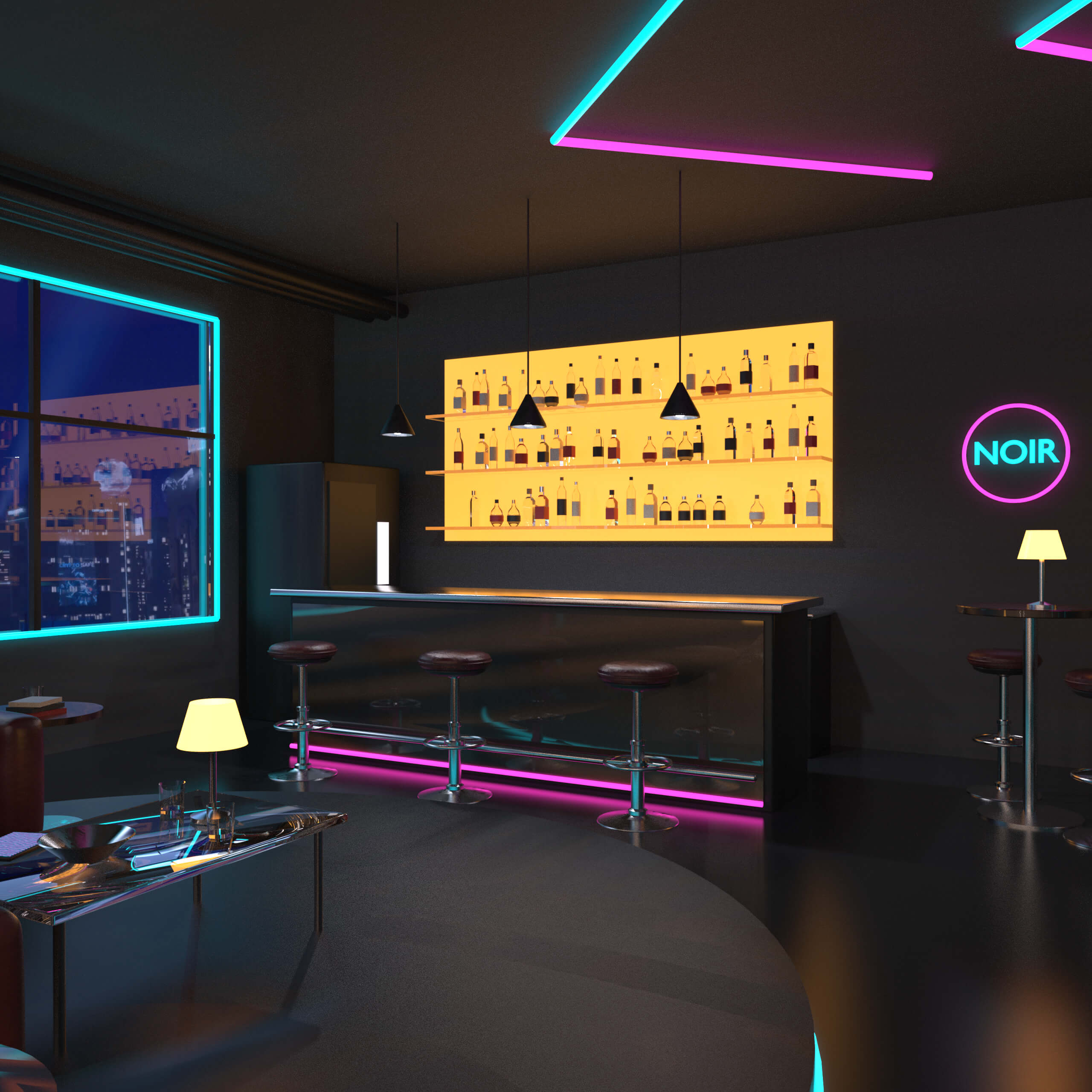
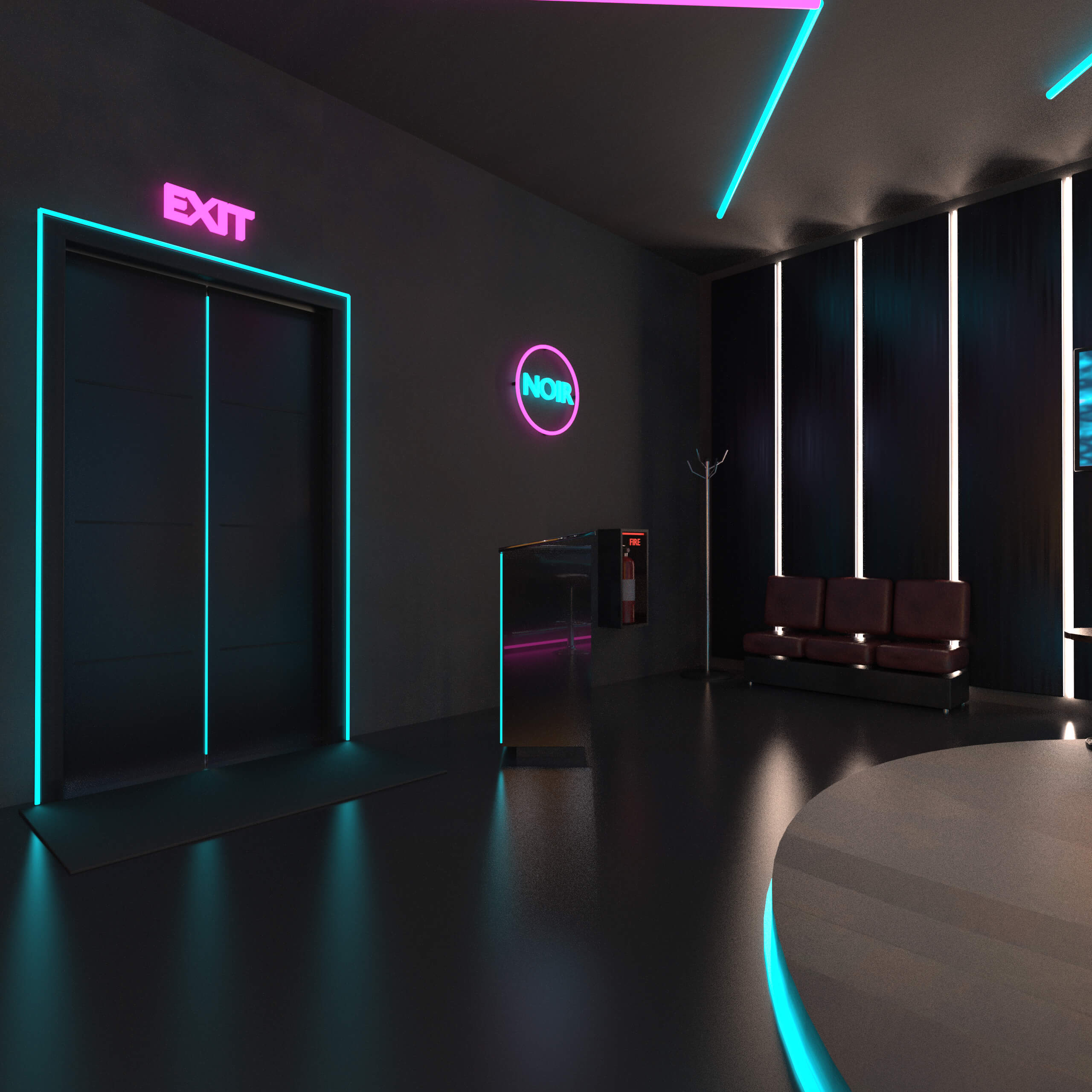
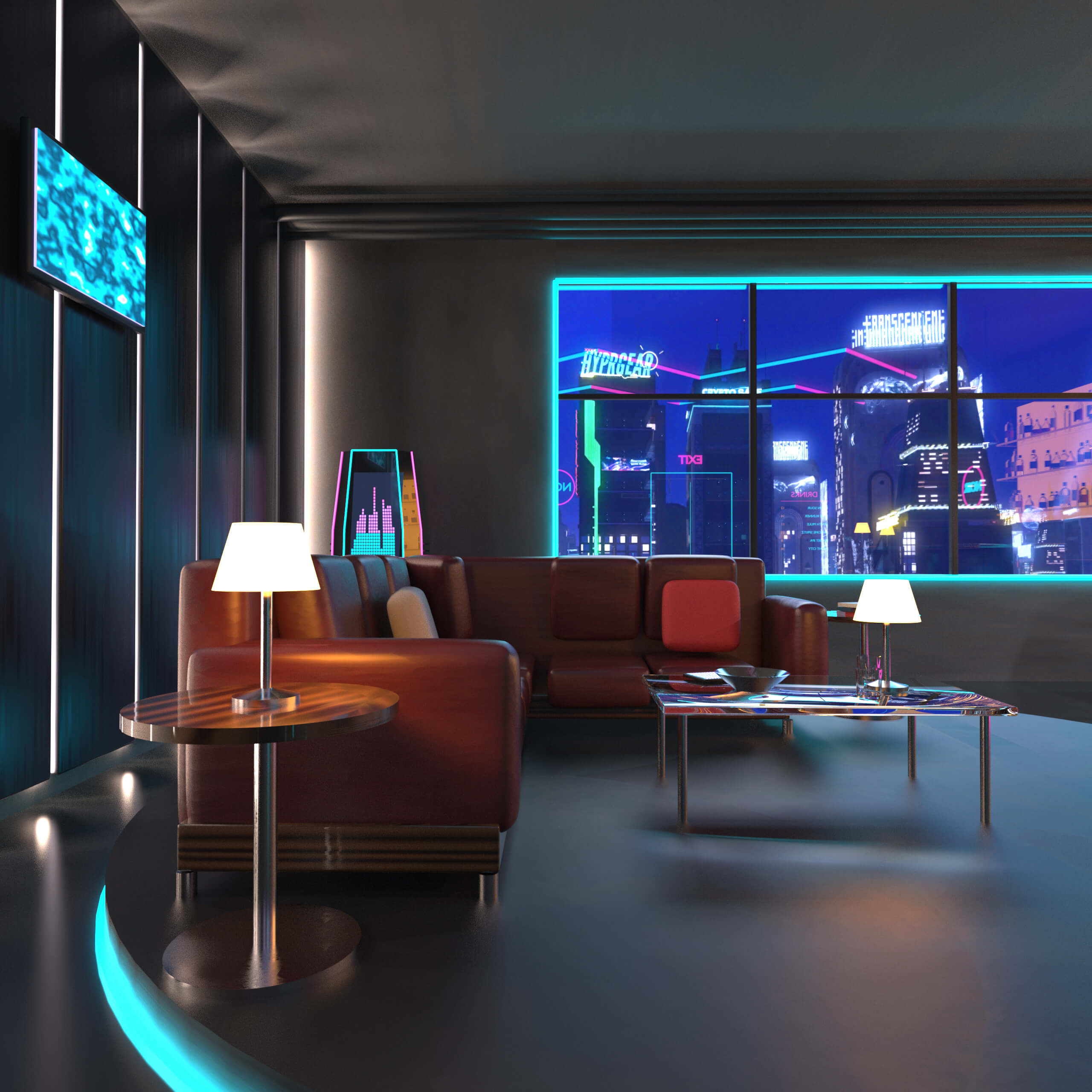
A timeless classic with a stylish edge, in a world of neon and chrome. Step into The Algorithm Bar, a neon-lit cyberpunk lounge built for intimate night scenes, noir storytelling and character portraits. Cyan and magenta light lines trace the ceiling and walls, a back-lit wall of bottles glows behind the counter, and a polished poured floor catches every reflection. The whole room is lit by its own emissive surfaces, so it renders moody out of the box with no extra lights required. For portraits, you may want to add a few character lights.
What's included
- 1 complete environment scene (load one file, everything is in place), with 6 cameras
- 2 Iray render settings presets: "Night" (the default, used for the promo images and applied automatically when the scene loads) and a brighter variant. Load either preset at any time to switch or restore the lighting.
- Every object is a separate node in one clean hierarchy, grouped logically (e.g. table → lamp → lampshade), so you can move, hide or replace anything. The front wall with the door can be hidden with a single node for camera shots into the room.
Bar area
- Bar counter with wood front panel, brushed steel top, magenta underglow and foot rail
- 3 upholstered bar stools
- Back counter with illuminated glass shelves and a large selection of bottles in six shapes (wine, whisky, gin, liqueur, vodka, rum) with varied glass colours, labels and caps
- 3 pendant lights above the counter
- Neon "NOIR" logo next to the bottle wall
Lounge
- Raised circular platform with cyan neon edge
- L-shaped leather sofa with two movable throw pillows
- Glass coffee table with tumblers, a bowl and a tablet
- 2 side tables, one with a table lamp
Entrance
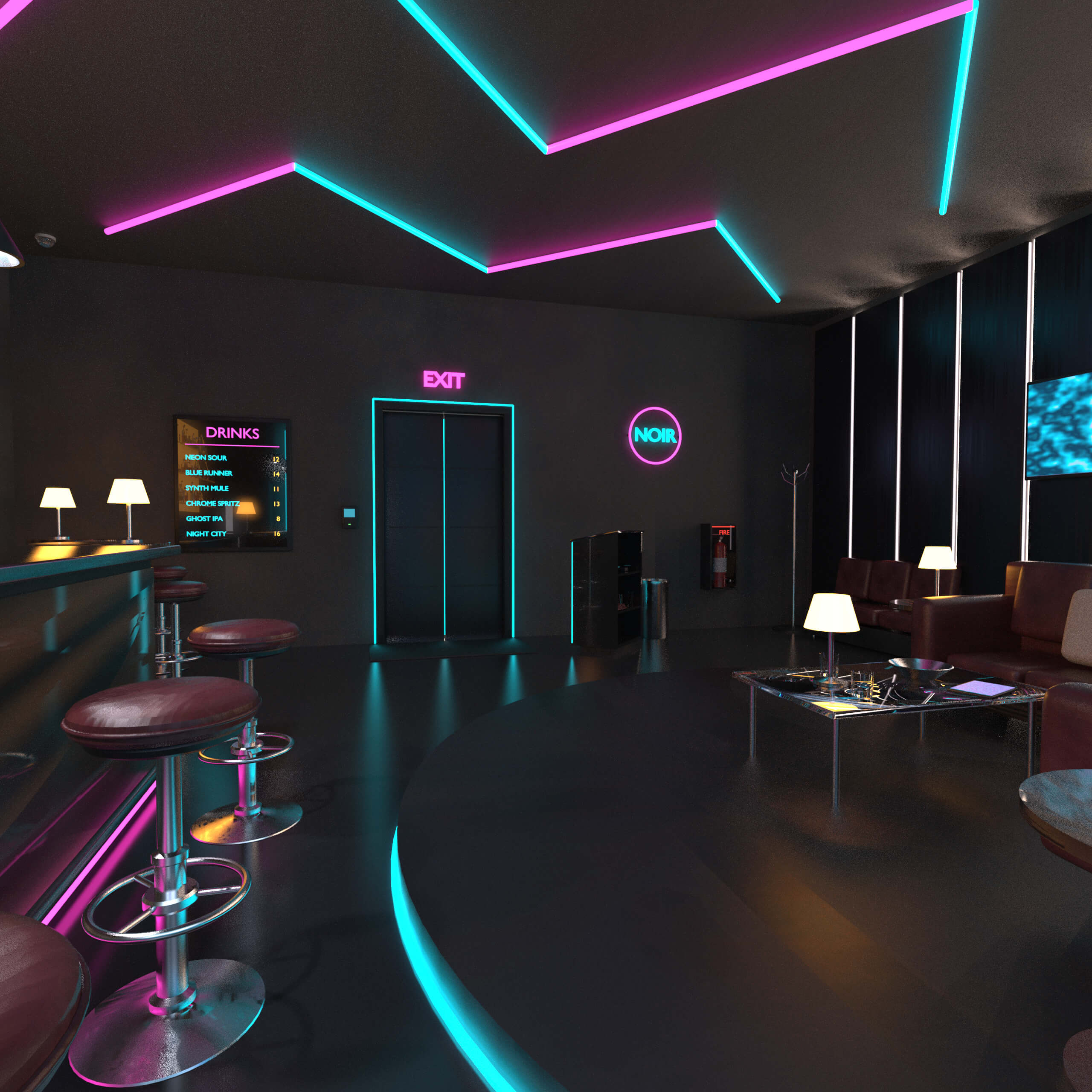
- Sliding door with cyan neon frame, access panel and EXIT sign
- Host stand with tablet and shelves, with a second neon "NOIR" logo on the wall behind it
- Waiting bench and coat stand
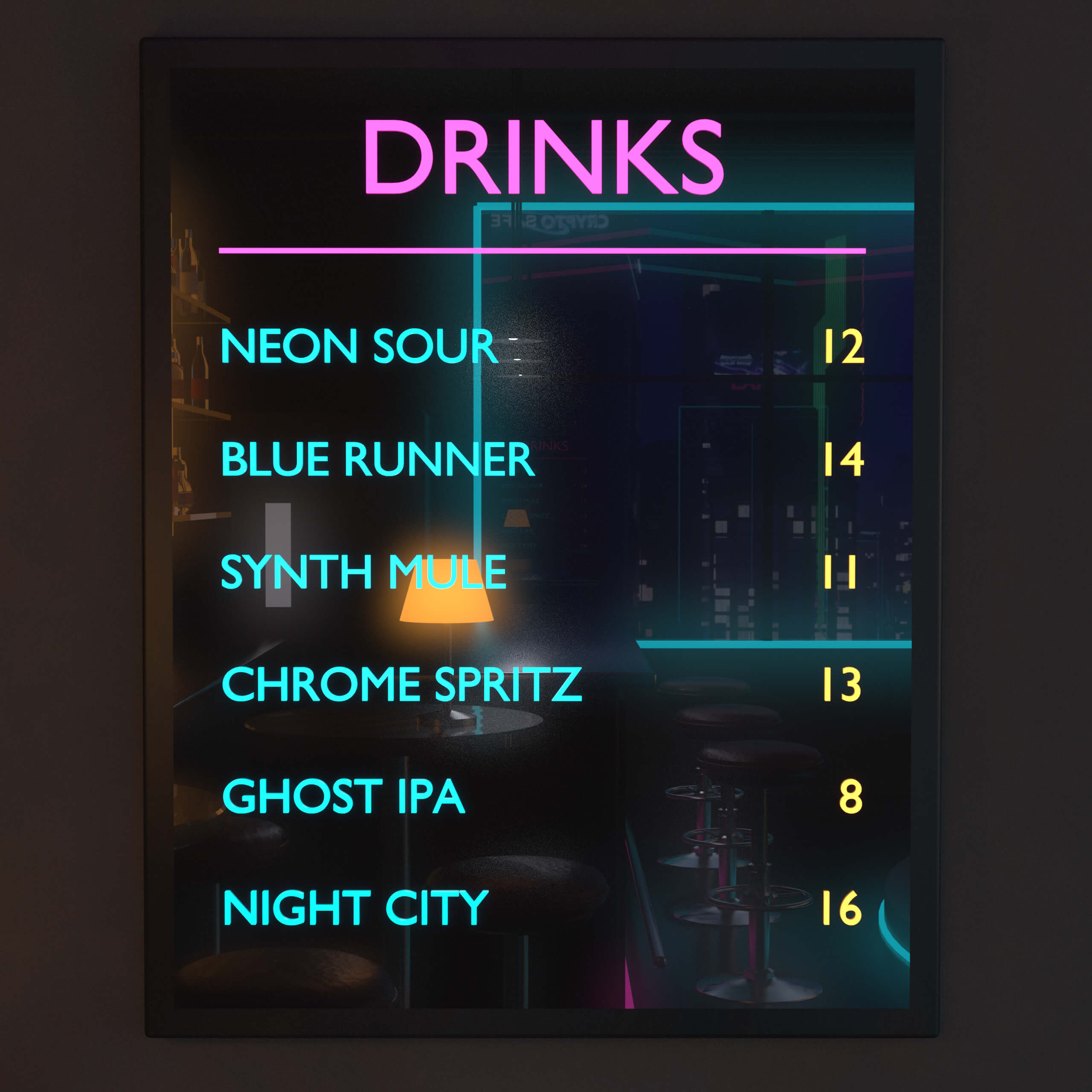
- Illuminated drinks menu board, fire extinguisher in a wall cabinet, door mat, dome security camera, trash bin
- 2 high tables with 4 stools
Room
- Concrete walls and ceiling, anodised wall panels with light grooves, 2 holo screens
- Window wall with neon frame, ceiling pipes, neon zigzag lights
- Vending machine and a cyberpunk music terminal with LED spectrum display
- Curved night-city backdrop with a rendered cyberpunk skyline
Dimensions and geometry
- Room size: approx. 8 m 8 m, ceiling height 3.5 m
- 110 nodes (103 meshes), 117,585 polygons
Materials and textures
- Iray Uber materials with PBR maps (base colour, roughness, normal, emission)
- 18 texture files, up to 8192 8192 px
- Neon and screens are emissive surfaces; their brightness can be adjusted in the Surfaces pane (Emission)
Compatibility and notes
- Daz Studio 4.24, NVIDIA Iray
- No figures, plugins or other products required
- Not set up for Filament or 3Delight
- Smart Content metadata and Content Library icons included
Installation
With Daz Install Manager (DIM), recommended:
1. Copy the downloaded ZIP file unchanged, without extracting it and without renaming it, into your DIM download folder, the "Package Archive" folder (DIM: gear icon > Advanced Settings > Downloads).
2. Restart DIM. The package appears in the "Ready to Install" tab.
3. Click Install. DIM installs the files into your content library and registers the Smart Content data.
Manual installation:
1. Open the ZIP and extract the contents of the "Content" folder into your Daz content library (e.g. "My DAZ 3D Library").
2. Start Daz Studio. If the product does not show up in Smart Content, use Content DB Maintenance > Re-Import Metadata.
A timeless classic with a stylish edge, in a world of neon and chrome. Step into The Algorithm Bar, a neon-lit cyberpunk lounge built for intimate night scenes, noir storytelling and character portraits. Cyan and magenta light lines trace the ceiling and walls, a back-lit wall of bottles glows behind the counter, and a polished poured floor catches every reflection. The whole room is lit by its own emissive surfaces, so it renders moody out of the box with no extra lights required. For portraits, you may want to add a few character lights.
What's included
- 1 complete environment scene (load one file, everything is in place), with 6 cameras
- 2 Iray render settings presets: "Night" (the default, used for the promo images and applied automatically when the scene loads) and a brighter variant. Load either preset at any time to switch or restore the lighting.
- Every object is a separate node in one clean hierarchy, grouped logically (e.g. table → lamp → lampshade), so you can move, hide or replace anything. The front wall with the door can be hidden with a single node for camera shots into the room.
Bar area
- Bar counter with wood front panel, brushed steel top, magenta underglow and foot rail
- 3 upholstered bar stools
- Back counter with illuminated glass shelves and a large selection of bottles in six shapes (wine, whisky, gin, liqueur, vodka, rum) with varied glass colours, labels and caps
- 3 pendant lights above the counter
- Neon "NOIR" logo next to the bottle wall
Lounge
- Raised circular platform with cyan neon edge
- L-shaped leather sofa with two movable throw pillows
- Glass coffee table with tumblers, a bowl and a tablet
- 2 side tables, one with a table lamp
Entrance
- Sliding door with cyan neon frame, access panel and EXIT sign
- Host stand with tablet and shelves, with a second neon "NOIR" logo on the wall behind it
- Waiting bench and coat stand
- Illuminated drinks menu board, fire extinguisher in a wall cabinet, door mat, dome security camera, trash bin
- 2 high tables with 4 stools
Room
- Concrete walls and ceiling, anodised wall panels with light grooves, 2 holo screens
- Window wall with neon frame, ceiling pipes, neon zigzag lights
- Vending machine and a cyberpunk music terminal with LED spectrum display
- Curved night-city backdrop with a rendered cyberpunk skyline
Dimensions and geometry
- Room size: approx. 8 m 8 m, ceiling height 3.5 m
- 110 nodes (103 meshes), 117,585 polygons
Materials and textures
- Iray Uber materials with PBR maps (base colour, roughness, normal, emission)
- 18 texture files, up to 8192 8192 px
- Neon and screens are emissive surfaces; their brightness can be adjusted in the Surfaces pane (Emission)
Compatibility and notes
- Daz Studio 4.24, NVIDIA Iray
- No figures, plugins or other products required
- Not set up for Filament or 3Delight
- Smart Content metadata and Content Library icons included
Installation
With Daz Install Manager (DIM), recommended:
1. Copy the downloaded ZIP file unchanged, without extracting it and without renaming it, into your DIM download folder, the "Package Archive" folder (DIM: gear icon > Advanced Settings > Downloads).
2. Restart DIM. The package appears in the "Ready to Install" tab.
3. Click Install. DIM installs the files into your content library and registers the Smart Content data.
Manual installation:
1. Open the ZIP and extract the contents of the "Content" folder into your Daz content library (e.g. "My DAZ 3D Library").
2. Start Daz Studio. If the product does not show up in Smart Content, use Content DB Maintenance > Re-Import Metadata.
Categories
