


 Free 3D
 3D Print Models
 3D Scans
 Animation & MoCap
 Textures
 Materials
 Skin Reference
 2D Game Assets
 Sound Effects
 Brushes & Tools
 Reference Photos
 Stock Images
 HDR Images
 3ds Max
 Maya
 Blender
 Unreal Engine
 Unity
 ZBrush
 Cinema 4D
 LightWave
 Marmoset
 SketchUp
 FBX
 DAE
 DXF
 GLB
Propsmith: Prop Clothing and Release Builder for DAZ

Not Rated Yet


! REPORT
NOTE: DIGITAL DOWNLOAD, NOT A PHYSICAL ITEM

Add to Collection

9 Likes
Share This Daz Content


Top Rated Vendor


3d artist
Vendor's Pages


License
Extended Use License
This item comes with our Extended Use Licensing. This means that you may use the model for both non-commercial and commercial purposes, in a variety of mediums and applications.
For full license terms, see our 3D Content Licensing Agreement
Item Details
| Vendor: | YuriBarinov |
| Published: | Nov 14, 2026 |
| Download Size: | 371.2 KB |
| Software: | Daz Studio |
| Compatible Figures: | Genesis 9 Genesis 8 Female Genesis 8 Male |
| dForce: | – |
Included Formats

Statistics
| Favorites: | 2 |
| Likes: | 9 |
| Views: | 338 |
Item Ratings
Not Rated Yet
Propsmith: Prop Clothing and Release Builder for DAZ
!!! I'm still having trouble uploading the video to the product page, and I'm working on resolving the issue. In the meantime, you can find the video tutorial on YouTube by searching for the product name.
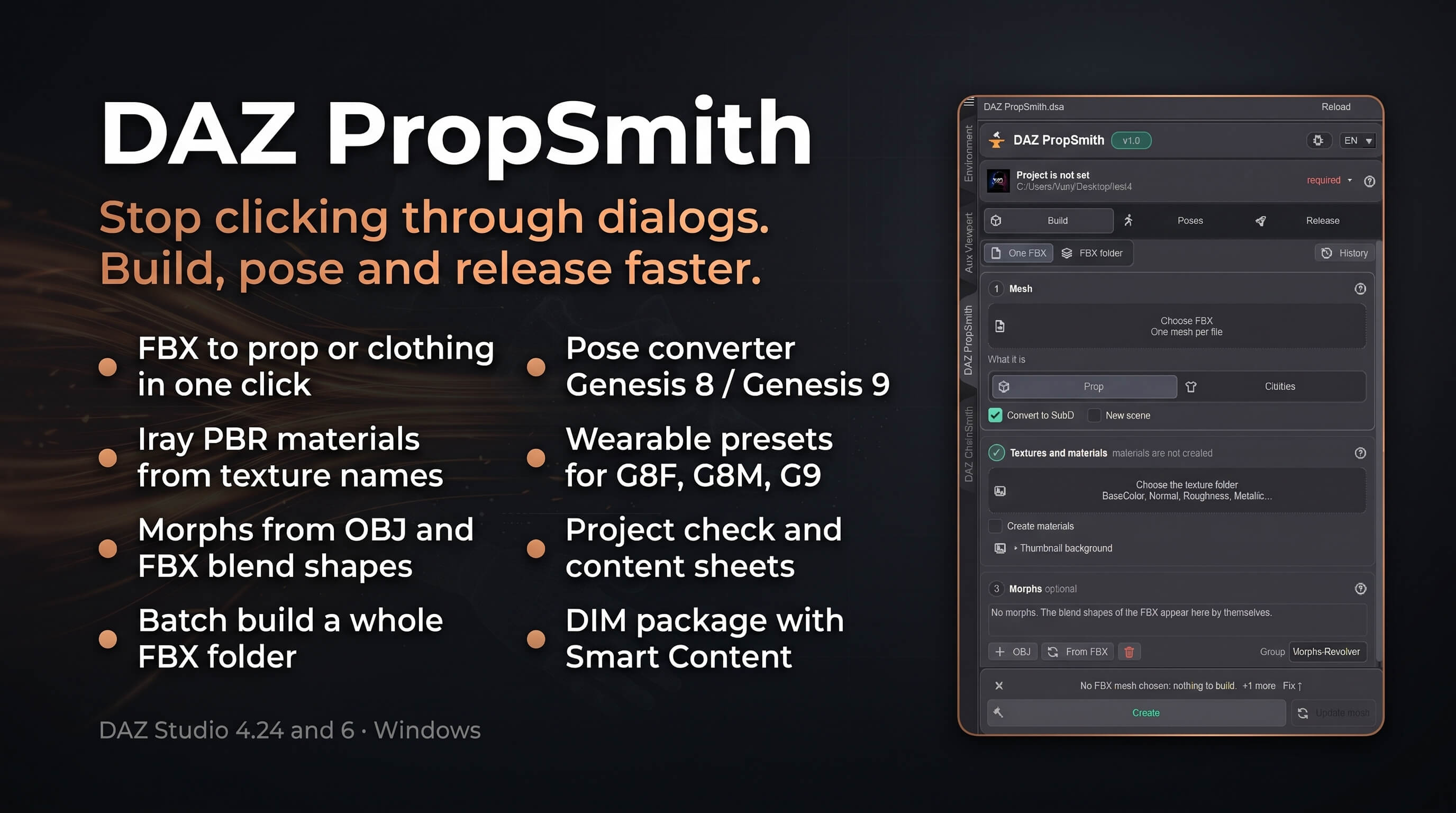
DAZ PropSmith is a script for DAZ Studio 4.24 and DAZ Studio 6 that turns an FBX mesh, its morphs and a texture folder into a finished prop or clothing item: Iray materials, icons and the right folder structure, ready for the Content Library. Instead of clicking through a dozen DAZ dialogs for every item, you choose the FBX and the texture folder in one window and press Create.
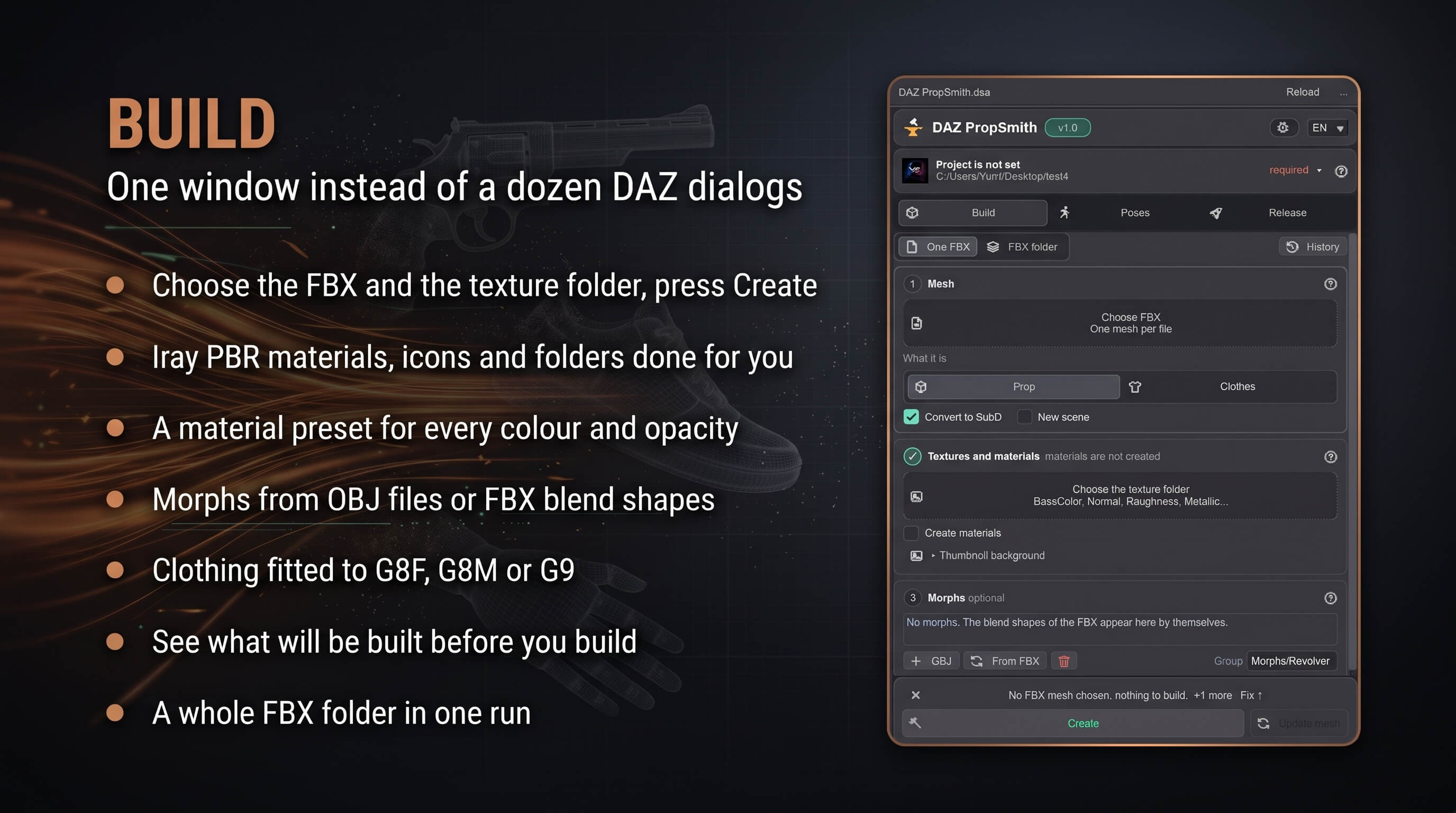
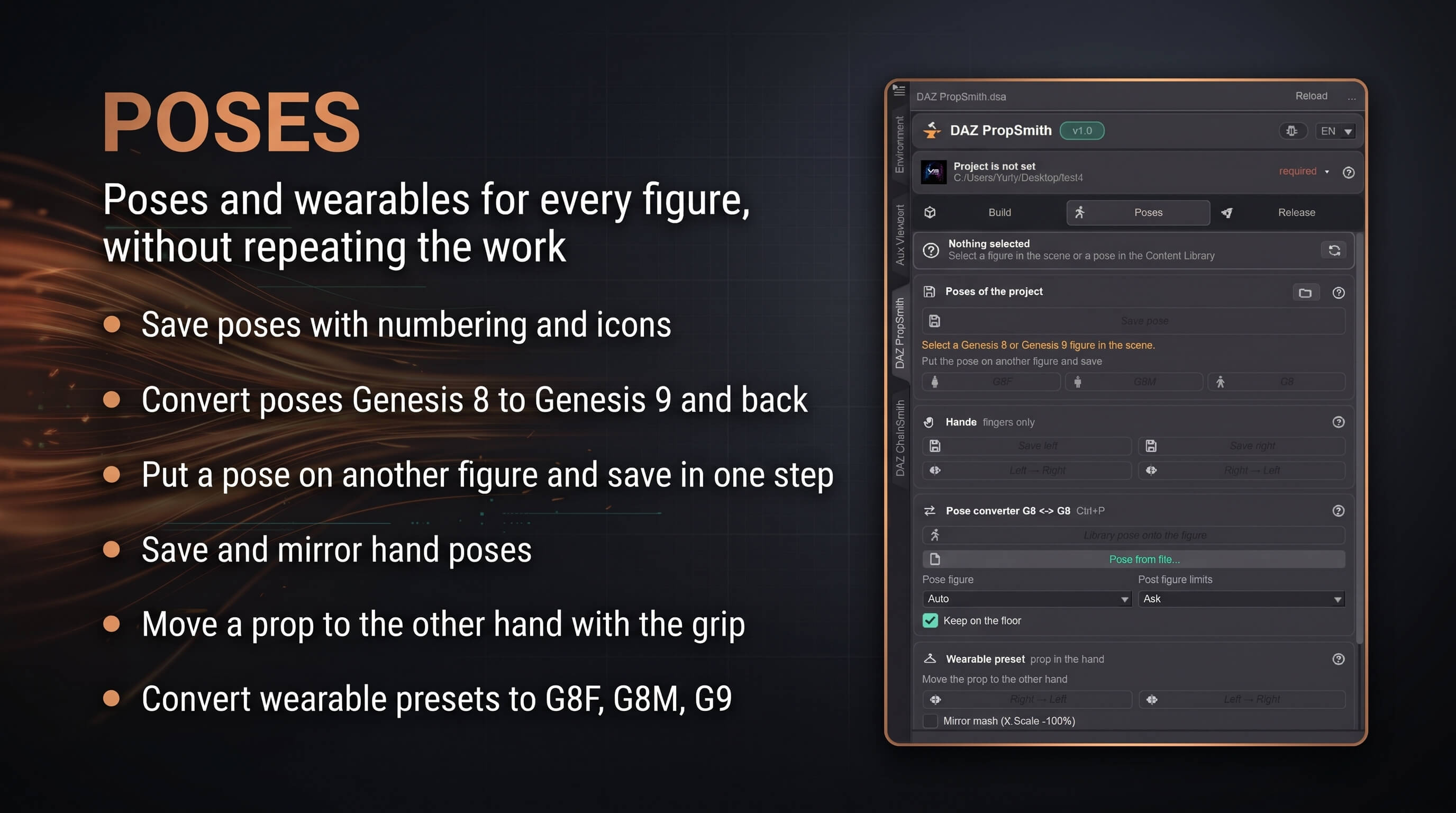
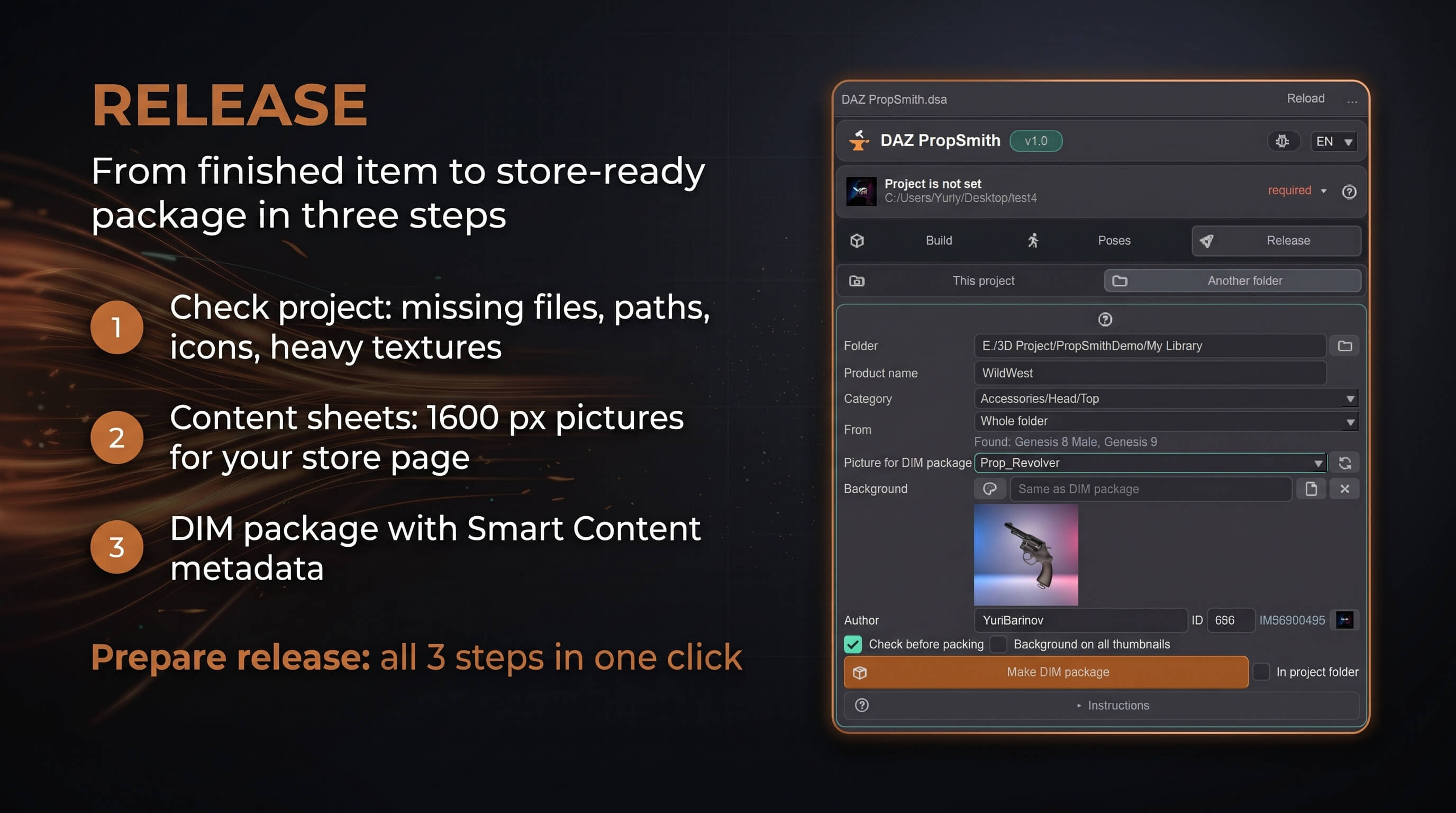
The window is built around three tabs. Build makes the item: it reads the FBX before the build, shows how many meshes, materials and blend shapes it has, which texture set goes on which surface and what Create will make, and keeps Create off until nothing stands in the way. Poses saves and converts poses between Genesis 8 and Genesis 9, saves hand poses and makes wearable presets for other figures. Release checks the project, makes content sheets for your store page and packs everything into a DAZ Install Manager package with Smart Content metadata.
## Build props and clothing
- One window: the project (folder, author, name), the FBX and the texture folder, then Create.
- Prop or clothing for Genesis 8 Female, Genesis 8 Male or Genesis 9. Clothing is fitted to the figure through the Transfer Utility and saved as a ready wearable, with Smoothing, dForce and Push modifiers if you want them.
- Uber Iray PBR materials built from the texture names, including packed maps (ORM, ARM, RMA, MRA) and glossiness to roughness. Height becomes displacement with SubD, bump without.
- A material preset for every colour variation and every opacity variation (4 colours 3 opacities = 12 presets), masks into the Diffuse Overlay, several texture sets on one mesh matched to its materials by name.
- Morphs from OBJ files or straight from FBX blend shapes (Blender shape keys), each with its own slider name and range, and a vertex count check before the build.
- Update mesh rebuilds the mesh and morphs of an existing item without touching its materials. A whole folder of FBX files can be built in one run.
- Clean DAZ folder structure: Props, People, data, Runtime/Textures, named after your author name and project.
## Poses and wearable presets
- Pose converter Genesis 8 ↔ Genesis 9: the pose keeps its look because the bones follow the directions of the source figure instead of copying angles.
- Save the pose of a figure to your project with numbering and icons, or put it onto a new figure of another generation and save it in one step.
- Save and mirror hand poses (fingers only).
- Move props from one hand to the other, save a prop held by a figure as a wearable preset and convert a wearable preset to G8F, G8M or G9.
## Release
- Check project: missing files, absolute paths, missing icons, numbering gaps, heavy textures, long paths and heavy meshes. It only reads, it changes nothing.
- Content sheets with icons, 1600 px wide, plus morph and material sheets of an item.
- DIM package: a zip for DAZ Install Manager with Smart Content metadata, a stable package number made from your author name and project, the product picture of your choice and a ReadMe for your buyers. The whole project or only its Genesis 8, Genesis 9, Genesis 8 Female or Genesis 8 Male part, also from any finished library folder.
- Prepare release runs the check, the sheets and the package in one go and stops at the first problem.
## Compatibility
- DAZ Studio 4.24 (and newer 4.x) and DAZ Studio 6, Windows.
- Genesis 8 / 8.1 Female, Genesis 8 / 8.1 Male, Genesis 9.
- Input: FBX (one mesh per file), OBJ morphs or FBX blend shapes, textures PNG, JPG, TGA or TIFF.
- The window does not block DAZ, in DAZ Studio 4.24 as in DAZ Studio 6: keep working in the scene and the Content Library while it is open.
## What you get
- DAZ PropSmith.dse: the script, one file for DAZ Studio 4.24 and 6.
- README.txt (English) and README_RU.txt (Russian) with installation and a full walk-through.
## Installation
Copy DAZ PropSmith.dse into the Scripts folder of your content library, for example Documents\DAZ 3D\Studio\My Library\Scripts\DAZ PropSmith\, then double-click it in the Content Library pane of DAZ Studio.
## Support
Send me a message through RenderHub with the version shown at the top of the window and the text of the error.
## Version history
1.0 - Realease
1.02 - what is new since 1.0 (1.01 and 1.02)
- Rebuilding an item with Create or Update mesh (New scene off) now always shows the new mesh in the scene, also when the old copy is there or DAZ Studio 6 still holds the old mesh in memory, and also when only the inside of the mesh changed.
- FBX from Blender keeps the rotation and scale of its object: the item looks as it does when you drop the FBX into DAZ.
- Clothes with Load a new figure find the base figure even when the library keeps it in another folder.
- With a prop selected in the hand of a figure, the wearable preset buttons work again.
- Script errors show the version and the line, so a screenshot is enough to find them.
- Small fixes in the Release tab layout and in the build report.
DAZ PropSmith is a script for DAZ Studio 4.24 and DAZ Studio 6 that turns an FBX mesh, its morphs and a texture folder into a finished prop or clothing item: Iray materials, icons and the right folder structure, ready for the Content Library. Instead of clicking through a dozen DAZ dialogs for every item, you choose the FBX and the texture folder in one window and press Create.
The window is built around three tabs. Build makes the item: it reads the FBX before the build, shows how many meshes, materials and blend shapes it has, which texture set goes on which surface and what Create will make, and keeps Create off until nothing stands in the way. Poses saves and converts poses between Genesis 8 and Genesis 9, saves hand poses and makes wearable presets for other figures. Release checks the project, makes content sheets for your store page and packs everything into a DAZ Install Manager package with Smart Content metadata.
## Build props and clothing
- One window: the project (folder, author, name), the FBX and the texture folder, then Create.
- Prop or clothing for Genesis 8 Female, Genesis 8 Male or Genesis 9. Clothing is fitted to the figure through the Transfer Utility and saved as a ready wearable, with Smoothing, dForce and Push modifiers if you want them.
- Uber Iray PBR materials built from the texture names, including packed maps (ORM, ARM, RMA, MRA) and glossiness to roughness. Height becomes displacement with SubD, bump without.
- A material preset for every colour variation and every opacity variation (4 colours 3 opacities = 12 presets), masks into the Diffuse Overlay, several texture sets on one mesh matched to its materials by name.
- Morphs from OBJ files or straight from FBX blend shapes (Blender shape keys), each with its own slider name and range, and a vertex count check before the build.
- Update mesh rebuilds the mesh and morphs of an existing item without touching its materials. A whole folder of FBX files can be built in one run.
- Clean DAZ folder structure: Props, People, data, Runtime/Textures, named after your author name and project.
## Poses and wearable presets
- Pose converter Genesis 8 ↔ Genesis 9: the pose keeps its look because the bones follow the directions of the source figure instead of copying angles.
- Save the pose of a figure to your project with numbering and icons, or put it onto a new figure of another generation and save it in one step.
- Save and mirror hand poses (fingers only).
- Move props from one hand to the other, save a prop held by a figure as a wearable preset and convert a wearable preset to G8F, G8M or G9.
## Release
- Check project: missing files, absolute paths, missing icons, numbering gaps, heavy textures, long paths and heavy meshes. It only reads, it changes nothing.
- Content sheets with icons, 1600 px wide, plus morph and material sheets of an item.
- DIM package: a zip for DAZ Install Manager with Smart Content metadata, a stable package number made from your author name and project, the product picture of your choice and a ReadMe for your buyers. The whole project or only its Genesis 8, Genesis 9, Genesis 8 Female or Genesis 8 Male part, also from any finished library folder.
- Prepare release runs the check, the sheets and the package in one go and stops at the first problem.
## Compatibility
- DAZ Studio 4.24 (and newer 4.x) and DAZ Studio 6, Windows.
- Genesis 8 / 8.1 Female, Genesis 8 / 8.1 Male, Genesis 9.
- Input: FBX (one mesh per file), OBJ morphs or FBX blend shapes, textures PNG, JPG, TGA or TIFF.
- The window does not block DAZ, in DAZ Studio 4.24 as in DAZ Studio 6: keep working in the scene and the Content Library while it is open.
## What you get
- DAZ PropSmith.dse: the script, one file for DAZ Studio 4.24 and 6.
- README.txt (English) and README_RU.txt (Russian) with installation and a full walk-through.
## Installation
Copy DAZ PropSmith.dse into the Scripts folder of your content library, for example Documents\DAZ 3D\Studio\My Library\Scripts\DAZ PropSmith\, then double-click it in the Content Library pane of DAZ Studio.
## Support
Send me a message through RenderHub with the version shown at the top of the window and the text of the error.
## Version history
1.0 - Realease
1.02 - what is new since 1.0 (1.01 and 1.02)
- Rebuilding an item with Create or Update mesh (New scene off) now always shows the new mesh in the scene, also when the old copy is there or DAZ Studio 6 still holds the old mesh in memory, and also when only the inside of the mesh changed.
- FBX from Blender keeps the rotation and scale of its object: the item looks as it does when you drop the FBX into DAZ.
- Clothes with Load a new figure find the base figure even when the library keeps it in another folder.
- With a prop selected in the hand of a figure, the wearable preset buttons work again.
- Script errors show the version and the line, so a screenshot is enough to find them.
- Small fixes in the Release tab layout and in the build report.
