


 Free 3D
 3D Print Models
 3D Scans
 Animation & MoCap
 Textures
 Materials
 Skin Reference
 2D Game Assets
 Sound Effects
 Brushes & Tools
 Reference Photos
 Stock Images
 HDR Images
 3ds Max
 Maya
 Blender
 Unreal Engine
 Unity
 ZBrush
 Cinema 4D
 LightWave
 Marmoset
 SketchUp
 FBX
 DAE
 DXF
 GLB

Light Painter - Paint Your Own HDRI Maps in DAZ Studio

Not Rated Yet


This Item Was Made Using
! REPORT
NOTE: DIGITAL DOWNLOAD, NOT A PHYSICAL ITEM

Add to Collection

5 Likes
Share This Daz Content


Top Rated Vendor


Helping AI, DAZ Studio & Digital Artists artists love their art and bestselling DAZ published artist since 2005. Former professional camera man and video editor in the adult movie industry in Hollywood and Europe for 2 decades.
Vendor's Pages


License
Extended Use License
This item comes with our Extended Use Licensing. This means that you may use the model for both non-commercial and commercial purposes, in a variety of mediums and applications.
For full license terms, see our 3D Content Licensing Agreement
Item Details
| Vendor: | Dreamlight |
| Published: | Nov 06, 2026 |
| Download Size: | 500 MB |
| Software: | Daz Studio |
| dForce: | – |
Included Formats

Statistics
| Favorites: | 3 |
| Likes: | 5 |
| Views: | 328 |
Item Ratings
Not Rated Yet
Light Painter - Paint Your Own HDRI Maps in DAZ Studio
LIGHT PAINTER - PAINT YOUR OWN HDRI MAPS IN DAZ STUDIO
Paint Light. Shape Shadows. Create Atmosphere.
Your Scene. Your Lighting. Your Vision.
--------------------------------------------------------------
INTRODUCING DREAMLIGHT LIGHT PAINTER
--------------------------------------------------------------
What if you could actually PAINT the lighting around your 3D characters or complete larger scenes?
Not just adjust lights, load presets or rotate an existing HDRI environment.
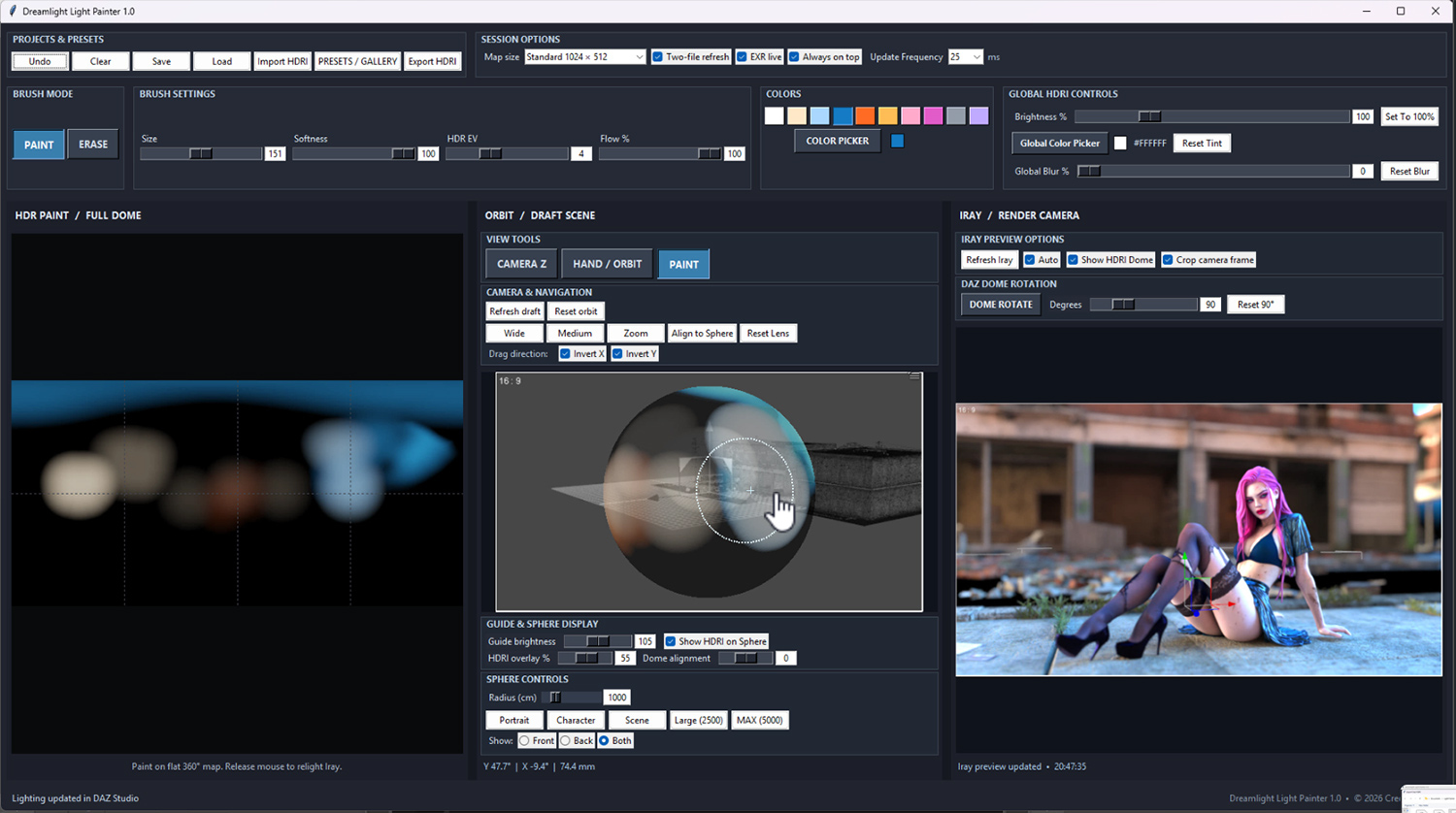
Actually PAINT your own lighting, directly onto a 360-degree environment, using brushes, colors and adjustable light intensity!
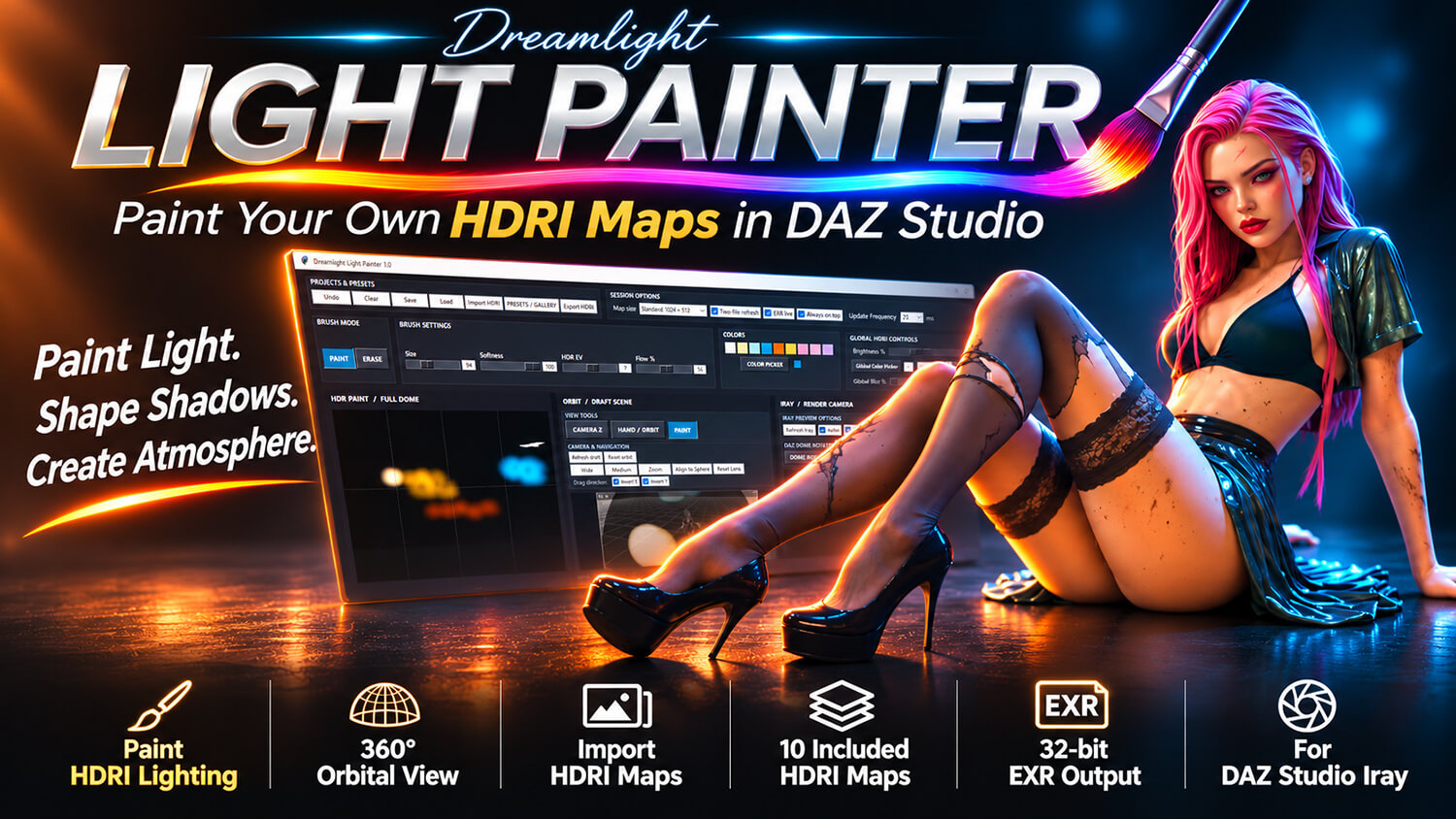
Welcome to Dreamlight Light Painter, an entirely new way to create beautiful, customized 32-bit HDR lighting environments for DAZ Studio and NVIDIA Iray.
Paint soft illumination, powerful highlights, colorful rim lighting, dramatic shadows and cinematic lighting effects with intuitive painting tools.
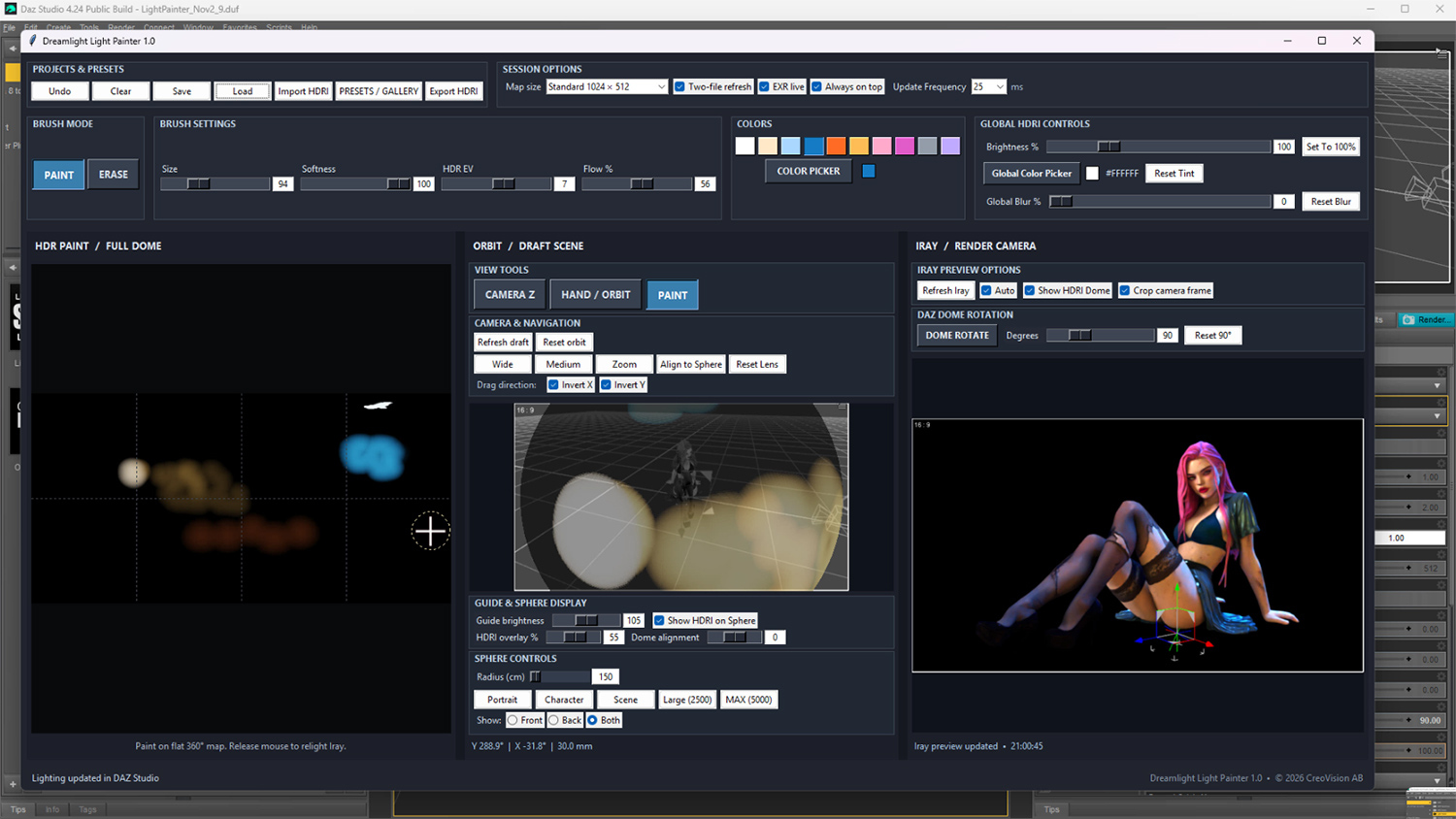
See how your lighting affects your DAZ Studio scene as you work, and experiment until you achieve exactly the mood you want, all LIVE and interactive!
Get started instantly with 10 included 32-bit HDRI lighting maps, or create something entirely your own!
No AI generation. No ComfyUI. No complex external lighting software.
Just your imagination, your DAZ Studio scenes, and the freedom to paint with light.
IMPORTANT: Light Painter is designed for interactive HDR lighting creation alongside DAZ Studio Iray. A powerful Windows desktop workstation with a dedicated NVIDIA RTX GPU is strongly recommended for a smooth creative experience. A Full HD (1920 x 1080) or larger display is also recommended. Please review the SYSTEM REQUIREMENTS and HDR RESOLUTION sections below before purchasing.
-----------------------------------------------
PAINT YOUR OWN HDRI LIGHTING
-----------------------------------------------
Traditional HDRI lighting is incredibly powerful, but it also has limitations.
You load an HDRI map, rotate it, adjust its brightness, and hope the existing light sources are positioned where you want them.
But what if the light needs to come from a completely different direction?
What if you want a beautiful orange glow on one side of your character, a cool blue highlight on the other, and a soft white fill light from above?
With Light Painter, you can create exactly that.
Start with a blank lighting environment and paint the illumination yourself.
Choose your brush color, size, intensity and flow, then begin painting.
Create broad, soft lighting areas or smaller, concentrated highlights.
Experiment with multiple colors, different lighting directions and creative combinations.
Every brush stroke becomes part of your custom 32-bit HDR environment, allowing Iray to illuminate your scene using the lighting you've created.
You're no longer limited to the lights that happen to exist in an HDRI photograph.
You're the lighting designer.
----------------------------------------------------------
SEE YOUR LIGHTING FROM EVERY ANGLE
----------------------------------------------------------
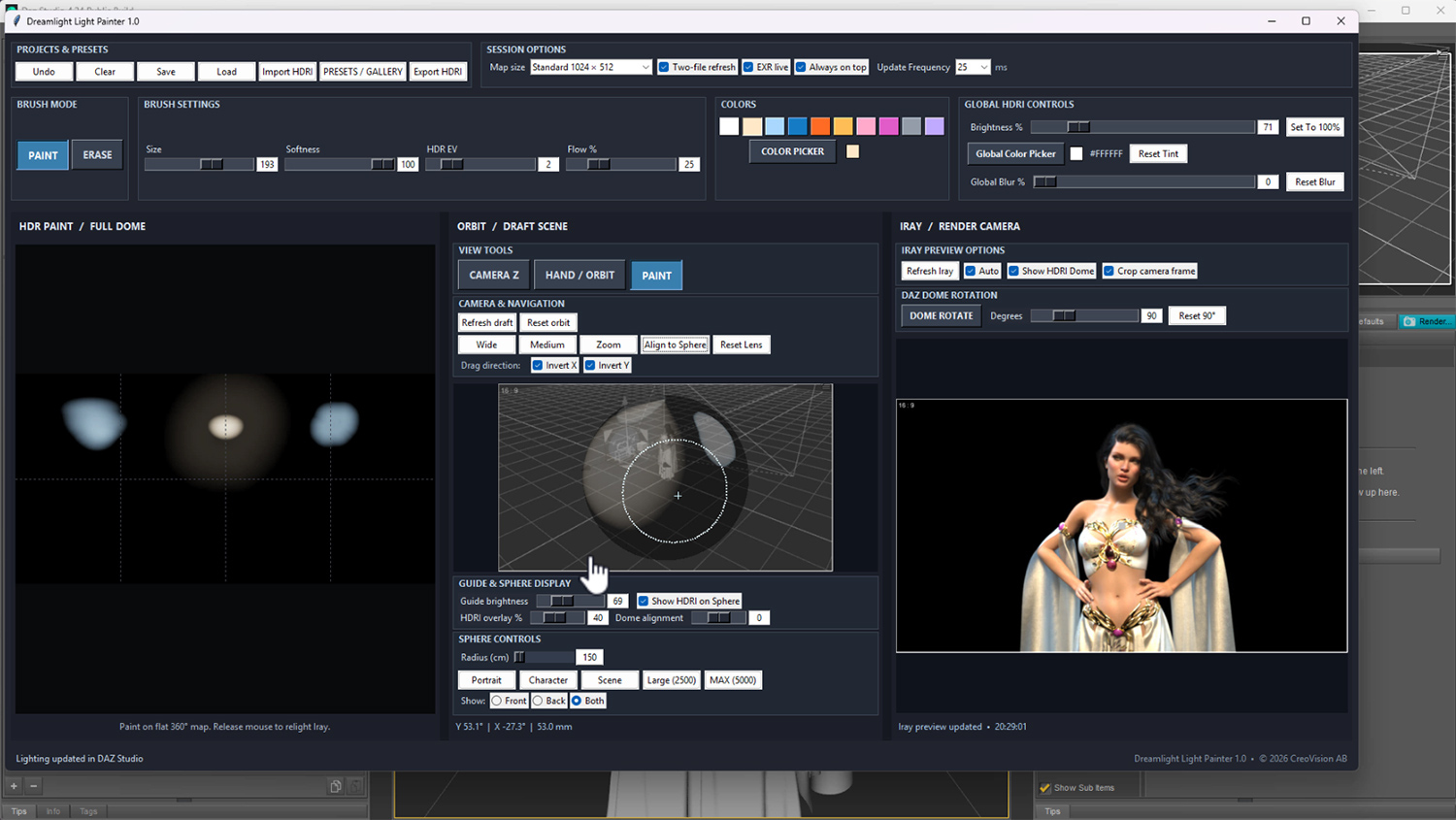
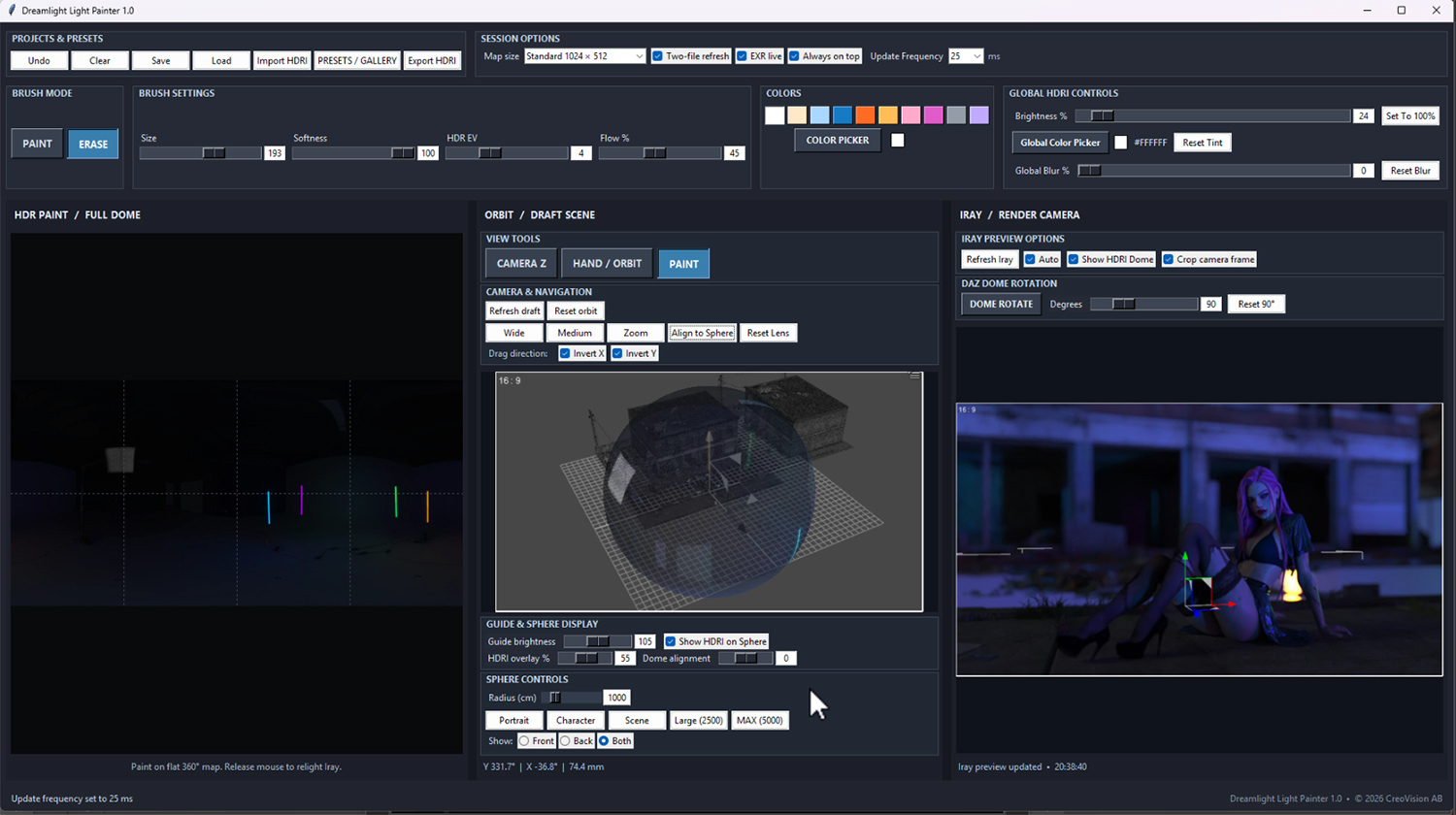
Light Painter introduces an interactive orbital painting environment designed specifically for creating lighting around your DAZ Studio characters and scenes.
Instead of trying to imagine where each light source should be placed on a flat HDRI map, you can work visually around your subject.
Rotate your orbital view, examine your scene from different directions, and paint lighting where you want it.
The dedicated Light Painter camera rig helps you navigate the lighting environment while maintaining the relationship between your painting and the Iray lighting dome.
Zoom in for more precise work, or zoom out to examine the overall lighting composition.
Switch between navigating and painting as you develop your lighting design.
The result is a creative workflow that makes working with HDR illumination more visual, intuitive and enjoyable.
----------------------------------------------------------
REAL HDR LIGHTING. REAL IRAY RESULTS.
----------------------------------------------------------
Light Painter doesn't simply paint colored graphics over your viewport.
It creates actual 32-bit floating-point HDR lighting maps that can be applied to the Iray environment in DAZ Studio.
Your painted colors and brightness values become illumination that Iray uses when rendering your scene.
Create:
- Beautiful soft portrait lighting
- Dramatic cinematic highlights
- Colorful rim lighting
- Warm sunset-inspired illumination
- Cool moonlight and atmospheric effects
- High-contrast studio lighting
- Fantasy and science fiction lighting
- Gentle ambient fill lighting
- Creative multicolored illumination
- Concentrated highlights and deep shadows
Experiment with different lighting directions, brightness levels and colors to discover entirely new looks.
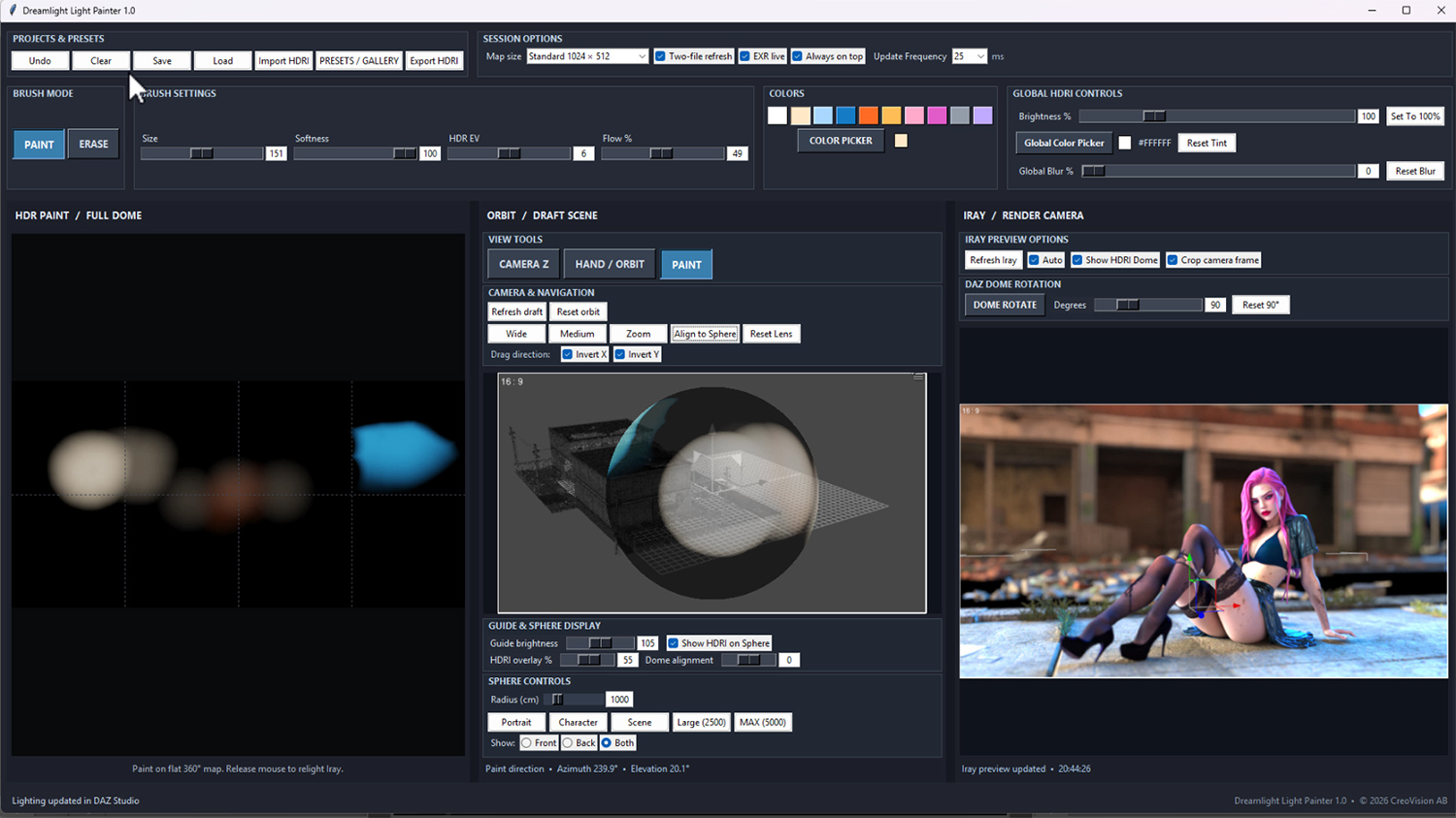
Light Painter updates the HDR lighting environment as you paint, allowing you to evaluate your changes in DAZ Studio.
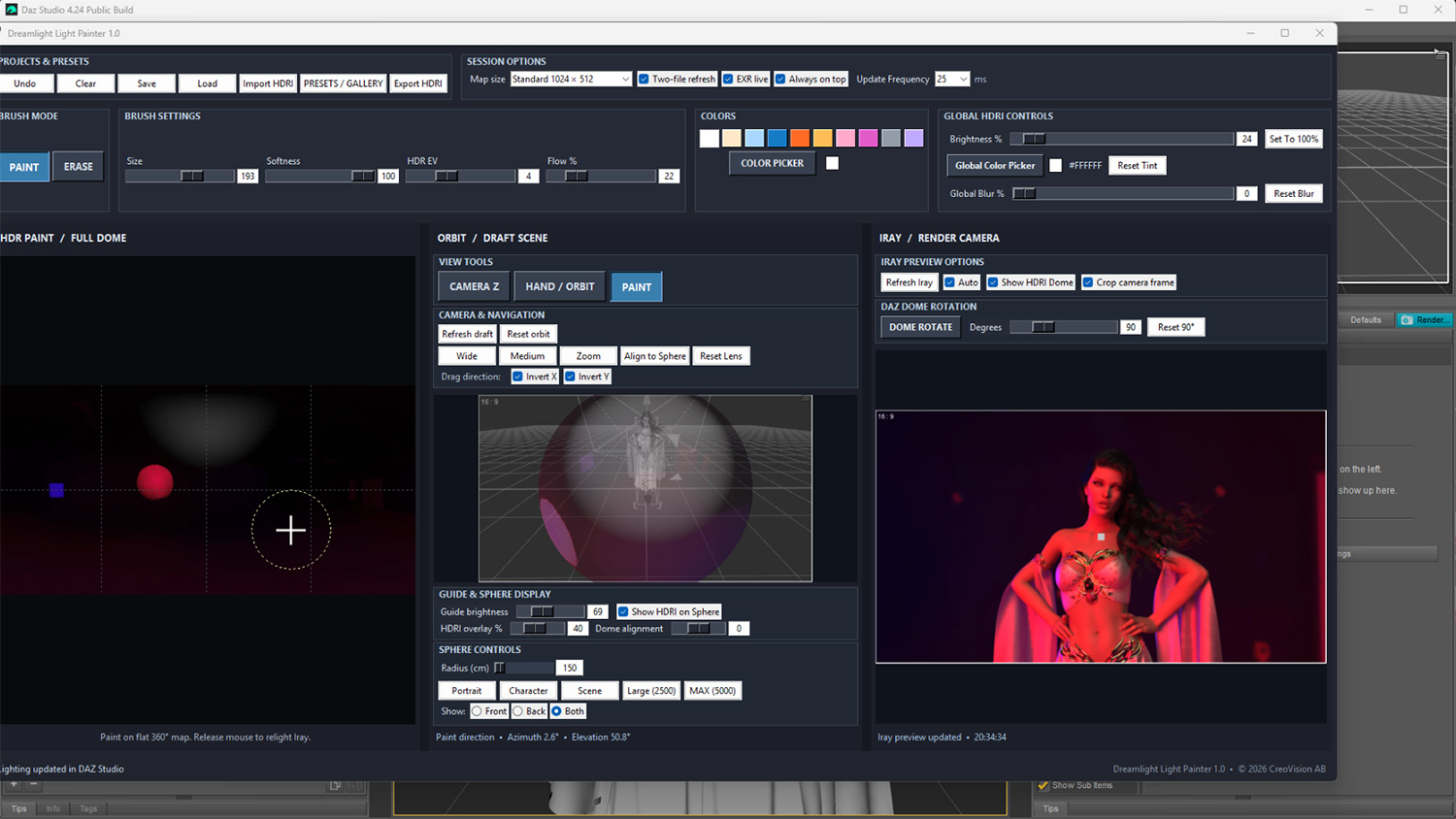
The orbital painting display provides your interactive working view, while Iray shows the actual rendered lighting result.
NOTE: The orbital view is a painting and navigation interface. Final lighting and shadow appearance should be evaluated using Iray, as results depend on your scene materials, render settings and geometry. The responsiveness of live Iray updates depends on your GPU, selected HDR resolution and scene complexity.
------------------------------------------------------------
IMPORT YOUR OWN HDRI ENVIRONMENTS
------------------------------------------------------------
Light Painter isn't limited to creating lighting from scratch.
You can also import existing compatible HDRI environments and use them as a foundation for your lighting design.
Already have a beautiful studio HDRI, an outdoor environment or a dramatic photographic lighting setup?
Bring it into Light Painter!
Then paint additional lighting to customize the environment for your particular scene.
Add a warm highlight where your character needs more illumination.
Introduce a cool rim light.
Create an extra lighting accent to make your subject stand out.
Or experiment with entirely different colors and lighting combinations.
Tone down or remove parts that distract, and make it cast lighting exactly how you want it.
This gives you a flexible way to enhance existing HDRI lighting instead of being limited to the original environment.
Start with a blank canvas or build upon an existing HDRI.
The choice is yours.
NOTE: Light Painter supports importing compatible HDR and EXR environments, including higher-resolution source maps. Imported maps are resampled to your selected Light Painter working resolution, with a maximum of 2048 x 1024 pixels in version 1.0. The edited HDR map does not retain the original resolution of a larger imported 4K or 8K HDRI.
----------------------------------------------------------------
CREATIVE BRUSHES AND LIGHTING CONTROL
----------------------------------------------------------------
Light Painter gives you a collection of practical tools for building your lighting environment.
PAINT BRUSH
Paint lighting directly into your HDR environment using your selected color and intensity.
BRUSH SIZE
Choose between smaller, more concentrated lighting areas and larger, softer illumination.
BRUSH FLOW
Adjust the strength of your brush strokes for more gradual and controlled lighting changes.
COLOR SELECTION
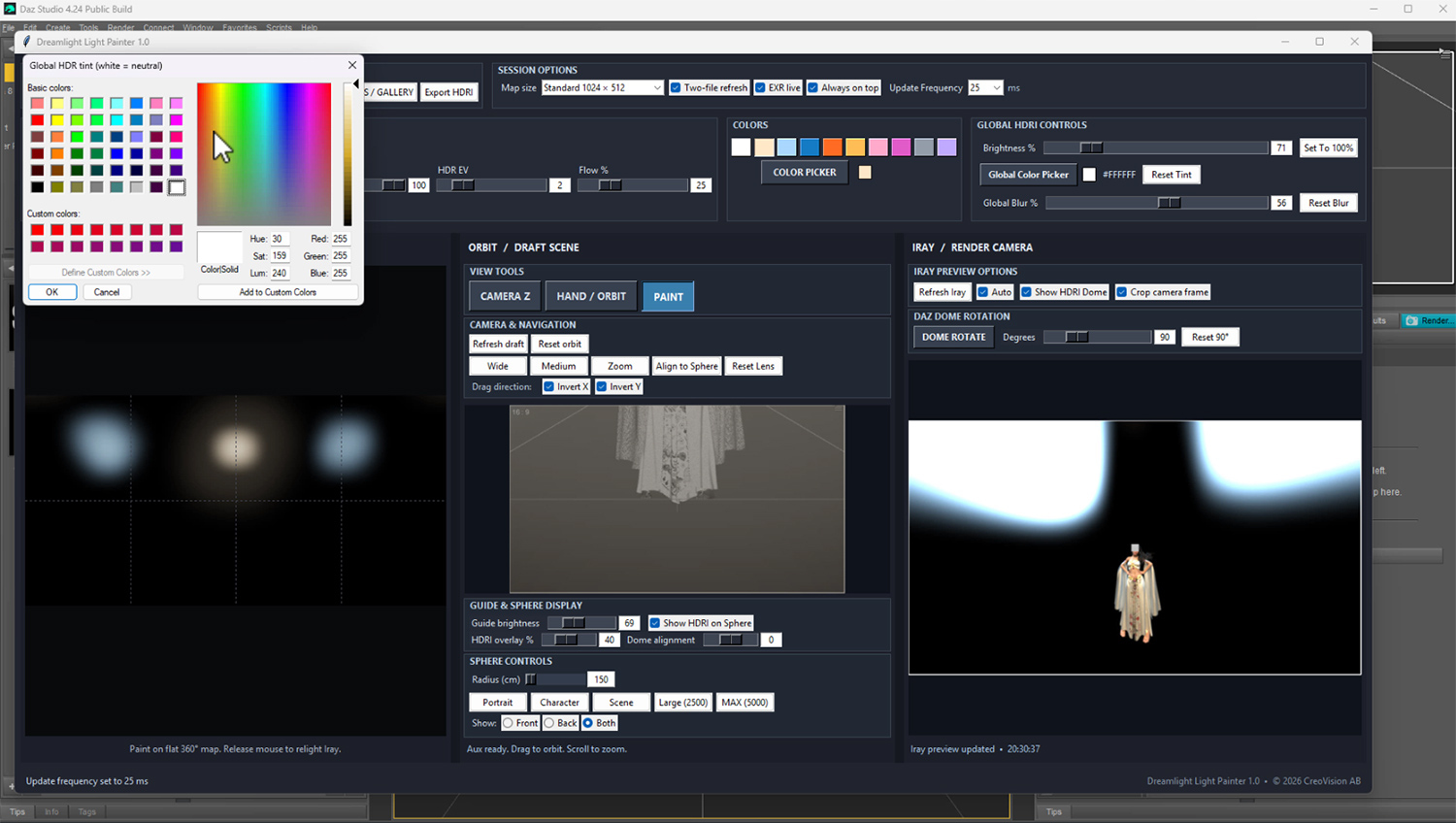
Choose from convenient preset colors or customize your lighting color to create the atmosphere you want.
ERASER
Remove painted lighting from selected areas and refine your lighting composition.
HDR BRIGHTNESS
Adjust the overall HDR lighting intensity without having to repaint your entire environment.
ORBITAL NAVIGATION
Rotate your lighting view around your subject to paint illumination from different directions.
ZOOM CONTROL
Move closer for more detailed work or pull back to examine the complete lighting setup.
MULTIPLE HDR RESOLUTIONS
Choose between different HDR map resolutions to balance performance, lighting detail and your creative requirements.
The combination of these tools allows you to work freely, from broad lighting experiments to more precise illumination adjustments.
---------------------------------------------------------
HDR RESOLUTION AND PERFORMANCE
---------------------------------------------------------
Light Painter 1.0 includes three working resolutions for creating and painting 32-bit HDR lighting environments:
- TURBO: 512 x 256 pixels
- STANDARD: 1024 x 512 pixels
- HIGH: 2048 x 1024 pixels
All three resolutions use the standard 2:1 equirectangular HDR environment format.
Why not 4K or 8K?
Light Painter is designed for interactive lighting creation, not simply displaying or rendering an existing HDRI photograph.
Every time you paint, the application processes and updates the HDR environment, allowing the new lighting to be evaluated in DAZ Studio.
Increasing the resolution from 2048 x 1024 to 4096 x 2048 means processing four times as many pixels.
An 8192 x 4096 environment contains sixteen times as many pixels as a 2048 x 1024 map!
During experimental testing, these larger working resolutions produced substantial slowdowns, even on a powerful NVIDIA RTX 4090 workstation.
For this reason, Light Painter 1.0 intentionally limits its interactive painting canvas to 2048 x 1024 pixels.
And there's another important distinction.
A high-resolution photographic HDRI can contain extremely fine environmental details, but Light Painter is primarily designed to create and control ILLUMINATION.
Broad soft lights, colored highlights, environmental fills and many studio-style lighting effects can work beautifully at the included resolutions.
Extremely small, concentrated light sources and very fine lighting details may benefit from higher HDR resolutions, but interactive responsiveness is an essential part of the Light Painter experience.
Choose the resolution that best suits your hardware and creative needs. Lower resolutions can provide a more responsive painting experience, particularly with complex scenes.
Higher working resolutions require more processing time, memory and potentially more GPU resources during Iray evaluation.
4K and 8K painting resolutions are NOT included in Light Painter 1.0.
-----------------------------------------------------------------
DESIGNED FOR CREATIVE EXPERIMENTATION
-----------------------------------------------------------------
One of the most exciting things about lighting is how dramatically it can change an image.
A simple portrait can become romantic, mysterious, cinematic, dramatic or completely surreal just by changing the illumination.
With Light Painter, experimenting with these different looks becomes part of the creative process.
Imagine painting a soft blue light behind a character.
Then adding a gentle orange highlight across the face.
Perhaps a subtle purple accent from above.
Or removing most of the fill light to create a more dramatic, shadowy atmosphere.
You can explore these ideas visually, without having to build complicated physical lighting rigs for every experiment.
Whether you're creating portraits, fantasy scenes, fashion renders, science fiction, architectural artwork or dramatic character studies, Light Painter gives you another way to express your artistic vision.
-----------------------------------------------
A NATURAL PART OF DAZ STUDIO
-----------------------------------------------
Dreamlight Light Painter is designed primarily for DAZ Studio and its NVIDIA Iray rendering engine.
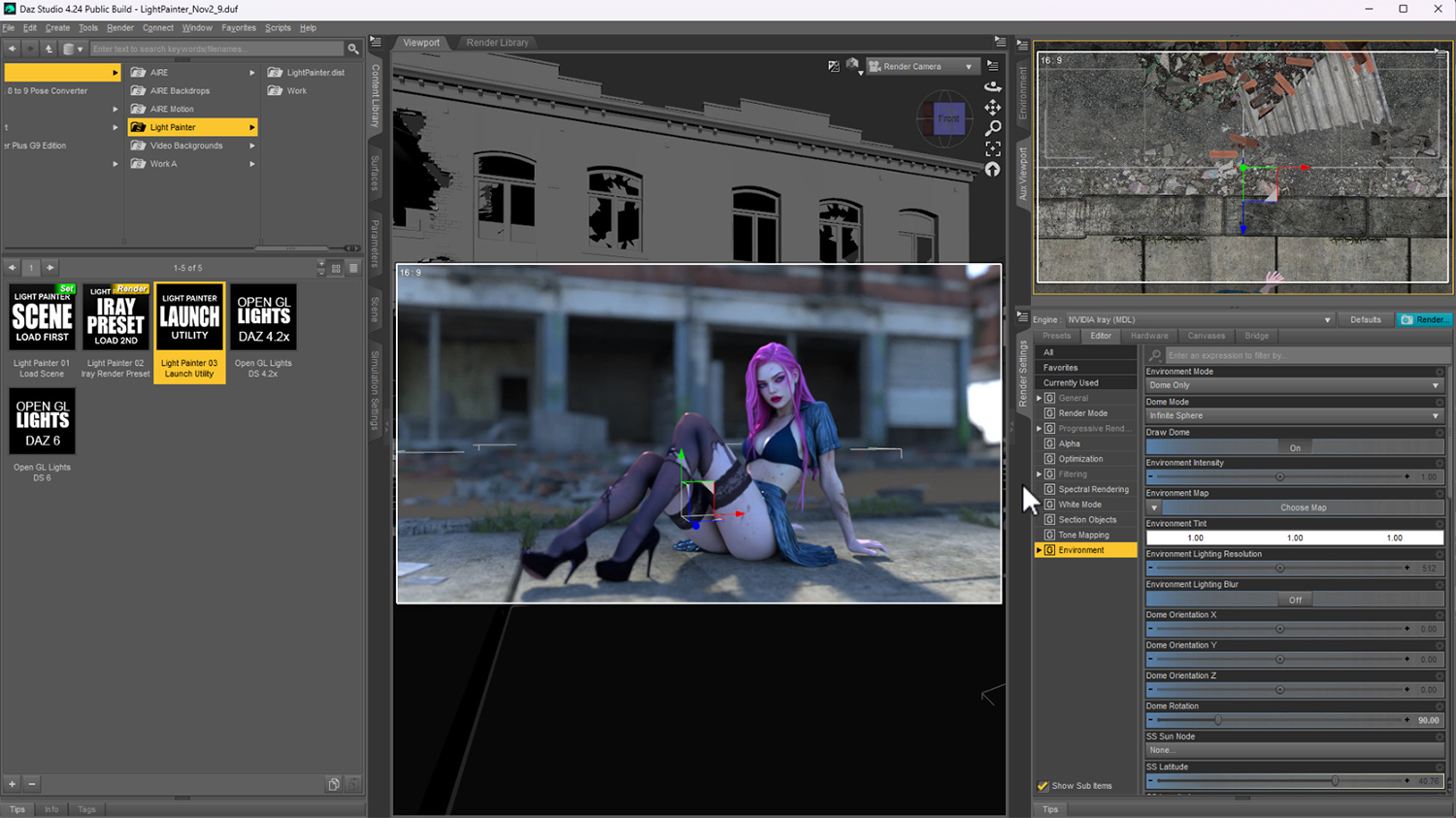
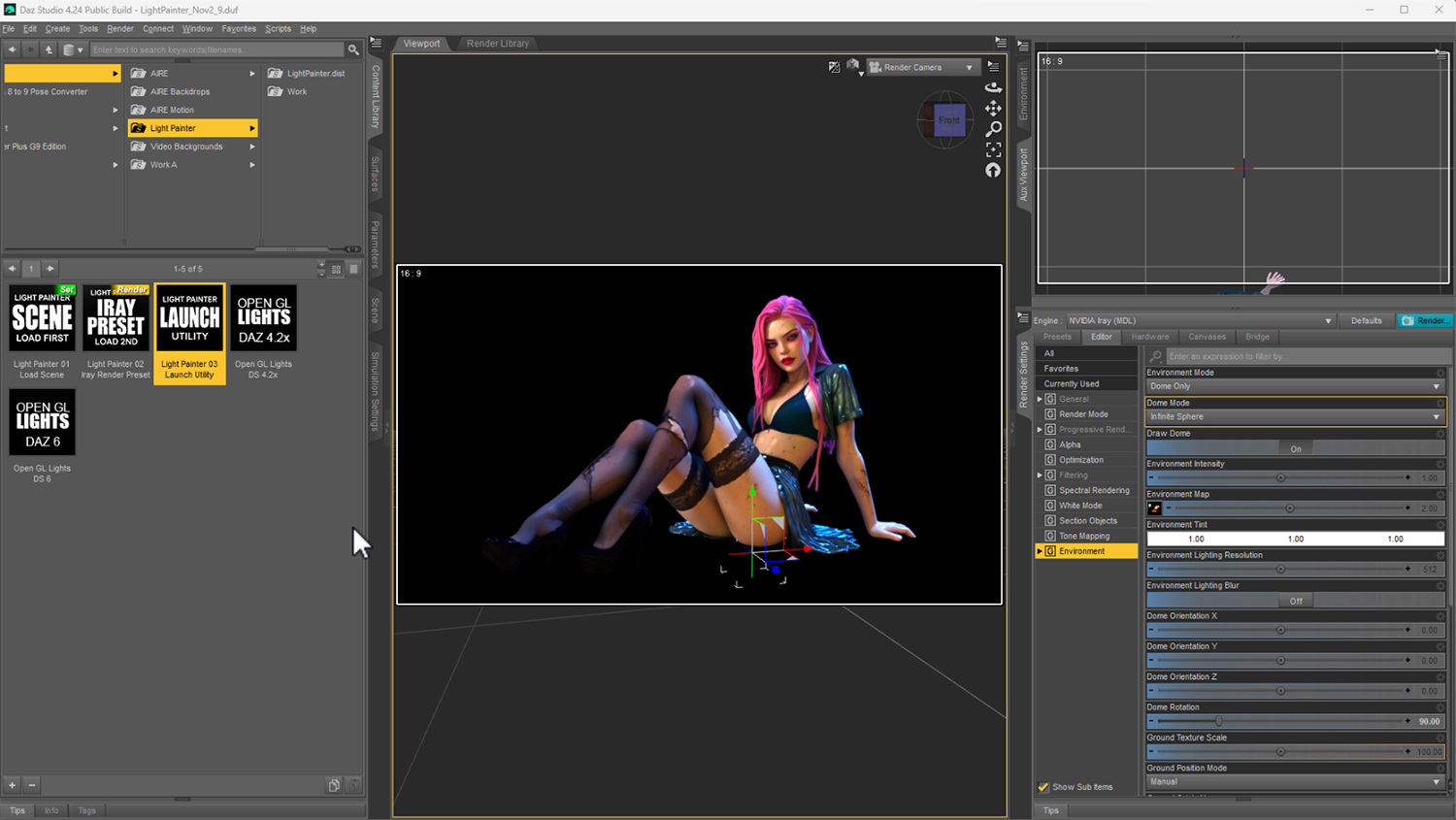
The included lighting workflow connects your painting environment with DAZ Studio, allowing your custom HDR maps to illuminate your scene.
The Light Painter camera rig provides a visual reference for where you are painting, helping you create lighting around the subject or area you've chosen.
Your Iray viewport or render provides the final reference for how the illumination affects your scene.
This means you can combine your painted HDR lighting with the powerful materials, cameras, characters and rendering tools already available in DAZ Studio.
Light Painter is a creative lighting tool, not a replacement for DAZ Studio or Iray.
It gives you more ways to work with them.
-----------------------------------------------------
WORKS WITH AIRE AND AIRE MOTION
-----------------------------------------------------
Light Painter is a standalone lighting product for DAZ Studio.
You do NOT need AIRE, AIRE Motion, ComfyUI or any AI models to use Light Painter.
Create your lighting, render your scene using Iray, and enjoy the results!
However, if you already own AIRE or AIRE Motion, you can expand your creative workflow even further.
LIGHT PAINTER + AIRE
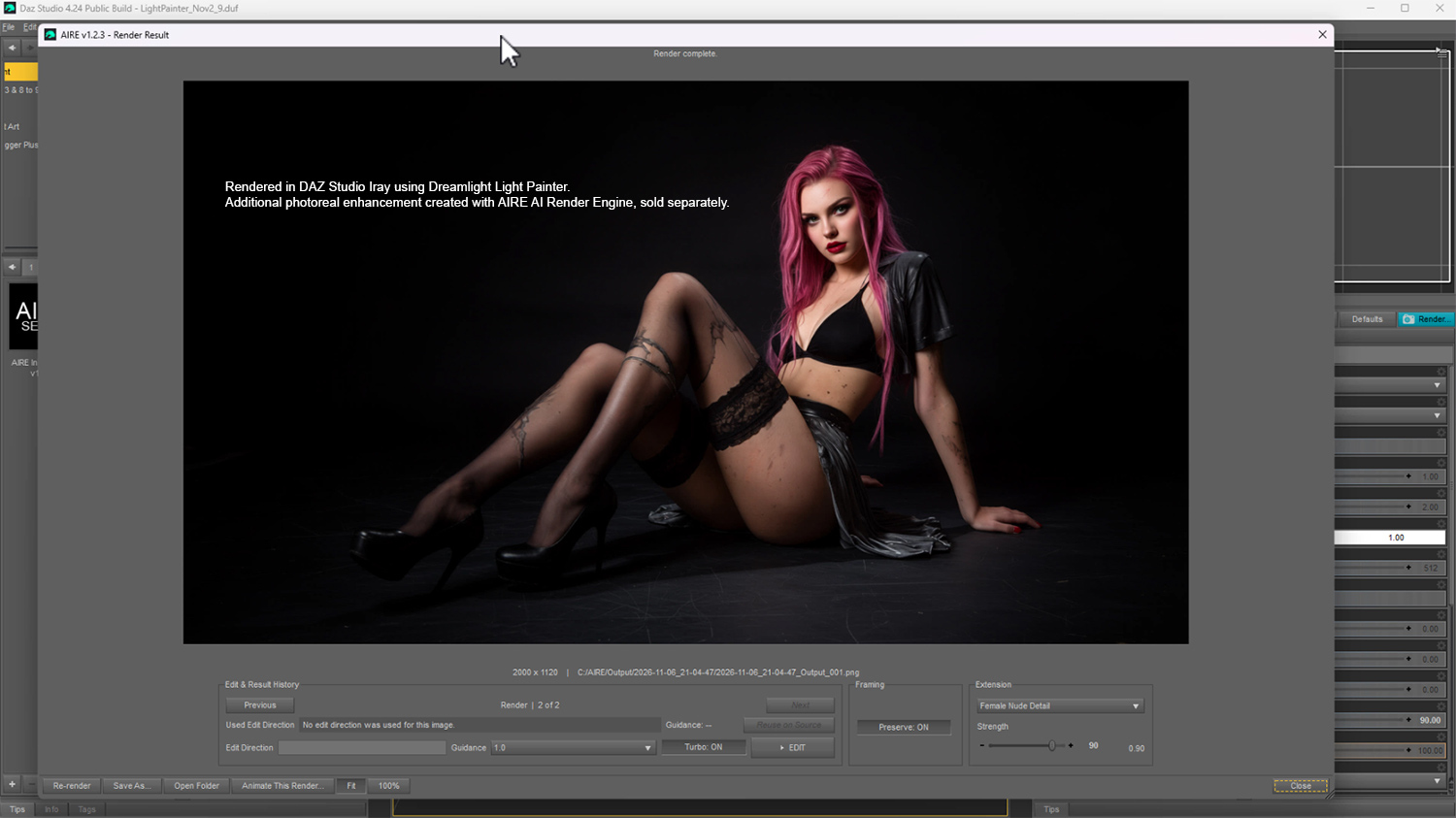
Create beautiful custom illumination in DAZ Studio, render your artwork using Iray, then use AIRE to explore additional realism, enhancement and creative image transformations.
LIGHT PAINTER + AIRE MOTION
Create and light your scene in DAZ Studio, render your image, then use AIRE Motion to explore turning your finished artwork into animated video.
AIRE and AIRE Motion provide additional creative possibilities, but neither is required to use Light Painter.
Both are separate products, sold separately.
Discover AIRE here:
aire-ai-render-engine-daz-studio
----------------------------------------------------
NO AI. NO CREDITS. JUST CREATIVITY.
----------------------------------------------------
Light Painter is built around your own artistic decisions.
It does not require an AI image generator to create your lighting environments.
There are no AI prompts to write, no AI models to download, and no cloud rendering credits to purchase.
You decide where to paint.
You decide the colors.
You decide how strong the lighting should be.
And you decide when the result looks right.
Your lighting is created through direct artistic control and rendered using DAZ Studio's Iray engine.
Traditional digital painting meets HDR environment lighting.
-----------------------------------
SYSTEM REQUIREMENTS
-----------------------------------
RECOMMENDED HARDWARE
- Windows PC, preferably a powerful desktop workstation
- DAZ Studio with NVIDIA Iray support
- Compatible DAZ Studio 4.23, 4.24 or DAZ Studio 6 installation
- Dedicated NVIDIA RTX graphics card strongly recommended
- Sufficient GPU VRAM and system RAM for your DAZ Studio scene, Iray rendering and HDR map processing
- Full HD display (1920 x 1080) or higher recommended
- Mouse or suitable pointing device for interactive painting
Light Painter was developed for the DAZ Studio Windows environment and is intended for artists working with interactive Iray lighting.
A powerful desktop workstation with a capable NVIDIA RTX GPU is strongly recommended for the most comfortable experience.
Although Light Painter creates HDR lighting maps using its own painting interface, evaluating those lighting changes directly in DAZ Studio with Iray can be demanding.
Performance depends on several factors:
- GPU performance and available video memory
- System RAM and available resources
- Scene complexity, geometry and material settings
- Selected HDR painting resolution
- Iray viewport rendering performance
- Other applications running at the same time
If your computer already struggles to run DAZ Studio Iray interactively, you should expect Light Painter's live lighting workflow to be significantly less responsive.
DISPLAY REQUIREMENTS
A Full HD (1920 x 1080) display or larger is recommended.
Light Painter uses a multi-panel interface with an orbital painting view, controls and preview areas. Sufficient screen space makes these tools considerably easier to use.
Higher-resolution desktop displays can provide a more comfortable workspace, particularly when working with DAZ Studio and Light Painter together.
Smaller laptop displays or high Windows display-scaling settings may leave insufficient usable screen space for a comfortable workflow.
WHAT ABOUT LAPTOPS?
Some high-performance laptops equipped with dedicated NVIDIA RTX graphics may be capable of running Light Painter.
However, performance varies considerably depending on GPU model, power limits, cooling, available memory and display size.
Light Painter is primarily recommended for a capable desktop workstation. Smooth interactive operation on laptops or lower-end hardware cannot be guaranteed.
WHAT ABOUT MINIMUM GPU REQUIREMENTS?
Because interactive performance depends heavily on the complete DAZ Studio scene and Iray rendering workload, no universal minimum VRAM figure can guarantee a smooth experience.
Light Painter has been developed and tested on high-performance NVIDIA RTX hardware, including the RTX 4090.
For the most responsive experience, start with a lower HDR working resolution and increase it only when your system performs comfortably.
No ComfyUI installation or AI generation models are required.
---------------------------
GETTING STARTED
---------------------------
Light Painter includes written documentation and a comprehensive video tutorial to help you begin creating your own lighting.
The basic workflow is straightforward:
1. Open your scene in DAZ Studio.
2. Load or prepare the Light Painter camera rig.
3. Launch the Light Painter interface.
4. Choose your HDR resolution and lighting setup.
5. Start with a blank environment or import a compatible HDRI.
6. Select your brush color, size and intensity.
7. Rotate your orbital view and paint your lighting.
8. Examine the result using Iray.
9. Refine the lighting until you're happy with the look.
10. Render your finished scene!
The included video tutorial demonstrates the lighting workflow and creative controls in detail.
---------------------------------------------
INCLUDED WITH LIGHT PAINTER
---------------------------------------------
- Dreamlight Light Painter 1.0
- Dedicated HDR lighting painting interface
- 360-degree orbital lighting workflow
- Light Painter camera rig for DAZ Studio
- 32-bit floating-point HDR lighting map creation
- Paint brush and eraser tools
- Brush size and flow controls
- Preset lighting colors and color selection
- Adjustable overall HDR brightness
- Orbital navigation and zoom controls
- Three HDR map resolutions: 512 x 256, 1024 x 512 and 2048 x 1024
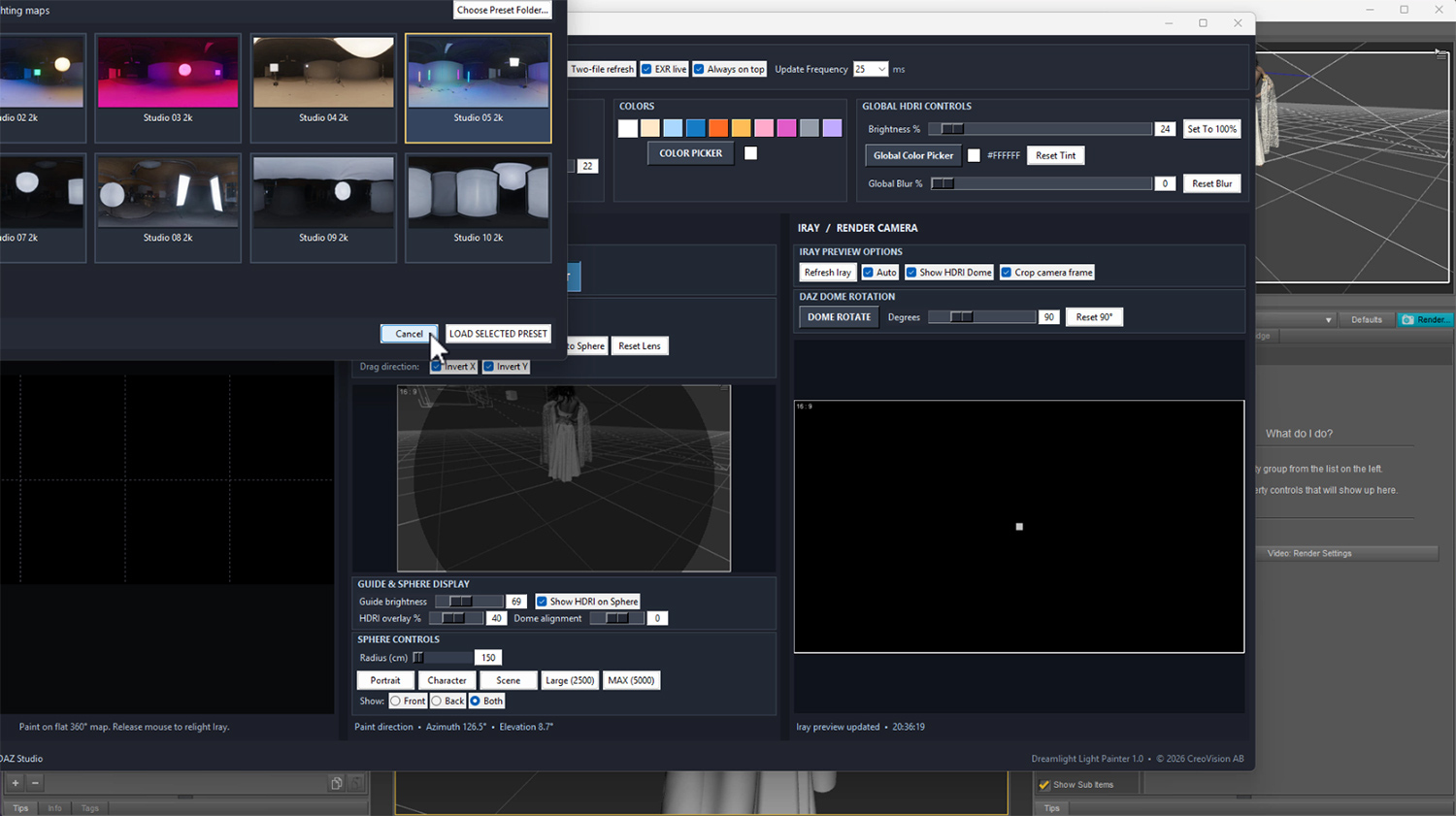
- 10 demo HDRI maps in EXR 32 bit format, instantly loadable via the gallery menu
- Import of compatible existing HDRI environments
- Direct HDR lighting application to DAZ Studio Iray
- Written installation and usage documentation
- Comprehensive approximately 47-minute How-To video tutorial
- Release documentation and third-party notices
AIRE and AIRE Motion are optional products and are not included.
-----------------------------
CREATIVE FREEDOM
-----------------------------
Imagine having the freedom to design your own lighting environments instead of searching through dozens of HDRI presets hoping to find the perfect one.
Paint a beautiful portrait light.
Create dramatic cinematic shadows.
Add subtle colorful highlights.
Build a completely original lighting atmosphere.
Or take an existing HDRI and give it your own artistic touch.
The possibilities aren't limited to a collection of predefined lighting presets.
They're shaped by your imagination.
Light Painter doesn't decide how your scene should look.
You do.
----------------------------------------
A NOTE FROM DREAMLIGHT
----------------------------------------
"I've been passionate about lighting in 3D art for more than two decades.
To me, lighting is one of the most creative and rewarding parts of making an image.
You can spend hours designing a character, carefully choosing materials and composing your scene, but it's often the lighting that brings everything together.
With Dreamlight Light Painter, I wanted to explore a different approach.
What if we could simply PAINT light?
What if we could create beautiful HDR lighting environments using the same intuitive approach as painting an image?
And what if we could do this while seeing how our lighting affects our DAZ Studio scenes LIVE?
That's the idea behind Light Painter.
It's not about replacing traditional lighting techniques. It's about giving artists another creative tool, another way to experiment, and another way to bring their imagination to life.
I hope you enjoy exploring Light Painter as much as I've enjoyed creating it!"
-----------------------------------------------
FREQUENTLY ASKED QUESTIONS
-----------------------------------------------
Q. WHAT EXACTLY DOES LIGHT PAINTER DO?
A. Light Painter lets you create and customize 32-bit HDR lighting environments by painting light and color directly in an interactive orbital interface. Your HDR map is used to illuminate scenes in DAZ Studio using Iray, LIVE and interactive.
Q. DO I NEED AIRE OR AIRE MOTION?
A. No. Light Painter is a standalone DAZ Studio lighting tool. AIRE and AIRE Motion are optional products that can extend your creative workflow.
Q. DOES LIGHT PAINTER USE AI?
A. No. Light Painter creates HDR lighting from your own painting and optional imported HDRI environments. No AI generation or ComfyUI installation is required.
Q. CAN I IMPORT MY OWN HDRI MAPS?
A. Yes. You can import compatible HDR and EXR environments and add painted lighting to customize the result. Imported maps are processed at your selected Light Painter working resolution.
Q. CAN I IMPORT 4K OR 8K HDRI MAPS?
A. Yes, compatible higher-resolution source HDRIs can be imported. However, Light Painter 1.0 resamples them to your selected working resolution, with a maximum of 2048 x 1024 pixels. It does not preserve the full original 4K or 8K resolution when producing the edited HDR environment.
Q. WHY DOES LIGHT PAINTER ONLY SUPPORT UP TO 2048 x 1024 PIXELS?
A. Light Painter is an interactive HDR lighting editor. Larger maps require significantly more processing whenever the lighting is updated. A 4K environment contains four times as many pixels as a 2K environment, while an 8K environment contains sixteen times as many. Experimental testing showed substantial slowdowns at higher resolutions, even on an NVIDIA RTX 4090. The 2048 x 1024 maximum was chosen to balance useful lighting detail with interactive performance.
Q. IS 2048 x 1024 ENOUGH FOR GOOD LIGHTING?
A. Yes, for many creative lighting applications. Broad soft lights, ambient illumination, colorful highlights and studio-style lighting can work very well at this resolution. Extremely small light sources and very fine lighting details may benefit from higher resolutions. Light Painter focuses on interactive illumination design rather than preserving ultra-high-resolution photographic environments.
Q. CAN I PAINT DIFFERENT LIGHT COLORS?
A. Yes! Create warm, cool, neutral or colorful lighting using the available brush colors and color selection controls.
Q. DOES IT CREATE REAL HDR LIGHTING?
A. Yes. Light Painter creates 32-bit floating-point HDR environment maps for Iray illumination. These are artist-created lighting environments, not physically measured HDRI captures.
Q. WILL MY LIGHTING CREATE SHADOWS?
A. Yes. Iray uses the HDR lighting environment to illuminate the scene and calculate shading and shadows. The appearance and definition of those shadows depend on the lighting distribution, scene geometry and materials.
Q. CAN I CHANGE THE BRUSH SIZE AND STRENGTH?
A. Yes. Light Painter includes adjustable brush settings, including size and flow, along with HDR brightness controls.
Q. CAN I SEE MY LIGHTING CHANGES IN DAZ STUDIO?
A. Yes. Light Painter applies updated HDR lighting to DAZ Studio as you work. Use Iray to evaluate the actual illumination and shadows. Interactive rendering performance depends on your GPU, scene complexity and HDR resolution.
Q. CAN I USE LIGHT PAINTER FOR PORTRAITS?
A. Absolutely! Portraits, fashion renders, character studies and cinematic artwork are excellent uses for painted HDR lighting.
Q. DOES LIGHT PAINTER REPLACE TRADITIONAL DAZ LIGHTS?
A. No. It offers a different way to create environmental illumination. You can still use DAZ Studio's traditional lighting tools when needed.
Q. DO I NEED TO PURCHASE HDRI MAPS?
A. No. You can create your own lighting environments from a blank canvas. Importing an existing HDRI is an optional feature. You can also use the included gallery of 10 demo HDRI maps to instantly get going.
Q. DO I NEED A POWERFUL GRAPHICS CARD?
A. A powerful NVIDIA RTX graphics card is strongly recommended, particularly if you want to see your lighting changes interactively through Iray. Light Painter processes HDR lighting maps, while DAZ Studio Iray handles the rendered scene. Both operations can require significant resources. Performance depends on GPU capability, memory, HDR resolution and scene complexity. A capable desktop workstation is recommended.
Q. CAN I USE LIGHT PAINTER ON A LAPTOP?
A. A powerful laptop with a dedicated NVIDIA RTX GPU may be capable of running Light Painter, but laptop performance and available screen space vary considerably. Smaller laptop displays, GPU power limitations and thermal constraints can affect the experience. For the best interactive workflow, a capable desktop workstation is strongly recommended.
Q. WHAT DISPLAY RESOLUTION DO I NEED?
A. A Full HD (1920 x 1080) display or larger is recommended. Light Painter's interface includes several painting, navigation and preview areas that benefit from a spacious desktop. Smaller displays and high Windows scaling settings may be uncomfortable or impractical.
Q. DOES IT INCLUDE A VIDEO TUTORIAL?
A. Yes! A comprehensive approximately 47-minute How-To video is included, demonstrating the workflow and creative controls.
Q. WHERE CAN I GET SUPPORT?
A. Please consult the included documentation and tutorial first. If you need additional assistance, contact Dreamlight through RenderHub Messages with a description of your issue and relevant system details.
-----------------------------------------------------
DREAMLIGHT LIGHT PAINTER 1.0
INITIAL RELEASE - NOVEMBER 7 2026
-----------------------------------------------------
HDR LIGHTING
- 32-bit HDR environment painting
- Create lighting from a blank canvas
- Import existing compatible HDRI maps
- Adjustable HDR brightness
- Three HDR resolutions up to 2048 x 1024
- Pre-load 10 included demo HDRI maps or start from scratch
PAINTING TOOLS
- Interactive brush painting
- Brush size and flow controls
- Color selection and preset colors
- Eraser
- Visual painting workflow
DAZ STUDIO INTEGRATION
- Dedicated orbital camera rig
- Interactive orbit and zoom
- HDR lighting application to Iray
- Visual lighting experimentation
- Standalone operation without AIRE
DOCUMENTATION
- Installation and usage instructions
- Approximately 47-minute video tutorial
- Release documentation
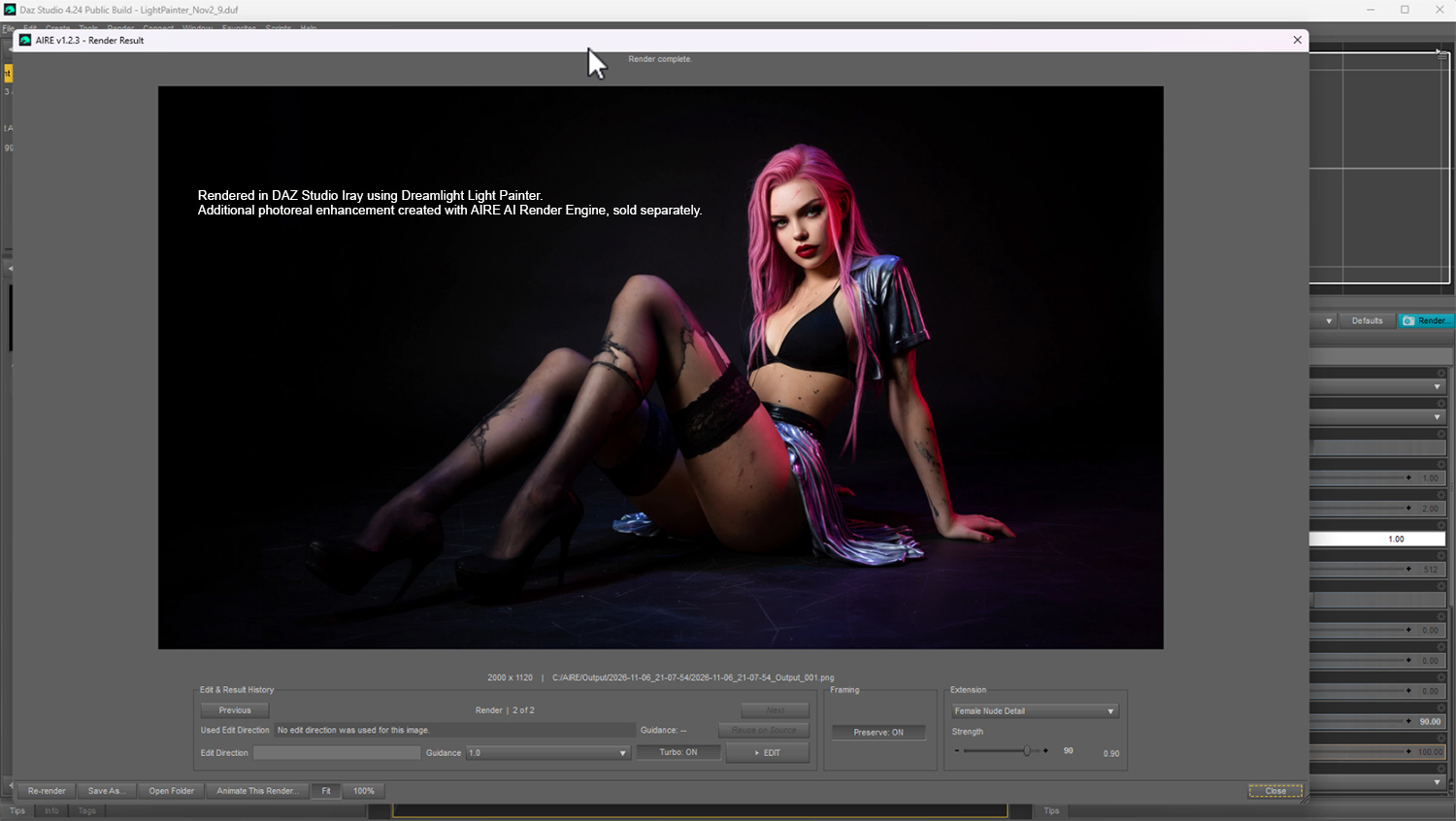
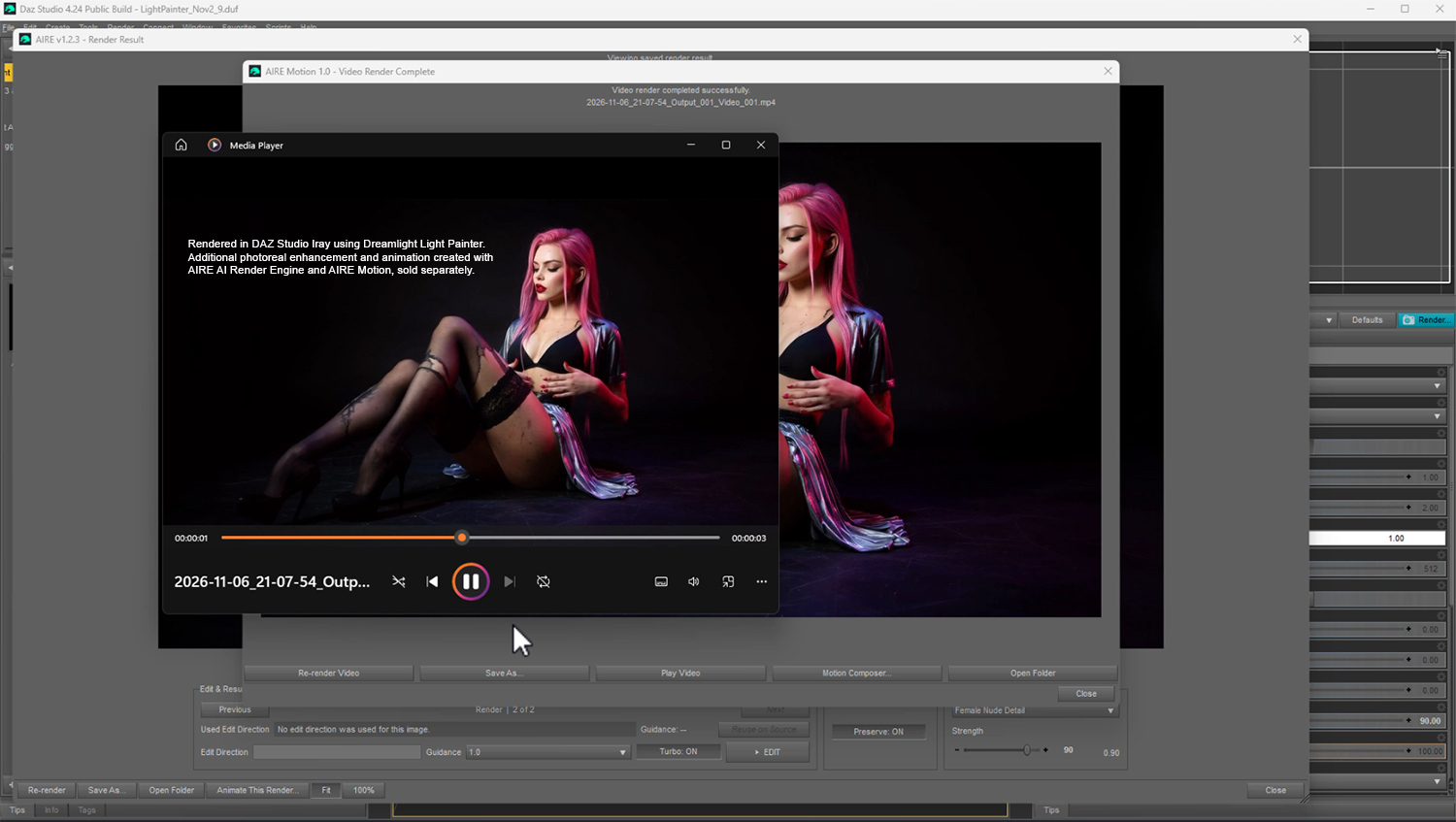
NOTE: Light Painter is designed primarily for DAZ Studio Iray. Some promotional artwork or demonstrations may include optional enhancements or animation created using AIRE and AIRE Motion, sold separately.
------------------------------------------
DREAMLIGHT LIGHT PAINTER
PAINT YOUR LIGHT.
SHAPE YOUR SHADOWS.
CREATE YOUR WORLD.
------------------------------------------
Paint Light. Shape Shadows. Create Atmosphere.
Your Scene. Your Lighting. Your Vision.
--------------------------------------------------------------
INTRODUCING DREAMLIGHT LIGHT PAINTER
--------------------------------------------------------------
What if you could actually PAINT the lighting around your 3D characters or complete larger scenes?
Not just adjust lights, load presets or rotate an existing HDRI environment.
Actually PAINT your own lighting, directly onto a 360-degree environment, using brushes, colors and adjustable light intensity!
Welcome to Dreamlight Light Painter, an entirely new way to create beautiful, customized 32-bit HDR lighting environments for DAZ Studio and NVIDIA Iray.
Paint soft illumination, powerful highlights, colorful rim lighting, dramatic shadows and cinematic lighting effects with intuitive painting tools.
See how your lighting affects your DAZ Studio scene as you work, and experiment until you achieve exactly the mood you want, all LIVE and interactive!
Get started instantly with 10 included 32-bit HDRI lighting maps, or create something entirely your own!
No AI generation. No ComfyUI. No complex external lighting software.
Just your imagination, your DAZ Studio scenes, and the freedom to paint with light.
IMPORTANT: Light Painter is designed for interactive HDR lighting creation alongside DAZ Studio Iray. A powerful Windows desktop workstation with a dedicated NVIDIA RTX GPU is strongly recommended for a smooth creative experience. A Full HD (1920 x 1080) or larger display is also recommended. Please review the SYSTEM REQUIREMENTS and HDR RESOLUTION sections below before purchasing.
-----------------------------------------------
PAINT YOUR OWN HDRI LIGHTING
-----------------------------------------------
Traditional HDRI lighting is incredibly powerful, but it also has limitations.
You load an HDRI map, rotate it, adjust its brightness, and hope the existing light sources are positioned where you want them.
But what if the light needs to come from a completely different direction?
What if you want a beautiful orange glow on one side of your character, a cool blue highlight on the other, and a soft white fill light from above?
With Light Painter, you can create exactly that.
Start with a blank lighting environment and paint the illumination yourself.
Choose your brush color, size, intensity and flow, then begin painting.
Create broad, soft lighting areas or smaller, concentrated highlights.
Experiment with multiple colors, different lighting directions and creative combinations.
Every brush stroke becomes part of your custom 32-bit HDR environment, allowing Iray to illuminate your scene using the lighting you've created.
You're no longer limited to the lights that happen to exist in an HDRI photograph.
You're the lighting designer.
----------------------------------------------------------
SEE YOUR LIGHTING FROM EVERY ANGLE
----------------------------------------------------------
Light Painter introduces an interactive orbital painting environment designed specifically for creating lighting around your DAZ Studio characters and scenes.
Instead of trying to imagine where each light source should be placed on a flat HDRI map, you can work visually around your subject.
Rotate your orbital view, examine your scene from different directions, and paint lighting where you want it.
The dedicated Light Painter camera rig helps you navigate the lighting environment while maintaining the relationship between your painting and the Iray lighting dome.
Zoom in for more precise work, or zoom out to examine the overall lighting composition.
Switch between navigating and painting as you develop your lighting design.
The result is a creative workflow that makes working with HDR illumination more visual, intuitive and enjoyable.
----------------------------------------------------------
REAL HDR LIGHTING. REAL IRAY RESULTS.
----------------------------------------------------------
Light Painter doesn't simply paint colored graphics over your viewport.
It creates actual 32-bit floating-point HDR lighting maps that can be applied to the Iray environment in DAZ Studio.
Your painted colors and brightness values become illumination that Iray uses when rendering your scene.
Create:
- Beautiful soft portrait lighting
- Dramatic cinematic highlights
- Colorful rim lighting
- Warm sunset-inspired illumination
- Cool moonlight and atmospheric effects
- High-contrast studio lighting
- Fantasy and science fiction lighting
- Gentle ambient fill lighting
- Creative multicolored illumination
- Concentrated highlights and deep shadows
Experiment with different lighting directions, brightness levels and colors to discover entirely new looks.
Light Painter updates the HDR lighting environment as you paint, allowing you to evaluate your changes in DAZ Studio.
The orbital painting display provides your interactive working view, while Iray shows the actual rendered lighting result.
NOTE: The orbital view is a painting and navigation interface. Final lighting and shadow appearance should be evaluated using Iray, as results depend on your scene materials, render settings and geometry. The responsiveness of live Iray updates depends on your GPU, selected HDR resolution and scene complexity.
------------------------------------------------------------
IMPORT YOUR OWN HDRI ENVIRONMENTS
------------------------------------------------------------
Light Painter isn't limited to creating lighting from scratch.
You can also import existing compatible HDRI environments and use them as a foundation for your lighting design.
Already have a beautiful studio HDRI, an outdoor environment or a dramatic photographic lighting setup?
Bring it into Light Painter!
Then paint additional lighting to customize the environment for your particular scene.
Add a warm highlight where your character needs more illumination.
Introduce a cool rim light.
Create an extra lighting accent to make your subject stand out.
Or experiment with entirely different colors and lighting combinations.
Tone down or remove parts that distract, and make it cast lighting exactly how you want it.
This gives you a flexible way to enhance existing HDRI lighting instead of being limited to the original environment.
Start with a blank canvas or build upon an existing HDRI.
The choice is yours.
NOTE: Light Painter supports importing compatible HDR and EXR environments, including higher-resolution source maps. Imported maps are resampled to your selected Light Painter working resolution, with a maximum of 2048 x 1024 pixels in version 1.0. The edited HDR map does not retain the original resolution of a larger imported 4K or 8K HDRI.
----------------------------------------------------------------
CREATIVE BRUSHES AND LIGHTING CONTROL
----------------------------------------------------------------
Light Painter gives you a collection of practical tools for building your lighting environment.
PAINT BRUSH
Paint lighting directly into your HDR environment using your selected color and intensity.
BRUSH SIZE
Choose between smaller, more concentrated lighting areas and larger, softer illumination.
BRUSH FLOW
Adjust the strength of your brush strokes for more gradual and controlled lighting changes.
COLOR SELECTION
Choose from convenient preset colors or customize your lighting color to create the atmosphere you want.
ERASER
Remove painted lighting from selected areas and refine your lighting composition.
HDR BRIGHTNESS
Adjust the overall HDR lighting intensity without having to repaint your entire environment.
ORBITAL NAVIGATION
Rotate your lighting view around your subject to paint illumination from different directions.
ZOOM CONTROL
Move closer for more detailed work or pull back to examine the complete lighting setup.
MULTIPLE HDR RESOLUTIONS
Choose between different HDR map resolutions to balance performance, lighting detail and your creative requirements.
The combination of these tools allows you to work freely, from broad lighting experiments to more precise illumination adjustments.
---------------------------------------------------------
HDR RESOLUTION AND PERFORMANCE
---------------------------------------------------------
Light Painter 1.0 includes three working resolutions for creating and painting 32-bit HDR lighting environments:
- TURBO: 512 x 256 pixels
- STANDARD: 1024 x 512 pixels
- HIGH: 2048 x 1024 pixels
All three resolutions use the standard 2:1 equirectangular HDR environment format.
Why not 4K or 8K?
Light Painter is designed for interactive lighting creation, not simply displaying or rendering an existing HDRI photograph.
Every time you paint, the application processes and updates the HDR environment, allowing the new lighting to be evaluated in DAZ Studio.
Increasing the resolution from 2048 x 1024 to 4096 x 2048 means processing four times as many pixels.
An 8192 x 4096 environment contains sixteen times as many pixels as a 2048 x 1024 map!
During experimental testing, these larger working resolutions produced substantial slowdowns, even on a powerful NVIDIA RTX 4090 workstation.
For this reason, Light Painter 1.0 intentionally limits its interactive painting canvas to 2048 x 1024 pixels.
And there's another important distinction.
A high-resolution photographic HDRI can contain extremely fine environmental details, but Light Painter is primarily designed to create and control ILLUMINATION.
Broad soft lights, colored highlights, environmental fills and many studio-style lighting effects can work beautifully at the included resolutions.
Extremely small, concentrated light sources and very fine lighting details may benefit from higher HDR resolutions, but interactive responsiveness is an essential part of the Light Painter experience.
Choose the resolution that best suits your hardware and creative needs. Lower resolutions can provide a more responsive painting experience, particularly with complex scenes.
Higher working resolutions require more processing time, memory and potentially more GPU resources during Iray evaluation.
4K and 8K painting resolutions are NOT included in Light Painter 1.0.
-----------------------------------------------------------------
DESIGNED FOR CREATIVE EXPERIMENTATION
-----------------------------------------------------------------
One of the most exciting things about lighting is how dramatically it can change an image.
A simple portrait can become romantic, mysterious, cinematic, dramatic or completely surreal just by changing the illumination.
With Light Painter, experimenting with these different looks becomes part of the creative process.
Imagine painting a soft blue light behind a character.
Then adding a gentle orange highlight across the face.
Perhaps a subtle purple accent from above.
Or removing most of the fill light to create a more dramatic, shadowy atmosphere.
You can explore these ideas visually, without having to build complicated physical lighting rigs for every experiment.
Whether you're creating portraits, fantasy scenes, fashion renders, science fiction, architectural artwork or dramatic character studies, Light Painter gives you another way to express your artistic vision.
-----------------------------------------------
A NATURAL PART OF DAZ STUDIO
-----------------------------------------------
Dreamlight Light Painter is designed primarily for DAZ Studio and its NVIDIA Iray rendering engine.
The included lighting workflow connects your painting environment with DAZ Studio, allowing your custom HDR maps to illuminate your scene.
The Light Painter camera rig provides a visual reference for where you are painting, helping you create lighting around the subject or area you've chosen.
Your Iray viewport or render provides the final reference for how the illumination affects your scene.
This means you can combine your painted HDR lighting with the powerful materials, cameras, characters and rendering tools already available in DAZ Studio.
Light Painter is a creative lighting tool, not a replacement for DAZ Studio or Iray.
It gives you more ways to work with them.
-----------------------------------------------------
WORKS WITH AIRE AND AIRE MOTION
-----------------------------------------------------
Light Painter is a standalone lighting product for DAZ Studio.
You do NOT need AIRE, AIRE Motion, ComfyUI or any AI models to use Light Painter.
Create your lighting, render your scene using Iray, and enjoy the results!
However, if you already own AIRE or AIRE Motion, you can expand your creative workflow even further.
LIGHT PAINTER + AIRE
Create beautiful custom illumination in DAZ Studio, render your artwork using Iray, then use AIRE to explore additional realism, enhancement and creative image transformations.
LIGHT PAINTER + AIRE MOTION
Create and light your scene in DAZ Studio, render your image, then use AIRE Motion to explore turning your finished artwork into animated video.
AIRE and AIRE Motion provide additional creative possibilities, but neither is required to use Light Painter.
Both are separate products, sold separately.
Discover AIRE here:
aire-ai-render-engine-daz-studio
----------------------------------------------------
NO AI. NO CREDITS. JUST CREATIVITY.
----------------------------------------------------
Light Painter is built around your own artistic decisions.
It does not require an AI image generator to create your lighting environments.
There are no AI prompts to write, no AI models to download, and no cloud rendering credits to purchase.
You decide where to paint.
You decide the colors.
You decide how strong the lighting should be.
And you decide when the result looks right.
Your lighting is created through direct artistic control and rendered using DAZ Studio's Iray engine.
Traditional digital painting meets HDR environment lighting.
-----------------------------------
SYSTEM REQUIREMENTS
-----------------------------------
RECOMMENDED HARDWARE
- Windows PC, preferably a powerful desktop workstation
- DAZ Studio with NVIDIA Iray support
- Compatible DAZ Studio 4.23, 4.24 or DAZ Studio 6 installation
- Dedicated NVIDIA RTX graphics card strongly recommended
- Sufficient GPU VRAM and system RAM for your DAZ Studio scene, Iray rendering and HDR map processing
- Full HD display (1920 x 1080) or higher recommended
- Mouse or suitable pointing device for interactive painting
Light Painter was developed for the DAZ Studio Windows environment and is intended for artists working with interactive Iray lighting.
A powerful desktop workstation with a capable NVIDIA RTX GPU is strongly recommended for the most comfortable experience.
Although Light Painter creates HDR lighting maps using its own painting interface, evaluating those lighting changes directly in DAZ Studio with Iray can be demanding.
Performance depends on several factors:
- GPU performance and available video memory
- System RAM and available resources
- Scene complexity, geometry and material settings
- Selected HDR painting resolution
- Iray viewport rendering performance
- Other applications running at the same time
If your computer already struggles to run DAZ Studio Iray interactively, you should expect Light Painter's live lighting workflow to be significantly less responsive.
DISPLAY REQUIREMENTS
A Full HD (1920 x 1080) display or larger is recommended.
Light Painter uses a multi-panel interface with an orbital painting view, controls and preview areas. Sufficient screen space makes these tools considerably easier to use.
Higher-resolution desktop displays can provide a more comfortable workspace, particularly when working with DAZ Studio and Light Painter together.
Smaller laptop displays or high Windows display-scaling settings may leave insufficient usable screen space for a comfortable workflow.
WHAT ABOUT LAPTOPS?
Some high-performance laptops equipped with dedicated NVIDIA RTX graphics may be capable of running Light Painter.
However, performance varies considerably depending on GPU model, power limits, cooling, available memory and display size.
Light Painter is primarily recommended for a capable desktop workstation. Smooth interactive operation on laptops or lower-end hardware cannot be guaranteed.
WHAT ABOUT MINIMUM GPU REQUIREMENTS?
Because interactive performance depends heavily on the complete DAZ Studio scene and Iray rendering workload, no universal minimum VRAM figure can guarantee a smooth experience.
Light Painter has been developed and tested on high-performance NVIDIA RTX hardware, including the RTX 4090.
For the most responsive experience, start with a lower HDR working resolution and increase it only when your system performs comfortably.
No ComfyUI installation or AI generation models are required.
---------------------------
GETTING STARTED
---------------------------
Light Painter includes written documentation and a comprehensive video tutorial to help you begin creating your own lighting.
The basic workflow is straightforward:
1. Open your scene in DAZ Studio.
2. Load or prepare the Light Painter camera rig.
3. Launch the Light Painter interface.
4. Choose your HDR resolution and lighting setup.
5. Start with a blank environment or import a compatible HDRI.
6. Select your brush color, size and intensity.
7. Rotate your orbital view and paint your lighting.
8. Examine the result using Iray.
9. Refine the lighting until you're happy with the look.
10. Render your finished scene!
The included video tutorial demonstrates the lighting workflow and creative controls in detail.
---------------------------------------------
INCLUDED WITH LIGHT PAINTER
---------------------------------------------
- Dreamlight Light Painter 1.0
- Dedicated HDR lighting painting interface
- 360-degree orbital lighting workflow
- Light Painter camera rig for DAZ Studio
- 32-bit floating-point HDR lighting map creation
- Paint brush and eraser tools
- Brush size and flow controls
- Preset lighting colors and color selection
- Adjustable overall HDR brightness
- Orbital navigation and zoom controls
- Three HDR map resolutions: 512 x 256, 1024 x 512 and 2048 x 1024
- 10 demo HDRI maps in EXR 32 bit format, instantly loadable via the gallery menu
- Import of compatible existing HDRI environments
- Direct HDR lighting application to DAZ Studio Iray
- Written installation and usage documentation
- Comprehensive approximately 47-minute How-To video tutorial
- Release documentation and third-party notices
AIRE and AIRE Motion are optional products and are not included.
-----------------------------
CREATIVE FREEDOM
-----------------------------
Imagine having the freedom to design your own lighting environments instead of searching through dozens of HDRI presets hoping to find the perfect one.
Paint a beautiful portrait light.
Create dramatic cinematic shadows.
Add subtle colorful highlights.
Build a completely original lighting atmosphere.
Or take an existing HDRI and give it your own artistic touch.
The possibilities aren't limited to a collection of predefined lighting presets.
They're shaped by your imagination.
Light Painter doesn't decide how your scene should look.
You do.
----------------------------------------
A NOTE FROM DREAMLIGHT
----------------------------------------
"I've been passionate about lighting in 3D art for more than two decades.
To me, lighting is one of the most creative and rewarding parts of making an image.
You can spend hours designing a character, carefully choosing materials and composing your scene, but it's often the lighting that brings everything together.
With Dreamlight Light Painter, I wanted to explore a different approach.
What if we could simply PAINT light?
What if we could create beautiful HDR lighting environments using the same intuitive approach as painting an image?
And what if we could do this while seeing how our lighting affects our DAZ Studio scenes LIVE?
That's the idea behind Light Painter.
It's not about replacing traditional lighting techniques. It's about giving artists another creative tool, another way to experiment, and another way to bring their imagination to life.
I hope you enjoy exploring Light Painter as much as I've enjoyed creating it!"
-----------------------------------------------
FREQUENTLY ASKED QUESTIONS
-----------------------------------------------
Q. WHAT EXACTLY DOES LIGHT PAINTER DO?
A. Light Painter lets you create and customize 32-bit HDR lighting environments by painting light and color directly in an interactive orbital interface. Your HDR map is used to illuminate scenes in DAZ Studio using Iray, LIVE and interactive.
Q. DO I NEED AIRE OR AIRE MOTION?
A. No. Light Painter is a standalone DAZ Studio lighting tool. AIRE and AIRE Motion are optional products that can extend your creative workflow.
Q. DOES LIGHT PAINTER USE AI?
A. No. Light Painter creates HDR lighting from your own painting and optional imported HDRI environments. No AI generation or ComfyUI installation is required.
Q. CAN I IMPORT MY OWN HDRI MAPS?
A. Yes. You can import compatible HDR and EXR environments and add painted lighting to customize the result. Imported maps are processed at your selected Light Painter working resolution.
Q. CAN I IMPORT 4K OR 8K HDRI MAPS?
A. Yes, compatible higher-resolution source HDRIs can be imported. However, Light Painter 1.0 resamples them to your selected working resolution, with a maximum of 2048 x 1024 pixels. It does not preserve the full original 4K or 8K resolution when producing the edited HDR environment.
Q. WHY DOES LIGHT PAINTER ONLY SUPPORT UP TO 2048 x 1024 PIXELS?
A. Light Painter is an interactive HDR lighting editor. Larger maps require significantly more processing whenever the lighting is updated. A 4K environment contains four times as many pixels as a 2K environment, while an 8K environment contains sixteen times as many. Experimental testing showed substantial slowdowns at higher resolutions, even on an NVIDIA RTX 4090. The 2048 x 1024 maximum was chosen to balance useful lighting detail with interactive performance.
Q. IS 2048 x 1024 ENOUGH FOR GOOD LIGHTING?
A. Yes, for many creative lighting applications. Broad soft lights, ambient illumination, colorful highlights and studio-style lighting can work very well at this resolution. Extremely small light sources and very fine lighting details may benefit from higher resolutions. Light Painter focuses on interactive illumination design rather than preserving ultra-high-resolution photographic environments.
Q. CAN I PAINT DIFFERENT LIGHT COLORS?
A. Yes! Create warm, cool, neutral or colorful lighting using the available brush colors and color selection controls.
Q. DOES IT CREATE REAL HDR LIGHTING?
A. Yes. Light Painter creates 32-bit floating-point HDR environment maps for Iray illumination. These are artist-created lighting environments, not physically measured HDRI captures.
Q. WILL MY LIGHTING CREATE SHADOWS?
A. Yes. Iray uses the HDR lighting environment to illuminate the scene and calculate shading and shadows. The appearance and definition of those shadows depend on the lighting distribution, scene geometry and materials.
Q. CAN I CHANGE THE BRUSH SIZE AND STRENGTH?
A. Yes. Light Painter includes adjustable brush settings, including size and flow, along with HDR brightness controls.
Q. CAN I SEE MY LIGHTING CHANGES IN DAZ STUDIO?
A. Yes. Light Painter applies updated HDR lighting to DAZ Studio as you work. Use Iray to evaluate the actual illumination and shadows. Interactive rendering performance depends on your GPU, scene complexity and HDR resolution.
Q. CAN I USE LIGHT PAINTER FOR PORTRAITS?
A. Absolutely! Portraits, fashion renders, character studies and cinematic artwork are excellent uses for painted HDR lighting.
Q. DOES LIGHT PAINTER REPLACE TRADITIONAL DAZ LIGHTS?
A. No. It offers a different way to create environmental illumination. You can still use DAZ Studio's traditional lighting tools when needed.
Q. DO I NEED TO PURCHASE HDRI MAPS?
A. No. You can create your own lighting environments from a blank canvas. Importing an existing HDRI is an optional feature. You can also use the included gallery of 10 demo HDRI maps to instantly get going.
Q. DO I NEED A POWERFUL GRAPHICS CARD?
A. A powerful NVIDIA RTX graphics card is strongly recommended, particularly if you want to see your lighting changes interactively through Iray. Light Painter processes HDR lighting maps, while DAZ Studio Iray handles the rendered scene. Both operations can require significant resources. Performance depends on GPU capability, memory, HDR resolution and scene complexity. A capable desktop workstation is recommended.
Q. CAN I USE LIGHT PAINTER ON A LAPTOP?
A. A powerful laptop with a dedicated NVIDIA RTX GPU may be capable of running Light Painter, but laptop performance and available screen space vary considerably. Smaller laptop displays, GPU power limitations and thermal constraints can affect the experience. For the best interactive workflow, a capable desktop workstation is strongly recommended.
Q. WHAT DISPLAY RESOLUTION DO I NEED?
A. A Full HD (1920 x 1080) display or larger is recommended. Light Painter's interface includes several painting, navigation and preview areas that benefit from a spacious desktop. Smaller displays and high Windows scaling settings may be uncomfortable or impractical.
Q. DOES IT INCLUDE A VIDEO TUTORIAL?
A. Yes! A comprehensive approximately 47-minute How-To video is included, demonstrating the workflow and creative controls.
Q. WHERE CAN I GET SUPPORT?
A. Please consult the included documentation and tutorial first. If you need additional assistance, contact Dreamlight through RenderHub Messages with a description of your issue and relevant system details.
-----------------------------------------------------
DREAMLIGHT LIGHT PAINTER 1.0
INITIAL RELEASE - NOVEMBER 7 2026
-----------------------------------------------------
HDR LIGHTING
- 32-bit HDR environment painting
- Create lighting from a blank canvas
- Import existing compatible HDRI maps
- Adjustable HDR brightness
- Three HDR resolutions up to 2048 x 1024
- Pre-load 10 included demo HDRI maps or start from scratch
PAINTING TOOLS
- Interactive brush painting
- Brush size and flow controls
- Color selection and preset colors
- Eraser
- Visual painting workflow
DAZ STUDIO INTEGRATION
- Dedicated orbital camera rig
- Interactive orbit and zoom
- HDR lighting application to Iray
- Visual lighting experimentation
- Standalone operation without AIRE
DOCUMENTATION
- Installation and usage instructions
- Approximately 47-minute video tutorial
- Release documentation
NOTE: Light Painter is designed primarily for DAZ Studio Iray. Some promotional artwork or demonstrations may include optional enhancements or animation created using AIRE and AIRE Motion, sold separately.
------------------------------------------
DREAMLIGHT LIGHT PAINTER
PAINT YOUR LIGHT.
SHAPE YOUR SHADOWS.
CREATE YOUR WORLD.
------------------------------------------
Categories
