


 Free 3D
 3D Print Models
 3D Scans
 Animation & MoCap
 Textures
 Materials
 Skin Reference
 2D Game Assets
 Sound Effects
 Brushes & Tools
 Reference Photos
 Stock Images
 HDR Images
 3ds Max
 Maya
Maya Blender
 Unreal Engine
 Unity
Unity ZBrush
 Cinema 4D
 LightWave
 Marmoset
 SketchUp
 FBX
FBX DAE
DAE DXF
DXF GLB
GLBWhy can't I see/update/delete my product reviews via the Downloads page?
 129
129
Urgh. I'd love to change my rating for AIRE https://www.renderhub.com/dreamlight/aire-ai-render-engine-daz-studio as I couldn't use it after the 1.2x update: Whatever I do, it hangs at 75%, even after a reboot.
But I can't give any feedback via a review as instead of an edit window, there is... nothing. Not a link to my (published) review, nor any edit functionality. What gives?
But I can't give any feedback via a review as instead of an edit window, there is... nothing. Not a link to my (published) review, nor any edit functionality. What gives?
! REPORT

You need to send a message to support at https://www.renderhub.com/my-messages?u=renderhub to let them know you want to change your rating.
REPLY
! REPORT

Yes, as @DoroThee237 mentioned, just send a message to Support with a link to the product page. They can send your review back to you for an update.
Please just keep in mind that the review functionality is not meant to be a bug report system. You should contact the vendor directly for assistance by clicking the "Contact the vendor for help" link right below the review section on your Downloads page.
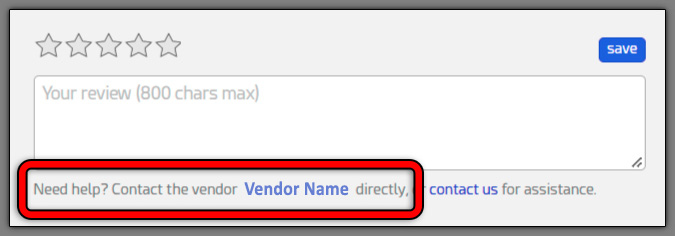
Please just keep in mind that the review functionality is not meant to be a bug report system. You should contact the vendor directly for assistance by clicking the "Contact the vendor for help" link right below the review section on your Downloads page.
REPLY
! REPORT
RenderHub Admin 1
Admin: 16,856
Mon, Oct 12For your particular case, I can tell you that Dreamlight is very active on RenderHub, is extremely friendly and helpful, and responds quickly to customer questions.

Hi there, sorry for your trouble. We've identified an issue with DS 6 and AIRE's output render window and are working to fix it. I've also sent you a PM... We'll get this sorted ASAP, either with a direct small patch, or a public patch release...
REPLY
! REPORT

Dreamlight
Karma: 24,312
Mon, Oct 12Hey, thanks, appreciate that, and it means a lot to me! Well, I started it, so I better fix it... ha ha
Hey Heckbarth, wanted to do a quick follow up and see if you got everything working?
REPLY
! REPORT