Free 3D
 3D Print Models
 3D Scans
 Animation & MoCap
 Textures
 Materials
 Skin Reference
 2D Game Assets
 Sound Effects
 Brushes & Tools
 Reference Photos
 Stock Images
 HDR Images
 3ds Max
 Maya
 Blender
 Unreal Engine
 Unity
 ZBrush
 Cinema 4D
 LightWave
 Marmoset
 SketchUp
 FBX
 DAE
 DXF
 GLB

! REPORT
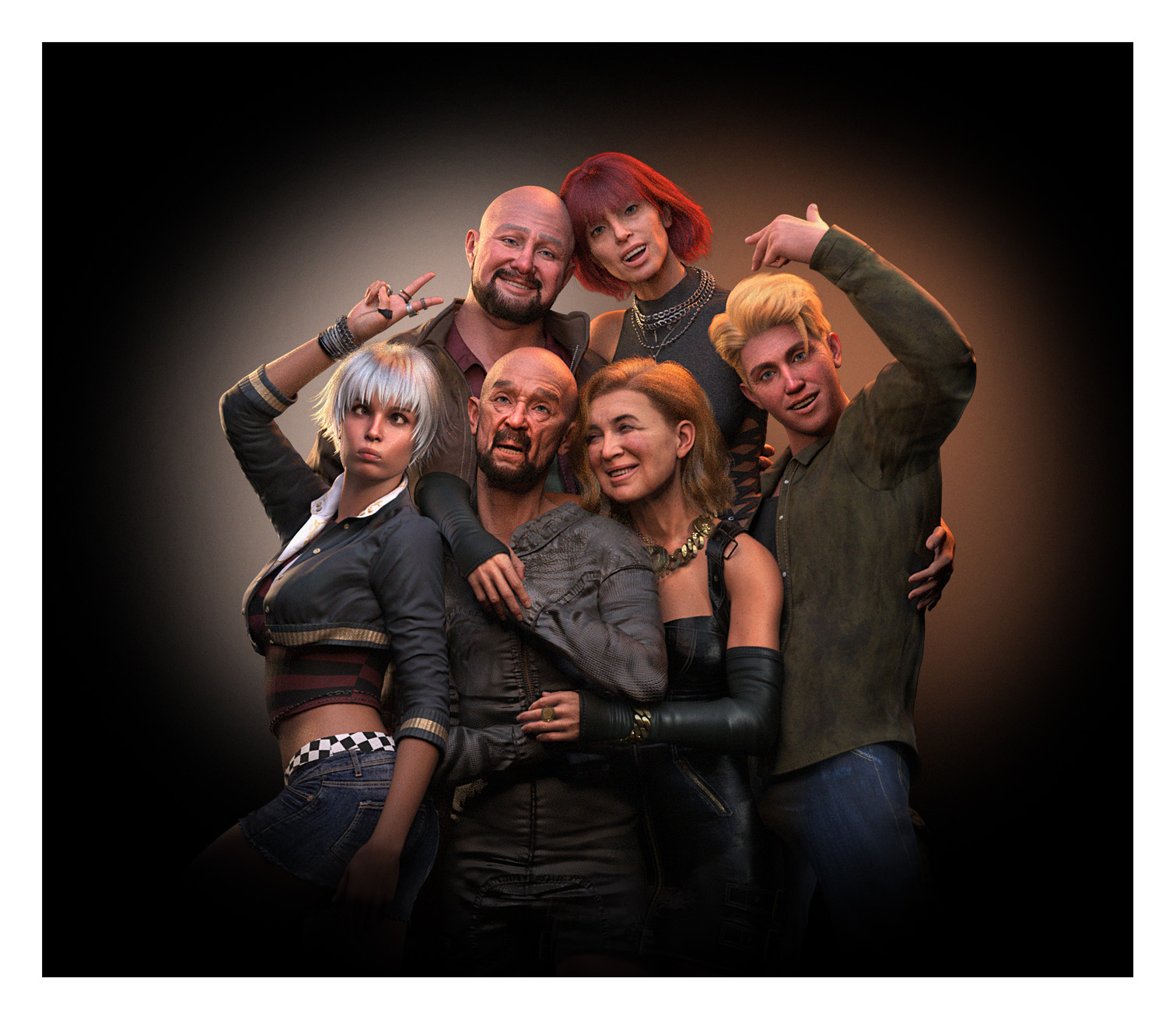
3 Generation Family Portrait
3D Render by IamRobotHaving family around is one of life's greatest blessings, and today's portrait captures a little of that special feeling.
Judith, mother to Lenore and grandmother to Aelia and Logan, decided it was time to arrange something memorable for her husband Walter. With Nicolai, Lenore and the grandchildren all involved, she organised a surprise family portrait, keeping everything a secret from Walter until the big day. Knowing her husband could be rather camera-shy, she was determined to make this a special occasion he would never forget.
Walter may not have been particularly enthusiastic about finding himself in front of a camera, but having his entire family gathered around him was something he could never turn down. There is a certain pride that comes with seeing the generations of your family together, and for Walter, that meant far more than any photograph ever could.
So, accepting his fate with a little good humour, Walter joined his loving wife Judith and the family she had so thoughtfully brought together. What began as a surprise portrait became something much more meaningful , a treasured moment celebrating family, love and the wonderful memories they continue to create together...even though Walter could have smiled more...lol
NO AI used in the creation of this artwork.
---------------------------------------------------------
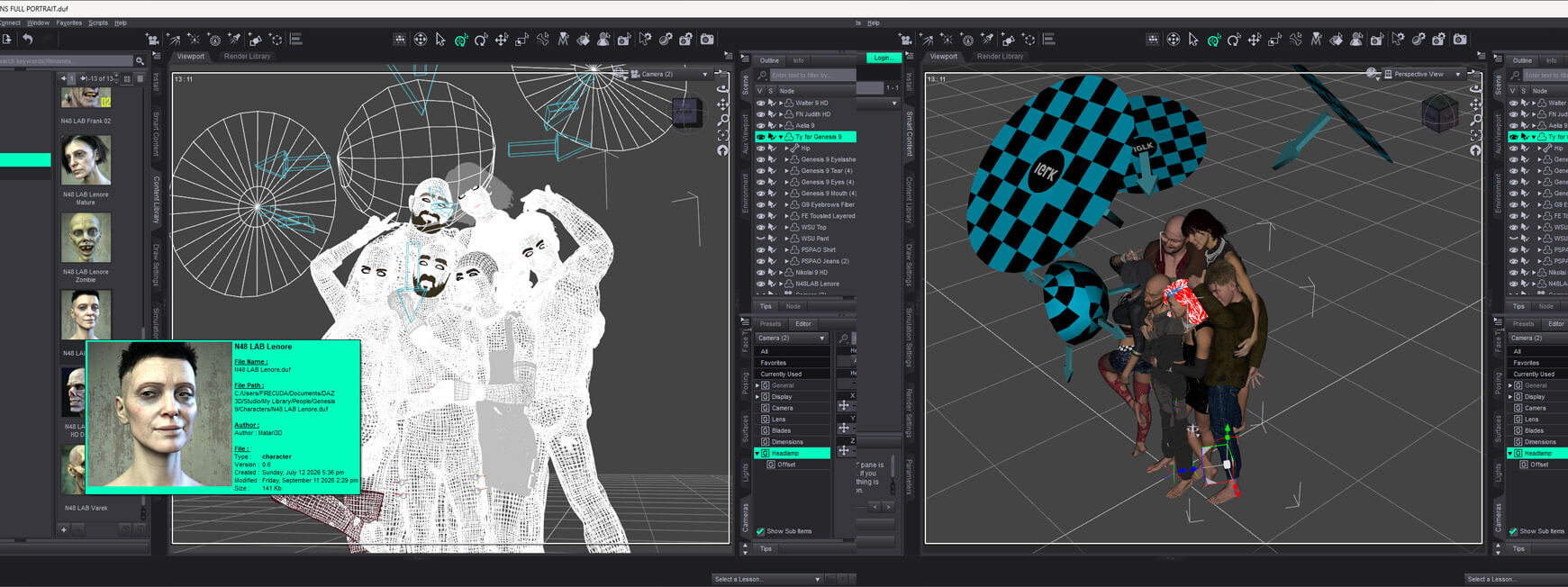
If anyone reads this...I'm having trouble rendering this full family portrait scene where it stops short of a full render, leaving grainy un-rendered areas, if anyone could let me know why, that would be awesome, thank you in advance.
In the mean time I will do extra research on line to see if I can find out what's happening.
Judith, mother to Lenore and grandmother to Aelia and Logan, decided it was time to arrange something memorable for her husband Walter. With Nicolai, Lenore and the grandchildren all involved, she organised a surprise family portrait, keeping everything a secret from Walter until the big day. Knowing her husband could be rather camera-shy, she was determined to make this a special occasion he would never forget.
Walter may not have been particularly enthusiastic about finding himself in front of a camera, but having his entire family gathered around him was something he could never turn down. There is a certain pride that comes with seeing the generations of your family together, and for Walter, that meant far more than any photograph ever could.
So, accepting his fate with a little good humour, Walter joined his loving wife Judith and the family she had so thoughtfully brought together. What began as a surprise portrait became something much more meaningful , a treasured moment celebrating family, love and the wonderful memories they continue to create together...even though Walter could have smiled more...lol
NO AI used in the creation of this artwork.
---------------------------------------------------------
If anyone reads this...I'm having trouble rendering this full family portrait scene where it stops short of a full render, leaving grainy un-rendered areas, if anyone could let me know why, that would be awesome, thank you in advance.
In the mean time I will do extra research on line to see if I can find out what's happening.

Great render!!!
To your render issuesI would take a look on the .log file, maybe you can find the problem there.
After many renders I usually close Daz and reopen it again to clean the render album and some .dsons that makes the rendering slower.
Just in case take a look to the progressive rendering, maybe the max time or the max samples are lower than the time or samples your render needs.
Hope it serves
To your render issuesI would take a look on the .log file, maybe you can find the problem there.
After many renders I usually close Daz and reopen it again to clean the render album and some .dsons that makes the rendering slower.
Just in case take a look to the progressive rendering, maybe the max time or the max samples are lower than the time or samples your render needs.
Hope it serves
REPLY
! REPORT
IamRobot
Karma: 2,637
Fri, Nov 06Thanks Bard, will look into this, I do close often then reopen, thanks for the help 

What, a Wonderful Job mo chara!! Top Marks!
With, your problem... I never start a render from the same page that I've just finished. Close it down and open it fresh and start the render. In a scene with lots of figures, I always manually set the render time... I'm certain you know how to do that. You can stop it when you're happy with it.
Sláinte a chara!
With, your problem... I never start a render from the same page that I've just finished. Close it down and open it fresh and start the render. In a scene with lots of figures, I always manually set the render time... I'm certain you know how to do that. You can stop it when you're happy with it.
Sláinte a chara!
REPLY
! REPORT
IamRobot
Karma: 2,637
Fri, Nov 06Gein my man!, will try to set the render time on my next create artwork and monitor the results, thank for your comment

IamRobot
Karma: 2,637
Sat, Nov 07Thanks for viewing and commenting, 'Expression' packs are awesome, especially with a 'reset' function

Great render! Love the poses.
I suspect that there is an issue with the size of the file: 6 characters might be a too heavy workload.
You could try hiding all bodyparts that are covered by garments, so they don't add to yourc polygon count (also teeth, shoes, not visible clothes). Another idea is rendering 2 or even 3 groups of people separately and then assemble them with layers in Gimp or Photoshop. In this case it might be a good idea to include one same figure to make positioning easy and retaining the shadows. Also set up a separate camera so you always have the same angle on all family members and ensure you only make changes in another camera/the viewport cam. This takes some time and effort, but with all different characters this is what I would do.
I suspect that there is an issue with the size of the file: 6 characters might be a too heavy workload.
You could try hiding all bodyparts that are covered by garments, so they don't add to yourc polygon count (also teeth, shoes, not visible clothes). Another idea is rendering 2 or even 3 groups of people separately and then assemble them with layers in Gimp or Photoshop. In this case it might be a good idea to include one same figure to make positioning easy and retaining the shadows. Also set up a separate camera so you always have the same angle on all family members and ensure you only make changes in another camera/the viewport cam. This takes some time and effort, but with all different characters this is what I would do.
REPLY
! REPORT
IamRobot
Karma: 2,637
Sat, Nov 07Thank you for your response, I have taken to creating the scene then just deleting the characters, leaving only 2 to render, then Photoshop compositing then together, a lot of extra work, applying shadows and removing highlights in the wrong places, and yes, having a Camera set for exact framing is a must...the price to pay for a low powered PC...lol...thank you for taking the time to view and comment


This is great work! Regarding your rendering issue, I always recommend starting with a fresh scene. Sometimes things can get a little wonky, and renders don't complete properly or render in full. Starting a new scene often helps!
REPLY
! REPORT
IamRobot
Karma: 2,637
3 Hours agoThank you for taking the time to view, appreciate your input regarding the rendering, making notes
3 Generation Family Portrait
 x1 [+]

Fri, Nov 06 82

 15
8220
15
Add to Collection

20 Likes
Share This Render


Software Used
 Adobe Photoshop
 Daz Studio
 Nvidia Iray Render
Marketplace Items Used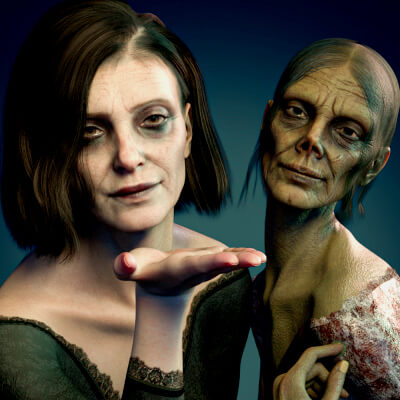
Artist Stats
Member Since:
Karma:
Followers:
Likes Received:
Karma:
Followers:
Likes Received:
Oct, 2026
2,637
13
270
2,637
13
270
Gallery Images:
Wallpaper Images:
Forum Topics:
Marketplace Items:
Wallpaper Images:
Forum Topics:
Marketplace Items:
15
0
0
0
0
0
0

65

10

1