


 Free 3D
 3D Print Models
 3D Scans
 Animation & MoCap
 Textures
 Materials
 Skin Reference
 2D Game Assets
 Sound Effects
 Brushes & Tools
 Reference Photos
 Stock Images
 HDR Images
 3ds Max
 Maya
Maya Blender
 Unreal Engine
 Unity
Unity ZBrush
 Cinema 4D
 LightWave
 Marmoset
 SketchUp
 FBX
FBX DAE
DAE DXF
DXF GLB
GLBRender Accelerator Studio V1.5.1 (DAZ 6 and 4.24)

4.8 Stars |13 Ratings


User Artwork (1)
! REPORT
NOTE: DIGITAL DOWNLOAD, NOT A PHYSICAL ITEM

Add to Collection

40 Likes
Available Add Ons

Share This Daz Content


Offered By


License
Extended Use License
This item comes with our Extended Use Licensing. This means that you may use the model for both non-commercial and commercial purposes, in a variety of mediums and applications.
For full license terms, see our 3D Content Licensing Agreement
Item Details
| Vendor: | laurendev |
| Published: | Sep 14, 2026 |
| Download Size: | 151.1 MB |
| Software: | Daz Studio |
| dForce: | – |
Included Formats

Statistics
| Favorites: | 15 |
| Likes: | 40 |
| Views: | 9,061 |
Item Ratings
13 Ratings
5 Stars|Oct 25, 2026
3000x3000 render time is now 10x faster.
5 Stars|Oct 24, 2026
This app is legit amazing, the speed boost is A and on my 5x card the DLSS5 enhancement is gorgeous. Highly recommended!
5 Stars|Oct 22, 2026
The best $45 I've ever spent. It's incredible how a single application can do so many things at once. Everything it promises works flawlessly for me. My render times have been reduced by up to 5x, with absolutely no loss in quality. When I use this software to render, Daz renders up to 5 times faster, uses significantly less RAM and VRAM, and there's absolutely no compromise in quality. Unbelievable! This application alone has the potential to completely revolutionize the Daz ecosystem. The DLSS 5, Lightmix, and RAM Reducer plugins all work amazingly well. Laurendev hasn't just created an application… he's built an entire ecosystem. On top of that, he responded to my messages almost immediately and was incredibly helpful. Thank you so much!

2 Stars|Oct 22, 2026
It doesn't give you what it says it does, if you have a low vram. It will just keep crashing. I might have to wait longer, but at least a normal render won't crash out in the middle of a rendering.
5 Stars|Oct 18, 2026
I took a chance on it and I'm soooo glad I did. It has cut my render time to 1/4 of its previous time. It's brilliant and making the render gorgeous and well-lit with the extensions you can add. Worth every single penny. Without a doubt, a lifesaver of a program.
5 Stars|Oct 04, 2026
Saves for me a whole lot off time,and my Renders are fabulous,great instrument worth every dollar
Page 1 of 3
Render Accelerator Studio V1.5.1 (DAZ 6 and 4.24)
---------------------------------------------------
NEW IN V1.5.0 - DAZ STUDIO 6 SUPPORT
---------------------------------------------------
LIMITED TIME: 20% OFF to celebrate DAZ Studio 6 support.
This is the biggest update yet, with 123 changes since the previous version. The update is completely free for all existing customers. Some of the key changes and new features are listed below.
DAZ STUDIO 6 SUPPORT (BETA)
- Render Accelerator Studio now works with DAZ Studio 6, as well as DAZ Studio 4.24
- Faster renders, Smart NTC texture compression and the Render Queue all work in DAZ Studio 6
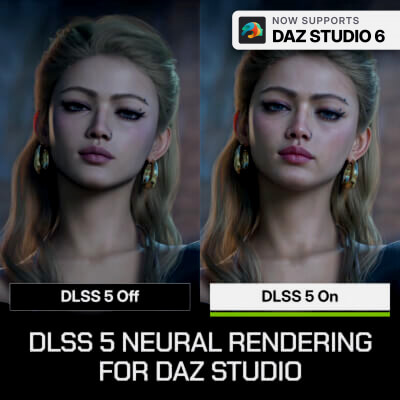
- The DLSS 5 and LightMix extensions work in DAZ Studio 6 too
- In DAZ Studio 6, the render window shows how much time is left until your render finishes
- New RAM Saver option for DAZ Studio 6: renders the denoising guides in a short pass first, so renders need several GB less RAM
- DAZ Studio 6 support is in beta. If you run into a problem, please let us know.
NEW FEATURES
- Change the render resolution and iterations directly in the Current Scene panel. The new values are also set in Daz Studio.
- New file name tokens: {frame}, {samples} and {renderTime}
- Support for the new RAM Reducer extension (sold separately)
RENDER QUEUE
- Several cameras of the same scene are rendered with a single scene load
- A scene that is already open in Daz Studio is not loaded again
- RAM Reducer and DLSS 5 presets can be set for the whole queue, and DLSS 5 results can be edited after the render
- Windows no longer goes to sleep while the queue is rendering
- The render window no longer jumps in front of other programs with every update
IMPROVEMENTS AND FIXES
- NVIDIA NTC is much faster when you render the same scene again in DAZ Studio 4.24
- Improved rendering performance for graphics cards with limited VRAM, especially in heavy scenes
- Fixed problems with transparent backgrounds and backdrops
- Fixed automatic updates for future versions
- Graphics cards are detected more reliably
- A wrong Windows clock is now explained clearly instead of showing a license error
---------------------------------------------------
RENDER ACCELERATOR STUDIO
---------------------------------------------------
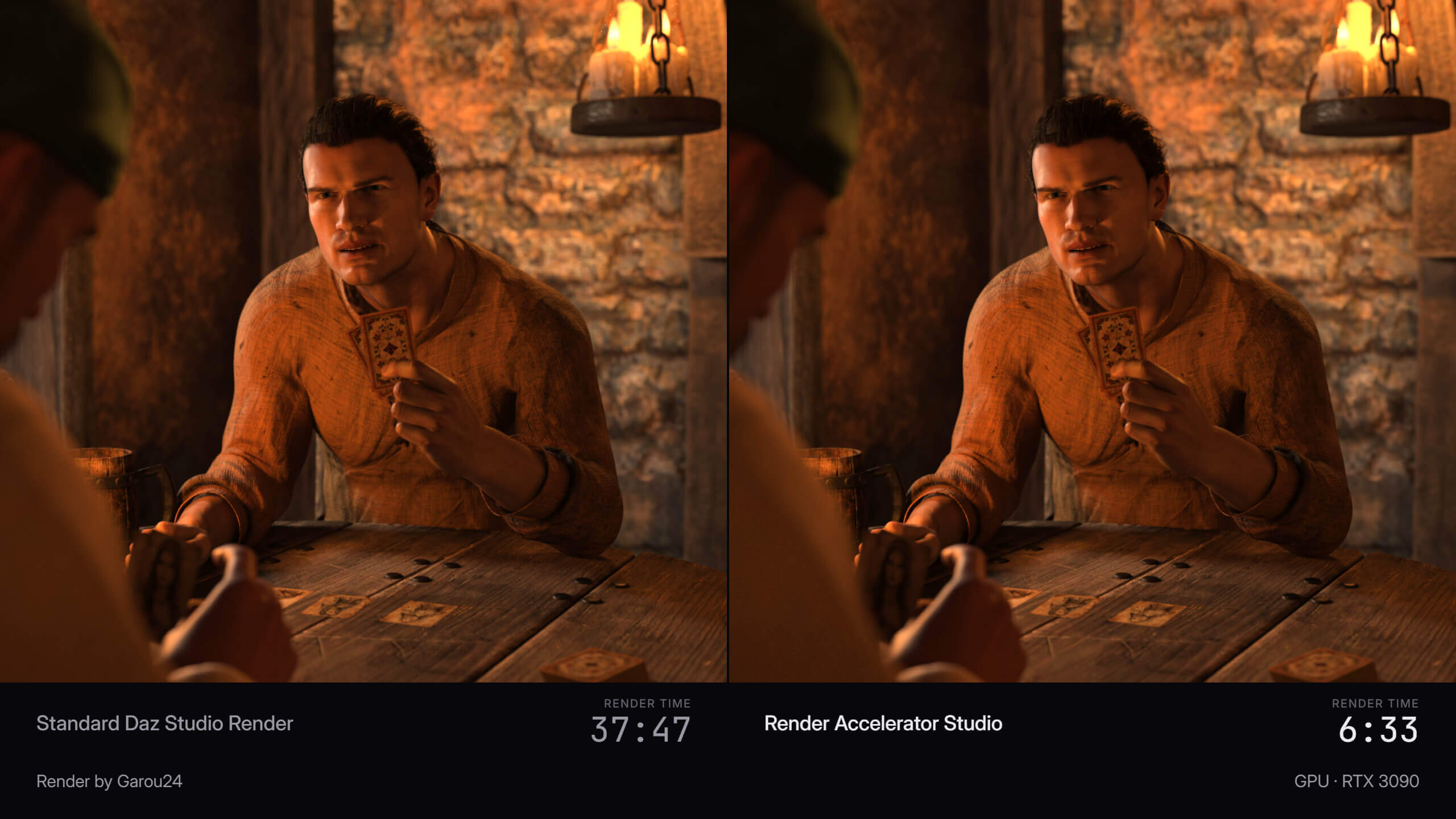
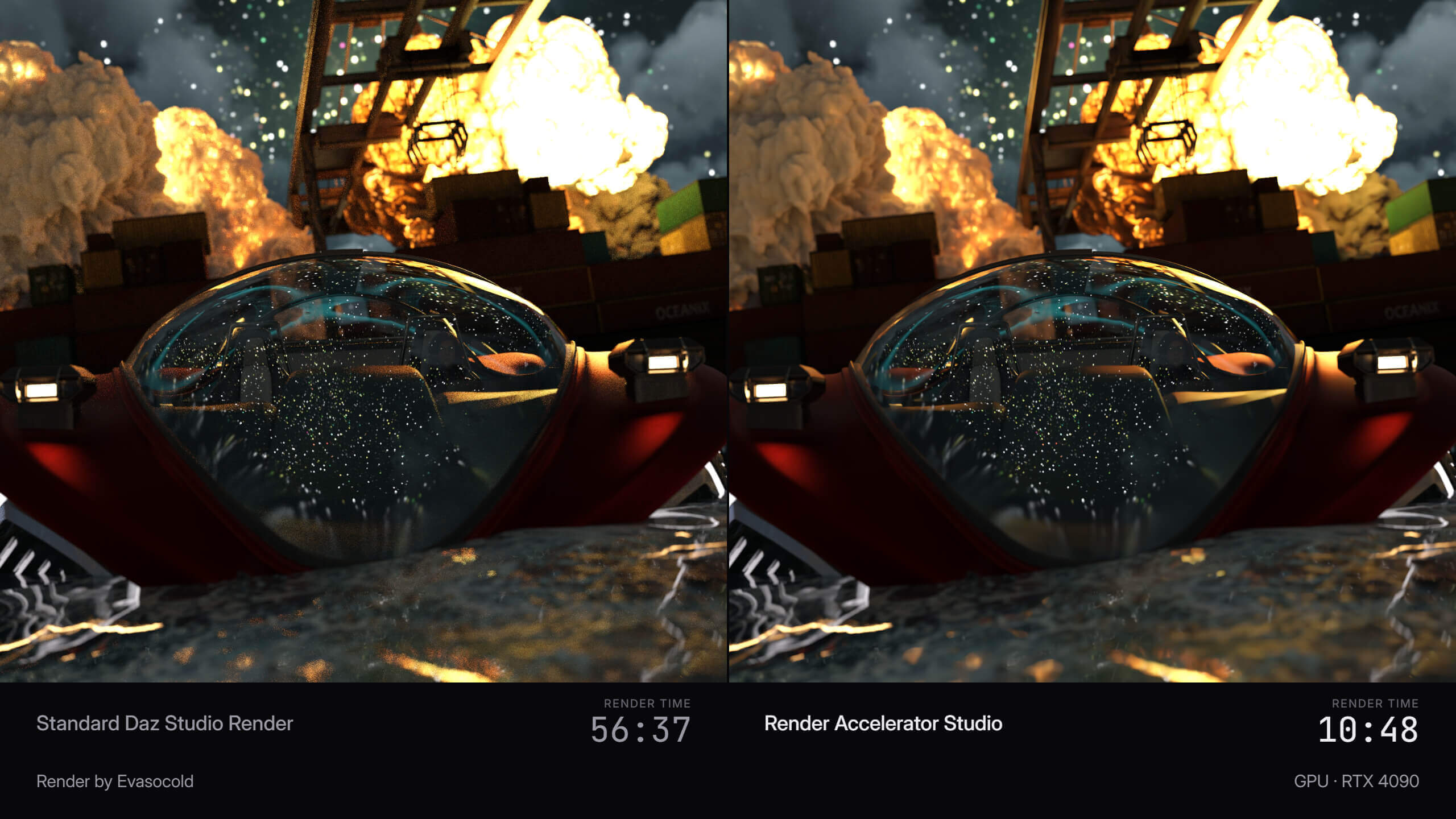
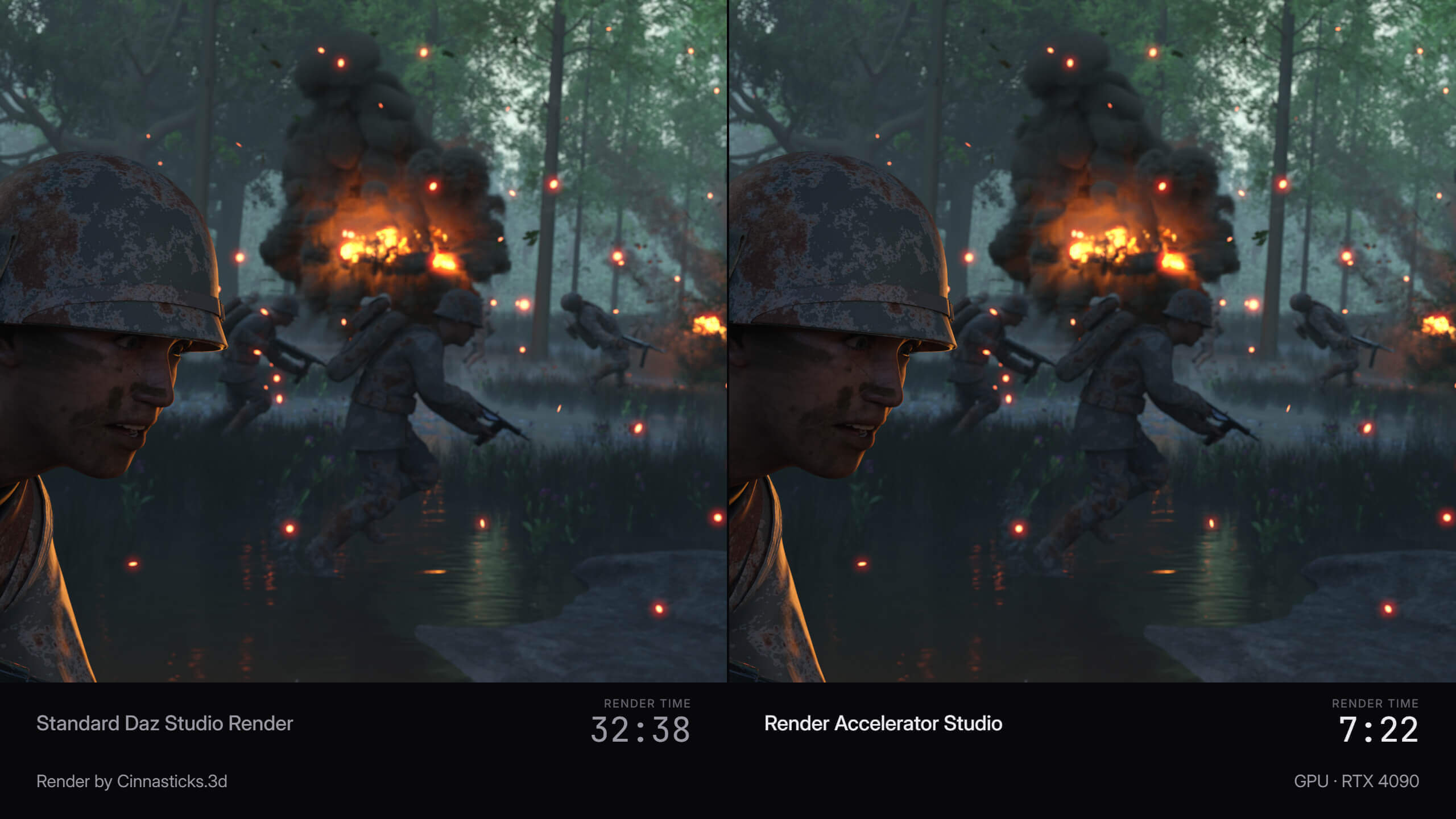
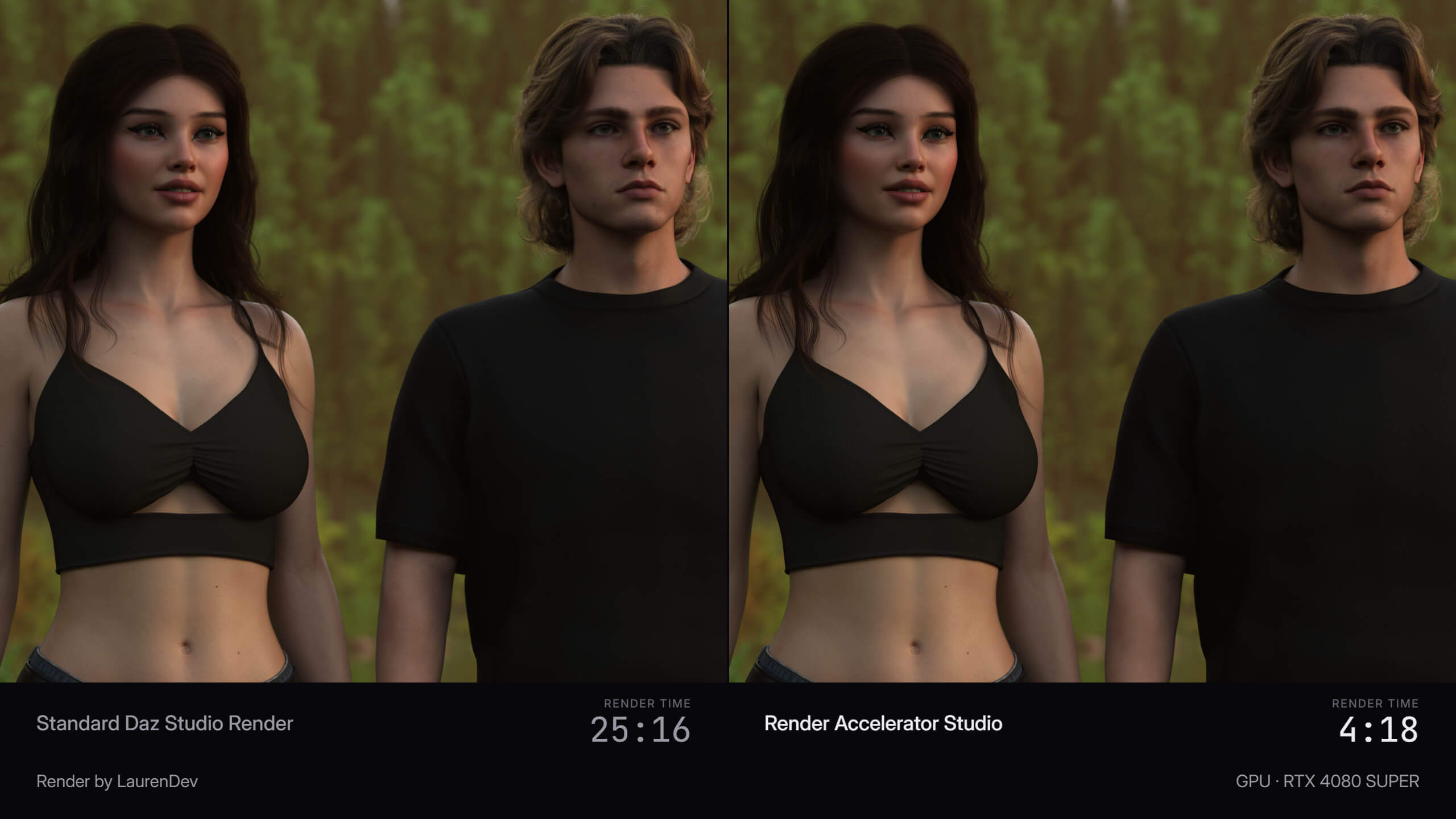
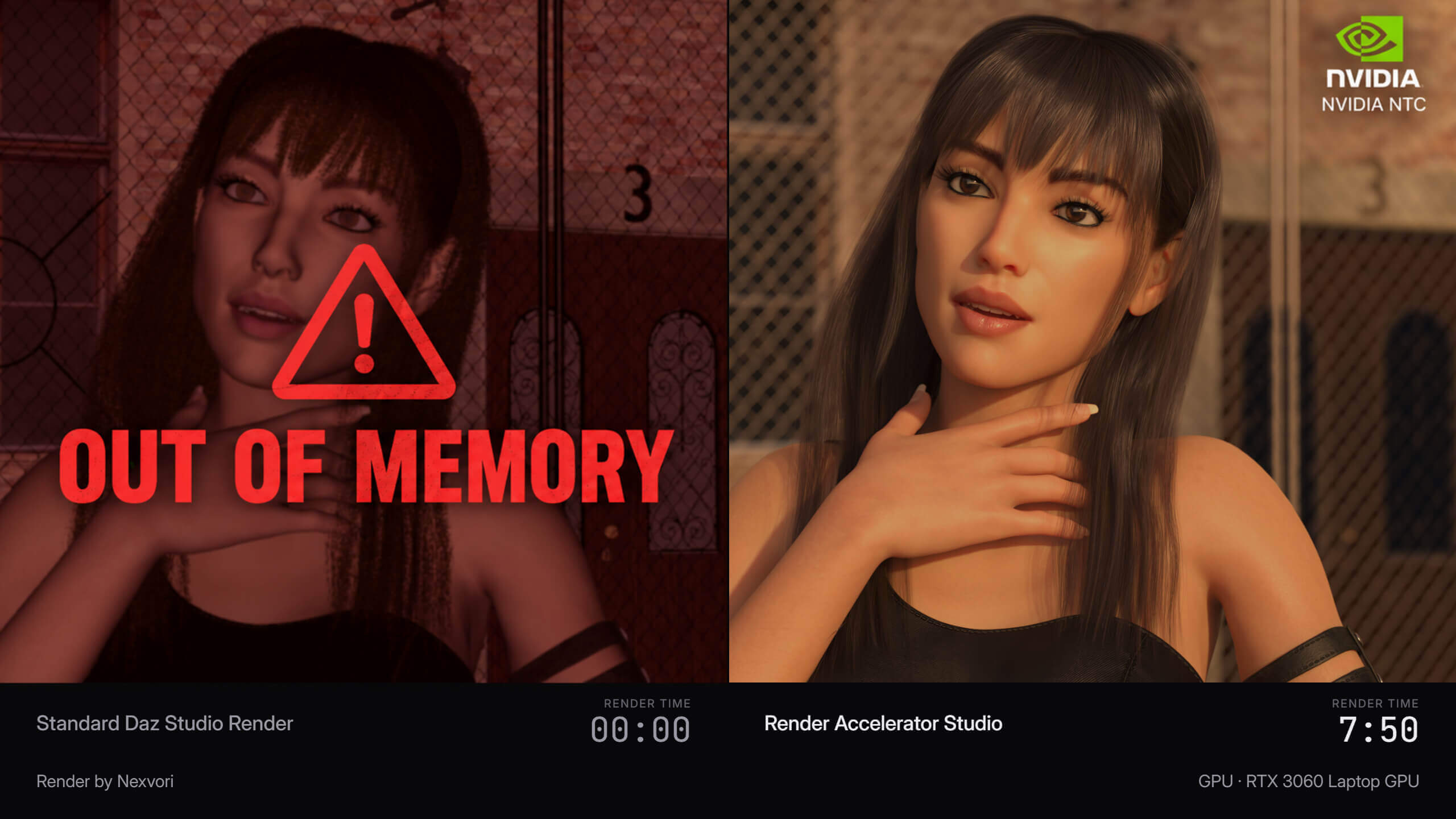
Render Accelerator Studio is designed to accelerate your DAZ Studio Iray renders by approximately 2-4x, while preserving the original appearance and visual quality of your scene.
RA does not work like a traditional AI image enhancer and does not invent details that were never present in your render. Instead, it works directly with your DAZ Studio rendering workflow to reduce render times, manage GPU resources, and produce the final result significantly faster.
-------------------------------------------------------------
FOUR TECHNOLOGIES IN ONE APPLICATION
-------------------------------------------------------------
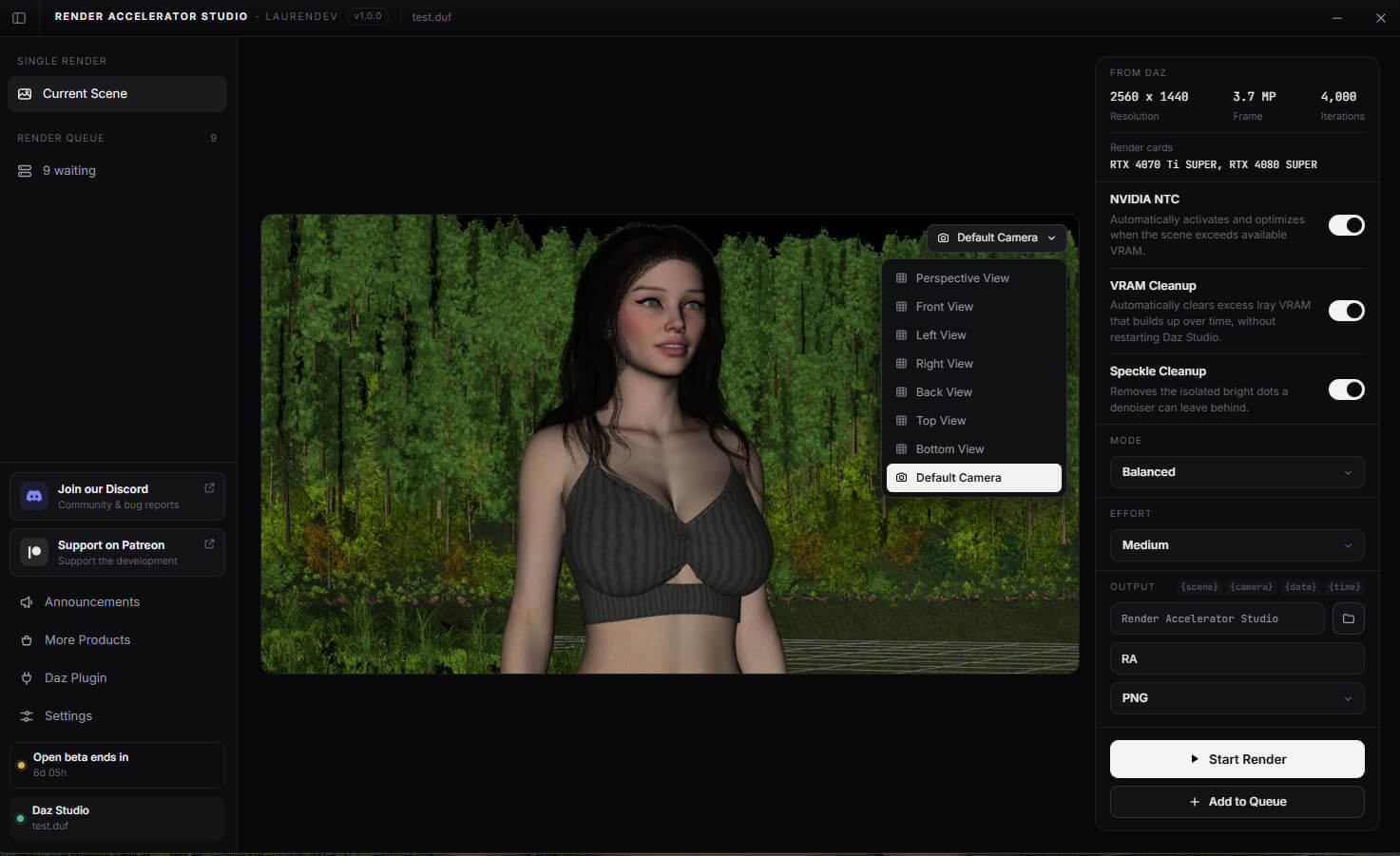
RENDER ACCELERATION:
- RA uses a specially trained model together with a custom-calibrated denoising system to significantly reduce Iray render times.
- Balanced / Medium is calibrated to reach approximately the same visual quality as a traditional DAZ Studio render in the shortest possible time.
- Higher Effort levels allow RA to spend more time processing the render, producing higher-quality results with more visible detail than a traditional DAZ Studio render, while still completing significantly faster.
NVIDIA NTC:
- NVIDIA's Neural Texture Compression technology is integrated into the RA workflow to help reduce VRAM usage in heavy scenes.
- If a scene exceeds your available VRAM, NTC can automatically optimize compatible textures while preserving their visual appearance.
- This can allow scenes that would otherwise exceed your GPU memory to render without manually reducing texture quality.
VRAM CLEANUP:
- DAZ Studio can retain unnecessary VRAM after working with multiple scenes or renders.
- RA can automatically clean up this unused VRAM before rendering, reducing the need to restart DAZ Studio simply to recover GPU memory.
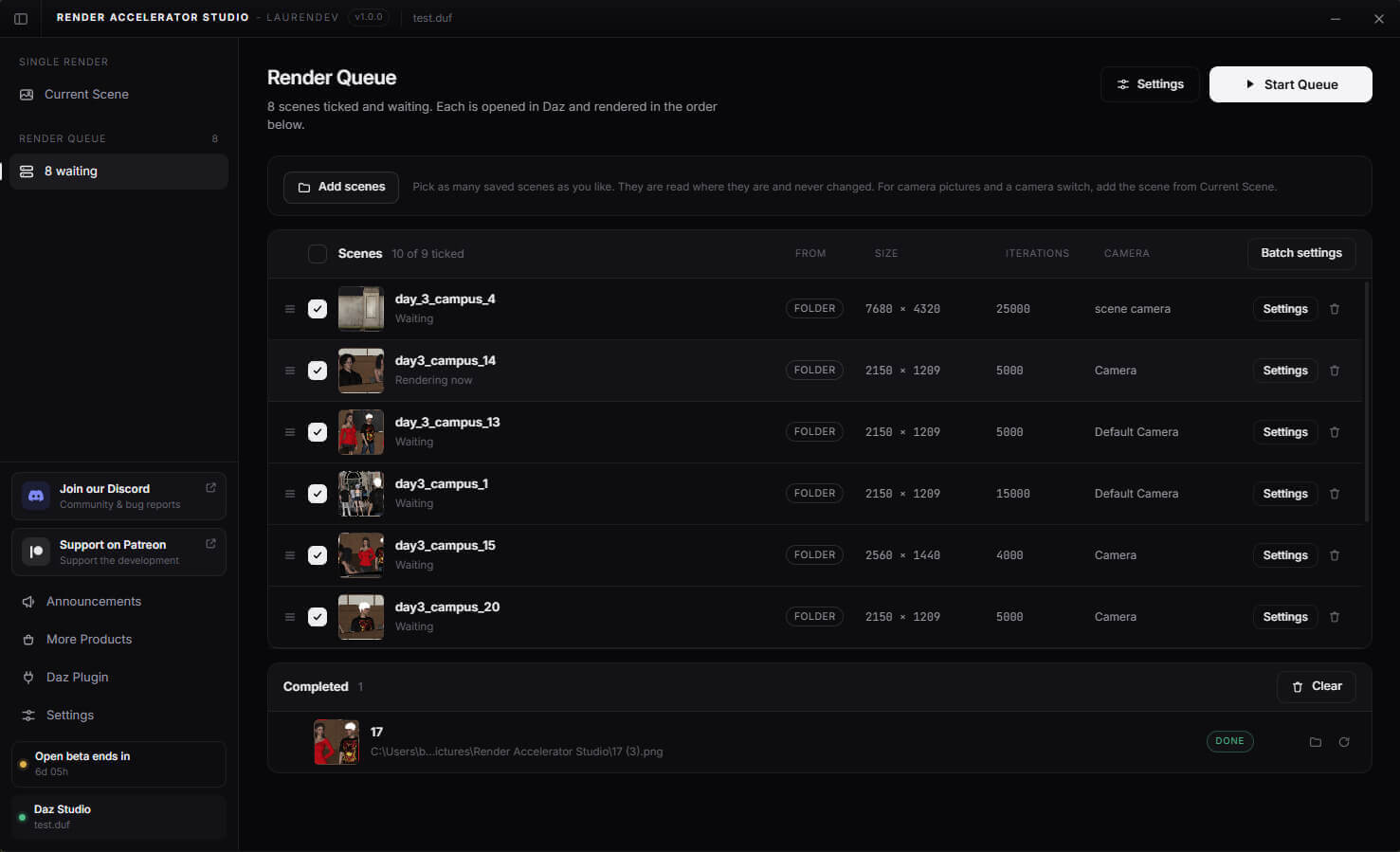
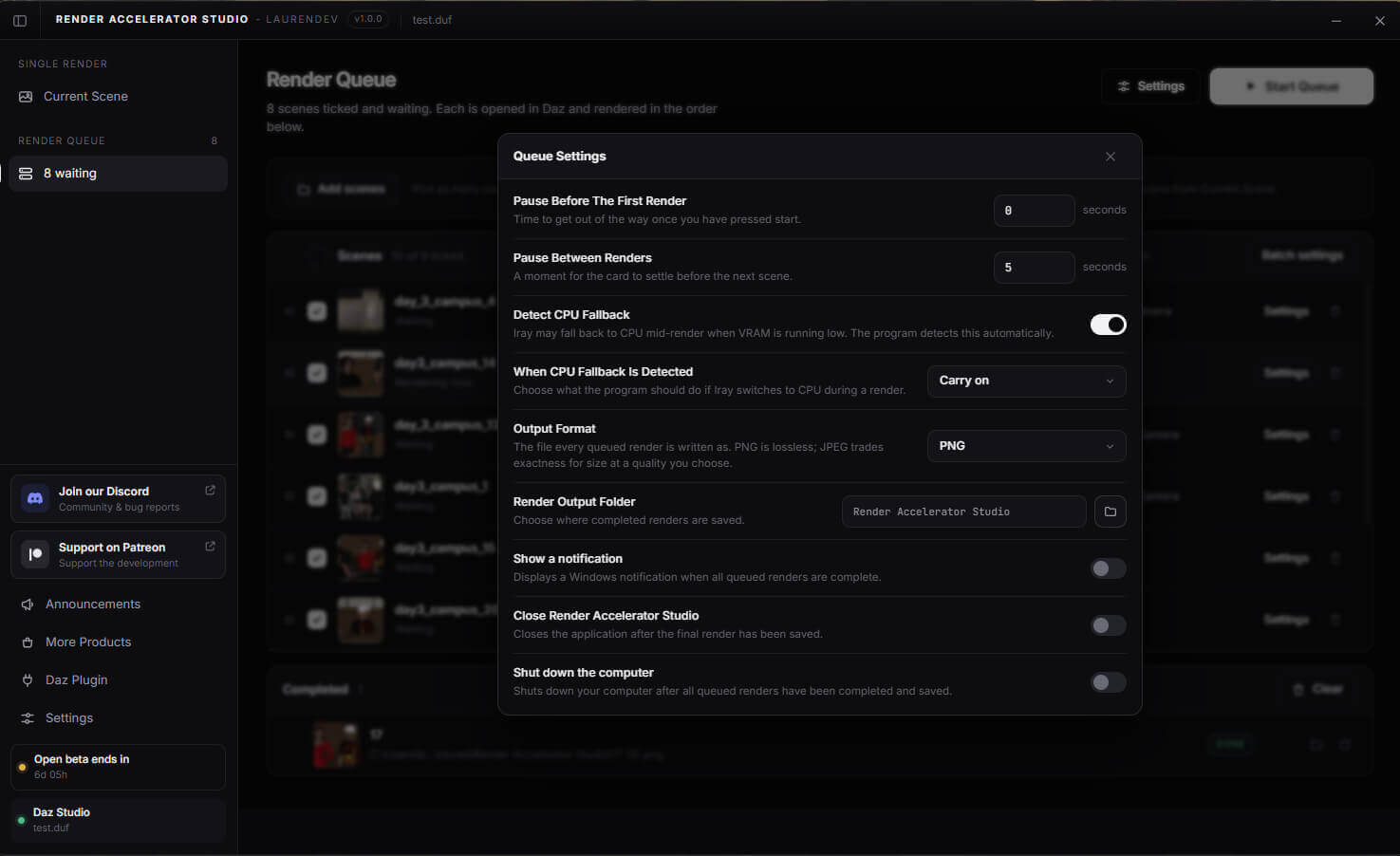
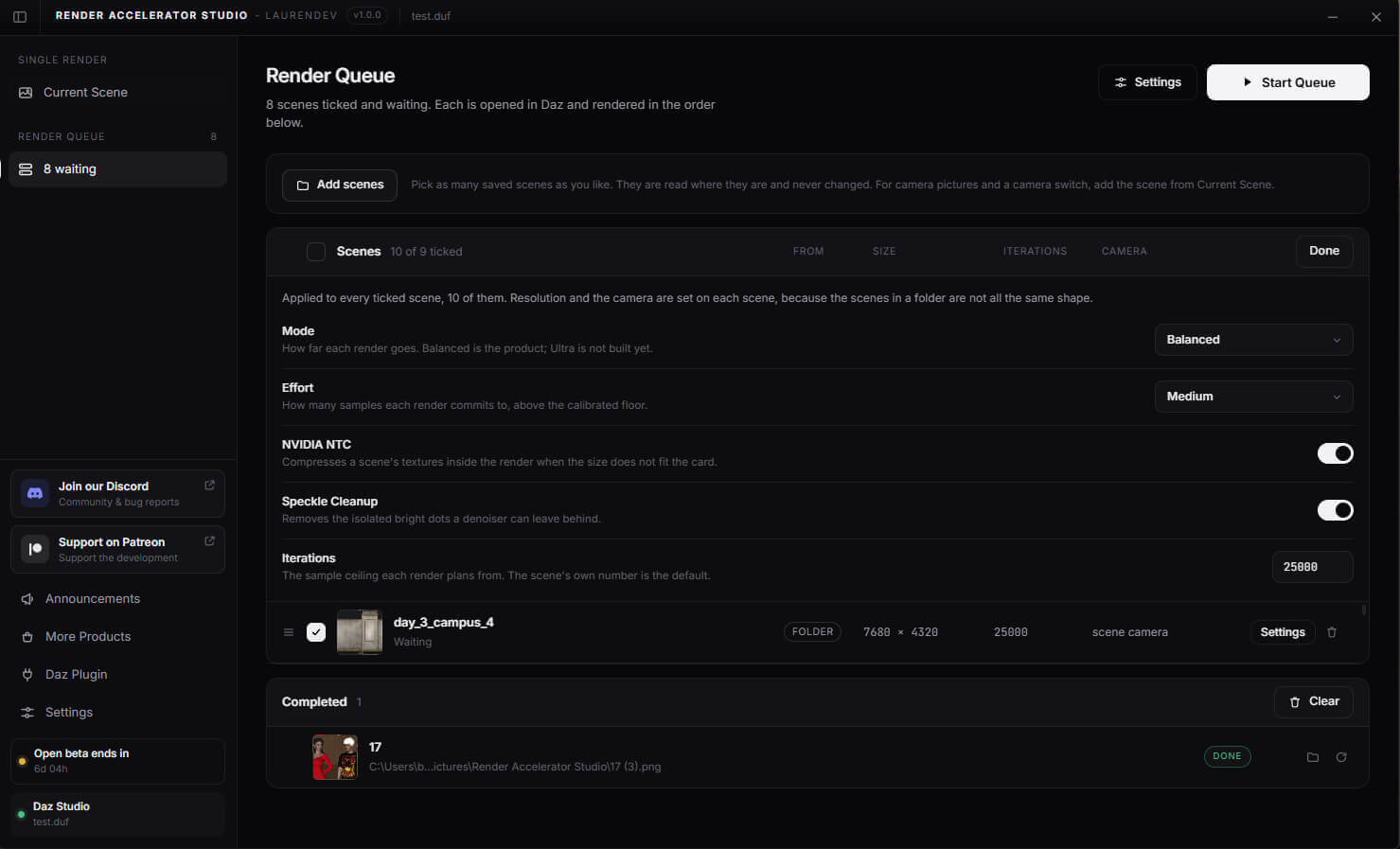
ADVANCED RENDER QUEUE:
RA includes a built-in Render Queue system for batch rendering multiple scenes.
You can:
- Queue multiple scenes
- Select different cameras
- Adjust render settings
- Change scene-specific settings without manually reopening every scene in DAZ Studio
- Use RA's acceleration and VRAM features across queued renders
-----------------------
RENDER MODES
-----------------------
Balanced: Designed to provide the best combination of render speed and visual quality.
Ultra: Coming soon.
-----------------------
EFFORT LEVELS
-----------------------
Medium: Optimized to reach traditional DAZ Studio render quality as quickly as possible.
High: Allows additional processing time for improved detail and image quality.
Max: Uses RA's highest processing level for the best available result. Render times are longer than Medium, but still significantly shorter than a traditional DAZ Studio render in most cases.
---------------------------------------------------
EASY DAZ STUDIO INTEGRATION
---------------------------------------------------
When Render Accelerator Studio is launched for the first time, it automatically detects your DAZ Studio installation and guides you through installing the required plugin.
Once connected, RA can automatically detect your currently opened DAZ Studio scene and available cameras.
Your scene remains a DAZ Studio / Iray render - RA simply manages and accelerates the rendering process.
------------------
EXTENSIONS
------------------
Render Accelerator Studio supports optional extensions that add additional rendering features.
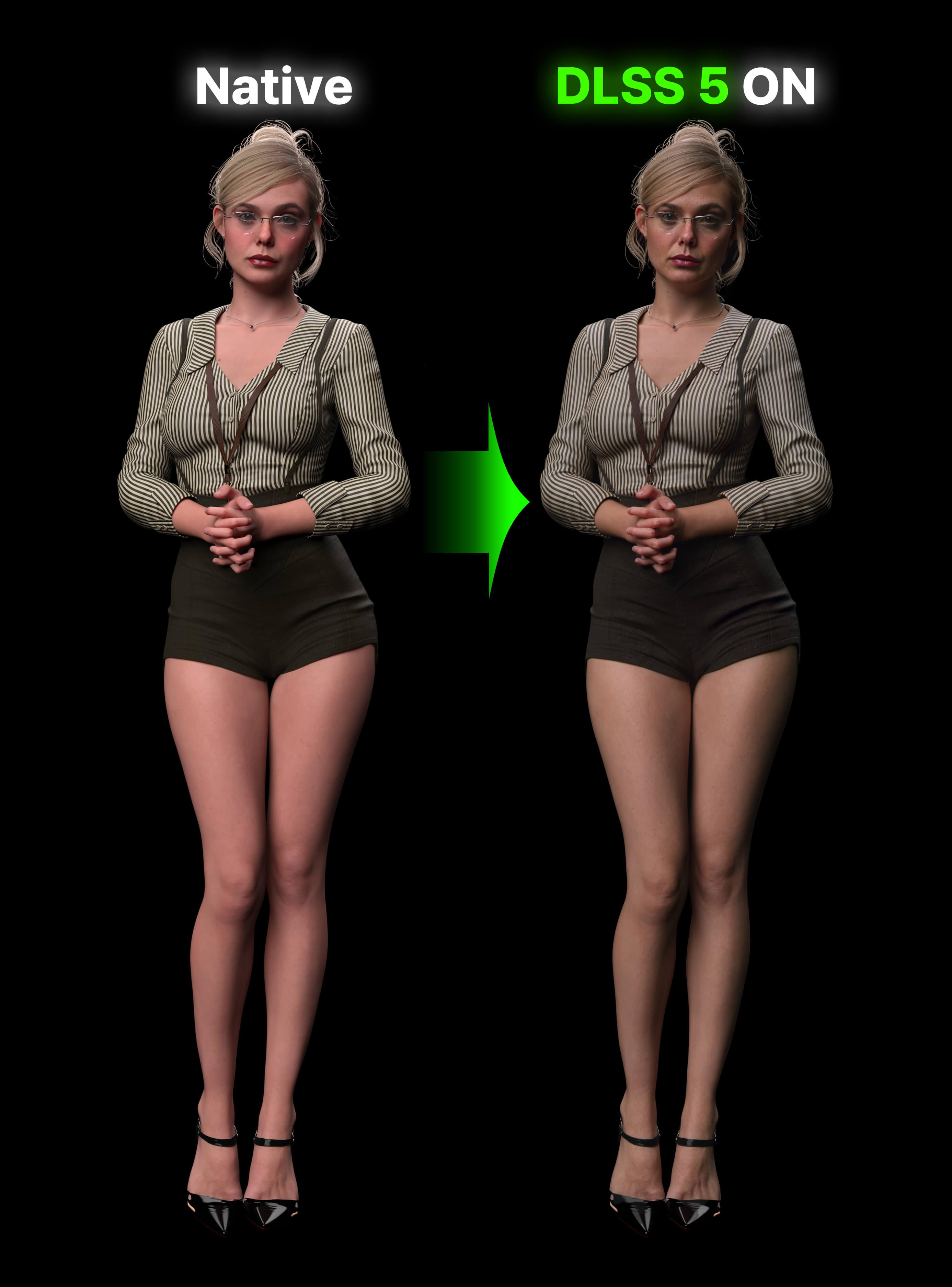
Extensions such as DLSS 5 Neural Rendering can be purchased separately and installed directly through the Extensions section inside RA Studio.
RA Studio is required to use RA Studio extensions.
-------------------------------------------
ABOUT ANTIVIRUS DETECTION
-------------------------------------------
Some antivirus programs may flag one of RA Studio's files as potentially harmful.
RA needs to communicate with DAZ Studio in the background and, when necessary, interact with its running process to control the render. Antivirus software can occasionally classify this type of behavior as suspicious because similar techniques may also be used by malicious applications.
This has been reported as a false positive to multiple antivirus vendors, including Microsoft Defender.
--------------------------------------
SUPPORT & BUG REPORTS
--------------------------------------
If you encounter a problem, open Settings -> Report a Problem inside Render Accelerator Studio. The application will generate a diagnostic ZIP containing the information needed to investigate the issue. You can send it through the RA Studio Discord community for support.
-------------------------------------------------
INTERNET CONNECTION REQUIRED
-------------------------------------------------
Render Accelerator Studio requires an active internet connection to operate.
An internet connection is required for license verification, application startup, and rendering. RA Studio cannot be used offline.
---------------------------
LICENSE DELIVERY
---------------------------
After purchasing Render Accelerator Studio, open the app and click “Open activation page“. Select RenderHub, enter your RenderHub username and order number, and submit your request. Your personal license key will appear on that page after your purchase is reviewed. Please check back shortly, then copy the key and enter it in the app to activate. Keep your key safe for future use.
---------------------------------------------------------
V1.4 CHANGELOG - SEPTEMBER 22, 2026
---------------------------------------------------------
Render Accelerator Studio V1.4 is the biggest update so far, bringing major improvements to rendering, VRAM management, customization, and overall stability.
- Denoiser customization has been added. You can now adjust the denoiser strength or disable it completely.
- Major improvements have been made for scenes affected by VRAM limitations. NVIDIA NTC compression has been reworked and can now significantly reduce VRAM usage in scenes where previous versions provided little or no benefit.
- Some scenes that would normally fail to render directly in DAZ Studio because of insufficient VRAM may now be able to render successfully through RA Studio.
- Added support for camera Local Dimensions. When "Use Local Dimensions" is enabled on the selected camera, RA Studio now uses the render resolution defined by that camera.
- More than 20 bugs have been fixed, including Render Queue, VRAM management, and general stability issues.
- LightMix support has been added. The LightMix extension launches alongside V1.4 and allows you to adjust scene lighting after the render is complete.
NEW IN V1.5.0 - DAZ STUDIO 6 SUPPORT
---------------------------------------------------
LIMITED TIME: 20% OFF to celebrate DAZ Studio 6 support.
This is the biggest update yet, with 123 changes since the previous version. The update is completely free for all existing customers. Some of the key changes and new features are listed below.
DAZ STUDIO 6 SUPPORT (BETA)
- Render Accelerator Studio now works with DAZ Studio 6, as well as DAZ Studio 4.24
- Faster renders, Smart NTC texture compression and the Render Queue all work in DAZ Studio 6
- The DLSS 5 and LightMix extensions work in DAZ Studio 6 too
- In DAZ Studio 6, the render window shows how much time is left until your render finishes
- New RAM Saver option for DAZ Studio 6: renders the denoising guides in a short pass first, so renders need several GB less RAM
- DAZ Studio 6 support is in beta. If you run into a problem, please let us know.
NEW FEATURES
- Change the render resolution and iterations directly in the Current Scene panel. The new values are also set in Daz Studio.
- New file name tokens: {frame}, {samples} and {renderTime}
- Support for the new RAM Reducer extension (sold separately)
RENDER QUEUE
- Several cameras of the same scene are rendered with a single scene load
- A scene that is already open in Daz Studio is not loaded again
- RAM Reducer and DLSS 5 presets can be set for the whole queue, and DLSS 5 results can be edited after the render
- Windows no longer goes to sleep while the queue is rendering
- The render window no longer jumps in front of other programs with every update
IMPROVEMENTS AND FIXES
- NVIDIA NTC is much faster when you render the same scene again in DAZ Studio 4.24
- Improved rendering performance for graphics cards with limited VRAM, especially in heavy scenes
- Fixed problems with transparent backgrounds and backdrops
- Fixed automatic updates for future versions
- Graphics cards are detected more reliably
- A wrong Windows clock is now explained clearly instead of showing a license error
---------------------------------------------------
RENDER ACCELERATOR STUDIO
---------------------------------------------------
Render Accelerator Studio is designed to accelerate your DAZ Studio Iray renders by approximately 2-4x, while preserving the original appearance and visual quality of your scene.
RA does not work like a traditional AI image enhancer and does not invent details that were never present in your render. Instead, it works directly with your DAZ Studio rendering workflow to reduce render times, manage GPU resources, and produce the final result significantly faster.
-------------------------------------------------------------
FOUR TECHNOLOGIES IN ONE APPLICATION
-------------------------------------------------------------
RENDER ACCELERATION:
- RA uses a specially trained model together with a custom-calibrated denoising system to significantly reduce Iray render times.
- Balanced / Medium is calibrated to reach approximately the same visual quality as a traditional DAZ Studio render in the shortest possible time.
- Higher Effort levels allow RA to spend more time processing the render, producing higher-quality results with more visible detail than a traditional DAZ Studio render, while still completing significantly faster.
NVIDIA NTC:
- NVIDIA's Neural Texture Compression technology is integrated into the RA workflow to help reduce VRAM usage in heavy scenes.
- If a scene exceeds your available VRAM, NTC can automatically optimize compatible textures while preserving their visual appearance.
- This can allow scenes that would otherwise exceed your GPU memory to render without manually reducing texture quality.
VRAM CLEANUP:
- DAZ Studio can retain unnecessary VRAM after working with multiple scenes or renders.
- RA can automatically clean up this unused VRAM before rendering, reducing the need to restart DAZ Studio simply to recover GPU memory.
ADVANCED RENDER QUEUE:
RA includes a built-in Render Queue system for batch rendering multiple scenes.
You can:
- Queue multiple scenes
- Select different cameras
- Adjust render settings
- Change scene-specific settings without manually reopening every scene in DAZ Studio
- Use RA's acceleration and VRAM features across queued renders
-----------------------
RENDER MODES
-----------------------
Balanced: Designed to provide the best combination of render speed and visual quality.
Ultra: Coming soon.
-----------------------
EFFORT LEVELS
-----------------------
Medium: Optimized to reach traditional DAZ Studio render quality as quickly as possible.
High: Allows additional processing time for improved detail and image quality.
Max: Uses RA's highest processing level for the best available result. Render times are longer than Medium, but still significantly shorter than a traditional DAZ Studio render in most cases.
---------------------------------------------------
EASY DAZ STUDIO INTEGRATION
---------------------------------------------------
When Render Accelerator Studio is launched for the first time, it automatically detects your DAZ Studio installation and guides you through installing the required plugin.
Once connected, RA can automatically detect your currently opened DAZ Studio scene and available cameras.
Your scene remains a DAZ Studio / Iray render - RA simply manages and accelerates the rendering process.
------------------
EXTENSIONS
------------------
Render Accelerator Studio supports optional extensions that add additional rendering features.
Extensions such as DLSS 5 Neural Rendering can be purchased separately and installed directly through the Extensions section inside RA Studio.
RA Studio is required to use RA Studio extensions.
-------------------------------------------
ABOUT ANTIVIRUS DETECTION
-------------------------------------------
Some antivirus programs may flag one of RA Studio's files as potentially harmful.
RA needs to communicate with DAZ Studio in the background and, when necessary, interact with its running process to control the render. Antivirus software can occasionally classify this type of behavior as suspicious because similar techniques may also be used by malicious applications.
This has been reported as a false positive to multiple antivirus vendors, including Microsoft Defender.
--------------------------------------
SUPPORT & BUG REPORTS
--------------------------------------
If you encounter a problem, open Settings -> Report a Problem inside Render Accelerator Studio. The application will generate a diagnostic ZIP containing the information needed to investigate the issue. You can send it through the RA Studio Discord community for support.
-------------------------------------------------
INTERNET CONNECTION REQUIRED
-------------------------------------------------
Render Accelerator Studio requires an active internet connection to operate.
An internet connection is required for license verification, application startup, and rendering. RA Studio cannot be used offline.
---------------------------
LICENSE DELIVERY
---------------------------
After purchasing Render Accelerator Studio, open the app and click “Open activation page“. Select RenderHub, enter your RenderHub username and order number, and submit your request. Your personal license key will appear on that page after your purchase is reviewed. Please check back shortly, then copy the key and enter it in the app to activate. Keep your key safe for future use.
---------------------------------------------------------
V1.4 CHANGELOG - SEPTEMBER 22, 2026
---------------------------------------------------------
Render Accelerator Studio V1.4 is the biggest update so far, bringing major improvements to rendering, VRAM management, customization, and overall stability.
- Denoiser customization has been added. You can now adjust the denoiser strength or disable it completely.
- Major improvements have been made for scenes affected by VRAM limitations. NVIDIA NTC compression has been reworked and can now significantly reduce VRAM usage in scenes where previous versions provided little or no benefit.
- Some scenes that would normally fail to render directly in DAZ Studio because of insufficient VRAM may now be able to render successfully through RA Studio.
- Added support for camera Local Dimensions. When "Use Local Dimensions" is enabled on the selected camera, RA Studio now uses the render resolution defined by that camera.
- More than 20 bugs have been fixed, including Render Queue, VRAM management, and general stability issues.
- LightMix support has been added. The LightMix extension launches alongside V1.4 and allows you to adjust scene lighting after the render is complete.
Categories
