


 Free 3D
 3D Print Models
 3D Scans
 Animation & MoCap
 Textures
 Materials
 Skin Reference
 2D Game Assets
 Sound Effects
 Brushes & Tools
 Reference Photos
 Stock Images
 HDR Images
 3ds Max
 Maya
Maya Blender
 Unreal Engine
 Unity
Unity ZBrush
 Cinema 4D
 LightWave
 Marmoset
 SketchUp
 FBX
FBX DAE
DAE DXF
DXF GLB
GLBEnvironment
Drop an HDRI here, or load the example.
Reading…

Edit, clamp, and blur HDR and EXR panoramas instantly in your browser. Our client-side HDRI Environment Editor lets you fine-tune 3D lighting setups with zero upload times and ultimate privacy.

Drop an HDRI here, or load the example.
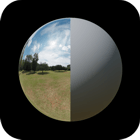
The chrome ball shows what a model reflects; the 18% gray ball shows the light it gets, as on a film set. Drag to turn.
Use this free online HDRI environment editor to adjust, clean up and convert equirectangular environment maps directly in your browser. It opens Radiance HDR and OpenEXR files, changes exposure, contrast, white balance, highlights, the sun and the sky-to-ground balance, blurs and levels the panorama, checks the result on a chrome ball and a gray ball, and downloads EXR, HDR or JPG, with no desktop application and no upload to a server.
Drop a Radiance .hdr or an OpenEXR .exr in half or 32-bit float, compressed as none, RLE, ZIPS, ZIP, PIZ or PXR24, including the multilayer files Blender writes. PNG and JPEG open too, with a note that 8-bit images cannot hold real light. The stats show a histogram in stops, the average and peak values and the dynamic range, so you can tell what a downloaded HDRI really contains before you light with it.
Exposure moves in stops, and Contrast spreads darks and brights apart around the image's own mid-tones, with the sun left out, which is gamma done safely for light. Temperature and Tint shift the white balance while white keeps its brightness, Saturation strengthens or mutes every color, and Vibrance lifts the dull ones first, so a hazy sky gains color without the grass going neon. Hold to compare shows the original at any point, and a double-click resets any slider. The preview uses a Filmic view by default, with a Standard view that clips at white, and a separate view exposure changes only the screen and never the file.
Clamp highlights rolls the brightest values off smoothly toward a limit between 1 and 65,504, which cuts fireflies and softens harsh shadows in Cycles and other path tracers. The sun is found automatically and marked in the panorama with its value, and Sun intensity scales it alone from 0 to 200%, so you can soften it, remove it and replace it with an engine light, or push it harder. The stats give its azimuth, elevation, size and share of the light, and a note warns when the sun is clipped.
Background blur wraps around the sphere, with no seam where the panorama joins and no smearing at the poles, and the sun stays sharp so shadows keep their edges. Rotation turns the environment by slider or by dragging the panorama sideways, Horizon tilt and roll level a crooked capture, and the Look around view lets you drag through the full 360° and zoom in. Sky exposure and Ground exposure brighten or darken each side of the horizon on its own, blended softly across it, to cut the colored bounce from grass or red earth or to add fill from the sky.
The Lighting Check shows a chrome ball and an 18% gray ball, the reference pair used on VFX sets, lit by the edited map with the sun as a separate light so the gray ball shows a real shadow edge. Download the result at full size, 4K, 2K or 1K as a ZIP-compressed EXR in half or 32-bit float, as a Radiance HDR or as a tone-mapped JPG for backplates. The saved file matches the preview, and a note says when a peak above 65,504 needs 32-bit float or a clamp.
Our online HDRI Environment Viewer / Editor, along with all of our creator tools, is completely free to use. Enjoy a user-friendly, ad-free environment to enhance your 3D workflow instantly—with no account, sign-up, or login required.