


 Free 3D
 3D Print Models
 3D Scans
 Animation & MoCap
 Textures
 Materials
 Skin Reference
 2D Game Assets
 Sound Effects
 Brushes & Tools
 Reference Photos
 Stock Images
 HDR Images
 3ds Max
 Maya
Maya Blender
 Unreal Engine
 Unity
Unity ZBrush
 Cinema 4D
 LightWave
 Marmoset
 SketchUp
 FBX
FBX DAE
DAE DXF
DXF GLB
GLB
! REPORT

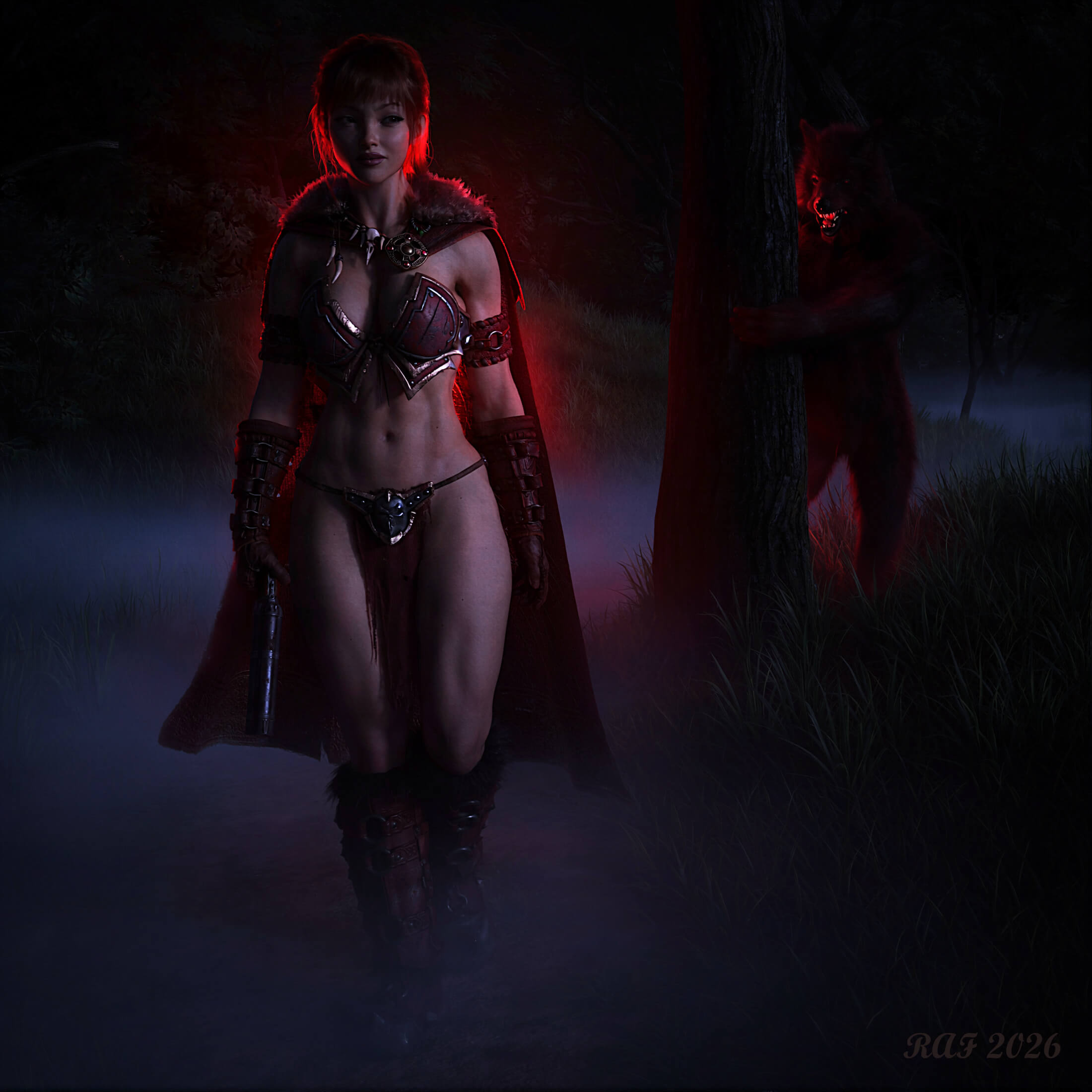
Red's Revenge (AIRE Render 1.2.3)
AI-Enhanced 3D Render by DustRiderStory:
The fog hung thick and heavy over the Whispering Woods. Valerie, known to the villages as Red, moved through the dark with absolute confidence. She wore her signature crimson cloak, though it was no longer a symbol of innocence. It wrapped around shoulders infused with dark powers specifically designed for the hunt, glowing in stark contrast to the misty shadows of the forest. Behind her, hiding in the darkness, the massive snarling Lycan peeked out, baring razor-sharp teeth. It crept closer, believing it had found an easy meal.
Then came the soft, wet crack of a heavy paw pressing onto a twig hidden in the grass. Valerie did not flinch. A slow, knowing smile spread across her face. She did not need to look back. She has been tracking this beast for ten long years, ever since the night it tore her childhood apart.
Her fingers tightened around the cold steel handle of her pistol designed to carry a pure silver payload. As she quietly lifted the barrel, the click of the hammer cocking was muffled by the rustling wind. The beast thought it was stalking a helpless girl. His focus on what he thought was easy prey made him completely blind to the truth. She was not the victim anymore. She was the bait. And her trap had just sprung.
Image Info:
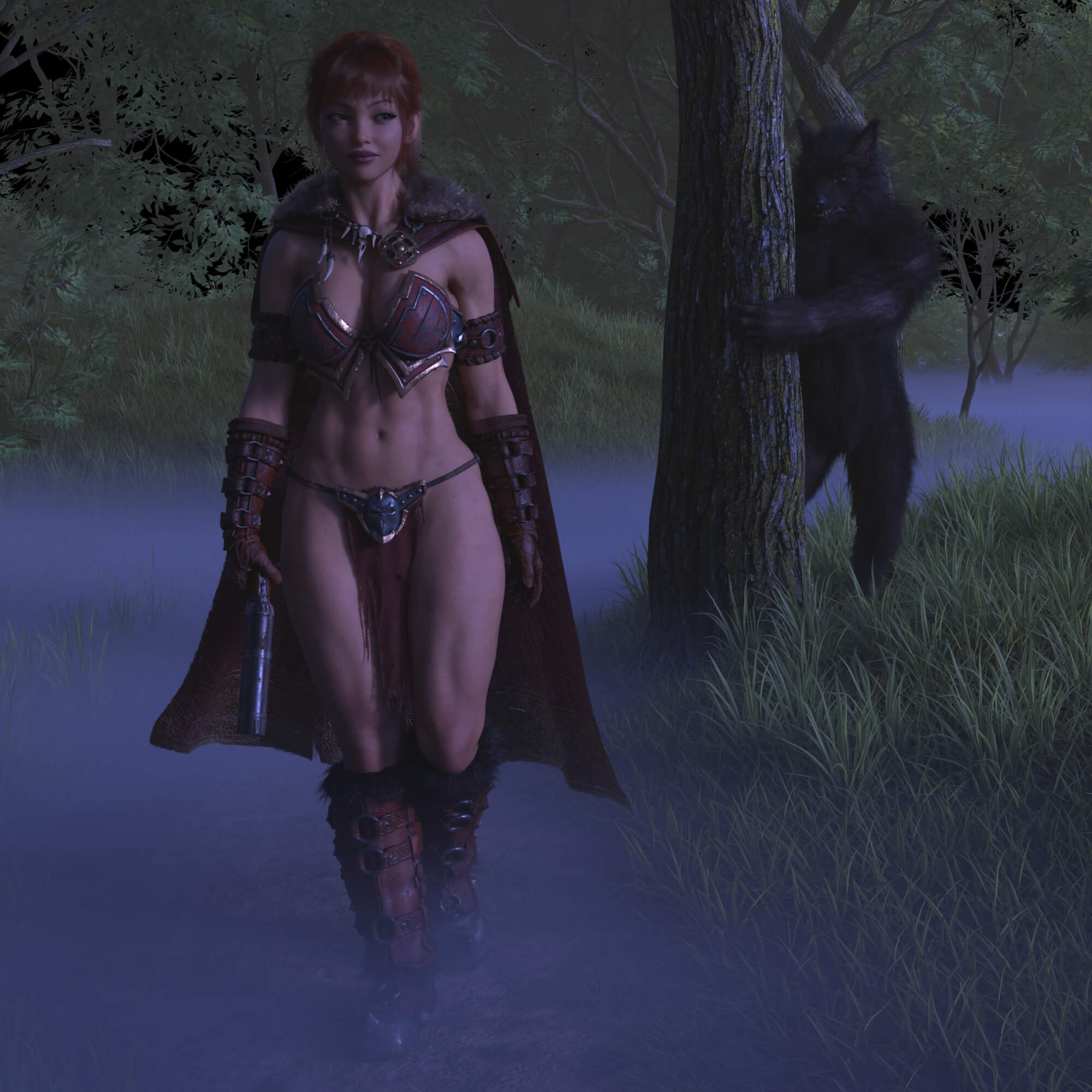
The main image was created with AIRE AI render engine using the second image as the base. The video was created using Aire Motion (image to video) with the main image as the reference. I actually wanted to create a final image using just DAZ and Iray for Halloween, but I got distracted with the AIRE products when I picked up AIRE Motion. I thought this would be a great test scene for AIRE Motion with the complexity of animation Red and the Lycan. It ended up taking more work than I was hoping for, but Dreamlight has made the whole process much easier than going through the Kita AI plugin and Pinokio AI. I really like the way AIRE gives us the ability to retain the character details/outfit and desired scene elements while allowing experimentation with lighting, mod, and style. The image and video took about 25 hours to complete. I probably could have created a great image directly from Iray with that additional time investment, but and animated video would have taken MUCH longer (AIRE Motion is actually really fast at creating a 5 second video). I used music that was can with AIRE Motion, but assembled the video in DaVinci Resolve so I could upscale it, and remove the first 2 frames where it's evident that AI is figuring thing out.
The character shape is based on PN Rafah (G9) with several additional morphs and skin/shaders from HH Scarlett. The outfit is a kit bash of various elements from products by Strangefate, with edits to the textures to make the leather red and some of the metal look like brass. The Wolf/Lycan is Lycan for G9, and the environment is Grassy Grove.
I just wanted to add that it's obvious that Dreamlight has put quite a bit of effort into the AIRE products. While there is still quite a bit of trial and error to get exactly what you want for the final render/video, it is much easier to keep the elements you want virtually unchanged, while letting the AI do some infill for areas you would prefer to change. It is particularly useful when you don't have DAZ assets that meet your vision for the image. I should also note that when giving creative direction, the order can make a big difference with the resulting image, so if you aren't getting what you want, even though you have described it very well, try changing the order a bit. It's a huge plus to have AIRE integrated directly into DAZ Studio.
The fog hung thick and heavy over the Whispering Woods. Valerie, known to the villages as Red, moved through the dark with absolute confidence. She wore her signature crimson cloak, though it was no longer a symbol of innocence. It wrapped around shoulders infused with dark powers specifically designed for the hunt, glowing in stark contrast to the misty shadows of the forest. Behind her, hiding in the darkness, the massive snarling Lycan peeked out, baring razor-sharp teeth. It crept closer, believing it had found an easy meal.
Then came the soft, wet crack of a heavy paw pressing onto a twig hidden in the grass. Valerie did not flinch. A slow, knowing smile spread across her face. She did not need to look back. She has been tracking this beast for ten long years, ever since the night it tore her childhood apart.
Her fingers tightened around the cold steel handle of her pistol designed to carry a pure silver payload. As she quietly lifted the barrel, the click of the hammer cocking was muffled by the rustling wind. The beast thought it was stalking a helpless girl. His focus on what he thought was easy prey made him completely blind to the truth. She was not the victim anymore. She was the bait. And her trap had just sprung.
Image Info:
The main image was created with AIRE AI render engine using the second image as the base. The video was created using Aire Motion (image to video) with the main image as the reference. I actually wanted to create a final image using just DAZ and Iray for Halloween, but I got distracted with the AIRE products when I picked up AIRE Motion. I thought this would be a great test scene for AIRE Motion with the complexity of animation Red and the Lycan. It ended up taking more work than I was hoping for, but Dreamlight has made the whole process much easier than going through the Kita AI plugin and Pinokio AI. I really like the way AIRE gives us the ability to retain the character details/outfit and desired scene elements while allowing experimentation with lighting, mod, and style. The image and video took about 25 hours to complete. I probably could have created a great image directly from Iray with that additional time investment, but and animated video would have taken MUCH longer (AIRE Motion is actually really fast at creating a 5 second video). I used music that was can with AIRE Motion, but assembled the video in DaVinci Resolve so I could upscale it, and remove the first 2 frames where it's evident that AI is figuring thing out.
The character shape is based on PN Rafah (G9) with several additional morphs and skin/shaders from HH Scarlett. The outfit is a kit bash of various elements from products by Strangefate, with edits to the textures to make the leather red and some of the metal look like brass. The Wolf/Lycan is Lycan for G9, and the environment is Grassy Grove.
I just wanted to add that it's obvious that Dreamlight has put quite a bit of effort into the AIRE products. While there is still quite a bit of trial and error to get exactly what you want for the final render/video, it is much easier to keep the elements you want virtually unchanged, while letting the AI do some infill for areas you would prefer to change. It is particularly useful when you don't have DAZ assets that meet your vision for the image. I should also note that when giving creative direction, the order can make a big difference with the resulting image, so if you aren't getting what you want, even though you have described it very well, try changing the order a bit. It's a huge plus to have AIRE integrated directly into DAZ Studio.

I love that Outfit, and I've never seen it look so good!
Top marks My Friend!!
Top marks My Friend!!
REPLY
! REPORT
DustRider
Karma: 2,354
Tue, Oct 27Thanks my friend!
It's amazing how a little work on the textures in Gimp can change the look of an outfit. I was really glad I could get the colors to match since I used 4 different products from Strangefate for her outfit (Kadis, STF Brutal Gear - Adventurer Cape, STF Leatherbound Boots, and STF Brutal Gear - Leatherbound).
It's amazing how a little work on the textures in Gimp can change the look of an outfit. I was really glad I could get the colors to match since I used 4 different products from Strangefate for her outfit (Kadis, STF Brutal Gear - Adventurer Cape, STF Leatherbound Boots, and STF Brutal Gear - Leatherbound).

I would call this a very successful exercise, well done....a great 5 min video as well, hehe....AIRE did a wonderful job on the video, keeping the wardrobe true, the lighting looks superb and the movement on the figure is mesmerising, hence 5 minute viewing....lol...
Thanks for your description and workflow as this just illustrates that even though it's AI Enhanced, there is still a lot of time and knowledge of how to work the AI and to get the best out of it.
Thoroughly enjoyed this
Thanks for your description and workflow as this just illustrates that even though it's AI Enhanced, there is still a lot of time and knowledge of how to work the AI and to get the best out of it.
Thoroughly enjoyed this
REPLY
! REPORT
DustRider
Karma: 2,354
Tue, Oct 27Thanks so much for your kind comments!!
Yes, there still isn't a "make art" button, even though so many think generative AI is just write a prompt and get an image .... well I guess it is, but not if you are actually looking to get something specific out of it. DAZ Studio and AIRE really helps to guide the AI to the result you have in your minds eye.
Yes, there still isn't a "make art" button, even though so many think generative AI is just write a prompt and get an image .... well I guess it is, but not if you are actually looking to get something specific out of it. DAZ Studio and AIRE really helps to guide the AI to the result you have in your minds eye.


That's a great idea, and you've executed it brilliantly.
No matter how controversial the discussions about AI may be, it remains a tool that we first have to learn to understand.
No matter how controversial the discussions about AI may be, it remains a tool that we first have to learn to understand.
REPLY
! REPORT
DustRider
Karma: 2,354
Tue, Oct 27Thanks you! I agree, AI is just another toll in the tool box. I still enjoy creating with just 3D, but AIRE gives additional possibilities.

Red's Revenge (AIRE Render 1.2.3)
AI-Enhanced
[+] Give Award


Mon, Oct 26 91
91
 10
10
9118
10
Add to Collection

18 Likes
Share This Render


Software Used
 DaVinci Resolve
 Daz Studio
 GIMP
GIMP Nvidia Iray Render
Marketplace Items Used
Artist Stats
Member Since:
Karma:
Followers:
Likes Received:
Karma:
Followers:
Likes Received:
Jun, 2025
2,354
37
628
2,354
37
628
Gallery Images:
Wallpaper Images:
Forum Topics:
Marketplace Items:
Wallpaper Images:
Forum Topics:
Marketplace Items:
28
0
0
0
0
0
0

66

10

1


