


 Free 3D
 3D Print Models
 3D Scans
 Animation & MoCap
 Textures
 Materials
 Skin Reference
 2D Game Assets
 Sound Effects
 Brushes & Tools
 Reference Photos
 Stock Images
 HDR Images
 3ds Max
 Maya
Maya Blender
 Unreal Engine
 Unity
Unity ZBrush
 Cinema 4D
 LightWave
 Marmoset
 SketchUp
 FBX
FBX DAE
DAE DXF
DXF GLB
GLBRenderHub Launches 3D Toolbox with 15 Free Online Tools

 0
0Article by Filip Radivojevic


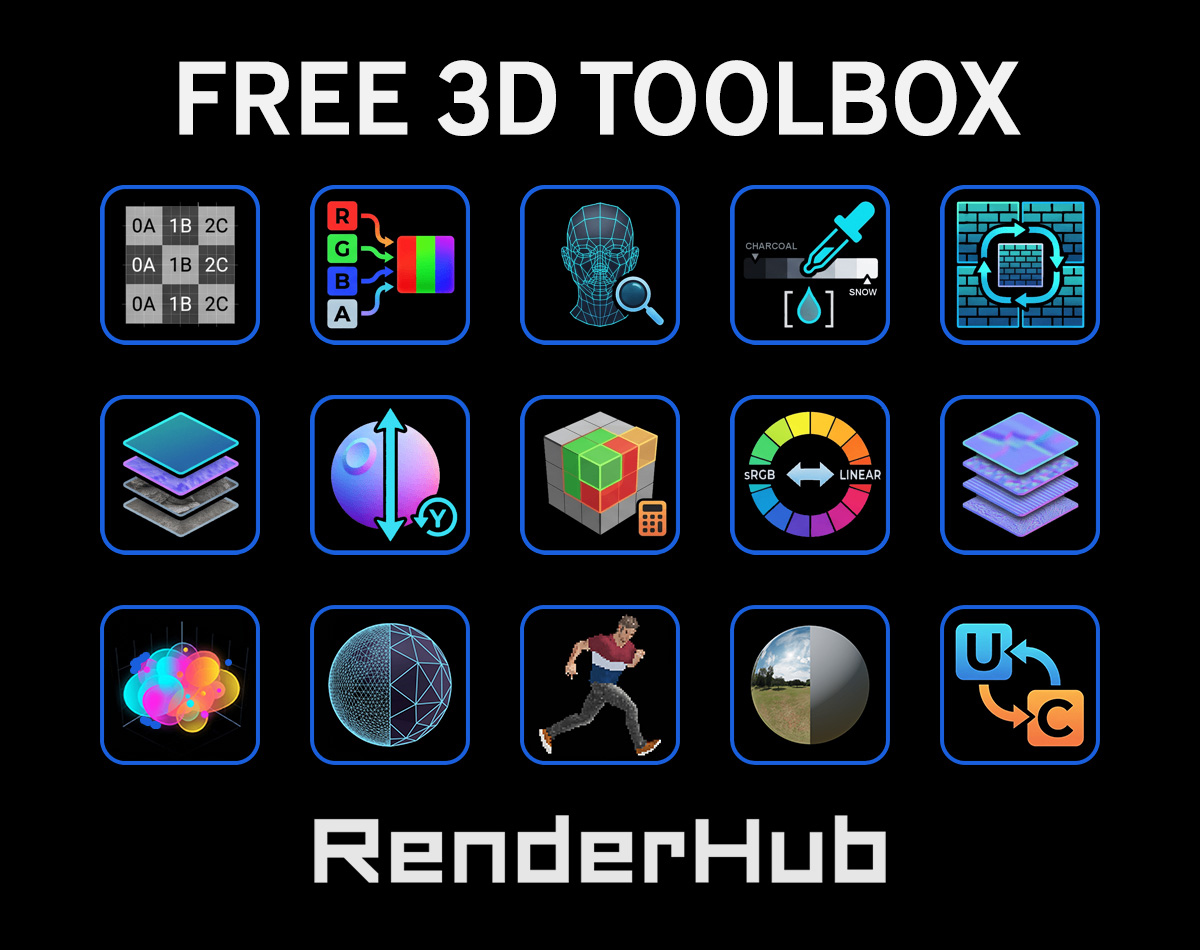
RenderHub has introduced the 3D Toolbox, a new collection of 15 free online tools designed for 3D artists, game developers, and technical artists. The collection covers common production tasks, including model inspection, polygon reduction, UV analysis, PBR material preparation, HDRI editing, and technical conversions.
Designed to complement existing 3D applications, the Toolbox helps artists streamline common asset preparation and troubleshooting tasks directly in their browsers without installing additional software. Many of its file-based utilities also process assets locally, without uploading them to a server. The tools can be used independently or together as part of a larger production workflow, providing a convenient way to inspect, optimize, and prepare 3D assets.
Inspect and Optimize 3D Assets
Understanding a model's technical structure is an important part of preparing assets for rendering, animation, and real-time applications. Three tools in the collection focus on inspecting geometry, reducing complexity, and reviewing 3D Gaussian Splatting data.
Model Inspector
The Model Inspector allows artists to examine 3D assets directly in their browsers, including mesh topology, polygon counts, UV layouts, materials, and object structure.
Its interactive viewport supports shaded, textured, and wireframe views, making it easier to compare a model's appearance with its underlying geometry. The tool also identifies common problems such as non-manifold geometry, flipped normals, and overlapping UVs.
This makes it particularly useful for checking downloaded models, evaluating asset complexity, or identifying technical issues before continuing production.
Polygon Reducer / LOD Generator
Reducing polygon counts while maintaining important geometric details is a common requirement in game development and real-time visualization.
The Polygon Reducer / LOD Generator creates four progressively simplified versions of a 3D model, with options to preserve UV seams, material boundaries, and open edges during reduction. For quad-based meshes, users can also enable Keep Quads to preserve quad topology during reduction, although GLB and STL exports remain triangulated.
Users can compare different levels of detail (LODs) in the integrated 3D viewer, examine geometry statistics, and export the resulting models. This provides a practical way to prepare lighter asset variations without manually creating each LOD.
The Gaussian Splat Viewer provides an interactive environment for examining 3D Gaussian Splatting scenes, including supported PLY and .splat files.
Users can navigate captured environments and objects while reviewing information such as splat counts, scene dimensions, file properties, and GPU memory requirements.
The viewer also helps identify potential issues, including floating or oversized splats, making it useful for evaluating 3D captures and reviewing exported Gaussian Splatting scenes before further processing or distribution.
Check UV Layouts and Texel Density
Proper UV mapping and consistent texture resolution are essential for predictable texturing results. Two Toolbox utilities help artists evaluate how textures are distributed across 3D surfaces.
The UV Layout & Checker helps identify problems such as texture stretching, uneven UV scaling, mirrored islands, and visible seams.
Artists can load a 3D model, apply a customizable checker pattern, and examine how the texture behaves across its surfaces. The tool also displays the UV layout separately and allows users to export checker textures and UV layouts as PNG files.
This makes it easier to spot mapping issues before applying detailed textures or developing materials.
Consistent texel density helps maintain comparable texture detail across different objects and surfaces, particularly in game environments.
The Texel Density Calculator determines density based on texture resolution, surface dimensions, and UV usage. It can also estimate the texture resolution needed to achieve a target density.
For additional analysis, users can load a 3D model and inspect texel density through a color-coded viewport, helping identify surfaces with inconsistent texture detail.
Create and Prepare PBR Materials and Textures
Physically Based Rendering (PBR) workflows depend on correctly prepared texture maps and material values. The Toolbox includes six utilities for creating, inspecting, combining, and converting texture data.
The Seamless Texture Generator transforms photographs and other source images into repeating textures suitable for 3D materials.
Users can blend opposite image edges, reduce uneven lighting, and preview how a texture repeats across a surface. A tiled image preview and an interactive 3D preview help reveal unwanted patterns or visible seams before export.
The tool is particularly useful for preparing reusable textures for environments, architectural surfaces, terrain, and other materials that cover large areas.
The PBR Map Generator / Viewer combines two related material workflows within a single tool.
In the Generate from Image workflow, users can upload a source photograph or texture and generate PBR maps using either the Metallic/Roughness or Specular/Glossiness workflow. Metallic/Roughness supports base color, metallic, and roughness maps, while Specular/Glossiness supports diffuse, specular, and glossiness maps. Both PBR workflows also support normal, ambient occlusion, height, and bump maps, with adjustable parameters to refine the generated results.
Alternatively, the Preview Existing Material workflow allows users to load their own texture maps and examine how they work together without generating new ones.
Both workflows use an integrated 3D viewport with physically based shading, allowing artists to evaluate surface appearance, material response, and texture repetition before exporting or using the maps in another application.
PBR Albedo & Reflectance Picker
Correct base color and reflectance values are important for creating believable PBR materials.
The PBR Albedo & Reflectance Picker allows artists to compare material colors against recommended albedo ranges and reference values for common real-world surfaces.
It also calculates non-metallic F0 reflectance from the index of refraction (IOR), providing corresponding values in Linear, sRGB, and Unreal Engine Specular formats.
These references can help artists identify potentially unsuitable material values and make more informed adjustments when developing or troubleshooting shaders.
Many real-time rendering workflows store several grayscale material maps within the channels of a single texture.
The PBR Channel Packer allows users to combine ambient occlusion, roughness, metallic, and other grayscale maps into the red, green, blue, and alpha channels of one image.
Presets for Unreal Engine, Unity, and glTF simplify common packing configurations, while custom channel assignments support other material setups.
Users can also inspect individual channels before exporting the packed texture, helping avoid incorrect channel assignments.
The Normal Map Combiner allows artists to blend a base normal map with additional detail maps to create more complex surface information.
Users can adjust the strength of individual normal maps and control the tiling of detail maps, allowing fine surface patterns to be incorporated without recreating the original normal map.
The tool supports OpenGL and DirectX normal-map conventions and includes an interactive lighting preview for evaluating the combined result.
This is useful when adding reusable details such as scratches, pores, fabric patterns, or subtle surface irregularities to existing materials.
Different 3D applications and game engines may use different tangent-space normal-map conventions, which can cause surface details to appear inverted when textures are transferred between them.
The Normal Map Channel Inverter addresses this compatibility issue by flipping the green (Y) channel to convert between DirectX and OpenGL conventions.
Users can process multiple normal maps and compare the converted results without manually editing individual texture channels. It provides a quick solution for correcting convention mismatches when transferring materials between applications.
Adjust HDRI Lighting and Color Values
Lighting environments and color-space conversions can significantly affect how materials appear during rendering. Two additional tools address these technical aspects of 3D workflows.
HDRI Environment Viewer / Editor
The HDRI Environment Viewer / Editor allows artists to inspect and modify HDR and EXR environment maps directly in the browser.
Its adjustments are organized into five categories: Light for exposure, contrast, and color adjustments; Sky & Ground for independent exposure control; Highlights for highlight clamping and sun intensity; Background for blur; and Orientation for rotation, horizon tilt, and roll. These controls allow artists to refine HDRI environments before using them for scene lighting.
The integrated lighting preview includes a chrome sphere and an 18% gray sphere, helping artists evaluate reflections and illumination. Modified environments can then be exported as EXR, HDR, or JPG files.
The Color Space Converter converts hexadecimal and RGB color values from sRGB to Linear RGB and vice versa.
Because color values are not represented numerically in the same way across these spaces, using an incorrect conversion can produce unexpected results in materials, lighting, or shader calculations.
The tool displays corresponding values side by side and provides the conversion calculations, helping artists transfer color information more accurately between different applications and workflows.
Convert Measurements and Prepare Sprite Sheets
The final two utilities address technical operations frequently encountered when transferring assets between applications or preparing textures for real-time effects.
The Unit of Measure (UOM) Converter provides conversions across multiple measurement categories, including length, area, volume, mass, angles, and digital storage.
For 3D artists, one of its most practical applications is resolving differences between measurement systems. Assets created in meters, centimeters, millimeters, or inches often require consistent unit conversions when moving between software applications.
By displaying both the converted value and its formula, the tool helps users verify measurements before adjusting asset dimensions or scale settings.
Sprite Sheet Packer / Unpacker
Sprite sheets and flipbook textures are widely used in game development for animations, visual effects, and other frame-based content.
The Sprite Sheet Packer / Unpacker allows artists to combine individual images into a sprite sheet or extract separate frames from an existing sheet.
Users can configure the frame layout, reorder images, preview animation playback, and export the resulting sprite sheets or extracted frames.
This makes it useful for preparing animated effects such as fire, smoke, explosions, and other texture-based animations used in real-time applications.
Explore the 3D Toolbox on RenderHub
The 3D Toolbox is now available, and we look forward to seeing how artists incorporate these utilities into their projects. Your experience and feedback can also help shape how the Toolbox develops in the future.
Explore the RenderHub 3D Toolbox and try the tools that fit your workflow.
Which tools do you find most useful, and what additional utilities would you like to see included in the Toolbox? Share your suggestions with the RenderHub community.